

By Ron Bhojwani
Last Updated: September 25, 2026
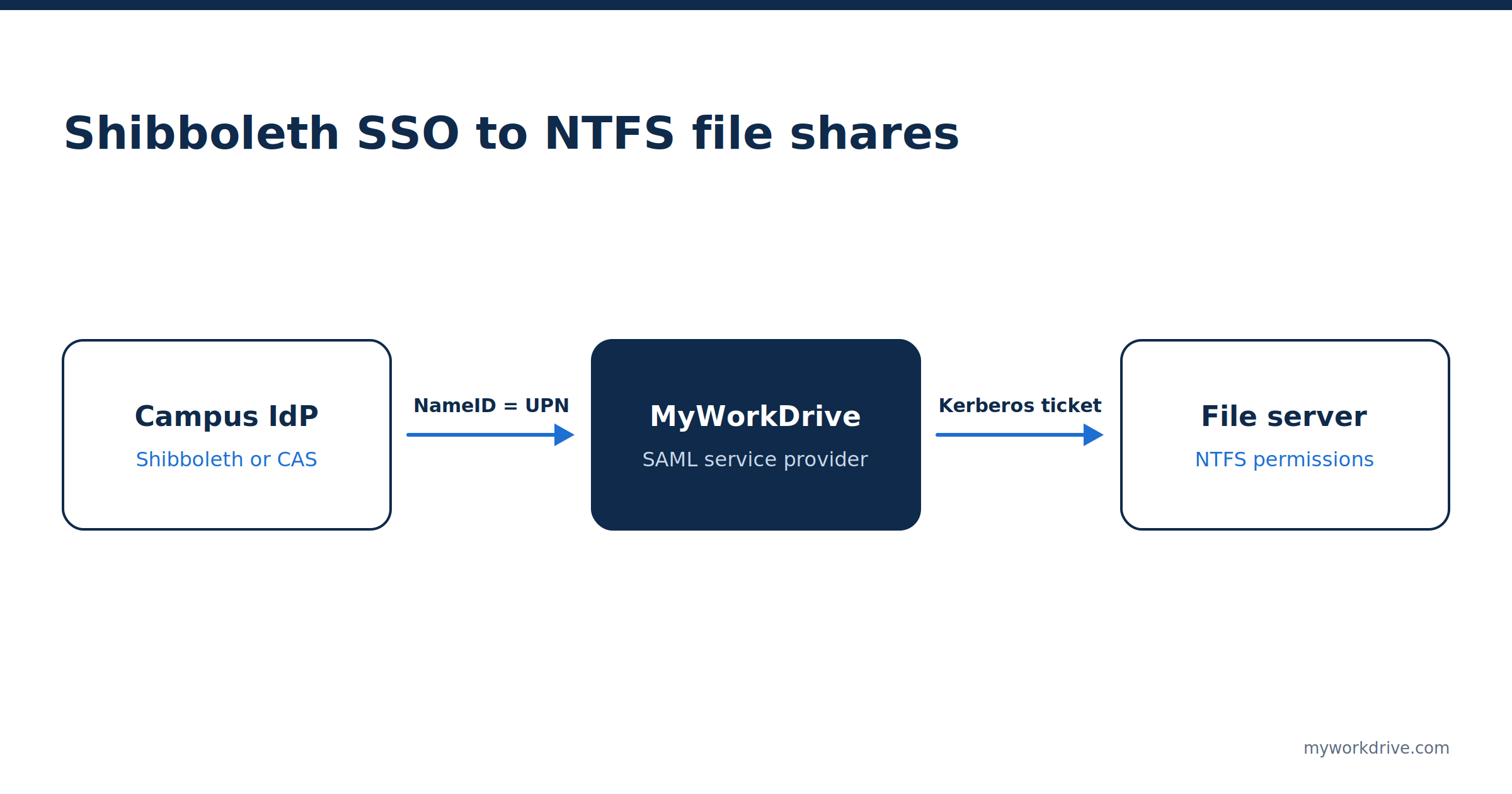
A Shibboleth assertion tells a service who signed in. It carries nothing a Windows file server can use to decide what that person may open. NTFS evaluates the security identifiers (SIDs) in a Windows access token, and no eduPerson attribute is a SID. Getting a campus SSO login onto an NTFS-permissioned share takes two joins. The assertion has to resolve to a real Active Directory account, and the access layer then needs a Kerberos ticket for that account that it can present to the file server. In practice, most stalled deployments trace back to one of those two joins.
Key takeaways
- Attribute release is decided by the campus identity team. The common R&E baseline carries an identifier, a name, an email address, and an optional affiliation. AD group membership is not part of it.
- Windows checks share permissions and NTFS permissions against the SIDs in the user's access token and applies whichever is more restrictive.
- MyWorkDrive takes the SAML NameID and matches it to an Active Directory userPrincipalName. Shibboleth IdPs send a transient NameID by default, so this service needs a custom NameID configured at the IdP.
- SMB shares behind the gateway need Kerberos constrained delegation with protocol transition, or resource-based constrained delegation when domain trusts or Entra Domain Services are involved.
- Access reviews for sensitive shares should examine AD group membership, since that is what the file server evaluates.
What does a Shibboleth SAML assertion actually contain?
Whatever the identity provider's attribute filter policy allows for that service. The campus identity team sets that policy per relying party, and federations publish shared baselines so each new service doesn't start the conversation from zero.
A widely referenced baseline is the REFEDS Research and Scholarship entity category. Its bundle requires a shared user identifier (eduPersonPrincipalName, plus eduPersonTargetedID when ePPN values can be reassigned), a person name as displayName or givenName plus sn, and an email address in the mail attribute. One element is optional: eduPersonScopedAffiliation.
R&S is scoped to services that support research and scholarship collaboration, and a service has to be registered in the category to receive the bundle automatically. A campus file gateway is usually configured directly with the institution's own IdP, so its release policy is whatever the identity team agrees to. The R&S bundle is still a useful map of what campus IdPs are already set up to release.
How much does eduPersonAffiliation say about a user?
Only a broad role. The eduPerson specification limits eduPersonAffiliation to eight values: faculty, student, staff, alum, member, affiliate, employee, and library-walk-in. Each institution decides its own criteria for each value, and anyone asserted as faculty, staff, student, or employee must also be asserted as member. A single person routinely carries several values at once.
The scoped variant appends a security domain after an at sign, so student@example.edu means the person holds the student affiliation within example.edu. That is enough to license a library database, and it says nothing about whether the person should open \\fileserver\research\lab-chen\raw-data.
Two attributes can carry finer detail, and neither is in the R&S bundle. eduPersonEntitlement holds URIs that stand for rights to specific resources, with the eligibility rules evaluated at the home institution and trust between the parties set up out of band. isMemberOf comes from the separate eduMember object class and carries group identifiers from a campus grouping service, such as Internet2's Grouper. Getting either released means asking the identity team for something beyond their standard policy.
| Attribute | What it carries | In the R&S bundle | Usable as an NTFS permission input |
|---|---|---|---|
eduPersonPrincipalName | Scoped, name-based identifier such as jchen@example.edu | Required | Only as a join key to an AD account |
eduPersonTargetedID | Opaque, non-reassigned identifier, usually per service | Required if ePPN can be reassigned | No |
mail, displayName | Email address and display name | Required | No |
eduPersonScopedAffiliation | One of eight broad roles, scoped to a domain | Optional | No |
eduPersonEntitlement | URIs for rights to specific resources | No | No, without a provisioning pipeline |
isMemberOf | Group identifiers from a grouping service | No | No, the values are not AD SIDs |
How does Active Directory decide who can open a file?
It works from an access token and never looks at SAML. According to Microsoft's access token documentation, a token holds the user's SID, the SIDs of every group the user belongs to, a logon SID, and the user's privileges, among other fields.
When that user opens a file over SMB, Windows evaluates two independent permission sets against those SIDs: the share permissions and the NTFS discretionary access control list on the file or folder. Microsoft's guidance on shared folder permissions is that neither changes the other and the more restrictive result wins. If Access-Based Enumeration is on, folders the token can't read are hidden from the listing entirely. MyWorkDrive applies ABE in Active Directory mode when the share is added by its UNC path, such as \\server\share.
A file server has no way to accept a SAML assertion or parse a scoped affiliation value. Group membership enters the picture only when a token is built, and Microsoft notes that a user added to a group after the token was issued has to sign in again before the change shows up. For a deeper look at ACL design on the file server side, see our guide to NTFS permissions and ACL management.
Why don't SAML attributes map to NTFS permissions?
No standard defines the translation, so anyone who wants one has to invent it and then keep it correct every term.
Consider what a translation layer would have to do with faculty@example.edu. It would need to decide which AD groups that value implies, and an eight-value vocabulary can't tell two labs in the same department apart. The ACLs on a research share encode decisions made by principal investigators and department IT staff, and those decisions typically live in AD groups.
Releasing isMemberOf doesn't close the gap either. Its values are identifiers from the grouping service, and a file server needs SIDs. Turning one into the other takes a provisioning pipeline that writes campus group memberships into AD. Some institutions run exactly that, and it is infrastructure the institution builds and owns upstream of any file access product.
So products that authenticate users through SAML and serve files from NTFS shares skip attribute translation. They use SAML to establish who the user is, then act as that user's AD account when talking to the file server.
How does a Shibboleth login reach an NTFS-permissioned share?
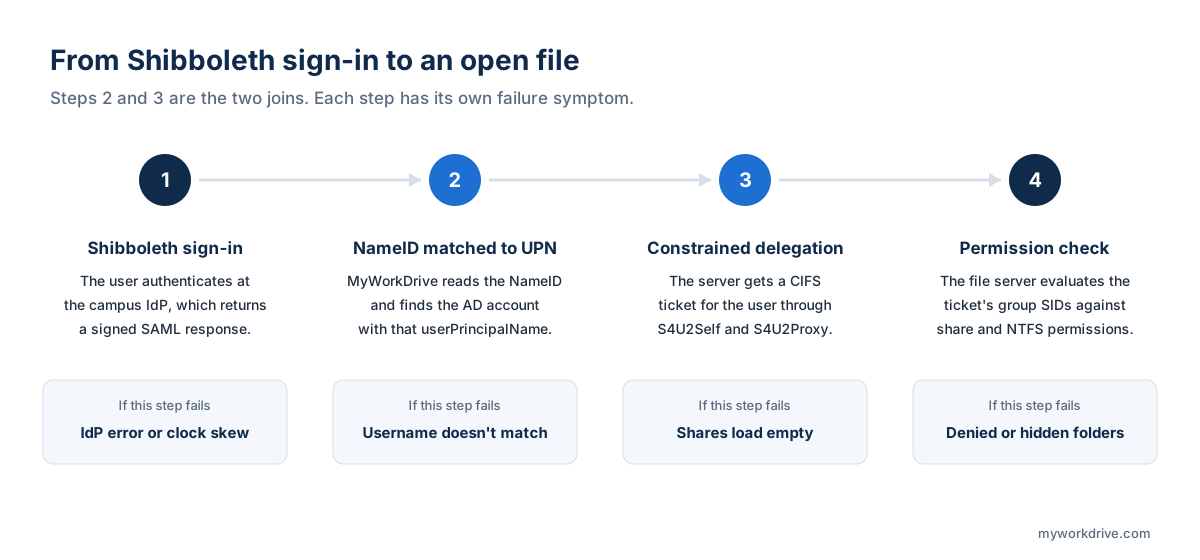
Step 1: Match the assertion to an Active Directory account
MyWorkDrive doesn't keep its own user database for SAML logins. Its FortiAuthenticator guide states that it takes the username from the assertion's NameID and matches it against a userPrincipalName in Active Directory. The manual SAML configuration article names Shibboleth as a supported IdP and says claim rules at the IdP can be adjusted when the presented value doesn't match the UPN.
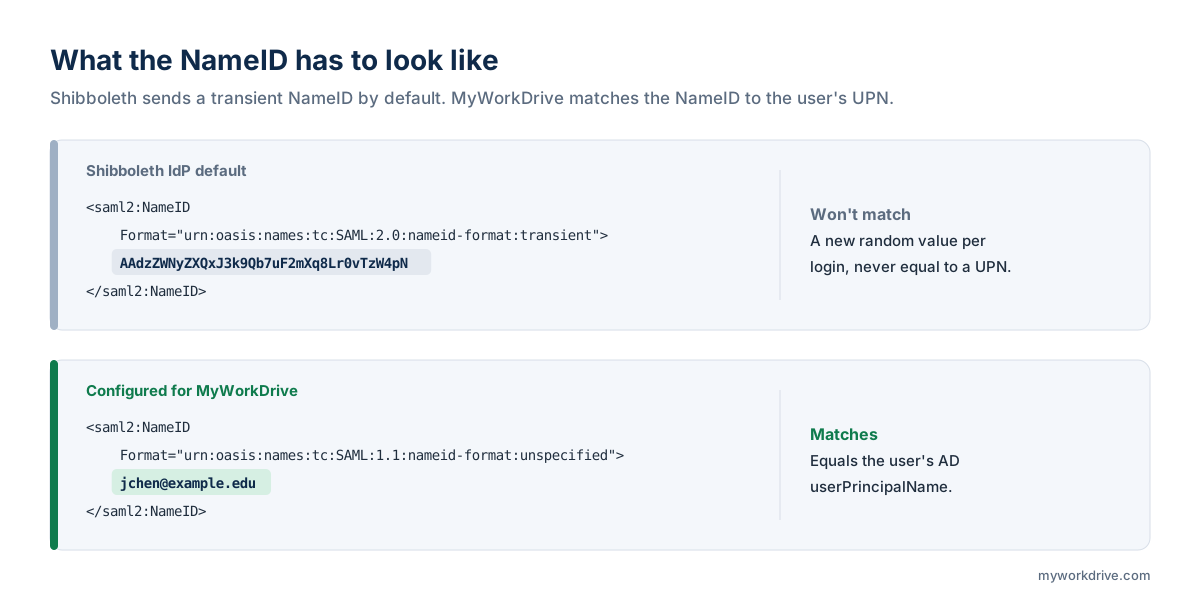
Shibboleth deployments hit a specific snag here. The Shibboleth IdP defaults to transient NameIDs, which are generated per transaction and will never equal a UPN. The identity team has to add a custom NameID generator for this service that draws its value from an attribute holding the UPN.
The format matters too. MyWorkDrive's Apereo CAS guide says MyWorkDrive specifically requests the unspecified NameID format. Shibboleth's documentation on custom NameID generation says the IdP ignores that format when an SP requests it or lists it in metadata, so it has to be forced with nameIDFormatPrecedence in a relying party override. Here is an illustrative configuration. The attribute ID adUPN is a placeholder for whatever attribute your resolver produces.
<bean parent="shibboleth.SAML2AttributeSourcedGenerator"
      p:omitQualifiers="true"
      p:format="urn:oasis:names:tc:SAML:1.1:nameid-format:unspecified"
p:attributeSourceIds="#{ {'adUPN'} }" /><bean parent="RelyingPartyByName" c:relyingPartyIds="MyWorkDrive">
<property name="profileConfigurations">
<list>
<bean parent="SAML2.SSO"
p:nameIDFormatPrecedence="urn:oasis:names:tc:SAML:1.1:nameid-format:unspecified" />
</list>
</property>
</bean>The source attribute also has to be released to the service in the attribute filter policy. If the IdP's data connector reads from Active Directory, userPrincipalName can be the source directly. If it reads from a separate campus LDAP, ePPN works when its value equals the AD UPN. Confirm the result in SAML-tracer before touching anything else.
UPN suffixes are a common point of failure for the join. An IdP that sends jchen@example.edu against a forest where the UPN is jchen@ad.example.edu produces a clean SAML exchange followed by a failed login. The fix is either adding example.edu as an alternative UPN suffix in AD or sourcing the NameID from a value that already matches.
Name changes break the join later. The eduPerson specification notes that ePPN values are often name-based and can change through ordinary business processes. If a name change updates ePPN in the IdP but the AD UPN changes on a different schedule, that user's logins fail until the two agree again.
Step 2: Kerberos delegation and the second hop
A matched account isn't enough. The MyWorkDrive server now has to present that user's identity to a file server on a different machine, which is the classic Kerberos double-hop problem. The user authenticated to Shibboleth and never gave MyWorkDrive a Kerberos ticket, so the server has to obtain one on the user's behalf.
Windows handles this with two Kerberos extensions. Protocol transition (S4U2Self) lets a trusted service get a ticket for a user who authenticated some other way. Constrained delegation (S4U2Proxy) then exchanges it for a ticket to a specific back-end service, CIFS in this case. In Active Directory Users and Computers, that combination is "Trust this computer for delegation to specified services only" plus "Use any authentication protocol." Microsoft's second-hop documentation describes the same setting as the switch that allows protocol transition, and it is the option MyWorkDrive's delegation article specifies.
That article states delegation is required when shares sit on a different server from MyWorkDrive, are reached through DFS, or users authenticate through ADFS or SAML. It applies only to SMB shares accessed with Active Directory user identity and SSO.
| Question | Kerberos constrained delegation (KCD) | Resource-based KCD (RBKCD) |
|---|---|---|
| Where it is configured | On the MyWorkDrive server's computer object | On each file server (the resource) that will accept delegated requests |
| Tools | ADUC Delegation tab or PowerShell | PowerShell only |
| Who can configure it | Domain administrator | An administrator with rights to the resource object |
| Domain trusts | Single domain only | Works across domains and forests |
| Entra Domain Services | Not available in a managed domain | Required |
| MyWorkDrive admin console check | Detects delegation set through the ADUC Delegation tab | May show a warning that MyWorkDrive documents as safe to ignore |
Unconstrained delegation would also make the hop and should not be used. MyWorkDrive's documentation strongly recommends against the "Trust this computer for delegation to any service" option and asks administrators to list specific servers and the CIFS service instead. Microsoft's Entra Domain Services guidance explains why managed domains need the resource-based form: administrators there don't hold domain admin rights, so account-based KCD can't be set.
Storage type determines whether any of this applies.
| Storage type | Delegation required | Why |
|---|---|---|
| Windows file server over SMB | Yes | NTFS ACLs are evaluated against the user's Kerberos identity |
| DFS namespace | Yes, for namespace servers and every target file server | The referral and the file access are separate hops |
| Azure Files joined to on-premises AD over SMB | Yes | The storage account is a domain member |
| Azure Files joined to Entra Domain Services | Yes, as RBKCD on a user object | The storage account joins as a user account and must sit in a custom OU |
| Azure Files or Azure Blob via connection string | No | Access is not mediated by AD |
| S3-compatible object storage | No | Access is not mediated by AD |
| SharePoint and OneDrive | No | Microsoft 365 handles authorization |
A campus connecting several back ends through one gateway will need delegation for some shares and not others. The Connect Any Storage page lists the supported types, and the Azure File Shares page covers the SMB and API connection options for Azure Files.
What delegation changes in your security model
Protocol transition lets the MyWorkDrive server request CIFS tickets for any user, to the servers on its delegation list, without that user presenting Kerberos credentials. The delegation list therefore defines how far a compromise of that server could reach. Keep the list to the file servers that actually host published shares, and manage the MyWorkDrive server with the same care as any other system trusted for delegation.
Accounts flagged "Account is sensitive and cannot be delegated," or placed in the Protected Users group, cannot be delegated at all. Microsoft recommends that flag for privileged accounts. An administrator who signs in through Shibboleth with a protected account will see empty shares because the domain controller refuses to issue a delegated ticket for that account. Day-to-day file access should run under a separate, unprivileged account.
What breaks when affiliation changes but group membership doesn't?
Affiliation in the IdP and group membership in AD are maintained by different systems on different schedules. A graduate student who finishes in May may lose student@example.edu quickly because the student information system drives affiliation, while staying in the lab's AD group until someone notices. A visiting researcher may be added to an AD group on day one and pick up affiliate@example.edu only after HR processing.
Authorization resolves against AD, so the AD side governs what a person can open, and access reviews that audit only the IdP will miss the real exposure. Pair group reviews with file-level evidence from file access audit logging when a share holds regulated data.
Timing adds a second gap. Group changes reach a file server inside a new Kerberos ticket, and Microsoft's Kerberos policy sets a 10-hour default for ticket lifetimes. Microsoft also warns that users whose accounts are disabled can keep reaching network services with tickets issued before the change. Any access path built on Kerberos delegation can inherit that window, so urgent removals should account for it.
Heavy group nesting causes a third failure. Windows limits an access token to 1,000 SIDs, and a user past that limit is denied with error 1384. Campuses that model every course section or project as an AD group can reach that ceiling for long-tenured faculty. In that case the Shibboleth login still succeeds, and the denial comes from the file server.
Federated users from other institutions raise a trust question. The eduPerson specification warns that consumers of eduPersonScopedAffiliation have to decide whether to trust its values, because the directory asserting it is generally not the authoritative source, and that trust has to be established out of band. With a UPN join, an outside user has no path to your NTFS shares without an account in your AD. Collaborators without accounts are better served through secure external sharing.
Which attributes should you request from a campus identity provider?
Ask for as little as possible: one value that equals the user's AD UPN, delivered as the NameID. Authorization happens in AD, so isMemberOf and eduPersonEntitlement add nothing here and lengthen the approval conversation. MyWorkDrive's CAS example releases email, givenName, and surname for display purposes alongside the NameID.
Settle two details before the first test. If the NameID source is ePPN, ask whether ePPN values are ever reassigned, because audit trails keyed on that value would then point at two different people over time. R&S requires IdPs with reassignable ePPNs to release eduPersonTargetedID as well. Also compare the ePPN scope with your AD UPN suffix, since the scope is frequently the institution's primary domain.
Sending all of it in one message saves a round trip with the identity team.
| Item | Value for MyWorkDrive |
|---|---|
| SP metadata | https://files.example.edu/SAML/ServiceProviderMetadata |
| Assertion consumer service | /SAML/AssertionConsumerService.aspx (path must not change) |
| Single logout | /SAML/SLOService.aspx |
| SP entityID | MyWorkDrive by default, editable in saml.config. InCommon registration requires an absolute http, https, or urn URI. |
| NameID | A value equal to the user's AD userPrincipalName, in the format MyWorkDrive requests |
| Attributes for authorization | None. NTFS and AD groups decide access. |
| IdP signing certificate | x509 .cer file placed in C:\Wanpath\WanPath.Data\Settings\SAML\Certificates |
| Test URL | /account/login-saml.aspx |
The entityID row deserves a decision early. InCommon's metadata registration rules require registered entityIDs to be absolute URIs, and the default value is a bare name. An internal gateway configured directly with the campus IdP doesn't need federation registration, but if you plan to register it, change the entityID before go-live, because every party that trusts the SP keys on that value.
MyWorkDrive lists CAS alongside Shibboleth on its education page. Its CAS guide configures Apereo CAS as a SAML identity provider, requires the unspecified NameID format, and sends the CAS uid in email format as the NameID. Delegation and NTFS evaluation behind a CAS login are identical to the Shibboleth case.
How do you test a Shibboleth file access integration?
Test the two joins separately. They fail differently and their symptoms overlap.
Start with SAML. The URL /account/login-saml.aspx runs the SAML flow for your own session without making SSO mandatory for everyone. Capture the exchange with SAML-tracer and read the NameID: its format, and whether its value exactly matches the test user's UPN. MyWorkDrive's SAML-tracer guide calls NameID format mismatches one of the most frequent sources of SSO failures.
Test delegation second, outside the product. MyWorkDrive documents a double-hop check that runs from any domain-joined workstation:
Invoke-Command -ComputerName MWDServer -ScriptBlock { Get-ChildItem -Path \\FileServer\ShareName }A directory listing means delegation works. A path-not-found error means it doesn't. Microsoft's remoting documentation is inconsistent about whether WinRM makes this hop under each delegation type, so treat a failure as a reason to check further. MyWorkDrive 5.4 and later include a file share test tool in the admin panel that simulates a login to a given share, with either an SSO email address or a username and password. MyWorkDrive's guide to failed logins and missing shares notes that a user who can reach a share by password but not through SSO is almost certainly missing delegation.
To see which CIFS services the MyWorkDrive server can delegate to under KCD:
Get-ADComputer MWDServer -Properties msDS-AllowedToDelegateTo | Select-Object -ExpandProperty msDS-AllowedToDelegateToRBKCD lives on the resource side, so query the file server instead:
Get-ADComputer FileServer -Properties PrincipalsAllowedToDelegateToAccountAllow time before retesting. MyWorkDrive says Kerberos tickets take at least 15 minutes to recycle and AD replication can take longer. Microsoft notes the KDC also caches denied attempts for 15 minutes. Running klist purge -li 0x3e7 on the MyWorkDrive server clears the computer account's tickets, though MyWorkDrive reports mixed results with it.
One trap for anyone scripting RBKCD: Set-ADComputer -PrincipalsAllowedToDelegateToAccount replaces the existing list. Read the current principals first and write back the combined set. MyWorkDrive's delegation article links a script that does this.
| Symptom | Likely cause | Where to look |
|---|---|---|
| IdP sign-in succeeds, MyWorkDrive reports the username doesn't match | Transient NameID, or a NameID value that differs from the UPN | SAML-tracer NameID; UPN suffix in AD |
| Sign-in succeeds and every share is empty | Delegation missing or not yet propagated | Double-hop test; delegation list; wait 15 minutes |
| Some shares load and others are empty | A file server or DFS target missing from the delegation list | msDS-AllowedToDelegateTo or the resource's RBKCD setting |
| One user, often an admin, sees empty shares | Account marked sensitive or placed in Protected Users | Account options in ADUC; group membership |
| Some folders are missing inside a share | Access-Based Enumeration hiding folders the user can't read | NTFS permissions for that user's groups |
| Access denied for a user in many groups | Token over the 1,000 SID limit | Group count and nesting for that account |
| Removed user can still open files for a while | Kerberos ticket issued before the group change | Ticket lifetime policy; disable the account |
| Invalid SAML response | Clock skew or signature validation failure | NTP on both servers; IdP certificate file |
The symptom that sends most people the wrong way is the empty share list. A user signs in through Shibboleth, lands in the interface, and sees nothing. It looks like an authorization bug and is almost always delegation, which matches MyWorkDrive's own troubleshooting guidance.
Where MyWorkDrive fits
MyWorkDrive acts as the SAML service provider and as the delegated access layer in front of the file system. Shibboleth, CAS, ADFS, Entra ID, and other SAML 2.0 providers handle sign-in. Access follows the AD groups and NTFS ACLs the institution already maintains, with no parallel permission model to reconcile as affiliations change. Policy in MyWorkDrive, such as data leak prevention rules and per-share client restrictions, can only remove capabilities and never grants access beyond what the file system allows.
MyWorkDrive doesn't provision AD groups or synchronize Grouper memberships. Where a campus wants affiliation-driven authorization, that logic belongs in the identity management pipeline that populates Active Directory.
The user directory mode decides whether any of this applies. SAML configuration is only supported when MyWorkDrive uses Active Directory as its user directory, and Entra ID mode uses a native Microsoft sign-in instead. MyWorkDrive's Active Directory vs Entra ID comparison lists Windows file share access in Active Directory mode as SMB and NTFS in the user context. In Entra ID mode, Windows file shares are reached through a service account, and file and folder level permissions come from ACLs on Azure Blob storage with hierarchical namespace. Access-Based Enumeration on an SMB share in Entra ID mode reflects what the service account can see. A campus that wants Shibboleth sign-in with per-user NTFS enforcement is describing an Active Directory mode deployment. The Identity and Access page summarizes both modes.
Frequently asked questions
Can Shibboleth attributes be used to set file share permissions?
Not directly. Windows evaluates share and NTFS permissions against the group SIDs in a user's access token, and a SAML assertion contains no SIDs or anything else a file server can interpret. Attribute-driven authorization needs a provisioning pipeline that writes the attributes into Active Directory group membership before anyone requests a file.
Which eduPerson attribute should be released for file access?
Usually none beyond the identifier. MyWorkDrive reads the SAML NameID and matches it to the user's Active Directory userPrincipalName, so the identity team needs to send one value that equals the UPN as the NameID. That value is often sourced from userPrincipalName itself or from eduPersonPrincipalName when the two match.
Why does a Shibboleth IdP send a NameID that MyWorkDrive can't match?
The Shibboleth IdP defaults to transient NameIDs, which are generated per transaction and never equal a UPN. The fix is a custom NameID generator sourced from a UPN-matching attribute. Because Shibboleth ignores the unspecified format when an SP requests it, the format is forced with nameIDFormatPrecedence in a relying party override.
Why do shares appear empty after a successful Shibboleth login?
Almost always Kerberos delegation. Authentication succeeded, so the user reaches the interface, but the MyWorkDrive server cannot present the user's identity to the file server on the second hop and has nothing to list. Check the delegation list, wait at least 15 minutes after changes, and run a double-hop test before investigating anything else.
What is the difference between KCD and resource-based constrained delegation here?
Kerberos constrained delegation is configured on the MyWorkDrive server's computer object and lists the CIFS services it may delegate to, within a single domain. Resource-based constrained delegation is configured on each file server and names the servers it accepts delegated requests from. The resource-based form is required across domain trusts and in Entra Domain Services.
Does CAS work the same way as Shibboleth for file access?
Yes. MyWorkDrive's CAS guide configures Apereo CAS as a SAML identity provider that sends the user's uid in email format as the NameID. Authorization still resolves against Active Directory and NTFS, and SMB shares behind the gateway need the same Kerberos delegation.
Does every storage back end need Kerberos delegation?
No. Delegation applies to SMB shares accessed with Active Directory identity, including Windows file servers, DFS namespaces, and domain-joined Azure Files. Azure Files or Blob through connection strings, S3-compatible storage, and SharePoint or OneDrive authorize through their own mechanisms and do not require it.
What happens when a student's affiliation changes but AD group membership does not?
The user keeps file access, because authorization resolves against Active Directory group membership and the SAML assertion plays no part in that decision. Access reviews that look only at IdP affiliation miss this case. Reviews of sensitive shares should audit AD group membership, and urgent removals should account for Kerberos ticket lifetimes, which default to 10 hours.
Related reading
- Secure file access for education
- Delegation setup for ADFS and SAML
- Configuring Apereo CAS as SAML single sign-on
- Troubleshooting failed login and missing shares
- Compliance and audit logging for file access
- NTFS permissions and ACL management
- How to keep ITAR and CUI files on campus
- Microsoft 365 Education storage limits
Test Shibboleth sign-in against your own file shares. Connect one test share, point your IdP at the MyWorkDrive metadata URL, and confirm the NameID match and delegation before rollout.
Start a free trialBook a demoView pricing

Ron is CEO of MyWorkDrive and a product engineer by background: he spent six years in engineering and product leadership at CData Software, then served as MyWorkDrive's Chief Product Officer before stepping into the CEO role. A Dartmouth College alum, he writes for IT leaders navigating file access, data sovereignty, and enterprise IT strategy.