
Secure External File Sharing, Without Losing Control.
Contractors get VPN credentials. Partners receive files as email attachments. Vendors end up on personal Dropbox links. IT has no visibility, no controls, and no audit trail. MyWorkDrive gives you a secure, standardized way to share files externally, without copying them to a third-party cloud.
Shadow IT Is Your Default External Sharing Strategy
When there's no sanctioned way to share files with external parties, users build their own. Every workaround creates risk you can't see and can't control.
Files leave your environment
Users upload to personal Dropbox, Google Drive, or WeTransfer accounts. Once a file is on a third-party service, you've lost control of who sees it, copies it, or forwards it. There's no way to revoke access after the fact.
No audit trail for external access
When a regulator asks who accessed a file and when, you need a definitive answer. Email attachments and personal cloud links don't generate logs. If something goes wrong, you're reconstructing the story from memory.
Contractor and partner onboarding is slow
Giving external parties access to the files they need takes days of back-and-forth. VPN credentials are a security risk. SharePoint guest access is complex to configure. So people default to workarounds.
Sharing Controlled By Policy, Not By Whatever Users Decide To Do
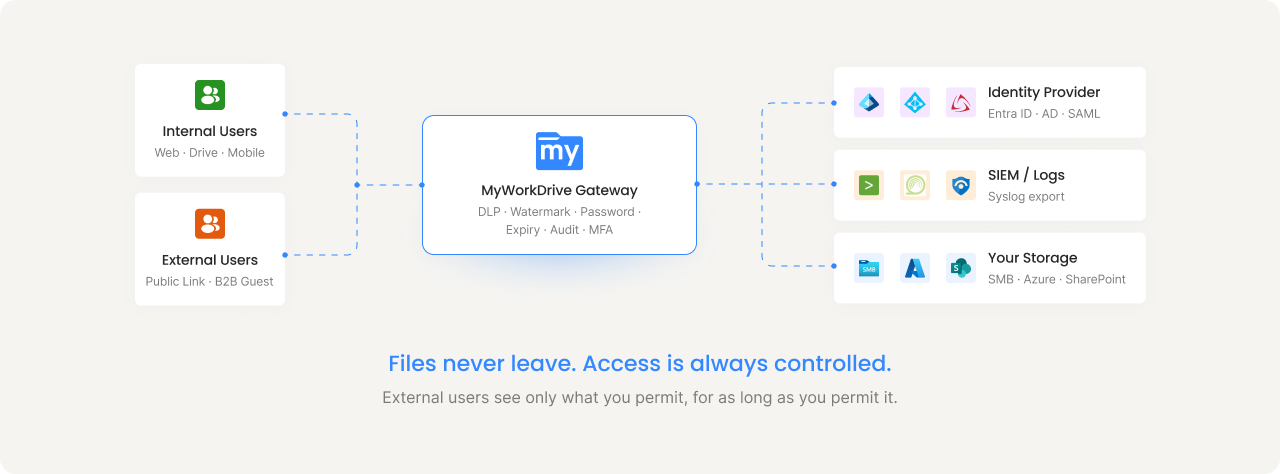
MyWorkDrive provides two external sharing mechanisms, each designed for different scenarios. Because the gateway connects to all your storage types, users can share a file from SharePoint, an SMB share, or Azure Blob through the same workflow. The file's location doesn't matter. The controls are the same.
Public Link Sharing
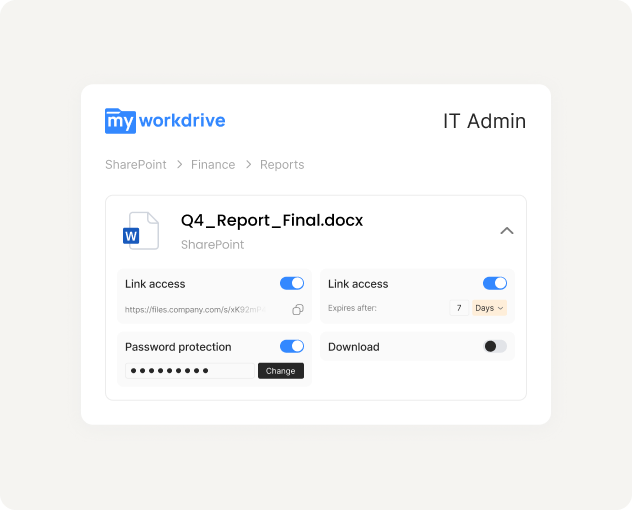
Share files and folders with anyone via a secure link, regardless of which storage system the file lives on. A SharePoint document, an SMB file share, and an Azure Blob container all share through the same interface with the same controls. No account required on the recipient's end.
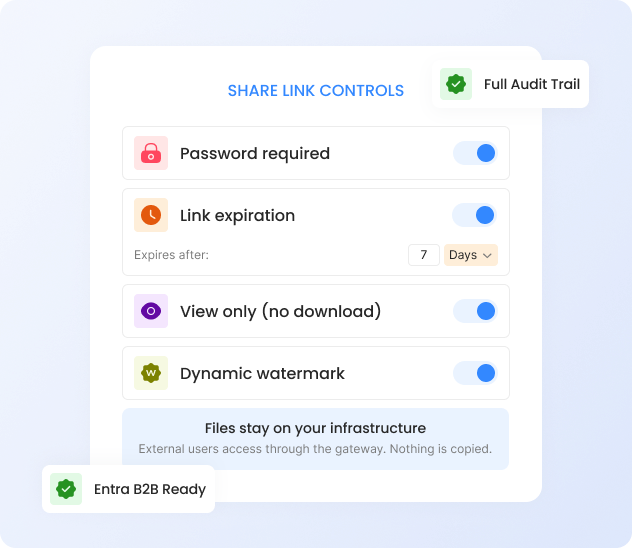
Admin controls: Enable or disable per share. Require passwords globally. Set maximum expiration windows. Block public sharing entirely on sensitive shares. All link creation and access is logged. Same policies apply across every connected storage type.
Microsoft Entra B2B Guest Access
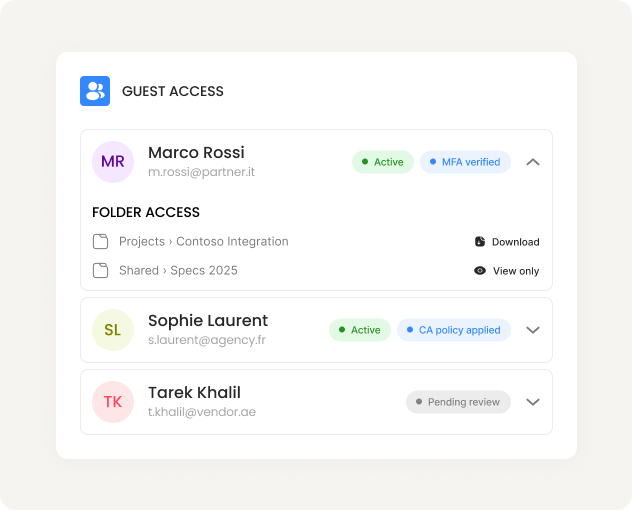
Invite external users through Microsoft Entra ID as B2B guests. They authenticate with their own Microsoft account and receive access to specific shares. MFA, Conditional Access, and access reviews all apply.
How it works: Guest users are created in your Entra ID and Active Directory. MyWorkDrive impersonates the guest to show them only their allowed folders. You manage no passwords. Guests are managed by your existing identity policies.
Data Leak Prevention (DLP)
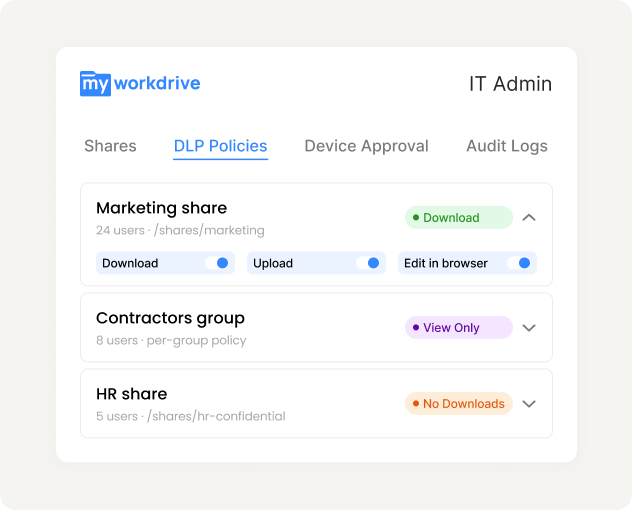
Apply DLP controls per share, per group, or per user. External recipients can view files in a secure browser viewer with dynamic watermarks showing their username and timestamp, while downloads, clipboard access, and printing are blocked.
Granular enforcement: Marketing can download with watermarks. Contractors can view but not copy. HR shares block downloads entirely. Rules apply across browser, mapped drive, and mobile clients.
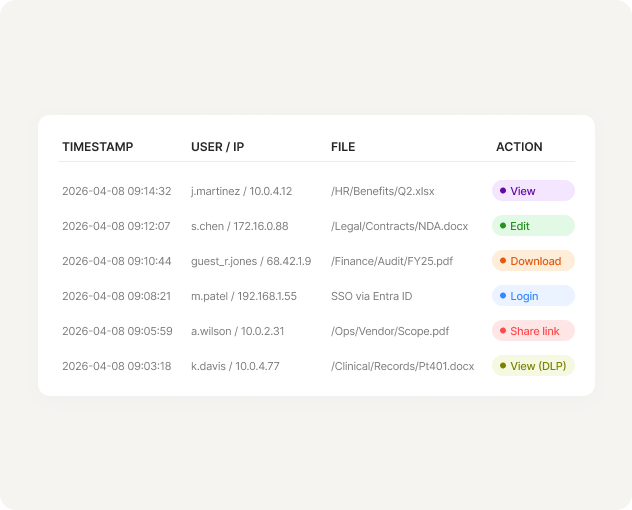
Complete Audit Trail
Every external access event is logged: who accessed what, when, from which device and IP, and what they did with the file. Logs cover public link creation, guest logins, file views, downloads, and edits.
SIEM integration: Export structured logs over Syslog to your SIEM (Splunk, QRadar, Sentinel). Set alerts for mass downloads, sudden public link creation on sensitive shares, or unexpected access patterns.
Files Never Leave Your Infrastructure
With most sharing tools, files get copied to a vendor cloud. With MyWorkDrive, external users access files through the gateway, whether those files live on SMB shares, SharePoint, OneDrive, Azure Files, or Azure Blob. One sharing workflow across every storage type you have.
Legal: Share case files with outside counsel
Password-protected, view-only link with 48-hour expiration and watermark. Counsel views in browser. No downloads, no copies, full audit log.
Healthcare: Vendor access to operational files
Entra B2B guest account with MFA. Vendor sees only their permitted shares. Access reviews revoke stale guests automatically.
Finance: Share reports with auditors
Download-enabled link with password, 7-day expiry, and mandatory watermark. Every download is logged to SIEM for the compliance team.
Construction: Subcontractor plan distribution
Share blueprints from an on-prem file server and project specs from SharePoint in a single workflow. Subcontractors see files from both storage systems on the same interface. Link expires after the project phase.
What Changes When Sharing Is Standardized Instead Of Improvised
Without managed sharing
- Files copied to personal cloud accounts you don't control
- Email attachments forwarded without limit or tracking
- VPN credentials shared with contractors who keep them indefinitely
- No record of external access for audit or compliance
- Revocation is impossible once a file has been downloaded or forwarded
- Different sharing mechanisms for SharePoint, file servers, and cloud storage
With MyWorkDrive external sharing
- Files stay on your storage. External users access through the gateway.
- Every link has a password, expiration, and permission scope you define
- View-only mode with watermarks prevents unauthorized copying
- Complete audit trail of every external access event, exportable to SIEM
- Revoke access instantly by disabling a link or removing a guest
- One sharing workflow across SMB, SharePoint, OneDrive, Azure Files, and Blob
External Sharing That Satisfies Your Compliance Framework
MyWorkDrive's external sharing controls map directly to the requirements regulated industries face every day.
HIPAA
PHI stays in your environment. DLP view-only mode prevents unauthorized downloads. Complete access logs for audit.
GDPR
No data stored on MyWorkDrive servers. Files remain in designated locations. Link expiration enforces data minimization.
CMMC
Access control, audit accountability, and media protection requirements addressed through DLP and logging capabilities.
FINRA
Immutable audit trail of all file access. Watermarking provides traceability. Password and expiration controls limit exposure.
Companies Benefited from Using MyWorkDrive
 HEALTHCARE
Sanford Health
One of the largest rural health systems in the United States, Sanford Health operates an integrated network of hospitals, clinics, and long-term care facilities across the Midwest and Great Plains regions.
 EDUCATION
University of Oxford
University of Oxford is one of the world's oldest and most prestigious universities. It comprises 39 autonomous colleges and is consistently ranked among the top universities globally across virtually every academic discipline.
 GOVERNMENT
CA Department of Fish and Wildlife
A California state agency responsible for managing the state's diverse fish, wildlife, and plant resources, as well as the habitats on which they depend. It oversees hunting and fishing regulations, species conservation programs, and environmental review across California's vast ecosystems.
 NONPROFIT
Habitat for Humanity
A global nonprofit that brings together volunteers, donors, and partner families to build and improve homes for people in need. Since 1976, it has helped millions of families achieve strength, stability, and self-reliance through affordable homeownership in over 70 countries.
 LEGAL
LEGAL
Aderant
A leading global provider of business management software for law firms, offering solutions that cover practice management, billing, financial reporting, and knowledge management. Its platforms are used by many of the world's largest law firms to streamline operations and improve profitability.
 DATA ANALYTICS
J.D. Power
A global data and analytics company known for its independent consumer intelligence and benchmarking studies across industries including automotive, financial services, healthcare, and technology.
See Standardized External Sharing On Your Own Files
Start a free 30-day trial. Connect your storage, create a share link with DLP controls, and see the full audit trail in action.