

By Dan Gordon
Last Updated: September 9, 2026
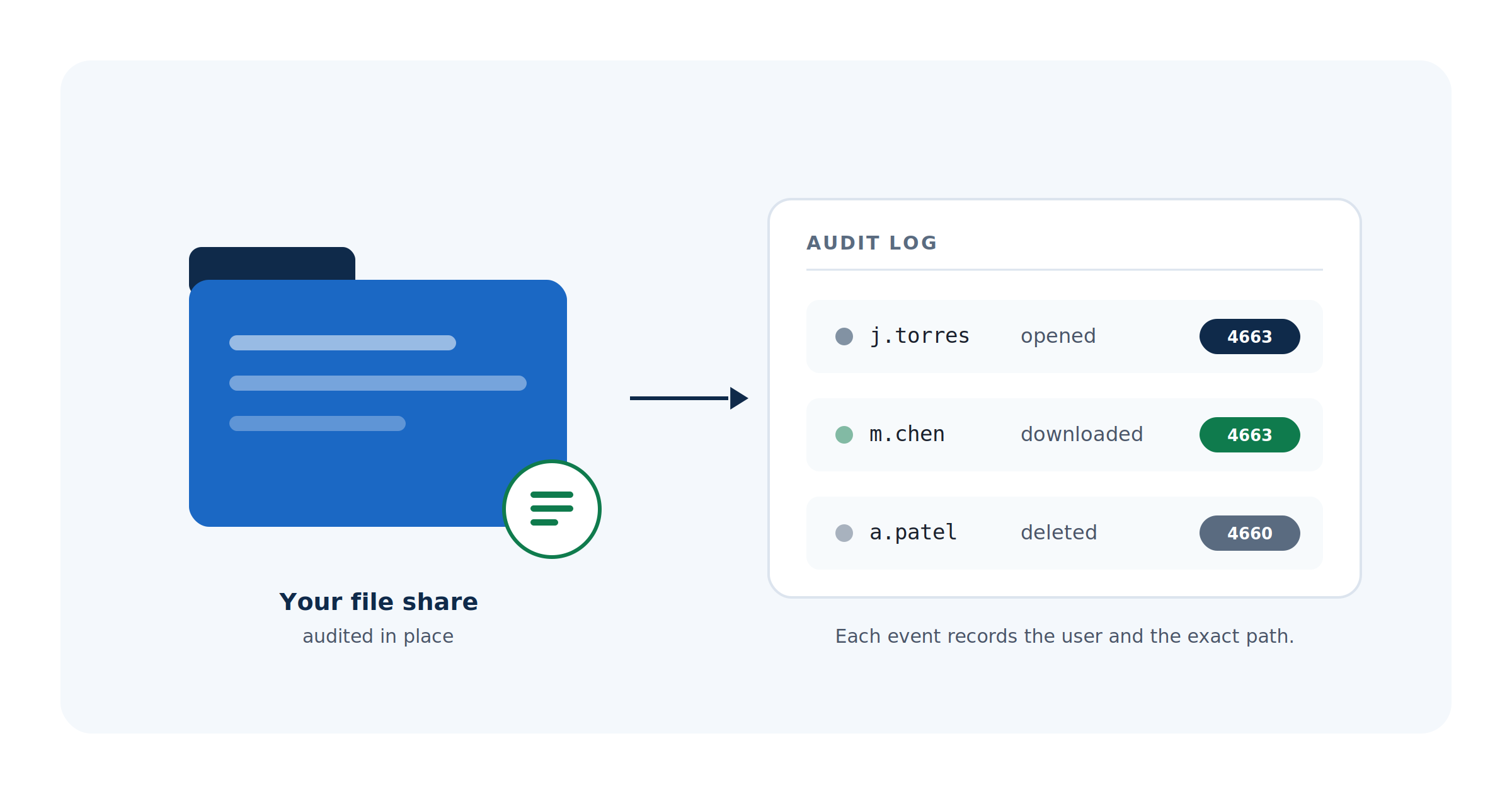
The question arrives in a predictable form. Someone asks whether a specific person opened a specific folder on a specific date, usually because an auditor asked first, or because an employee left and took a client list with them. The honest answer in most organizations is that nobody knows, because file access auditing was either never enabled or was enabled, generated a wall of events, and got switched off two weeks later.
Windows can answer the question. It requires configuration in two places rather than one, it produces far more data than people expect, and the event that most administrators go looking for is not quite the event they need. This post covers what Windows logs natively, which event IDs answer which question, why object access auditing tends to get reverted, what auditors actually ask for, and where an access layer like MyWorkDrive records activity that file system auditing does not see.
Windows Needs Two Things Configured, Not One
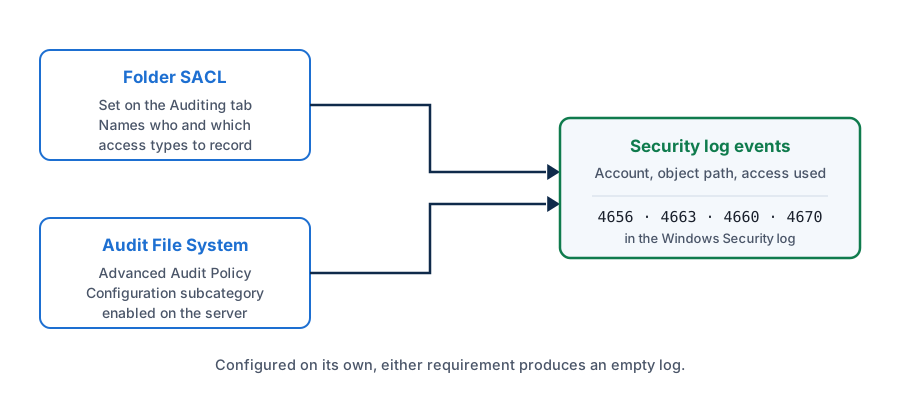
File access auditing on Windows depends on a pair of settings that are managed in different places and are easy to get half-right.
The first is a system access control list on the folder itself. A SACL sits alongside the DACL that controls NTFS permissions and specifies which principals and which access types should generate audit records. It is configured through Advanced Security Settings on the Auditing tab.
The second is the Audit File System subcategory under Advanced Audit Policy Configuration, which determines whether the operating system generates events when users attempt to reach file system objects.
Microsoft is explicit that no audit events are generated for the default file system SACLs. Enabling the policy without setting SACLs produces an empty Security log, which is the single most common reason administrators conclude that auditing is broken.
Two other subcategories work differently and matter for shares. Audit File Share records connections to network shares. Audit Detailed File Share records access to individual files through a share, and it does so without requiring SACLs at all, which makes it both useful and expensive.
Which Event Answers Which Question
| Event | What it records | Needs a SACL |
|---|---|---|
| 4656 | A handle to an object was requested, and the result of that request | Yes |
| 4663 | An access right was used on an object, with account, path, and access mask | Yes |
| 4658 | A previously opened handle was closed. Depends on Audit Handle Manipulation | Yes |
| 4660 | An object was deleted. Carries the handle ID but not the object name | Yes |
| 4664 | An attempt to create a hard link | Yes |
| 4670 | Permissions on an object were changed | Yes |
| 5140 | A network share was accessed. Records the connection, not the files | No |
| 5145 | A share object was checked for desired access, per file, with source address | No |
The distinction between 4656 and 4663 is where most log analysis goes wrong. Event 4656 shows that access was requested and what the result was, which is not the same as the operation being carried out. Event 4663 shows that an access right was used. Microsoft's own guidance points to 4663 when the question is whether something actually happened.
Event 4663 also has no failure variant. Denied attempts show up as failure instances of 4656, so a query built only on 4663 will find every successful read and no blocked ones.
For deletions, 4660 sounds like the right event and mostly is not, because it does not include the name of the object that was deleted. Microsoft recommends using 4663 filtered on DELETE access instead. The tradeoff is that 4663 with DELETE also fires during renames, so a deletion report built that way needs corroboration rather than being taken at face value.
Why Object Access Auditing Gets Reverted
Three failure modes account for most abandoned auditing projects.
Volume. Microsoft rates Audit File System event volume as dependent on how SACLs are configured, which is a polite way of saying that auditing read access on a busy share will bury everything else. Detailed File Share is worse, because event 5145 is generated for files accessed through a share whether or not a SACL exists. Microsoft's own Q&A documents a related surprise: a single Windows client opens multiple simultaneous TCP connections to a share using different source ports, and each can produce its own 5145 entry, so one user browsing one folder is not one event.
Security log rollover. The Security event log has a fixed maximum size, and once file auditing is on, that ceiling is reached far sooner than the retention window anyone assumed. Evidence that existed last month is gone by the time someone asks for it. Exporting events off the server is the only real answer, which is a project in itself rather than a checkbox.
Policy conflict. Audit policy can be set at the legacy category level through Audit object access, or at the subcategory level through Advanced Audit Policy Configuration. Setting the legacy category will override subcategory settings, and Group Policy applies audit policy only at the category level, so existing domain policy can quietly undo per-subcategory configuration on newly joined machines. The security option named "Audit: Force audit policy subcategory settings (Windows Vista or later) to override audit policy category settings" reverses that behavior, backed by the SCENoApplyLegacyAuditPolicy registry value. CIS benchmarks call for it to be enabled.
The practical implication is to stop trusting the Group Policy editor as a picture of reality. Run auditpol /get /category:"Object Access" on the file server and read what is actually in effect. Administrators are regularly surprised to find subcategories enabled that no GPO appears to set.
What an Auditor Actually Asks For
The regulatory requirements in this area are less prescriptive than most people expect, which cuts both ways.
For healthcare, 45 CFR 164.312(b) establishes audit controls as a required standard, calling for mechanisms that record and examine activity in information systems containing electronic protected health information. It names no log format, no required fields, and no retention period.
One correction worth making, because it circulates widely: HIPAA does not impose a six-year log retention requirement. The six-year rule in 164.316(b)(2) covers documentation of policies and procedures. Log retention is a decision your organization makes and documents, informed by risk analysis rather than dictated by the rule.
For defense contractors, NIST SP 800-171 control 3.3.1 requires creating, protecting, and retaining audit records sufficient to support monitoring, analysis, investigation, and reporting of unauthorized activity. Control 3.3.2 requires that the actions of individual users be uniquely traceable to those users, which is the requirement that shared service accounts fail. Both map into the Audit and Accountability family that a CMMC assessment examines.
What assessors ask for in practice is narrower than the control text suggests. They want to see that logging is enabled on the systems holding regulated data, that the records identify individual users, that someone reviews them on a defined cadence, and that the records still exist when requested. The last two are where organizations with technically correct configurations fall down.
The Gap Between File System Auditing and Remote Access
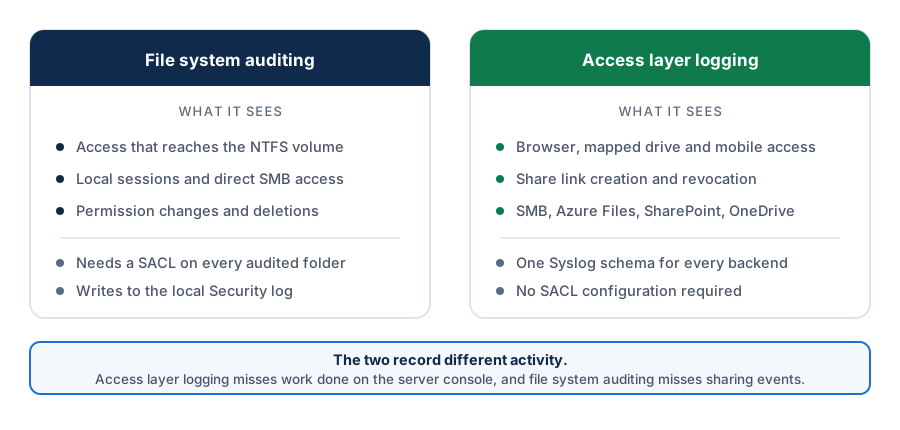
File system auditing sees operations that reach the file system on that server. That covers a great deal and misses two things that matter now.
The first is storage that is not a Windows volume. Once some data sits in SharePoint, OneDrive, or Azure Files, each platform keeps its own activity log with its own schema, retention, and console. Reconstructing a single timeline for one user across a Windows share and a SharePoint site means correlating three exports by hand, and the timestamps will not agree.
The second is the layer above the file system. When a user downloads a file through a browser, shares a link with someone outside the organization, or has a share link revoked, the file system sees a read at most. It does not see the link creation, the external recipient, or the revocation, because those events never touch NTFS.
How MyWorkDrive Logs File Access
MyWorkDrive records activity at the access layer, which means it captures events regardless of whether the underlying storage keeps its own log, and it captures sharing activity that has no file system equivalent.
Four categories of event are recorded. Authentication events include login attempts with identity provider details, source IP, and device identifiers. File operations cover opens, downloads, uploads, saves, and deletes with the full path and result. Sharing activity covers link creation, revocation, access events, and guest user activity. Admin changes cover policy updates, device approvals, and configuration changes.
Events export via Syslog over UDP or TCP, with each record carrying user, source IP, device identifier, share, path, operation, result, and bytes transferred. That field set is what makes the logs usable in a SIEM without a parsing project, and it covers SMB shares alongside Azure Files, SharePoint, and OneDrive in one schema.
Threshold alerts cover excessive downloads, unusual sharing, bulk deletions, and failed logins, delivered by email through your SMTP server. Thresholds are set per organization, since normal looks different for a design firm moving large files daily than for a finance team that rarely exports anything.
Three limits are worth stating directly. This is access logging, not a records management system, so retention schedules, legal hold, and eDiscovery export are not part of it. The logs are not written to immutable storage, so if your compliance program requires tamper-evident retention, that belongs in your SIEM or archive rather than here. And access-layer logging does not see activity that bypasses it, so a user working directly on the server console or over SMB from inside the network produces no MyWorkDrive event. Native file system auditing still has a job on the server itself.
A Logging Setup That Survives Contact With Production
- Decide what question you need to answer before touching any configuration. Proving deletions, detecting bulk downloads, and reconstructing one user's activity are different problems with different event sets, and trying to cover all of them at once is what produces unusable volume.
- Scope SACLs to folders that hold regulated or sensitive data. Auditing an entire volume is the decision that gets reverted. Start with the shares you would actually be asked about.
- Audit writes and deletes before reads. Write and delete auditing produces manageable volume and answers most real questions. Add read auditing only where the data genuinely warrants it.
- Enable the Audit File System subcategory under Advanced Audit Policy Configuration, and enable the security option forcing subcategory settings to override category settings so domain policy does not undo it.
- Verify with
auditpolrather than with the Group Policy editor. Confirm the effective state on the file server itself. - Get events off the server. Forward the Security log to a SIEM or log collector, because the local Security log will roll over well inside your retention window once file auditing is running.
- Add access layer logging for remote and sharing activity, which covers link creation, external recipients, downloads, and cross-storage events that file system auditing cannot see.
- Configure alerts on patterns, not on individual events. Bulk deletions and download spikes are the ones that matter.
- Write down the review cadence and who does it, then actually do it. Assessors ask for evidence of review, and this is the step organizations skip.
- Test the whole thing with a real question. Pick a file, have someone open it, and see whether you can produce an answer a week later. That rehearsal is worth more than any configuration checklist.
Frequently Asked Questions
How do I find out who accessed a file on a Windows share?
Windows records file access only when two things are configured together. The folder needs a system access control list specifying which access types to audit, and the Audit File System subcategory needs to be enabled under Advanced Audit Policy Configuration. Once both are in place, event 4663 in the Security log shows the account, the object path, and the access that was used.
What is the difference between event 4656 and event 4663?
Event 4656 records that a handle to an object was requested and the result of that request, which does not mean the operation happened. Event 4663 records that an access right was actually used. Microsoft recommends 4663 for confirming an operation took place. Event 4663 has no failure variant, so denied attempts appear as failure instances of 4656.
Why am I not seeing event 4663 after enabling auditing?
Almost always because the folder has no SACL. No audit events are generated for default file system SACLs, so enabling the audit policy alone produces nothing. The other common cause is a conflict between the legacy Audit object access category setting and the Advanced Audit Policy subcategories. Run auditpol /get /category:"Object Access" to see what is actually in effect.
Does file access auditing slow down a file server?
The cost is log volume rather than throughput. Microsoft rates Audit File System event volume as depending on SACL configuration, and Detailed File Share generates event 5145 for every file accessed through a share regardless of SACLs. On a busy server that can fill the Security log quickly, which is why broad read auditing is usually scoped down.
How long do HIPAA audit logs have to be kept?
The HIPAA Security Rule does not set a retention period for audit logs. 45 CFR 164.312(b) requires mechanisms that record and examine system activity, without naming a log format, required fields, or a duration. The six-year retention requirement in 164.316(b)(2) applies to documentation of policies and procedures, which is a separate obligation often misread as a log retention rule.
Can I get file access logs without configuring SACLs on every folder?
Partly. The Audit File Share and Audit Detailed File Share subcategories log share connections and per-file share access without requiring SACLs, producing events 5140 and 5145. They cover access arriving over SMB only, and 5145 is high volume. An access layer that logs at the application level is the other route, since it records events without touching file system audit configuration.
Start a free trialBook a demoView pricing

Daniel, Founder of MyWorkDrive.com, has worked in various technology management roles serving enterprises, government and education in the San Francisco bay area since 1992. Daniel is certified in Microsoft Technologies and writes about information technology, security and strategy and has been awarded US Patent #9985930 in Remote Access Networking.