
Downgrade from Microsoft E3 to F3 with MyWorkDrive
Most organizations assign full Microsoft 365 E3 or E5 licenses to every user, even those who never open a desktop app. MyWorkDrive enables Office Online editing on your existing files, so the right users can move to F-tier licenses and save up to $588 per seat, per year.
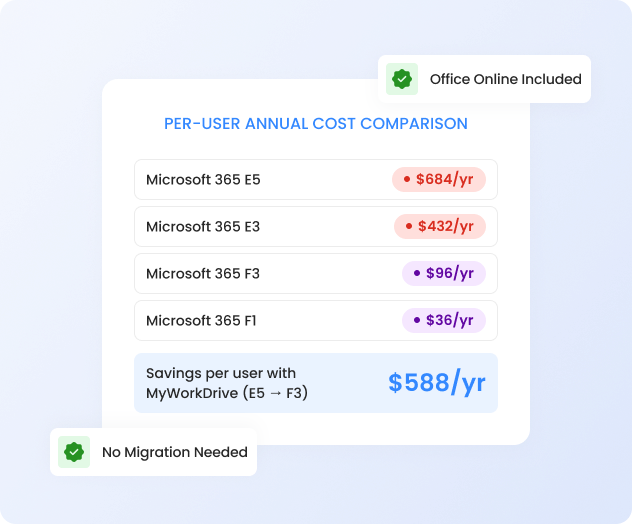
Save Up to 70% on Microsoft Licensing
E3 and E5 licenses bundle desktop apps, advanced compliance, and full SharePoint. Capabilities many of your users never touch. But without an alternative way to access and edit files, downgrading them isn't an option.
Over-Licensed Workforce
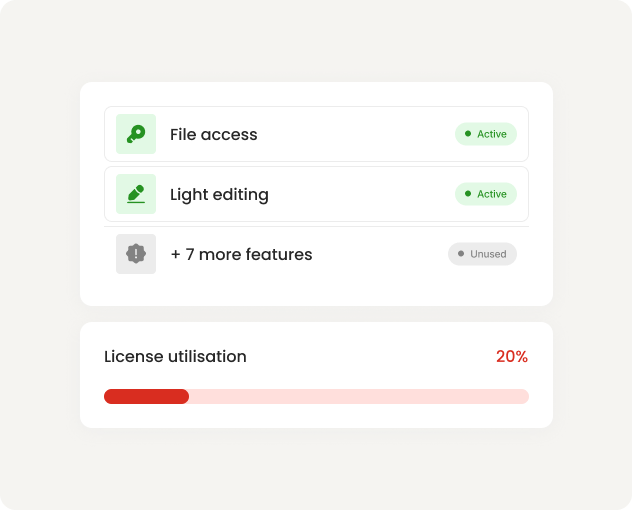
Frontline, warehouse, and administrative staff get the same E3/E5 license as power users. Most only need file access and light editing, but there's been no way to provide that without a full license.
Locked Into E-Tier By Default
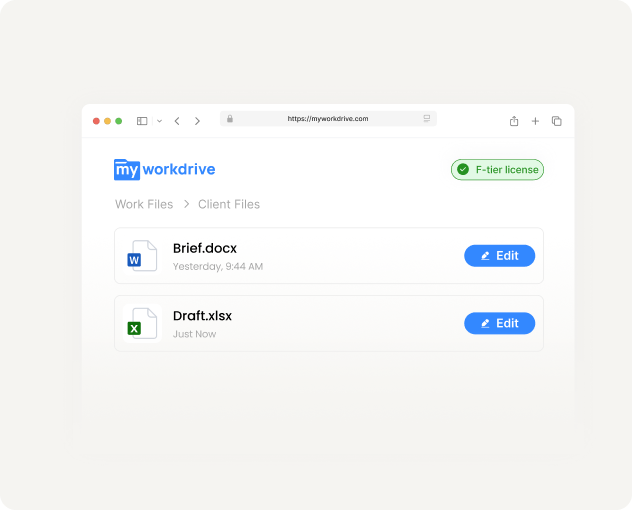
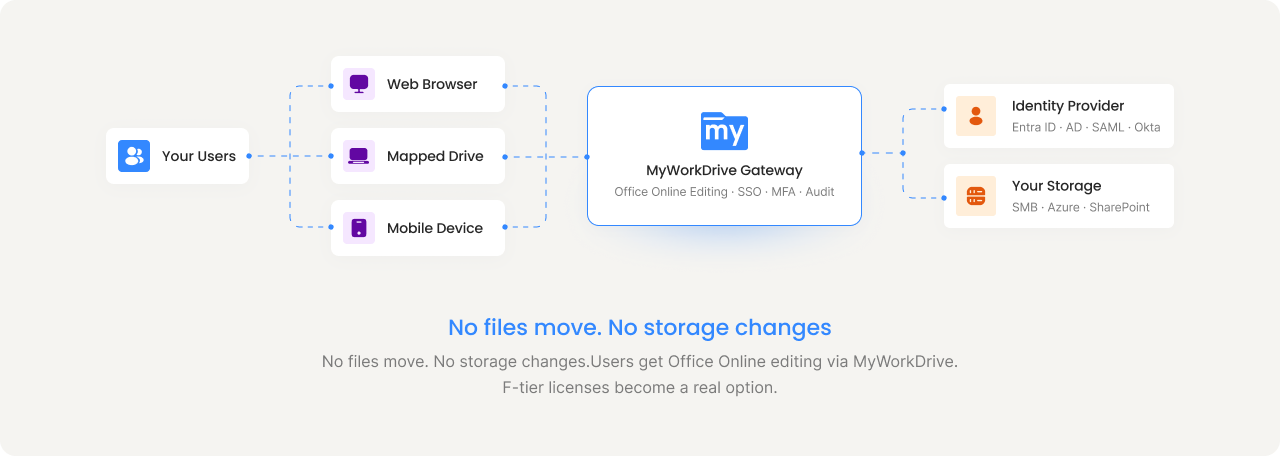
IT teams assume every user needs an E3 or E5 license to edit Office files. They don't. MyWorkDrive enables full Office Online editing on files that live on your own servers, mapped drives included. That means F-tier licenses become viable without sacrificing productivity.
Costs Scale With Headcount
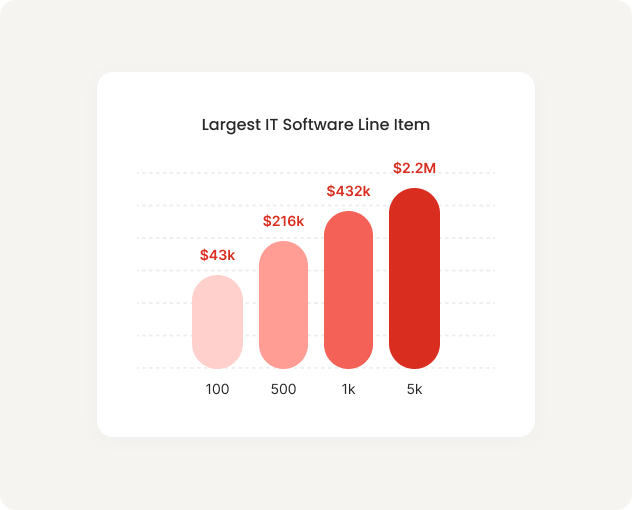
At $36–57/user/month, Microsoft licensing is often the single largest line item in IT software spend. Every unnecessary E-tier license compounds across thousands of users.
MyWorkDrive Bridges The Gap Between F-Tier Licenses And Full File Productivity
MyWorkDrive provides Office Online editing directly on your existing file shares: on-prem SMB, Azure Files, SharePoint, or anywhere your files live. Users who don't need desktop apps get full browser-based editing through MyWorkDrive, enabling a safe transition to F-tier. Learn more.
Audit your license usage
Identify users who primarily access and edit files but don't use desktop Office, advanced SharePoint, or E-tier compliance features.
Deploy MyWorkDrive
Install on your infrastructure in hours, not months. Connect to your existing storage and identity provider. No migration, no new storage.
Transition eligible users to F-tier
Move qualifying users from E3/E5 to F1 or F3. They keep full file access and browser-based Office editing through MyWorkDrive.
Realize savings from month one
The license cost delta drops to your bottom line immediately. MyWorkDrive at $5/user/month is a fraction of the savings generated.
What The Savings Look Like At Scale
License optimization savings depend on how many users are candidates for F-tier. Here's what the numbers look like at different scales, assuming 30% of users are eligible. Some organizations with large frontline workforces achieve 40% or more. Learn more.
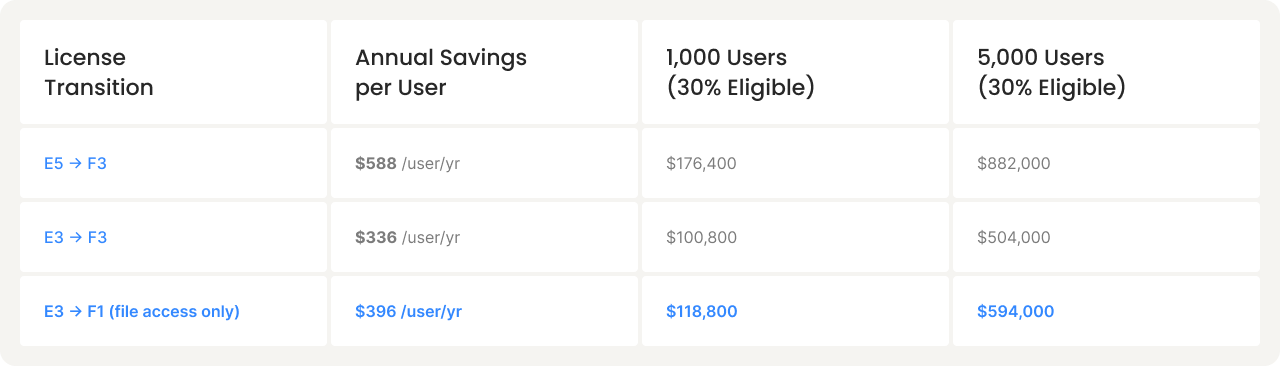
MyWorkDrive cost: $5/user/month ($60/yr), included in savings calculations above.Volume discounts available at 5,000+ users.
* Based on Microsoft list pricing as of 2025. Your Enterprise Agreement pricing may vary. Savings assume MyWorkDrive licensing for transitionedusers. Always consult your Microsoft licensing agreement and partner before making license changes.
Organizations Are Already Doing This
License optimization isn't theoretical. Healthcare, education, and government organizations are already using MyWorkDrive to right-size their Microsoft spend.
Customer Story
Large U.S. Healthcare System: $14M in Savings. Zero Files Migrated.
A leading rural healthcare network in the United States supports tens of thousands of clinical and administrative users across multiple states and care settings. Facing rapidly increasing Microsoft licensing costs in a highly regulated environment, the organization deployed MyWorkDrive to provide secure, browser-based access to existing on-premises file shares.
Clinical adoption exceeded expectations with minimal resistance. The platform has proven flexible enough to support ongoing growth through acquisitions, allowing newly integrated facilities to access existing file shares without complex migrations.
Identified Licensing Savings
Clinical And Admin Users
Healthcare Network
Training And Disruption
Who's A Candidate, And Who Isn't
License optimization works for the right users. We're transparent about where the line is.
Good candidates for F-tier
Should stay on E-tier
MyWorkDrive does not replace Microsoft 365. It reduces the number of users who need a full E-tier license to access and edit files. We always recommend consulting your Microsoft licensing agreement and partner before making changes.
Find Out How Much Your Organization Could Save
Start a free 30-day trial. Connect your storage, test Office Online editing on your own files, and identify which users are candidates for F-tier transitions.