

By Dan Gordon
Last Updated: August 26, 2026
Export control officers at research universities face a specific problem. A mechanical engineering lab wins a defense subcontract. The technical data package is ITAR-controlled. The statement of work invokes DFARS 252.204-7012, which means NIST SP 800-171 controls apply to any Controlled Unclassified Information (CUI) the project touches. The data lands on a department file server, and within a week a grad student has emailed a drawing to a personal account so they can work on it from home.
Nobody on that project intended to violate export control law. The workflow left the door open. This post covers where controlled research data actually goes and what ITAR and CUI rules require. It then explains how to give researchers file access that does not depend on making copies.
Where Export-Controlled Research Data Ends Up
Common Ways ITAR and CUI Files Leave Controlled Storage
Audit findings at research institutions tend to repeat the same patterns:
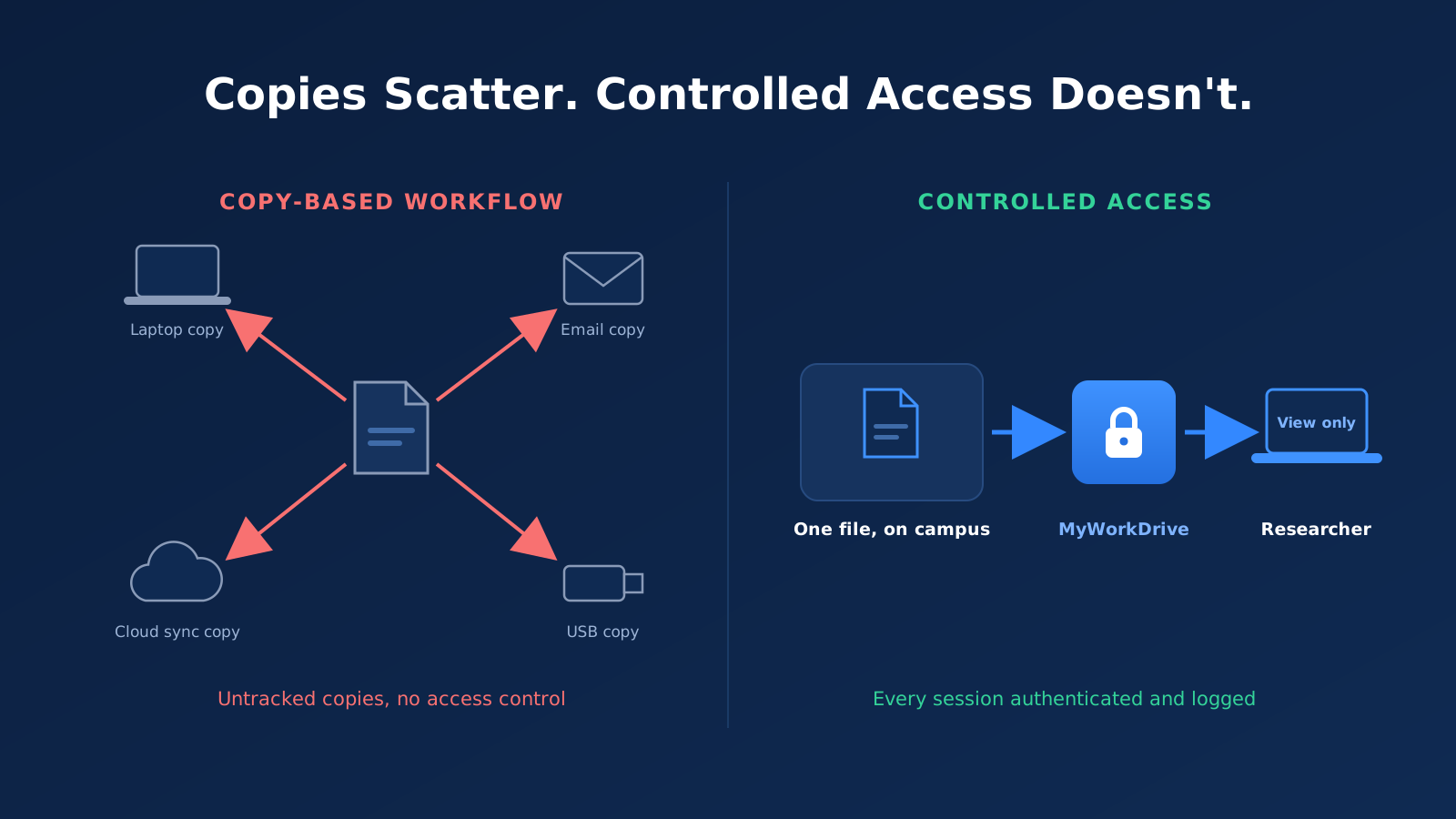
Email attachments. A researcher sends a controlled drawing to a collaborator, a sponsor, or their own personal account. The file now exists in at least two mail systems, neither of which the export control office governs.
Sync clients. OneDrive, Dropbox, or Google Drive is installed on a lab workstation. A controlled folder gets dragged into a synced location. The file replicates to a commercial cloud tenant and to every device linked to that account.
Laptop downloads. A faculty member copies a project folder to a personal laptop before travel. If that laptop crosses a border, the data crosses with it. If the traveler is headed to a country listed in 22 CFR 126.1, the exposure is severe.
USB drives and external disks. Still common in engineering labs where large CAD assemblies move between machines.
Departmental shadow servers. A lab stands up its own NAS because the sanctioned storage is slow over VPN. The export control office does not know the NAS exists.
In each case, the file was copied out of controlled storage because copying was the only practical way to work with it.
Why Copy-Based Workflows Persist in Research
Research computing environments reward copies. VPN access to campus file shares is slow from home, so people download what they need before they leave. Collaborators at other institutions cannot reach internal shares at all, so email becomes the transfer mechanism. Cloud sync is the default on managed laptops because it works well for uncontrolled data.
Policy memos do not change these incentives. Researchers follow the fastest path to their files, and if the compliant path is slower, it gets skipped. The fix has to happen at the infrastructure level. Make the compliant path the fast path, and remove the technical ability to create copies where policy says copies cannot exist.
ITAR and CUI Compliance Requirements for Research Data
How ITAR and CUI Obligations Overlap
ITAR (22 CFR Parts 120-130) governs defense articles and technical data on the U.S. Munitions List. It is administered by the Directorate of Defense Trade Controls at the State Department. Releasing ITAR technical data to a foreign person, anywhere, is an export that generally requires authorization.
CUI is a separate framework. Export-controlled information is itself a CUI category, so ITAR technical data held under a federal contract is usually also CUI. When a DoD contract or subcontract includes DFARS 252.204-7012, the contractor must implement NIST SP 800-171 on any system that stores, processes, or transmits that CUI. University-held subawards flow these clauses down. A single project folder can therefore carry both ITAR access restrictions and 800-171 technical control requirements at the same time.
One nuance matters for universities specifically. Fundamental research that is ordinarily published and shared broadly is excluded from export controls. That exclusion covers research results. It does not cover ITAR-controlled technical data received from a sponsor, and it does not survive publication restrictions or access restrictions accepted in a contract. Many university projects hold controlled inputs even when their outputs will be public.
Deemed Exports and Foreign-Person Access
Under ITAR, releasing technical data to a foreign person inside the United States is treated as an export to that person's country of citizenship or permanent residency. The common name for this is a deemed export. On a research campus, this is the rule with the most day-to-day consequences. Graduate students, postdocs, and visiting scholars are often foreign persons under the regulation. If they can open an ITAR file, the institution has exported technical data, whether or not anyone left the building.
Compliance therefore requires access control at the level of named individuals, screened for U.S.-person status where the project demands it, with records showing who could reach what. A file share where "everyone in the department" has read access cannot meet that bar.
The ITAR Encryption Carve-Out for Cloud Storage
Since March 2020, 22 CFR 120.54(a)(5) has provided that sending, taking, or storing unclassified technical data is not an export if the data is secured with end-to-end encryption, the cryptography meets FIPS 140-2 or equivalent standards (AES-128 or stronger), the data is not intentionally sent to or stored in a country listed in 22 CFR 126.1 or Russia, and the decryption keys are not provided to any third party, including the cloud provider.
The carve-out is real, and some institutions use it. It also carries operational burden. The institution must maintain end-to-end encryption where the provider never holds keys, prove that condition continuously, and ensure no decryption occurs in a prohibited jurisdiction. Standard cloud storage with provider-managed encryption does not qualify, because the provider holds the keys. Many export control officers reach a simpler conclusion: if the data never leaves institution-controlled storage, the institution does not need to rely on the carve-out at all.
NIST SP 800-171 and DFARS Obligations
DFARS 252.204-7012 has required NIST SP 800-171 implementation since 2017. What changed recently is enforcement. The Department of Defense published the final CMMC rule in the Defense Federal Acquisition Regulation Supplement on September 10, 2025, effective November 10, 2025. Contracting officers can now insert DFARS 252.204-7021 into solicitations, and CMMC status becomes a condition of award over a phased rollout. Universities holding defense contracts and subawards with CUI will see CMMC Level 2 requirements appear in their agreements.
For file access specifically, 800-171 requirements include limiting system access to authorized users (3.1.1), controlling CUI flow (3.1.3), employing least privilege (3.1.5), protecting CUI in transit with FIPS-validated cryptography (3.13.8 and 3.13.11), and creating audit records that support investigation of unauthorized activity (3.3.1). Uncontrolled copies on laptops and personal cloud accounts fail several of these at once.
Providing Access Without Creating Copies
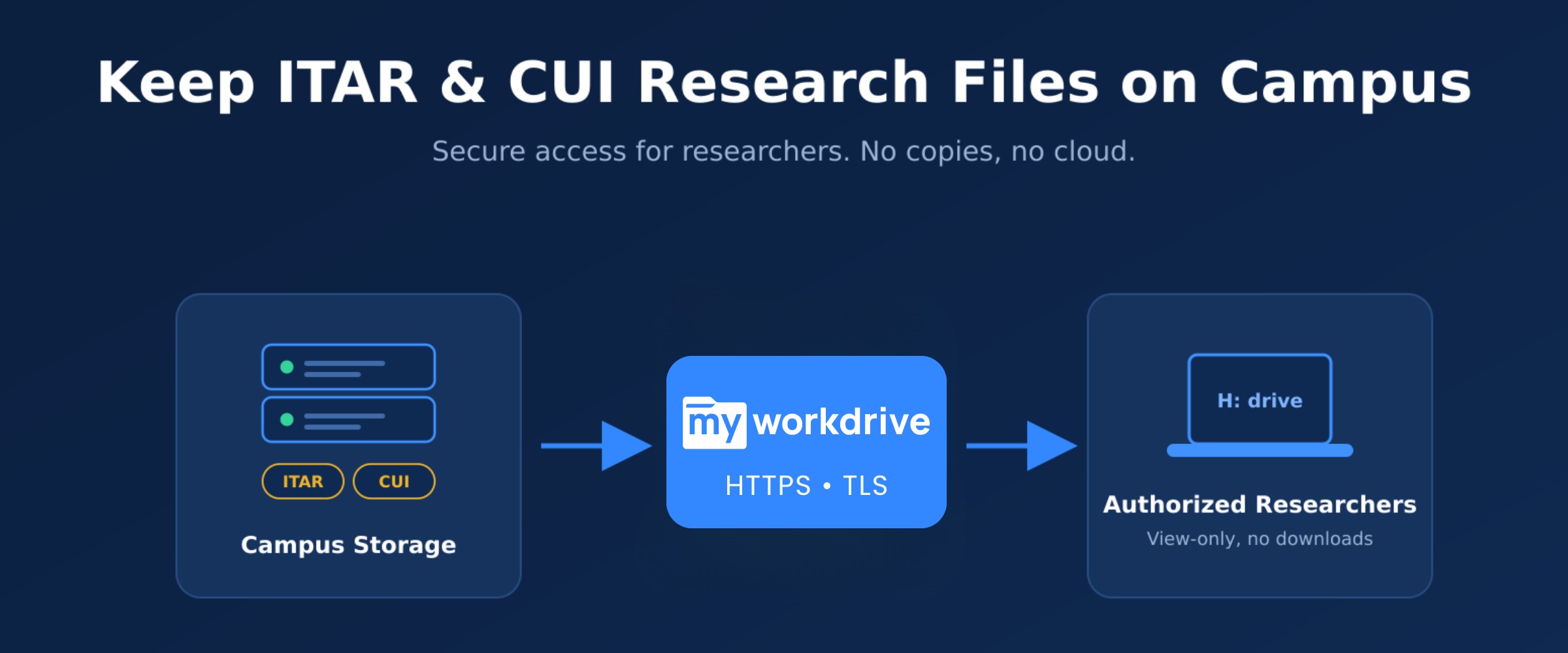
The alternative to copy-based work is a file access gateway. Files stay where they are, on institution-owned Windows file servers or approved storage. Researchers reach them through an authenticated HTTPS session. Nothing syncs, and nothing is staged on a vendor's cloud. This is the model MyWorkDrive implements, and the sections below describe how each piece maps to the requirements above.
Keeping Data on Institution-Controlled Storage
MyWorkDrive installs on a Windows Server inside the institution's environment and publishes existing SMB file shares over HTTPS on port 443. SMB port 445 stays closed to the internet. Files are never copied to MyWorkDrive's cloud, because there is no MyWorkDrive cloud storage tier. The server is a broker between the authenticated user and the share. Storage remains the same NTFS-permissioned shares the institution already backs up, snapshots, and audits.
For institutions with storage beyond traditional file servers, the same gateway model covers Azure Files, Azure Blob, Amazon FSx, Azure NetApp Files, and SharePoint, all under the institution's own tenant and keys.
File Access Without Local Downloads
For shares holding controlled data, administrators can enable Data Leak Prevention. Users open files in a secure browser viewer. Downloading, printing, and clipboard copy are blocked, and a dynamic watermark carrying the username and timestamp discourages screen capture. The same view-only enforcement extends to the mapped drive client through a secure viewer driver, so a researcher can browse the H: drive as usual while the controlled share refuses to hand over a local copy.
Where editing is required, institutions can host the editor themselves. Office Online Server, ONLYOFFICE, And Collabora both run on institution-owned infrastructure, so document content stays inside the network during editing sessions. Browser editing sessions stage content in memory or in temporary locations that are cleaned up when the session ends. File contents do not persist on the application server. For ITAR shares, self-hosted editors are the right choice; editing modes that stage copies in Microsoft 365 should be reserved for uncontrolled data.
Role-Based and US-Person Access Controls
MyWorkDrive inherits NTFS permissions directly. It cannot grant more access than Active Directory and the file system already allow, which preserves least privilege by construction. Export control offices can implement U.S.-person restrictions the way they already manage everything else: an AD security group per controlled project, populated only with screened, authorized individuals. Access-based enumeration hides shares from users who lack rights, so a visiting scholar browsing the drive never sees that the controlled project exists.
Authentication runs through the institution's identity provider over SAML, including Entra ID and Duo, so MFA and Conditional Access policies apply to every session. Device approval adds another gate: mapped drive and mobile access can be limited to specific, registered devices, and offboarded users lose access the moment their directory account is disabled.
FIPS Encryption and Key Control
All client connections require TLS 1.2 or higher, with TLS 1.3 preferred where supported. MyWorkDrive has been issued FIPS 186-4 RSA algorithm validation certificate #3018 from NIST, and Windows FIPS mode is supported on the server. SSL certificates are customer-owned and live in the Windows Certificate Store, so no external party holds key material for the institution's sessions. Because the data itself never moves to a third-party cloud, the institution is not asked to prove the key-custody conditions of the 120.54 carve-out for its day-to-day file access.
Access Logging and Audit Evidence
Every authentication, file open, download attempt, permission denial, share change, and device approval is logged. Logs export over Syslog to the institution's SIEM, with alert thresholds for mass downloads and unexpected policy changes. When an export control officer needs to know who accessed a technical data package, from where, and on what device, the log already holds the answer.
Copies and Cloud vs. Controlled Access
| Factor | Copies and Cloud Sync | Controlled Gateway Access (MyWorkDrive) |
|---|---|---|
| Where files live | Laptops, email, personal cloud, vendor tenants | Institution-owned storage only |
| Copies created | One per device, per sync, per attachment | None; single authoritative file |
| Foreign-person access control | Lost once a copy leaves the share | NTFS and AD groups enforced on every session |
| Encryption and key custody | Provider-managed keys; 120.54 conditions unmet | TLS 1.2+/1.3; customer-owned certificates |
| Download prevention | Not possible | DLP view-only, watermarks, clipboard blocking |
| Audit trail | Fragmented across systems, often absent | Full access log with SIEM export |
| Offboarding | Copies persist after departure | Access ends when the AD account is disabled |
How MyWorkDrive Supports Controlled-Data Access
Capabilities Mapped to ITAR and CUI Requirements
| Requirement | Regulatory Driver | MyWorkDrive Capability |
|---|---|---|
| Limit access to authorized users | NIST 800-171 3.1.1; ITAR deemed export rule | NTFS permission inheritance, AD/Entra ID groups, access-based enumeration |
| Least privilege | NIST 800-171 3.1.5 | Cannot grant more access than NTFS already allows |
| Control CUI flow | NIST 800-171 3.1.3 | DLP download blocking, per-share and per-group; public sharing disabled on controlled shares |
| Protect data in transit | NIST 800-171 3.13.8, 3.13.11; 22 CFR 120.54 conditions | TLS 1.2 minimum, TLS 1.3 preferred; FIPS 186-4 RSA validation certificate #3018; Windows FIPS mode |
| Session and MFA enforcement | NIST 800-171 3.5.3 | SAML SSO with Entra ID, Duo, Okta; Conditional Access applies; granular session timeouts |
| Device restriction | NIST 800-171 3.1.18 | Device approval for mapped drive and mobile clients |
| Audit and accountability | NIST 800-171 3.3.1 | Detailed event logging, Syslog SIEM export, mass-download alerts |
| Keep data off foreign or third-party infrastructure | 22 CFR 120.54; 126.1 jurisdictions | Self-hosted gateway; no vendor cloud storage of file content; self-hosted editors available |
File-Level Access vs. Email-Only Encryption
Some institutions respond to ITAR obligations by deploying encrypted email and telling researchers to use it for controlled attachments. Encrypted email protects the message in transit and stops there. The attachment still lands as a plaintext file in the recipient's mail client and downloads folder, and every reply spawns another copy. It also fails to address the primary workflow. Most controlled-data work is people opening and editing files day after day, and email plays no useful part in that.
File-level access control addresses the working copy problem directly. The file has one home, and everyone authorized works against that home. Since nothing moves between mailboxes, there are no attachments to protect in the first place.
Scope and Limitations
MyWorkDrive supports compliance efforts. It does not make an institution ITAR compliant or CMMC certified on its own, and no software product can. Export control compliance still requires a technology control plan, personnel screening, training, licensing decisions, and physical security, all owned by the institution. A few specifics worth stating plainly:
- MyWorkDrive holds a FIPS 186-4 RSA algorithm validation. That is an algorithm certificate, not a FIPS 140-2 cryptographic module validation for the whole product. Institutions relying on specific FIPS language in a contract should review the requirement with their assessor.
- Desktop Office editing over the standard mapped drive delivers file content to the workstation. For controlled shares, use DLP secure view or self-hosted browser editing instead.
- Editing modes that stage temporary copies in Microsoft 365 should not be enabled on ITAR shares. Use Office Online Server or ONLYOFFICE hosted on campus.
- Configuration choices matter. A controlled share with downloads enabled and public links allowed is not a controlled share. Review settings with your export control officer before onboarding a project.
Checklist: Keeping Controlled Research Data On-Premises
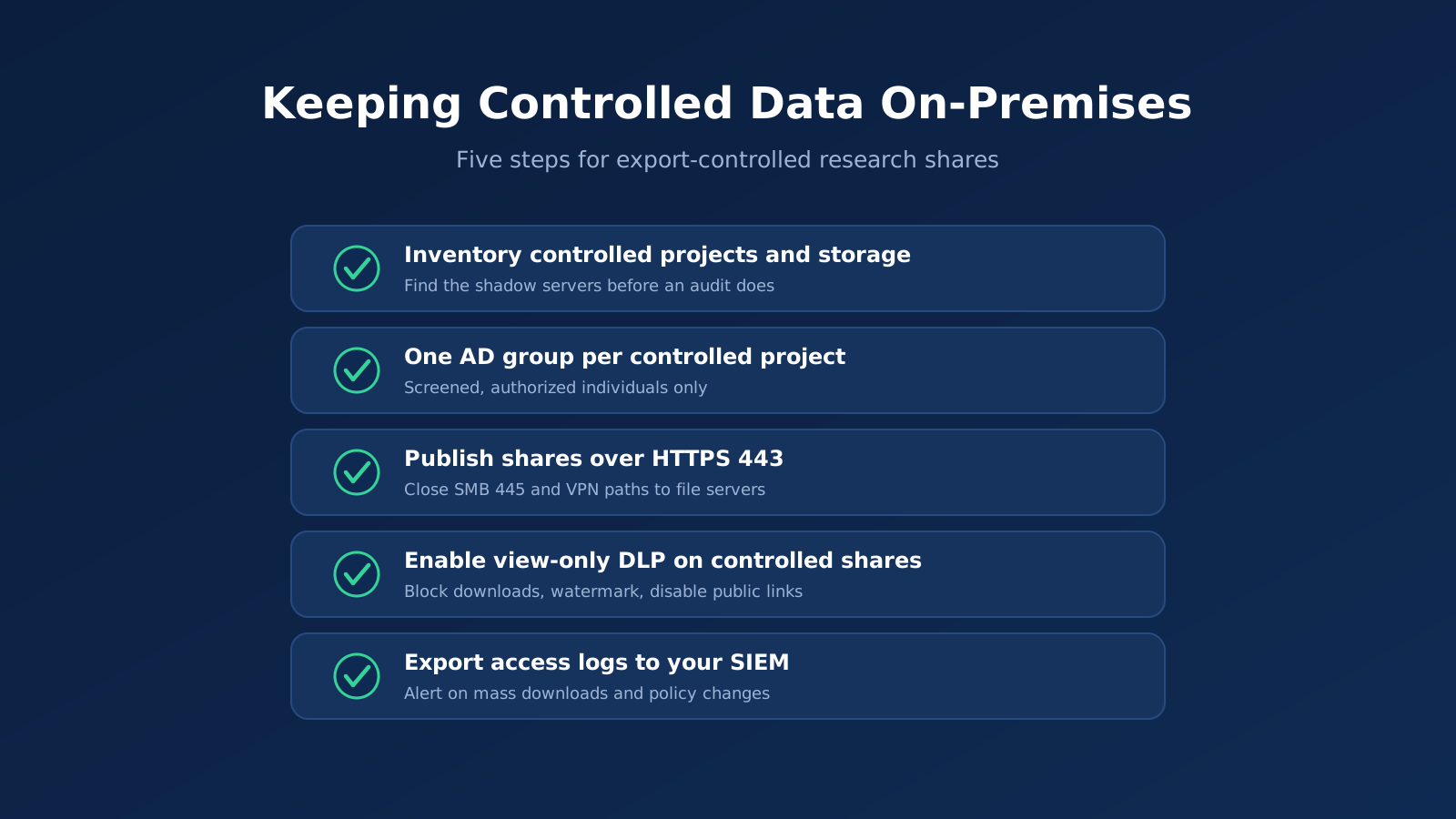
- Inventory controlled projects and their storage. Find the shadow NAS boxes and departmental servers now, not during an audit.
- Create one AD security group per controlled project. Populate it only with screened, authorized individuals. Document U.S.-person determinations where required.
- Consolidate controlled data onto NTFS-permissioned shares governed by those groups, with access-based enumeration on.
- Publish the shares through the gateway over HTTPS 443. Close SMB 445 and any VPN split-tunnel paths to the file servers.
- Enable DLP on controlled shares. Block downloads, enable watermarking, and disable public sharing.
- Choose self-hosted editing (Office Online Server or ONLYOFFICE) for any controlled share that needs in-place editing.
- Enforce MFA through your identity provider and set session timeouts to policy.
- Turn on device approval in monitor mode, review for a week, then enforce.
- Export logs to your SIEM and set alerts for mass downloads and policy changes.
- Remove sync clients and mapped VPN drives from workstations that touch controlled data, and communicate the new access path before cutting the old one.
Institutions that follow this sequence typically find the researcher experience improves at the same time compliance does. Files open faster over HTTPS than over VPN-tunneled SMB, and the H: drive still looks like the H: drive.
Frequently Asked Questions
Can ITAR Data Be Stored in the Cloud?
Yes, under narrow conditions. 22 CFR 120.54(a)(5) permits storing unclassified ITAR technical data in the cloud if it is protected with end-to-end encryption meeting FIPS 140-2 or equivalent standards, it is not stored in a 126.1 country or Russia, and no third party, including the cloud provider, ever holds the decryption keys. Provider-managed encryption does not qualify. Many institutions avoid the burden of proving these conditions by keeping the data on institution-controlled storage and providing remote access through a gateway instead.
What Is a Deemed Export?
A deemed export is the release of controlled technical data to a foreign person inside the United States. Under ITAR, that release is treated as an export to the person's country of citizenship or permanent residency and generally requires authorization. On campus, granting a foreign-person graduate student read access to an ITAR project folder is a deemed export, even if the student never leaves the lab.
Does ITAR Require FIPS-Validated Encryption?
ITAR does not impose a general encryption mandate on data an institution keeps on its own premises under physical and logical access control. FIPS 140-2 compliant cryptography (or equivalent, AES-128 or stronger) becomes a condition when an institution relies on the 120.54 encryption carve-out to move or store technical data outside its own controlled environment. Separately, if the data is also CUI under a DFARS 252.204-7012 contract, NIST SP 800-171 requires FIPS-validated cryptography where cryptography is used to protect CUI confidentiality.
Do We Need a Separate Enclave to Protect CUI Research Data?
Not necessarily a physically separate one. What NIST SP 800-171 and CMMC require is a defined boundary within which the controls apply. Many institutions scope an enclave logically: dedicated shares, dedicated AD groups, gateway-only access, DLP enforcement, and SIEM logging, all on existing infrastructure. That logical enclave is far cheaper than a parallel network and easier to defend in an assessment than a policy that claims the entire campus network meets 800-171.
How Do We Stop Controlled Files From Ending Up on Laptops and Personal Cloud?
Address the incentive first. Researchers copy files when remote access is slow, so give them fast HTTPS gateway access with a mapped drive experience and no VPN. Then close the technical paths. Enforce view-only DLP on controlled shares, block downloads, disable public links, and restrict access to approved devices. Pair the technical controls with offboarding tied to the directory, so departing personnel lose access the day their account is disabled, and there are no lingering copies to chase.
Start a free trialBook a demoView pricing

Daniel, Founder of MyWorkDrive.com, has worked in various technology management roles serving enterprises, government and education in the San Francisco bay area since 1992. Daniel is certified in Microsoft Technologies and writes about information technology, security and strategy and has been awarded US Patent #9985930 in Remote Access Networking.