

By Ron Bhojwani
Last Updated: August 31, 2026
How Universities Can Handle the Microsoft 365 Storage Limits Before the Overage Bill
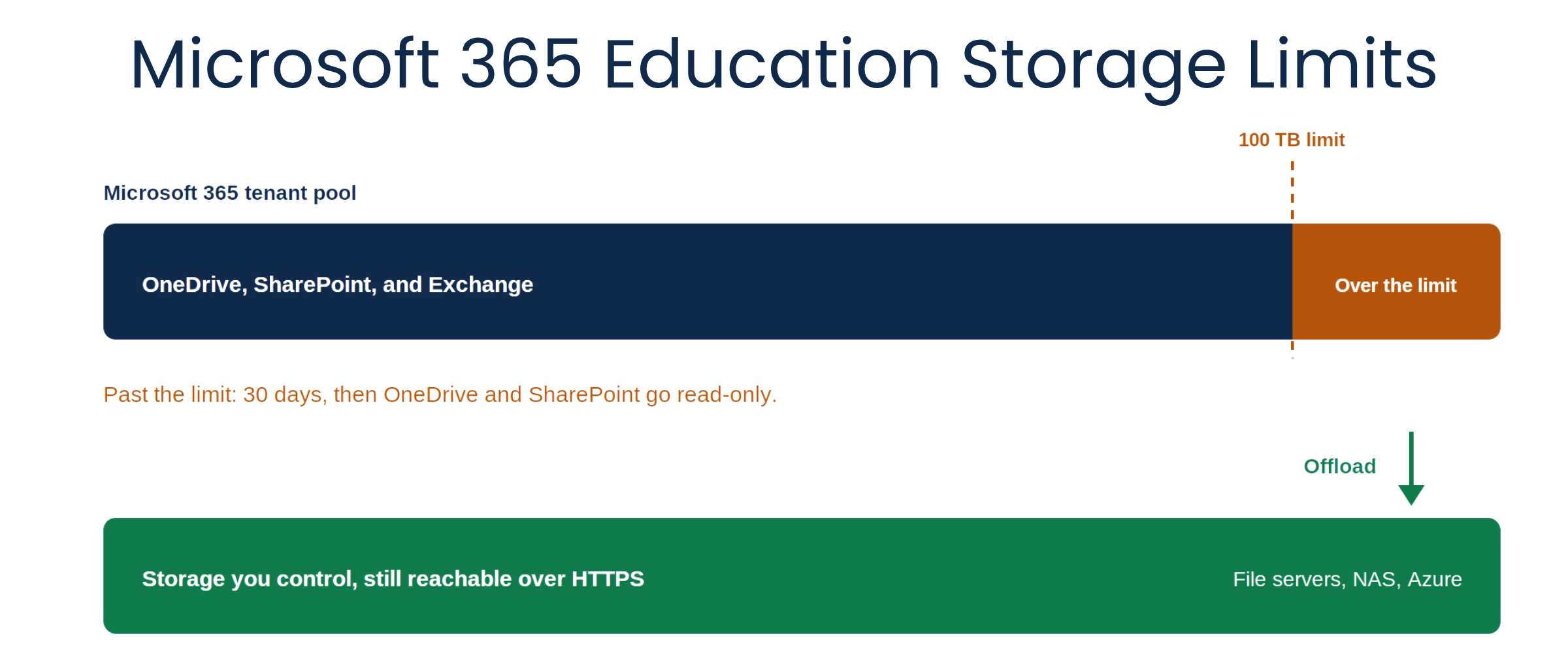
In short: Microsoft 365 Education tenants receive 100 TB of free pooled storage across OneDrive, SharePoint, and Exchange, plus 50 GB per paid A3 user and 100 GB per paid A5 user. Go past that limit and the tenant has 30 days to act before OneDrive and SharePoint switch to read-only. Additional pooled storage is sold in 10 TB increments at $300 USD estimated retail per month. Universities have three options: buy capacity, reduce usage, or move data onto storage the institution controls and keep it accessible from there.
Last reviewed August 2026. Microsoft's storage terms and enforcement dates have changed several times since 2024; the primary sources are linked throughout.
What are the Microsoft 365 Education storage limits?
Two limits govern every education tenant.
Tenant pooled storage. Each institution receives 100 TB of free pooled storage shared across OneDrive, SharePoint, and Exchange, with an additional 50 GB per paid A3 user and 100 GB per paid A5 user. Student Use Benefit licenses do not contribute to the pool. Microsoft's education storage page gives the calculation as 100 TB + (paid A3 users x 50 GB) + (paid A5 users x 100 GB) + any additional storage purchased. Pooled means the ceiling applies to the institution as a whole, so a few research groups or a backlog of Teams recordings can pull an entire tenant toward the limit.
Per-user OneDrive entitlements. Office 365 A1 (free) users have been limited to 100 GB of OneDrive storage since February 1, 2024. A3 and A5 licenses that include the SharePoint (Plan 2) for Education service plan carry a 5 TB per-user OneDrive entitlement. Admins can set lower quotas, and those lower quotas are honored.
The two limits interact. Every gigabyte in a user's OneDrive counts toward the tenant pool regardless of that user's individual entitlement.
Timeline of the changes
| Date | What changed |
|---|---|
| February 1, 2024 In effect | Office 365 A1 (free) OneDrive capped at 100 GB per user, within the tenant's pooled storage. |
| August 1, 2024 In effect | Pooled storage model takes technical effect: 100 TB per tenant across OneDrive, SharePoint, and Exchange, plus 50 GB per paid A3 user and 100 GB per paid A5 user. |
| Current agreement term Varies by tenant | Tenants already over the limit on August 1, 2024 received additional storage at no cost through the length of their then-current term. The grace ends at renewal rather than on a fixed date. |
| July 1, 2026 Rolling out | Enforcement of per-user OneDrive entitlements begins, expected to complete by mid-July 2026. Timing varies by tenant. Not scheduled for government clouds at this time. |
The July 2026 change is narrower than it is often described. Microsoft frames it as enforcement of entitlements that already existed, and notes that generally only users whose user-specific limit was set above their license entitlement are affected. The details are in Microsoft's over-quota enforcement FAQ.
One distinction is worth getting right, because institutions frequently plan around it incorrectly: storage packs that add to the shared tenant pool do not raise an individual user's per-user OneDrive entitlement. Raising a specific user's limit requires a OneDrive Extra Storage capacity pack or a higher-tier license.
How much does additional Microsoft 365 Education storage cost?
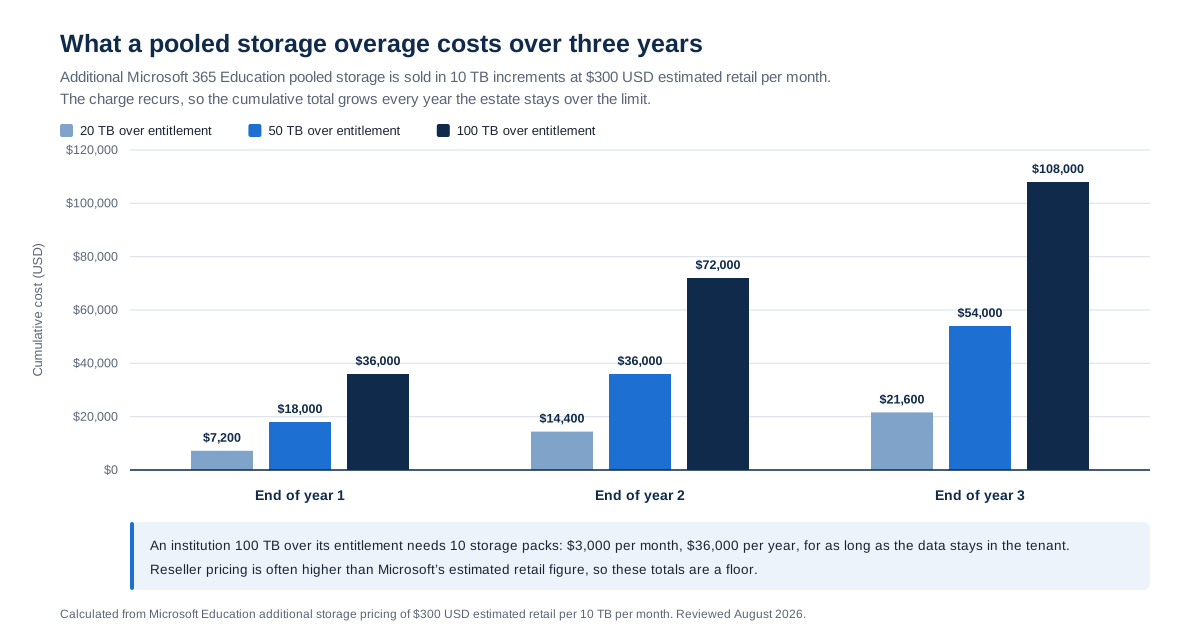
Additional pooled storage is sold in 10 TB increments at $300 USD estimated retail per month. Reseller pricing varies and is often higher than the estimated retail figure, so treat $300 per 10 TB as a planning floor rather than a quote.
Because the charge is recurring, the number that matters is the annual one. Consider an institution with 1,000 paid A3 licenses:
| Line | Value |
|---|---|
| Free pooled storage | 100 TB |
| A3 license contribution (1,000 × 50 GB) | 50 TB |
| Total entitlement | 150 TB |
| Actual estate across OneDrive, SharePoint, and Exchange | 250 TB |
| Over entitlement | 100 TB |
| Storage packs required | 10 × 10 TB |
| Recurring cost | $3,000 per month $36,000 per year |
The alternative paid path is adding A3 or A5 licenses, which contributes pooled capacity while also increasing license spend. Microsoft's pay-as-you-go option, M365 OneDrive Storage, is not available to education and government customers, so metering is not on the table. The available levers are usage reduction, capacity packs, and license upgrades.
Microsoft also offers education pricing for Microsoft 365 Archive, which charges a per-GB monthly rate for archived SharePoint sites and applies only once combined archived and active pooled storage exceeds the tenant's entitlement.
What happens when a tenant goes over the storage limit?
The enforcement path is documented in Microsoft's pooled storage management guidance:
- At 80 percent of the pooled limit, the technical contact receives email notification.
- At 90 percent, banner notifications appear in the Microsoft 365 admin center and the SharePoint admin center.
- At 100 percent, the tenant has 30 days to act.
- After 30 days, OneDrive and SharePoint sites transition to read-only. Users can view, download, and delete content and empty recycle bins, but cannot add or modify files.
- Exchange is unaffected. Mail continues to send and receive. Exiting read-only mode requires either reducing usage below the limit or increasing capacity above current usage.
Most institutions have not felt this yet. Microsoft has said that roughly 99.96 percent of school tenants sit well below their allotment, and tenants that were over the limit when the model took effect were given additional storage at no cost through the length of their current term. That grace period follows the agreement term rather than a fixed date, so the cost usually surfaces at renewal. Research-heavy universities with large SharePoint estates and long-lived project archives are the group most likely to be over the line when it does.
Why universities cannot delete their way under the cap
Two obstacles get in the way of the obvious response.
Much of the data cannot be purged. Research datasets carry retention obligations from funders, and controlled research data carries handling rules of its own. Institutional records sit under legal and accreditation retention schedules. Teams recordings, thesis archives, and departmental history hold value even when nobody opens them. Retention and legal hold status has to be confirmed before anything is deleted, and that review takes staff time.
Volume is the second obstacle. Estates that run to hundreds of terabytes cannot be reduced over a weekend. Bulk moves are measured in weeks or months, which means a tenant approaching its limit needs to start well before the 30-day window opens.
What to move off Microsoft 365, and where to put it
Microsoft's own guidance for over-limit tenants points to cleaning up content or increasing capacity through A3 and A5 licenses, storage packs, or cold storage destinations including M365 Archive, Azure Files, and Azure Blob storage. The same logic extends to on-premises file servers and NAS the institution already owns.
The candidates are the content quietly consuming the pool:
- Inactive and cold files, including completed-project folders
- Large research datasets past their active analysis phase
- Teams meeting recordings
- Archived departmental shares
-
Duplicated learning materials and course content Destinations that keep the data out of the pooled tenant:
-
Existing on-premises Windows file servers, DFS namespaces, and NAS
- The institution's own Azure Files shares
- The institution's own Azure Blob storage, including archive tiers
- M365 Archive, which stays inside Microsoft 365 and bills per GB once the tenant is over its entitlement
How to keep offloaded data accessible
Data reduction tools address capacity without addressing usability. Once files leave OneDrive and SharePoint, they leave the interface faculty and staff know. A dataset on a file server or in an Azure storage account is cheaper and still governed, but it is no longer a click away in the browser, on a laptop off campus, or on a phone. When that happens, people rebuild the sprawl somewhere else, usually in personal cloud accounts.
Any offload plan needs an access layer alongside it. Three requirements:
- Users reach the data through a familiar interface without new credentials or a VPN client.
- Access follows the permission model the institution already maintains.
- Every access is logged, so the offloaded data remains auditable for FERPA and research compliance purposes.
Where MyWorkDrive fits
MyWorkDrive provides browser, mapped drive, and mobile access over HTTPS to storage the institution controls. It connects to Windows file servers, DFS namespaces, and on-premises NAS, to Azure Files, to S3-compatible object storage, and optionally to Azure Blob. Offloaded data stays reachable without sitting in the pooled tenant.
Access follows existing Active Directory groups and NTFS permissions. There is no separate permission model to rebuild for the offloaded data, and MyWorkDrive cannot elevate permissions beyond what the file system already grants. It can only enforce or restrict further by policy. Campus identity systems including Shibboleth, CAS, ADFS, Entra ID, and any SAML 2.0 provider are supported, so sign-in stays the sign-in users already know. Details are on the secure file access for education page.
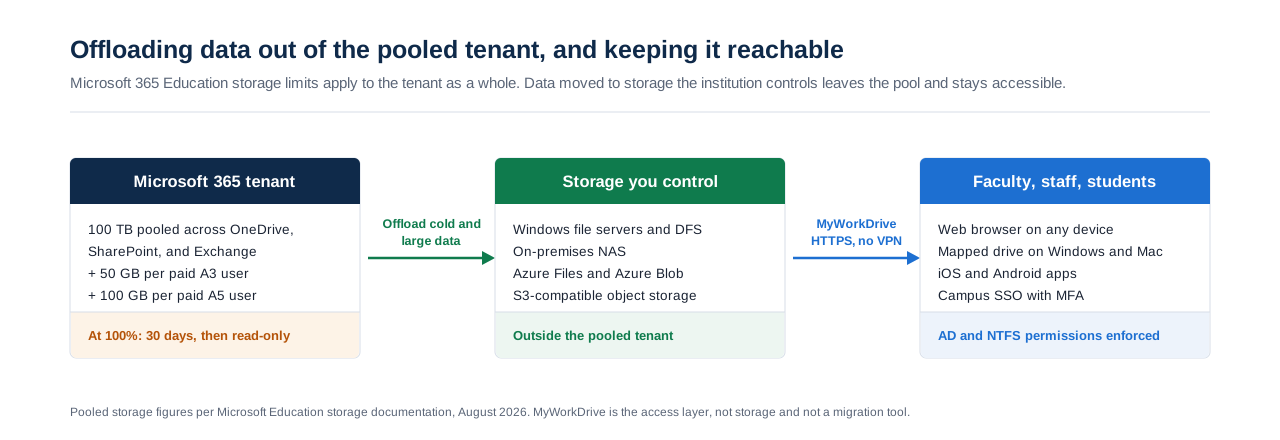
Scope. MyWorkDrive is an access and control layer. It is not storage, and it is not a migration or data-assessment tool. Deciding what to offload and moving it is a separate step, handled with Microsoft's admin storage reports or a dedicated data management product. What MyWorkDrive does is make the offloaded data usable once it lands, under institutional permissions and institutional control.
Buy more storage, delete, or offload: comparing the three options
| Factor | Buy additional Microsoft storage | Delete and reduce usage | Offload to institution-controlled storage |
|---|---|---|---|
| Cost model | Recurring: $300 USD estimated retail per 10 TB per month, or additional A3 and A5 licenses | No license cost, significant staff time | One-time move plus storage already owned or lower-cost infrastructure |
| Time to implement | Days, through the tenant admin center or a reseller | Weeks to months, gated by retention review | Weeks to months for bulk data movement |
| Where data lives | Microsoft's pooled tenant | Reduced footprint in the pooled tenant | On-premises, NAS, or the institution's own Azure or S3 storage |
| Retention risk | None | High if legal hold or funder obligations are missed | Low, data is relocated rather than destroyed |
| Access after the change | Unchanged in OneDrive and SharePoint | Deleted content is gone | Browser, mapped drive, and mobile over HTTPS with an access layer in place |
| Permissions | Microsoft 365 permissions | Microsoft 365 permissions | Existing Active Directory groups and NTFS ACLs |
| Exposure to future price changes | Tied to Microsoft pricing | Recurs whenever the pool refills | Limited to infrastructure the institution controls |
Most institutions end up combining all three. Capacity packs buy time, cleanup addresses genuinely disposable content, and offloading handles the data that has to be kept but does not need to sit in premium cloud storage.
Checklist before your next renewal
- Run the storage reports in the Microsoft 365 admin center and compare current tenant usage against your calculated entitlement.
- Identify the largest and coldest consumers, typically research archives, Teams recordings, and dormant departmental sites.
- Confirm retention schedules, funder obligations, and legal holds before deleting anything.
- Check your agreement renewal date, since that is when any no-cost grace on existing overage ends.
- Decide what stays in Microsoft 365 and what moves out.
- Choose destinations: on-premises file servers, NAS, your own Azure Files or Azure Blob, or M365 Archive.
- Start bulk moves early, allowing weeks rather than days.
- Stand up an access layer so faculty, staff, and students can still reach offloaded data.
- Set per-site and per-user quotas plus governance policies so the pool does not refill.
Frequently asked questions
What are the Microsoft 365 Education storage limits?
Each education tenant receives 100 TB of free pooled storage across OneDrive, SharePoint, and Exchange, plus 50 GB per paid A3 user and 100 GB per paid A5 user, with Student Use Benefit licenses excluded from the calculation. Separately, Office 365 A1 (free) users are limited to 100 GB of OneDrive storage, and A3 and A5 licenses that include SharePoint (Plan 2) for Education carry a 5 TB per-user OneDrive entitlement.
How much does additional Microsoft 365 Education storage cost?
Additional pooled storage is sold in 10 TB increments at $300 USD estimated retail per month. An institution 100 TB over its entitlement needs ten increments, which is $3,000 per month or $36,000 per year on a recurring basis. Reseller pricing is often higher than the estimated retail figure.
What is pooled storage in Microsoft 365 Education?
Pooled storage means the limit applies to the institution as a whole rather than to individual users or sites. Total capacity is 100 TB plus 50 GB for each paid A3 user, plus 100 GB for each paid A5 user, plus any storage packs purchased. All OneDrive, SharePoint, and Exchange consumption draws from that single pool.
What happens if our tenant goes over the storage limit?
Admins are notified at 80 percent and 90 percent of the pooled limit. At 100 percent the tenant has 30 days to act, after which OneDrive and SharePoint sites become read-only. Users can still view, download, and delete content, and Exchange mail is unaffected. Reducing usage or adding capacity restores write access.
When does the July 2026 OneDrive enforcement take effect?
General availability rollout begins July 1, 2026 and is expected to complete by mid-July 2026, with timing varying by tenant. Microsoft describes it as enforcement of existing per-license entitlements, affecting mainly users whose user-specific limit was set above their entitlement. It is not scheduled for government clouds at this time.
Will buying a storage pack raise an individual user's OneDrive limit?
No. Storage packs that add to the shared tenant pool do not increase a single user's per-user OneDrive entitlement. Raising a specific user's limit requires a OneDrive Extra Storage capacity pack or a higher-tier license.
Do Teams meeting recordings count toward the storage limit?
Yes. Teams recordings are stored in OneDrive and SharePoint, so they consume both the individual user's or site's quota and the tenant pool. Recording backlogs are a common reason an estate grows faster than expected.
Can we move data out of OneDrive and SharePoint and still access it?
Yes, provided the destination has an access layer. Data can be offloaded to on-premises file servers, NAS, or the institution's own Azure Files or Azure Blob storage, with browser, mapped drive, and mobile access provided over HTTPS by a product such as MyWorkDrive, under existing Active Directory and NTFS permissions.
Where should universities move offloaded Microsoft 365 data?
Onto storage the institution controls: existing Windows file servers or NAS, or the institution's own Azure Files or Azure Blob storage. Microsoft also lists M365 Archive and Azure storage as cold-storage options for over-limit tenants.
Does Microsoft offer pay-as-you-go storage to universities?
No. The M365 OneDrive Storage pay-as-you-go option is not available to education and government customers. Education tenants are directed to usage reduction, capacity packs, or license upgrades.
Related reading
Start a free trialBook a demoView pricing

Ron is CEO of MyWorkDrive and a product engineer by background: he spent six years in engineering and product leadership at CData Software, then served as MyWorkDrive's Chief Product Officer before stepping into the CEO role. A Dartmouth College alum, he writes for IT leaders navigating file access, data sovereignty, and enterprise IT strategy.