

By Dan Gordon
Last Updated: November 5, 2026
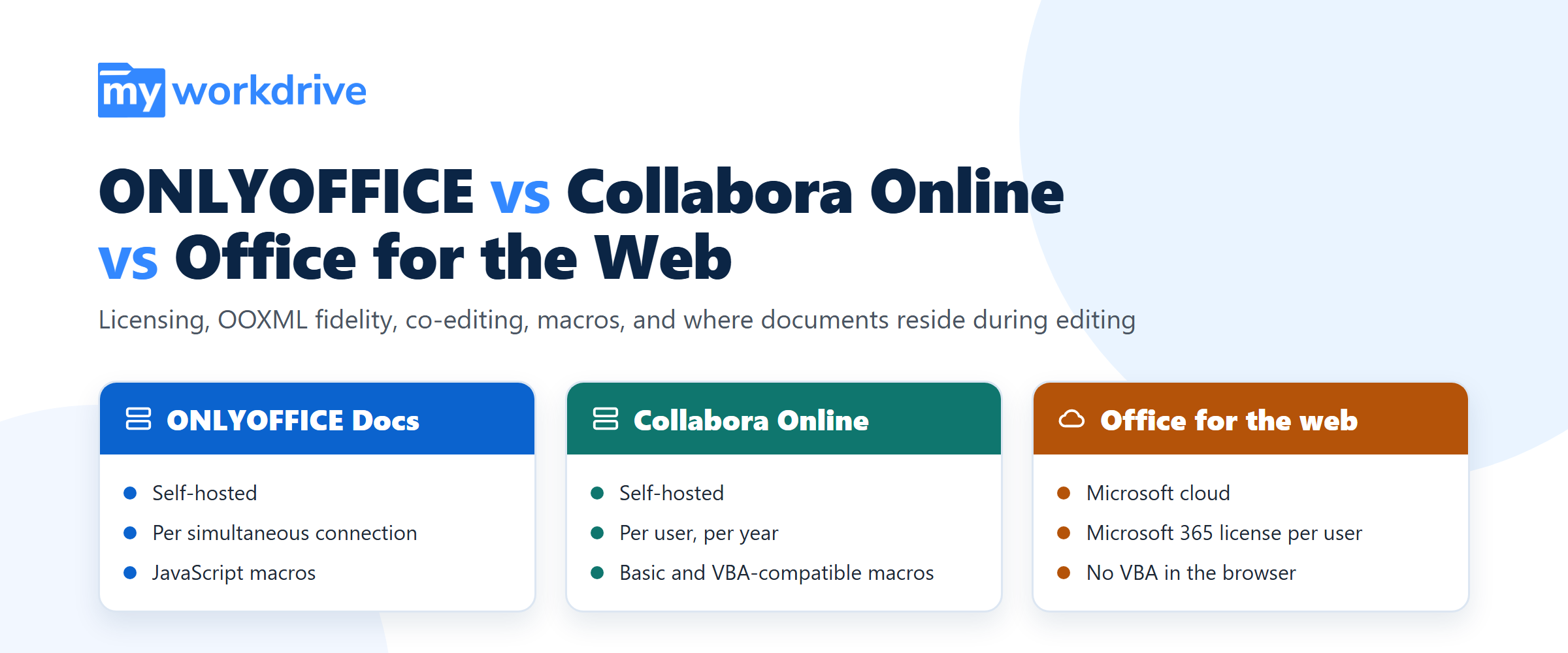
ONLYOFFICE Docs, Collabora Online and Office for the web all let users edit Word, Excel and PowerPoint files in a browser, with real-time co-editing. They differ in four ways that matter to IT: how they are licensed, how faithfully they render Office Open XML (OOXML) files, which macros they can run, and where a document sits while someone edits it. ONLYOFFICE and Collabora are self-hosted, so the working copy stays on a server you run. Office for the web is a Microsoft cloud service that requires a Microsoft 365 business license for every user who edits.
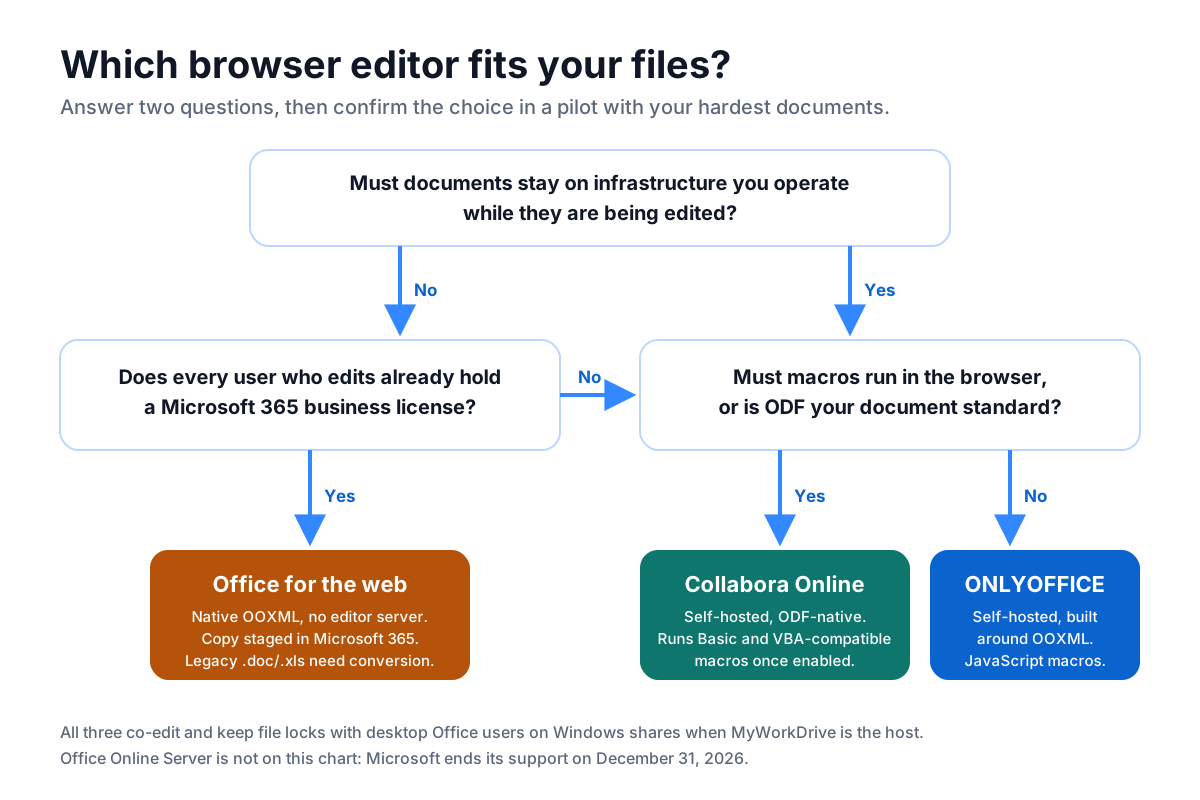
The short answer: choose Office for the web when every editor already holds a Microsoft 365 business license and the files may enter Microsoft 365 during editing. Choose ONLYOFFICE for a self-hosted editor built around OOXML. Choose Collabora Online when OpenDocument is your standard or macros have to run in the browser. With MyWorkDrive as the host, any of the three edits files in place on Windows file servers, Azure Files, S3 and SharePoint, without migrating them.
| Factor | ONLYOFFICE Docs | Collabora Online | Office for the web |
|---|---|---|---|
| Hosting | Self-hosted | Self-hosted | Microsoft cloud |
| Production license | Developer Edition (the edition MyWorkDrive's integration uses) | Collabora Online subscription | Microsoft 365 business license for each user who edits |
| Billing metric | Simultaneous connections | Users, per year | Users, per month |
| Native format | Built around OOXML (docx, xlsx, pptx) | OpenDocument (odt, ods, odp), with OOXML through LibreOffice filters | OOXML |
| Legacy .doc, .xls, .ppt | Edited without conversion | Edited without conversion | Must be converted to docx, xlsx or pptx first |
| Macros in the browser | JavaScript macros. VBA does not run | Basic and VBA-compatible macros, disabled by default | VBA does not run. Office Scripts (TypeScript) instead |
| Real-time co-editing | Yes, Fast and Strict modes | Yes | Yes |
| Working copy during editing | Document Server cache on your server | Isolated per-document directory on your server | Temporary copy in OneDrive or SharePoint Online |
| Block print, Save As, download in the editor | Yes (clipboard not blocked) | Yes (clipboard not blocked) | No. Use the MyWorkDrive DLP module |
| Minimum MyWorkDrive Server | 6.1.1 | 7.3.1 | 6.0 (OneDrive) or 6.1 (SharePoint) |
The rows on legacy formats, blocking, versions and editing location come from MyWorkDrive's Office Online Editing Comparison. The sections below explain each row and cite the vendor sources.
Licensing: What Each Editor Costs in Production
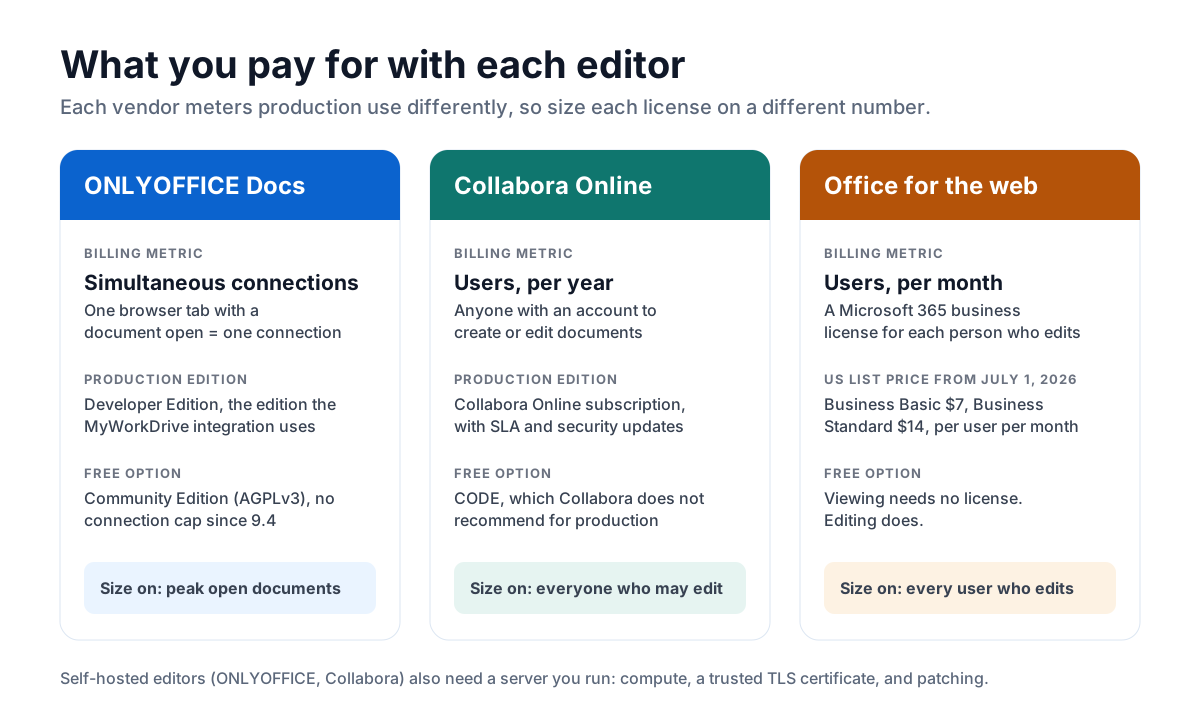
Each vendor meters production use differently, so the same organization can need very different license quantities depending on the editor. Office Online Server, the self-hosted Microsoft option, is not in this comparison: Microsoft ends its support on December 31, 2026, and our Office Online Server alternatives guide covers that retirement.
ONLYOFFICE Docs: priced by simultaneous connections
ONLYOFFICE Docs comes in three editions:
- Community Edition is free under AGPLv3. Version 9.4, released May 19, 2026, removed its long-standing cap of 20 simultaneous connections and added attribution and labeling terms. It comes with no vendor support.
- Enterprise Edition is a commercial license for an organization's own use with ONLYOFFICE's connectors, priced by simultaneous connections.
- Developer Edition is the commercial license for integrating the editors into another application. ONLYOFFICE sells it as Development Server, Single Server and Cluster licenses, each for a one-year term.
MyWorkDrive's ONLYOFFICE integration is built on Developer Edition, and that is the edition its knowledge base names for production use with full support. ONLYOFFICE counts one connection for every browser tab with a document open, so a person with three documents open uses three. Size the license on the peak number of documents open at the same time, not on headcount.
Collabora Online: priced per user, per year
Collabora ships two builds. CODE, the Collabora Online Development Edition, is free and continuously updated, but Collabora's FAQ says it comes with no SLA and does not recommend it for production. Collabora Online is the supported edition. It is sold as an annual subscription per user, and Collabora counts anyone with an account to create or edit documents. Pricing is by quote, and reseller price lists such as Linuxfabrik's put small deployments at around €20 per user per year, with discounts for volume, multi-year terms and education.
MyWorkDrive's Collabora Online article lists Collabora Online as the license its integration requires. MyWorkDrive does not host or supply a Collabora server, so you run your own instance or buy one through a reseller.
Office for the web: priced per Microsoft 365 user, per month
Office for the web has no server for you to license. The cost is a Microsoft 365 business license for every user who edits. MyWorkDrive's Office Online editing guide states that an Office 365 business account is required to edit documents online, and that viewing does not require one. Microsoft raised commercial list prices on July 1, 2026: Business Basic rose from $6 to $7 per user per month and Business Standard from $12.50 to $14, while Business Premium stayed at $22.
If your users already hold those licenses, Office for the web adds no license cost. If they don't, it is usually the most expensive of the three options.
| Editor | Free option | Production license | Billing metric | Infrastructure you run |
|---|---|---|---|---|
| ONLYOFFICE Docs | Community Edition, AGPLv3, no connection cap since 9.4, no vendor support | Developer Edition (Development Server, Single Server or Cluster), one-year term | Simultaneous connections | Document Server on Linux, Windows or Docker |
| Collabora Online | CODE, not recommended by Collabora for production | Collabora Online subscription with SLA and security updates | Users with access, per year | Collabora server, usually Linux or Docker |
| Office for the web | Viewing only | Microsoft 365 business plan that includes the web apps | Users, per month | None for the editor |
Worked example: 500 staff, 120 documents open at peak. ONLYOFFICE needs a Developer Edition license covering about 120 connections, plus headroom for busy periods. Collabora needs a subscription for everyone who may edit, which could be all 500. Office for the web needs 500 Microsoft 365 business licenses. If those have to be bought for editing alone, that is $42,000 a year on Business Basic or $84,000 on Business Standard at US list prices. The self-hosted editors also need a server, a trusted TLS certificate and someone to patch them. For an editor that runs inside your own environment, the subscription price matters less than the operating effort.
OOXML Rendering Fidelity and Format Support Compared
Rendering fidelity is whether a document looks and behaves the same in the browser as in desktop Office, and whether it is unchanged after a round trip. The main factor is each editor's native format.
- Office for the web is Microsoft's own editor for Microsoft's format. Files open without conversion. It edits a subset of desktop Office's features, but content it can't edit is preserved in the file, not stripped out.
- ONLYOFFICE Docs is built around OOXML. Its GitHub repository describes the suite as fully compatible with docx, xlsx and pptx. On open, the Document Server converts the file into an internal format in its cache, then writes OOXML back on save.
- Collabora Online is built on LibreOffice technology, so its native format is OpenDocument. OOXML files pass through LibreOffice's import and export filters on every open and save. Most business documents survive that unchanged. Complex layouts, advanced charts, SmartArt and heavily formatted workbooks are where differences are most likely to show up.
Fonts matter more than many teams expect. Office for the web renders with Microsoft's cloud fonts. Self-hosted editors can only use the fonts installed on the editor server, so install your corporate fonts there before the pilot, or layouts will shift.
| Format or factor | ONLYOFFICE Docs | Collabora Online | Office for the web |
|---|---|---|---|
| docx, xlsx, pptx | Core formats | Supported through LibreOffice filters | Native |
| doc, xls, ppt (legacy binary) | Fully supported | Fully supported | Requires conversion to the newer format |
| odt, ods, odp (OpenDocument) | Supported | Native | Word for the web edits .odt with partial feature support. Test .ods and .odp |
| PDF, txt, rtf, csv | Supported (MyWorkDrive's guide also lists html and epub) | Supported | Varies by app |
| Edit size limits | Set in server configuration and bounded by server memory | Set in server configuration and bounded by server memory | Microsoft documents limits per app. Excel is the tightest (25 MB through standard WOPI integrations) |
| Fonts | Fonts installed on your server | Fonts installed on your server | Microsoft cloud fonts |
The format rows for ONLYOFFICE and Collabora come from MyWorkDrive's ONLYOFFICE guide and editing comparison. Microsoft lists its limits in What are the file sizes supported by Microsoft 365 for the web?: editing limits of 100 MB for Word and 300 MB for PowerPoint, and 25 MB for Excel through standard partner integrations. Our Office for the web file size FAQ links to the same page.
How to test fidelity. Choose 20 to 30 of your hardest files: finance models with pivot tables and named ranges, contracts with tracked changes and numbered clauses, presentations with custom templates and embedded media, and legacy .xls files. Open each one in the candidate editor, edit it, save it, and reopen it in desktop Office. Note anything that moved or broke. An hour spent on this tells you more than any vendor's compatibility claim.
Co-Editing, Macros, and Known Functional Limits
Co-editing and file locking
All three editors support real-time co-editing. ONLYOFFICE offers two modes, documented in its co-editing guide. In Fast mode, the default for documents, co-authors' changes appear as they type. In Strict mode, other users' changes stay hidden until you save. Collabora Online and Office for the web co-edit in real time.
Co-editing inside the browser is only half the problem on a file server, because the same file can also be open in desktop Office over a mapped drive. MyWorkDrive's editing comparison lists file locking as supported with online and local users for all three editors. Under the MyWorkDrive file locking model, a file being edited in the browser shows as in use to a desktop Office user on a Windows share, and the reverse is also true. SharePoint, OneDrive, Azure Files and Azure Blob storage get no SMB locks, so give users access to those sources only through MyWorkDrive.
Macros
Macros separate the three editors most clearly.
- Office for the web opens and edits macro-enabled workbooks such as .xlsm, and the VBA code stays in the file, but it cannot run or edit VBA. Microsoft's browser automation is Office Scripts, written in TypeScript, and existing VBA has to be rewritten by hand to use it.
- ONLYOFFICE Docs runs macros written in JavaScript against its own API and does not execute VBA. From version 9.0, its AI plugin can convert VBA code to JavaScript macros, and ONLYOFFICE's documentation says to review and test the output, especially for complex macros.
- Collabora Online can run LibreOffice Basic and VBA-compatible macros, but only after an administrator enables
enable_macros_executionin the security section ofcoolwsd.xml. Macros cannot be edited online, and they cannot open other documents or use the Shell command.
“By default, execution of macros is completely disabled.”
Source: Collabora, How to use and manage Basic and VBA compatible macros in Collabora Online
None of the three is a full replacement for desktop Excel with VBA. For workbooks that depend on VBA, MyWorkDrive can open the file in locally installed Office from the web client. That option is listed as supported for every editor in the editing comparison.
Other known limits
| Limit | ONLYOFFICE Docs | Collabora Online | Office for the web |
|---|---|---|---|
| VBA execution | No (AI-assisted conversion to JavaScript from 9.0) | VBA-compatible macros once enabled, with partial VBA coverage | No |
| Editing macros in the browser | JavaScript macros only | No, macros are edited in the desktop application | No for VBA. Office Scripts are edited in the browser |
| Blocking print, Save As and download | Supported. Clipboard not blocked | Supported. Clipboard not blocked | Not supported. Use the MyWorkDrive DLP module |
| Editor patching and uptime | Your team | Your team | Microsoft |
| Rendering on your fonts | Only fonts installed on the server | Only fonts installed on the server | Microsoft cloud fonts |
Where copy and paste has to be controlled as well, MyWorkDrive's DLP module adds a view-only mode with watermarks that blocks the clipboard, downloads and printing, whichever editor you choose.
Where Documents Reside During an Editing Session
A browser editor always works on a copy of the file, so the question for a security review is where that copy lives and who operates the system holding it. With MyWorkDrive as the host, the original stays on your file share the whole time, and MyWorkDrive holds the file in memory without persisting it. The copy the editor works on is in a different place for each editor.
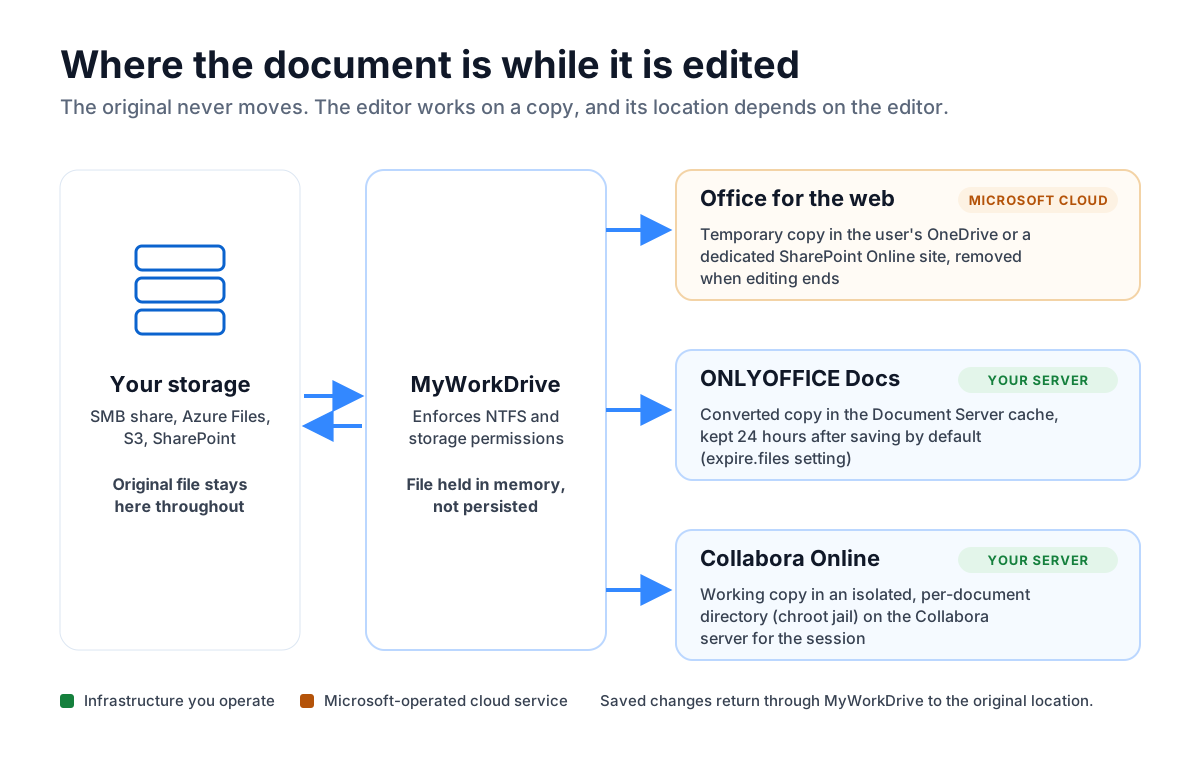
- Office for the web works on a temporary copy that MyWorkDrive places in the user's OneDrive or in a dedicated SharePoint Online site. MyWorkDrive monitors the edits, copies the changes back to the share, and removes the temporary file when editing ends. Session traffic runs through MyWorkDrive's encrypted tunnel. During the session, the document is inside your Microsoft 365 tenant.
- ONLYOFFICE Docs downloads the file, converts it into a cache folder named after the document key, and builds the final file from that cache when editing ends. The cache is kept for 24 hours after a successful save by default (the
expire.filessetting). Files that fail to save back go to a separate "forgotten" folder that the scheduled cleanup does not empty. - Collabora Online copies each open document into its own directory inside a chroot jail on the Collabora server and edits that copy for the rest of the session.
“Any files edited in Office Online are stored temporarily on the user's organizational OneDrive account, our company's dedicated SharePoint Online site, or your own Office Online or ONLYOFFICE servers and are removed when file editing is complete.”
| Editor | File at rest | Working copy | Who operates the editor | Fits when |
|---|---|---|---|---|
| Office for the web | Your storage | Temporary copy in OneDrive or a dedicated SharePoint Online site, removed afterward | Microsoft | Microsoft 365 is approved for that class of data |
| ONLYOFFICE Docs | Your storage | Document Server cache on your server, 24 hours by default | Your organization | Data must stay on your infrastructure, and cache retention is set to match policy |
| Collabora Online | Your storage | Isolated per-document directory on your server | Your organization | Data must stay on your infrastructure or in a set jurisdiction |
For controlled unclassified information, export-controlled data or strict data residency rules, the self-hosted editors keep the whole session inside a boundary you control. That fits data sovereignty and CMMC and CUI requirements, which the Microsoft 365 staging route may not meet. Treat the editor server's disks, snapshots and backups as regulated storage. Our guide to self-hosted document editing and data sovereignty covers cache retention, air-gapped networks and jurisdiction in depth. Our post on editing on-premises files in Microsoft 365 covers the staging trade-off.
Choosing an Editor for File Servers and Cloud Storage
None of the three editors can open a path like \\fileserver\finance\budget.xlsx by itself. Each needs a host application that authenticates the user, checks permissions, hands the editor the file and writes the result back. MyWorkDrive is that host for Windows file servers and other storage. It enforces NTFS permissions, so no editor can grant rights a user doesn't already have, and it keeps users on the same shares and drive letters they already use.
| Scenario | Recommended editor | Why |
|---|---|---|
| Every editor already has Microsoft 365 Business Basic or higher, and no residency limits apply | Office for the web | No added license cost, no editor server, native OOXML |
| CUI, ITAR, health or other regulated data on file servers | ONLYOFFICE Docs or Collabora Online | The working copy stays on infrastructure you operate |
| Heavy docx, xlsx and pptx use with desktop Office users on the same shares | ONLYOFFICE Docs | Built around OOXML, with legacy formats edited without conversion |
| OpenDocument is the organization's standard, as in many European public bodies | Collabora Online | ODF is its native format |
| Macros must run in the browser | Collabora Online, or ONLYOFFICE after converting VBA to JavaScript | Office for the web cannot run VBA |
| Many staff, few documents open at once | ONLYOFFICE Docs | Licensed on simultaneous connections, not headcount |
| Office Online Server is in use today | Any of the three | MyWorkDrive switches provider in the admin panel. Support for Office Online Server ends December 31, 2026 |
How the choice plays out by storage type
- Windows file servers, DFS and NAS. All three editors work through MyWorkDrive, and SMB locks protect files that are also open in desktop Office on mapped drives.
- Azure Files. MyWorkDrive connects to Azure file shares directly. If you choose a self-hosted editor, run it in the same Azure region as the share so the document stays in one region. Our Azure Files guide compares the editors on that storage.
- Amazon S3 and S3-compatible buckets. MyWorkDrive Server 7.3 and later integrates natively with S3. Object storage has no file locks, so give users access through MyWorkDrive only.
- SharePoint and OneDrive. MyWorkDrive publishes document libraries as shares. On SharePoint Server Subscription Edition, editors bind through WOPI, which our SharePoint Server SE guide covers.
Running more than one editor
A MyWorkDrive server has one online editing provider active at a time. To use Office for the web on general shares and a self-hosted editor on regulated shares, publish the regulated shares from a second MyWorkDrive server configured for ONLYOFFICE or Collabora. You can also turn off online editing for specific shares, users or groups with DLP settings, and have those users edit in desktop Office through the MyWorkDrive mapped drive. For more detail on setting up ONLYOFFICE, see our ONLYOFFICE integration guide.
Frequently Asked Questions
Which is better for Microsoft Office file compatibility, ONLYOFFICE or Collabora Online?
ONLYOFFICE Docs is built around OOXML, the format behind docx, xlsx and pptx, so it is usually the closer match for organizations that work mainly in Microsoft Office formats. Collabora Online is built on LibreOffice technology with OpenDocument as its native format and handles OOXML through conversion filters. Test both with your most complex files before you decide.
How much does each editor cost in production?
ONLYOFFICE Docs Developer Edition is licensed by simultaneous connections, with each browser tab that has a document open counting as one connection. Collabora Online is an annual subscription per user, and reseller price lists start at around 20 euros per user per year for small deployments. Office for the web requires a Microsoft 365 business license for each user who edits, from $7 per user per month for Business Basic at US list prices since July 1, 2026.
Can ONLYOFFICE, Collabora Online, or Office for the web run VBA macros?
Office for the web cannot run VBA; it preserves the code in the file and offers Office Scripts instead. ONLYOFFICE runs JavaScript macros, and from version 9.0 its AI plugin can convert VBA to JavaScript for review. Collabora Online can run Basic and VBA-compatible macros after an administrator enables macro execution, which is disabled by default.
Do all three editors support real-time co-editing?
Yes. ONLYOFFICE Docs, Collabora Online and Office for the web all support real-time co-editing. ONLYOFFICE also offers a Strict mode that hides co-authors' changes until you save. With MyWorkDrive as the host, all three also keep file locks with desktop Office users on Windows file shares.
Where is my document stored while I edit it in Office for the web?
The original stays on your file share. With MyWorkDrive, Office for the web works on a temporary copy placed in the user's OneDrive or a dedicated SharePoint Online site. Changes are copied back to the share, and the temporary copy is removed when editing ends. ONLYOFFICE and Collabora keep their working copy on a server you operate instead.
Does Office for the web require a Microsoft 365 license to edit files?
Yes. Editing documents in Office for the web requires a Microsoft 365 business account for each user who edits. Viewing documents does not require one.
Can legacy .doc, .xls, and .ppt files be edited in the browser?
ONLYOFFICE Docs and Collabora Online edit legacy .doc, .xls and .ppt files without conversion. Office for the web requires converting them to docx, xlsx or pptx before editing.
Can I use more than one editor with MyWorkDrive?
Each MyWorkDrive server has one online editing provider active at a time. To offer different editors for different shares, run a second MyWorkDrive server configured for the other editor, or turn off online editing for specific shares, users or groups.
Which editor should replace Office Online Server?
Microsoft ends Office Online Server support on December 31, 2026. Organizations that need editing to stay on their own infrastructure usually move to ONLYOFFICE Docs or Collabora Online, and those already licensed for Microsoft 365 can use Office for the web. In MyWorkDrive, the change is a provider switch in the admin panel.
Start a free trialBook a demoView pricing

Daniel, Founder of MyWorkDrive.com, has worked in various technology management roles serving enterprises, government and education in the San Francisco bay area since 1992. Daniel is certified in Microsoft Technologies and writes about information technology, security and strategy and has been awarded US Patent #9985930 in Remote Access Networking.