

By Dan Gordon
Last Updated: October 9, 2026
Microsoft announced the retirement of Office Online Server effective December 31, 2026. After that date Microsoft stops providing security updates, bug fixes, and technical support for the product. Existing installations continue to run, but newly discovered vulnerabilities go unpatched, and compatibility breaks caused by browser or operating system updates go unaddressed.
Microsoft has not announced an on-premises successor. It has stated that browser-based Office investment is focused on Office for the web within Microsoft 365, and has directed on-premises customers requiring browser-based editing beyond December 2026 to Microsoft 365 or to supported desktop clients. For browser editing from Microsoft after that date, Microsoft 365 is the only route on offer.
Office Online Server follows the Modern Lifecycle Policy rather than the Fixed Lifecycle Policy, so there is no mainstream and extended support split, and Microsoft has not announced a paid extended security update program of the kind available for Windows Server.
For organizations operating under frameworks that require software to be vendor-supported, the practical deadline arrives earlier than the retirement date. The replacement has to be in production before December 31, 2026, which puts selection and piloting in the months before that date.
Why Azure Files Requires a WOPI Host for Browser-Based Office Editing
The retirement affects Azure Files deployments differently from SharePoint deployments because of how browser editing reaches a file.
Browser-based Office editing operates through WOPI, the Web Application Open Platform Interface. WOPI involves two parties: a WOPI client, which is the editor, and a WOPI host, which is the application holding the file and exposing it to the editor over HTTPS along with permissions, locking, and save-back behavior. SharePoint and OneDrive both act as WOPI hosts. A file share has no such layer.
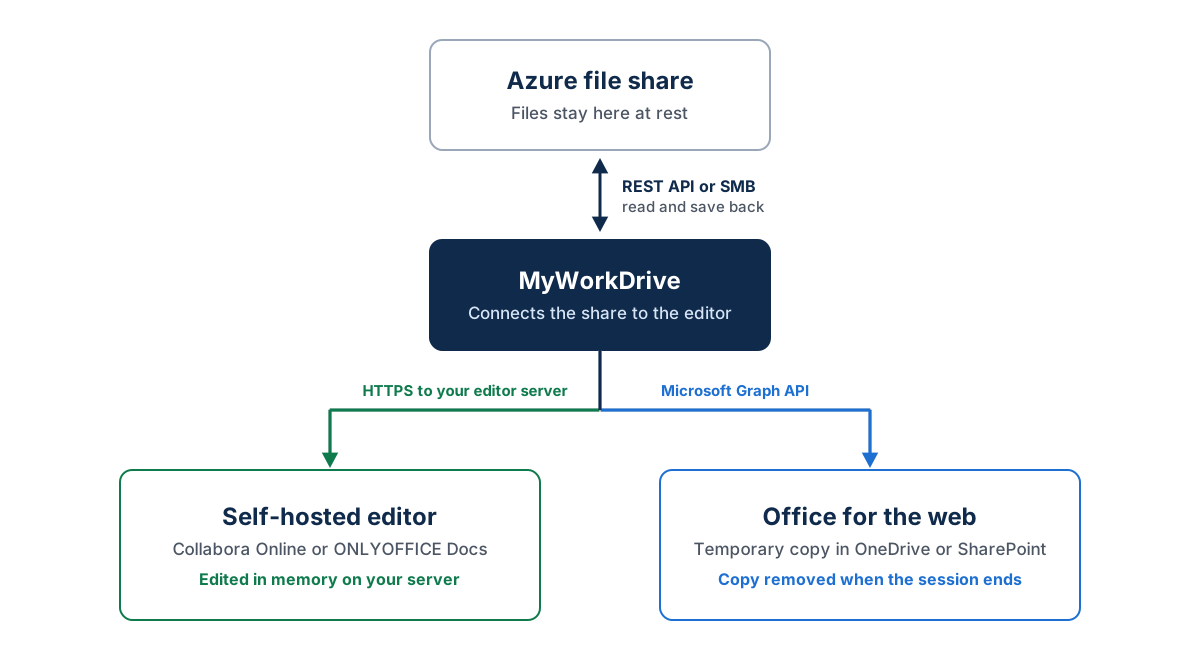
Azure Files presents storage over SMB, NFS, and the Azure Files REST API. None of these is a WOPI endpoint, and none provides a web application layer or a browser session, so no editor can address a file share directly. Something has to sit between the share and the editor and act as the WOPI host.
Where Office Online Server was the editor in that arrangement, the retirement removes the on-premises half of it. And because Azure Files is frequently selected precisely to avoid moving content into SharePoint, the standard Microsoft migration guidance does not apply. A team that chose Azure Files for data residency, a lift-and-shift of an existing file server, or application compatibility is unlikely to accept migration into SharePoint as a remedy, since that reverses a deliberate architectural decision.
A related consequence affects organizations running SharePoint Server Subscription Edition alongside Azure Files. The retirement applies to Office Online Server itself rather than to the products integrating with it, but those integrations end with it. SharePoint Server SE and Exchange Server SE remain supported while losing their browser-based editing path, leaving desktop Office as the only Microsoft-supported way to edit their content.
Replacing Office Online Server for an Azure file share therefore involves two decisions: which editor to run, and what will act as the WOPI host in front of the share once Office Online Server is gone.
Office Online Server Alternatives That Work With Azure Files
Three realistic options remain for files stored on Azure Files: Microsoft's own Office for the web reached through the Graph API, and two self-hosted editors. They differ mainly in licensing and in where the document goes during an edit.
Office for the Web via the Microsoft Graph API
The document remains on Azure Files at rest. When a user opens it for editing, it is placed temporarily into either the user's OneDrive for Business or a dedicated, locked-down SharePoint Online site, edited in Office for the web, saved back to the file share, and removed from the temporary location when the session ends.
This delivers genuine Office for the web: rendering is the closest of the three options to the desktop applications, and co-authoring works the way users already know it. It requires a Microsoft 365 Business or Enterprise account per editing user. Viewing does not require one; editing does.
The consideration is the data path. For the duration of an editing session the document exists in Microsoft 365. When MyWorkDrive provides this route, session data also passes through MyWorkDrive's relay service, an encrypted TLS tunnel built on Cloudflare, and only while the edit session is open. Organizations already operating Microsoft 365 usually find this unremarkable, but where regulation drives the use of Azure Files in a specific region, it is a question to resolve before deployment.
Collabora Online
Collabora Online is a WOPI client built on LibreOffice technology, deployed on infrastructure the organization controls. The document never leaves that environment. There is no Microsoft 365 dependency and no per-user Microsoft license for editing.
One distinction is often missed at the budgeting stage. Collabora Online Development Edition, shortened to CODE, is the freely available build and the one many evaluations start on, but Collabora describes it as suited to testing, home use, and small teams, and does not recommend it for production. Production deployments are expected to run Collabora Online, the enterprise build with long term support, signed security updates and contractual SLAs, which is a commercial subscription. Pilots built on CODE on the assumption that the same terms carry forward tend to surface the discrepancy at rollout.
Collabora handles the OOXML formats, supports co-editing, and is a strong option where data residency is a hard requirement or the deployment is air-gapped. The trade-off is rendering fidelity. Complex Excel models with heavy conditional formatting or pivot tables, and PowerPoint decks with elaborate layouts, will not always render identically to Microsoft Office. That rarely matters for general document and spreadsheet work, but a finance team working inside complex workbooks should test before committing.
ONLYOFFICE Docs
ONLYOFFICE Docs is the second self-hosted option, generally regarded as the closest of the open-source editors to Microsoft Office in OOXML fidelity and interface familiarity. It covers docx, xlsx, pptx, odt, ods, odp, doc, xls, ppt, pdf, txt, rtf, html, epub, and csv, with co-editing support.
One licensing point causes recurring problems at rollout. MyWorkDrive's ONLYOFFICE integration uses the Developer Edition, which the customer licenses directly from ONLYOFFICE. Community Edition is limited to 20 simultaneous connections, which is enough for a proof of concept and too small for production in most organizations. Budgeting for the Developer Edition license from the start avoids discovering the ceiling mid-pilot.
Office for the Web vs Collabora vs ONLYOFFICE: Selecting an Editor for Azure Files
In most environments the decision turns on where the document is permitted to exist during an editing session.
| Consideration | Office for the web (Graph API) | Collabora Online | ONLYOFFICE Docs |
|---|---|---|---|
| Where the editor runs | Microsoft 365 | Self-hosted on infrastructure you control | Self-hosted on infrastructure you control |
| Where the document sits during editing | Temporary copy in the user’s OneDrive or a dedicated SharePoint Online site, removed when the session ends | In memory on your Collabora server | In memory on your ONLYOFFICE server |
| Licensing for editing users | Microsoft 365 Business or Enterprise account per editing user; viewing does not need one | Collabora Online subscription; the free CODE build is not recommended for production | ONLYOFFICE Docs Developer Edition; Community Edition is limited to 20 simultaneous connections |
| Rendering of complex Office files | Closest to the desktop applications | Can differ on complex workbooks and layouts; test first | Generally closer to Microsoft Office than Collabora; test first |
| VBA macros | Do not run; macros stay in the file | Disabled by default; an administrator can enable them, with limitations | Not supported; ONLYOFFICE uses JavaScript macros |
| Legacy .doc, .xls, and .ppt files | Require conversion to .docx, .xlsx, or .pptx | Supported | Supported |
| Blocking print, Save As, and download while editing | Not available in the editor; use MyWorkDrive DLP | Supported; clipboard not blocked | Supported; clipboard not blocked |
| Typical fit | Organizations already licensed for Microsoft 365 with no residency constraint | Residency or air-gap requirements for general document work | Residency requirements where OOXML fidelity matters most |
The document location, legacy format, and print and download rows describe each editor as integrated with MyWorkDrive, per the Office Online Editing Comparison.
Where content falls under data residency obligations or a controlled unclassified information boundary, the Graph route has to clear a compliance review before cost or fidelity enter the discussion. The file leaves Azure Files and exists in Microsoft 365 for the duration of the session, which constitutes a transfer of custody even though the document returns afterward and the temporary copy is removed. That call belongs to whoever owns the compliance position, and it should be settled in writing before deployment. Where the constraint is real, Collabora and ONLYOFFICE are the candidates, since both keep the document inside infrastructure the organization operates.
Where residency is not a constraint, licensing usually decides. An organization already paying for Microsoft 365 Business or Enterprise obtains Office for the web without additional Microsoft licensing. Rendering is the closest to the desktop applications, and users need no retraining because they already work in the same editor elsewhere. An organization without those licenses faces different arithmetic: purchasing Microsoft 365 solely to enable browser editing against a file share is rarely justifiable when a self-hosted Collabora Online or ONLYOFFICE Developer Edition deployment meets the same requirement. That calculation is often the whole business case for self-hosting, so run it with real editing-user counts and current license prices.
Fidelity is the third consideration, and teams often test it too late. All three editors handle ordinary documents and spreadsheets without difficulty. Differences emerge in complex workbooks with pivot tables, dense conditional formatting, or extensive named ranges, and in presentations with intricate layouts, custom fonts, or embedded objects. ONLYOFFICE is generally closer to Microsoft Office in OOXML rendering than Collabora, though both have improved substantially. Test with the most complex file in the estate, taken from the team whose work a layout shift would disrupt most.
Macros are a limitation on every route. Office for the web cannot run VBA macros, although it opens and edits macro-enabled workbooks and leaves the macros in place. ONLYOFFICE uses JavaScript macros and does not run VBA. Collabora Online ships with macro execution disabled by default; an administrator can enable Basic and VBA-compatible macros, with documented limitations. Where a department depends on macro-driven workbooks, browser editing does not replace desktop Office for those files regardless of route, and a hybrid in which those users retain a desktop client is the realistic outcome.
Mixed deployments are reasonable, for example Office for the web for general staff and a self-hosted editor for shares holding regulated content, and the decision is best made per share. In MyWorkDrive, only one online editing provider is active on a server at a time, while DLP settings can switch online editing off for specific shares, users, or groups. Plan a mixed model with both controls in mind.
Connecting Azure Files to a Browser-Based Office Editor with MyWorkDrive
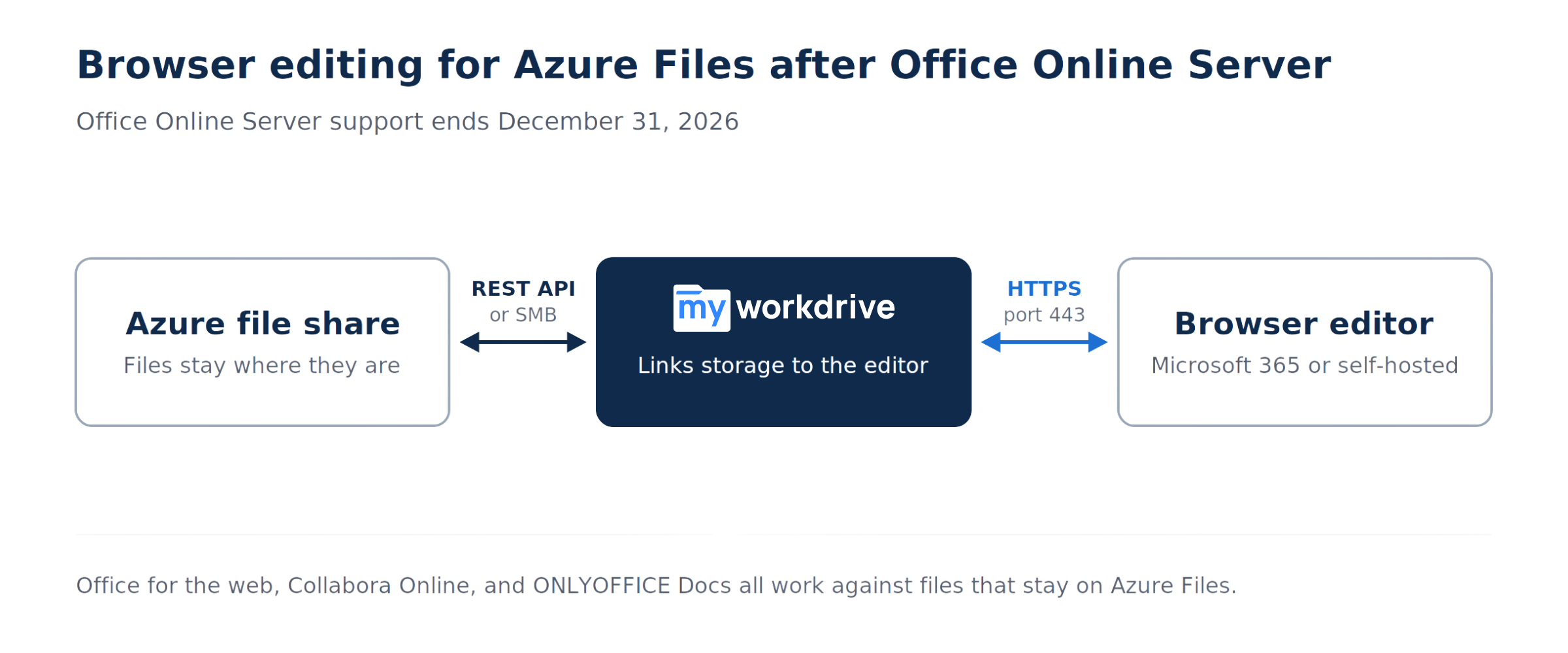
MyWorkDrive takes the WOPI host role, acting as the layer between Azure Files and the editor while leaving the storage decision untouched.
It connects to Azure File Shares natively, over the Azure Files REST API with either a storage account connection string or Entra ID, or over SMB in Active Directory deployments, and supports Azure Blob, Windows file shares, NAS, SharePoint, OneDrive, and S3 within the same deployment. Files are not migrated or synced into a separate repository. Data remains in the Azure File Share, so existing backup, retention, and compliance workflows continue operating against the same storage.
The editor is configured under Integrations in the MyWorkDrive admin panel. MyWorkDrive does not host or resell an office suite. It connects to whichever editor an organization already runs or chooses to run, which keeps the editor decision separable and revisable without changing the storage layer or re-platforming. An organization deploying Collabora now and moving to a different suite in two years leaves the access layer and its Entra ID policies untouched. For existing Office Online Server deployments there is also a transitional path: MyWorkDrive can point at a local Office Online Server while it remains in place, allowing the storage and access layer to move first and the editor decision to follow separately rather than as a single cutover.
Two operational details deserve attention during a pilot.
Access runs over HTTPS on port 443, so Azure File Share access does not require exposing SMB on port 445 to clients and does not require a VPN tunnel. Port 445 is widely blocked by ISPs and commonly restricted by corporate egress policy, which is among the more frequent reasons direct Azure Files access fails for remote users.
File locking depends on how the share is connected. Where MyWorkDrive reaches the files over SMB, either an Azure file share joined to Active Directory or a local Azure File Sync server, locking interoperates with SMB. MyWorkDrive sets locks for its own users and checks for SMB locks placed by other sources, so a user editing a document in the browser and a user opening the same file from a mapped drive or an on-premises application do not overwrite each other. Where the share is connected over the REST API with a connection string or Entra ID, MyWorkDrive does not place SMB locks and its locking covers MyWorkDrive users only, so MyWorkDrive recommends making it the only access path to those shares.
One point applies to deployments running Azure File Sync. Where files replicate to a local Windows Server, MyWorkDrive can be pointed at the local synced copy with NTFS ACLs preserved. Presenting a single access path per share rather than both the cloud and local copies avoids locking conflicts between the two.
Frequently Asked Questions
Will Office Online Server stop working on December 31, 2026?
No. Existing installations continue to run after the date. What ends is Microsoft support, including security updates, bug fixes, and technical assistance. The practical exposure is unpatched vulnerabilities and unresolved compatibility breaks from browser or operating system updates, together with the difficulty of demonstrating to an auditor that a core system runs on a supported platform.
Is there a replacement for Office Online Server from Microsoft?
No. Microsoft has stated it is focusing browser-based Office investment on Office for the web within Microsoft 365 and has not announced an on-premises successor. Microsoft's guidance directs on-premises customers to Microsoft 365, or to supported desktop clients such as Microsoft 365 Apps for enterprise and Office LTSC 2024 for content held in SharePoint Server Subscription Edition and Exchange Server Subscription Edition.
Can Azure Files work with WOPI directly?
No. Azure Files presents storage over SMB, NFS, and the Azure Files REST API, and none of these is a WOPI endpoint. WOPI requires a host application that exposes the file to the editor over HTTPS and handles permissions, locking, and save-back. A file share cannot perform that function, so a WOPI host has to sit between Azure Files and the editor.
Can Office files on Azure Files be edited without Microsoft 365 licenses?
Yes, using a self-hosted editor. Collabora Online and ONLYOFFICE Docs both provide browser-based editing and co-editing without Microsoft 365 accounts, running on infrastructure the organization controls. Neither is free for production use. MyWorkDrive's ONLYOFFICE integration uses the Developer Edition license, and Community Edition is limited to 20 simultaneous connections. Collabora does not recommend its freely available CODE build for production, and production deployments are expected to run the commercially supported Collabora Online.
What happens to SharePoint Server Subscription Edition?
SharePoint Server SE and Exchange Server SE remain supported products, with Microsoft's support timeline for Subscription Edition extending well beyond 2026. What they lose is the Office Online Server integration, meaning browser-based editing of their content ends with the retirement and desktop Office becomes the Microsoft-supported editing path.
Do files have to be migrated off Azure Files to keep browser editing?
No. All three remaining editor options work against files that stay on Azure Files, provided a WOPI host sits in between. Migration into SharePoint restores browser editing but is not the only route, and it reverses the architectural decision many Azure Files deployments made deliberately.
How long does replacing Office Online Server take?
The storage and access layer and the editor choice can be separated. Connecting Azure File Shares and standing up browser access for a pilot is typically same-day work, while selecting and piloting an editor depends on document complexity. An Office Online Server instance still in service can remain in place during the transition rather than requiring a single cutover.
Start a free trialBook a demoView pricing

Daniel, Founder of MyWorkDrive.com, has worked in various technology management roles serving enterprises, government and education in the San Francisco bay area since 1992. Daniel is certified in Microsoft Technologies and writes about information technology, security and strategy and has been awarded US Patent #9985930 in Remote Access Networking.