

By Ron Bhojwani
Last Updated: October 7, 2026
Microsoft ends support for Office Online Server on December 31, 2026, and it has not announced a successor. Any organization that relies on Office Online Server (OOS) for browser editing in SharePoint Server, Office attachment previews in Outlook on the web, PowerPoint sharing in Skype for Business Server meetings, or editing documents on network file shares needs a replacement running in production before that date.
The working Office Online Server alternatives fall into four groups: Office for the web in Microsoft 365, the self-hosted editors Collabora Online and ONLYOFFICE Docs, and desktop Office through Microsoft 365 Apps for enterprise or Office LTSC 2024. The right choice depends mostly on two facts about your environment: which system holds the files, and whether a document is allowed to leave your network while someone edits it.
| Item | Detail |
|---|---|
| End of support date | December 31, 2026 |
| Announced | October 21, 2025, on Microsoft’s Office End of Support blog (updated April 2, 2026) |
| Lifecycle policy | Modern Lifecycle Policy with a single retirement date and no extended support phase |
| Microsoft successor | None announced |
| Microsoft’s recommended path for browser editing | Microsoft 365 (Office for the web) |
| Supported desktop clients for SharePoint Server SE and Exchange Server SE content | Microsoft 365 Apps for enterprise and Office LTSC 2024 |
| Integrating products that remain supported | SharePoint Server Subscription Edition, Exchange Server Subscription Edition, Skype for Business Server Subscription Edition |
| Function Microsoft says will no longer be supported | Excel workbooks hosted in Power BI Report Server through Office Online Server |
What Office Online Server End of Support Means for On-Premises Deployments
Installed Office Online Server farms keep serving documents after December 31, 2026. From that date Microsoft ships no further updates for the product, security or otherwise, and its support teams stop taking OOS cases. Microsoft’s retirement announcement warns that systems running OOS may become vulnerable as threats evolve.
The exposure is specific to what OOS does. It parses Office files that users open and share, and many deployments publish it to the internet so remote and external users can reach it. MyWorkDrive’s own local Office Online Server option, for example, requires the OOS farm to be reachable over HTTPS on port 443 with a valid certificate. Once patching stops, any vulnerability found in its file-handling code stays open on that host for as long as the farm runs.
OOS falls under Microsoft’s Modern Lifecycle Policy, so there was never a mainstream and extended support split to fall back on. Microsoft offers paid Extended Security Updates for products such as Windows Server and SQL Server, but it has not announced an equivalent program for Office Online Server.
Regulated organizations also have an audit question to answer. NIST SP 800-171 Revision 2 requirement 3.14.1 asks organizations to identify, report, and correct system flaws in a timely manner. A server that can no longer be patched cannot meet that requirement by itself, so an assessor will expect either a replacement or a documented compensating control. For defense contractors, the DFARS 252.204-7012 obligations behind that requirement still apply during the CMMC Phase 2 suspension.
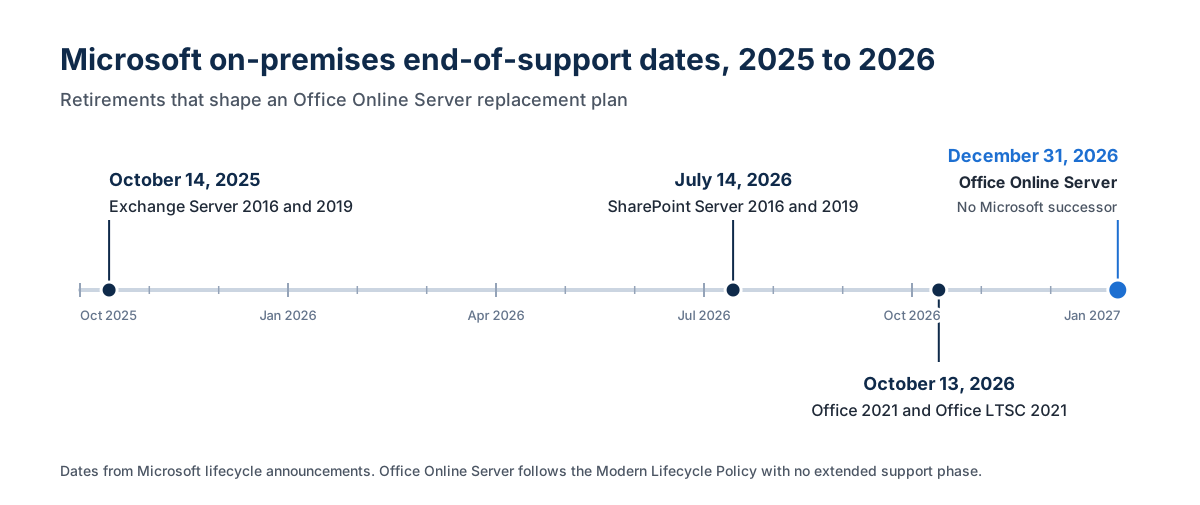
Several other Microsoft on-premises products reached end of support in the same period, and many environments are handling more than one of these dates:
| Product | End of support | Effect on an OOS replacement plan |
|---|---|---|
| Exchange Server 2016 and 2019 | October 14, 2025 | Exchange Server SE is the supported on-premises version that still integrates with OOS |
| SharePoint Server 2016 and 2019 | July 14, 2026 | Farms still on these versions are already unsupported; SharePoint Server SE is the on-premises upgrade target |
| Office 2021 and Office LTSC 2021 | October 13, 2026 | A desktop editing fallback has to use Microsoft 365 Apps or Office LTSC 2024 |
| Office Online Server | December 31, 2026 | Browser editing on on-premises hosts needs Microsoft 365 or a non-Microsoft editor |
Why Microsoft Is Not Shipping a Replacement
Microsoft’s announcement gives a short explanation. As customers adopted Microsoft 365, it decided to concentrate browser-based Office development on Office for the web, the version that runs in its cloud. The announcement points organizations that want to keep editing in a browser toward Microsoft 365:
“our recommended path is to transition to Microsoft 365”
Microsoft, Announcing the retirement for Office Online Server, Office End of Support blog
Office Online Server shipped in 2016 as the successor to Office Web Apps Server 2013, and it gave on-premises customers the browser versions of Word, Excel, PowerPoint, and OneNote inside their own data centers. After the retirement, Microsoft has one browser editor left, and it runs only in Microsoft 365. For documents stored on SharePoint Server Subscription Edition and Exchange Server Subscription Edition, the announcement names Microsoft 365 Apps for enterprise and Office LTSC 2024 as the supported desktop clients. In practice, SharePoint Server SE and Exchange Server SE remain supported, and Microsoft’s supported way to edit their documents is desktop Office.
Third-party editors can still connect to these hosts. OOS communicates with its hosts through WOPI, the Web Application Open Platform Interface, which Microsoft documents publicly. SharePoint Server lets administrators bind file extensions to a WOPI-compatible editor of their choice, so Collabora and ONLYOFFICE can occupy the slot OOS used to fill. File shares and object storage have no WOPI layer of their own and need a separate host application in front of them. The Azure Files guide to Office Online Server end of life explains the WOPI client and host roles in detail.
Which Systems Lose Browser-Based Editing
Microsoft Learn describes a single OOS farm as serving files accessed through SharePoint Server, Exchange Server, shared folders, and websites. Skype for Business Server and Power BI Report Server also depend on it for specific features. Each host loses something different.
| Host system | What OOS provided | Status after retirement | Microsoft-supported fallback |
|---|---|---|---|
| SharePoint Server Subscription Edition | Browser viewing and editing of Office files in document libraries | SharePoint Server SE stays supported; its OOS integration does not | Microsoft 365 Apps for enterprise or Office LTSC 2024 |
| Exchange Server Subscription Edition | Office attachment previews in Outlook on the web | Exchange Server SE stays supported; the renderer behind previews does not | Download attachments and open them in desktop Office |
| Skype for Business Server | PowerPoint presentations in web conferences | Skype for Business Server SE stays supported; PowerPoint sharing still depends on OOS | No on-premises replacement announced |
| Power BI Report Server | Hosting and displaying Excel workbooks | Microsoft says this function will no longer be supported | Not specified in the announcement |
| File shares and applications that call OOS directly | Browser editing for files outside SharePoint | The editor goes out of support; the host application keeps working | Depends on the host application |
SharePoint Server Subscription Edition
Upgrading to SharePoint Server SE keeps the farm supported, but every WOPI binding that points at OOS now points at unsupported software. Microsoft publishes instructions for disconnecting OOS from a SharePoint Server farm, and once the bindings are removed, document libraries open files in desktop Office instead of the browser. Staff who are used to clicking a document and editing it in a tab will notice the change immediately, and users without a desktop Office license lose editing altogether.
Exchange Server Subscription Edition
Exchange uses OOS to render Office attachments inside Outlook on the web. Microsoft’s Exchange documentation states that on-premises customers must deploy OOS for this feature, configured through the WacDiscoveryEndpoint setting on mailbox servers or at the organization level. Without a supported renderer, users download attachments and open them locally, which creates its own data-handling questions on shared or unmanaged devices.
Skype for Business Server
Skype for Business Server uses OOS to handle PowerPoint presentations in web conferencing. The server product remains supported in its Subscription Edition, but none of the third-party editors covered in this guide is documented as a renderer for Skype meetings. Organizations still on Skype for Business Server should plan on desktop screen sharing for presentations or a move to another meeting platform.
Power BI Report Server
Microsoft’s announcement states that hosting Excel workbooks in Power BI Report Server through OOS will no longer be supported. Report authors who embedded workbooks this way will need another delivery method, such as rebuilding the content as Power BI reports or distributing the workbooks for desktop Excel.
File servers and applications that call OOS directly
Some organizations never connected OOS to SharePoint. They pointed a file access product at it so users could edit documents stored on Windows file shares from a browser. MyWorkDrive supports this configuration, and its Office Online Editing Comparison now lists the local OOS option as end of life on December 31, 2026. The file access layer keeps working, and only the editor behind it needs replacing.
Office Online Server Alternatives for SharePoint, File Servers, and Cloud Storage
Start with the system that holds the files, because it determines which editors can connect at all.
SharePoint Server SE: Collabora Online or ONLYOFFICE Docs
Two self-hosted editors document SharePoint Server integration.
Collabora Online integrates through SharePoint’s own WOPI bindings. Collabora’s setup uses the external WOPI zone, relies on SharePoint’s proof-key authentication for WOPI applications, and binds file extensions one at a time with New-SPWOPIBinding after any existing OOS binding for that extension is removed. Collabora positions this as a drop-in path for SharePoint environments leaving OOS.
ONLYOFFICE Docs connects through an official SharePoint connector. Version 3.1.0, released in March 2026, added the ONLYOFFICE PDF Editor and a Visio diagram viewer to SharePoint and expanded the list of supported formats. ONLYOFFICE Docs can run on your own servers or as ONLYOFFICE Docs Cloud.
Both vendors describe their products as OOS replacements, and both claims deserve a pilot before cutover. Test co-authoring on the file types your users edit most, and put your largest and most complex Excel workbooks into the test set.
MyWorkDrive is not part of this path. Its SharePoint and OneDrive connections cover Microsoft 365 document libraries, so a SharePoint Server farm needs its replacement editor bound directly to the farm.
Windows file servers and NAS: a host application plus an editor
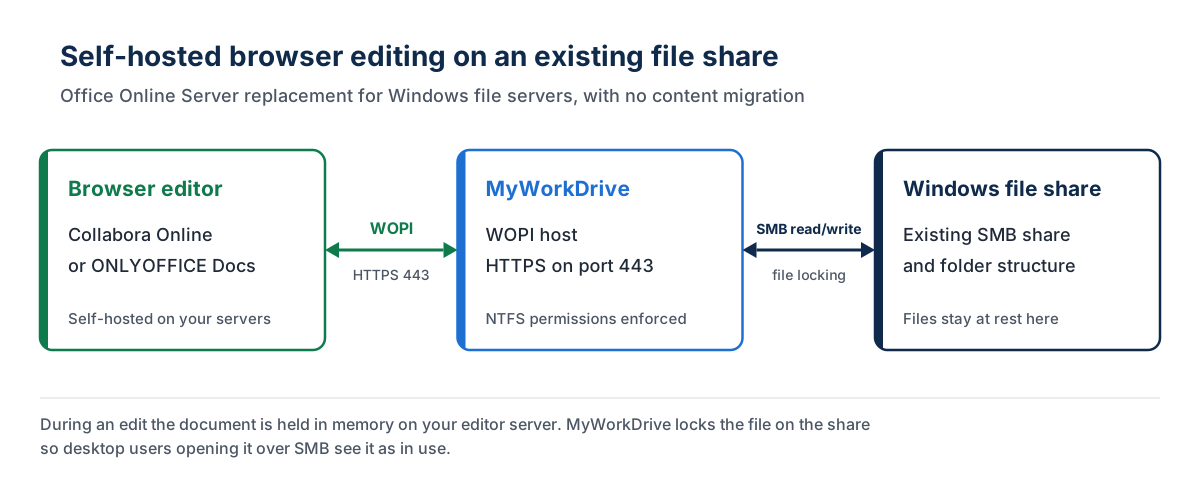
A Windows file share has no web layer. SMB serves files to clients, but nothing on the share can run a browser editing session or write an editor’s changes back. Browser editing on a file server therefore needs a host application between the share and the editor.
MyWorkDrive fills that role. It publishes existing SMB shares over HTTPS on port 443 with NTFS permissions enforced as they already stand, and it passes documents to the editor you configure. According to the Office Online Editing KB, it supports these editing backends:
- Office for the web through Microsoft 365. The file is staged in the user’s OneDrive or a dedicated SharePoint Online site for the session, saved back to the share, and removed afterward. Editing requires a Microsoft 365 business account, while viewing does not.
- Collabora Online, from MyWorkDrive Server 7.3.1. You deploy and license your own Collabora server, and MyWorkDrive connects to its WOPI discovery endpoint.
- ONLYOFFICE Docs, from MyWorkDrive Server 6.1.1, using the ONLYOFFICE Developer Edition. MyWorkDrive’s KB notes that Community Edition is limited to 20 users.
- A local Office Online Server, which keeps working until you retire it and carries the same December 31, 2026 end-of-support date as any other OOS farm.
When a user opens a file for browser editing, MyWorkDrive locks it on the SMB share. A colleague who opens the same file in desktop Office, whether through a MyWorkDrive mapped drive or directly over SMB, sees it as in use. Co-authoring works when every editor is in the browser, and mixed desktop and browser co-editing is not supported. The File Locking Details article covers the specifics.
Two constraints affect planning. Only one online editing provider can be active on a MyWorkDrive server at a time. Data Leak Prevention settings can switch online editing off for specific shares, users, or groups, so a mixed model with Office for the web for general staff and a self-hosted editor for regulated content has to be designed around the single-provider limit.
Cloud storage: Azure Files, Azure Blob, S3, and managed file services
Cloud file and object storage have the same gap as a file server, since none of them acts as a WOPI host. MyWorkDrive connects Azure Files, Azure Blob, S3-compatible storage, Azure NetApp Files, Amazon FSx, SharePoint Online, and OneDrive within one deployment, so the editor choice above applies across all of them. For repositories that are not SMB, MyWorkDrive coordinates file locks internally instead of placing SMB locks, so MyWorkDrive recommends making it the only access path to that storage. The Azure Files guide walks through that case, including how SMB and REST API connections differ for locking, and Is MyWorkDrive Only for On-Premises Deployments? lists the supported storage types.
Comparing the Office Online Server alternatives
| Option | Where editing runs | Documented host integrations | Licensing for editing users | Legacy .doc, .xls, .ppt | Support status |
|---|---|---|---|---|---|
| Office for the web (Microsoft 365) | Microsoft cloud | SharePoint Online and OneDrive; file storage through MyWorkDrive staging | Microsoft 365 business or enterprise account | Conversion to .docx, .xlsx, .pptx required | Supported |
| Collabora Online | Your servers, on-premises or cloud | SharePoint Server through WOPI bindings; MyWorkDrive 7.3.1 and later | Collabora Online subscription; CODE is the free edition | Supported | Supported |
| ONLYOFFICE Docs | Your servers or ONLYOFFICE Docs Cloud | SharePoint through the ONLYOFFICE connector; MyWorkDrive 6.1.1 and later | Developer Edition for MyWorkDrive; Community Edition limited to 20 users | Supported | Supported |
| Desktop Office | The user’s device | Any host that opens files in client apps; MyWorkDrive mapped drive | Microsoft 365 Apps for enterprise or Office LTSC 2024 | Supported | Supported; Office 2021 ended October 13, 2026 |
| Office Online Server (current) | Your servers | SharePoint Server, Exchange Server, Skype for Business Server; MyWorkDrive 6.0 and later | Office volume licensing | Conversion to .docx, .xlsx, .pptx required | Ends December 31, 2026 |
Legacy format handling and MyWorkDrive version requirements come from MyWorkDrive’s Office Online Editing Comparison. SharePoint integration details come from Collabora and ONLYOFFICE documentation. For rendering fidelity and VBA macro behavior across the three browser editors, see the comparison in the Azure Files guide.
Migration Paths That Do Not Require Moving Content to SharePoint Online
Microsoft’s recommended path assumes content moves into SharePoint Online and OneDrive. Organizations that kept files on-premises for data residency or application compatibility would be taking on a migration project with re-permissioning and user retraining attached, as covered in SharePoint migration costs. Four paths keep content where it is.
Path 1: Replace the editor inside SharePoint Server SE
Keep the farm, remove the OOS bindings, and bind Collabora Online or ONLYOFFICE Docs in their place. Libraries keep their content and permissions. Most of the work is server-side editor deployment and WOPI configuration, followed by file-type testing. For organizations already committed to SharePoint Server SE, this is the shortest route.
Path 2: Put a self-hosted editor behind a file access layer
For file servers and cloud storage, deploy MyWorkDrive in front of the existing shares and connect Collabora Online or ONLYOFFICE Docs. Documents stay on the share at rest, and MyWorkDrive’s editing comparison notes that during an edit they are held in memory on your own editor server. The whole editing path stays on infrastructure you operate, which fits data sovereignty requirements and CUI boundaries.
Path 3: Use Office for the web without moving content at rest
Files stay on the file server, and Office for the web edits a temporary copy staged in your Microsoft 365 tenant for the length of the session. Users get Microsoft’s editor and the co-authoring they already know. Settle the data path before choosing this option: during the session the document exists in Microsoft 365, and MyWorkDrive’s KB states that edit session data passes through its relay in an encrypted TLS 1.2 stream, only while the edit is open. For organizations already standardized on Microsoft 365, this may be acceptable. Where residency rules drove on-premises storage in the first place, get a written decision from whoever owns compliance before rollout.
Path 4: Fall back to desktop Office
Some users never needed browser editing. Through a mapped drive, desktop Office edits files directly on the share with normal file locking, and MyWorkDrive’s web client can also open files in locally installed Office. This path needs a supported desktop version, which since October 13, 2026 means Microsoft 365 Apps or Office LTSC 2024. It also brings back per-user desktop licensing that browser editing can let organizations align to actual usage.
| Path | Where the document sits during editing | Typical fit |
|---|---|---|
| 1. New editor in SharePoint Server SE | Your Collabora or ONLYOFFICE servers | Farms staying on SharePoint Server SE |
| 2. Self-hosted editor with MyWorkDrive | In memory on your Collabora or ONLYOFFICE server | File servers and cloud storage with residency or CUI requirements |
| 3. Office for the web with staging | Temporary copy in your Microsoft 365 tenant | Organizations licensed for Microsoft 365 with no residency limits |
| 4. Desktop Office | The user’s device | Power users and macro-dependent workbooks |
If you already use Office Online Server with MyWorkDrive
Changing editors does not touch shares or permissions. In the MyWorkDrive admin panel, enable the new provider under Integrations and select it under Settings, Office Online Edit. Because only one provider can be active at a time, run the pilot on a separate test server or schedule a short switchover window, and keep the OOS endpoint details on hand until the pilot is signed off.
Planning the Replacement Before the Supported-Software Deadline
As of mid-October 2026, about eleven weeks remain, and year-end change freezes can shorten that further. The schedule below is an example that leaves a buffer before December 31:
| Phase | Target window | Work | Output |
|---|---|---|---|
| Inventory | October 19 to October 30 | Run Get-SPWOPIBinding on each SharePoint farm, check WacDiscoveryEndpoint on Exchange, review the Skype for Business topology, and search application settings for the OOS /hosting/discovery URL | A list of every system that calls OOS |
| Decide | November 2 to November 6 | Choose an editor per host based on the permitted data path and licensing | A written decision that includes the compliance owner’s position |
| Pilot | November 9 to November 25 | Test with real documents, including complex workbooks, legacy formats, co-authoring, and external users | Pilot results and a defect list |
| Rollout | November 30 to December 15 | Rebind SharePoint file extensions, switch the MyWorkDrive editing provider, and tell users what changed | Production editing on the new editor |
| Decommission | December 16 to December 23 | Remove remaining OOS bindings and endpoints, shut down the farm, and update the system inventory | OOS retired, with evidence for auditors |
Look beyond SharePoint and Exchange during inventory. OOS discovery URLs can end up in intranet portals and line-of-business applications, and those integrations do not appear in SharePoint or Exchange admin tools. Searching configuration files and reverse proxy rules for the OOS hostname is a quick way to find them.
Budget the editor license before the pilot starts. Collabora sells Collabora Online as a subscription separate from its free CODE edition, and MyWorkDrive’s ONLYOFFICE integration expects the Developer Edition. Office for the web needs a Microsoft 365 account for each person who edits.
Pick pilot files that are likely to fail. The Microsoft browser editors require legacy .doc, .xls, and .ppt files to be converted first, and Excel for the web enforces file size limits that large workbooks can exceed. VBA macros do not run in Excel for the web, so departments that depend on macro-driven workbooks will keep desktop Office for those files whichever browser editor you choose.
Finally, record the retirement date and the replacement for each host. Auditors reviewing flaw remediation or asset inventory controls will ask for that record.
MyWorkDrive’s Office editing options let file server and cloud storage customers change editors without migrating content, and existing shares can be connected for a pilot without changing permissions. To test a replacement editor against your own shares before the deadline:
Frequently Asked Questions
When does Office Online Server support end?
Microsoft ends support for Office Online Server on December 31, 2026. The retirement was announced on October 21, 2025. After that date Microsoft releases no further updates for the product and stops providing technical support, and it has not announced a paid extended security update program for Office Online Server.
What is the best Office Online Server alternative for SharePoint Server Subscription Edition?
For browser editing that stays on-premises, the documented options are Collabora Online, which binds to SharePoint Server through WOPI, and ONLYOFFICE Docs, which uses an official SharePoint connector. Microsoft's own supported option for SharePoint Server SE content is desktop editing with Microsoft 365 Apps for enterprise or Office LTSC 2024. Pilot either third-party editor with your most complex documents before cutover.
Can Office files on Windows file shares be edited in a browser without SharePoint Online?
Yes. A file share needs a host application that brokers the editing session, such as MyWorkDrive, which publishes existing SMB shares over HTTPS and connects them to Office for the web, Collabora Online, or ONLYOFFICE Docs. Files stay on the file server and existing NTFS permissions continue to apply.
What happens to attachment previews in Outlook on the web for Exchange Server SE?
On-premises Exchange relies on Office Online Server to preview Office attachments in Outlook on the web. Exchange Server SE remains supported, but after December 31, 2026 the renderer behind those previews is unsupported. Users can download attachments and open them in desktop Office, and some third-party products offer attachment viewing for Exchange.
Can Office Online Server still be used after December 31, 2026?
It will keep running, but Microsoft will no longer patch it. Continuing to use it means accepting unpatched vulnerabilities on a server that is often internet-facing, and it makes flaw remediation requirements such as NIST SP 800-171 requirement 3.14.1 harder to satisfy. Treat any use past the deadline as a short, documented exception with a firm replacement date.
Do MyWorkDrive customers using a local Office Online Server need to change anything?
Yes, before December 31, 2026. MyWorkDrive lists its local Office Online Server option as end of life on that date. Customers can switch to Office for the web, to Collabora Online on MyWorkDrive Server 7.3.1 or later, or to ONLYOFFICE Docs on MyWorkDrive Server 6.1.1 or later. The change is made in the admin panel and does not affect shares or permissions.
Is Power BI Report Server affected by the Office Online Server retirement?
Yes. Microsoft states that hosting Excel workbooks in Power BI Report Server through Office Online Server will no longer be supported. Workbooks displayed this way need another delivery method, such as rebuilding the content as Power BI reports or sharing the workbooks for desktop Excel.
Do Collabora Online and ONLYOFFICE require Microsoft 365 licenses?
No. Both editors run on infrastructure you control and do not require Microsoft 365 accounts for editing. Each has its own licensing: Collabora Online is a commercial subscription with a free CODE edition, and MyWorkDrive's ONLYOFFICE integration uses the ONLYOFFICE Developer Edition, with Community Edition limited to 20 users.
Start a free trialBook a demoView pricing

Ron is CEO of MyWorkDrive and a product engineer by background: he spent six years in engineering and product leadership at CData Software, then served as MyWorkDrive's Chief Product Officer before stepping into the CEO role. A Dartmouth College alum, he writes for IT leaders navigating file access, data sovereignty, and enterprise IT strategy.