

By Ron Bhojwani
Last Updated: October 7, 2026
Most data residency policies are written around storage: the country a file server sits in, or the region assigned to a storage account. Browser-based editing is where those policies often break without anyone noticing. When a user opens a Word document in a web editor, the server running the editor loads a working copy of the file, and that server may sit in another country or belong to a provider that answers to another country's courts.
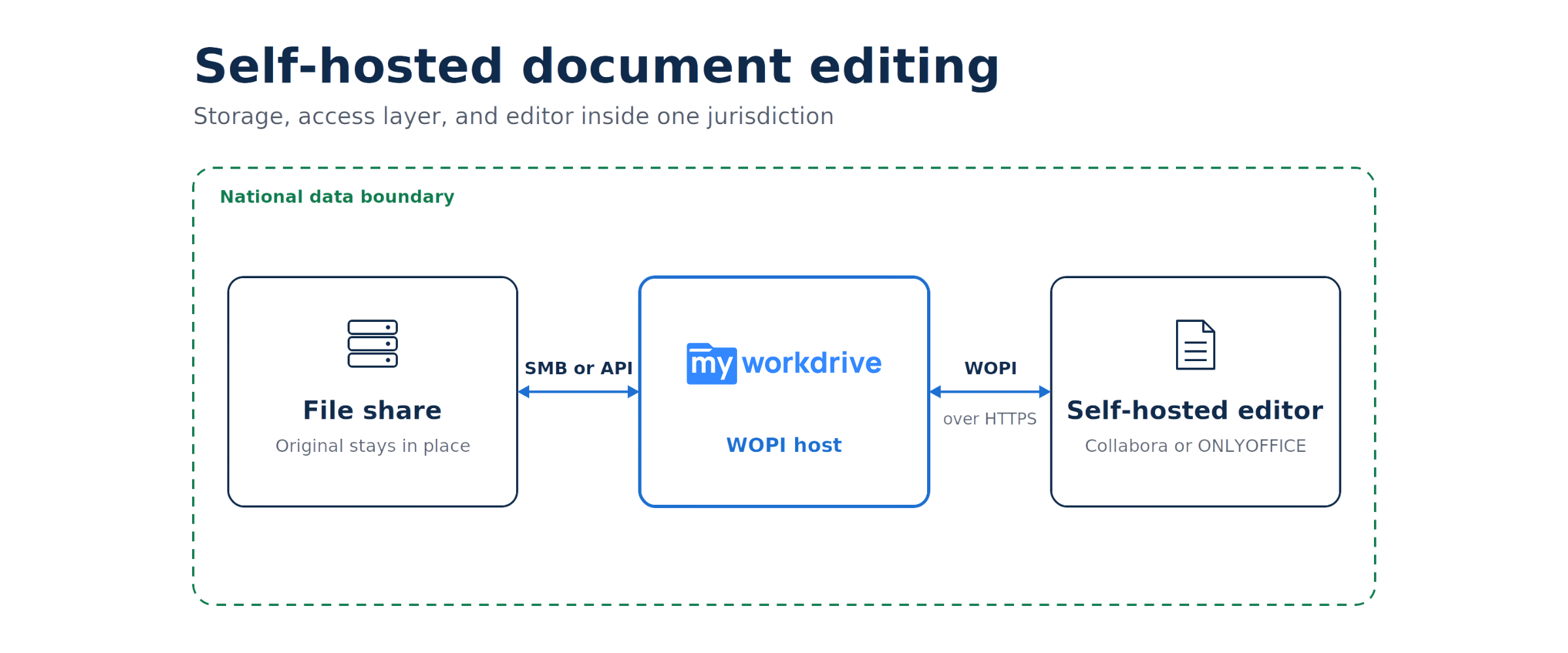
Self-hosted document editing puts that working copy on infrastructure the organization runs, inside the approved jurisdiction. Microsoft retires Office Online Server on December 31, 2026, which leaves Collabora Online and ONLYOFFICE Docs as the two self-hosted editors most organizations will evaluate. This guide covers where a document exists during an editing session, how each editor is licensed for production, what an air-gapped deployment needs, and how MyWorkDrive connects either editor to file shares that stay where they are.
| Topic | What to know |
|---|---|
| Cloud editors and residency | A cloud editor processes the document on the provider's servers. Region settings control where that happens, but the provider's home-country law still applies. |
| Office Online Server | Microsoft support ends December 31, 2026. Microsoft has not announced an on-premises successor. |
| Collabora Online in production | Requires a Collabora Online subscription. Collabora does not recommend its free CODE build for production. |
| ONLYOFFICE in production | The MyWorkDrive integration uses Developer Edition. Community Edition dropped its 20-connection cap in version 9.4. |
| Air-gapped networks | Both editors can run offline once packages, certificates, fonts, and license files are supplied inside the network. |
Why Data Residency Rules Out Cloud-Based Browser Editing
Data residency describes where data is stored and processed. Data sovereignty asks which legal system governs that data and who can be compelled to disclose it. A document held in a Frankfurt data center meets a German residency requirement, yet a court order served on the data center operator's US parent company can still reach it. Our article on data sovereignty and global information governance covers the distinction in more depth.
How the CLOUD Act Applies to EU-Hosted Data
The CLOUD Act, enacted in March 2018 and codified at 18 U.S.C. § 2713, requires US providers of electronic communication and remote computing services to preserve and disclose data within their possession, custody, or control, regardless of whether that data is located inside or outside the United States. The test is whether the provider controls the data, so data held in a US provider's EU region remains within the statute's reach.
Microsoft completed its EU Data Boundary in February 2025. Under it, customer data for Microsoft 365, Azure, Dynamics 365, and Power Platform is stored and processed in the EU and EFTA, which is a meaningful residency commitment. Its limits on jurisdiction came up on June 10, 2025, when a French Senate inquiry into public procurement and digital sovereignty asked Anton Carniaux, Microsoft France's director of public and legal affairs, whether he could guarantee under oath that French citizens' data would never be transmitted to US authorities without French authorization.
"No, I cannot guarantee it."
Anton Carniaux, Microsoft France, testimony to the French Senate inquiry, June 10, 2025
He added that this had never happened and that Microsoft reviews each request and rejects those it considers unfounded. For an organization whose policy requires certain documents to stay under domestic legal control, the same reasoning covers the editing service. A US-operated editor running in an EU data center is still operated by a company that can receive US disclosure orders.
GDPR Transfer Rules and the Editing Session
Chapter V of the GDPR restricts transfers of personal data outside the European Economic Area. The European Data Protection Board's Guidelines 05/2021, finalized in February 2023, treat remote access from a third country, including access by a support provider, as making data available in that country. The same guidance asks controllers to weigh risks such as conflicting national law and government access in a third country, even where a processing operation does not formally count as a transfer.
For transfers to the United States, organizations can currently rely on the EU-US Data Privacy Framework. The EU General Court upheld it on September 3, 2025. An appeal, Case C-703/25 P, is pending at the Court of Justice of the European Union, the court that invalidated Safe Harbor in 2015 and Privacy Shield in 2020. Swiss data protection commissioners, through privatim, have taken a restrictive position on international cloud platforms as well, which our post on Swiss public sector file access covers. For EU obligations specific to file servers, see GDPR compliance for file access.
In practice, the browser editor is a processor of the document in its own right. If a share holds data that may not leave a jurisdiction, or may not come under a foreign provider's control, a cloud-hosted editor fails that requirement even when its working copy exists for only a few minutes.
Jurisdictional Exposure: Where Documents Exist During an Editing Session
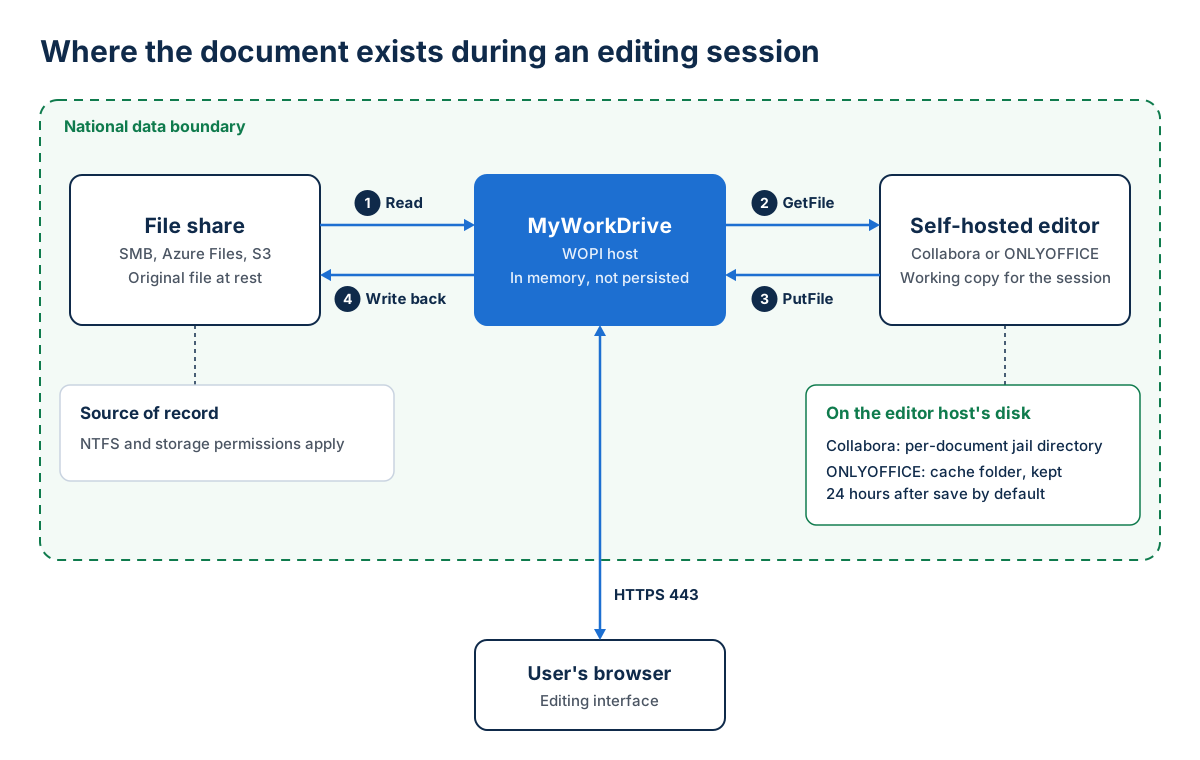
Browser editors that work against file shares use WOPI, the Web Application Open Platform Interface. The WOPI host holds the file and enforces permissions, locking, and save-back. The WOPI client is the editor. It fetches the file from the host, opens it on its own server, renders the document in the user's browser, and sends the saved result back. MyWorkDrive acts as the WOPI host in front of SMB shares, Azure Files, S3-compatible storage, and other repositories. Our post on Office Online Server end of life and Azure Files explains the two WOPI roles in more detail.
For a sovereignty review, the component to examine is the WOPI client, because the document exists wherever the editor runs for the length of the session.
| Editing method | File at rest | Working copy during the session | Who operates the editor | Sovereignty fit |
|---|---|---|---|---|
| Desktop Office over a mapped drive | Your storage | Memory and temporary files on the user's device | No editing server involved | Strong when endpoints fall under the same policy |
| Office for the web (Microsoft 365 staging) | Your storage | Temporary copy in the user's OneDrive or a dedicated SharePoint Online site, removed when the session ends | Microsoft | Only where Microsoft 365 is approved for that class of data |
| Office Online Server | Your storage | Your Office Online Server | Your organization | Self-hosted, but Microsoft support ends December 31, 2026 |
| Collabora Online | Your storage | A per-document working directory on your Collabora server | Your organization | Strong when the editor host and its backups stay in-jurisdiction |
| ONLYOFFICE Docs | Your storage | The Document Server cache on your ONLYOFFICE server, kept 24 hours after saving by default | Your organization | Strong when cache location and retention are set deliberately |
The Office for the web row describes MyWorkDrive's Microsoft 365 integration. According to the Office Online Editing setup guide, that route stages the file in your tenant and relays session traffic through MyWorkDrive's encrypted TLS tunnel while the edit session is open. It suits shares where Microsoft 365 is already approved and no strict sovereignty boundary applies.
What Self-Hosted Editors Write to Disk
Collabora Online runs each open document in its own isolated process. Collabora's architecture documentation says the server copies the document into a dedicated directory inside a chroot jail when it is first loaded, and the editing process works on that copy for the rest of the session.
ONLYOFFICE Docs downloads the file from the WOPI host, converts it to an internal format in a cache folder named after the document key, and assembles the final file from that cache when editing ends. ONLYOFFICE staff describe the default cache lifetime as 24 hours after a successful save, set by the expire.files parameter (86400 seconds). Files that fail to save back to storage go to a separate "forgotten" folder that the scheduled cleanup does not empty. The cache can also be moved to S3-compatible storage, in which case that bucket has to sit in the same jurisdiction.
Treat the editor host's disks and any external cache storage as regulated storage. Include them in backup scope and in your records of processing activities.
Other Places a Document Leaves Traces
- Server logs. Editor and reverse proxy logs record file names and user identities, and debug logging records considerably more. Keep production log levels in place and ship logs to an in-country SIEM.
- Snapshots and backups. A virtual machine snapshot of an editor server captures whatever sits in its cache at that moment, so snapshot storage needs the same residency controls as the file share.
- The publishing path. MyWorkDrive's Cloud Web Connector uses an outbound connection on port 7844 to Cloudflare. Organizations with strict jurisdiction rules can publish MyWorkDrive with direct HTTPS or their own reverse proxy instead, or keep it on a private network with internal DNS.
- Plugins and AI features. Optional plugins and AI assistants in current editor releases can send document text to an external service. Check what each upgrade enables and limit outbound traffic from the editor host to known destinations.
Self-Hosted Editors for Sovereign and Air-Gapped Environments
Microsoft announced the retirement of Office Online Server on October 21, 2025. Support ends December 31, 2026. After that date security updates and technical support stop, and Microsoft has not named an on-premises successor. Existing servers keep running, and MyWorkDrive can still point at one during a transition. A new sovereign design should start from an editor that will keep receiving security fixes, which leaves the two self-hosted editors documented in the MyWorkDrive knowledge base.
Collabora Online
Collabora Online is a browser-based office suite built on LibreOffice technology. MyWorkDrive integrates with Collabora Online over WOPI from version 7.3.1. The Collabora server must be reachable over HTTPS with a valid certificate and expose a working WOPI discovery endpoint, typically at /hosting/discovery. Its Content Security Policy must list the MyWorkDrive domain under frame-ancestors, and its allowed WOPI host list must include the MyWorkDrive server. MyWorkDrive does not host or supply a Collabora server, so the organization runs and licenses its own instance, directly or through a reseller.
ONLYOFFICE Docs
ONLYOFFICE Docs is developed by Ascensio System SIA, a company registered in Latvia. MyWorkDrive has supported it since server version 6.1.1, and setup consists of pointing MyWorkDrive at the ONLYOFFICE server's HTTPS URL. The ONLYOFFICE integration supports co-editing and opens OOXML, OpenDocument, legacy .doc, .xls, and .ppt files, PDF, and several other formats.
Some sovereignty reviews look at the software supplier as well as the hosting location. In March 2026, Nextcloud, IONOS, and other European companies announced Euro-Office, a fork of ONLYOFFICE positioned as a European-governed office suite. Coverage of the fork cited disagreements over development transparency and the project's contribution process, and ONLYOFFICE said the fork violated its license terms. Euro-Office is not among the editors documented for MyWorkDrive. Collabora Online and ONLYOFFICE Docs both publish their source code, so a security team can review the build it deploys.
| Attribute | Collabora Online | ONLYOFFICE Docs |
|---|---|---|
| Basis | LibreOffice technology | Developed by Ascensio System SIA (Latvia) |
| Free build | CODE, a rolling development release with no SLA | Community Edition under AGPLv3, with no connection cap since version 9.4 |
| Production license | Collabora Online subscription | Developer Edition, per the MyWorkDrive knowledge base |
| License metric | Users with access, per year | Simultaneous connections, per server or cluster |
| Minimum MyWorkDrive version | 7.3.1 | 6.1.1 |
| Legacy .doc, .xls, and .ppt files | Supported | Supported |
| Blocking print, Save As, and download in the editor | Supported; clipboard not blocked | Supported; clipboard not blocked |
| MyWorkDrive configuration | WOPI server URL, CSP frame-ancestors entry, allowed WOPI host entry | ONLYOFFICE server HTTPS URL |
The legacy format and blocking rows come from MyWorkDrive's Office Online Editing Comparison.
Air-Gapped Deployment Requirements
An air-gapped network has no route to the internet, so every dependency the editor needs at runtime has to exist inside it. Editing itself needs no external service once the editor is running. Software delivery and license handling are the parts that typically assume a connection, and both need an internal process.
| Requirement | What to plan |
|---|---|
| Software and updates | Mirror packages or container images to an internal repository or registry, and define how security updates are imported and approved. |
| Certificates | MyWorkDrive needs the Collabora WOPI URL on a valid, trusted certificate, and self-signed or incomplete chains can fail silently. On a closed network that normally means an internal certificate authority trusted by the MyWorkDrive server and by user browsers. |
| Licensing | ONLYOFFICE delivers Developer Edition licenses as a key file. Confirm with each vendor how license validation and renewal work without internet access before purchase. |
| Fonts | Rendering depends on the fonts installed on the editor server. Install corporate fonts there to avoid layout shifts. |
| Identity | Use on-premises Active Directory or a SAML 2.0 identity provider inside the network. MyWorkDrive does not require Entra ID. |
| Publishing | Run MyWorkDrive on the private network with internal DNS. The Cloud Web Connector needs outbound access to Cloudflare and has no place in an air-gapped design. |
| Egress | Apply default-deny outbound rules on the editor host and review firewall logs during the pilot. |
Collabora Online and ONLYOFFICE Licensing for Production Deployments
A common licensing problem appears at rollout, when a pilot built on a free edition meets production terms. Both vendors separate their free builds from their supported ones, and they count usage differently.
Collabora Online Licensing
Collabora offers two server builds. CODE, the Collabora Online Development Edition, is free and continuously updated, and Collabora's FAQ says it comes with no SLA or long-term support. Collabora's FAQ puts it plainly:
"We don't recommend CODE for business or production environments."
Collabora Online FAQ
Collabora Online is the supported edition, sold as an annual subscription based on the number of users, with SLA, maintenance, long-term support, and security updates included. Collabora counts as a user anyone with an account to create or edit documents, and it offers discounts on multi-year terms. Pricing is by quote. MyWorkDrive's Collabora article lists Collabora Online as the license its integration requires.
ONLYOFFICE Docs Licensing
ONLYOFFICE Docs comes in three editions. Community Edition is free under AGPLv3. Version 9.4, released May 19, 2026, removed the long-standing limit of 20 simultaneous connections and added license terms that require attribution and clear labeling of modified versions, with trademark rights handled under a separate policy. Community Edition includes no vendor support.
Enterprise Edition is a proprietary license for an organization's own use, priced by simultaneous connections, with a year of support included. Developer Edition is the commercial license for integrating the editors into another application. ONLYOFFICE sells it as a Development Server license for integration and testing, a Single Server license for production, and a Cluster license for deployments across more than one location, each valid for one year.
The MyWorkDrive integration is built on Developer Edition, and the ONLYOFFICE integration article names it as the license for production use with full vendor support. Community Edition also works with the integration. Without the connection cap it is practical for pilots, and for teams prepared to support it themselves under the AGPL terms.
The two vendors measure usage differently. ONLYOFFICE defines a simultaneous connection as a browser tab with a document open, so size a license against peak concurrent open documents. Collabora counts users with access, so size its subscription against everyone who may edit.
| Edition | License | Production use | Vendor support | Billing basis |
|---|---|---|---|---|
| Collabora CODE | Open source | Not recommended by Collabora | Community forum | Free |
| Collabora Online | Commercial subscription | Yes; the edition MyWorkDrive's integration requires | SLA, long-term support, security updates | Per user, per year |
| ONLYOFFICE Community Edition | AGPLv3 with additional terms | Permitted; self-supported | None included | Free; no connection cap since 9.4 |
| ONLYOFFICE Enterprise Edition | Proprietary | Yes | One year included | Simultaneous connections |
| ONLYOFFICE Developer Edition | Commercial | Yes; the edition named in the MyWorkDrive knowledge base | Included | Simultaneous connections; Development Server, Single Server, or Cluster license, one-year term |
| Office Online Server | Microsoft volume licensing | Support ends December 31, 2026 | Ends December 31, 2026 | Office licenses |
Keeping Documents on National or On-Premises Infrastructure During Editing
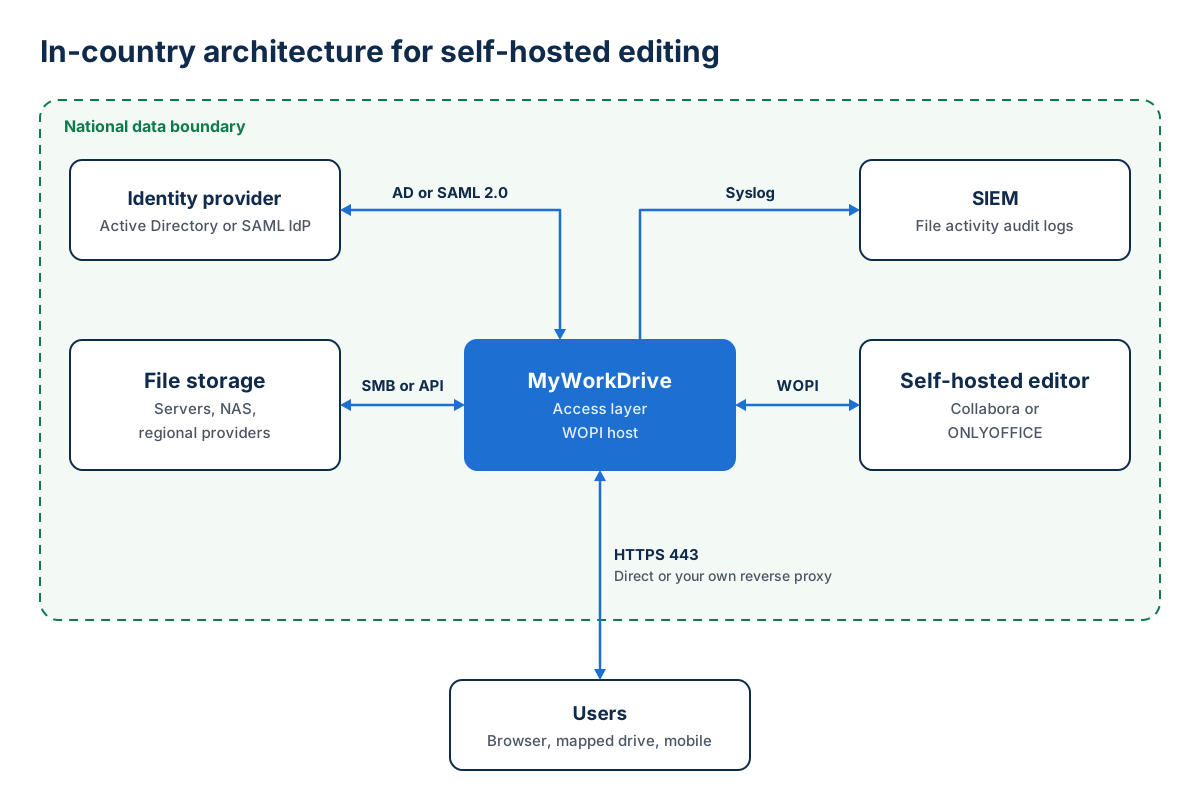
A sovereign editing deployment has six components, and each one needs a location inside the boundary. Storage needs the same review as the editor. If file shares sit with a US hyperscaler, the jurisdiction question from the first section applies to them too, and on-premises hardware or a regional hosting provider avoids it.
| Component | Where it runs | MyWorkDrive detail |
|---|---|---|
| File storage | In-country file servers, NAS, or storage with a regional provider | Connects to existing storage without migration or sync |
| Access layer | MyWorkDrive on Windows Server, on-premises or on an in-country VM | File content is processed in memory and not persisted on the MyWorkDrive server |
| Editor | Collabora Online or ONLYOFFICE Docs on an in-country host | One online editing provider is active per MyWorkDrive server; editing can be restricted by IP address |
| Identity | On-premises Active Directory or a SAML 2.0 identity provider | Entra ID is optional; NTFS permissions stay authoritative |
| Publishing | Direct HTTPS on port 443, or your own reverse proxy such as F5, nginx, or Kemp | Skip the Cloudflare-based Cloud Web Connector where routing must stay on your infrastructure |
| Audit | An in-country SIEM | File activity logs forward to your SIEM over Syslog |
MyWorkDrive's data sovereignty architecture keeps file content in memory on the MyWorkDrive server without persisting it there, and it enforces existing NTFS and storage permissions without a separate user database. Identity options are described under Identity and Access, and audit logging under Compliance and Audit. Our guide to file access audit logging covers what auditors ask for.
Configuring MyWorkDrive for a Self-Hosted Editor
- Classify shares. Decide for each share whether browser editing is allowed at all, and which editor may process its content.
- Deploy the editor in-jurisdiction. For ONLYOFFICE, keep the cache on local or in-country storage and set expire.files to match your retention policy. For Collabora, set the frame-ancestors value and the allowed WOPI host entry for your MyWorkDrive domain.
- Connect the editor. In the MyWorkDrive admin panel, enable the provider under Integrations, then select it as the Office Online Edit provider under Settings. Online editing is then enabled for all shares unless restricted.
- Restrict where editing applies. Use DLP settings to turn online editing off by share, user, or group. Restrict the editing provider by IP address where it should serve internal users only.
- Cover the clipboard. Both editors can block printing, Save As, and download, but neither blocks the clipboard. For content that must not be copied out, MyWorkDrive's DLP view-only mode covers the clipboard as well and adds watermarks.
- Publish and verify. Publish MyWorkDrive through direct HTTPS or your own reverse proxy. During the pilot, run the editor host with default-deny egress rules and check firewall logs to confirm that no editing traffic leaves the boundary.
Only one online editing provider can be active on a MyWorkDrive server. An organization that wants Office for the web for general shares and a self-hosted editor for regulated shares can run separate MyWorkDrive servers for the two groups. The alternative is to turn off online editing for the regulated shares and have those users edit in desktop Office through the MyWorkDrive mapped drive, which keeps the working copy on a managed endpoint.
The Data Sovereignty page describes the wider deployment model, including storage and identity options, and the Office Editing page compares every editing backend MyWorkDrive supports. To test a self-hosted editor against your own shares, start a trial and connect a pilot Collabora Online or ONLYOFFICE server.
Frequently Asked Questions
What is self-hosted document editing?
Self-hosted document editing means the browser-based editor runs on servers your organization operates, such as Collabora Online or ONLYOFFICE Docs, instead of a public cloud service. The editor opens a working copy of each document on that server during the session, so the server's location and operator determine where the document is while it is being edited.
Does the Microsoft EU Data Boundary meet data sovereignty requirements for document editing?
It addresses residency, because Microsoft stores and processes covered customer data within the EU and EFTA. Jurisdictional exposure remains. Microsoft is a US provider subject to the CLOUD Act, and in June 2025 Microsoft France told a French Senate inquiry under oath that it could not guarantee French data would never be transmitted to US authorities without French authorization.
Is Office Online Server still an option for on-premises document editing?
Only as a short-term bridge. Microsoft ends support for Office Online Server on December 31, 2026, after which it receives no security updates, bug fixes, or technical support, and Microsoft has not announced an on-premises successor. Existing servers keep running, and new sovereign deployments should plan on Collabora Online or ONLYOFFICE Docs.
Can Collabora CODE be used in production?
Collabora does not recommend it. CODE is a free, continuously updated development build with no SLA or long-term support. Production deployments are expected to run Collabora Online, the supported subscription edition priced per user per year, and the MyWorkDrive Collabora integration lists Collabora Online as its requirement.
Does ONLYOFFICE Community Edition still have a 20-connection limit?
No. ONLYOFFICE removed the 20 simultaneous connection limit from Community Edition in version 9.4, released May 19, 2026. Community Edition remains licensed under AGPLv3 with additional attribution terms and comes with no vendor support or SLA.
Which ONLYOFFICE edition does MyWorkDrive use?
The MyWorkDrive integration uses ONLYOFFICE Docs Developer Edition, which supports third-party API integration, and the MyWorkDrive knowledge base names it as the license for production use with full vendor support. Community Edition can also be used with the integration.
Can Collabora Online and ONLYOFFICE run in an air-gapped network?
Both can run without internet access once their software, certificates, fonts, and licenses are provided inside the network. Plan how security updates will be imported, use an internal certificate authority that the MyWorkDrive server and user browsers trust, and confirm with each vendor how license validation works offline. MyWorkDrive itself can run on a private network with internal DNS.
Where is a document stored while it is edited in a self-hosted editor?
On the editor server. Collabora Online copies each open document into an isolated working directory on its server, and ONLYOFFICE Docs converts the file into its cache, where the edited output stays for 24 hours by default. The original remains on your file share, and changes are written back to it through the WOPI host.
Sources
- Microsoft Tech Community, Announcing the retirement for Office Online Server, October 21, 2025
- Microsoft, Microsoft completes landmark EU Data Boundary, February 26, 2025
- U.S. Government Publishing Office, 18 U.S.C. § 2713
- heise online, Not sovereign: Microsoft cannot guarantee the security of EU data, July 2025
- European Data Protection Board, Guidelines 05/2021 on the interplay between Article 3 and Chapter V of the GDPR, version 2, February 2023
- WilmerHale, European Court of Justice to Review Challenge to EU-U.S. Data Privacy Framework, December 2025
- Collabora, Collabora Online FAQ
- Collabora, Collabora Online architecture
- ONLYOFFICE, ONLYOFFICE Docs 9.4 released, May 19, 2026
- ONLYOFFICE Help Center, Developer Edition license FAQ
- ONLYOFFICE Community Forum, Document Server cache lifetime
- AWS Marketplace, ONLYOFFICE Docs Developer Edition listing
- TechRadar, European companies launch Euro-Office
- heise online, Euro-Office: First version of the open-source web office is here
Start a free trialBook a demoView pricing

Ron is CEO of MyWorkDrive and a product engineer by background: he spent six years in engineering and product leadership at CData Software, then served as MyWorkDrive's Chief Product Officer before stepping into the CEO role. A Dartmouth College alum, he writes for IT leaders navigating file access, data sovereignty, and enterprise IT strategy.