

By Dan Gordon
Last Updated: November 19, 2026
Denmark is paying to reduce its dependence on a small number of foreign technology suppliers. At the same time, organizations covered by the country's NIS 2 Act have to account for who reaches their data and report significant incidents within 24 hours. Both requirements meet at the file server.
Picture a Danish municipality moving its cloud infrastructure away from one large supplier. The office suite has an alternative, and so does the collaboration platform. Then the project reaches the file server: fifteen years of case files, drawings and records on storage the municipality already owns, already governs and already keeps in Denmark. None of it needs to move. What staff need is a way to reach those files from outside the building, and a way to give an external architect or auditor controlled access to one folder. Ideally that happens without a VPN client on every laptop and without copying the data into someone else's platform.
That is where sovereignty programs tend to stall. The data is already sovereign. The route to it isn't.
The short answer: Danish organizations can reduce cloud dependence for file access without migrating their file servers. The storage, NTFS permissions and Active Directory groups stay where they are, and only the access route changes. An access layer installed on a Windows Server the organization operates, on premises or on a Danish or EU virtual machine, publishes the existing shares over HTTPS. Staff get remote access without a VPN, outside parties get expiring share links instead of accounts, and every file operation is logged for the 24-hour early warning the NIS 2 Act requires. No copy of the data sits with a cloud supplier.
| Topic | What applies |
|---|---|
| Sovereignty funding | DKK 80 million for 2026 to 2029 (about DKK 20 million a year), allocated in the Finance Act for 2026 to fund an action plan for digital sovereignty |
| Key analysis | Digital suverænitet i den offentlige sektor, PA Consulting, January 2026, for the Ministry of Digital Affairs, the Agency for Digital Government, KL and Danske Regioner |
| Cybersecurity law | Lov om foranstaltninger til sikring af et højt cybersikkerhedsniveau (NIS 2-loven), Act No. 434 of 6 May 2025 |
| In force | 1 July 2025 |
| Public sector scope | Municipalities and regions are covered as public administration entities |
| Registration | Through Virk.dk with MitID, deadline 1 October 2025 |
| Incident reporting | Early warning within 24 hours, incident notification within 72 hours, final report within one month |
| Supervision | The sector authority responsible for each sector |
What Danish Digital Sovereignty Policy Is Asking For
On 28 August 2025 the Danish government proposed DKK 80 million for digital sovereignty across 2026 to 2029, or DKK 20 million a year, in its finance bill. The Finance Act for 2026 allocated the money to fund an action plan for digital sovereignty. The Ministry of Digital Affairs put the reasoning in one sentence:
“Afhængighed af få, store techgiganter kan svække et samfunds robusthed.”
“Dependence on a few large tech giants can weaken a society's resilience.”
Source: Danish Ministry of Digital Affairs (Digitaliseringsministeriet), 28 August 2025. English translation ours.
The aim isn't a clean break from foreign technology. Caroline Stage, Minister for Digital Affairs when the funding was announced, described it as keeping "valget til at sige fra": the choice to say no.
What the PA Consulting analysis found
In January 2026, PA Consulting published an analysis of digital sovereignty in the public sector for the Ministry of Digital Affairs, the Agency for Digital Government (Digitaliseringsstyrelsen), KL and Danske Regioner. The work was done under initiative 12 of the joint public-sector digitalization strategy for 2026 to 2029. It draws on desk research, more than 30 interviews and 15 cases from Denmark and abroad.
Its conclusions are more measured than most headlines about leaving Big Tech:
“Fuld digital suverænitet er ikke et endemål.” … “Økonomiske besparelser bør derfor ikke være det primære formål.”
“Full digital sovereignty is not an end goal.” … “Economic savings should therefore not be the primary purpose.”
Source: PA Consulting, Digital suverænitet i den offentlige sektor, January 2026, key observations 1.1 and 1.3. English translation ours.
| Topic | What the report says | Where |
|---|---|---|
| Ambition | Full digital sovereignty is not an end goal, because it is not realistic in the short or medium term | Key observation 1.1 |
| Savings | Replacing technology can cut license costs, but migration brings its own costs, so savings should not be the primary purpose | Key observation 1.3 |
| Supplier dependence | High dependence on a few large suppliers and lack of competition is the first of four core challenges, and breaking a vendor lock-in carries significant costs and risks | Challenge 01 |
| Microsoft licenses | The Danish state paid more than half a billion kroner for Microsoft licenses in 2024, a 20 percent increase in one year | Challenge 01, footnote |
| Software as a service | Most office suites and collaboration tools now run as SaaS, can hold sensitive data and can be hard to control | Technology stack overview |
| Cloud market | Studies cited in the report suggest 87 percent of the Danish cloud market is supplied by a few large US tech companies | Challenge 02, footnote |
| Alternatives | Real European alternatives exist for software and cloud. Examples of open source include LibreOffice, Open-Xchange and Nextcloud | Summary and section 1 |
| Aarhus Kommune | Moved its cloud infrastructure from Microsoft to a European provider, and set up open source office alternatives as a fallback | Cases 10 and 11, observation 2.6 |
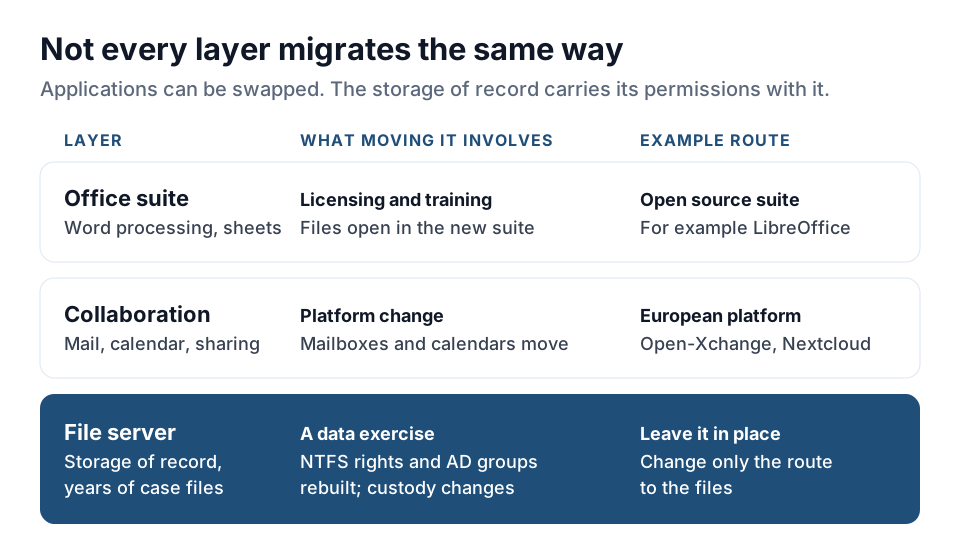
What the report does not say, and what matters for anyone planning this work, is that every layer of the technology stack migrates the same way. Replacing a word processor is mostly a licensing and training exercise. Replacing the place where files live is a data exercise. And in most Danish organizations, the files already sit in the right place.
The NIS 2 Act Adds a Separate Requirement
Denmark implemented the NIS 2 Directive through Lov om foranstaltninger til sikring af et højt cybersikkerhedsniveau, usually called NIS 2-loven (Act No. 434 of 6 May 2025). The Agency for Digital Government lists it in its overview of the NIS 2 regulatory framework. The Act entered into force on 1 July 2025. Covered entities register through Virk.dk with MitID, and the registration deadline was 1 October 2025. Municipalities and regions are in scope as public administration entities, and each sector authority supervises compliance in its own sector.
The obligations follow the directive:
- Risk management measures, including access control policies, multi-factor authentication and supply chain security.
- Management responsibility for cybersecurity.
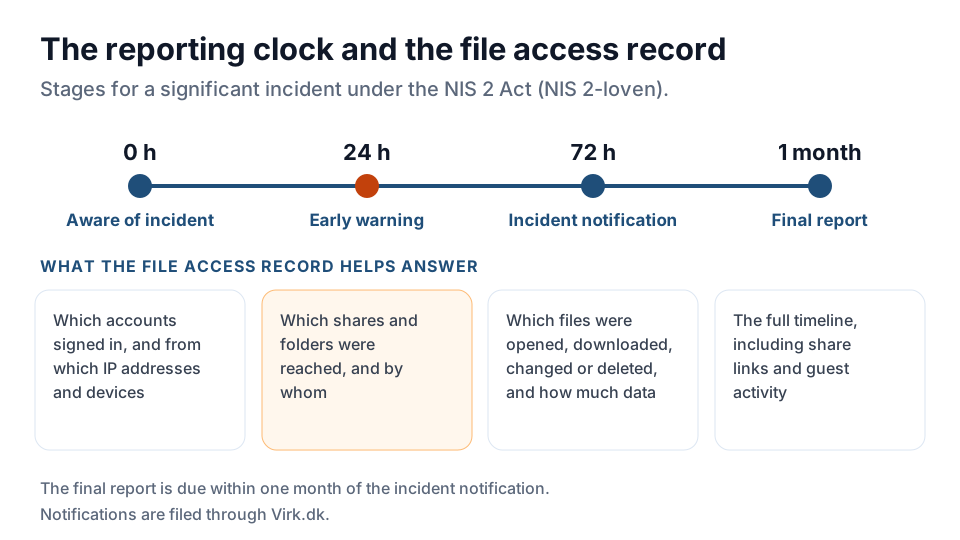
- Incident reporting in three stages: an early warning within 24 hours of becoming aware of a significant incident, an incident notification within 72 hours, and a final report within one month of the notification.
The 24-hour deadline is the part that bears directly on file infrastructure. Under the directive, the early warning must, where applicable, say whether the incident is suspected to be malicious or could have a cross-border impact, and the 72-hour notification must give an initial assessment of its severity and impact. Meeting those deadlines is only realistic if the organization can quickly establish what was reached and by whom. A file server that was never set up to record access can't answer the question inside a day, and often can't answer it at all. Windows can audit file access, but only once object access auditing and a SACL on each folder are configured. Our guide to file access audit logging on Windows shares covers that setup.
So Danish organizations are working toward two requirements at once. They need to depend less on suppliers that hold their data, and they need to account for access to it. A SaaS file platform makes the first harder. A VPN in front of an unaudited file share makes the second harder.
Why Remote File Access Is the Hardest Layer to Make Sovereign
Office documents, email and collaboration have credible alternatives because they are applications. A file server is not an application. It is the storage of record, tied to Active Directory groups, NTFS permissions and a folder structure that encodes years of organizational decisions. Moving it into another platform means recreating that permission model somewhere else, which is the cost and risk the PA Consulting analysis attaches to breaking a lock-in. It also hands custody of the data to whichever platform receives it.
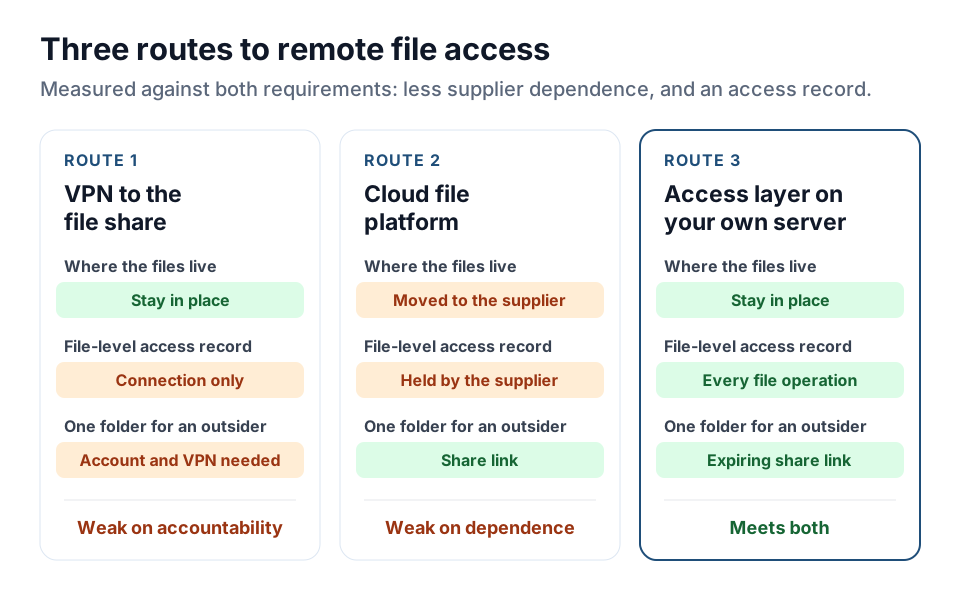
The two usual answers each fail one of the two requirements:
- A VPN keeps the data in place, but it extends the whole network to every remote device. SMB is a chatty protocol that slows down badly over home and mobile connections. The VPN logs the connection, not the files opened, and it offers nothing for giving an external architect or auditor access to a single folder.
- A cloud file platform fixes the user experience but relocates the data into the supplier's infrastructure, the very dependency a sovereignty program exists to reduce.
A third approach leaves the storage alone and changes only the route to it.
| Question | VPN to the file share | Cloud file platform (SaaS) | Access layer on your own server |
|---|---|---|---|
| Where the files live | In place, on your storage | Copied or moved into the supplier's platform | In place, on your storage |
| Who holds custody of the data | You | The supplier | You |
| File-level access record | The VPN logs the connection, not the files opened | Kept in the supplier's platform | Every sign-in, file operation and sharing event, sent to your SIEM |
| Permission model | Existing NTFS and Active Directory | Rebuilt in the new platform | Existing NTFS and Active Directory, inherited |
| Access for one outside party to one folder | An account and a VPN connection | Share link | Expiring share link, no account |
| Network exposure | Whole network extended to each remote device | None to your network | HTTPS only, no network extension |
| Performance over home connections | SMB over VPN is slow on high-latency links | Good | Good, over HTTPS |
| Fit with a sovereignty program | Fits, but weak on accountability | Adds the dependency the program aims to reduce | Fits both requirements |
Keeping File Access on Infrastructure You Already Own
MyWorkDrive installs on a Windows Server the organization already operates, on premises or on a Danish or European virtual machine, and publishes existing storage over HTTPS. It connects to on-premises SMB file shares and NAS, Azure Files and Blob, S3-compatible storage, and SharePoint Online and OneDrive where those are in use. No data is migrated, and no second copy of the file set is created. File content is processed in memory and isn't persisted on the MyWorkDrive server.
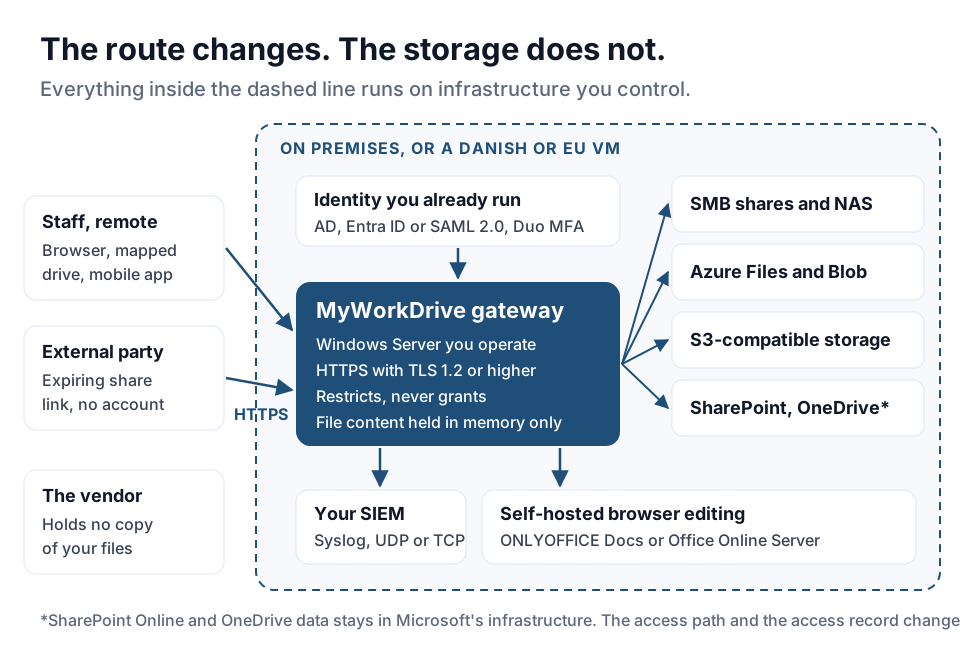
Permissions are inherited, not rebuilt
With MyWorkDrive, existing permissions remain authoritative. It adds a policy layer that can restrict access further, but it can't grant access the storage hasn't already granted. Domain controllers keep authenticating users as they do today, and Active Directory groups, organizational units and group policies stay in place.
For an organization in the middle of a sovereignty migration, this has a practical benefit. The access layer can change without the identity and permission model changing at the same time, and one large change at a time is easier to test and easier to roll back.
Sign-in through the identity provider already in service
Users sign in through Microsoft Entra ID natively, or through SAML 2.0 providers such as Okta, ADFS, Ping and Shibboleth, with native Duo integration for multi-factor authentication. Connections use TLS 1.2 or higher. Because access runs over HTTPS, the corporate network doesn't have to reach every remote device.
Browser Editing Without a Microsoft 365 Tenant
For organizations shrinking their Microsoft footprint, the editing path decides whether a document leaves the building during a work session. MyWorkDrive supports more than one editing backend:
| Backend | Where the file sits during editing | What you need | Fit for reducing Microsoft dependence |
|---|---|---|---|
| ONLYOFFICE Docs, self-hosted | On infrastructure you control | An ONLYOFFICE Docs license. No Microsoft 365 license required | Strong: storage and editing both stay with you |
| ONLYOFFICE Docs, cloud | With the cloud provider that hosts it | An ONLYOFFICE Docs license | Removes the Microsoft dependency, adds a hosting one |
| Office Online Server, self-hosted | Inside your network | Local server infrastructure and Office volume licensing | Keeps data in place, keeps a Microsoft license |
| Microsoft 365 integration (default) | Staged in your Microsoft 365 tenant for the session, then removed | Microsoft 365 licenses | Simplest to set up, but files pass through the tenant |
For a Danish authority whose stated aim is less reliance on a single foreign supplier, self-hosted ONLYOFFICE Docs keeps both the storage and the editing session on infrastructure it controls. Office Online Server does the same for organizations that want Microsoft's editor and already hold volume licensing. The Microsoft 365 option works and is the simplest to set up, but choose it knowing that files stage in the tenant while they are open. Our article on where documents sit during browser editing covers licensing for sovereign and in-country deployments.
An Access Record for the 24-Hour Early Warning
MyWorkDrive records four kinds of event:
- Authentication: login attempts, identity provider details, source IP and device identifiers.
- File operations: opens, downloads, uploads, saves and deletes, with the full path and the result.
- Sharing: link creation, revocation, link access and guest activity.
- Administration: policy updates, device approvals and configuration changes.
Each entry carries the user, source IP, device identifier, share, path, operation, result and bytes transferred. Events export over Syslog, using UDP or TCP, so file activity lands in the same SIEM as the rest of the infrastructure.
This is what turns the early warning from an estimate into a statement. When a sector authority asks which systems and data were affected, an organization that logs file access against the share it came from answers with a query instead of a reconstruction. Our post on the Netherlands' 24-hour Cbw deadline walks through the same problem under Dutch law.
Giving External Parties Access Without New Accounts
Consultants, auditors and partner organizations need specific folders, not Active Directory accounts. MyWorkDrive issues share links against existing shares, and each link can have:
- an expiry after a set number of days
- an optional password
- view-only access, with no saving to the recipient's device
- a maximum number of downloads
Dynamic watermarks show the viewer's name and the exact time of viewing. Link creation, revocation and every access event go into the same log as internal activity. The organization then has a record of what each outside party reached, which is useful evidence for the third-party side of NIS 2 risk management.
How This Maps to the NIS 2 Act
| Obligation (NIS 2 Directive article the Act implements) | What MyWorkDrive provides | Who is responsible |
|---|---|---|
| Access control policies, Article 21(2)(i) | Inherits NTFS and Active Directory permissions, adds restrictions per share, group or user, and never grants more than the storage allows | Shared: the product enforces, the organization sets policy and cleans up permissions |
| Multi-factor authentication, Article 21(2)(j) | Sign-in through the existing identity provider, with native Duo integration and Entra ID Conditional Access honored | Shared |
| Cryptography and encryption, Article 21(2)(h) | HTTPS with TLS 1.2 or higher for every connection | Product |
| Supply chain security, Article 21(2)(d) | Logged, expiring share links for outside parties. No copy of customer data held by the vendor | Organization, with evidence from the product |
| Incident handling and reporting, Articles 21(2)(b) and 23 | Authentication, file, sharing and administrative events exported over Syslog to the SIEM | Organization, using the SIEM |
| Log retention and review | Set by the receiving SIEM or log store, not by MyWorkDrive | Organization |
| Registration and notifications through Virk.dk | Not a product function | Organization |
Several rows end with the organization on purpose. Retention, log review, registration and the notifications themselves are organizational duties, and a vendor that claims to cover them for you deserves suspicion.
Supplier Jurisdiction, Stated Plainly
MyWorkDrive is made by a United States company. For an organization whose sovereignty policy is partly about foreign supplier dependence, that fact belongs in the evaluation, not in a footnote.
The software runs on infrastructure the organization owns, and the vendor doesn't host, store or hold the customer's files at any point. There is no vendor-side repository with a copy of the data. That is a different risk profile from a SaaS platform where the supplier is the custodian, and it is why this architecture shows up in sovereignty-driven procurement.
The PA Consulting analysis lists the US CLOUD Act among the structural barriers to control over public data, because it can require American providers to hand over data even when it is stored in the EU. The concern is about providers that hold the data. Whether and how it touches a given deployment is a legal question, so organizations should take their own legal advice on foreign supplier exposure. They should also weigh the licensing relationship separately from data custody, because the two are different dependencies.
| Question | SaaS file platform | MyWorkDrive on your own server |
|---|---|---|
| Who holds the files | The supplier | You, on your existing storage |
| Where file content is processed | The supplier's infrastructure | Your Windows Server, in memory |
| Who holds the access log | The supplier's platform | Your SIEM |
| Supplier relationship | Subscription with the platform provider | Software license with a US vendor |
| If the contract ends | The data has to be migrated out | The files stay where they are, and the access route has to be replaced |
Scope and Limitations
- Technical controls, not compliance. MyWorkDrive provides technical controls and evidence. The organization remains responsible for its own compliance program, and no product delivers compliance with the NIS 2 Act on its own. Nothing here is legal advice.
- Device approval is an allowlist, not a posture check. It covers MyWorkDrive mapped drive and mobile clients. It doesn't check endpoint compliance and doesn't apply to browser access. Device posture needs Conditional Access at the identity provider.
- Permission cleanup comes first. MyWorkDrive restricts access and never grants more than the underlying storage permits, so an over-permissive NTFS structure stays over-permissive. Clean it up before publishing shares externally. Our guide to NTFS permissions and ACL management covers the review.
- SharePoint Online and OneDrive data stays with Microsoft. Connecting them through MyWorkDrive changes the access path and adds a unified access record. It doesn't relocate the data.
Where to Start
- Map the file stores. List the file servers, NAS devices and cloud shares that hold case files and records, and who reaches each one today, including VPN users and outside parties.
- Review permissions. Tighten NTFS rights and group membership on the shares you plan to publish.
- Place the gateway. Install the access layer on a Windows Server on premises or on a Danish or EU virtual machine, and connect it to your existing identity provider.
- Pick the editing backend. Decide between self-hosted ONLYOFFICE Docs, Office Online Server and Microsoft 365 staging, based on where documents may sit while open.
- Send events to the SIEM. Configure Syslog export, then run a drill: from the logs alone, establish within a few hours what one test account reached in a day.
- Replace attachments with share links. Move external exchanges off email and personal cloud accounts onto expiring, logged links.
Frequently Asked Questions
Does MyWorkDrive replace a file server?
No. It publishes an existing file server, NAS or cloud storage over HTTPS. The storage, the permissions and the folder structure stay as they are. Organizations that want to retire a file server still need a storage plan, and MyWorkDrive concerns how that storage is reached rather than where it lives.
Is this an alternative to a VPN for Danish organizations?
For file access, yes. MyWorkDrive gives mapped drive, browser and mobile access over HTTPS without extending the network to the remote device, and it records file-level activity that a VPN does not produce. Organizations that use a VPN for other services will still need it for those services.
When did Denmark's NIS 2 Act take effect, and who does it cover?
Lov om foranstaltninger til sikring af et højt cybersikkerhedsniveau, known as NIS 2-loven, entered into force on 1 July 2025. It is Denmark's main NIS 2 law and covers essential and important entities in most NIS 2 sectors, including public administration entities such as municipalities and regions. Telecoms and energy have their own sector acts. Covered entities register through Virk.dk, and the registration deadline was 1 October 2025.
How does this support duties under Denmark's NIS 2 Act?
It addresses access control and the evidence needed for incident reporting. File activity exported to a SIEM makes it possible to establish what was reached and by whom within the 24-hour early warning window, and share link controls govern access granted to outside parties. Sector authorities assess the organization's overall program, not a single product.
Can documents be edited in the browser without Microsoft 365?
Yes. A self-hosted ONLYOFFICE Docs deployment provides browser-based editing without a Microsoft 365 tenant, and requires an ONLYOFFICE Docs license. A self-hosted Office Online Server is also supported and requires Office volume licensing and local server infrastructure.
What did the PA Consulting analysis conclude about digital sovereignty?
The January 2026 analysis, prepared for the Ministry of Digital Affairs, the Agency for Digital Government, KL and Danske Regioner, found that full digital sovereignty is not an end goal and that economic savings should not be the primary purpose of migration. It named high dependence on a few large suppliers as a core challenge and noted that the Danish state paid more than half a billion kroner for Microsoft licenses in 2024, up 20 percent in one year.
Does using a United States supplier undermine a digital sovereignty program?
It depends on which dependency the program is addressing. MyWorkDrive does not host or store customer files, so no copy of the data sits with the vendor and there is no vendor-side custody to transfer. The licensing relationship is a supplier dependency like any other and should be assessed as one. Organizations with a formal sovereignty requirement should get their own legal assessment rather than rely on a vendor's description.
Start a free trialBook a demoView pricing
