

By Ron Bhojwani
Last Updated: November 10, 2026
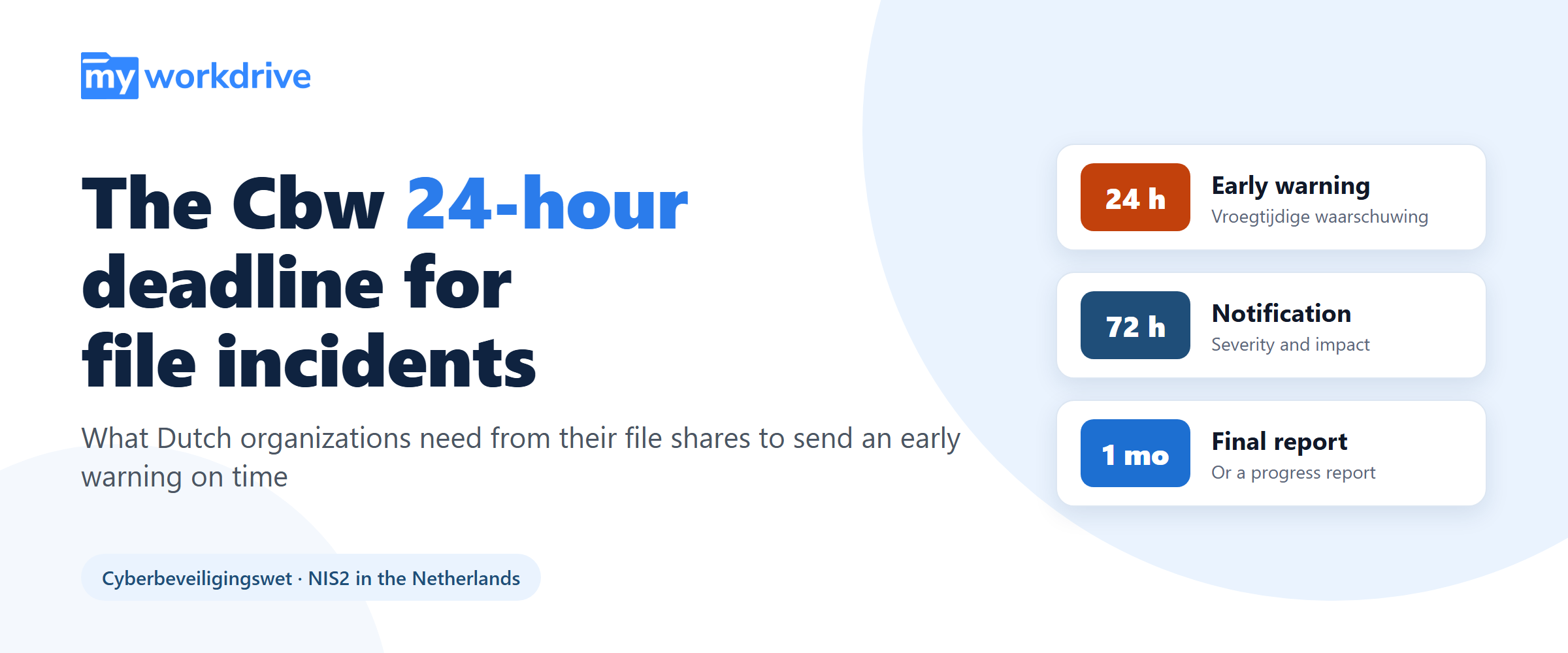
The Cyberbeveiligingswet (Cbw) has applied to more than 8,000 Dutch organizations since 15 August 2026, and one of its duties runs on a clock. When an organization observes a significant incident, it must send an early warning as soon as possible and in any event within 24 hours.
Twenty-four hours is usually enough to describe an incident in an application, where sessions are logged and accounts are known. A file share is harder. Most file servers were never set up to record who opened what, so the organization knows the server was involved but can't say what was reached on it.
The short answer: to meet the Cbw deadline for a file incident, the file access record has to exist before the incident happens. Auditing switched on afterwards captures nothing that already happened. A log that names the user, device, source IP, share, path, operation, result and bytes transferred for every file event, streamed to the SIEM, lets you replace "a file server was in scope" with "these accounts reached these folders in this window, and this much data left."
| Topic | What applies |
|---|---|
| What it is | The Dutch law implementing the EU NIS2 Directive |
| In force | 15 August 2026, together with the Wet weerbaarheid kritieke entiteiten (Wwke), which implements the CER Directive |
| Who it covers | More than 8,000 essential and important entities across 18 sectors. The Wwke covers about 500 organizations |
| Example sectors | Energy, drinking water, digital infrastructure, healthcare, government, transport |
| Scope test | Each organization determines for itself whether it falls within scope |
| Duties | Registration (registratieplicht), duty of care (zorgplicht), reporting duty (meldplicht) |
| Where to report | The central reporting point at mijn.ncsc.nl, which forwards significant incident reports to the sectoral CSIRT and the competent supervisor |
| First deadline | Early warning as soon as possible and in any event within 24 hours of observing the incident (4 hours for entities also under DORA or the Netcode) |
| Accountability | The board carries final responsibility for cyber risk management |
What the Cyberbeveiligingswet Requires
The Cbw implements NIS2 in the Netherlands. According to the Rijksoverheid announcement of 7 July 2026, it entered into force on 15 August 2026 alongside the Wet weerbaarheid kritieke entiteiten (Wwke), which implements the EU CER Directive and applies to about 500 organizations. The Cbw itself covers organizations that provide essential or important services in 18 sectors, including energy, drinking water, digital infrastructure, healthcare, government and transport. There is no list to look yourself up in: organizations are responsible for checking whether the law applies to them.
The three duties: registratieplicht, zorgplicht and meldplicht
- Registration (registratieplicht). In-scope organizations must register in the entity register run by the National Cyber Security Centre (NCSC), through mijn.ncsc.nl. This has been mandatory since 15 August 2026.
- Duty of care (zorgplicht). Organizations must take measures to manage the risks to their network and information systems, and to prevent incidents or limit their consequences.
- Reporting duty (meldplicht). Significant incidents must be reported within the statutory deadlines to the sectoral CSIRT and the competent supervisor. Reports go through the central reporting point at mijn.ncsc.nl, which forwards a significant incident report to both automatically.
Cbw reporting deadlines: 24 hours, 72 hours, one month
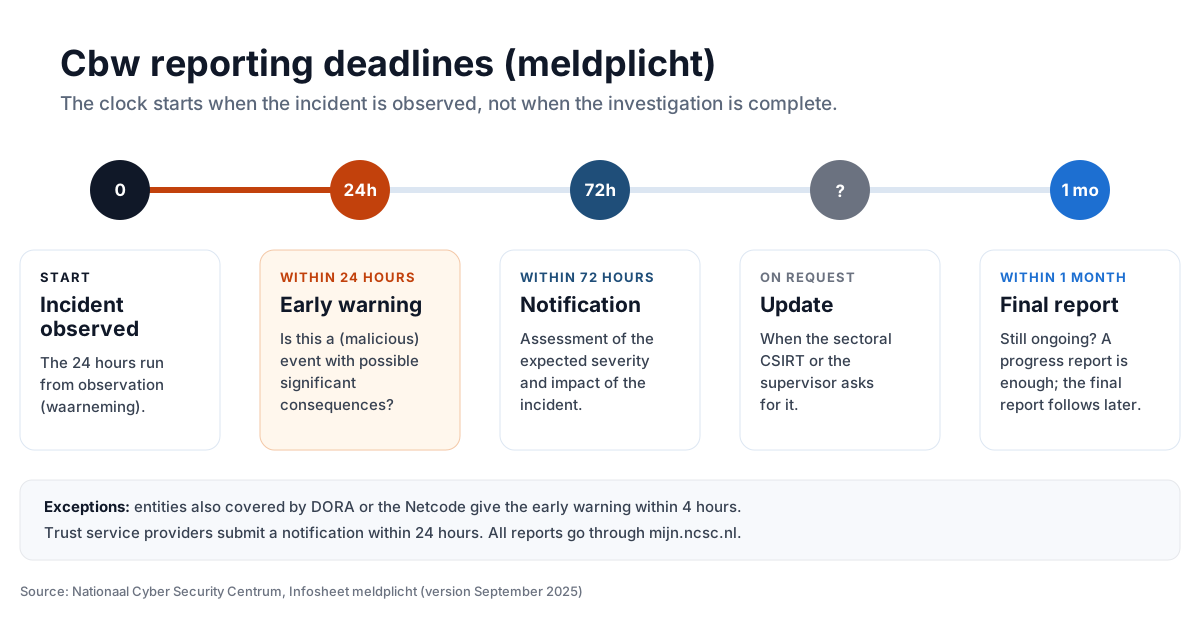
The NCSC's Infosheet meldplicht (version September 2025) sets out a phased reporting duty. The first step is the early warning.
“De eerste melding is een vroegtijdige waarschuwing die zo snel mogelijk, maar in ieder geval binnen 24 uur na waarneming van het incident plaatsvindt.”
In English: the first report is an early warning, made as soon as possible and in any event within 24 hours of observing the incident. Source: NCSC, Infosheet meldplicht
| Stage | Deadline | What it covers |
|---|---|---|
| Early warning (vroegtijdige waarschuwing) | As soon as possible, and in any event within 24 hours of observing the incident | Whether this is a (malicious) event with possible significant consequences |
| Notification (melding) | As soon as possible, and in any event within 72 hours | An assessment of the expected severity and impact of the incident |
| Update | On request | Further information when the sectoral CSIRT or the supervisor asks for it |
| Final report (eindrapport) | Within one month | If the incident is still ongoing at that point, a progress report is enough and the final report follows later |
| Exception: DORA or Netcode | Within 4 hours | Entities also covered by DORA or the Netcode (the network code on cybersecurity for cross-border electricity flows) give the early warning within four hours |
| Exception: trust service providers | Within 24 hours | Trust service providers submit a notification within 24 hours |
What counts as a significant incident
The NCSC defines a significant incident as one that causes, or can cause, serious operational disruption of services or financial loss for the organization, or considerable material or immaterial damage to other organizations. The NCSC also says the exact thresholds are still being worked out, so in practice the organization has to make that call itself, quickly, and be able to explain it afterwards.
The board answers for cyber risk
“Het bestuur is eindverantwoordelijk voor cyberrisicobeheersing.”
In English: the board carries final responsibility for cyber risk management. Source: Rijksoverheid, 7 July 2026
Board members must also have enough knowledge to assess the risks and the security measures taken. That changes who cares about the answer. When a file server is involved in an incident, the quality of what the organization can say within 24 hours becomes a board matter, not only an IT one.
Why the 24-Hour Early Warning Is Hard When File Shares Are Involved
An early warning doesn't need a complete picture. The NCSC infosheet frames it around one question: is this a (malicious) event with possible significant consequences? The second half of that question is where file incidents stall. You can't judge the possible consequences of an intrusion on a file server without knowing which data it reached. And whatever you say at 24 hours carries straight into the 72-hour notification, which asks for an assessment of severity and impact.
A credible first statement about file data depends on evidence that most file servers don't produce.
- Auditing is off by default. Windows Server can record file access, but only after two things are configured: an advanced audit policy subcategory (Audit File System, or Audit File Share and Audit Detailed File Share), and a system access control list (SACL) on each folder you want watched. Neither is in place on a default installation.
- When it is on, the volume works against you. Object access auditing fills the Security event log quickly. On a busy file server, older events can be overwritten before anyone looks, and finding one account's activity in millions of entries is slow work under deadline pressure.
- The events don't line up with how people ask the question. Event 4663 records an access attempt against a local file system path, a handle and an access mask. Share-level events (5140 and 5145) are a separate subcategory. Turning that into "which user opened which files in the Finance share, and how much left" means correlating several event types, often across several servers. None of them record bytes transferred.
- Nothing sees the paths around the server. A file synced to a personal cloud account, pulled through a remote desktop session or sent as an email attachment never shows up in the file server's audit trail once it has left.
So at the 24-hour mark, the organization can say that a file server was in scope. It can't yet say what was reached on it. That second sentence is the one the CSIRT and the supervisor need.
| Question at hour 24 | Default Windows file server | File access record through MyWorkDrive |
|---|---|---|
| Is anything being recorded? | No. Audit policy and SACLs are not configured by default | Yes, provided the event stream was set up before the incident: authentication, file, sharing and administrative events |
| Which account and device? | Account, plus source address in share events, and only if auditing was enabled. No device identifier | User, source IP and device identifier on every entry |
| Which share and path? | Local file system path. Share access is a separate event subcategory | Share and full path on every entry |
| What was done, and did it work? | Access mask, to be interpreted per event | Operation (open, download, upload, save, delete) and result |
| How much data moved? | Not recorded | Bytes transferred |
| Was anything shared outside? | Not visible | Link creation, revocation, access events and guest activity |
| Where does the evidence sit? | Each server's Security event log, unless forwarded | In your SIEM over Syslog, next to network and endpoint telemetry |
What a Usable File Access Record Contains
The record that answers the question is narrower than full file system auditing, and more useful. It needs to show:
- Who acted: the identity, plus the source IP and device.
- When it happened.
- Where: the share and the path.
- What: the operation that was attempted.
- Whether it succeeded.
- How much data moved.
MyWorkDrive records four kinds of events:
- Authentication events: login attempts, identity provider details, source IP and device identifiers.
- File operations: opens, downloads, uploads, saves and deletes, with full path and result.
- Sharing events: link creation, revocation, access events and guest user activity.
- Administrative changes: policy updates, device approvals and configuration changes.
Each entry carries the user, source IP, device identifier, share, path, operation, result and bytes transferred. Events export over Syslog, using UDP or TCP, so file activity sits in the same SIEM as network and endpoint telemetry. That is where an incident actually gets investigated. MyWorkDrive can also send email alerts through your SMTP server when activity crosses thresholds you set, such as excessive downloads, which can shorten the time between an incident starting and someone observing it.
During an incident, this changes the work itself. Instead of enabling auditing after the fact, which captures nothing that already happened, the team filters a stream that already exists by account, device or time window and reads off the answer.
| What the CSIRT and supervisor will want to know | Log fields to filter on |
|---|---|
| Which accounts were involved? | User, identity provider details, login attempts |
| From where? | Source IP, device identifier |
| Which data was reached? | Share, path, operation, result |
| Did data leave? | Downloads with bytes transferred, share link access events, guest activity |
| Was anything destroyed or changed? | Deletes and saves, with result |
| Did the attacker change controls? | Policy updates, device approvals, configuration changes |
A 24-Hour Working Plan for a File Incident
The Cbw sets the deadline, not the internal steps. The plan below is an example of how a team with a file access stream in its SIEM can use the 24 hours. Adjust it to your own incident response procedure.
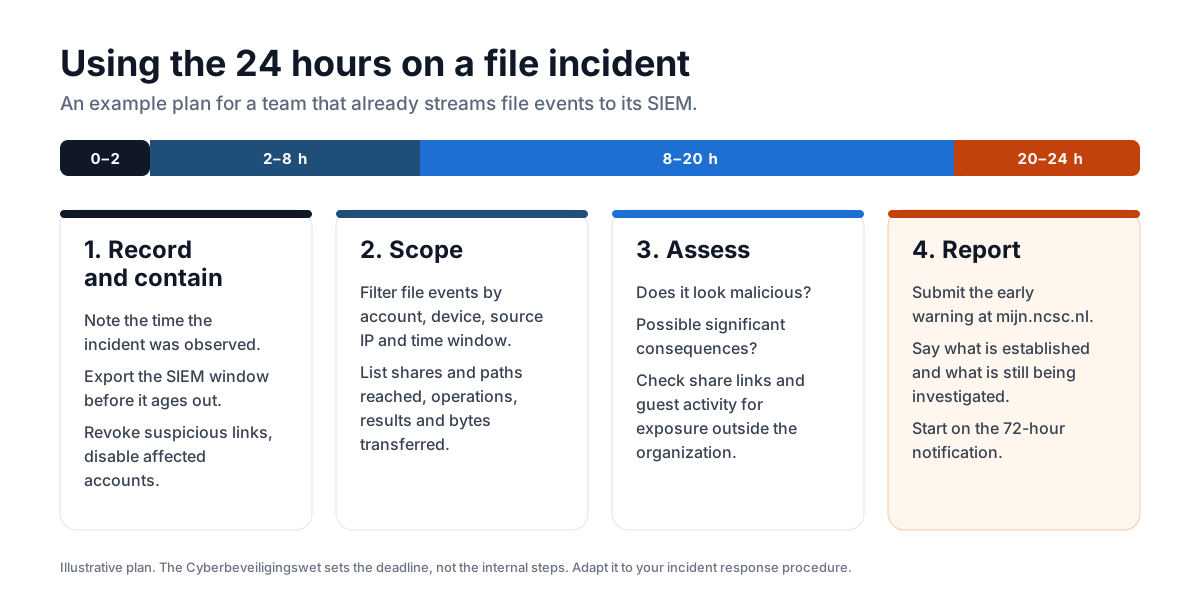
- Hours 0 to 2: record and contain. Write down when the incident was observed, because the 24 hours run from that moment. Export the relevant window from the SIEM so it can't age out. Revoke suspicious share links and disable affected accounts.
- Hours 2 to 8: scope. Filter file events by the affected accounts, devices, source IPs and time window. List the shares and paths reached, the operations and results, and the bytes transferred.
- Hours 8 to 20: assess. Decide whether the event looks malicious and whether it has possible significant consequences. Check sharing events and guest activity for exposure outside the organization.
- Hours 20 to 24: report. Submit the early warning through mijn.ncsc.nl. State what is established and what is still being investigated, and start preparing the 72-hour notification.
Keeping the Data Where the Organization Already Has It
The Cbw does not require data to be held in the Netherlands, and the duty of care is technology-neutral. What it does require is that risks to network and information systems are managed. Copying the file set into an additional platform makes that harder: it adds one more system to secure, monitor and include in the incident scope.
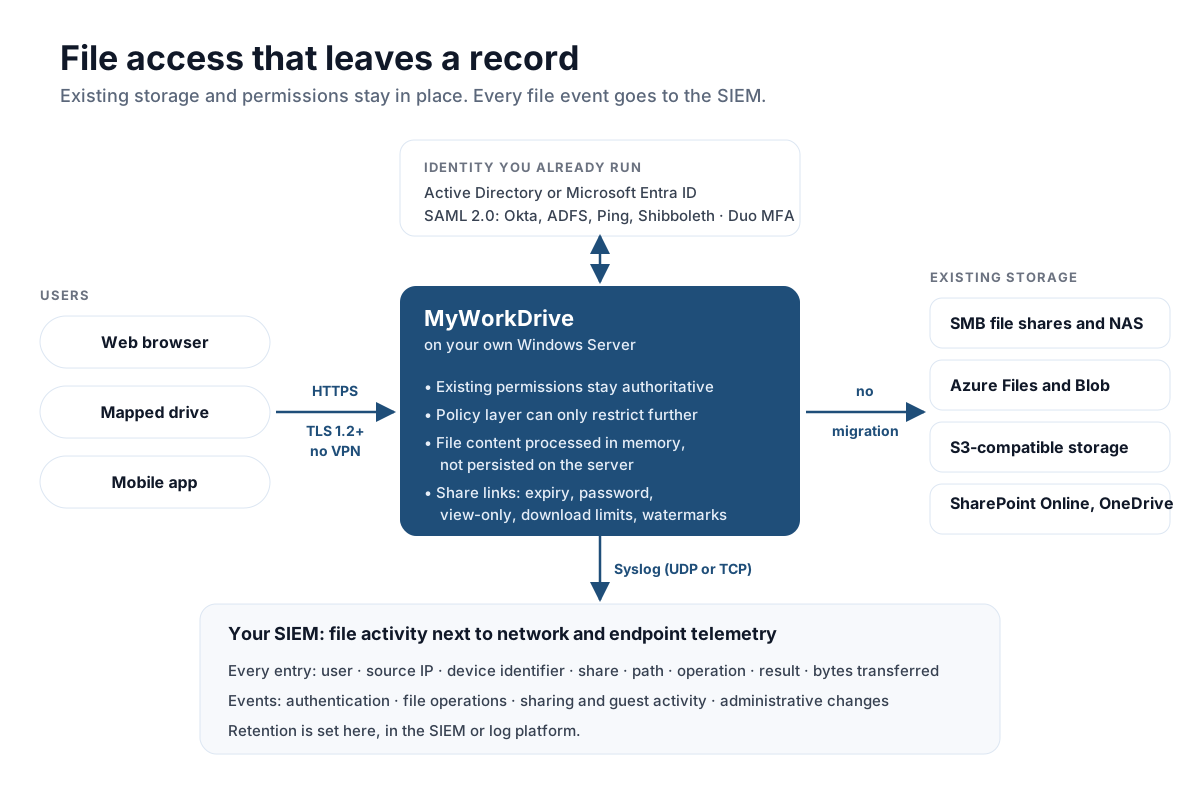
MyWorkDrive installs on a Windows Server the organization already operates and publishes existing storage over HTTPS. It connects to on-premises SMB file shares and NAS, Azure Files and Blob, S3-compatible storage, and SharePoint Online and OneDrive. No data is migrated and no second copy of the file set is created. According to MyWorkDrive's architecture documentation, file content is processed in memory and is not persisted on the application server.
Permissions carry over instead of being rebuilt. MyWorkDrive's existing permissions remain authoritative: the product adds a policy layer that can restrict access further, but it can't grant access that hasn't already been granted. Domain controllers keep authenticating users, and existing Active Directory groups, organizational units and group policies stay in place. Sign-in uses the identity provider already in service, through native Microsoft Entra ID authentication or SAML 2.0 with providers such as Okta, ADFS, Ping and Shibboleth, with native Duo integration for multi-factor authentication. All connections use TLS 1.2 or higher.
Because access runs over HTTPS instead of an extended network tunnel, remote users don't need a VPN client on every device. Their activity lands in the same record as everyone else's, which closes one of the gaps that makes file incidents hard to scope.
Controlling What Leaves, and Recording It When It Does
A lot of the exposure in a file incident doesn't come from an intruder reading a share. It comes from the ordinary movement of files to people outside the organization. NIS2 lists supply chain security among the measures in Article 21, so the data you exchange with suppliers is an explicit part of the duty of care.
MyWorkDrive issues share links against existing shares with:
- expiry after a set number of days
- an optional password
- view-only access, so files can't be saved locally
- a maximum number of downloads per link
Dynamic watermarks show the viewer's name and the exact time of viewing. Link creation, revocation and every access event are logged alongside internal activity. For an organization mapping its dependencies and the data it exchanges with suppliers, that log documents what actually happened, which is not always what the policy said should happen.
Scope and Limitations
- MyWorkDrive provides technical controls and evidence, not compliance. The organization stays responsible for its own compliance program, and no product makes an organization compliant with the Cyberbeveiligingswet on its own. Nothing in this article is legal advice. Whether an organization falls within scope is a legal question.
- Log retention depends on where the Syslog stream goes. Retention is set in the SIEM or log platform, not in the file access layer. Meeting an internal or supervisory retention expectation depends on that platform's configuration.
- Device approval is an allowlist, not a posture check. It applies to MyWorkDrive mapped drive and mobile clients. It doesn't check endpoint compliance, and it doesn't cover browser access. To enforce device posture, use Conditional Access at the identity provider.
- MyWorkDrive can't fix an over-permissive share. It restricts access but never grants more than the underlying storage allows. If a share structure is too open, it stays too open, and the log will record access that shouldn't have been possible.
- SharePoint Online and OneDrive data stays in Microsoft's infrastructure. Connecting them as storage changes the access path and the access record. It doesn't change where the data resides.
Frequently Asked Questions
When did the Cyberbeveiligingswet take effect?
The Cyberbeveiligingswet entered into force on 15 August 2026, together with the Wet weerbaarheid kritieke entiteiten. The Dutch government says it applies to more than 8,000 organizations, and registration in the entity register has been mandatory since that date. Neither the government nor the NCSC announcement mentions a transition period.
What are the Cbw reporting deadlines?
According to the Dutch NCSC infosheet on the reporting duty, an early warning is due as soon as possible and in any event within 24 hours of observing the incident, a notification within 72 hours, and a final report within one month. If the incident is still ongoing after a month, a progress report is enough and the final report follows later. Entities also covered by DORA or the Netcode must give the early warning within four hours.
What is a significant incident under the Cbw?
The NCSC describes a significant incident as one that causes, or can cause, serious operational disruption of services or financial loss for the organization, or considerable material or immaterial damage to other organizations. The NCSC notes that the exact thresholds are still being worked out.
Where do you report an incident under the Cyberbeveiligingswet?
Reports go through the central reporting point at mijn.ncsc.nl. A report of a significant incident is forwarded automatically to the organization's sectoral CSIRT and the competent supervisor.
Does the Cyberbeveiligingswet require data to stay in the Netherlands?
No. The law imposes a duty of care over network and information systems, not a data localization requirement. Organizations with their own residency commitments, whether contractual or sectoral, handle those separately.
Can a standard file server produce the evidence needed for an early warning?
Not as deployed. File system and file share auditing are off by default and need both an audit policy and SACLs on the folders to be watched. When enabled, they produce a high volume of events that makes a targeted question slow to answer, they don't record bytes transferred, and they capture nothing about files that left through routes outside the server.
Does this require migrating data or changing permissions?
No. MyWorkDrive publishes existing shares over HTTPS from a Windows Server the organization already operates. Storage, Active Directory groups and NTFS permissions stay as they are, and the product can restrict access further but cannot grant access that has not already been granted.
Start a free trialBook a demoView pricing

Ron is CEO of MyWorkDrive and a product engineer by background: he spent six years in engineering and product leadership at CData Software, then served as MyWorkDrive's Chief Product Officer before stepping into the CEO role. A Dartmouth College alum, he writes for IT leaders navigating file access, data sovereignty, and enterprise IT strategy.