

By Ron Bhojwani
Last Updated: October 7, 2026
For a long time the honest answer to "can I require MFA before someone opens a file share" was no, not really. Conditional Access governed Microsoft 365 and web applications, and SMB sat outside it. Administrators worked around the problem with VPN sign-in policies or virtual desktops. Some accepted that network location was the only control on the file server.
That has changed. Microsoft Entra Private Access, part of Global Secure Access, publishes internal resources as enterprise applications in Entra ID, and Conditional Access policies apply to those applications the same way they apply to any other app in the tenant. In January 2026 Entra Private Access for Domain Controllers reached general availability, enforcing Conditional Access and multifactor authentication for Kerberos authentication to Active Directory domain controllers. Microsoft has also kept widening endpoint coverage, with the Global Secure Access iOS client reaching general availability in April 2026 and BYOD support for Windows clients using Entra-registered devices following in June 2026.
If you run a managed Windows estate and you want Conditional Access in front of your file shares, this is a good answer and you should use it.
There is one condition, and Microsoft states it plainly in its own documentation. Remote workers can reach these resources without a VPN if they have the Global Secure Access Client installed. The client is not optional, and there is no browser equivalent. Every device that needs to reach an SMB share through Entra Private Access has to be running software your organization installs and maintains.
For most enterprises, that condition determines how much of the user population Entra Private Access can actually reach.
Why Entra Private Access Requires the Global Secure Access Client
The Global Secure Access client requirement is easy to wave away as a deployment detail, so it helps to be precise about what it implies.
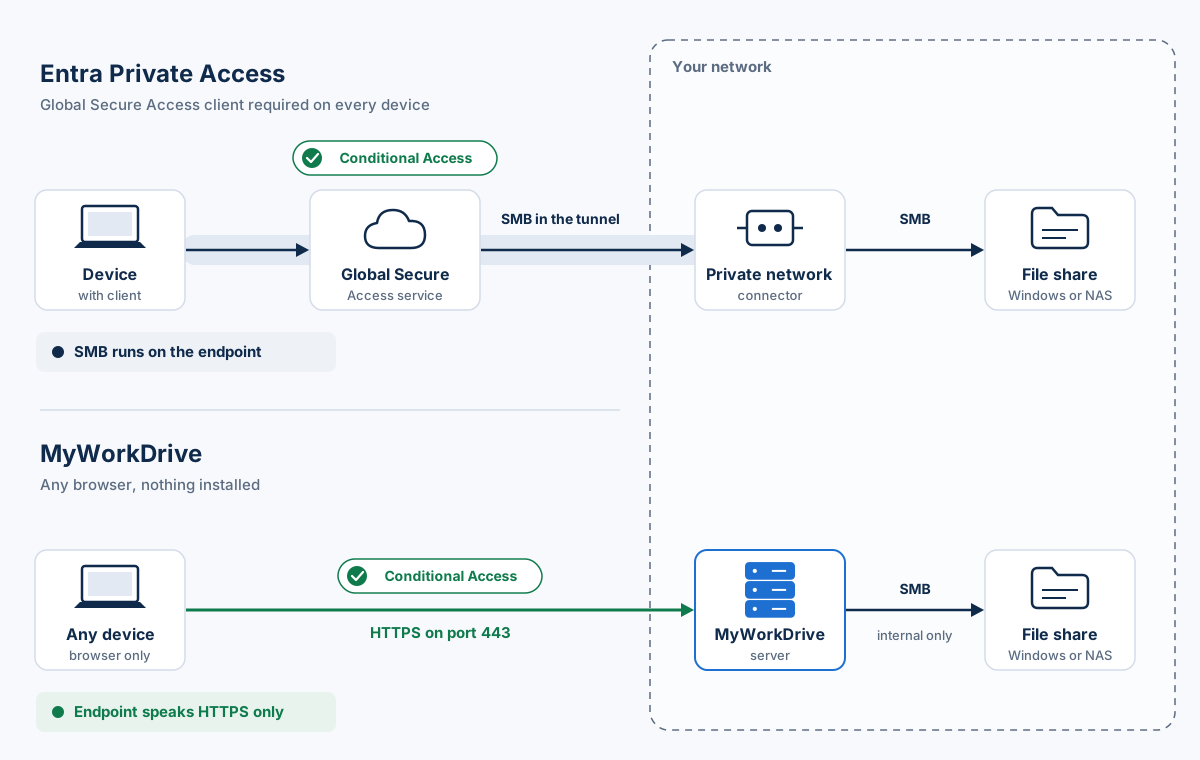
There is no agentless path to a file share. Entra Private Access tunnels traffic from the endpoint to a private network connector you install inside your network, and the tunnel is established by the client. A browser cannot participate. Whatever Conditional Access policies you build, they only ever evaluate sessions coming from devices running that software.
BYOD registration does not remove this. The June 2026 general availability of BYOD support for Windows clients using Entra-registered devices widened which devices can be brought into scope, but a registered personal laptop still needs the client installed to reach an SMB share. Registration affects how the tenant sees the device. Traffic still has to travel through the client.
That leaves a straightforward test for any given population. If you can install and maintain software on the device, Entra Private Access covers it well. If you cannot, there is no configuration that gets you there, and the answer becomes either issue a corporate device, stand up a virtual desktop, or decline the request.
Most mid-sized enterprises have a sizable group of users whose devices fall on the second side of that test.
Conditional Access Stops at the Connection
The second gap is structural. A future release will not close it, because it sits outside what a network access product is for.
Conditional Access decides whether a session is allowed. It evaluates the user, the device, the location, the sign-in risk, and the application, and it either grants or blocks. Once it grants, the user has the share mapped and the file in hand. What happens to that document afterwards is governed by something else entirely.
In practice that means several things a security team usually wants are not available through this route. There is no way to let someone read or edit a document without also allowing them to copy it, because once SMB is mapped the file system is the file system. There is no watermarking, so a document opened on an approved device and photographed on a phone leaves no trace tying the leak back to a user. And there is no path for sending a file to someone outside the tenant: the usual Microsoft route there is to move the document into SharePoint or OneDrive first, which relocates the data out of the controlled share and undermines the reason the file server exists.
Sensitivity labels in Microsoft Purview address part of this, and for organizations that have invested in a labeling program they are a reasonable answer. But they require classification to be applied and maintained, enforcement happens on the client, licensing is separate, and coverage across CAD, engineering, and media formats is uneven. For a file server holding thirty years of mixed project data, labeling every document is a long-running program in its own right.
Architecture teams should also know that Entra Private Access wraps SMB in a tunnel and leaves SMB running on the endpoint. The client still speaks the file protocol, over a controlled path.
Unmanaged Devices That Cannot Run the Global Secure Access Client
These gaps tend to be dismissed as edge cases until someone counts how many people sit in them. In most enterprises the unmanaged population is a permanent group.
External auditors and outside counsel need read access to a defined set of documents for a defined period, on their own firm's laptops, which your Intune tenant will never see. Enrolling them is not on the table, and neither is emailing the documents.
Partner firms and supply chain contacts sit in the same position. An engineering practice exchanging drawings with a client, a manufacturer sharing specifications with a supplier, a contractor reviewing plans: all of them need access to specific shares, and few will accept an agent from your organization on their machines.
Contractors and seasonal staff arrive faster than device provisioning does. A six-week engagement that requires a corporate laptop to be imaged, shipped, and recovered is a cost that frequently exceeds the value of the work.
Clinical, laboratory, and shop floor terminals are often vendor-managed or locked to a validated configuration, and installing additional software on them is either prohibited or triggers requalification. The same applies to a surprising amount of equipment in manufacturing and utilities.
Field and frontline workers on personal phones and tablets are a related case. Microsoft's iOS client reaching general availability in April 2026 helps where you manage the device, but a subcontractor checking a drawing on their own phone at a site is not someone you are enrolling.
These populations remain after a deployment matures, because any large organization with external relationships keeps producing them.
How to Apply Conditional Access to File Shares Without an Agent
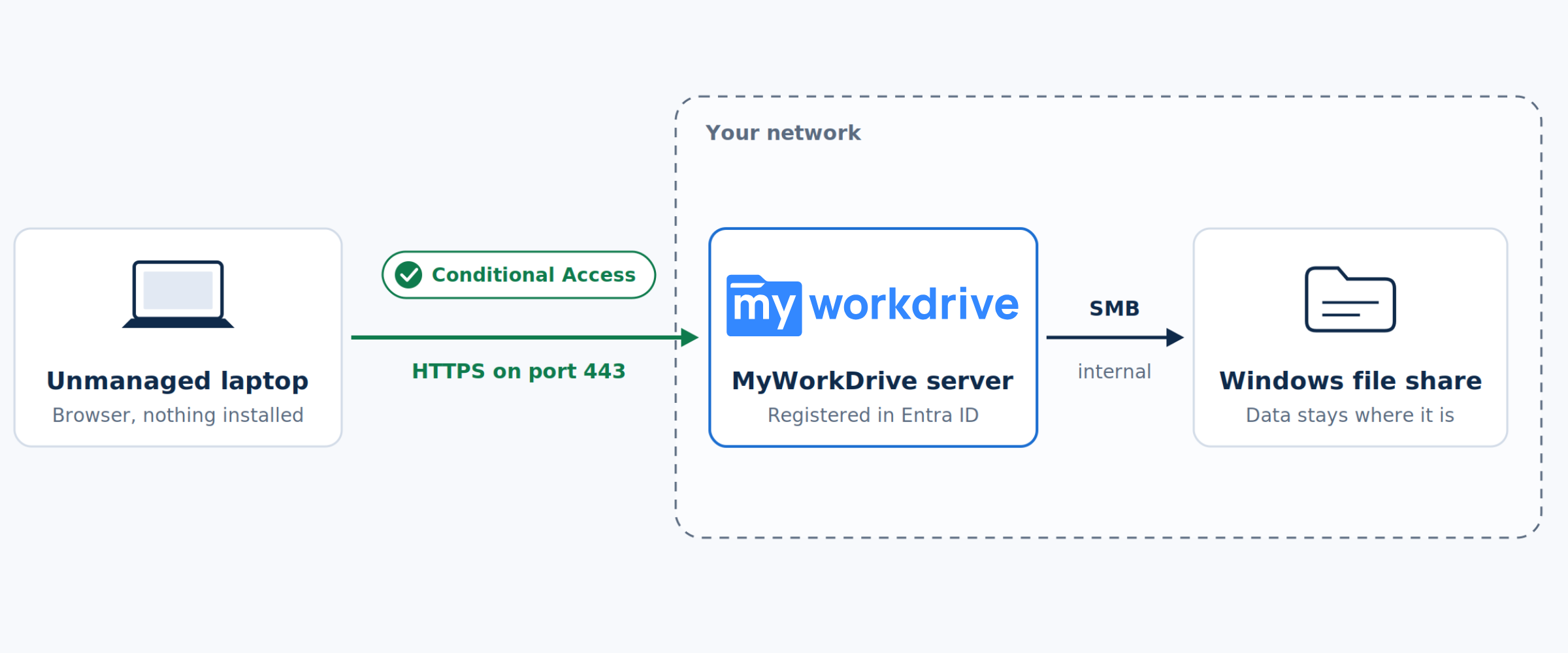
MyWorkDrive takes a different approach to the same problem. Rather than tunneling SMB to the endpoint, it publishes your existing file shares as a web application registered in Entra ID.
Conditional Access applies because the session is an ordinary Entra ID enterprise application sign-in. Multifactor authentication, device compliance, named locations, sign-in risk, session controls, and authentication strength all evaluate exactly as they do for any other app in your tenant. From Entra ID's perspective this is another application, so there is no special case to configure.
The agent requirement disappears because access runs over HTTPS on port 443 in a browser. An auditor, a partner firm, or a contractor signs in through your Entra ID tenant, satisfies whatever Conditional Access policies you have defined for them, and reaches only the shares assigned to them. Nothing is installed. For users who want a mapped drive letter, there is a client, but it is optional and access does not depend on it.
SMB stays inside your network. The endpoint speaks HTTPS, and the MyWorkDrive server speaks SMB on the inside of your network, so the file protocol is never tunneled out to devices. For a security architecture team this is a meaningfully different claim from wrapping SMB in transport security.
Existing permissions carry over as they are. MyWorkDrive honors NTFS permissions and Active Directory group membership as they already stand, so least privilege carries over unchanged. You do not maintain a parallel permission model or run a remapping project, and the data itself does not move. Your files stay on the server, the NAS, Azure Files, or wherever they currently live.
Because file access now runs through an application, controls can operate at the document level. Documents can be made viewable and editable in the browser without permitting download. Watermarking can stamp the viewing user's identity across the page, which changes the calculus on photographing a screen. External share links are issued from the share itself under policy, with expiry and password requirements, so a file can be sent to a client without first being copied into SharePoint. Device approval can restrict the mapped drive and mobile clients to an approved list of endpoints. And file-level events, covering who opened, edited, downloaded, or shared what, export to your SIEM alongside the Entra ID sign-in logs.
That last point carries extra weight under CMMC, CJIS, HIPAA, and similar regimes, where auditors usually want to know what a user did after reaching a share.
Entra Private Access and MyWorkDrive: Which to Use When
It would be a mistake to read this as an argument against Entra Private Access. For managed devices on a managed estate it is a capable product that is well integrated with the rest of Entra ID. If you already license it, use it.
The point is narrower. Entra Private Access answers one question, which is whether a user on a device you control should be allowed to reach a resource. Most enterprises have a second question as well, which is how to give access to people on devices they do not control, and a third, which is how to govern what happens to the document after access is granted. Those are different problems, and a network access product is not built to solve them.
A sensible architecture uses both. Entra Private Access for the managed Windows population, where the client is already deployed and broad internal access is appropriate. MyWorkDrive for everyone else, and for any share where view-without-download, watermarking, external sharing, or file-level audit is a requirement. Both enforce the same Conditional Access policies from the same Entra ID tenant, so the security model stays consistent regardless of which path a user takes.
| Capability | Entra Private Access | MyWorkDrive |
|---|---|---|
| How users connect | Global Secure Access client tunnels traffic to a private network connector inside your network | Browser over HTTPS on port 443; optional mapped drive and mobile clients |
| Software on the endpoint | Required for Private Access traffic (Windows, macOS, Android, and iOS through Microsoft Defender for Endpoint) | None for browser access |
| Conditional Access | Yes, applied to the enterprise application for the private resource | Yes, applied to the MyWorkDrive enterprise application sign-in |
| Protocol on the endpoint | SMB, carried inside the tunnel | HTTPS only; SMB runs between the MyWorkDrive server and your storage |
| View without download | Not part of the product; once the share is mapped, the user has the file | Available with DLP; view-only mode blocks download, copy, and print |
| Watermarking | Not part of the product | Viewer username, timestamp, and custom text |
| Sending files outside the tenant | Usually requires moving the file to SharePoint or OneDrive | Share links from the existing share with expiry, password, and download limits |
| File-level audit | Sign-in and network traffic logs | File open, edit, download, delete, and share events exported to a SIEM over Syslog |
| Best fit | Managed devices that need broad internal access | Unmanaged devices, external users, and shares that need document-level controls |
DLP controls are part of MyWorkDrive Enterprise. Enabling Office Online editing on a DLP share also re-enables printing and clipboard access, so view-only is the stricter setting.
If you want to see what this looks like against your own shares, MyWorkDrive installs on a Windows server in your environment and connects to your existing file shares, SharePoint, Azure Files, or NAS without moving any data. A pilot can be running the same day.
Frequently Asked Questions
Does Conditional Access work with SMB file shares?
Yes. Microsoft Entra Private Access publishes internal resources as enterprise applications in Entra ID, and Conditional Access policies apply to those applications as they do to any other app in the tenant. Multifactor authentication, device compliance, named locations, and sign-in risk are all evaluated. Entra Private Access for Domain Controllers reached general availability in January 2026, extending this to Kerberos authentication against Active Directory domain controllers.
Can I apply Conditional Access to a file share without installing an agent?
Not through Entra Private Access. Microsoft's documentation states that remote workers reach these resources without a VPN if they have the Global Secure Access client installed, and there is no browser equivalent. To reach a file share from an unmanaged device under Conditional Access, the share has to be published as an HTTPS web application instead, which is the approach MyWorkDrive takes.
Does Entra Private Access require a client on every device?
Yes, for access to SMB resources. BYOD support for Windows clients using Entra-registered devices reached general availability in June 2026 and the Global Secure Access iOS client in April 2026, which widened the range of devices that can be brought into scope. Neither change removes the client requirement itself.
Can Conditional Access prevent someone from downloading a file from a share?
No. Conditional Access decides whether a session is permitted. Once the share is mapped, the file system governs what the user can do with the document. Preventing download while still allowing view and edit requires a control that operates at the file level.
What is the difference between Entra Private Access and MyWorkDrive?
Entra Private Access is a Zero Trust network access product. It tunnels SMB traffic from a client on the endpoint to a connector inside your network, and Conditional Access governs whether the tunnel is established. MyWorkDrive publishes file shares as an Entra ID web application over HTTPS on port 443. SMB never reaches the endpoint, no agent is required, and controls such as watermarking, view without download, external share links, and file-level audit operate on the document itself.
Do I have to migrate my files to use Conditional Access on them?
No. Both approaches work against file shares where they currently sit. MyWorkDrive installs on a Windows server inside your network and connects to existing Windows file shares, NAS, SharePoint, OneDrive, and Azure Files, inheriting NTFS permissions and Active Directory group membership without moving data or rebuilding the permission model.
Start a free trialBook a demoView pricing

Ron is CEO of MyWorkDrive and a product engineer by background: he spent six years in engineering and product leadership at CData Software, then served as MyWorkDrive's Chief Product Officer before stepping into the CEO role. A Dartmouth College alum, he writes for IT leaders navigating file access, data sovereignty, and enterprise IT strategy.