

By Ron Bhojwani
Last Updated: November 24, 2026
You can't open a Word, Excel or PowerPoint file straight from an S3 bucket in a browser editor. Office for the web, ONLYOFFICE and Collabora Online all need a host: a server that signs the user in, hands the editor the file, holds the edit lock and writes each save back. In Microsoft's protocol that server is called a WOPI host, and a bucket can't be one, because it only stores objects and answers S3 API calls. The way to edit documents in S3 without moving them is to put a host in front of the bucket. MyWorkDrive Server 7.3 and later does this for Amazon S3 and S3-compatible storage. The bucket appears to users as an ordinary share, documents open in a browser editor, and every object stays in the bucket under its own name.
This guide explains why object storage can't serve an editor on its own, how editing works through MyWorkDrive, what to configure for Wasabi, Backblaze B2, Cloudflare R2 and MinIO, and how permissions, versioning and locking behave on each backend.
| Approach | How it works | Files moved? | Lock between users? | Main drawback |
|---|---|---|---|---|
| Download, edit, upload | Users pull the file from the console or a client, edit it in desktop Office, then upload it again | A copy lands on every laptop | No | The last upload silently wins, and stray copies pile up on endpoints |
| Drive-mounting tool on each PC | A client presents the bucket as a local drive | Often cached on the device | Usually not shared across users | An install on every device, and no browser editing |
| Migrate to another platform | Move the files into SharePoint, OneDrive or a sync-and-share product | Yes | The platform's own | A migration project, new permissions, and sometimes storage only that platform can read |
| Host in front of the bucket | MyWorkDrive publishes the bucket as a share and acts as the host for a browser editor | No | Yes, for everyone working through MyWorkDrive | Users should reach the bucket only through MyWorkDrive, so its locks cover everyone |
Why Object Storage Cannot Act as a WOPI Host
WOPI, the Web Application Open Platform Interface, is the protocol Microsoft built so that its browser editors could work on files held by someone else's storage. The editor is the WOPI client. The storage side is the WOPI host, and it has to run a small web service that answers the editor's calls. Office for the web, Office Online Server and Collabora Online all use WOPI. ONLYOFFICE Docs has its own integration API, built on a document key and a callback address, and it supports WOPI as well. Whichever protocol is used, the editor stores nothing itself and depends on the host for every read and write.
Microsoft's WOPI requirements list the operations a host must implement before users can edit: "CheckFileInfo, GetFile, PutFile, PutRelativeFile, Lock, Unlock, UnlockAndRelock, RefreshLock". Each is an HTTPS request to the host's WOPI service, and the host has to run code to answer it. An S3 bucket exposes the S3 API and nothing else, so there is no place for that code to run. Even with a translation layer in between, a bucket lacks four things a WOPI host has to provide.
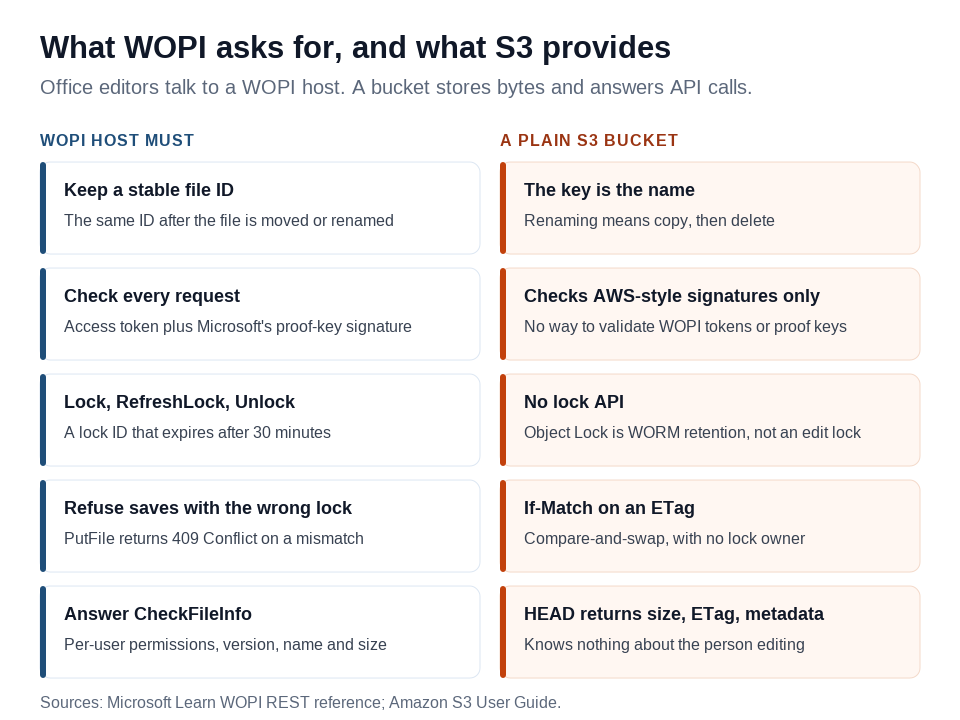
1. A file ID that survives a rename. Microsoft's WOPI concepts page says a file ID must "remain the same when the file is moved or renamed." In S3 the key is the file's name and path. General purpose buckets have no rename operation, so renaming a file means copying it to a new key and deleting the old one. AWS added an atomic RenameObject call in June 2025, but it works only for the S3 Express One Zone storage class.
2. Locks with an owner and an expiry. A WOPI host stores a lock ID for each file being edited, rejects saves that carry the wrong ID, and drops the lock if the editor stops renewing it.
“WOPI locks must automatically expire after 30 minutes if not renewed by the WOPI client.”
S3 has no equivalent. AWS says so directly in the Amazon S3 User Guide:
“Amazon S3 does not support object locking for concurrent writers.”
The feature called S3 Object Lock is a different thing. It is write-once-read-many retention for compliance and ransomware protection, and it stops versions from being deleted. It doesn't tell a second user that a document is already open.
3. Saves that respect the lock. When a lock doesn't match, PutFile must return 409 Conflict with the current lock in an X-WOPI-Lock header. S3 came closer to this in 2024, when AWS added conditional writes: If-None-Match in August and If-Match, which fails a write if the object's ETag has changed, in November. That is optimistic concurrency. It can stop one save from overwriting another, but it has no lock owner, no expiry and no "file in use" message for the second person.
4. An answer about the user. CheckFileInfo returns details about the person editing, such as whether that user can write to the file. Every request also carries an access token that the host must validate, and requests from Microsoft 365 for the web carry proof-key signatures that the host must verify. A bucket authenticates access keys, not employees, and can check only AWS-style request signatures.
There is also a program rule. Microsoft makes Office for the web available to third-party storage through its Cloud Storage Partner Program, and the program overview says it is "not open to Microsoft 365 customers directly." An organization that writes its own WOPI host for its own bucket still can't plug Microsoft's editor into it. That leaves three realistic routes: a self-hosted editor behind a host you control, a vendor that stages the file in your Microsoft 365 tenant, or migration.
Editing Documents in Amazon S3 Without Migrating Data
MyWorkDrive is a file access server that you install on Windows Server in your own environment. It started with SMB file shares, and the server release notes record S3 support in version 7.1, a built-in S3 connector in the 7.3 preview of July 2026, and Wasabi and Cloudflare R2 support in 7.3.1.74 in October 2026. The connector reads and writes the bucket with an access key and secret. According to MyWorkDrive's S3 storage guide, "No data is ever cached or stored on the MyWorkDrive server, or sync'd out to clients." Files move in memory as users open them and are written back to the bucket when they change.
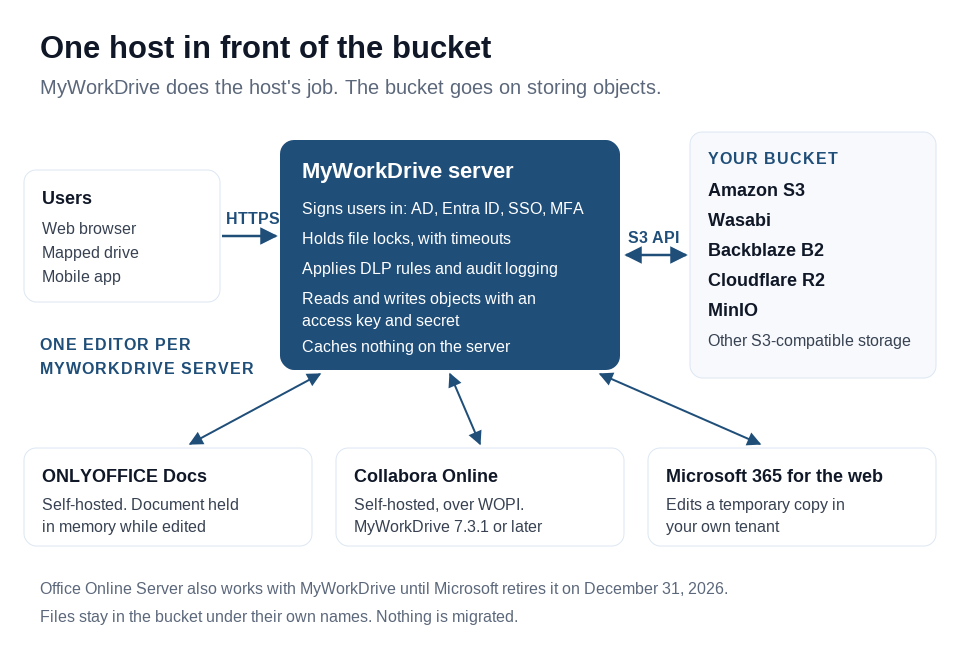
For editing, MyWorkDrive does the host's job. It signs the user in, decides whether that user may edit, passes the document to the configured editor, holds the lock, and writes the saved result back to the same object key.
| Duty | The bucket on its own | With MyWorkDrive in front |
|---|---|---|
| Sign the user in | Knows access keys, not people | Active Directory, Entra ID or SAML single sign-on, with MFA |
| Decide who may edit | A key's policy applies to every person using that key | Share assignment by user or group, with download, online editing and sharing set per group |
| Give the editor the file | No editor integration | Reads the object through the S3 API and passes it to the editor in memory |
| Hold the edit lock | No lock API | MyWorkDrive locks with timeouts, renewed while the user stays connected |
| Write the save back | A PUT replaces whatever is there | Writes to the same key, under the lock |
| Record the access | Provider access logs, if you turn them on | Every open, edit and save in MyWorkDrive's logs, with Syslog forwarding to a SIEM |
Setting up an S3 share for editing
The S3 storage guide walks through the admin screens. In outline:
- Create an access key for MyWorkDrive alone. Scope it to the bucket you plan to publish, with permission to list, read, write and delete objects. Delete is needed because a rename or move in S3 is a copy followed by a delete.
- Add the provider under Integrations. Give it a name you'll recognize, choose the provider from the list, and enter the access key, secret key and region. Some providers ask for extra details, covered in the next section.
- Add a share. Choose S3 Compatible Storage as the storage type, pick the provider you just created, and enter the bucket name. A subfolder path is optional and publishes one prefix instead of the whole bucket. Share names can't be changed later, so choose the name users should see.
- Choose who sees the share. Select users and groups from your identity provider, then set per-group options such as download, online editing and public sharing. The guide is explicit that this step doesn't control access to the bucket, which the key and secret do. It controls who sees the share in MyWorkDrive.
- Pick the editor in the admin panel. A MyWorkDrive server runs one online editing provider at a time.
- Pilot with real files, including large Excel workbooks, presentations with embedded media and documents with tracked changes, before you open the share to everyone.
Choosing an editor
The editor decides where the document sits while someone works on it. MyWorkDrive's editing comparison covers each option in detail.
| Editor | Where the document is during editing | Licensing | MyWorkDrive requirement |
|---|---|---|---|
| ONLYOFFICE Docs, self-hosted | In memory on the ONLYOFFICE server you run | ONLYOFFICE Docs Developer Edition for supported production use | Server 7.3 or later for S3 shares. Setup guide |
| Collabora Online, self-hosted | In memory on the Collabora server you run | Collabora Online | Server 7.3.1 or later, over WOPI. Setup guide |
| Microsoft 365 for the web | A temporary copy in the user's OneDrive or a dedicated SharePoint site in your tenant, deleted when the session ends | Microsoft 365 licenses that include the web apps | OneDrive mode or SharePoint service mode. Setup guide |
| Office Online Server, self-hosted | In memory on your Office Online Server | Office volume licensing | Microsoft retires the product on December 31, 2026, and MyWorkDrive ends its integration on the same date |
For buckets that hold regulated data, the self-hosted editors keep the whole session on infrastructure you operate, which suits data sovereignty requirements. Microsoft 365 for the web gives users the editor they already know, at the cost of a short-lived copy inside your tenant. Our post on editing on-premises files in Microsoft 365 explains where that copy lives and for how long. For a side-by-side of the editors themselves, see ONLYOFFICE vs Collabora vs Office for the web.
Users who prefer desktop Office can still use it. They can open the file from the MyWorkDrive web client in locally installed Office, or work from a drive letter, because MyWorkDrive also maps an S3 bucket as a Windows drive.
Wasabi, Backblaze B2, Cloudflare R2, and MinIO Configuration Notes
The S3 storage guide names Amazon S3, Backblaze B2, Cloudflare R2 and Wasabi as supported providers and invites customers to ask about others. Every provider speaks the S3 API, but they differ on endpoints, keys, versioning and billing. Those differences matter more for documents than for backups, because an edited document is overwritten many times.
| Provider | S3 endpoint | Keys for MyWorkDrive | Object versioning | Retention lock | Watch for |
|---|---|---|---|---|---|
| Amazon S3 | s3. | IAM access key, scoped by policy | Off by default, enabled per bucket | S3 Object Lock | Every version is billed as a full object |
| Wasabi | s3. | Access key from the Wasabi console | Off by default, enabled per bucket | Object Lock, chosen when the bucket is created | Minimum storage duration: 90 days pay-as-you-go, 30 days Reserved Capacity |
| Backblaze B2 | s3. | A standard application key. The master key doesn't work with the S3 API | Always on | Object Lock | Old versions stay until a lifecycle rule removes them |
| Cloudflare R2 | <ACCOUNT_ID>. | Access key ID and secret from an R2 API token | Not supported | Bucket locks by prefix, not S3 Object Lock | An overwrite replaces the previous content for good |
| MinIO | Your own server's HTTPS address, path-style by default | An access key created on your MinIO server | Enabled per bucket | Object Lock | The community edition's repository was archived in April 2026 |
The MyWorkDrive admin form asks for an access key, secret key and region, and the S3 storage guide notes that some providers need more information, so have the endpoint or account details on hand before you start. For Wasabi and Cloudflare R2, run MyWorkDrive Server 7.3.1.74 or later.
Wasabi
- Use the endpoint for your bucket's region. Wasabi's service URL list gives one per region, such as s3.us-east-1.wasabisys.com.
- Price in the minimum storage duration. On pay-as-you-go pricing, Wasabi bills each object for at least 90 days, and 30 days on Reserved Capacity Storage. On a bucket without versioning, Wasabi's pricing FAQ treats an overwrite as a deletion: the replaced copy moves to deleted storage and is billed for the rest of the period. One document saved a few times costs next to nothing. A share where hundreds of large workbooks are saved all day long will show up on the bill.
- Decide on Object Lock at creation. Wasabi turns versioning on per bucket, but Object Lock can only be enabled when the bucket is created.
- Egress is free as long as monthly downloads don't exceed your active storage volume.
Backblaze B2
- Create a standard application key. Backblaze's S3-compatible key documentation states that "The master app key that is automatically created by the system is not supported in the S3-Compatible API." Restrict the new key to the bucket you are publishing.
- Expect every save to be kept. Backblaze says its buckets "are always versioned by default." That gives you recovery from a bad save without any setup, and it means storage grows with every edit until a lifecycle rule removes prior versions. B2 lifecycle rules are set in the Backblaze web console or through its Native API, not the S3 API.
- There is no minimum storage duration fee, and egress is free up to three times your average monthly stored data, according to Backblaze pricing.
Cloudflare R2
- Build the endpoint from your account ID. The endpoint is
https://<ACCOUNT_ID>.r2.cloudflarestorage.comand the region isauto. The access key ID and secret come from an R2 API token, which can be limited to one bucket. - Plan for no versioning. Cloudflare's S3 compatibility list shows PutBucketVersioning and GetBucketVersioning as unimplemented. When a user saves, the previous content is gone, so protect edited prefixes with a scheduled backup to a second bucket or provider.
- Keep bucket locks off prefixes that users edit. R2 bucket locks "prevent the deletion and overwriting of objects," so a lock on an active folder would make every save fail. They suit archive prefixes.
- R2 charges nothing for egress, and its PutObject supports If-Match and If-None-Match conditional writes.
MinIO
- Use a certificate the MyWorkDrive server trusts. MinIO runs on hardware you control, so documents never leave your premises. The endpoint is your own server's address, and the MyWorkDrive server has to trust its TLS certificate.
- Expect path-style requests. MinIO accepts only path-style requests unless MINIO_DOMAIN is configured for virtual-hosted addressing.
- Check the edition you run. MinIO removed the embedded admin console from the community edition in May 2025 and moved features such as LDAP and OIDC sign-in to its commercial AIStor product, switched the community edition to source-only distribution in October 2025, and archived the community repository on April 25, 2026. A production document store needs a supported build, whether that is AIStor or another S3-compatible server.
- Confirm support first. MinIO isn't among the providers named in MyWorkDrive's S3 storage guide, although the storage connections page lists it. Ask MyWorkDrive support to confirm your setup before a production rollout.
Preserving Native Object Layout Instead of Opaque Object IDs
How a platform writes files into a bucket decides whether anything else can read them. There are two common designs.
Opaque object IDs. Some collaboration platforms use the bucket as a blob store. Each file becomes an object named after an internal ID, and the file names, folder tree and permissions live only in the application's database. Nextcloud works this way when S3 is configured as its primary storage. Its admin manual says that "All metadata (filenames, directory structures, etc) is stored in Nextcloud and not in the object store," and the object store "only holds the file content by unique identifier." In Nextcloud's code, that identifier is urn:oid: followed by the file ID. ownCloud Infinite Scale's S3 driver follows a similar pattern: file contents go to the bucket under generated IDs, and metadata stays on a separate POSIX file system.
Native layout. The object key is the folder path plus the file name, so the bucket reads like a file share to any S3 tool.
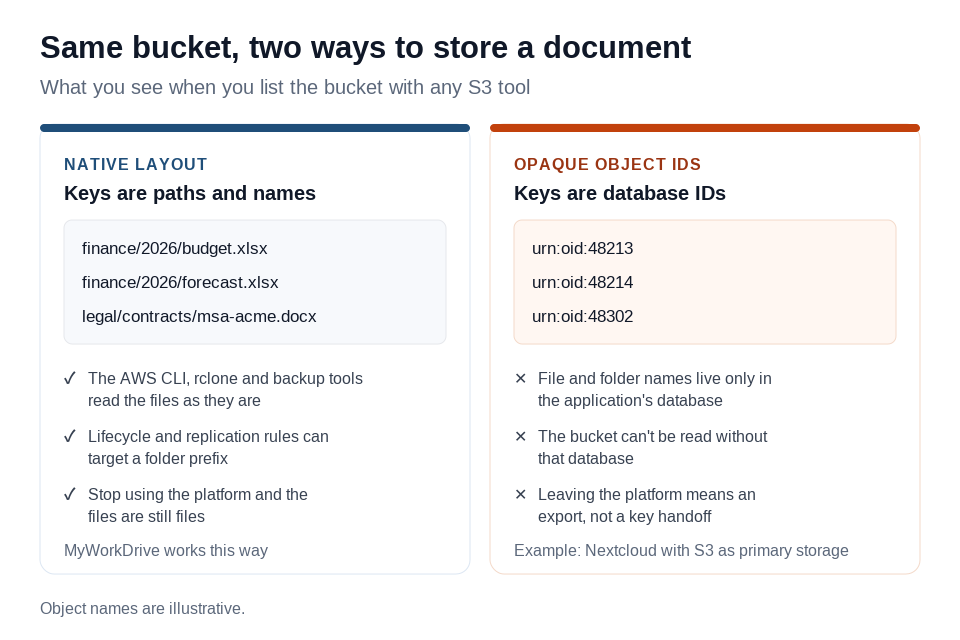
MyWorkDrive uses the native layout. It publishes a bucket that already exists, or a prefix inside one, and the folders users see are the prefixes in the bucket. A document saved as Finance/2026/budget.xlsx through MyWorkDrive is the object with that key, so you can confirm the layout during your pilot with a plain listing such as aws s3 ls s3://your-bucket/Finance/2026/. Because MyWorkDrive holds no copy and no database of file contents, removing it leaves the bucket exactly as usable as before.
| Task | Native layout | Opaque object IDs |
|---|---|---|
| Back up or restore one file | Copy or restore the object by its name | Look the ID up in the application database first, and keep bucket and database backups in step |
| Lifecycle and replication rules | Target a prefix such as archive/ or legal/ | Rules can't tell one department's files from another's |
| Feed other tools | Analytics, search and AI pipelines read the same objects users edit | Other tools need an export or the platform's API |
| Switch platforms | Point the new tool at the same bucket | Export every file and rebuild the folder tree |
| Rename a large folder | Slow: S3 copies and deletes every object under the prefix | Fast: only database rows change |
The last row is the price of a native layout. Renaming a folder that holds thousands of objects takes time and API requests, because S3 has no rename for general purpose buckets. Plan folder structures before you publish a bucket to users, and do large reorganizations with S3 tools outside working hours. If you are moving off a platform that stores opaque IDs, our Nextcloud alternative page compares the two approaches.
Permissions, Versioning, and Locking Across S3 Backends
The access key sets the ceiling for permissions
Access to an S3 share has two layers. The bucket layer is the access key you gave MyWorkDrive: whatever that key can't do, no user can do through the share. The user layer is MyWorkDrive's share assignment and per-group settings, plus data leak prevention controls that can block download, printing and Save As, or disable online editing for some groups.
What S3 doesn't have is NTFS-style permissions on individual files and folders. Everyone assigned to an S3 share gets the same rights inside it. To separate departments, publish separate buckets, or separate prefixes as separate shares, each assigned to its own groups. AWS IAM policies can also confine a key to one prefix. Other providers' key scoping varies, so check yours before you design around it. If your data is mostly on Windows file servers today, our guide to NTFS permissions and ACL management explains the model you'd be leaving behind for these shares.
Versioning stores every save as a full object
Turn versioning on before users start editing. With versioning enabled, an overwritten object isn't lost: the previous content becomes a noncurrent version that you can restore. AWS's versioning documentation makes the cost clear:
“Each version of an object is the entire object; it is not just a diff from the previous version.”
Source: Amazon S3 User Guide, Retaining multiple versions of objects
Editing makes this add up quickly. In Microsoft 365 for the web mode, MyWorkDrive copies changes from the staged copy back to the source while the session is still open, not only when it closes, as our Microsoft 365 editing post describes. A long session on a versioned bucket can therefore leave many versions of one workbook. Whichever editor you use, a busy document collects new versions every working day. Three practical rules:
- Add a lifecycle rule for noncurrent versions as soon as you enable versioning. On AWS, a NoncurrentVersionExpiration rule can expire noncurrent versions after 30 days while always keeping the newest 20, for example. The provider notes above cover Wasabi, Backblaze B2 and Cloudflare R2.
- Remember that versioning can't be switched off later. AWS says a version-enabled bucket "can never return to an unversioned state", only be suspended.
- Restore from the provider, not from MyWorkDrive. MyWorkDrive's Previous Versions feature reads Volume Shadow Copy snapshots on Windows file servers and isn't supported on S3 shares. Restore an earlier version of a document with your provider's console or CLI.
S3 Object Lock is worth considering for ransomware protection, since it stops versions from being deleted during a retention period. Combined with frequent saves, though, it also stops you from expiring versions you no longer want, so size the retention period with storage cost in mind. Our post on ransomware prevention for file shares covers the wider defense.
Only MyWorkDrive coordinates locks, so route everyone through it
Because S3 has no lock API, every lock on an S3 share lives inside MyWorkDrive. The file locking guide sets a 15-minute timeout for documents opened in desktop Office and 20 minutes for documents opened in Office 365. The lock renews as long as the user's client stays connected and clears itself after a disconnect. Administrators can see current locks on the Shares tab of the admin panel.
Those locks protect only people who work through MyWorkDrive. A script, sync tool or second application writing to the same bucket with its own keys never sees them. MyWorkDrive's guidance for all non-SMB storage is the same:
“It is advised when using Non-SMB Storage to exclusively provide access via MyWorkDrive, as the internal locking in MyWorkDrive will ensure file locks are accurately handled across users and enable Co-Editing (when Office Online editing is enabled).”
Source: MyWorkDrive File Locking Details
Co-editing works inside the browser editor: several people can work on the same document at once, and anyone who tries to open it another way gets the standard "in use" message. Keep automated writers on separate prefixes, or give them read-only keys. Every open and save on the share is also recorded in MyWorkDrive's file access audit logs, which you can forward to a SIEM over Syslog.
Frequently Asked Questions
Can you edit Word or Excel files directly in Amazon S3?
Not directly. S3 stores objects and has no editor or edit lock of its own. To edit a document in a browser without downloading it, put a host such as MyWorkDrive in front of the bucket. It signs the user in, passes the file to ONLYOFFICE, Collabora Online or Microsoft 365 for the web, holds the lock, and writes the save back to the same object.
Why can't an S3 bucket act as a WOPI host?
A WOPI host is a web service that answers editor calls such as CheckFileInfo, PutFile and Lock. A bucket only answers S3 API requests and can't run that code. S3 also has no lock API, its keys change when a file is renamed, and it authenticates access keys rather than the individual user, all of which a WOPI host has to handle.
Does S3 Object Lock stop two people from editing the same file?
No. S3 Object Lock is write-once-read-many retention that prevents object versions from being deleted or overwritten for a set period. It has no concept of a user having a file open. Edit locking has to come from the application in front of the bucket.
Do I have to migrate files out of S3 to edit them in a browser?
No. MyWorkDrive publishes the existing bucket, or a folder inside it, as a share, and documents open in a browser editor from there. The files stay in the bucket, and MyWorkDrive doesn't cache or sync copies to its server or to user devices.
Which S3-compatible providers work with MyWorkDrive?
MyWorkDrive's S3 storage guide names Amazon S3, Backblaze B2, Cloudflare R2 and Wasabi, and asks customers using other S3-compatible services such as MinIO to check with MyWorkDrive. Wasabi and Cloudflare R2 support was added in MyWorkDrive Server 7.3.1.74 in October 2026.
Will files saved through MyWorkDrive still be readable by other S3 tools?
Yes. MyWorkDrive keeps the bucket's native layout, so a file saved as Finance/2026/budget.xlsx is stored under that object key. The AWS CLI, rclone, backup software and other applications see the same files that users edit.
Does S3 versioning keep a copy of every save?
Yes, if versioning is enabled on the bucket. Each save creates a new version that is stored and billed as a complete object. Add a lifecycle rule that expires older noncurrent versions, and restore earlier versions through your storage provider, because MyWorkDrive's Previous Versions feature doesn't support S3 shares.
Which MyWorkDrive version do I need to edit documents in S3?
MyWorkDrive Server 7.3 or later, which includes the built-in S3 connector. Use 7.3.1.74 or later for Wasabi and Cloudflare R2, and 7.3.1 or later to use Collabora Online as the editor.
Start a free trialBook a demoView pricing