

Ransomware targeting enterprise file shares is one of the fastest-growing threats to business continuity. Once an attacker gains a foothold on a single endpoint, they move laterally across SMB connections to encrypt shared folders - often crippling entire departments in minutes. Effective ransomware prevention for file shares starts with eliminating the conditions that allow that lateral movement: over-permissioned accounts, exposed SMB ports, and broad network-level access via VPN. Organizations focused on protecting network file shares and SMB ransomware mitigation must adopt a defense-in-depth approach that addresses each stage of the attack chain.
- Block lateral movement by replacing VPN with application-level HTTPS access on port 443
- Enforce least-privilege NTFS permissions so users can only reach the files they need - nothing more
- Detect and respond faster with unified audit logging, file activity alerts, and SIEM integration
What Is Ransomware Prevention for File Shares?
Ransomware prevention for file shares is a set of controls designed to stop malicious encryption of data stored on network shares. It combines least-privilege access, network segmentation, application-layer access controls, and continuous monitoring to limit what a compromised account can reach. By restricting access to only the files a user needs - and eliminating direct SMB exposure to the internet - organizations reduce the blast radius of any single compromised endpoint. These measures form the foundation of an effective ransomware defense for file servers strategy.
How Ransomware Attacks File Shares
Understanding the ransomware attack chain is essential before implementing prevention measures. Ransomware does not encrypt file shares at random - it follows a predictable sequence of steps that exploit common weaknesses in enterprise environments.
Ransomware Attack Flow: How It Spreads Across File Shares
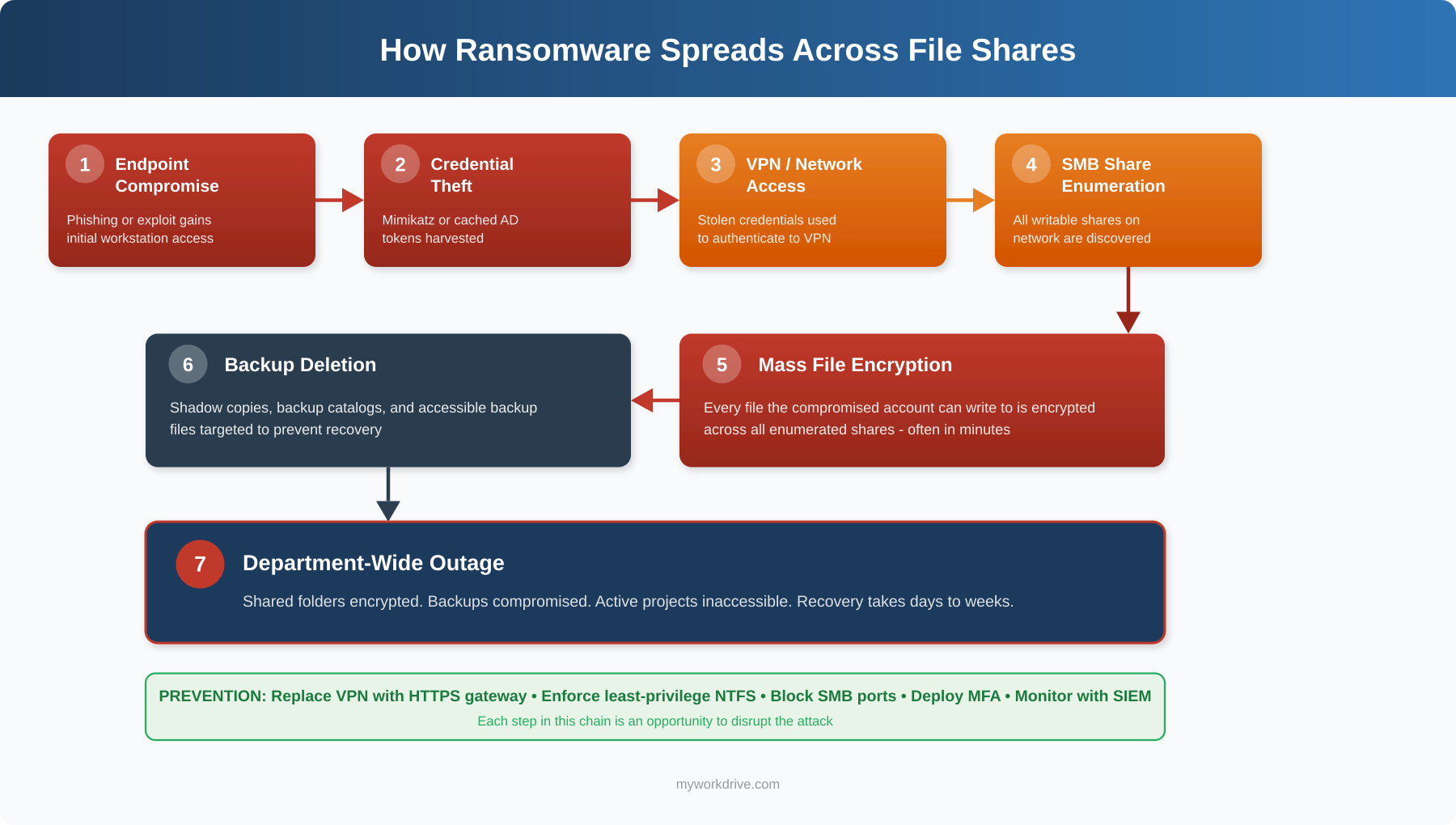
The diagram above illustrates the full ransomware attack chain against file shares. What makes this sequence so damaging is its speed - steps 4 through 6 can execute in minutes once an attacker has valid credentials. The critical insight for defenders is that every stage represents a breakable link. Blocking SMB ports stops enumeration at step 4. Enforcing least-privilege NTFS permissions limits encryption at step 5 to only the folders one account can reach. Maintaining immutable backups neutralizes the leverage created at step 6. The most resilient organizations don't rely on stopping the attack at a single point - they layer controls across the entire chain so that a failure at one stage doesn't cascade into a department-wide outage.
Ransomware families like WannaCry, NotPetya, and Ryuk each followed variations of this pattern, exploiting open SMB connections and over-permissioned accounts to maximize the blast radius of a single compromised endpoint. Understanding this attack flow is the foundation for building effective file share ransomware protection.
Why It Matters to IT and Security Teams
File shares remain the primary repository for unstructured enterprise data. When ransomware encrypts those shares, the operational impact is immediate: users lose access to active projects, regulated records become unavailable for compliance, and recovery timelines stretch from hours into weeks. The CISA #StopRansomware Guide specifically recommends blocking SMB ports (TCP 445, 137-139) at internet perimeter firewalls and enforcing least-privilege access as foundational defenses.
Why Ransomware Prevention for File Shares Matters
For IT Directors
Ransomware incidents that hit file shares create cascading disruptions. Restoring from backup is rarely instant - and testing backup integrity under pressure introduces additional risk. Organizations that implement least-privilege file share access reduce their mean time to contain an incident because the blast radius is already limited by design.
For CISOs and Security Teams
Cyber insurance underwriters now scrutinize how organizations control access to shared storage. Policies increasingly penalize broad network-access VPNs and favor file-level, identity-verified controls. Implementing Zero Trust file access aligns with both NIST SP 800-207 Zero Trust Architecture guidance and insurer expectations.
For System Administrators
Maintaining dozens of VPN tunnels, troubleshooting split-tunneling issues, and managing firewall rules for SMB traffic creates ongoing operational overhead. Application-level file access over HTTPS simplifies the stack while simultaneously reducing the attack surface. This approach also supports secure remote file access without the complexity of traditional VPN infrastructure.
Common Challenges and Risks
- Over-permissioned accounts and inherited share access. Many organizations inherit broad "Everyone" or "Authenticated Users" permissions from years of organic file share growth. A single compromised account with excessive access becomes a vehicle for mass encryption.
- Direct SMB port exposure. VPN connections place remote users on the internal network, where SMB ports (445, 137-139) are reachable. Ransomware families like WannaCry and NotPetya specifically exploited open SMB to propagate across networks.
- Lack of visibility into file activity. Without centralized logging, IT teams cannot detect the early signs of a ransomware attack - rapid file renames, mass deletions, or unusual access patterns - until the damage is extensive.
- Stale permissions and dormant accounts. Former employees, expired contractor accounts, and abandoned service accounts retain access to sensitive shares. Attackers exploit these forgotten credentials as low-profile entry points.
- Inconsistent backup and recovery testing. Even organizations with backup policies may not test restores regularly, leading to unpleasant surprises during an actual incident.
- VPN as a single point of failure. A compromised VPN credential grants broad network access, not just file access. Lateral movement from a VPN-connected endpoint to domain controllers and file servers is a well-documented ransomware playbook.
Traditional Defenses vs. Zero Trust File Access
Organizations evaluating ransomware protection for SMB shares must understand how traditional defenses compare to modern Zero Trust approaches. Each strategy carries different levels of risk, complexity, and effectiveness against lateral movement.
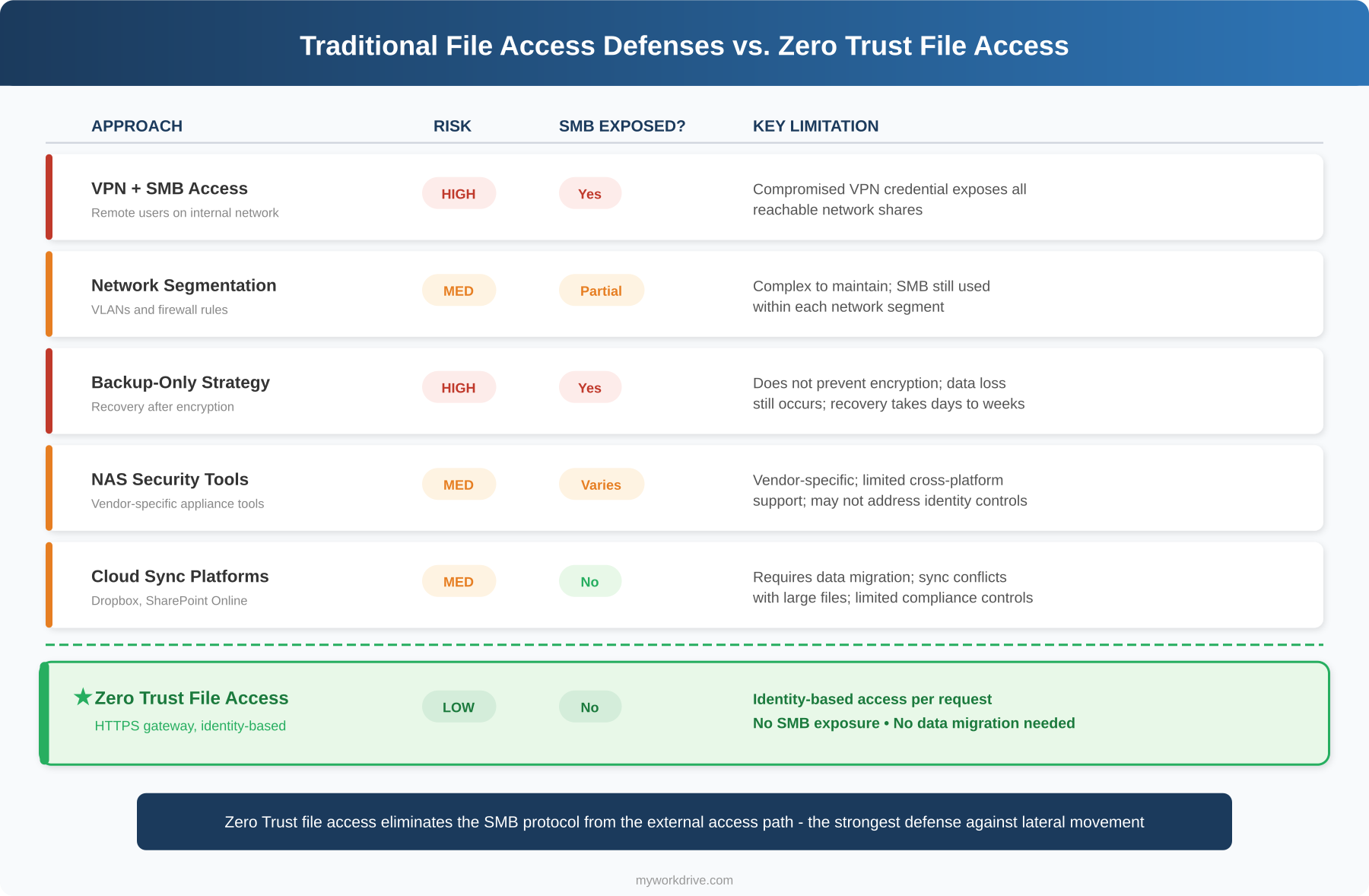
The following table summarizes the risk profile of each approach for quick reference:
| Approach | Risk Level | SMB Exposure | Limitations |
|---|---|---|---|
| VPN + SMB Access | High | Full | Grants broad network access; compromised VPN credential exposes all reachable shares |
| Network Segmentation | Medium | Partial | Reduces blast radius but is complex to maintain; SMB still used within segments |
| Backup-Only Strategy | High | Full | Does not prevent encryption; data loss still occurs; recovery can take days or weeks |
| NAS Security Tools | Medium | Varies | Vendor-specific; limited cross-platform support; may not address identity controls |
| Cloud Sync Platforms | Medium | None | Requires data migration; sync conflicts with large files; limited compliance controls |
| ★ Zero Trust File Access | Low | None | Identity-based access per request; no SMB exposure; no data migration required |
Zero Trust file access, delivered through an HTTPS file access gateway, provides the strongest defense against ransomware lateral movement because it eliminates the SMB protocol from the external access path entirely.
Ransomware Prevention Checklist for File Shares
Use this checklist to evaluate and strengthen your file share ransomware defenses. Each item addresses a specific vector in the ransomware attack chain.
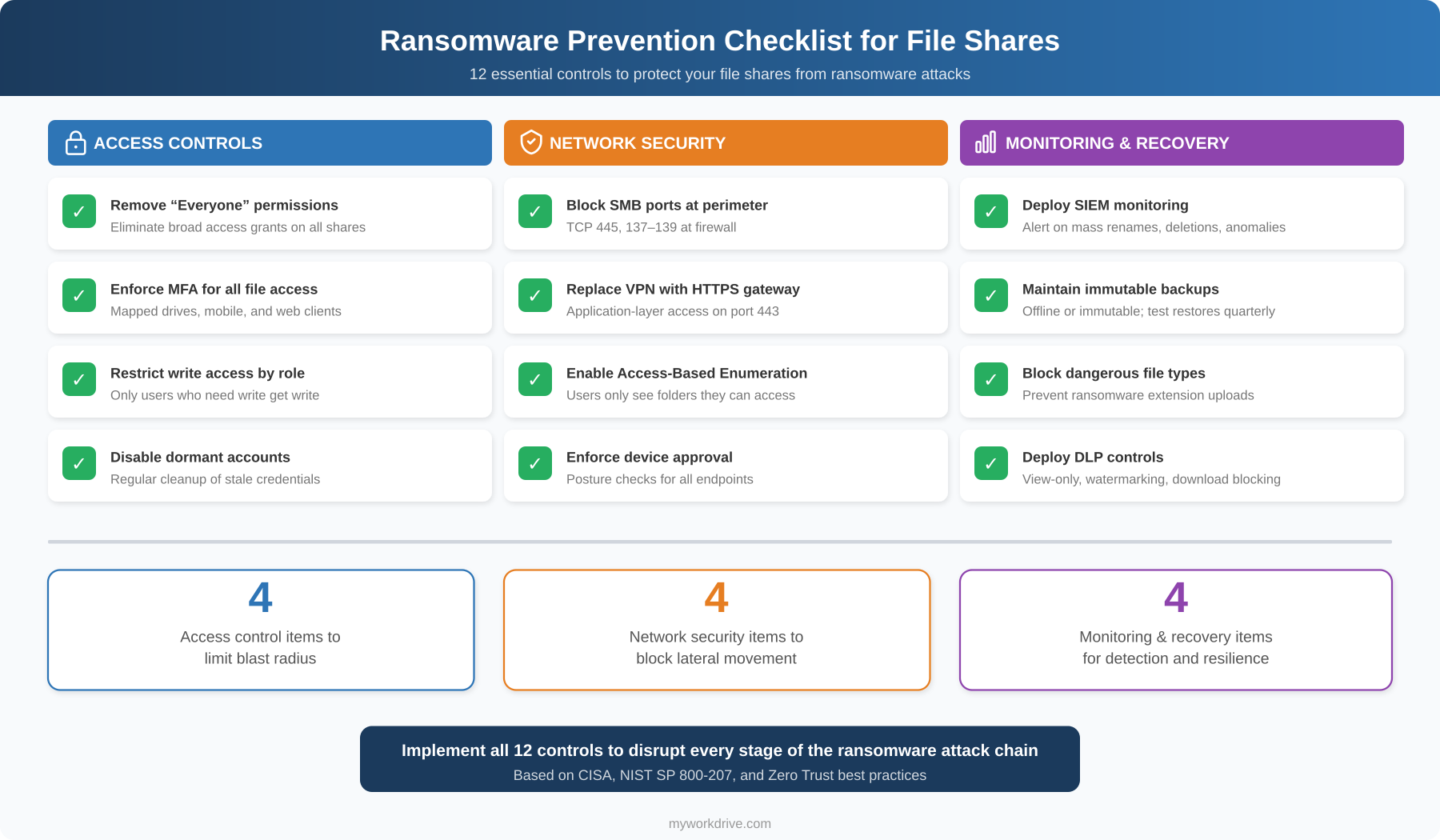
The checklist above organizes 12 essential controls into three categories. Access controls limit the blast radius by ensuring that a compromised account can only reach the files it legitimately needs - removing broad "Everyone" permissions, enforcing MFA, restricting write access by role, and disabling dormant accounts. Network security controls eliminate the protocols ransomware relies on by blocking SMB ports at the perimeter, replacing VPN with an HTTPS gateway, enabling Access-Based Enumeration, and enforcing device approval. Monitoring and recovery controls ensure that if an attack does begin, it is detected quickly and recovery is possible - through SIEM integration, immutable backups, file type blocking, and DLP policies.
Not every organization will implement all 12 controls on day one. Prioritize based on your current exposure: if you still use VPN for remote file access with broad NTFS permissions, addressing those two gaps will produce the largest immediate reduction in ransomware risk.
How to Prevent Ransomware from Spreading Across File Shares
- Audit and enforce least-privilege NTFS permissions. Review every share and remove broad access grants. Assign permissions by Active Directory security group, matching each group to specific departmental folders. Enable Access-Based Enumeration (ABE) so users only see folders they can open.
- Eliminate direct SMB exposure to the internet. Block TCP ports 445, 137, 138, and 139 at your perimeter firewall. Replace VPN-based file access with an application-layer gateway that serves files exclusively over HTTPS (port 443). This is the single most important step for preventing ransomware on SMB shares.
- Require multi-factor authentication for all file access. Integrate your file access solution with your identity provider (Active Directory, Entra ID, Okta, Duo) and enforce MFA via Conditional Access policies. This ensures that stolen passwords alone cannot unlock shared folders.
- Implement data leak prevention (DLP) controls. Configure view-only access with watermarking for sensitive shares. Block downloads where unnecessary and restrict clipboard operations. This limits what an attacker - or a compromised endpoint - can extract.
- Deploy centralized audit logging with SIEM integration. Log every file access event, including user identity, source IP, device, operation type, and timestamp. Export logs via Syslog to your SIEM and configure alerts for anomalous patterns like mass file renames or deletions.
- Segment your network and restrict lateral movement. Isolate file servers into dedicated VLANs. Apply firewall rules that limit SMB traffic to only the application servers that need it - not to end-user workstations.
- Enforce device approval and posture checks. Only allow managed, approved devices to connect via mapped drive or mobile clients. Unmanaged or non-compliant endpoints should be restricted to browser-only access with DLP controls active.
- Test backup restores regularly. Maintain offline or immutable backups of critical file shares and verify restore procedures quarterly. Document recovery time objectives (RTOs) and validate that they are achievable.
How a File Access Gateway Differs from Other Approaches
Organizations evaluating file share ransomware protection often compare several approaches. Understanding the differences helps security teams choose the right solution for their environment. A file access gateway operates differently from each of the following:
VPN-Based File Access
VPN places the remote device directly on the internal network, exposing all reachable SMB shares. A file access gateway brokers connections at the application layer over HTTPS, so the endpoint never joins the network and cannot enumerate SMB shares. This is the core difference between traditional remote file access and a Zero Trust approach.
Cloud Sync Platforms (Dropbox, SharePoint Online)
Sync platforms require migrating data to their proprietary cloud storage. This creates data residency concerns, file sync conflicts with large binary files, and ongoing storage costs. A file access gateway connects to files where they already reside - on existing Windows file servers, Azure Files, or SharePoint - without migration or duplication.
Distributed or Global File Systems
Global file systems replicate data across multiple locations, adding infrastructure complexity and cost. A file access gateway provides secure remote file access to existing storage without replication, keeping the architecture simple and the data footprint controlled.
NAS-Specific Security Tools
NAS vendor security tools are typically limited to a single storage platform and may not integrate with enterprise identity providers or SIEM systems. A file access gateway works across multiple storage backends and integrates with Active Directory, Entra ID, and SAML-based identity providers for consistent policy enforcement.
How MyWorkDrive Helps Prevent Ransomware on File Shares
MyWorkDrive eliminates the conditions that allow ransomware to spread across file shares. Instead of placing users on the network via VPN, MyWorkDrive brokers secure, application-level access to existing Windows SMB shares, Azure Files, SharePoint, OneDrive, and Azure Blob Storage - all over HTTPS on port 443.
Key capabilities that directly reduce ransomware risk:
- Least-privilege enforcement by design. MyWorkDrive inherits your existing NTFS and share permissions and cannot elevate them. Users can never gain more access through MyWorkDrive than their Active Directory or Entra ID account allows. The platform can only further restrict access through policy.
- Zero SMB/NetBIOS exposure. All client connections use only port 443. Ports 445, 139, and 53 are never exposed to external clients, eliminating the primary lateral movement vectors that ransomware exploits.
- No file content stored on application servers. Files are processed in memory only and proxied between storage and client over TLS. No customer data persists on MyWorkDrive servers, which means there is no additional target for encryption.
- Identity provider integration with MFA. Authentication flows through Active Directory with SAML SSO or natively through Microsoft Entra ID. MFA and Conditional Access policies are enforced at the IdP. Supported providers include Duo, Okta, ADFS, PingFederate, and OneLogin.
- Data Leak Prevention (DLP) controls. Administrators can block downloads, restrict clipboard access, and add dynamic watermarks on a per-share, per-group, or per-user basis. This limits what a compromised session can extract from file shares.
- Device approval for mapped drive and mobile clients. Only authorized devices can connect. Start in monitor mode to build an allowlist, then enforce. Unapproved devices can be restricted to browser-only access with DLP active.
- Comprehensive audit logging with SIEM export. Every authentication event, file operation, public link action, and administrative change is logged. Logs can be exported via Syslog and include user, source IP, device identifier, share path, operation, result, and bytes transferred. Configure threshold-based alerts for mass downloads, rapid file modifications, or unexpected policy changes.
- File type blocking and allow lists. Restrict which file extensions can be uploaded or accessed through mapped drive clients, providing an additional layer of defense against ransomware payloads.
- Access-Based Enumeration support. Integrates with the Windows Server ABE feature so users only see the folders they have permission to open, reducing reconnaissance opportunities for attackers.
- Cloud Web Connector for zero inbound firewall rules. Publish your MyWorkDrive server using outbound-only connections through Cloudflare tunnels, eliminating the need to open any inbound firewall ports.
How It Works
- Deploy MyWorkDrive on Windows Server. Install on a dedicated Windows Server 2019 or later instance. The server joins your Active Directory domain or connects to Microsoft Entra ID.
- Connect your identity provider. Configure SSO through SAML 2.0 (ADFS, Okta, Duo, Ping) in AD mode, or use native Microsoft sign-in with Entra ID. MFA and Conditional Access policies enforce automatically.
- Publish your file shares. Select the SMB shares, Azure Files, SharePoint libraries, or OneDrive locations you want to make accessible. MyWorkDrive reads and enforces your existing NTFS/ACL permissions - no reconfiguration required.
- Set security policies. Enable DLP modes (view-only, watermarking, download blocking) per share or per group. Configure device approval rules. Set session timeouts appropriate for your risk posture.
- Choose your publishing method. Use the Cloud Web Connector for outbound-only publishing with no firewall changes. Or publish directly over HTTPS with your own SSL certificate. Optionally place behind a reverse proxy or WAF.
- Roll out clients to users. Users access files through the web browser file manager, the Windows or macOS mapped drive client, or iOS and Android mobile apps - all over port 443 with SSO. No VPN client required.
- Monitor and respond. Integrate logs with your SIEM. Review file activity dashboards. Tune alert thresholds for your environment. Continuously refine share permissions based on actual usage patterns.
Security and Compliance
Encryption and Transport Security
All client connections and API paths use TLS 1.2 or higher, with TLS 1.3 preferred where supported. MyWorkDrive supports Windows FIPS mode and holds a FIPS 186-4 RSA algorithm validation certificate (#3018) from NIST. Data at rest remains protected by your own storage encryption (BitLocker, Azure Storage Service Encryption, etc.).
Least-Privilege Access Model
Authorization honors your NTFS and share permissions, Microsoft 365 site and library ACLs, and Azure RBAC. MyWorkDrive cannot elevate permissions - it can only restrict further by policy. This aligns directly with the NIST SP 800-207 principle of per-session, least-privilege access.
Auditability
Every file access, authentication decision, public link event, and administrative change generates a log entry. Fields include user, source IP, device identifier (where available), share, path, operation, result, and bytes transferred. Export to your SIEM via Syslog for long-term retention, correlation, and forensic analysis.
Compliance Framework Support
MyWorkDrive provides safeguards that help organizations meet requirements under HIPAA, CMMC, GDPR, FINRA, FedRAMP, and FIPS. The platform's architecture - where files never leave customer storage and no data persists on application servers - simplifies evidence collection and audit preparation. SOC 2 Type II certification is maintained, and a HIPAA Business Associate Agreement (BAA) is available.
Zero Trust Alignment
MyWorkDrive's architecture maps to the CISA Zero Trust Maturity Model across identity, devices, network, applications, and data pillars. Every request is authenticated and authorized. No implicit trust is granted based on network location. Device posture checks, Conditional Access, and DLP controls enforce policy continuously. This architecture provides comprehensive ransomware protection strategies aligned with federal guidance.
Use Cases
Healthcare: Protect Patient Records on Legacy File Shares
Who: HIPAA Security Officers and Health IT Directors at hospitals and clinics
Outcome: Clinical staff access patient files through the browser or mapped drive over HTTPS, with DLP preventing unauthorized downloads. Detailed audit logs support HIPAA breach investigations and compliance reviews. No PHI is stored on the MyWorkDrive server.
Financial Services: Secure Client Data Under FINRA/SOX
Who: CISOs and Compliance Officers at broker-dealers, banks, and advisory firms
Outcome: Advisors access client files with MFA-enforced sessions and granular share permissions. Public link sharing is governed by policy with mandatory expiration and password requirements. Syslog export to the firm's SIEM satisfies regulatory record-keeping obligations.
Government and Defense: CMMC and FedRAMP Readiness
Who: IT Directors and Information System Security Officers (ISSOs) at federal contractors and state agencies
Outcome: Agencies deploy MyWorkDrive as a fully private cloud on their own infrastructure. FIPS-validated encryption, Access-Based Enumeration, and device approval controls support CMMC Level 2 and FedRAMP requirements without migrating data to third-party cloud storage.
Legal: Attorney-Client Privilege and Secure Collaboration
Who: Managing Partners and IT Directors at law firms
Outcome: Attorneys access case files from any location with SSO and MFA. DLP watermarking deters unauthorized distribution. Comprehensive file activity logs provide the forensic evidence needed to support privilege claims and meet ethical obligations.
Education: Protect Research Data and Student Records
Who: CIOs and IT Security Managers at universities and school districts
Outcome: Faculty access research files and student records without VPN. Device approval ensures only institutional devices connect via mapped drive. FERPA and GDPR compliance requirements are met through least-privilege access, audit logging, and DLP controls.
Manufacturing and Engineering: Secure CAD and IP Files
Who: Engineering Directors and IT Managers at manufacturing firms
Outcome: Engineers access large CAD files through mapped drives over HTTPS without VPN latency issues. File type blocking prevents upload of unauthorized executables. Network segmentation between the MyWorkDrive server and file storage limits the lateral movement risk if an engineering workstation is compromised.
Key Takeaways
- Ransomware spreads across file shares through SMB access and lateral movement from compromised endpoints.
- Over-permissioned NTFS accounts dramatically increase the blast radius of any ransomware attack.
- VPN-based file access exposes internal network resources and enables lateral movement.
- Zero Trust file access reduces lateral movement risk by authenticating and authorizing every request at the application layer.
- HTTPS-based file access gateways protect file servers without requiring data migration to cloud storage.
- A prevention checklist covering permissions, MFA, SMB blocking, SIEM monitoring, and immutable backups provides a practical starting framework.
- Understanding the full ransomware attack chain - from endpoint compromise through backup deletion - helps teams prioritize the right defensive controls.
FAQ
What is ransomware prevention for file shares?
Ransomware prevention for file shares is a combination of access controls, network architecture, and monitoring designed to stop ransomware from encrypting data stored on network shares. Core elements include least-privilege NTFS permissions, elimination of direct SMB port exposure, multi-factor authentication, and centralized file activity logging.
How does ransomware spread across file shares?
Most ransomware spreads across file shares by exploiting SMB connections from a compromised endpoint. When a user's device is infected, the malware enumerates accessible network shares and encrypts files that the user account has write access to. VPN connections worsen this by placing the infected device directly on the internal network.
Does MyWorkDrive prevent ransomware?
MyWorkDrive reduces the conditions that allow ransomware to spread across file shares. It eliminates direct SMB exposure by serving files over HTTPS only, enforces least-privilege NTFS permissions that cannot be elevated, and provides audit logging with configurable alerts for anomalous file activity. Combined with MFA and DLP controls, this significantly limits the blast radius of any compromised account.
How does least-privilege access reduce ransomware risk?
Least-privilege access ensures each user can only reach the files required for their role. If an account is compromised, the attacker can only encrypt the files that account has write permissions to - not the entire file server. This directly reduces the blast radius of a ransomware event.
Can ransomware spread if users access files over HTTPS instead of VPN?
When users access files through an application-layer gateway over HTTPS (like MyWorkDrive), there is no direct SMB connection between the user's device and the file server. The ransomware on the endpoint cannot enumerate or encrypt network shares through the HTTPS proxy the way it can over a VPN-connected SMB path. This is why SMB vs. HTTPS file is a critical architectural decision for ransomware prevention.
What compliance frameworks require ransomware prevention controls for file shares?
Multiple frameworks address ransomware prevention controls. HIPAA requires safeguards for protected health information including access controls and audit logging. CMMC requires least-privilege access and incident detection. The CISA #StopRansomware Guide recommends blocking SMB ports and enforcing MFA. NIST SP 800-207 establishes Zero Trust principles including per-session, least-privilege access. GDPR mandates appropriate technical measures to protect personal data.
How does ransomware prevention for file shares relate to Zero Trust?
Zero Trust architecture removes implicit trust based on network location. For file shares, this means replacing VPN (which grants network access) with application-level access that authenticates and authorizes every request. Least-privilege NTFS permissions, MFA, device posture checks, and continuous monitoring are all Zero Trust controls that directly prevent ransomware propagation. Learn more about Zero Trust file access and how it applies to file access gateway architecture.
What is the role of audit logging in ransomware prevention?
Audit logging enables early detection of ransomware activity. Rapid file renames, mass deletions, and unusual access patterns generate log entries that can trigger SIEM alerts. Fast detection reduces the window during which ransomware can encrypt files, enabling faster containment and smaller blast radius.
Does MyWorkDrive require data migration to protect file shares?
No. MyWorkDrive connects to files where they already reside - Windows SMB shares, Azure Files, SharePoint, OneDrive, and Azure Blob Storage. There is no migration into a proprietary repository. Existing NTFS permissions remain authoritative.
How quickly can MyWorkDrive be deployed?
A single-server deployment with four or more vCPUs and 16 GB RAM can be operational within days. The four-phase implementation covers server installation, publishing configuration, storage and identity integration, and optional features like DLP and device approval.
How does a file access gateway differ from VPN file access?
A file access gateway brokers connections at the application layer, authenticating and authorizing each request individually. VPN grants broad network-level access once credentials are verified. The gateway approach eliminates SMB exposure, enforces per-session access controls, and prevents lateral movement - making it a fundamentally stronger approach for ransomware prevention for file shares.