By Ron Bhojwani
Last Updated: November 16, 2026
Amendment 13 to Israel's Privacy Protection Law has been in force since August 2025, and it gave the Privacy Protection Authority far stronger enforcement powers than it had before. One of the duties the Authority can now enforce is older than the amendment and easy to miss. Databases classified at the medium or high security level must keep an automatic log of access, retain it for at least 24 months, and review it under a documented routine.
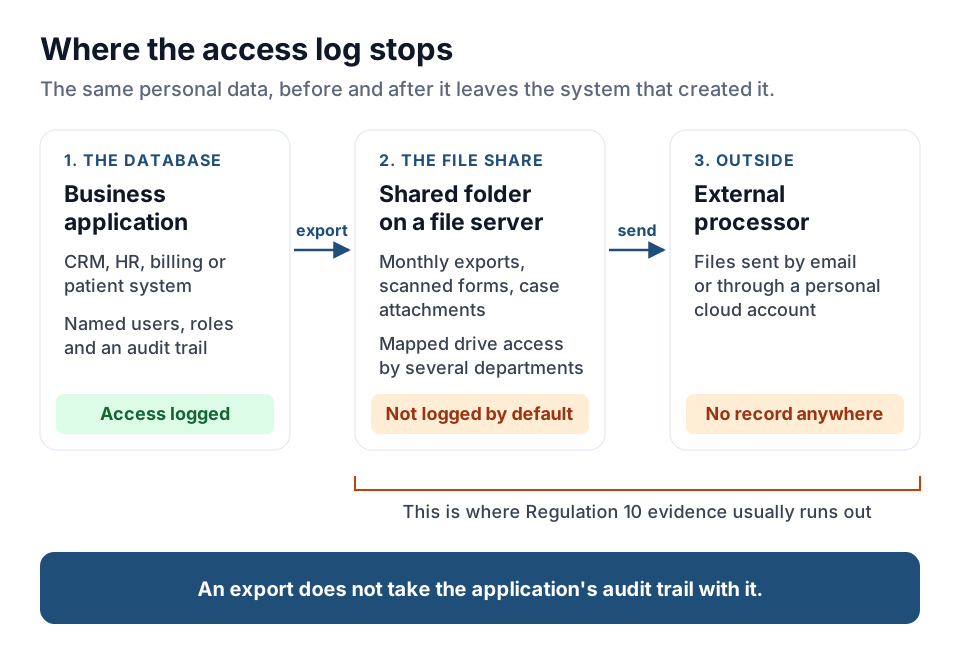
Picture a privacy officer, newly appointed, asking for that log. The application team pulls it from the CRM the same afternoon. Then someone mentions the shared folder. The same personal data sits there as monthly exports, scanned forms and case attachments. Several departments open it over a mapped drive, and every so often a batch goes out to an external processor by email. Nobody can produce a log for that folder, because nobody ever kept one.
This is a common shape of the Amendment 13 gap. Regulated data is well governed inside the system that created it and barely governed once it is exported to a file share.
The short answer: Regulation 10 of Israel's Privacy Protection (Data Security) Regulations 5777-2017 requires medium and high security level databases to keep an automatic access log. Each entry records who accessed the system, when, which component, what type of access, its scope, and whether it was approved or denied. Logs must be kept for at least 24 months and reviewed under a documented routine. Business applications usually produce this log. Windows file servers holding exports of the same data usually don't. You can close the gap without moving the data by publishing the existing file shares through an access layer that logs every sign-in, file operation and sharing event, and by sending those events to a SIEM that handles retention and review.
| Topic | What applies |
|---|---|
| Law | Privacy Protection Law, 5741-1981, as amended by Amendment 13 |
| In force | 14 August 2025 |
| Regulator | Privacy Protection Authority (הרשות להגנת הפרטיות) |
| Logging rule | Regulation 10 of the Privacy Protection (Data Security) Regulations, 5777-2017 |
| Applies to | Databases at the medium or high security level |
| What the log records | User identity, date and time, system component, type of access, scope, and whether access was approved or denied |
| Retention | At least 24 months |
| Review | A documented routine, with a report of problems found and the steps taken |
| Data localization | No general requirement. Transfers abroad fall under the Transfer of Data to Databases Abroad Regulations, 5761-2001 |
| Base sanction for Regulation 10 failures | ILS 40,000 (medium level) or ILS 160,000 (high level) |
What Amendment 13 Changed, and What It Didn't
Amendment 13 entered into force on 14 August 2025. It moved Israeli privacy law away from a model built around registering databases and toward a broader framework for processing personal data. It also substantially expanded the administrative enforcement powers of the Privacy Protection Authority (PPA). The Chambers Data Protection & Privacy 2026 guide to Israel summarizes the changes.
Registration was narrowed at the same time. It now applies mainly to data brokers holding data on more than 10,000 people and to public bodies' databases. A database holding special-sensitivity data on more than 100,000 people must now notify the PPA.
Enforcement powers and penalties
The PPA can now impose monetary sanctions directly. The amounts are set out in the Third Schedule to the Law, depend on the database's security level, and are updated for inflation. These are the figures that matter most for access logging:
| Violation or rule | Amount |
|---|---|
| Failures under Regulation 10 (access logging) | ILS 40,000 for a medium-level database, ILS 160,000 for a high-level database |
| Risk survey, penetration testing, severe incident reporting and outsourcing controls | ILS 320,000 for a high-level database |
| High-level database holding data on 1,000,000 people or more | The amount is doubled |
| Continuing violation | An extra 1% of the fine for each day the violation continues after a payment demand |
| Repeat violation of the same provision within two years | An amount equal to the fine is added, doubling it |
| Appeal | To the magistrate's court within 45 days. Filing does not stay the sanction unless the PPA head agrees or the court orders it |
Some sanctions are calculated per person in the database, so exposure for a large database can run into millions of shekels. The PPA has also started using these powers. On 21 July 2026 it fined a health maintenance organization ILS 256,000 for failing to report a data security incident in a timely manner, its first fine for breaching the incident reporting duty, as reported by Pearl Cohen.
Civil exposure grew too. Amendment 13 added exemplary damages of up to ILS 10,000, which a court can award without proof of harm for specific database violations, such as failing to give a required notice or refusing a person's request to see or correct their data. The older route under section 29A, compensation without proof of harm of up to ILS 50,000 (linked to the consumer price index) for an infringement of privacy, still applies.
Who has to appoint a privacy officer
Amendment 13 widened the duty to appoint a privacy officer. It now covers:
- controllers and holders of databases belonging to public bodies, other than security bodies
- data brokers holding data on more than 10,000 people
- controllers and holders whose main activities involve regular, systematic monitoring of people on a significant scale
- controllers and holders whose main activity includes processing special-sensitivity data on a significant scale, such as banks, insurers, hospitals and health funds
Because the duty reaches holders, Israel's term for processors, service providers that hold data for public bodies are covered as well. For now, monetary sanctions for failing to appoint apply only to the first two groups.
No general data localization rule
Amendment 13 did not add a localization requirement, and Israeli law has no general obligation to keep personal data inside Israel. Transfers abroad are still governed by the Privacy Protection (Transfer of Data to Databases Abroad) Regulations, 5761-2001. They allow a transfer when the destination's law protects the data at a level no lower than Israeli law, or when one of the listed conditions applies, such as the person's consent or a contractual undertaking from the recipient.
Some sector rules do have a localization-like effect. Bank of Israel Proper Conduct of Banking Business Directive 362, on cloud computing, says a bank may not store, transfer or process information it defines as sensitive on a cloud outside Israel unless it has confirmed that the cloud provider's level of protection complies with the GDPR.
For most Israeli organizations, then, the hard part of Amendment 13 is showing who accessed personal data. Where it is stored is usually settled already.
Regulation 10: The Access Log Requirement
The operative requirement comes from the Privacy Protection (Data Security) Regulations, 5777-2017, which have applied since May 2018. The rule is older than Amendment 13. What changed is the PPA's ability to fine organizations that ignore it. The PPA has published an action guide for implementing Regulation 10(d) on log retention, updated after Amendment 13.
Regulation 10(a) calls for an automatic logging mechanism that allows access to the database systems to be audited. In the regulation's own words:
“ינוהל מנגנון תיעוד אוטומטי שיאפשר ביקורת על הגישה למערכות המאגר”
“An automatic logging mechanism shall be maintained that allows audit of access to the database systems.”
Source: Privacy Protection (Data Security) Regulations, 5777-2017, Regulation 10(a). English translation ours.
| Sub-regulation | What it requires | What that means in practice |
|---|---|---|
| 10(a) | An automatic logging mechanism that allows access to the database systems to be audited | Every access is recorded without anyone having to turn logging on for a given event |
| 10(b) | As far as possible, the mechanism must not allow its operation to be cancelled or changed, and any change must be detected and reported to those responsible | Protect the logs, and alert when logging is switched off or altered |
| 10(c) | A documented routine for reviewing the logs, with a report of problems found and the steps taken | A scheduled review that produces a written record |
| 10(d) | Logs kept for at least 24 months | A retention setting, plus a storage plan that follows the PPA's guide |
| 10(e) | Authorized users told that the mechanism exists | A notice to everyone with access |
What each log entry has to record
Regulation 10(a) lists the data points each entry must capture:
- the identity of the user
- the date and time of the access attempt
- the system component accessed
- the type of access
- the scope of the access
- whether access was approved or denied
The PPA's action guide for Regulation 10(d) reads these broadly. The accessing party can be a person or an internal or external interface. The log should also show the component through which access was made, and "type of access" covers reading, writing and retrieval.
How long, and where, to keep the logs
Regulation 10(d) sets a minimum of 24 months. The PPA's guide then distinguishes between kinds of system.
- Critical systems. Logs must stay accessible, available and secured on local storage for the full two years. The guide's list includes the operating system, the database itself, Active Directory, EDR, NAC, the firewall, the web application firewall and the database firewall, and it says the list is not exhaustive.
- Other database system logs. At least six months on local storage is enough. The rest of the two years can be served from long-term storage, such as an off-site backup.
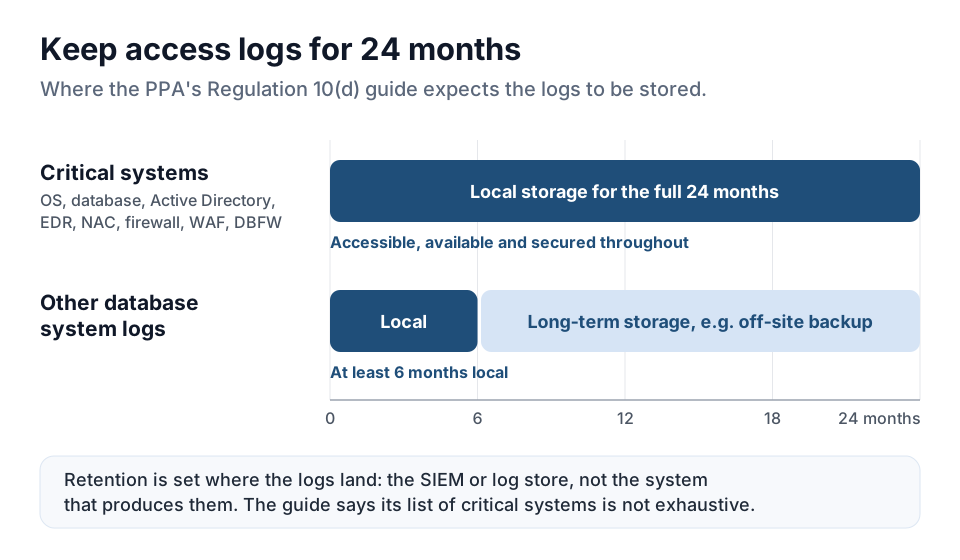
The Active Directory entry matters for file servers. Where Active Directory controls access to a medium or high level database, as it usually does once that data sits on file shares, the guide expects its logs to stay on local storage for the full two years.
Does Regulation 10 Apply to Your Database?
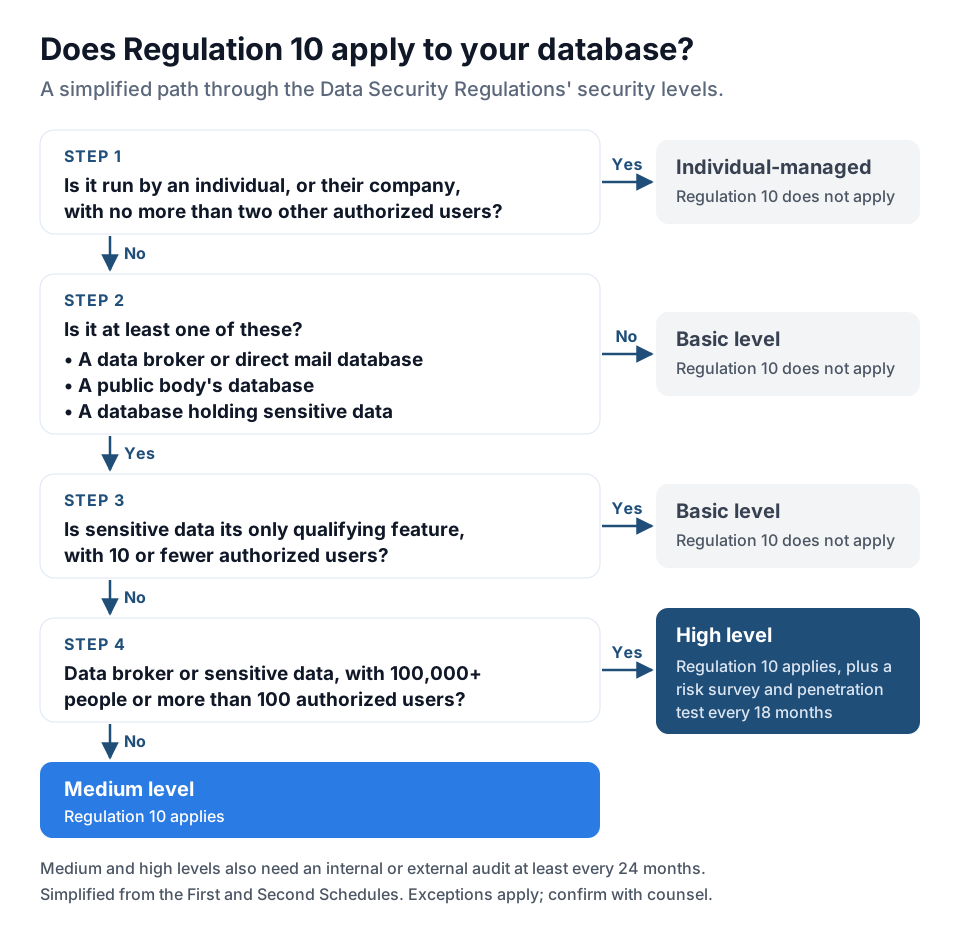
Regulation 10 applies only to databases at the medium or high security level. The levels are set out in the First and Second Schedules to the Data Security Regulations. In simplified form:
- Medium level. A database that is not run by an individual and is a data broker or direct mail database, a public body's database, or a database that holds sensitive data. The sensitive categories include medical and mental health, genetic, biometric, financial and criminal record information, along with political or religious views, intimate life and communications data. A sensitive-data database with 10 or fewer authorized users drops to the basic level, as does one holding only employee or supplier data used to run the business.
- High level. A data broker or sensitive-data database, including one belonging to a public body, that holds data on 100,000 people or more or has more than 100 authorized users.
- Individual-managed. A database run by an individual, or by their company, with no more than two other authorized users. Regulation 10 doesn't apply.
| Obligation | Basic | Medium | High |
|---|---|---|---|
| Automatic access log (Regulation 10) | Not required | Required | Required |
| Internal or external audit at least every 24 months | Not required | Required | Required |
| Risk survey and penetration test at least every 18 months | Not required | Not required | Required |
| Base sanction for Regulation 10 failures | None | ILS 40,000 | ILS 160,000 |
The classification rules have exceptions this summary leaves out, so confirm the level of each database with counsel.
Why a Windows File Server Doesn't Produce This Log
A standard Windows file server doesn't meet Regulation 10 as it is usually deployed.
- Auditing is off by default. Windows can audit file access, but only after you enable the Audit File System subcategory in the advanced audit policy and set a system access control list (SACL) on each folder you want watched. Our guide to file access audit logging on Windows shares walks through the setup.
- The volume makes review impractical. Once it is on, object access auditing writes to the Security event log at a rate that makes the routine review in Regulation 10(c) hard to run without extra tooling. On a busy server, older events can be overwritten before anyone looks at them.
- It records file system operations, not access to a database. Event 4663 describes an access attempt against a local path, a handle and an access mask. It has no view that matches how the business thinks about the data, such as "the patient exports folder", and it doesn't record how much data was read.
- External recipients are invisible. Giving an outside party access to one folder on a file server means creating an account and opening a VPN connection, so in practice data reaches processors, auditors and partners by email attachment or a personal cloud account. Neither route leaves a record in any of the organization's systems.
| Regulation 10 asks for | Typical business application | Windows file share as deployed |
|---|---|---|
| Automatic access log | Built-in audit trail | Off until audit policy and SACLs are configured |
| Identity of the accessing party | Named application user | Windows account, if auditing is on |
| Component, type and scope of access | Screen, record or report, read or write | Local path and access mask, no bytes transferred |
| Approved or denied | Usually recorded | Recorded only for audited objects |
| Access by external parties | Through provisioned accounts or an API | Not recorded when files leave by email or personal cloud |
| Routine review | Application reports or SIEM | Security event log on each server, at high volume |
Is the Shared Folder Part of the Database?
Whether a given shared folder is part of a database, or a database in its own right, is a legal question. The answer depends on what the folder holds and how it's used, so take it to counsel rather than to a vendor. The Data Security Regulations are written around the database and the systems that hold it, not around a particular piece of software. Assuming that exported records fall outside them because they moved to a file share is the riskier position.
In practice, the work is a mapping exercise:
- List the medium and high level databases. Start from the organization's database inventory and security level classification.
- Find where their data lands in file storage. Look for exports, reports, scanned documents and attachments on file servers, NAS devices, Azure Files and SharePoint libraries.
- Record who reaches each location and how. Note the Active Directory groups, mapped drives, VPN users and any external parties that receive files.
- Test the record. For one folder and one week, try to reconstruct who opened what, when, and whether access was allowed. Compare the result with the fields Regulation 10(a) lists.
- Close the gaps you find. Tighten NTFS permissions and group membership first, then put a logging access path in front of the locations that hold regulated data. Our guide to NTFS permissions and ACL management covers the permission review.
Producing the Record Without Moving the Data
MyWorkDrive installs on a Windows Server the organization already runs and publishes existing storage over HTTPS. It connects to on-premises SMB file shares and NAS, Azure Files and Blob, S3-compatible storage, and SharePoint Online and OneDrive. Nothing is migrated, and no second copy of the file set is created. File content is processed in memory and is not persisted on the MyWorkDrive server. For organizations bound by Directive 362 or by contractual residency commitments, the data stays exactly where it already sits, in Israel or wherever the organization has placed it.
What gets logged
MyWorkDrive records access as it happens. It logs four kinds of event:
- Authentication events: login attempts, identity provider details, source IP and device identifiers.
- File operations: opens, downloads, uploads, saves and deletes, with the full path and the result.
- Sharing events: link creation, revocation, link access and guest activity.
- Administrative changes: policy updates, device approvals and configuration changes.
Each entry carries the user, source IP, device identifier, share, path, operation, result and bytes transferred. Events export over Syslog, using UDP or TCP, so file activity lands in the organization's SIEM, where retention and routine review are already managed for everything else. MyWorkDrive can also send email alerts through your SMTP server when activity crosses thresholds you set, such as an unusual number of downloads.
Permissions stay where they are
MyWorkDrive uses the permissions you already have. Its existing permissions remain authoritative: it adds a policy layer that can restrict access further, but it can't grant access that hasn't already been granted. Domain controllers keep authenticating users as they do today, and existing Active Directory groups, organizational units and group policies stay in place.
Sign-in goes through the identity provider already in service: Microsoft Entra ID natively, or SAML 2.0 providers such as Okta, ADFS, Ping and Shibboleth, with native Duo integration for multi-factor authentication. All connections use TLS 1.2 or higher.
External access that leaves a record
External access is the part that most often has no record at all. Instead of creating an account for an external processor, auditor or clinical affiliate, MyWorkDrive issues share links against existing shares. Each link can have:
- an expiry after a set number of days
- an optional password
- view-only access, with no saving to the recipient's device
- a maximum number of downloads
Dynamic watermarks show the viewer's name and the exact time of viewing. Link creation, revocation and every access event go into the same log stream as internal activity. That is what lets an organization say which outside parties touched a record, and when.
How MyWorkDrive Maps to Regulation 10
| Regulation 10 requirement | What MyWorkDrive provides | Who is responsible |
|---|---|---|
| 10(a) Automatic log of access to database systems | Authentication, file operation, sharing and administrative events recorded automatically | Product |
| 10(a) Identity of the accessing party | User identity, source IP and device identifier on every entry | Product |
| 10(a) Date, time, component, access type, scope and result | Timestamp, share and full path, operation, result and bytes transferred | Product |
| 10(b) Protection against disabling or alteration, with alerts | Administrative and configuration changes are themselves logged. Tamper alerting is set up in the receiving SIEM | Shared |
| 10(c) Documented routine review and reporting | Syslog export over UDP or TCP into the SIEM, where review and reporting run | Organization, using the SIEM |
| 10(d) Retention of at least 24 months | Set by the receiving SIEM or log store, not by MyWorkDrive | Organization, using the SIEM |
| 10(e) Informing authorized users | Not a product function | Organization |
The table stops short on 10(b) through 10(e) on purpose. Tamper alerting, log review, retention and telling users about the log are organizational responsibilities. Treat any vendor that claims to cover them for you with suspicion.
Scope and Limitations
- Technical controls, not compliance. MyWorkDrive provides technical controls and evidence. The organization remains responsible for its own compliance program, and no product delivers compliance with the Privacy Protection Law or its regulations on its own. Nothing here is legal advice.
- Retention depends on where the logs go. Meeting the 24-month requirement in Regulation 10(d), and the PPA's expectations on local versus long-term storage, depends on how the SIEM or log platform is configured, not on the file access layer.
- Device approval is an allowlist, not a posture check. It applies to MyWorkDrive mapped drive and mobile clients. It doesn't check endpoint compliance and doesn't cover browser access. Device posture needs Conditional Access at the identity provider.
- Permission review comes first. MyWorkDrive restricts access and never grants more than the underlying storage permits. An over-permissive NTFS structure stays over-permissive, and the log will faithfully record access that should never have been possible.
- SharePoint Online and OneDrive data stays with Microsoft. Where they are connected as storage, the access path and the access record change. Where the data resides does not.
Frequently Asked Questions
What is Amendment 13 to Israel's Privacy Protection Law?
Amendment 13 is a broad revision of Israel's Privacy Protection Law, 5741-1981. It entered into force on 14 August 2025, narrowed database registration, widened the duty to appoint a privacy officer, and substantially expanded the Privacy Protection Authority's power to impose monetary sanctions.
Does Amendment 13 require personal data to be kept in Israel?
No. Israeli law has no general data localization requirement. Transfers abroad are governed by the Privacy Protection (Transfer of Data to Databases Abroad) Regulations, 5761-2001, which allow a transfer where the destination's law gives protection no lower than Israeli law or where a listed condition applies. Sector rules can differ. Bank of Israel Directive 362 bars banks from keeping information they define as sensitive on a cloud outside Israel unless the provider's protection complies with the GDPR.
Which databases does the Regulation 10 logging duty apply to?
Medium and high security level databases under the Privacy Protection (Data Security) Regulations, 5777-2017. Broadly, a database is medium level if it is not run by an individual and is a data broker or direct mail database, a public body's database, or a database holding sensitive data with more than 10 authorized users. It is high level if it is a data broker or sensitive-data database that holds data on 100,000 people or more or has more than 100 authorized users.
What must a Regulation 10 access log record?
Regulation 10(a) requires the identity of the user, the date and time of the access attempt, the system component accessed, the type of access, its scope, and whether access was approved or denied. The Privacy Protection Authority's guide adds that the accessing party may be a person or an internal or external interface, and that access types include reading, writing and retrieval.
How long must access logs be kept?
At least 24 months under Regulation 10(d). The Privacy Protection Authority's action guide expects logs from critical systems, including the operating system, the database and Active Directory, to stay on local storage for the full two years. For other database system logs, at least six months on local storage is enough before the rest of the period is served from long-term storage.
What are the fines for breaching Regulation 10?
The base monetary sanction in the Third Schedule to the Privacy Protection Law is ILS 40,000 for a medium-level database and ILS 160,000 for a high-level database, updated for inflation. Continuing violations add 1% of the fine per day after a payment demand, and a repeat violation of the same provision within two years doubles it.
Can a Windows file server meet this requirement on its own?
Not as deployed. Object access auditing is available through system access control lists but is off by default, and the event volume it produces once enabled makes the routine review required by Regulation 10(c) hard without additional tooling. It also has no record of files that reach external parties by email or a personal cloud account, which is how data usually leaves when the only alternative is an account and a VPN connection for each outsider.
Does adding a file access layer require migrating data or changing permissions?
No. MyWorkDrive publishes existing shares over HTTPS from a Windows Server the organization already operates. Storage, Active Directory groups and NTFS permissions stay as they are, and MyWorkDrive can restrict access further but cannot grant access that has not already been granted.
Start a free trialBook a demoView pricing