
Edit Local Files in Office Online

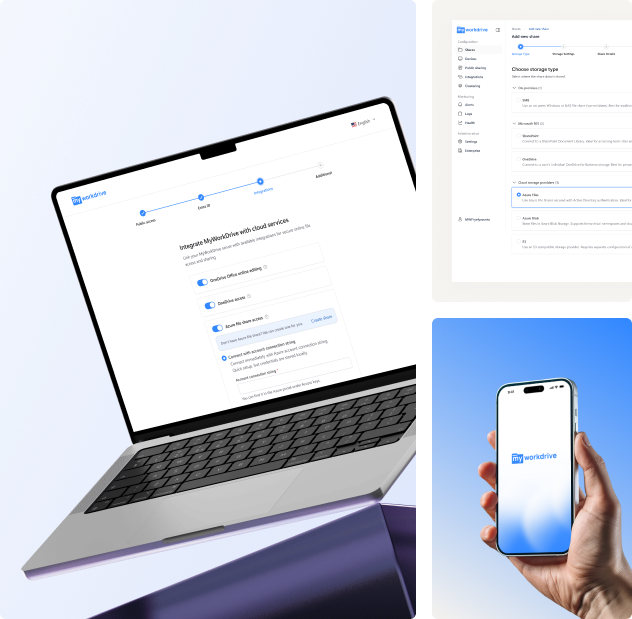
Enable online editing for Word, Excel, and PowerPoint files while keeping them stored securely on your servers. No need for a VPN, syncing, or a desktop Office installation. Users can seamlessly edit Office files hosted on your Windows file servers, NAS, S3, or Azure Files. All while maintaining on-prem security with AD or Entra ID permissions.

MyWorkDrive lets users edit and co-edit Office files in a browser while keeping data on your servers, either via Microsoft 365 (OneDrive or SharePoint), your own Office Online Server, or with OnlyOffice.

Data sovereignty illustration showing secure file storage and access control across different geographical locations
Trusted by Organizations Worldwide

Why This Matters

Legacy Systems
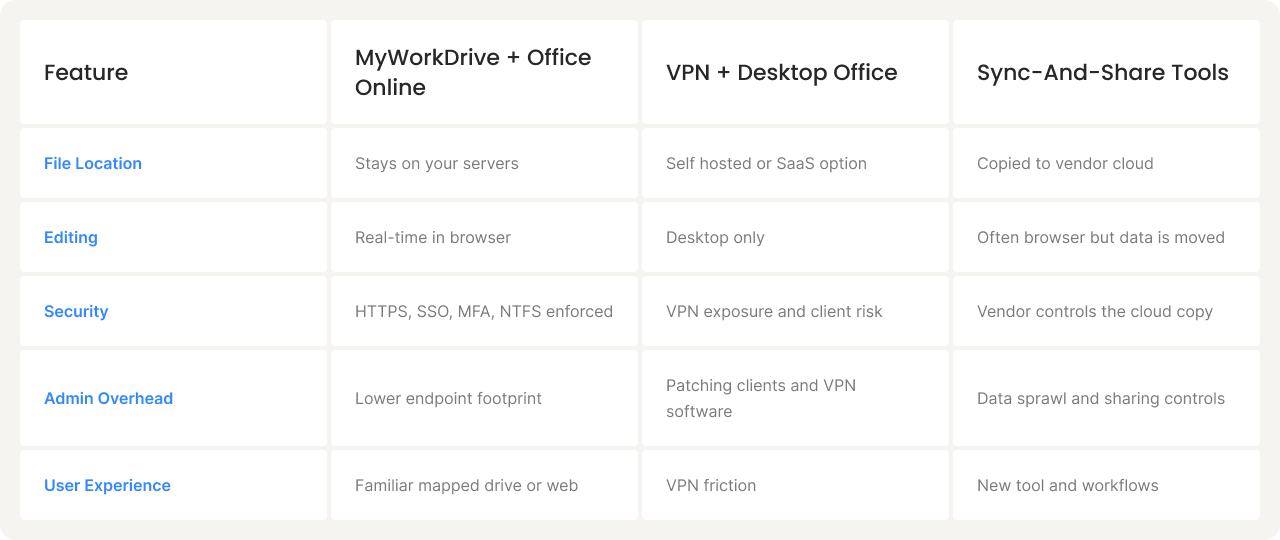
  • Traditional options for editing files from outside the office create friction.
  • VPNs are slow for large files and expand your attack surface, increasing the risk of cyberattacks.
  • Sync-and-share tools copy data around and create version chaos, confusion, and data sprawl.
  • Requiring desktop Office everywhere adds licensing and device management overhead.
MyWorkDrive + Office Online
  • With MyWorkDrive and Office Online, users can open and coauthor files in a browser while the files remain on servers.
  • You get fast collaboration, full control, and less software to manage on endpoints.
  • Eliminates the need to download files or rely on third-party cloud storage. Data stays secure and compliant on your infrastructure.
  • Seamlessly integrates with existing Active Directory and NTFS permissions, reducing administrative overhead.

How It Works

Install MyWorkDrive

Install MyWorkDrive

Deploy on any Windows Server (on-premises or cloud). No data migration needed.

Integrate Identity

Integrate Identity

Integrate with Active Directory or Entra ID,
automatically. Support for SAML directories.

Connect File Shares

Connect File Shares

Connect instantly to local or cloud storage. Including
SMB, NAS, Azure Files, Azure Blob, S3 object storage.

Access Anywhere

Access Anywhere

Secure file access from any device via mapped drive, web browser, or mobile apps. No VPN required.

Key Benefits

Why Choose MyWorkDrive

Where teams use it

Keep files on infrastructure you own or trust: on-prem, private cloud, or regional providers. Meet sovereignty requirements while delivering a simple, familiar file experience for end users.

Hospitals and Healthcare
Collaborate on PHI while keeping data on hospital servers.
Policy and Legal
Work on case files securely without copying to external clouds.
Research and Education
Coauthor data-heavy documents from campus or home.
Finance and Government
Strict control with full auditability.

Prefer a non-Microsoft editor? OnlyOffice is supported

If you want an alternative or a mixed environment, MyWorkDrive also supports OnlyOffice for browser-based editing and coauthoring while files stay on your storage. Same security model, same user experience.
Frequently Asked Questions

Do files get uploaded to the cloud to edit in Office Online?

No. Files remain on your servers. Edits are written back to the original location. Temporary caches are cleared when the file is closed.

Do users need desktop Office installed?

No. Many teams use the browser editor exclusively. Desktop Office is optional for users who prefer it.

What identity and permissions are used?

We integrate with Active Directory or Entra ID. Your NTFS permissions and security groups apply automatically.

Does this work in hybrid storage environments?

Yes. You can publish on-prem shares alongside supported cloud storage and present them through one interface.

Is a VPN required?

No. Access runs over HTTPS with SSO and MFA

Do we need specific Microsoft licensing?

Office Online usage requires the appropriate Microsoft rights.