


If you manage Microsoft licensing, this will feel familiar. On December 4, 2025, Microsoft announced another round of price increases for Microsoft 365 and Office 365 commercial subscriptions.
The new pricing takes effect July 1, 2026. It hits virtually every plan tier—Enterprise, Business, Frontline, Government, and key standalone products.
This isn't new. Microsoft raised prices in 2022. They're doing it again in 2026. And they'll do it again after that.
But here's what most articles about the 2026 increase won't tell you: many of your users probably don't need the license tier they're on. With the right tooling, you can move them to a dramatically cheaper plan—without losing the ability to edit Office files in the browser.
What's Changing in July 2026
Most plans will see increases between 5% and 33%. Here are the key numbers from Microsoft's official pricing update:
| Plan | Current | New Price | Increase | % Change |
|---|---|---|---|---|
| Microsoft 365 E3 | $36/mo | $39/mo | +$3 | 8% |
| Microsoft 365 E5 | $57/mo | $60/mo | +$3 | 5% |
| M365 Business Standard | $12.50/mo | $14/mo | +$1.50 | 12% |
| M365 Business Basic | $6/mo | $7/mo | +$1 | 16% |
| Office 365 E3 | $23/mo | $26/mo | +$3 | 13% |
| Microsoft 365 F1 | $2.25/mo | $3/mo | +$0.75 | 33% |
| Microsoft 365 F3 | $8/mo | $10/mo | +$2 | 25% |
| M365 Apps for Enterprise | $12/mo | $14/mo | +$2 | 20% |
All prices per user, per month (USD). Source: Microsoft.
What Microsoft Says About the Increase
Microsoft points to over 1,100 new features shipped in the past year. That includes Copilot Chat enhancements, Defender for Office 365 P1, and expanded Intune capabilities. As Tony Redmond noted in his analysis, the increase could bring in an estimated $10.7 billion in additional annual revenue.
The platform has genuinely expanded. But the real question isn't whether Microsoft 365 is getting better.
It's whether every user in your org needs a $39/month E3 license.
The Real Problem: Over-Licensing
What Most Users Actually Do
Think about how most people in your org use Microsoft 365 day-to-day. They open a Word doc. They edit a spreadsheet. They review a PowerPoint. They send email and chat in Teams.
That's it.
What They're Paying For But Not Using
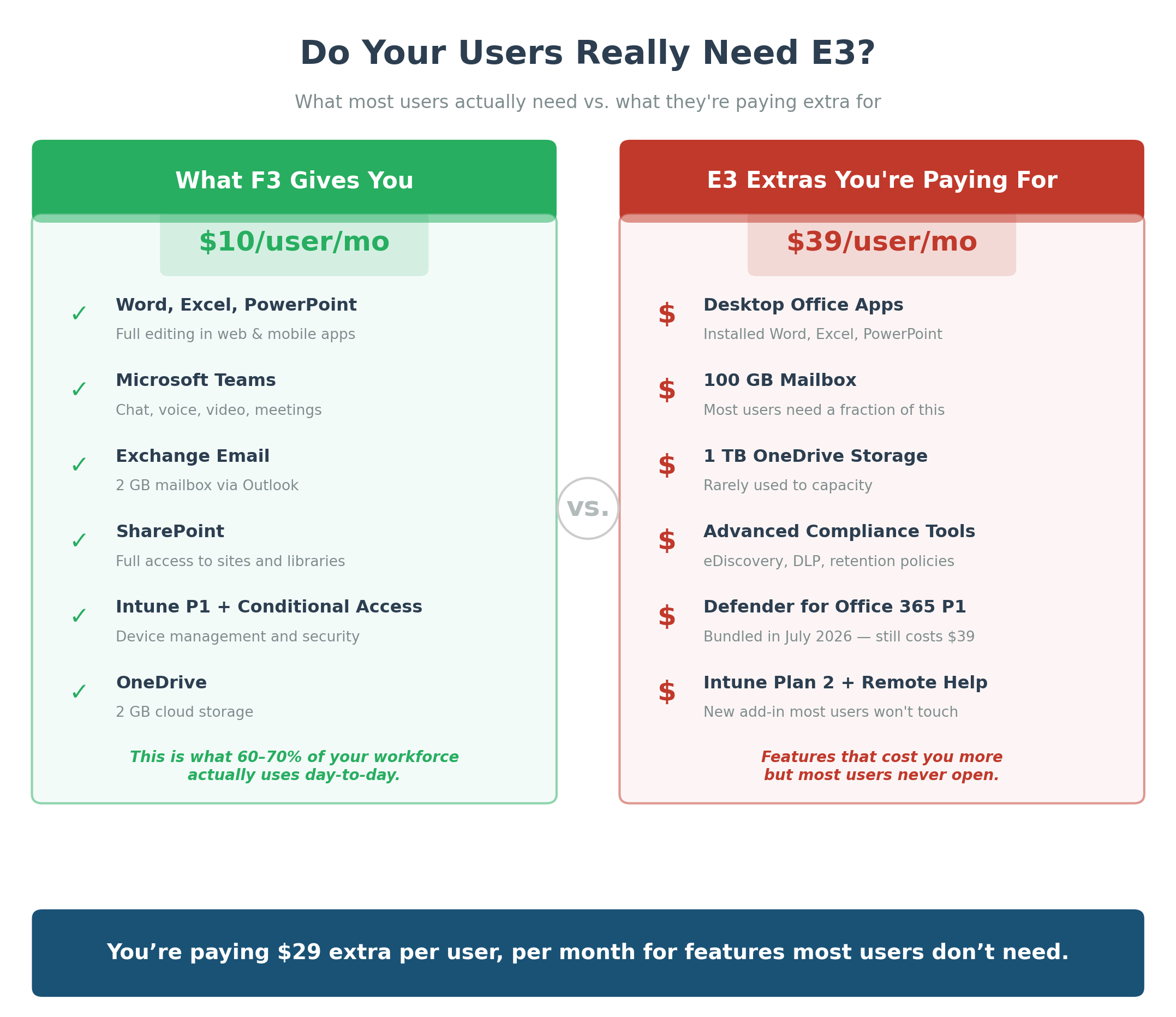
Advanced compliance tools. Power BI Pro. Phone System. Desktop-installed Office apps. Intune Endpoint Privilege Management. Security Copilot.
Industry data suggests most companies waste over 30% of their Microsoft licensing spend. Users sit on tiers with features they never touch. The 2026 increase makes that waste more expensive.
Where the Opportunity Is
This is where Microsoft's Frontline licenses (F1 and F3) get interesting. And where a tool like MyWorkDrive changes the math entirely.
F-Tier Licenses: The Overlooked Cost Saver
Microsoft's F1 and F3 plans were built for frontline workers. But their capabilities are more broadly useful than most IT teams realize.
| Capability | F1 ($3/mo*) | F3 ($10/mo*) |
|---|---|---|
| Office Web/Mobile Apps | View + basic editing | Full editing |
| Desktop Office Apps | Not included | Not included |
| Microsoft Teams | Chat + meetings | Full access |
| Exchange Email | No mailbox | 2 GB mailbox |
| SharePoint | Read-only | Full access |
| OneDrive Storage | 2 GB | 2 GB |
| Security (Intune, Cond. Access) | Basic | Intune P1 + Cond. Access |
*Post-July 2026 pricing
The Key Takeaway
F3 includes full web and mobile Office editing at $10/month. That's $29/month less than E3.
For users who don't need desktop apps, advanced compliance, or 100 GB mailboxes, that's a huge overspend.
The Catch
F-tier licenses include almost no OneDrive or SharePoint storage. If your files live in SharePoint or OneDrive, an F-tier license alone won't give users a great way to access them.
That's exactly the problem MyWorkDrive solves.
How MyWorkDrive Makes F-Tier Licensing Practical
MyWorkDrive is a secure file access solution. It lets users open, edit, and co-author Word, Excel, and PowerPoint files in the browser—while keeping those files on your own infrastructure.
Your existing file servers, NAS, Azure Files, Azure Blob, or S3. Wherever your data lives today, it stays there. See all supported storage types.
No Migration Required
Most orgs assume browser-based Office editing means migrating to SharePoint or OneDrive. That's months of work, re-permissioning headaches, and ongoing storage costs.
MyWorkDrive eliminates that. It integrates with your Microsoft 365 tenant to enable Office Online editing on files that live outside SharePoint—on your own servers.
Full Office Online Editing in the Browser
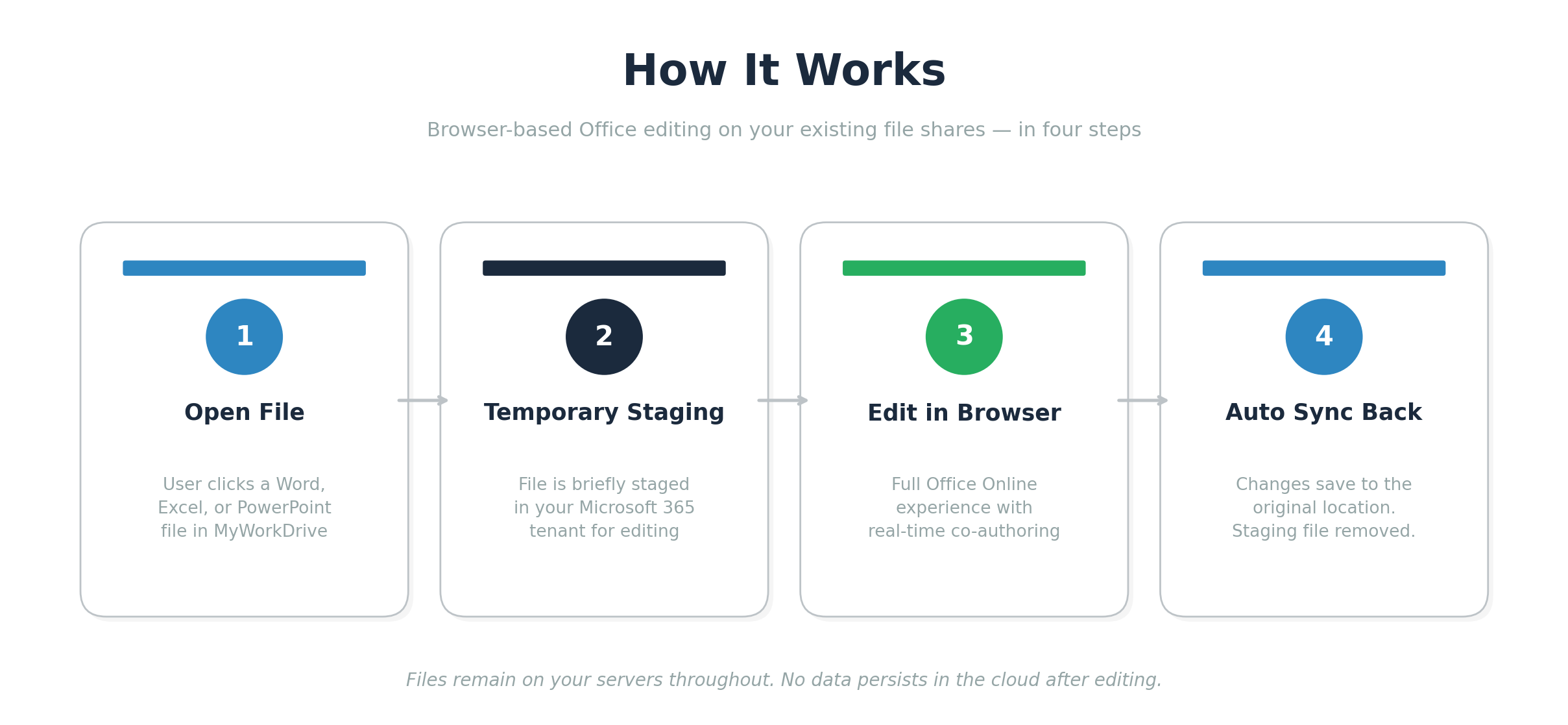
When a user clicks a file in MyWorkDrive, it's temporarily staged in your M365 tenant for the editing session. The user gets the full Office Online experience, including real-time co-authoring.
When they're done, changes sync back. The staging file is removed. No data persists in the cloud.
Your Data Stays on Your Servers
This matters for compliance-sensitive industries. Healthcare, legal, financial services, government—if you need data sovereignty, MyWorkDrive keeps data on your infrastructure.
No VPN required. No sync-and-share sprawl. AD and Entra ID permissions apply automatically. Learn more about security and DLP.
Choose Your Editing Backend
MyWorkDrive supports multiple editing options:
- Microsoft 365 staging — the default, simplest setup
- Dedicated SharePoint site — enterprise option with centralized control
- Office Online Server — self-hosted, files never leave your network
- OnlyOffice — non-Microsoft alternative, no M365 license needed
The Math: How Much Can You Actually Save?
Let's get specific.
Savings depend on how many users you can shift from E3 (or Business Standard) to F3. These are users who work in the browser and don't need desktop Office, advanced compliance, or large mailboxes.
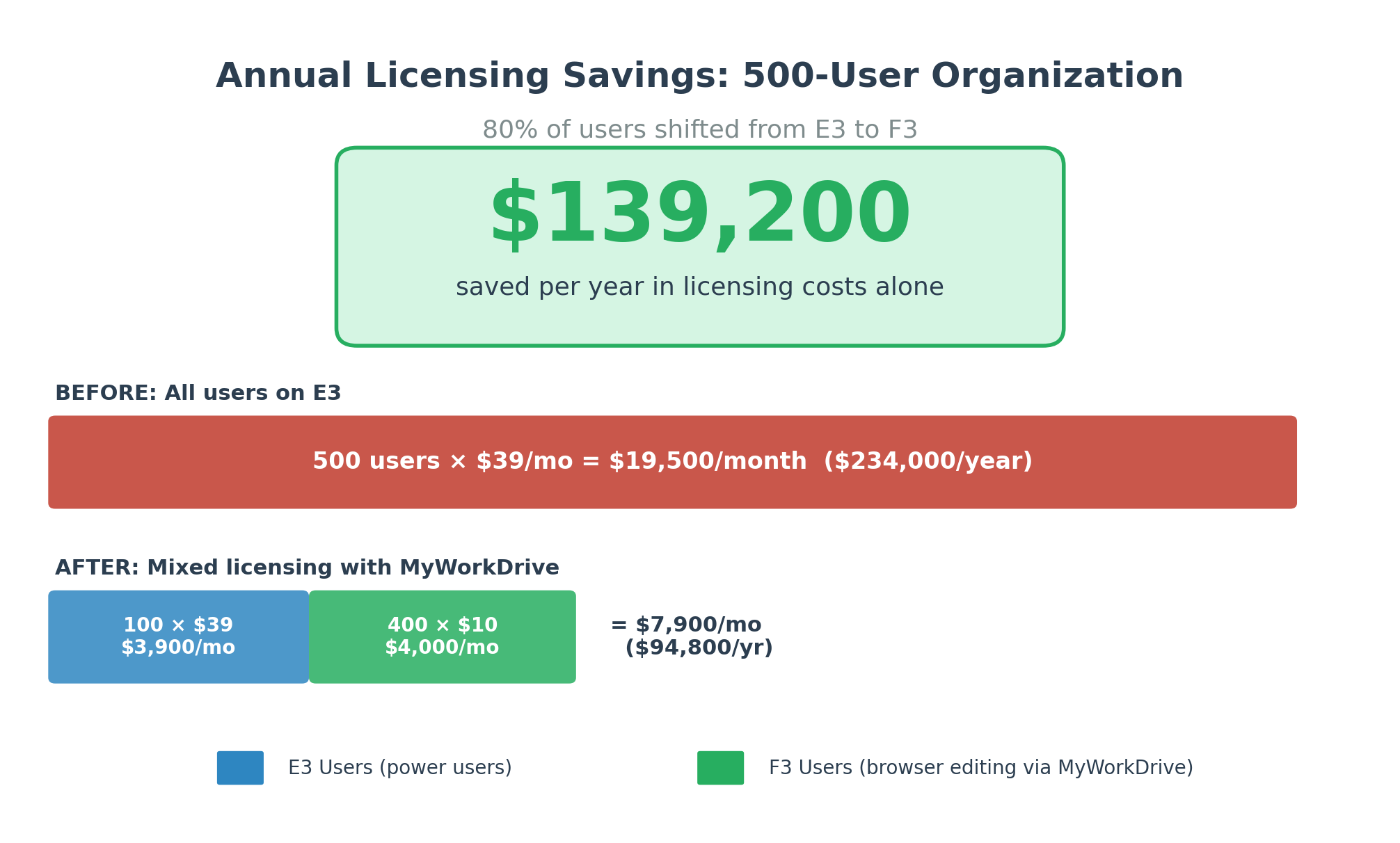
Scenario: 500 Users, 80% Moved to F3
| Line Item | Details |
|---|---|
| Total users | 500 |
| Power users on E3 (admins, execs, finance) | 100 × $39/mo = $3,900/mo |
| Browser users on F3 + MyWorkDrive | 400 × $10/mo = $4,000/mo |
| Previous cost (all on E3) | 500 × $39/mo = $19,500/mo |
| New cost (mixed licensing) | $3,900 + $4,000 = $7,900/mo |
| Monthly savings (licensing alone) | $11,600/month |
| Annual savings (licensing alone) | $139,200/year |
Many organizations find that 70–80% of their users don't need desktop Office or E3/E5 features.
Per-User Savings at a Glance
| Moving From | Moving To | Save/User/Mo | Save/User/Year |
|---|---|---|---|
| M365 E3 ($39) | F3 ($10) | $29 | $348 |
| M365 E5 ($60) | F3 ($10) | $50 | $600 |
| Biz Standard ($14) | F3 ($10) | $4 | $48 |
| M365 E3 ($39) | F1 ($3) | $36 | $432 |
Note: F1 works for view-only and light editing users. F3 is the better fit for full browser-based editing. MyWorkDrive works with both.
Who Benefits Most?
Not every user is a candidate for F-tier. Your CFO running complex Excel models needs desktop Excel. Your compliance team needs E5 security tools.
But a surprising number of roles don't need premium licensing:
- Frontline and field workers — view and edit on shared devices or phones
- Admin and support staff — browser-based, no advanced desktop features needed
- Remote and mobile workers — edit from tablets, phones, or thin clients
- Contractors and external collaborators — no VPN or desktop install required
- View-heavy roles — HR readers, compliance reviewers, quality checkers
- Industries with high frontline density — retail, manufacturing, healthcare, hospitality, logistics, education, government
This Won't Be the Last Price Increase
A Pattern, Not a One-Off
Microsoft raised prices in 2022. They're raising them again in 2026. That's a four-year cycle.
With massive ongoing investment in AI infrastructure, datacenter capacity, and security, there's every reason to believe this pattern continues.
Why It Will Keep Happening
Microsoft's cloud division operates at a 68% margin—but that margin is declining year-over-year as AI investments consume capital. Price increases offset the difference.
The question isn't if prices go up again. It's when.
Build a Resilient Strategy Now
Right-sizing users today doesn't just save money now. It creates a licensing structure that's resilient to the next increase—and the one after that.
How to Get Started: 5 Steps
1. Audit your license usage. Find out which users actually use desktop Office, advanced compliance, large mailboxes, and E3/E5-specific features. Most orgs find a significant chunk that don't.
2. Identify F3 (or F1) candidates. Browser-based workers who do light-to-moderate editing are the sweet spot.
3. Deploy MyWorkDrive. Install on any Windows Server. Connect your existing file shares. Integrate with AD or Entra ID. No data migration.
4. Shift eligible users to F-tier. They keep browser-based Office editing, Teams access, and secure remote file access—at a fraction of the cost.
5. Redirect the savings. For a 500-user org, that's six figures annually. Put it toward security, infrastructure, or the teams that genuinely need premium licensing.
See It in Action
The 2026 Microsoft 365 price increase doesn't have to mean bigger bills across the board.
With MyWorkDrive, your users get browser-based Office editing on your existing file shares. Your organization gets the flexibility to stop overpaying.
Book a demo to see how it works—and how much you could save before July 2026.
Frequently Asked Questions
How much is Microsoft 365 increasing in 2026?
Most plans increase between 5% and 33%, effective July 1, 2026. Enterprise plans like M365 E3 go up $3/month (8%), while Frontline plans like M365 F1 see the largest percentage jump at 33%. The new pricing applies to new subscriptions and renewals after July 1.
When does the Microsoft 365 price increase take effect?
July 1, 2026. Existing customers stay on current pricing until their subscription renews after that date. Organizations renewing before July 1 can lock in current rates for the duration of their term.
Can you edit Office files with an F3 license?
Yes. Microsoft 365 F3 includes full editing rights for Word, Excel, and PowerPoint through web and mobile Office apps. It does not include desktop-installed Office. Combined with MyWorkDrive, F3 users can edit files stored on your own servers through the browser.
What's the difference between Microsoft 365 F1 and F3?
F1 ($3/month after July 2026) provides basic communication tools and view-plus-basic-editing in web Office apps, but no mailbox. F3 ($10/month) adds full web/mobile Office editing, a 2 GB Exchange mailbox, full Teams access, SharePoint access, and Intune P1.
How does MyWorkDrive reduce Microsoft 365 licensing costs?
MyWorkDrive enables browser-based Office editing on files stored on your own servers—without migrating to SharePoint or OneDrive. This means users who only need to edit documents in the browser can move from expensive E3/E5 licenses to F3, saving up to $29–50 per user per month.
Do files move to the cloud when editing with MyWorkDrive?
Not permanently. Files are temporarily staged in your Microsoft 365 tenant during the editing session, then removed when editing ends. Changes sync back to the original file location. No data persists in the cloud.
Sources: Microsoft Official Blog: Advancing Microsoft 365 · Microsoft Licensing: 2026 M365 Packaging & Pricing Updates · Office 365 IT Pros: Microsoft 365 Pricing Increase Analysis