

By Kyle Lachmann
Last Updated: May 29, 2026
The level you need comes down to the type of government information your contract covers: FCI or CUI. Pick wrong and you either spend on controls you don't need or fail an assessment you thought you'd pass. This guide walks through how to tell which level applies and what each one requires of the systems that hold your files.
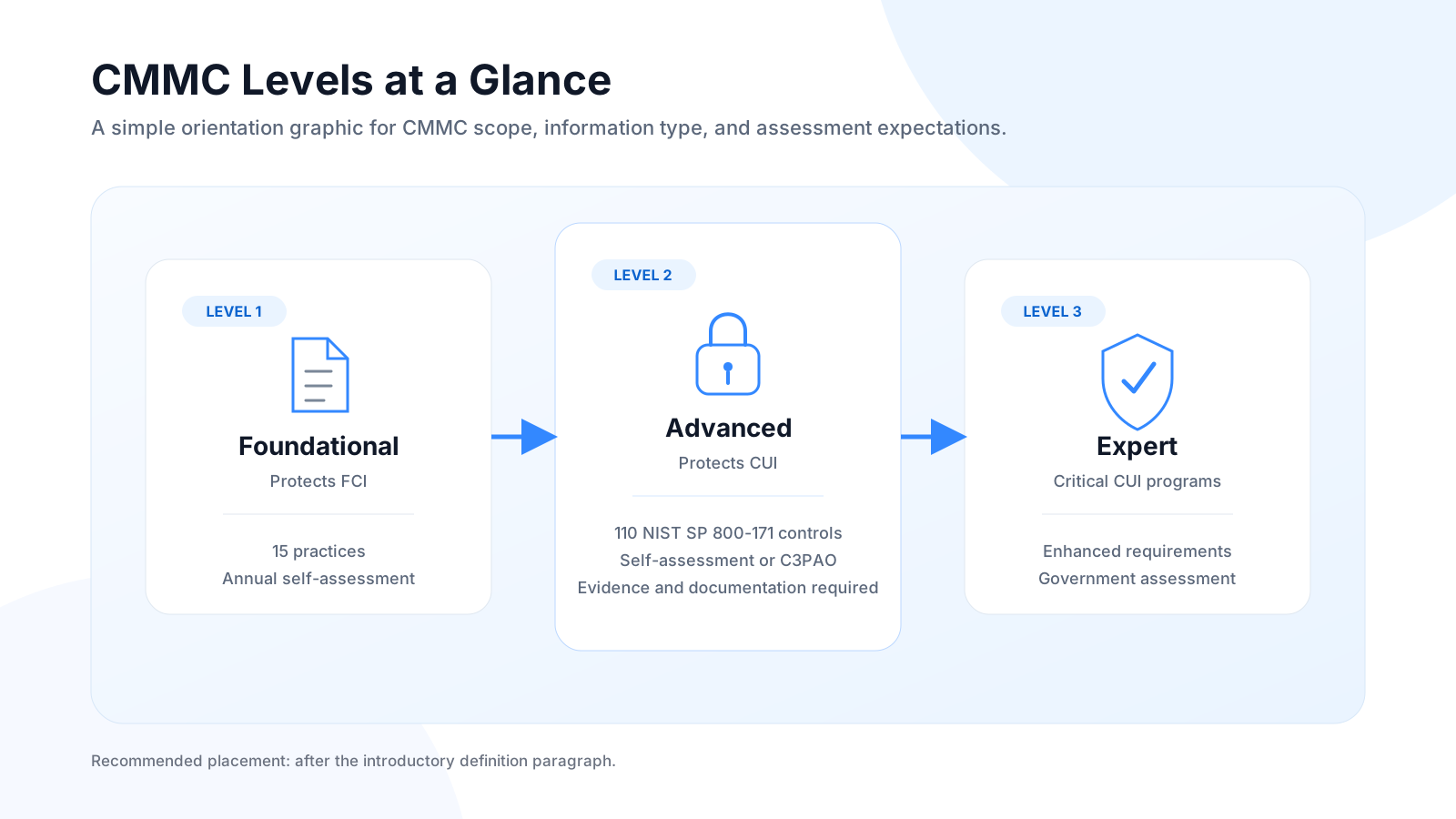
A quick note on timing. The final 48 CFR DFARS rule took effect on November 10, 2025, so CMMC requirements now appear in live DoD solicitations under DFARS clause 252.204-7021. Phase 2, which makes third-party C3PAO assessments mandatory for Level 2 on applicable contracts, begins November 10, 2026. If you are bidding on DoD work, your CMMC level is a condition of award today, not a future planning item.
FCI vs. CUI: the threshold that sets your level
Every level determination starts with one question: what kind of government information does your organization handle?
Federal Contract Information (FCI) is defined in FAR 52.204-21 as information that isn't intended for public release, provided by or generated for the government under a contract to deliver a product or service. Procurement data, delivery schedules, pricing, and contract correspondence are typical examples. FCI maps to CMMC Level 1.
Controlled Unclassified Information (CUI) is information the government creates or holds that requires safeguarding under law, regulation, or government-wide policy, but is not classified. It covers things like technical data, export-controlled information, privacy data, and defense-related specifications. If your contract includes DFARS clause 252.204-7012, you are handling CUI, and CMMC Level 2 applies.
In practice, the presence of actual CUI is what triggers Level 2. A contract that only involves FCI stays at Level 1. Once CUI enters the picture, the Level 2 obligations attach. Most contractors doing engineering, technical design, R&D, manufacturing, or IT work for defense programs are handling CUI in some form. The DoD estimates that roughly 80,000 organizations in the Defense Industrial Base will need Level 2 certification.
How to read your contract and confirm your level
Your solicitation language is the authoritative source. Don't rely on informal guidance from a prime.
| Contract signal | What it means | CMMC level |
|---|---|---|
| DFARS 252.204-7021 specifies Level 1 | FCI only | Level 1 — Foundational |
| DFARS 252.204-7021 specifies Level 2 | CUI present | Level 2 — Advanced |
| DFARS 252.204-7012 present | Safeguarding Covered Defense Information clause; indicates CUI | Level 2 — Advanced |
| FAR 52.204-21 only (no DFARS 7012) | Basic FCI safeguarding | Level 1 — Foundational |
| Prime flow-down citing NIST SP 800-171 | Subcontractor must meet Level 2 controls | Level 2 — Advanced |
| No CMMC clause | Pre-CMMC contract or exempt | Verify with the contracting officer |
Subcontractors are not exempt. DFARS 252.204-7012 carries mandatory flow-down, so a prime that handles CUI has to pass those obligations down to subs that touch the same data. DoD guidance indicates that the majority of CUI-handling contractors, on the order of 70 to 75 percent or more, will need a C3PAO assessment rather than a self-assessment. If a work order references DFARS 252.204-7012 or NIST SP 800-171, Level 2 obligations apply to you regardless of what your own prime contract says.
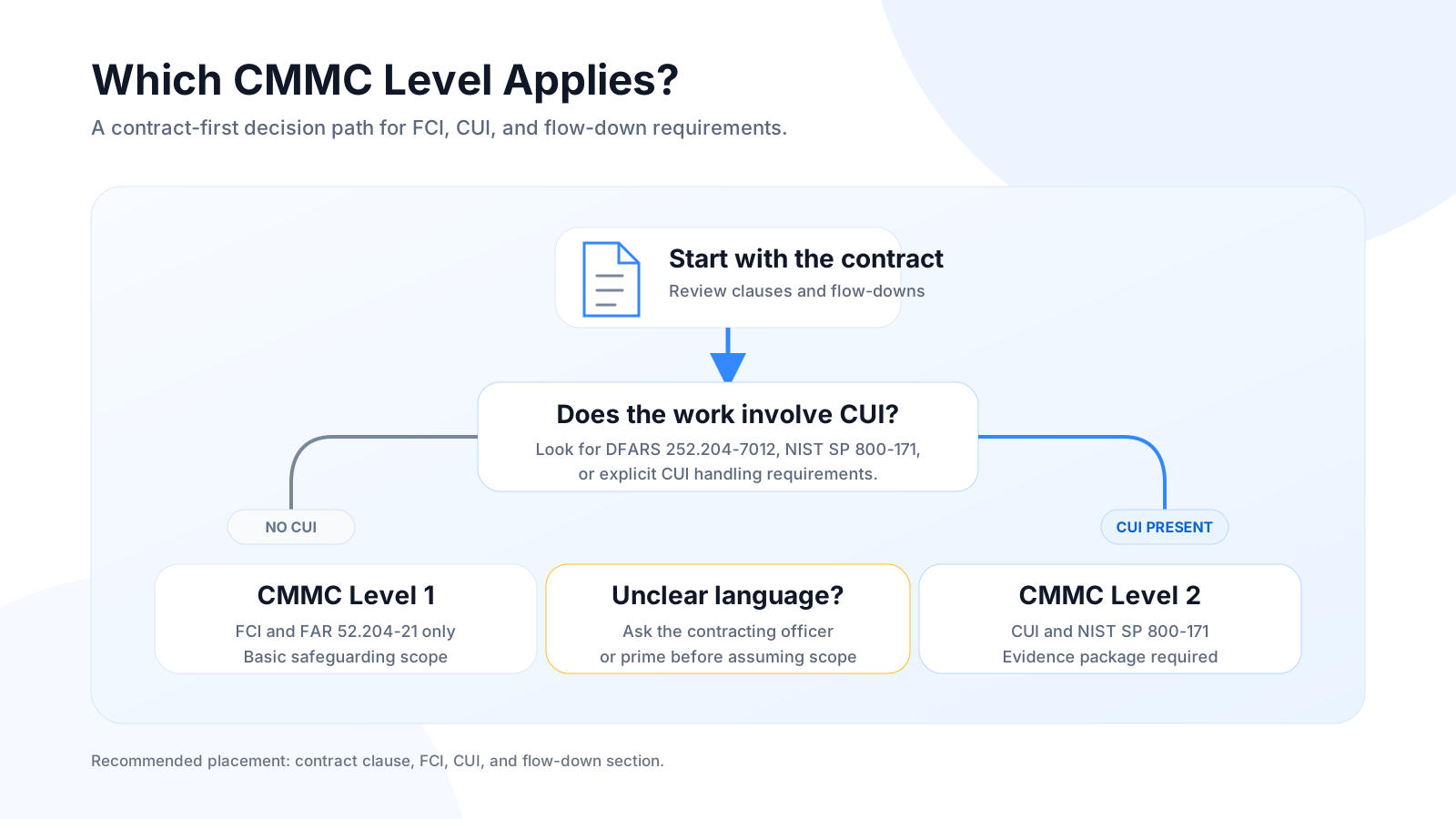
A fast self-check: does your work involve technical drawings, export-controlled specs, proprietary defense data, or information derived from classified sources? If yes, plan for Level 2.
CMMC Level 1: requirements and file access controls
Level 1 covers contractors that handle FCI. It requires the 15 security practices in FAR 52.204-21, spread across six domains: Access Control, Identification and Authentication, Media Protection, Physical Protection, System and Communications Protection, and System and Information Integrity.
The assessment model is an annual self-assessment with results submitted to SPRS and an affirmation signed by a senior official. No third-party assessor is involved. That does not make it a formality. A false attestation can create False Claims Act liability, and the Department of Justice has actively pursued cybersecurity misrepresentations under it.
File access controls required at Level 1:
- Limit system access to authorized users and authorized devices.
- Restrict the transaction types users can perform (read versus read/write versus delete).
- Verify and control connections to external systems.
- Control information posted on publicly accessible systems.
- Identify and authenticate users before granting access.
- Sanitize or destroy media containing FCI before disposal or reuse.
The practical floor at Level 1 is authenticated, authorized-user access with no anonymous shares, basic permission tiers, and the ability to sanitize media. Granular audit logging and encryption at rest are not explicitly required at Level 1, but both become requirements at Level 2.
CMMC Level 2: requirements and file access controls
Level 2 maps to all 110 security requirements in NIST SP 800-171 Revision 2, the control set written specifically to protect CUI on non-federal systems. CMMC Level 2 adopts those 110 requirements with no additions, which translate to 320 assessment objectives a C3PAO will evaluate. The jump from Level 1 is substantial, both in the number of controls and in the documentation and evidence you have to produce.
The assessment model is a third-party assessment by an authorized C3PAO every three years, plus an annual affirmation. Phase 2, beginning November 10, 2026, makes those C3PAO assessments mandatory for Level 2 on applicable contracts. A narrow set of lower-sensitivity Level 2 contracts may still accept a self-assessment, but per DoD guidance that is the exception rather than the rule, and the contracting officer determines it program by program.
NIST SP 800-171 control families most relevant to file infrastructure:
| Control family | Abbrev. | Controls | File access relevance |
|---|---|---|---|
| Access Control | AC | 22 | Least privilege, remote access, CUI flow enforcement |
| Audit and Accountability | AU | 9 | Log file access events; retain and protect logs |
| Configuration Management | CM | 9 | Baseline configs for file servers; restrict unauthorized software |
| Identification and Authentication | IA | 11 | MFA for privileged and remote access; unique IDs |
| Incident Response | IR | 3 | Detect, report, and respond to file-related security events |
| Media Protection | MP | 9 | Protect CUI on removable media; sanitize; encrypt portable storage |
| Risk Assessment | RA | 3 | Periodic risk assessments covering file systems and data flows |
| System and Communications Protection | SC | 16 | Encrypt CUI in transit and at rest using FIPS-validated cryptography |
| System and Information Integrity | SI | 7 | Malware protection; alert on anomalous file activity |
Source: NIST SP 800-171 Rev 2; DoD CMMC Level 2 control mapping. The table above lists the file-relevant families; NIST SP 800-171 Rev 2 has 14 families and 110 requirements in total.
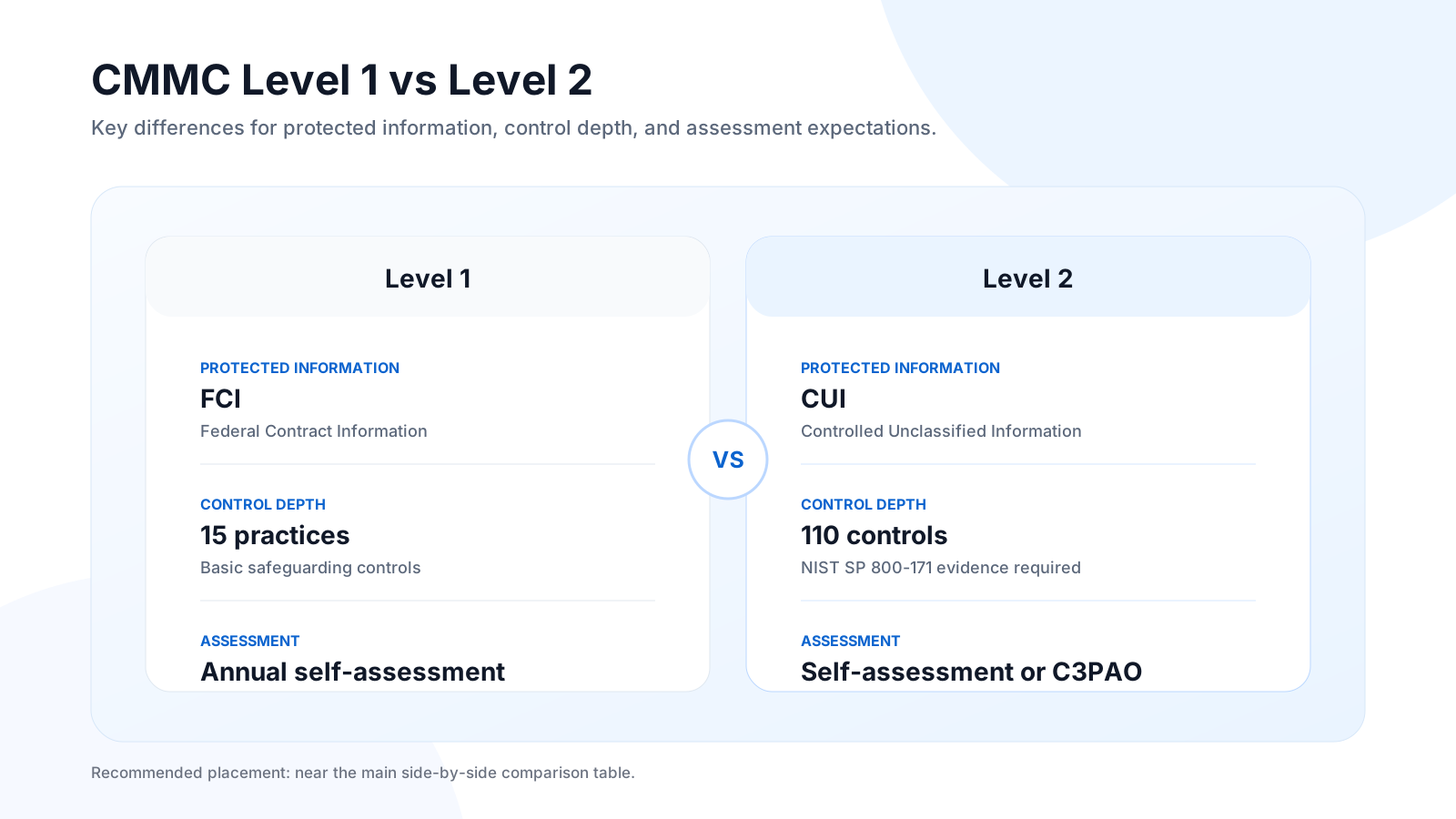
Side-by-side comparison
| Dimension | Level 1 — Foundational | Level 2 — Advanced |
|---|---|---|
| Data type protected | FCI | CUI |
| Governing standard | FAR 52.204-21 | NIST SP 800-171 Rev 2 |
| Number of practices | 15 | 110 |
| Assessment type | Annual self-assessment + affirmation | C3PAO third-party (every 3 years) + annual affirmation |
| SPRS submission | Required | Required |
| System Security Plan (SSP) | Recommended | Mandatory |
| Encryption at rest | Not explicitly required | Required — FIPS-validated cryptography, AES-256 |
| Encryption in transit | Not explicitly required | Required — FIPS-validated, TLS 1.2 minimum |
| Multi-factor authentication | Not required | Required for privileged and remote access |
| Audit logging | Not required | Required — access events, timestamped and retained |
| Role-based access control | Basic user-level controls | Least-privilege RBAC, documented |
| Incident response plan | Not required | Required — written, tested, reportable to DoD |
| C3PAO assessment mandatory | No | Yes — Phase 2, November 10, 2026 |
File access control requirements, mapped by level
Level 1 — foundational file access controls
| Control | Requirement |
|---|---|
| Authenticated user access | Username and password minimum. No anonymous shares. |
| Permission scoping | Users access only what their role requires. |
| Transaction-type restrictions | Read, read/write, and delete differentiated at the share level. |
| External connection control | Verify and limit connections from outside systems touching FCI. |
| Media sanitization | Wipe or destroy storage containing FCI before disposal or reuse. |
| Public system restriction | FCI must not appear on publicly accessible systems. |
Level 2 — advanced file access controls (adds to Level 1)
| Control | Requirement |
|---|---|
| Least-privilege RBAC | Documented role assignments. NTFS or equivalent enforcement. |
| Multi-factor authentication | Required for all privileged accounts and all remote access. |
| Encryption at rest (AES-256) | FIPS-validated cryptography. All CUI repositories encrypted. |
| Encryption in transit (TLS 1.2+) | All CUI transfers use FIPS-validated cryptographic protocols. |
| Comprehensive audit logging | Access, modifications, and deletions logged with user identity and timestamp. SIEM-compatible. Logs protected from tampering. |
| CUI flow control | DLP controls on downloads, shares, and external transfers. Prevent unauthorized CUI movement between system components. |
| Portable storage restrictions | Control or prohibit USB and removable media on CUI systems. |
| Session termination | Automatic timeout after inactivity on CUI-connected systems. |
Where C3PAO assessments tend to break down. A few file-side findings come up again and again: audit logs that miss failed access attempts, encryption at rest applied to some CUI repositories but not all, MFA enforced for remote access but not for on-premises privileged accounts, and no documented RBAC matrix. The single most common finding in the wider 800-171 world is control 3.13.11, FIPS-validated cryptography. It sits at the top of DIBCAC's list of most-failed requirements, usually because organizations rely on "FIPS-compliant" vendor language without an actual CMVP-validated module or a documented certificate number. Assessors expect to see the CMVP certificate recorded in your SSP, not a marketing claim.
One date worth putting on the calendar: FIPS 140-2 certificates move to "Historical" status on September 21, 2026, roughly seven weeks before Phase 2 begins. The current target is FIPS 140-3. If your encryption rests on a 140-2-only basis, confirm the modules also carry active FIPS 140-3 validation and capture those certificate numbers in your SSP before assessment season.
What this means for your file infrastructure
The gap between Level 1 and Level 2 is less about adding a few settings and more about restructuring how access is controlled, proven, and documented. If you handle CUI, the system holding your files has to do more than keep them behind a password. It has to demonstrate, to an independent assessor, that it did so, with documented controls and evidence you can export.
A file access platform operating in a Level 2 environment generally needs to deliver:
- FIPS-validated cryptography at rest and in transit, with CMVP certificate numbers you can hand to an assessor.
- Active Directory integration (SAML/ADFS or equivalent). Standalone user databases that duplicate AD tend to expand your audit scope.
- Granular, exportable audit logs capturing user identity, timestamp, file path, and action type on every event, in a SIEM-compatible format.
- DLP controls on file movement to restrict downloads, block sharing to unapproved destinations, and enforce view-only access where needed.
- A contained audit boundary. If your file platform replicates files to a third-party cloud, that vendor's infrastructure enters your CMMC System Security Plan, which is one of the more reliable ways to watch compliance cost and complexity climb.
As covered in our CMMC 2.0 Framework and Implementation Timeline guide, compliance ultimately rests on the security framework of the end-user environment. Your infrastructure choices, not just your written policies, shape your compliance posture.
How MyWorkDrive addresses both levels
MyWorkDrive is a secure access gateway to your existing Windows file server infrastructure, whether that lives on-premises or in a private cloud. It does not replicate files outside your controlled environment, and no customer file data is stored on the platform itself.
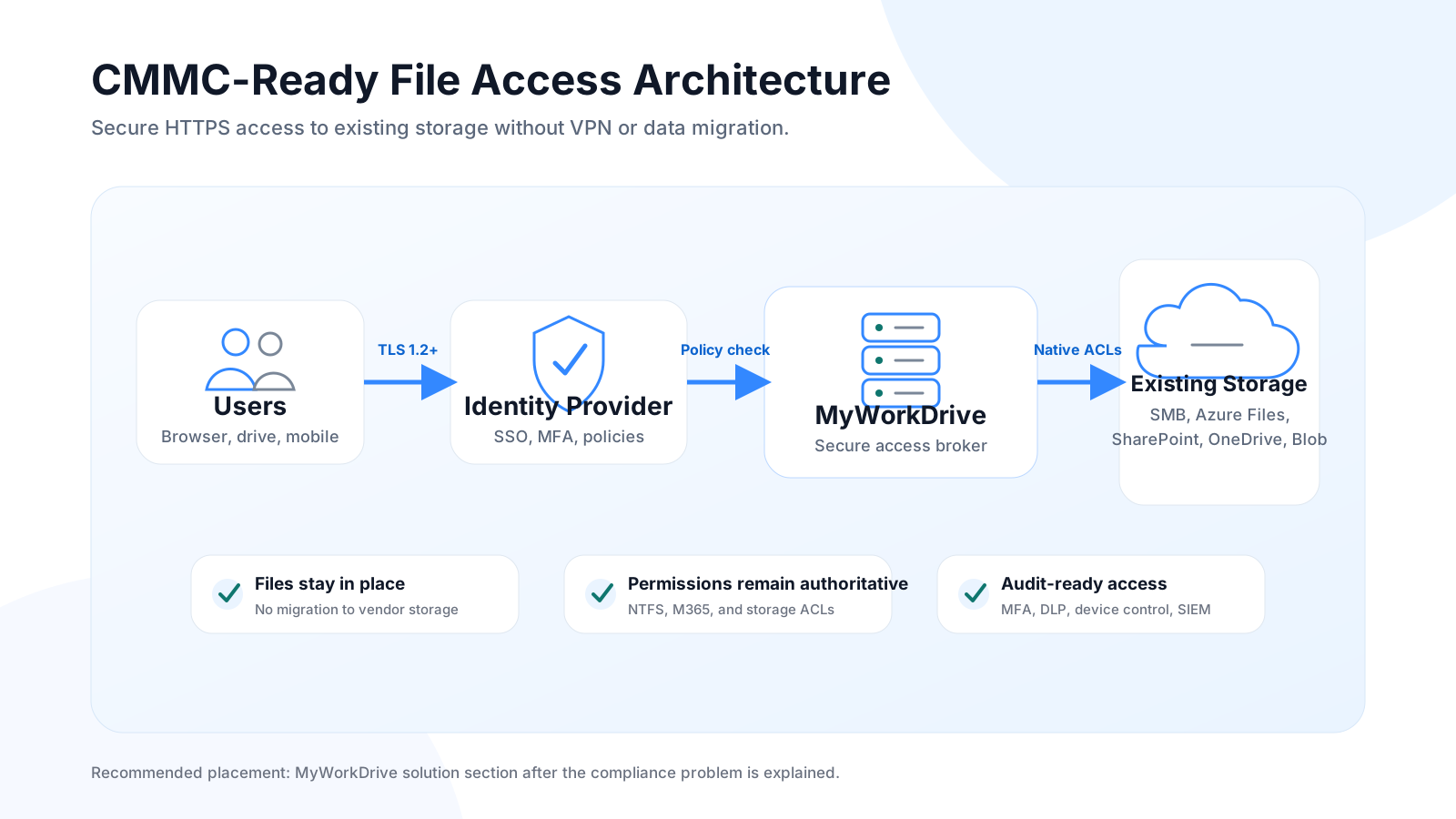
That architecture has a direct CMMC consequence. Your audit boundary stays on infrastructure you already own and control. There is no MyWorkDrive data center to add to your System Security Plan. As covered in our CMMC Compliance File Sharing overview, keeping the data in place tends to make SSP documentation more contained.
Level 1 coverage. Active Directory-based authenticated access, NTFS-enforced user and group permissions, external connection control through a single secure port, and share-level restrictions that keep FCI from reaching unauthorized destinations. The 15 FAR 52.204-21 access control requirements are addressable in a standard configuration.
Level 2 coverage — mapped to NIST SP 800-171 control families:
| Control family | MyWorkDrive capability |
|---|---|
| Access Control (AC) | NTFS least-privilege RBAC; session timeouts; single encrypted port; Access-Based Enumeration |
| Audit and Accountability (AU) | File events logged with user identity and timestamp; SIEM-compatible export; threshold-based activity alerts |
| Identification and Authentication (IA) | Native AD integration; SAML/ADFS; two-factor authentication; complex password enforcement |
| System and Communications Protection (SC) | AES-256 at rest; TLS 1.2 minimum (1.3 preferred) in transit; FIPS-validated cryptography via Windows FIPS mode; NIST FIPS 186-4 RSA algorithm validation certificate #3018 |
| Media Protection (MP) | DLP controls restricting download, copy, and modification; view-only and watermarked access; device approval |
| Configuration Management (CM) | Administrator-approved device enforcement; only authorized endpoints connect to file shares |
| Incident Response (IR) | Activity threshold alerts; SIEM integration for anomaly detection; Shadow Copy recovery support |
A note on FIPS, since assessors look closely here: MyWorkDrive runs on Windows and uses the operating system's CMVP-validated cryptographic modules when Windows FIPS mode is enabled, which is how it meets the FIPS-validated cryptography requirement in 800-171. Separately, MyWorkDrive holds a NIST FIPS 186-4 RSA algorithm validation certificate (#3018). Record the relevant CMVP certificate numbers in your SSP as your evidence.
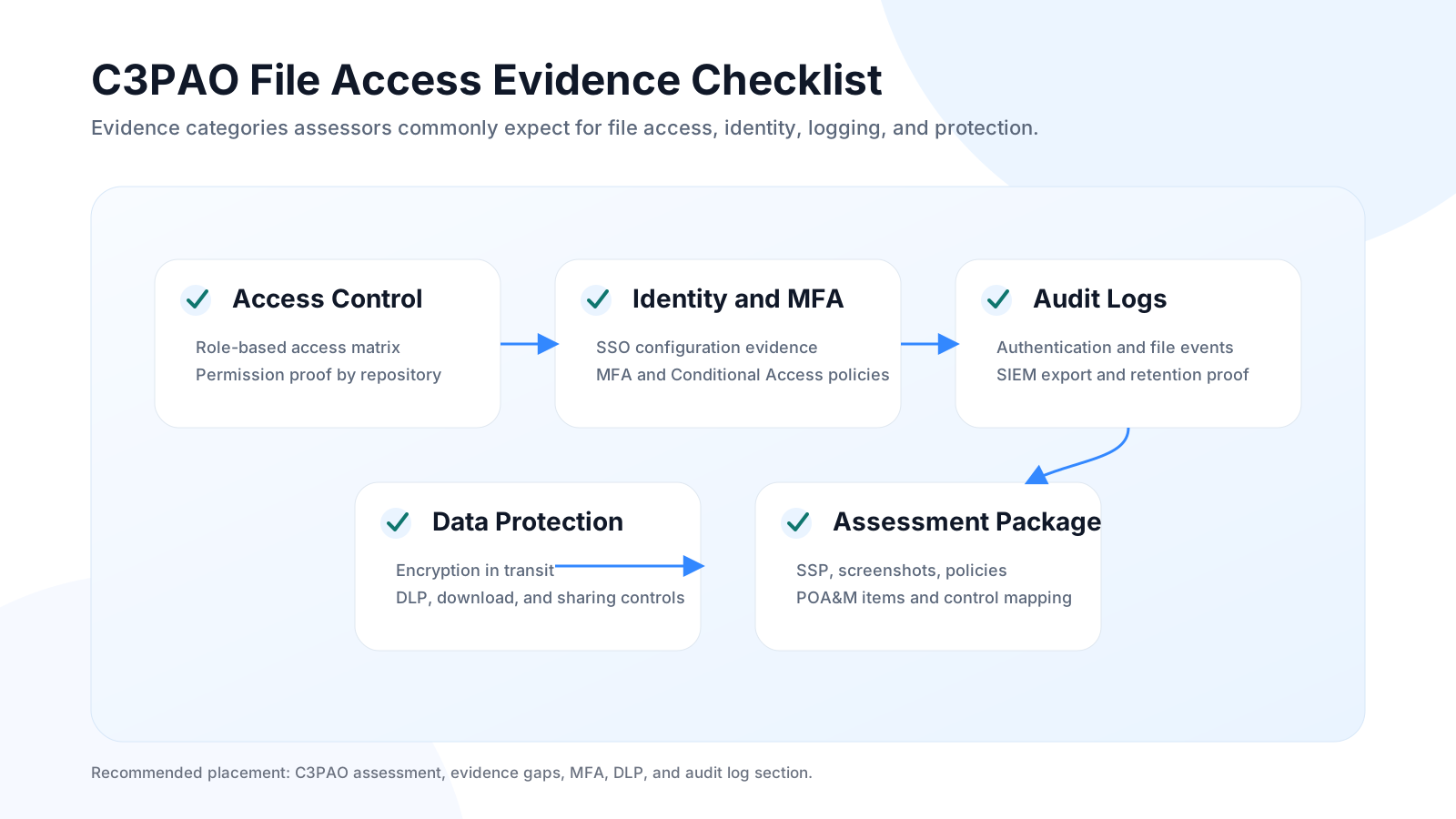
For contractors that need a fully isolated architecture, MyWorkDrive supports a completely on-premises model, including a locally hosted Office Online Server, so document editing never leaves the controlled environment.
Scoping your SSP? Because MyWorkDrive stores no customer file data, it functions as a secure access broker rather than a data-holding component. That distinction matters when you define your assessment boundary. See the full CMMC compliance architecture.
Start a free trialBook a demoView pricing
Your file infrastructure should narrow your CMMC audit, not widen it. Deploy on your existing Windows file server in under two hours. FIPS-validated cryptography, NTFS RBAC, a full audit trail, and no customer file data stored outside your environment.
Frequently asked questions
What is the difference between FCI and CUI? FCI is non-public information provided by or generated for the government under a contract to deliver a product or service, such as pricing or delivery schedules. CUI is government information that requires safeguarding under law or policy but is not classified, such as technical data or export-controlled specifications. FCI maps to CMMC Level 1; CUI maps to Level 2.
Which CMMC level does my contract require? Check the clauses in your solicitation. FAR 52.204-21 alone points to Level 1. DFARS 252.204-7012, or a 252.204-7021 clause specifying Level 2, points to Level 2. A prime's flow-down referencing NIST SP 800-171 also puts you at Level 2. When the language is unclear, confirm with the contracting officer.
Is self-assessment allowed for CMMC Level 2? Only in limited, lower-sensitivity cases, and the contracting officer decides program by program. DoD guidance indicates most CUI-handling contractors will need a C3PAO assessment. Starting November 10, 2026 (Phase 2), third-party C3PAO assessments become mandatory for Level 2 on applicable contracts.
When do CMMC Level 2 third-party assessments become mandatory? Phase 2 of the rollout begins November 10, 2026. From that point, C3PAO certification becomes a standard condition of award for applicable Level 2 contracts.
Does MyWorkDrive need to be included in my System Security Plan? MyWorkDrive stores no customer file data and acts as a secure access broker to your existing file servers, so it does not enter your SSP as a data-holding component. The Windows file infrastructure it connects to remains in scope, as it would regardless of access method.
Does MyWorkDrive meet the FIPS-validated cryptography requirement? MyWorkDrive uses the Windows operating system's CMVP-validated cryptographic modules when Windows FIPS mode is enabled, and it holds a NIST FIPS 186-4 RSA algorithm validation certificate (#3018). Document the applicable CMVP certificate numbers in your SSP as evidence, and confirm FIPS 140-3 validation ahead of the September 21, 2026 transition.
Related reading
- Why MyWorkDrive Is the Smart Choice for CMMC-Compliant File Sharing
- CMMC 2.0 Framework and Implementation Timeline
- CMMC Compliance File Sharing Requirements & Checklist
Structured data (for the dev / CMS team)
Add both JSON-LD blocks to the page <head>. Replace every bracketed placeholder with real values, and keep the FAQ schema text identical to the on-page FAQ above (Google requires a match).