

By Scott Miller
Last Updated: September 23, 2026
In early 2026, NAVFAC Southwest said in sources-sought notices that it anticipated all solicitations issued on or after November 10, 2026 would require CMMC Level 2 certification or higher, and that firms without it would not be eligible for award. For contractors pursuing NAVFAC SW Planning, Design and Construction MACCs and Architect-Engineer IDIQ contracts, that date set the planning calendar. It was the start of CMMC Phase 2, when third-party C3PAO certification was scheduled to become a condition of award for most contracts involving Controlled Unclassified Information (CUI).
That schedule no longer applies. On July 13, 2026, the Department of War suspended the Phase 2 transition and gave a CMMC Reform Task Force 60 days to review the program. On September 3, Revision 3 of DARS Class Deviation 2026-O0025 kept the suspension in binding acquisition instruction and directed contracting officers to remove or revise Phase 2 requirements in solicitations and contracts. For now, Level 1 and Level 2 requirements can be met through self-assessment, and no replacement Phase 2 date has been announced. Our post on the CMMC Phase 2 suspension covers the details.
The requirements underneath CMMC stayed where they were. DFARS 252.204-7012 still obligates you to safeguard covered defense information by implementing the 110 requirements of NIST SP 800-171 Revision 2. Contracting officers still check SPRS for a current CMMC status before award and before exercising an option, and for most CUI work during the suspension that status is a Level 2 (Self) score backed by an annual affirmation from a senior official. Self-assessment is now the main way the Department verifies compliance, so an inaccurate score carries False Claims Act exposure, and much of that score depends on how your file servers and remote access handle CUI.
The rest of this post covers what those controls ask of your file-sharing infrastructure and where MyWorkDrive fits in a Level 2 environment, whether your next review is a self-assessment or a third-party assessment.
What CMMC Level 2 Actually Demands from Your File Infrastructure
CMMC Level 2 maps directly to the 110 security controls in NIST SP 800-171. For file sharing specifically, this means your solution must address access control, audit and accountability, configuration management, identification and authentication, incident response, media protection, risk assessment, system and communications protection, and system and information integrity, among others.
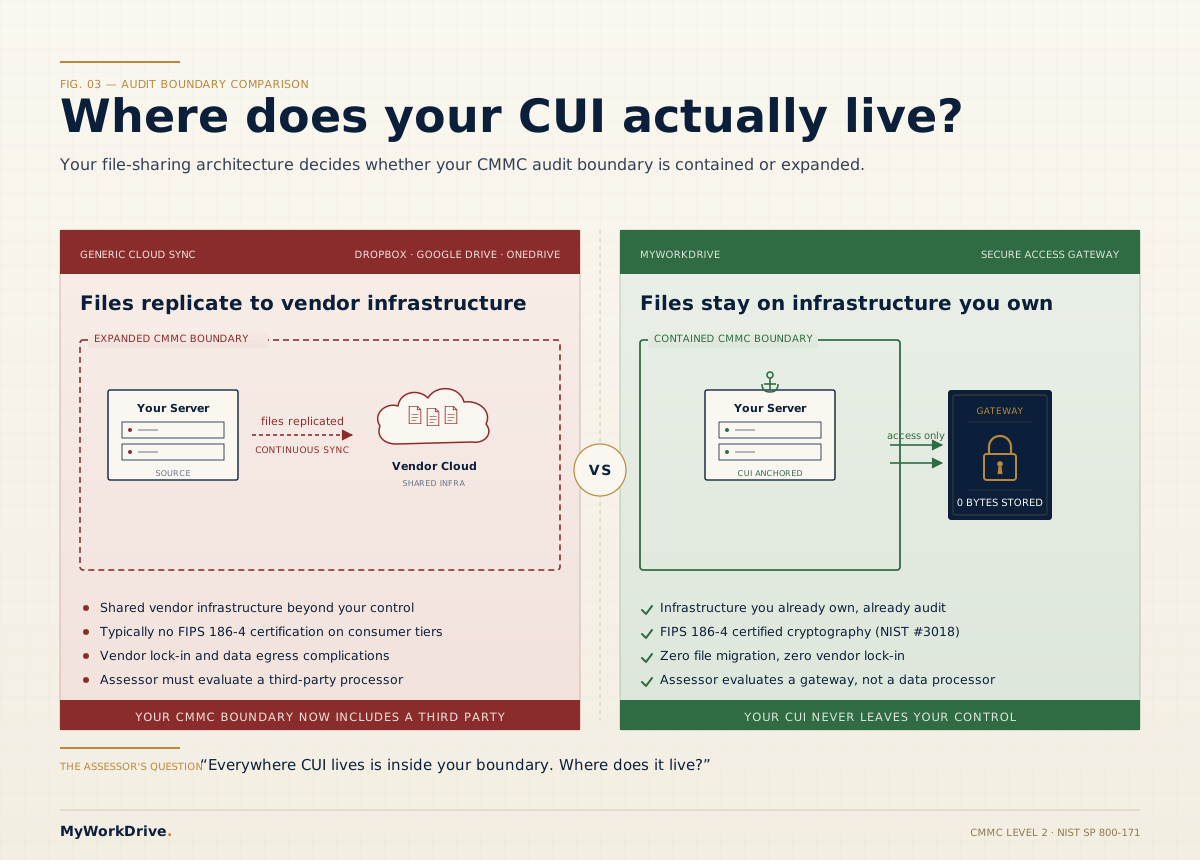
Cloud sync services like Dropbox or Google Drive store your files on infrastructure you do not control. Once CUI lands in one of them, that provider enters your CMMC assessment scope, and DFARS 252.204-7012 requires a cloud service that stores CUI to meet the FedRAMP Moderate baseline or equivalent. Whether a given service qualifies depends on the specific plan and how it is configured, so the boundary grows in ways that take real effort to document and defend.
MyWorkDrive takes a fundamentally different approach.
The MyWorkDrive Difference: Your Data Stays Yours
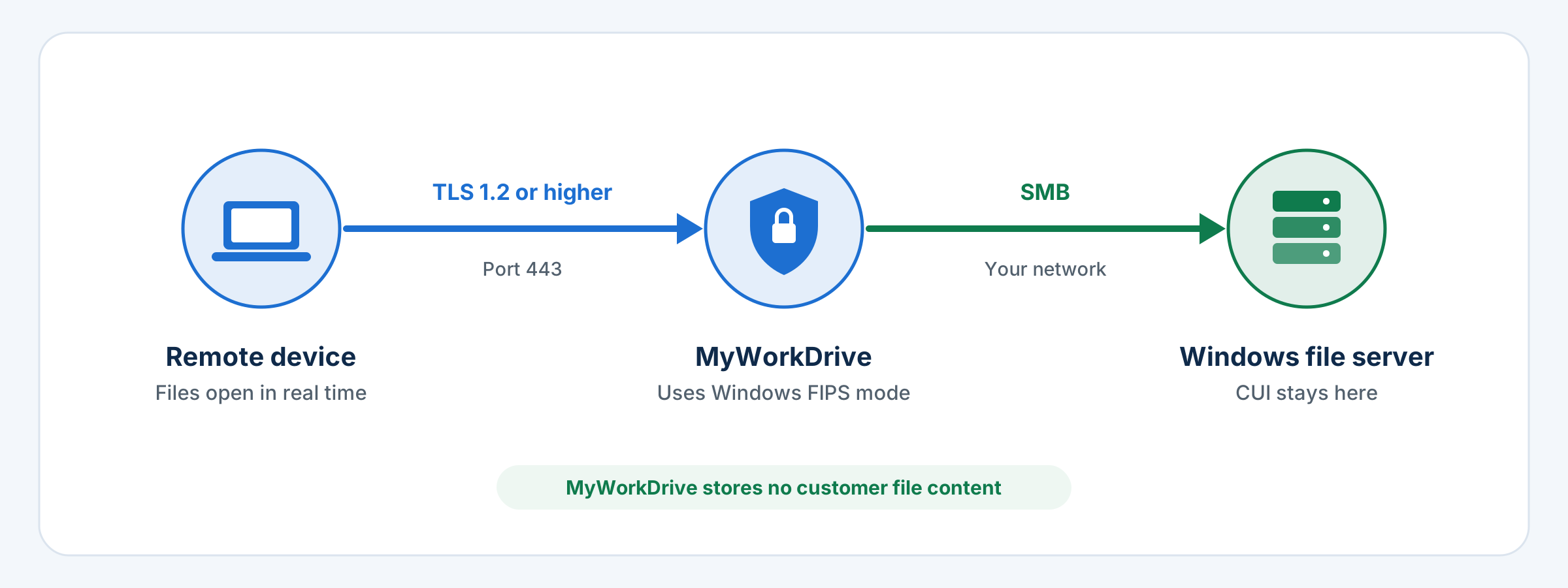
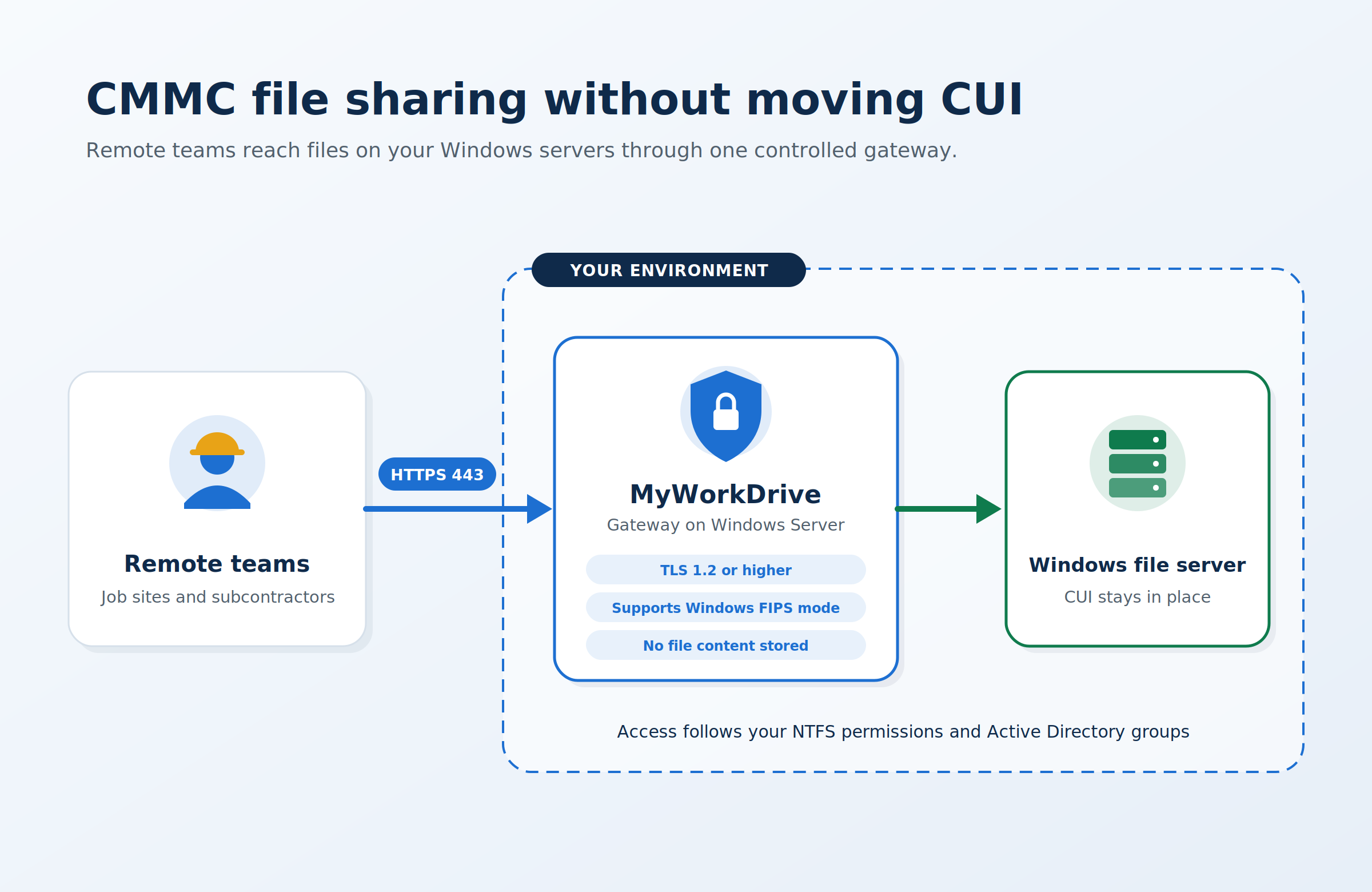
The most important thing to understand about MyWorkDrive is architectural: it never stores your data. MyWorkDrive functions as a secure gateway to your existing Windows file server infrastructure. Files remain on your servers, whether on-premises or in a private cloud, and MyWorkDrive simply brokers access to them. No file migration. No vendor lock-in. No shared cloud infrastructure touching your CUI.
This matters enormously for CMMC. Because MyWorkDrive does not hold your data, your existing backup software, archiving procedures, and data retention policies remain intact and in your control. Your CMMC System Security Plan doesn't have to account for a third-party cloud holding your sensitive files, because none of them are there.
Encryption is where assessors look closely, so the details matter. Connections use TLS 1.2 or higher. For the FIPS-validated cryptography that NIST SP 800-171 control 3.13.11 requires, MyWorkDrive relies on the CMVP-validated cryptographic modules in Windows Server when Windows is configured for FIPS mode. MyWorkDrive's own FIPS 186-4 RSA certificate #3018 is an algorithm validation, which is separate from a FIPS 140 module validation and does not satisfy 3.13.11 on its own. FIPS 140-2 module certificates moved to the historical list on September 21, 2026, so confirm the FIPS 140-3 status of the modules in your Windows Server version. Encryption at rest is handled by your storage, for example BitLocker on the file server, since that is where the files live and MyWorkDrive stores no customer file content.
Security Features Built for the Defense Industrial Base
MyWorkDrive's feature set reads like a CMMC compliance checklist. Here are the capabilities most directly relevant to defense contractors pursuing Level 2 certification.
-
FIPS-Validated Cryptography Through Windows Server
- Connections use TLS 1.2 or higher. With Windows FIPS mode enabled, MyWorkDrive uses the operating system's CMVP-validated modules for TLS. MyWorkDrive also holds FIPS 186-4 RSA algorithm certificate #3018.
-
Active Directory and MFA
- Native AD integration with two-factor authentication, SAML/ADFS support, and complex password enforcement with no separate identity stack required.
-
Granular Audit Logging
- Every access, modification, and deletion is logged with timestamps and user identity. Logs are exportable and SIEM-compatible for assessor review.
-
Data Loss Prevention (DLP)
- Administrators can restrict file downloads, deletions, or modifications at the share, user, or global level. View-only and watermarked access modes protect CUI from exfiltration.
-
Device Approval Controls
- Administrators can allowlist the devices that connect through MyWorkDrive's mapped drive and mobile clients, and unapproved devices running those clients are blocked. Device approval is not an endpoint compliance check, so pair it with Conditional Access at your identity provider.
-
Zero Trust Architecture
- Web, mapped drive, and mobile access delivered over a single secure port. Access follows your existing NTFS permissions, and MyWorkDrive cannot grant access beyond what those permissions allow, so least privilege depends on keeping the underlying NTFS permissions tight.
Speed: The Concern No One Talks About Enough
Compliance platforms often get criticized for one thing that doesn't appear in any certification checklist: they slow teams down. Clunky interfaces, VPN friction, file-sync delays, and limited mobile access create workarounds, and workarounds are where CUI security breaks down.
MyWorkDrive was architected to eliminate this friction entirely. Because it connects directly to your existing Windows file shares, there is no sync engine adding latency, no file-format conversion, and no waiting for cloud replication. Files are accessed in real time, as if employees were sitting in the office, whether they're working from a job site in San Diego, a hotel in Washington D.C., or a remote office across the country.
Users access files through a standard web browser, a mapped network drive, or a mobile client. There's no proprietary application to learn. The experience is fast, familiar, and requires no change in how your team actually works, only in how securely they do it. For construction and A-E firms bidding on NAVFAC contracts, where project managers and field supervisors need access to drawings, submittals, and contract documents without delay, this matters operationally.
A Track Record with Government-Sector Organizations
MyWorkDrive is not new to the requirements of regulated, security-conscious environments. The platform has been deployed by government agencies, universities, healthcare organizations, legal firms, and enterprises across the globe, all operating under strict data governance obligations.
For government deployments specifically, MyWorkDrive supports a fully private cloud model where all files, transmissions, and document edits are contained entirely within the agency's or contractor's own infrastructure, including support for a locally hosted Office Online Server. That means even document editing never leaves your controlled environment. It's the kind of deployment architecture that government security teams understand and trust.
MyWorkDrive has also earned the Skyhigh CloudTrust™ Enterprise-Ready rating, an independent assessment evaluated against Cloud Security Alliance criteria. For DoD contractors who need to demonstrate the enterprise credibility of their toolchain to assessors, this independent validation carries real weight.
The CMMC Compliance Checklist MyWorkDrive Helps You Check Off
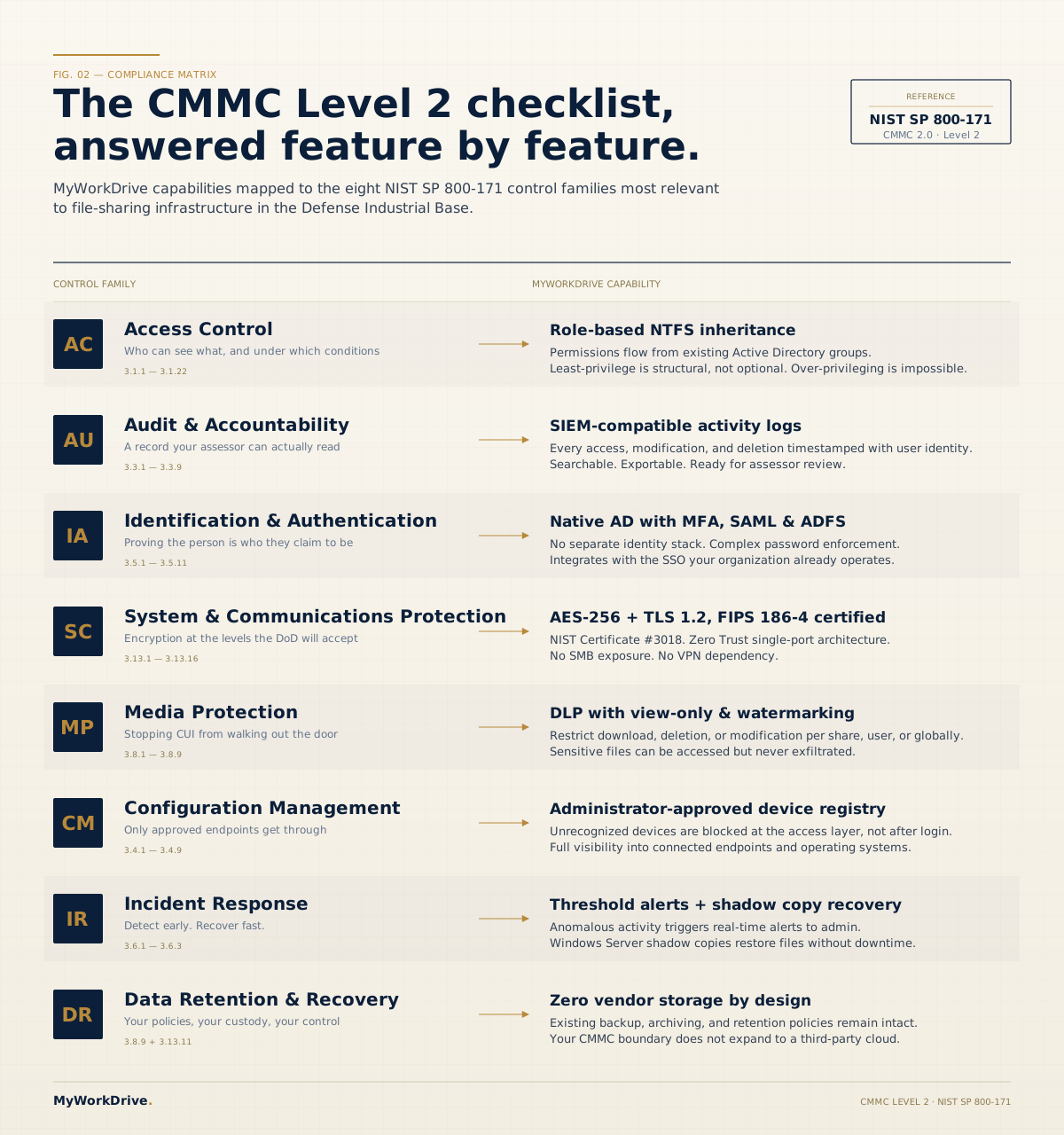
| Control family | How MyWorkDrive supports it |
|---|---|
| Access Control (AC) | Role-based permissions inherited from NTFS; MyWorkDrive cannot grant access beyond existing NTFS rights, so least privilege follows your permission design |
| Audit and Accountability (AU) | All file access, modifications, and deletions logged with timestamps, searchable, exportable, and SIEM-compatible |
| Identification and Authentication (IA) | Active Directory integration, MFA/2FA, SAML/ADFS support, complex password enforcement |
| System and Communications Protection (SC) | TLS 1.2 or higher in transit using Windows Server's CMVP-validated modules in FIPS mode; encryption at rest handled by your storage; single-port HTTPS access |
| Media Protection (MP) | DLP controls prevent unauthorized download or deletion; view-only and watermarked access modes supported |
| Configuration Management (CM) | Device approval allowlists devices for the mapped drive and mobile clients; admin visibility into which devices are connecting |
| Incident Response (IR) | File activity alerts for threshold-exceeding events; shadow copy integration for rapid file recovery |
| Data Retention and Recovery | No data stored by vendor; existing retention policies preserved; Windows Server shadow copies support easy file restoration |
What NAVFAC SW Contractors Should Do During the Suspension
Keep remediating. The Phase 2 pause moved the verification schedule, and the controls your SPRS score reports against are the same ones a C3PAO would test. Firms that were preparing for a third-party assessment can keep closing gaps and collecting evidence, and Level 2 certifications already issued remain valid. Scheduling a voluntary C3PAO assessment now is a business decision to weigh against the contracts you hold and the ones you plan to pursue.
Read each solicitation and contract as it arrives instead of relying on notices issued before July. On existing contracts, the CMMC clause stays in force until the contracting officer removes it by modification, which the deviation ties to the next option exercise or scheduled administrative modification, so confirm the change in your contract file. Primes will also keep asking subcontractors for SPRS status as a flow-down condition.
The Task Force's recommendations went to the DoW CIO in September and had not been published as of this update. A Task Force report does not change any contract obligation by itself. Changing the program would take further regulatory action, such as a revised class deviation or an amendment to 32 CFR Part 170.
For the file-sharing part of your boundary, MyWorkDrive gives field crews and subcontractors access to CUI on the Windows file servers you already run. Access follows your existing NTFS permissions and Active Directory groups, with MFA enforced at your identity provider. File activity is logged and can be exported to your SIEM through Syslog, and files are not copied to a vendor cloud. The MyWorkDrive server still transmits CUI, so it belongs inside your assessment boundary and your System Security Plan should describe it. Our CMMC compliance file sharing page maps MyWorkDrive to the relevant NIST SP 800-171 controls, and the construction file access page covers job-site and subcontractor access for A-E and construction firms.
Frequently Asked Questions
"We already have a file server setup. Does implementing MyWorkDrive mean ripping everything out and starting over?"
Not at all. MyWorkDrive is purpose-built to layer on top of your existing Windows file server infrastructure. There is no file migration, no data transfer to a vendor's cloud, and no reconfiguration of your existing NTFS permissions. Deployment is additive: your team keeps working the way they always have, and MyWorkDrive adds secure remote access and compliance controls on top of what you already own.
"How do we know MyWorkDrive will actually satisfy a C3PAO assessor during our CMMC Level 2 audit?"
MyWorkDrive publishes a mapping of its features to the NIST SP 800-171 controls that apply to file sharing. The MyWorkDrive server transmits CUI, so it sits inside your assessment boundary and belongs in your System Security Plan. When MyWorkDrive is self-hosted, it does not store customer file content or copy files to a vendor cloud, so no third-party storage provider enters scope through the file access layer. Your assessor evaluates your environment as a whole, and MyWorkDrive supplies access controls and audit logs that support your evidence for the controls it touches.
"We're a small firm. Is MyWorkDrive too complex or expensive for us to manage?"
MyWorkDrive is well suited to small and mid-size defense contractors. It deploys on your existing Windows Server with no new hardware required, and is administered through a straightforward management console. Pricing is per-user and scales with your organization. The absence of file migration and the preservation of your current IT environment means implementation costs are a fraction of what a full cloud migration would require.
"What happens if a team member loses their device or accesses files from an untrusted location?"
MyWorkDrive's device approval feature lets administrators allowlist the devices that connect through the mapped drive and mobile clients, so an unapproved device running those clients is blocked even when valid credentials are presented. Device approval is not an endpoint compliance check, so use Conditional Access at your identity provider to enforce device compliance and location conditions. Session timeouts are configurable per client, and all access is logged. If a device is compromised, access can be revoked from the admin console without affecting other users.
"Our subcontractors also need file access. Does that create a CMMC problem?"
Under CMMC, prime contractors are responsible for verifying subcontractor compliance, and flow-down requirements apply throughout the supply chain. MyWorkDrive allows you to create isolated, permission-controlled access for external parties without exposing your broader file infrastructure. Combined with its DLP controls, such as view-only access and download limits, you can give subcontractors exactly the access they need, and nothing more.