

By Ron Bhojwani
Last Updated: June 19, 2026
Quick answer: Microsoft 365 Copilot oversharing is when Copilot surfaces files a user can technically open but was never meant to see. Copilot reads everything a person can access across SharePoint, OneDrive, Teams, and Exchange, so years of broad sharing links, inherited folder permissions, and "Everyone except external users" sites suddenly become searchable through a plain-language prompt. Permissions are the root cause. Copilot inherits the access your users already have and makes forgotten exposure trivial to find. Before you deploy, audit and tighten access with Microsoft Purview and SharePoint Advanced Management, and keep sensitive file-server data off the Copilot-indexed estate so it can't be surfaced at all.
Key takeaways
- Microsoft 365 Copilot can access everything a user can across SharePoint, OneDrive, Teams, and Exchange, so existing over-permissions are what create the exposure.
- Concentric AI found that 16% of business-critical data is overshared, averaging about 802,000 exposed files per organization.
- Microsoft's own remediation path is Microsoft Purview and SharePoint Advanced Management, both included with the Copilot license.
- Files kept on Windows file servers and reached through MyWorkDrive never enter the Graph semantic index, so Copilot has no way to surface them.
Microsoft 365 Copilot has moved from pilot to production in thousands of organizations over the past year, and the same question keeps surfacing in security reviews: what happens when an assistant that can read everything a user can access gets pointed at a tenant nobody has cleaned up in a decade? This guide covers what oversharing means in a Copilot context, why your existing permissions decide your exposure, how to run a pre-deployment audit with the tools Microsoft built for it, and where keeping sensitive data on your own file servers fits in.
What is Microsoft 365 Copilot oversharing?
Microsoft 365 Copilot oversharing is when Copilot surfaces a file that a user can technically open but was never meant to see. It happens because Copilot inherits the same access a person already has and makes that access easy to act on through a plain-language prompt.
Under the hood, Copilot grounds its answers on your organization's content through a semantic index built on the Microsoft Graph. When you prompt it, the index retrieves the most relevant material a user is allowed to see and feeds that into the response. Because Copilot uses the same access controls as the rest of Microsoft 365, it only returns content the person asking could already reach.
Oversharing is what happens when that access is broader than anyone intended. If a user could already find a file through Microsoft Search, Copilot can summarize, quote, or reference it in an answer. So a perfectly ordinary prompt such as "summarize our compensation planning" can pull a salary spreadsheet out of a site that was set to "Everyone except external users" three reorganizations ago. Nobody was browsing hundreds of thousands of files looking for that exposure before. A natural-language prompt finds it in seconds.
Why are permissions the real root cause?
Permissions are the root cause because Copilot doesn't grant any new access. It inherits whatever your Entra ID and Microsoft 365 permissions already allow, which means the exposure was sitting there long before Copilot arrived. It accumulates quietly: a SharePoint site shared company-wide so the owner stops fielding access requests, an HR folder that kept the loose permissions it inherited from an old structure, an anonymous link meant to last a week that never expired, sites whose owners left years ago.
The independent research lines up on the scale of the problem. Concentric AI's Data Risk Report, drawn from an analysis of more than 550 million records, found that 16% of business-critical data is overshared, with an average of about 802,000 files at risk per organization. A Microsoft consulting firm, EPC Group, reported that across the enterprise Copilot deployments it audited, 80% of tenants had material oversharing exposure that would surface PHI, salary data, board minutes, M&A materials, or customer PII through Copilot prompts before guardrails were in place. And a Gartner survey of 132 IT leaders found that oversharing concerns pushed 40% of organizations to delay their Copilot rollout by three months or more.
None of these are edge cases. They describe the baseline state of most Microsoft 365 tenants. Copilot didn't create that exposure. It just made a decade of access drift discoverable by anyone who can type a question.
What does a pre-deployment oversharing audit actually involve?
A pre-deployment oversharing audit means finding overshared content, containing your highest-risk sites, and then remediating the permissions underneath, using tools Microsoft already ships. Microsoft 365 Copilot licenses include both Microsoft Purview and SharePoint Advanced Management (SAM), and Microsoft publishes an oversharing blueprint structured as pilot, deploy, and operate. If your sensitive content lives inside the Microsoft 365 estate, this is the correct path, and it works in three broad stages.
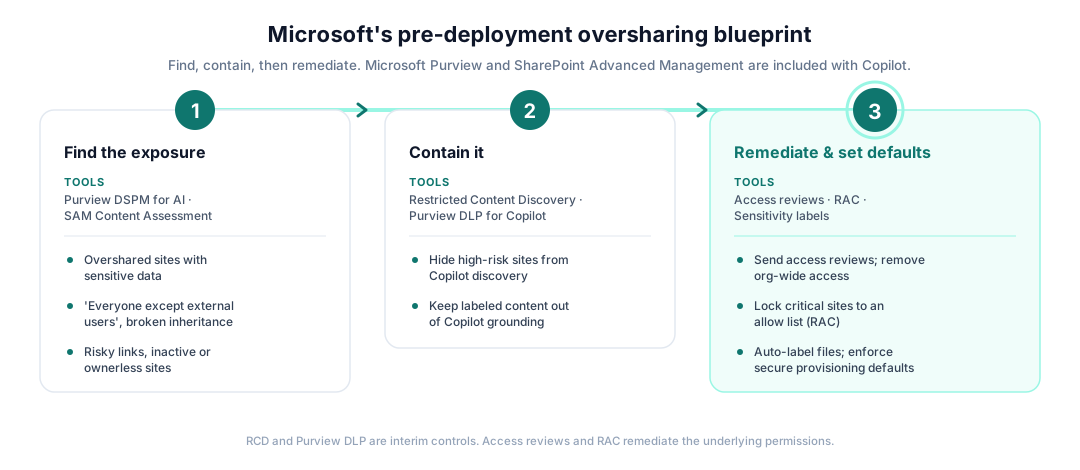
Find the exposure. Microsoft Purview Data Security Posture Management (DSPM) for AI runs data risk assessments that flag overshared sites holding sensitive data, risky sharing links, and frequently accessed content. The SAM Content Management Assessment surfaces sites with oversized audiences, "Everyone except external users" usage, broken permission inheritance, and sites that are inactive or have no owner.
Contain it while you work. For the highest-risk sites, SharePoint Restricted Content Discovery (RCD) excludes them from Copilot discovery so the assistant can't surface that content while you remediate. A Purview Data Loss Prevention policy for Copilot keeps content with selected sensitivity labels out of Copilot grounding entirely. These are interim controls that buy you time.
Remediate and set durable defaults. Send site access reviews to the owners who actually know who needs what, remove organization-wide access, and use Restricted Access Control (RAC) to lock business-critical sites to an allow list. Apply sensitivity labels, including auto-labeling for unlabeled files that contain sensitive information, and use site lifecycle management to archive or delete stale content so Copilot has less to wade through. Then enforce secure provisioning defaults so new oversharing doesn't creep back in.
This is real work, and it's the right work for data that already lives in SharePoint, OneDrive, Teams, and Exchange. It's also why so many teams delay: the cleanup is where the time goes.
How MyWorkDrive keeps sensitive file-server data out of Copilot's reach
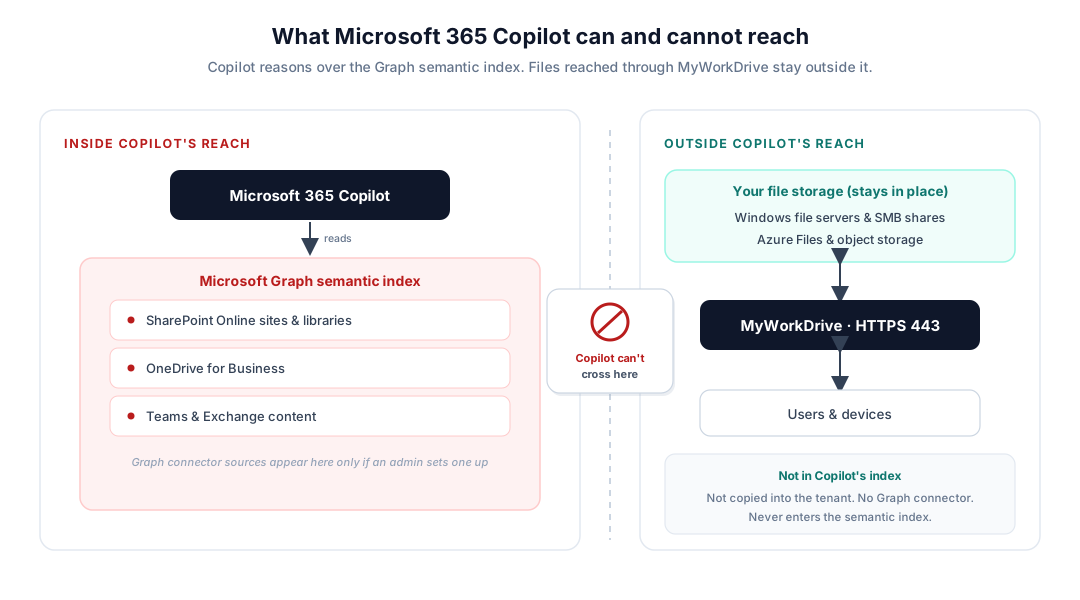
Here's the architectural point that often gets missed. Copilot can only reason over content that's in the Microsoft Graph semantic index. The index is built from text-based SharePoint Online content, OneDrive, the rest of the Graph, and anything an administrator deliberately ingests with a Microsoft Graph (Copilot) connector. If a file isn't discoverable through Microsoft Search, Copilot can't surface it.
Files that live on your Windows file servers and SMB shares and are reached through MyWorkDrive over HTTPS aren't copied into SharePoint or OneDrive, and MyWorkDrive doesn't register a Graph connector to ingest them. They stay on your file servers under NTFS and Active Directory control. That means they never enter the tenant semantic index, so Copilot has no way to surface them.
- SharePoint Online sites and document libraries
- OneDrive for Business content
- Teams chats and channels, Exchange mail
- Any external source an admin ingests with a Microsoft Graph (Copilot) connector
- Files on Windows file servers and SMB shares reached through MyWorkDrive
- Azure Files and object storage accessed as file shares, not copied into the tenant
- On-prem data MyWorkDrive brokers over HTTPS without a Graph connector
To be clear about what this is and isn't: MyWorkDrive doesn't fix oversharing inside SharePoint. It changes a different decision, which is whether sensitive file data needs to be in the tenant-wide index in the first place. Plenty of it doesn't. Engineering drawings, case files, financial models, and regulated records can stay on the file servers they already live on, reachable for the people who need them, without becoming Copilot-discoverable across the tenant.
For the SharePoint and OneDrive you do connect through MyWorkDrive, the controls strengthen the access path without replacing tenant governance. Every user authenticates with their own identity, so no shared service account reaches into your data on behalf of everyone, which is the kind of per-request, least-privilege model that underpins zero-trust file access. MyWorkDrive can only further restrict access, never elevate it, so your tenant and NTFS permissions stay authoritative. On top of that you can layer DLP controls like view-only access, dynamic watermarking, and download and clipboard restrictions, plus device approval, and unified audit logging exported to your SIEM across every connected repository.
One honest limitation: MyWorkDrive device approval is an allow list for mapped-drive and mobile clients, not an endpoint compliance check. For posture enforcement, pair it with Conditional Access at your identity provider.
There's a budget angle too. Keeping browser-based Office editing on your own file shares is what lets you right-size users from E3 or E5 down to F3 without forcing a SharePoint migration, which matters more with the Microsoft 365 price increase taking effect July 1, 2026.
Where Purview fits, and where MyWorkDrive fits
If your exposure is inside the Microsoft 365 estate, the right tools are Microsoft Purview and SharePoint Advanced Management, not MyWorkDrive. Overshared SharePoint sites, broken inheritance, anonymous links, and mislabeled sensitive files all live inside the tenant, and Purview and SAM are what remediate them, exactly as described in the audit section above. The cleanest way to see the division of labor is to match each goal to the tool built for it.
| If your goal is | Use | What it does |
|---|---|---|
| Remediate overshared SharePoint and OneDrive sites | Microsoft Purview + SharePoint Advanced Management | Finds and fixes over-permissioned, ownerless, and inherited access inside the tenant |
| Hide your riskiest sites from Copilot during cleanup | Restricted Content Discovery | Excludes those sites from Copilot and organization-wide search |
| Keep labeled sensitive content out of Copilot answers | Purview DLP for Copilot | Blocks selected sensitivity labels from Copilot grounding |
| Keep sensitive file-server data out of the index entirely | MyWorkDrive | Serves files over HTTPS without copying them into SharePoint or registering a Graph connector |
| Add least-privilege access, DLP, and audit to connected SharePoint and OneDrive | MyWorkDrive | Per-user authentication, plus view-only, watermarking, download, and device controls, with SIEM logging |
Think of it as choosing the right layer for each problem. Purview and SAM clean up and govern the content that belongs in Microsoft 365. MyWorkDrive gives you somewhere to keep the sensitive file data that doesn't belong in a tenant-wide index, and it adds least-privilege access, DLP, device approval, and auditing to the file data you do expose. Used together, you shrink both what Copilot can reach and how much of your tenant needs deep remediation.
Frequently asked questions
Can Microsoft 365 Copilot access my Windows file server? Not on its own. Copilot grounds its answers on content in the Microsoft Graph, which covers SharePoint Online, OneDrive, Teams, and Exchange, plus anything an admin deliberately ingests with a Microsoft Graph (Copilot) connector. A standalone Windows file server isn't in that index. Files you reach through MyWorkDrive stay on the file server and aren't copied into the tenant, so Copilot can't see or summarize them unless you separately build a connector pointed at the same share.
Does Copilot respect NTFS permissions? Copilot enforces Microsoft 365 and Entra ID permissions on content that's in the Graph. It doesn't read NTFS permissions on a file server, because file-server content isn't in its index to begin with. When MyWorkDrive brokers access to an SMB share, NTFS and share permissions and Access-Based Enumeration still govern what each user can open, and MyWorkDrive authenticates every user with their own identity instead of a shared service account.
Does Copilot index files stored on a file share? Only if you set up a Microsoft Graph (Copilot) connector to ingest that share into the semantic index. By default, file-share content sits outside Copilot's reach. MyWorkDrive provides HTTPS access to those files without creating such a connector.
How do I prevent Copilot oversharing before deployment? Run Microsoft's oversharing blueprint first. Use Purview DSPM for AI and the SAM Content Management Assessment to find overshared sites, apply Restricted Content Discovery and a Purview DLP policy to contain the riskiest content, then remediate permissions with access reviews and Restricted Access Control. For sensitive data that doesn't need to be in Microsoft 365 at all, keep it on your file servers and serve it through MyWorkDrive so it never enters the index.
Will MyWorkDrive stop Copilot from oversharing inside SharePoint? No, and we won't claim it does. Oversharing inside your Microsoft 365 estate is remediated with Microsoft Purview and SharePoint Advanced Management. MyWorkDrive helps a different way: it lets you keep sensitive file data off the indexed estate entirely, and it adds least-privilege access, DLP, device approval, and audit logging to the SharePoint and OneDrive you do connect.
Is Copilot oversharing a bug? No. Copilot is doing what it's designed to do, which is surface content a user already has permission to access. The exposure comes from permissions that were set too broadly over the years and never reviewed. That's why Microsoft recommends an oversharing audit before deployment.
Does Microsoft 365 Copilot share data outside my organization? Copilot operates within your Microsoft 365 service boundary and returns content to the user who prompts it, based on that user's existing permissions. The oversharing risk is internal: people seeing content inside the organization that they were never meant to access. It isn't a public data leak, which is why the fix is to tighten internal permissions; there is no external feed to block.
What's the fastest way to reduce Copilot exposure before deployment? Two moves. First, use SharePoint Restricted Content Discovery to exclude your highest-risk sites from Copilot while you remediate permissions, and apply a Purview DLP policy that keeps sensitivity-labeled content out of Copilot grounding. Second, for sensitive data that doesn't belong in the tenant index at all, keep it on your file servers and provide access through MyWorkDrive instead of migrating it into SharePoint.
Does editing an on-prem file through MyWorkDrive put it into Copilot's index? Browser-based Office editing stages a temporary copy inside your Microsoft 365 tenant and removes it when you save or close the session. That transient item isn't a durable part of your SharePoint estate. For the most sensitive content where you want zero tenant staging, use mapped-drive or desktop editing, or a customer-hosted Office Online Server.
Decide what Copilot can reach before you turn it on
MyWorkDrive lets you keep sensitive file data on infrastructure you control, outside the Copilot-indexed estate, with least-privilege access, DLP, device approval, and SIEM-ready audit logging on everything you do connect.