

By Dan Gordon
Last Updated: August 12, 2026
FERPA compliant file sharing means moving student education records between authorized people in a way that satisfies 34 CFR Part 99: disclosure only with written consent or under a listed exception, access limited to those with a legitimate educational interest, identities authenticated by reasonable methods, and a record of what happened. In practice that requires encryption in transit, named-user permissions tied to your identity provider, audit logging, and controls on what leaves a device. No product is FERPA certified, and the institution remains the accountable party.
Every school and college shares student records constantly. Transcripts move to receiving institutions, IEPs move between a special education team and outside therapists, financial aid documents move between offices, and advising notes move between a faculty member and a counselor.
Most of that sharing happens over channels nobody logs. Email attachments, personal cloud folders, and USB drives are still the default at a large number of institutions, usually because the sanctioned option is slower.
This guide covers what FERPA requires when education records are shared and why the common methods fall short. It then walks through the technical controls that close the gap, and the vendor rules that decide which tools an institution can put in front of student records.
What FERPA compliant file sharing actually means
The Family Educational Rights and Privacy Act (20 U.S.C. § 1232g), implemented at 34 CFR Part 99, applies to every educational agency or institution receiving funds under a program administered by the U.S. Department of Education. That covers effectively all public K-12 districts, public colleges, and private institutions whose students receive federal aid.
The rule that governs sharing is the disclosure rule. An institution may not disclose personally identifiable information from education records without the written consent of the parent or eligible student, unless one of the exceptions in 34 CFR 99.31 applies.
FERPA does not name a technology, mandate a specific encryption standard, or certify products. It requires reasonable methods. Two provisions carry that weight for anyone selecting a sharing tool:
- 34 CFR 99.31(a)(1)(ii) requires reasonable methods to ensure school officials access only the records in which they have legitimate educational interests. An institution that does not use physical or technological access controls has to demonstrate that its administrative policy is effective.
- 34 CFR 99.31(c) requires reasonable methods to identify and authenticate the identity of anyone receiving personally identifiable information from education records.
34 CFR 99.31(a)(1)(ii) sets a higher evidentiary burden on institutions relying on policy alone. When access is governed by a permission model and a log, the control is the evidence. When it is governed by a memo instructing staff not to open folders they do not need, the institution has to prove the memo works.
What counts as an education record
An education record is any record directly related to a student and maintained by the institution, or by a party acting for the institution (34 CFR 99.3). Format is irrelevant. A PDF on a departmental share, a spreadsheet of advising notes, and a scanned accommodation letter all qualify.
Records commonly shared under FERPA include:
- Academic transcripts, grades, and enrollment data
- Disciplinary records and behavioral assessments
- Special education files and individualized education programs
- Health and counseling records maintained by the school
- Financial aid and student billing information
Several categories fall outside the definition, including sole possession records kept as a personal memory aid and not shared, records created and maintained by a law enforcement unit for law enforcement purposes, and employment records unrelated to student status. Directory information may be disclosed without consent if the institution has followed the notification and opt-out procedure in 34 CFR 99.37.
When written consent is required, and when it is not
Valid consent under 34 CFR 99.30 must be signed and dated by the parent or eligible student, specify the records to be disclosed, state the purpose of the disclosure, and identify the party or class of parties receiving the information.
Most day-to-day sharing happens under an exception rather than a consent form. The exceptions in 34 CFR 99.31 that matter most for file sharing are disclosure to school officials with legitimate educational interests, disclosure to a school where the student seeks or intends to enroll (34 CFR 99.34), disclosure in connection with financial aid the student has applied for or received, disclosure to authorized representatives conducting audits or evaluations of education programs (34 CFR 99.35), and disclosure in a health or safety emergency (34 CFR 99.36).
The practical consequence is that a sharing platform has to enforce scope. An exception permits disclosure of the records relevant to that purpose, not access to everything on the share.
Why traditional sharing methods fall short
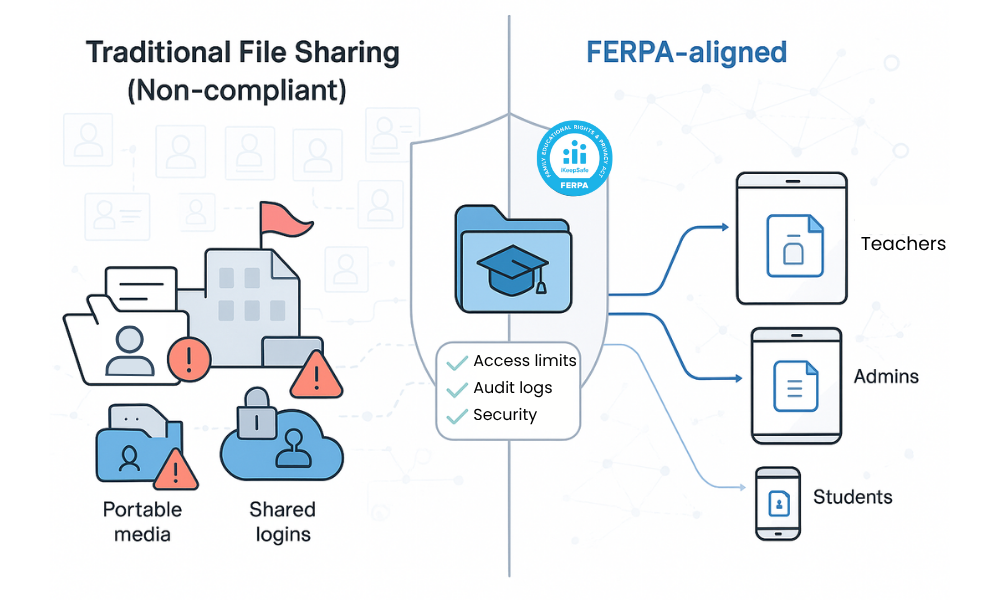
The gap between how institutions actually share records and what 34 CFR Part 99 expects is usually a gap in evidence rather than intent.
| Method | Where it breaks down | Regulatory consequence |
|---|---|---|
| Email attachments | Recipients can forward without institutional knowledge. Copies persist in mailboxes and on devices indefinitely. Access cannot be revoked after sending. | No reasonable method of limiting onward access. No usable record of who obtained the file.34 CFR 99.31(a)(1)(ii) |
| Personal cloud accounts | Records move to a provider the institution has no agreement with. Link sharing is often public or unexpiring. Nothing appears in institutional logs. | Disclosure to a party with no supporting exception, and the provider is not covered by any school official designation. |
| Consumer file sync tools | Permission models are coarse. Audit detail is limited. Storage jurisdiction may be unknown, which conflicts with state student privacy statutes. | Difficult to demonstrate scoped access or produce access history on request. |
| FTP and SFTP drops | Plain FTP transmits credentials and data in the clear. Shared service accounts obscure who actually retrieved a file. | Authentication cannot identify the individual receiving the records.34 CFR 99.31(c) |
| VPN alone | A tunnel encrypts the network path and then exposes broad network reach. It produces no document-level record of opens, downloads, or shares. | Encryption without scoped access or file-level evidence. Useful as transport, insufficient as a control. |
| Shared desk accounts | A generic registrar or help desk login means log entries name the counter, not the person. | Defeats authentication and makes legitimate educational interest unprovable per user. |
The enforcement picture has shifted enough to make this worth taking seriously. FERPA itself has no private right of action, following Gonzaga University v. Doe, 536 U.S. 273 (2002), and the Department of Education's remedy is withdrawal of federal funding, which it has never imposed. The consequences have moved elsewhere. In November 2025 the attorneys general of California, Connecticut, and New York secured $5.1 million from an education technology provider over a breach traced to credentials of a former employee that were never deactivated and to an absence of monitoring for suspicious logins. The FTC followed with a consent order over the same incident. In March 2026 the California Privacy Protection Agency issued its first student privacy decision, a $1.10 million fine against a school ticketing platform.
IBM's 2025 Cost of a Data Breach report put the average US breach at $10.22 million, with education among the few sectors where costs rose.
The vendor question: school official status
Any outside platform touching education records operates under one provision: the school official exception at 34 CFR 99.31(a)(1). Under 34 CFR 99.31(a)(1)(i)(B), a contractor may be treated as a school official if it performs an institutional service the institution would otherwise use employees for, is under the direct control of the institution with respect to the use and maintenance of education records, and is subject to the redisclosure limits of 34 CFR 99.33(a).
Two of those three conditions turn on architecture.
Direct control is difficult to demonstrate when a platform holds the storage account in its own name, sets the retention schedule, chooses the region, and can reach the underlying data for its own operations. In that arrangement the institution asserts direct control in a contract without holding it in the deployment, and counsel will read the terms of service and subprocessor list accordingly.
Redisclosure limits apply to every subprocessor in a vendor's chain. The sanction is specific: under 34 CFR 99.33(e), a third party found to have improperly redisclosed personally identifiable information from education records may be denied access to those records for at least five years.
Your annual FERPA notification also has to state the criteria for who qualifies as a school official (34 CFR 99.7(a)(3)(iii)). A vendor that satisfies all three regulatory conditions still fails if your published notice does not describe outsourced providers as school officials.
Controls a FERPA compliant file sharing platform needs
Encryption in transit
TLS 1.2 as a minimum, with TLS 1.3 where the client supports it. Certificates under institutional control. Encryption at rest is a property of the storage platform holding the files, so confirm what your file server, NAS, or cloud storage tier already provides rather than assuming an access product supplies it.
Access control tied to institutional identity
Permissions should derive from the directory you already run. A separate user database inside a sharing tool creates a second permission model that drifts out of alignment with the first, and drift is what produces the access a reviewer finds. Multi-factor authentication belongs at the identity provider, where it is already governed.
Audit logging with export
Logging is how an institution demonstrates the reasonable methods required by 34 CFR 99.31(a)(1)(ii). Useful logs capture user identity, timestamp, source IP, device identifier, share, path, operation, and result, and they leave the platform for a SIEM where retention and immutability are managed.
FERPA's recordkeeping requirement at 34 CFR 99.32 does not apply to disclosures made to school officials under 99.31(a)(1). Routine staff access to a student's file does not belong in the record of disclosures you maintain for that student. Access logs still matter, for a different reason: they evidence the reasonable methods required by 99.31(a)(1)(ii) and the authentication required by 99.31(c). Presenting file access logs as satisfaction of 99.32 invites a correction from a reviewer who knows the regulation.
Controls on what leaves the session
External sharing and unmanaged devices are where records escape. The controls that matter are view-only access with downloads blocked, watermarking that identifies the viewer, clipboard and print restriction, link passwords and expiration, and the ability to revoke access after the fact.
How MyWorkDrive supports FERPA compliant file sharing
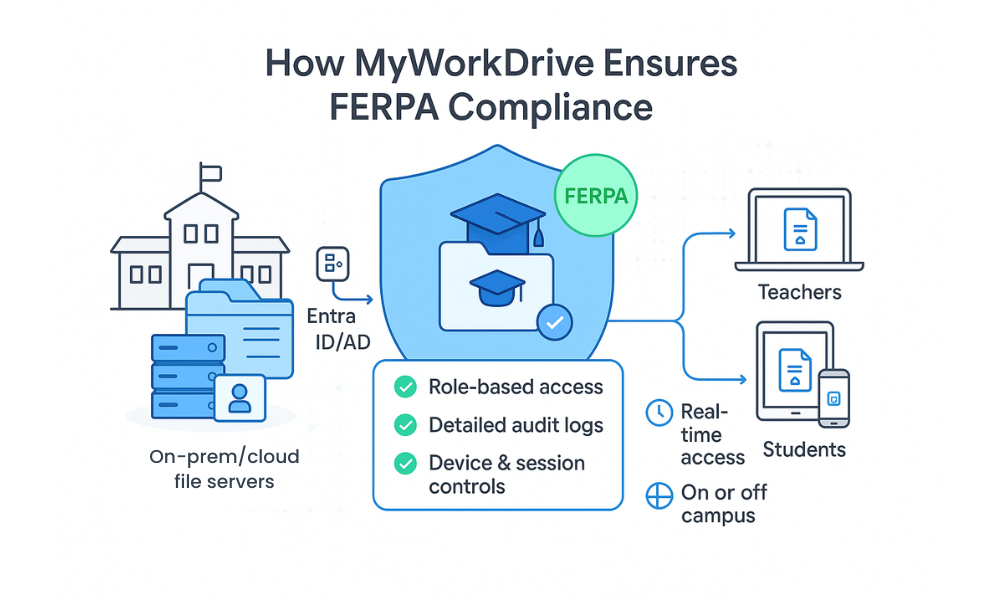
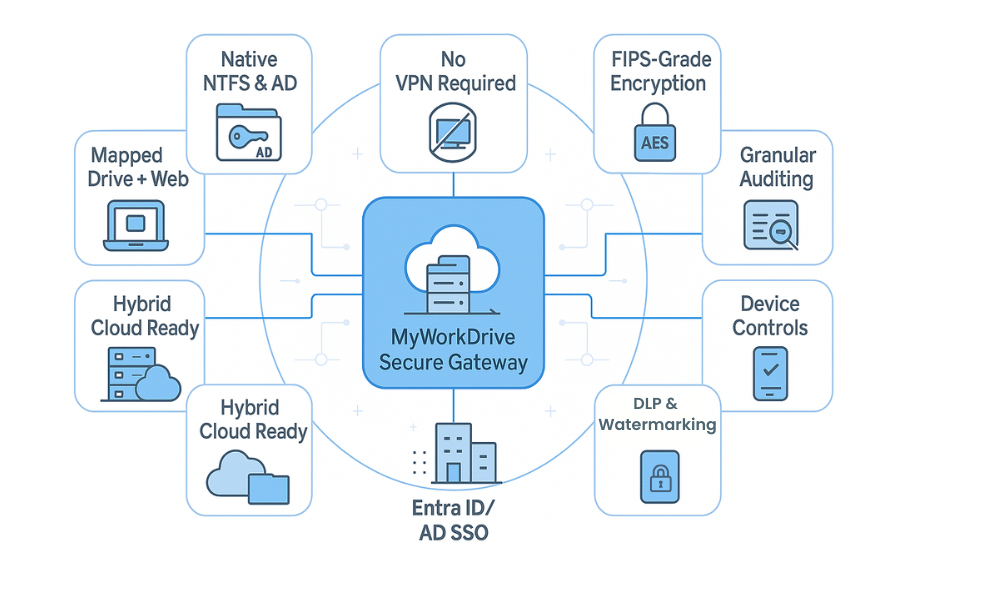
MyWorkDrive installs on a Windows Server inside your environment and publishes existing file shares over HTTPS on port 443. Faculty, staff, and students reach records through a browser, a mapped drive client on Windows or Mac, or mobile apps. There is no VPN client, no data migration, and no separate user directory. Educational institutions keep their storage and their permissions exactly as they are.
Records stay on institutional storage
File content remains in your storage: Windows SMB shares, DFS namespaces, NAS, Azure Files, SharePoint, or OneDrive. File content does not persist on MyWorkDrive servers. Browser-based Office editing writes temporary items to a staging location that clears when the edit is committed or the session ends, and institutions that need editing to stay inside the perimeter can run on-premises Office Online Server or ONLYOFFICE.
This is what makes school official status easy to evidence. You administer the server, own the storage account, set retention, and run the backups, so direct control over the use and maintenance of records is a property of the deployment. There is no vendor-held copy to account for in a redisclosure analysis.
Permissions come from Active Directory and NTFS
Authentication defers to your identity provider. Active Directory mode uses your domain controllers, and MyWorkDrive never sees or stores passwords. Microsoft Entra ID mode uses native Microsoft authentication with Conditional Access applied at sign-in. SAML 2.0 integration covers ADFS, Okta, OneLogin, Duo, Ping, and Shibboleth, and MyWorkDrive's education documentation also lists CAS among supported campus identity systems.
File permissions come from NTFS and Active Directory group membership, unchanged. The policy layer is restrictive only. MyWorkDrive can narrow what an authorized user may do, per share, per group, or per user, and it cannot grant access your file system has not already granted. Access-based enumeration keeps folders a user cannot open out of view. Granular permission settings let you scope a share to a team without rebuilding your directory.
Encryption and validated cryptography
All client connections use TLS 1.2 or higher, with TLS 1.3 where available. Only port 443 is exposed; SMB (445) and NetBIOS (139) are never reachable from the internet. MyWorkDrive holds FIPS 186-4 RSA algorithm validation under NIST Certificate #3018 and supports Windows FIPS mode. Encryption at rest remains a function of your storage platform, under your key management.
MyWorkDrive is also SOC 2 Type II certified, which answers a recurring line of questioning in higher education vendor review.
Audit trail and SIEM export
Every authentication outcome, file operation, link event, guest action, device approval, and administrative change is logged with user, timestamp, source IP, device identifier where available, share, path, operation, result, and bytes transferred. Logs export over Syslog on UDP or TCP to Splunk, Microsoft Sentinel, QRadar, or whatever your institution runs, which is where retention and tamper resistance are enforced. Configurable thresholds send alerts on excessive downloads, unusual sharing, bulk deletions, and repeated failed logins. Implementation detail is on the Compliance and Audit page.
Controlled external sharing
Secure external sharing is where most FERPA exposure originates, and it is the workflow email replaces badly. MyWorkDrive provides two mechanisms.
Public link sharing creates a link to a file or folder with no account required on the recipient's end. Administrators can require passwords globally, set a maximum expiration, separate view permission from download permission, require administrative approval, or disable links entirely on sensitive shares. Every access is logged, and a link can be revoked.
Microsoft Entra B2B guest access brings external collaborators in under their own identity, so your Conditional Access policies and access reviews apply to them and removal in Entra ID ends access immediately.
DLP and device controls
Data loss prevention settings apply per share, per group, or per user, so an accommodation letters folder can be handled differently from a course materials share. Available controls include blocking downloads while permitting browser viewing, dynamic watermarking with username and timestamp, clipboard restriction in the secure viewer, and print prevention. Watermarking is what addresses screen capture, by identifying the viewer in any image that leaves the session rather than by preventing the capture itself.
Device approval starts in monitor mode to build an allowlist from real usage, then switches to enforcement, with separate rules for web, mapped drive, and mobile clients.
One deployment note: shares with DLP enabled require the MyWorkDrive secure driver for mapped drive access, and the secure driver is not installed by default. Plan for it when enabling DLP for mapped drive users.
| Platform | Access method | Authentication |
|---|---|---|
| Windows | Mapped drive client with drive letters and file locking, plus web | Active Directory or Entra ID, MFA at your identity provider |
| macOS | Mapped drive client, plus web | SAML SSO or Entra ID |
| Chromebook | Browser only, no extension or admin rights required | Campus SSO through SAML 2.0 |
| iOS and Android | Native mobile apps with device approval | Same identity provider, same policies |
| Linux, labs, thin clients | Browser only, no client software to image or maintain | Campus SSO, no residual files after logout |
Sharing scenarios and how to handle them
| Scenario | FERPA basis | Controls to apply |
|---|---|---|
| Transcripts to a receiving institution | Disclosure to a school where the student seeks or intends to enroll.34 CFR 99.31(a)(2), 99.34 | Password-protected link with a short expiration, download permitted, access logged with identity and timestamp, link revocable if the transfer falls through. |
| Faculty and counselor collaboration on a student plan | School officials with legitimate educational interests.34 CFR 99.31(a)(1) | AD group scoped to the support team rather than the department. Access-based enumeration hides unrelated folders. Membership reviewed each term. |
| Special education team including outside therapists | Contractors treated as school officials, bound by redisclosure limits.34 CFR 99.31(a)(1)(i)(B), 99.33(a) | Entra B2B guest identity so access ends on removal. View-only with watermarking for evaluation reports. Scope to the specific folder, not the special education share. |
| Parent access to their child's records | Disclosure to the parent of a student who is not an eligible student.34 CFR 99.31(a)(12) | A folder scoped by NTFS permission to that family, populated deliberately by staff. Verify identity before granting. Log every access to support later disputes. |
| External auditors and program evaluators | Authorized representatives conducting an audit or evaluation of an education program.34 CFR 99.31(a)(3), 99.35 | Time-limited access to a scoped share, downloads blocked where viewing suffices, full access log produced as part of the audit record. |
| Faculty working from home | Same legitimate educational interest as on campus.34 CFR 99.31(a)(1) | Browser or mapped drive over HTTPS, no VPN. Device approval for mapped drive. Making the sanctioned path the fast path is what stops the personal cloud workaround. |
Adjacent requirements you will meet in procurement
FERPA sets a minimum. Several other frameworks usually appear before a contract is signed.
HECVAT. The Higher Education Community Vendor Assessment Toolkit is the questionnaire colleges use to evaluate a provider's security, privacy, accessibility, and AI practices. It was created in 2016 by the Higher Education Information Security Council with EDUCAUSE, Internet2, and REN-ISAC, and EDUCAUSE distributes it at no cost. HECVAT 4, released in February 2025, consolidated the former Full, Lite, and On-Premise workbooks into a single file of roughly 321 questions across seven sections, adding dedicated privacy and artificial intelligence sections. A "Start Here" tab routes the provider through the sections that apply based on deployment model and data types.
Two points shape how an on-premises product moves through that review. Whole categories of question resolve differently when the provider never hosts the data, because datacenter security, tenant isolation, subprocessor inventory, and backup encryption all point back to infrastructure the institution already runs and has already assessed. And no product is HECVAT certified. EDUCAUSE does not collect completed workbooks and REN-ISAC's Cloud Broker Index has been retired, so a current copy comes from the provider directly. K-12 districts use an adapted instrument derived from the same work.
GLBA. Institutions participating in Title IV federal student aid are financial institutions under the Gramm-Leach-Bliley Act and agree in their Program Participation Agreement to meet the FTC Safeguards Rule at 16 CFR Part 314. The revised rule took effect June 9, 2023 and is examined through the annual student aid compliance audit, with findings resolved as part of the Department's determination of administrative capability. The rule lists nine elements. Three touch file sharing directly: 314.4(c)(1) on access controls that limit users to the information they need, 314.4(c)(3) on encryption of customer information in transit and at rest, and 314.4(c)(5) on multi-factor authentication for anyone reaching an information system. Institutions holding information on fewer than 5,000 consumers address only the first seven elements. Because the FTC and CFPB treat FERPA compliance as satisfying the GLBA privacy requirements, the Safeguards Rule is where audit findings originate.
State student privacy law. New York Education Law § 2-d, implemented through Part 121 of the Commissioner's Regulations in January 2020, requires districts to designate a Data Protection Officer, adopt a policy aligned with the NIST Cybersecurity Framework, publish a Parents' Bill of Rights, and execute a written data privacy agreement with any contractor receiving personally identifiable information. Contractors must encrypt that information in motion and at rest, must not sell it or use it for marketing, and must bind subcontractors to the same terms. California's K-12 Pupil Online Personal Information Protection Act and Connecticut's Student Data Privacy Law impose overlapping obligations, and both saw their first enforcement actions in November 2025. Many districts standardize on the Student Data Privacy Consortium's National Data Privacy Agreement rather than negotiating each one. A platform that never takes custody of records narrows the scope of these agreements substantially.
COPPA. For districts serving students under 13, the FTC's amended COPPA Rule reached its compliance date on April 22, 2026. The amendments expanded personal information to include biometric and government-issued identifiers, added a written data retention policy requirement, and imposed separate consent for disclosing children's data to third parties. School authorization remains available for legitimate educational purposes with tighter notice content, so COPPA answers a vendor gave in 2024 need refreshing before a district relies on them.
What MyWorkDrive does not do
Here is what the product does not cover.
No product is FERPA certified. FERPA is enforced by the Department of Education's Student Privacy Policy Office. There is no certification scheme and no audit that produces a FERPA seal. Any vendor claiming FERPA certification is describing something that does not exist.
MyWorkDrive is a file access and sharing layer, not a compliance program. It supplies access control, encryption in transit, audit evidence, and DLP for the files it publishes. It does not write your annual FERPA notification, define your criteria for legitimate educational interest, manage your retention schedule, or handle parent inspection requests. Detailed control mappings are available on request.
It does not scan file contents. DLP here means download blocking, watermarking, clipboard and print restriction, and device approval. There is no pattern-matching engine that identifies a Social Security number inside a document.
It does not secure email. Message and attachment encryption for Gmail or Outlook is a separate product category. If staff are emailing student PDFs, the fix is giving them a permissioned link instead of an overlay on the mail client.
It does not cover your student information system. Banner, Colleague, PowerSchool, and Infinite Campus have their own access models and audit trails. MyWorkDrive addresses the unstructured file estate around them.
It cannot fix permissions you have not set. MyWorkDrive enforces NTFS and Active Directory permissions as they exist. A share granting Domain Users the Modify right will be published that way. Remediate broad permissions first, and use the audit logs to find them.
Implementation checklist
- Inventory where education records are shared from. Departmental shares, home directories, scanned document repositories, and mailboxes. Document the current sharing paths, including the unsanctioned ones.
- Retire shared accounts. Named users only for anything touching student records, so a log entry identifies a person rather than a counter.
- Scope permissions to function. Map access to AD groups tied to job role, and review membership each term instead of annually. Turnover in registrar and help desk roles is measured in semesters.
- Require MFA at the identity provider. Single compromised credentials caused both of the largest recent education sector breaches.
- Publish one sanctioned sharing path and make it fast. Browser access with no install, working on Chromebooks and personal laptops, removes the reason people reach for personal cloud accounts.
- Set link defaults before rollout. Global password requirement, maximum expiration, view-versus-download separation, and links disabled on the most sensitive shares.
- Apply DLP where records leave managed devices. View-only with watermarking for sensitive shares, device approval in monitor mode first.
- Export logs to your SIEM and set thresholds. Mass download and unusual sharing alerts turn a log into a control.
- Update your annual FERPA notification. Confirm the criteria describe outsourced providers as school officials, or the exception does not cover your vendors.
- Keep a current vendor assessment on file. HECVAT for higher education, a state data privacy agreement or the SDPC National Data Privacy Agreement for K-12.
Education pricing starts at $5 per user per month, and education discounts apply. Campus-wide unlimited licensing is available for institutions that would prefer not to recount seats every registration cycle. A 14-day free trial connects to a test share, and complimentary setup assistance is available for qualifying institutions.
Frequently asked questions
What is FERPA compliant file sharing?
FERPA compliant file sharing is the transmission, storage, and access of student education records in a way that satisfies 34 CFR Part 99. Records may be disclosed only with written consent or under a listed exception, access must be limited to those with a legitimate educational interest, identities must be authenticated by reasonable methods, and the institution must be able to show how access was controlled. In practice this requires encryption in transit, named-user permissions, audit logging, and controls on downloading and re-sharing.
Does FERPA require encryption?
FERPA does not require encryption or name any specific technology. It requires reasonable methods to ensure school officials access only the records in which they have legitimate educational interests (34 CFR 99.31(a)(1)(ii)), and reasonable methods to identify and authenticate anyone receiving personally identifiable information from education records (34 CFR 99.31(c)). In practice reviewers expect encryption in transit, multi-factor authentication, permissions scoped to job function, and access logging. Institutions participating in Title IV federal student aid face a separate and explicit encryption requirement under the GLBA Safeguards Rule at 16 CFR 314.4(c)(3).
What types of student information are covered by FERPA?
FERPA covers any education record directly related to a student and maintained by a school, district, or a party acting for the institution, as defined at 34 CFR 99.3. This includes transcripts, grades, disciplinary records, attendance, special education files and IEPs, health and counseling records maintained by the school, financial aid information, and class schedules. Sole possession notes, law enforcement unit records, and properly designated directory information fall outside or under separate rules.
Are email attachments FERPA compliant for sharing student records?
Standard email is rarely appropriate for sharing student records. Once sent, an attachment can be forwarded to anyone, stored indefinitely on unmanaged devices, and cannot be revoked, so the institution loses the ability to limit access after the fact. Ordinary mail systems also produce no record of who ultimately obtained the file. Use a permissioned link with an expiration and an access log instead of attaching the record.
Can I use Dropbox or Google Drive for FERPA compliant file sharing?
Consumer accounts are not appropriate for education records. They move records to a provider the institution has no agreement with, offer coarse permissions, produce limited audit detail, and often store data in a jurisdiction the institution has not approved. Enterprise and education editions of these services can be configured for compliance with the right agreements and settings in place, but the personal accounts staff sign up for on their own cannot.
How do school official status and legitimate educational interest affect file sharing?
Under 34 CFR 99.31(a)(1), an institution may disclose education records without consent to school officials it has determined have legitimate educational interests, meaning they need the record to perform a professional responsibility. Sharing tools have to enforce that scope through permissions rather than trust, because 34 CFR 99.31(a)(1)(ii) requires reasonable methods to ensure officials reach only the records in which they have a legitimate interest. Your annual FERPA notification must also state the criteria for who qualifies.
Do third-party vendors need formal agreements to support FERPA compliant file sharing?
Yes. Under 34 CFR 99.31(a)(1)(i)(B), an outside party may be treated as a school official only if it performs a function the institution would otherwise use employees for, is under the direct control of the institution regarding the use and maintenance of education records, and is subject to the redisclosure limits of 34 CFR 99.33(a). Agreements should reflect all three conditions and require breach notification. A third party found to have improperly redisclosed records may be denied access to education records for at least five years under 34 CFR 99.33(e).
Is a VPN alone enough to make file sharing FERPA compliant?
No. A VPN encrypts the network path and then grants broad network reach, which is the opposite of the scoped access 34 CFR 99.31(a)(1)(ii) contemplates. It also produces no document-level record of who opened, downloaded, or shared a specific file. FERPA compliant file sharing needs application-level permissions, per-file logging, and controls on what leaves the session, none of which a tunnel provides.
What technical features should a FERPA compliant file sharing solution include?
Look for TLS 1.2 or higher in transit, permissions that derive from your existing directory rather than a second user database, multi-factor authentication enforced at your identity provider, and audit logging detailed enough to reconstruct access, with export to a SIEM. For sharing specifically, you need link passwords and expiration, separation of view and download permission, revocation, watermarking, and device approval. Confirm encryption at rest with whoever holds the storage, since that is a storage function rather than an access-layer function.
How does MyWorkDrive help institutions achieve FERPA compliant file sharing?
MyWorkDrive publishes your existing file shares over HTTPS on port 443 without migrating data, so education records stay on institutional storage and file content never persists on MyWorkDrive servers. Access is authenticated by your Active Directory, Entra ID, or SAML provider, and NTFS permissions remain authoritative, with the policy layer able to restrict further but never to elevate. Every authentication, file operation, and sharing event is logged with user, timestamp, source IP, and path, and exports over Syslog to your SIEM. External sharing runs through password-protected, expiring links or Entra B2B guest identities rather than email attachments.
Is MyWorkDrive FERPA certified?
No product is FERPA certified, because no certification scheme exists. FERPA is enforced by the U.S. Department of Education's Student Privacy Policy Office, and compliance obligations attach to the institution rather than the vendor. MyWorkDrive supplies technical controls a FERPA program relies on, including scoped access, encryption in transit, audit evidence, and DLP, and holds FIPS 186-4 RSA algorithm validation under NIST Certificate #3018 along with SOC 2 Type II certification. Institutions remain responsible for their own compliance programs.
Start a free trialBook a demoView pricing

Daniel, Founder of MyWorkDrive.com, has worked in various technology management roles serving enterprises, government and education in the San Francisco bay area since 1992. Daniel is certified in Microsoft Technologies and writes about information technology, security and strategy and has been awarded US Patent #9985930 in Remote Access Networking.