

By Kyle Lachmann
Last Updated: May 8, 2026
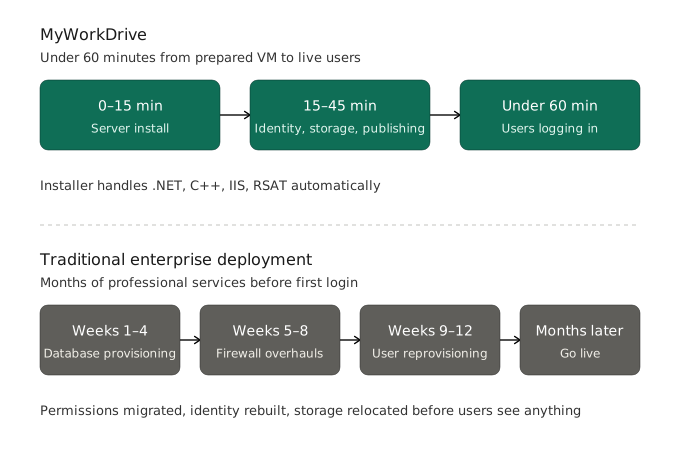
Enterprise software has a reputation for being slow and painful to deploy: months of professional services, SQL database provisioning, firewall overhauls, and reprovisioning users and permissions before a single employee logs in. MyWorkDrive works differently. It installs on a Windows Server you already have, connects to the identity and storage you already use, and is typically live within a day.
That doesn't mean zero preparation. This post covers what a MyWorkDrive deployment looks like, the dependencies that matter, where enterprise environments can add complexity, and how our team helps.
What MyWorkDrive Installs On
MyWorkDrive runs as an IIS website on Windows Server. The installer pulls in its own prerequisites — .NET, C++, IIS, and RSAT — so there's nothing to set up manually beforehand. A standard install takes about 15 minutes once the VM is ready. Configuration adds roughly another 30 minutes, depending on which features you're enabling.
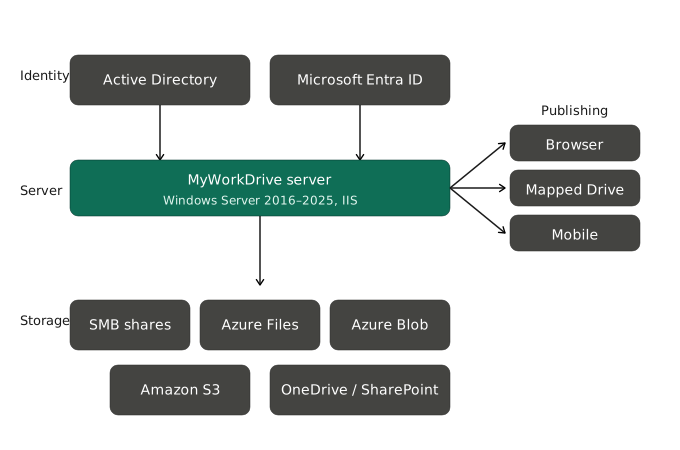
Supported server operating systems include every Windows Server release Microsoft still supports, from 2016 through 2025, running physical or virtual, on-premises or in Azure. We track Microsoft's support lifecycle deliberately: MyWorkDrive depends on current versions of .NET, IIS, and TLS, and Microsoft only tests and patches those components on supported builds. We can't support deployments on end-of-life Windows Server versions for the same reason Microsoft can't — the underlying components are no longer tested or patched.
End-user clients work the same way. The Windows and macOS Mapped Drive clients use OS-level features (File Provider and FSKit on macOS, for example) that only work properly on currently supported OS versions. Running the clients on end-of-life desktop operating systems is unsupported, and we don't recommend it because of the security and reliability issues that come with unpatched OSes.
Identity: Active Directory or Entra ID
Identity is one of the most important architectural decisions in a MyWorkDrive deployment. Version 7 makes this a choice during installation, and it can't be changed afterward, so it's worth thinking through before you start.
Active Directory is the right choice if you have an on-premises domain-joined environment. MyWorkDrive integrates directly with your existing AD, inheriting users, groups, and NTFS permissions without reprovisioning anything. There's no separate user database to maintain. AD deployments can also layer on SAML SSO through Entra ID, Okta, OneLogin, ADFS, or other providers.
Microsoft Entra ID makes more sense for cloud-first organizations. Version 7 added native Entra ID authentication that doesn't require Active Directory or SAML at all. The server doesn't have to be domain-joined, Managed Identity is supported for Azure-hosted servers (so storage credentials don't have to live on the server), and permissions are defined directly through Entra ID users and groups. This is the cleanest fit for Azure-native deployments using Azure Files, Azure Blob Storage, or OneDrive and SharePoint.
Storage: Connecting What You Already Have
MyWorkDrive connects to existing storage rather than migrating it. Supported types include SMB File Shares (on-premises NAS or Windows file servers), Azure Files, Azure Blob Storage, Amazon S3, and OneDrive/SharePoint. Direct API access to Azure Storage, added in version 7.0, has lower latency than SMB-mounted Azure shares and is what we recommend for Azure-hosted deployments.
The placement principle is straightforward: put the MyWorkDrive server as close to the storage as you can. An Azure VM next to Azure Files, or a Windows Server VM on the same LAN as your SMB shares. Cross-region or cross-provider setups add latency that's avoidable, and we'd recommend avoiding it.
Publishing MyWorkDrive
Once it's installed, the server has to be reachable by users. The simplest option is the built-in Cloud Connector, which opens an outbound encrypted tunnel to a myworkdrive.net hostname and doesn't require any inbound firewall changes. At the other end of the spectrum, you can publish through reverse proxies, load balancers, and application gateways however your network team prefers.
Our team has supported publishing on F5, Kemp, NetScaler, Azure Application Gateway, and a long list of custom proxy setups. SSL, DNS, and firewall port adjustments are documented, and support is available to work through non-standard configurations with you directly if you need it.
What You Need to Deploy MyWorkDrive
MyWorkDrive is enterprise infrastructure, and deploying it calls for the same IT skills any enterprise project does: someone who can provision and manage a Windows Server VM, handle DNS, SSL, and firewall rules, and has admin rights to Active Directory or Entra ID and the relevant storage. Nothing exotic. These are standard skills in the kinds of organizations that run MyWorkDrive.
Who MyWorkDrive Is Built For
MyWorkDrive is designed for organizations that manage identity and storage at enterprise scale: typically 50+ users, with Windows Server infrastructure (on-premises or in Azure) and an IT team that can own the deployment. That's the environment where Zero Trust architecture, DLP controls, compliance features, and storage flexibility actually pay off.
For organizations that fit that profile, the deployment is fast and predictable. With a prepared environment (a patched Windows Server VM, domain-joined if you're using AD, with DNS, SSL, and admin credentials in hand) you can have a working deployment running in under an hour. Beyond that baseline, the rest is configuration, and our team is available to help with all of it.
MyWorkDrive provides secure private cloud file access to SMB File Shares, Azure Files, Azure Blob Storage, Amazon S3, OneDrive, and SharePoint from any browser, Mapped Drive, or mobile device, without VPN and without migrating your files.
Frequently Asked Questions
Does MyWorkDrive work with our existing identity provider?
Yes. MyWorkDrive supports a wide range of SAML-based identity providers, including CAS, Shibboleth, FortiAuthenticator, and custom Azure App Registrations. If your SSO setup is non-standard or heavily customized, chances are we've seen something similar before, and we'll work through it with you.
Does MyWorkDrive integrate with our existing security stack?
Yes. MyWorkDrive is built to coexist with enterprise security platforms, including endpoint protection tools like CrowdStrike. Our team has worked through the configuration edge cases that come up in hardened environments, so you shouldn't have to weaken your security posture to get the deployment running.
Can MyWorkDrive be published behind our reverse proxy or application gateway?
MyWorkDrive has been deployed behind every major enterprise reverse proxy and application gateway in common use, including Azure Application Gateway. Publishing configuration is part of the standard deployment process, and our team handles it with you.
Does MyWorkDrive support Azure Blob Storage with custom access controls?
Yes. MyWorkDrive supports Azure Blob Storage with custom ACLs, and our team has plenty of experience configuring complex Azure storage environments — standard role assignments or fully custom access requirements.
What deployment support does MyWorkDrive provide?
All customers can reach our support team by email and web call for deployment questions, configuration help, and troubleshooting. Enterprise customers get a fully managed deployment, structured across dedicated sessions that cover server installation, publishing configuration, SharePoint service editing, Azure Application Gateway setup, guest user access, client rollout with scripted MDM installs, and multi-node cluster configuration with load balancer and SQL session management.
What if our environment has requirements that aren't covered in documentation?
We don't really have an "out of scope" category for deployment scenarios. If it touches your MyWorkDrive deployment, we'll help you work through it.