

By Kyle Lachmann
Last Updated: July 28, 2026
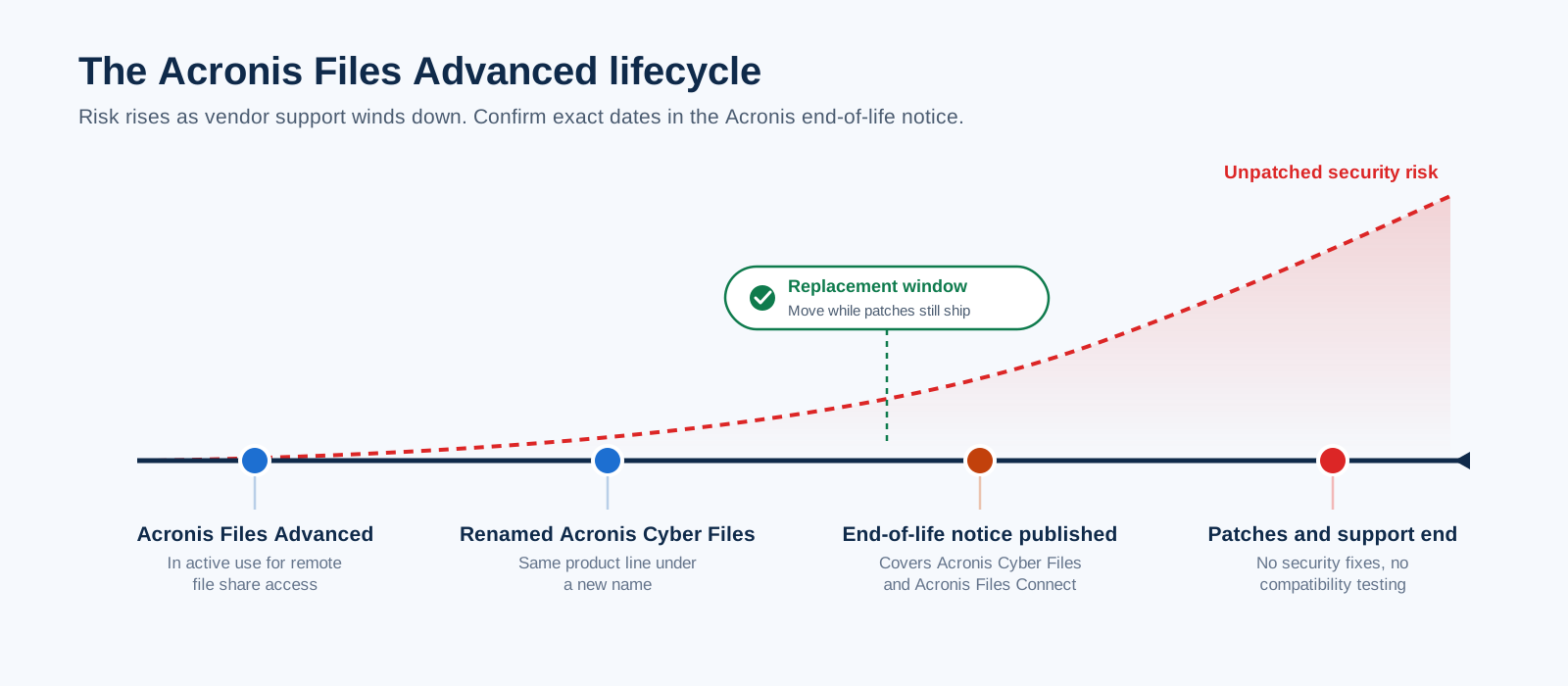
Acronis renamed Acronis Files Advanced to Acronis Cyber Files, and the company has since published an official end-of-life notice that covers both Acronis Cyber Files and Acronis Files Connect. Confirm the exact dates for your license in that notice, because timelines can differ by edition and region. The practical outcome is the same for every customer: security patches will stop, and so will vendor support and compatibility testing against new operating systems.
If your organization still runs Acronis Files Advanced for remote file access, you now have a fixed window to choose a replacement. This guide explains what end of life means for your risk posture and what to evaluate in an Acronis Files Advanced alternative. It also shows how MyWorkDrive lets you replace the product without moving a single file.
What End of Life Means for Acronis Files Advanced Customers
Under Acronis's lifecycle policy, a product past end of life keeps running, but you run it at your own risk. No new security patches ship, and support cases are no longer accepted under standard terms. Compatibility with future Windows Server releases or new browser and mobile OS versions goes untested.
For teams that handle regulated data, that combination is hard to defend in an audit. HIPAA, CMMC, GDPR, and FINRA programs all expect supported software with a patch path. An unsupported file access gateway sitting on your network edge is exactly the kind of finding assessors flag first.
There is a second, quieter cost. Acronis Files Advanced runs as a multi-component stack: a Gateway Server, a Web Server, a File Repository, and a PostgreSQL database. Every one of those components still needs patching and monitoring, plus its own backup jobs, even after the vendor stops improving them.
What to Look for in an Acronis Files Advanced Alternative
Teams that chose Acronis Files Advanced usually did so for a specific reason: it provided remote and mobile access to on-premises Windows file shares without pushing everything to a public cloud. Any replacement should preserve that property. Use these criteria when you evaluate:
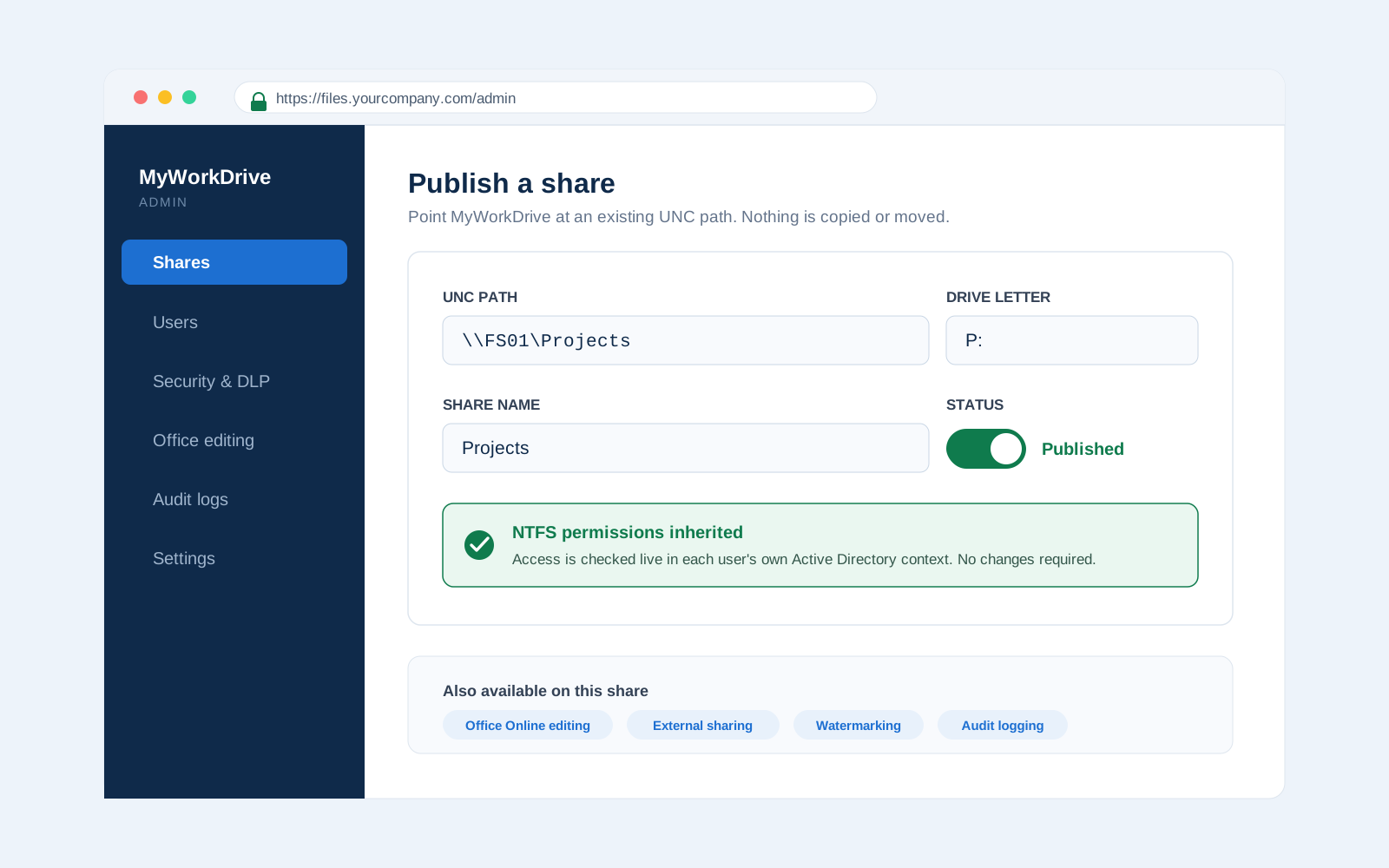
Files stay in place. The largest hidden cost in a replacement project is data migration. Acronis's Sync and Share feature copies files into a separate repository before they can be shared that way. A replacement that reads your existing NTFS and SMB shares directly removes the migration project entirely, along with the permission remapping that usually comes with it.
No parallel identity store. Acronis Files Advanced provisions directory users into its own console, which creates a second place to manage onboarding and offboarding. Look for a product that authenticates against Active Directory or Microsoft Entra ID directly and enforces your existing NTFS permissions live, in each user's own security context.
Minimal server footprint. Fewer components mean fewer patch cycles and fewer failure points. A single Windows role is easier to operate than a gateway, a web tier, a repository, and a database.
Modern editing and sharing. Users moving off Acronis will expect browser-based Office editing and mobile apps. Controlled external sharing matters just as much, so verify how each candidate delivers it and what data leak protection wraps around it.
Provable security. Ask for specifics: TLS versions, cipher validation, audit log formats, and SIEM export. Vague "enterprise-grade encryption" language is not something you can put in a compliance binder.
MyWorkDrive vs Acronis Files Advanced
MyWorkDrive installs as a single role on Windows Server using IIS and .NET. It publishes your existing SMB and NTFS shares, Azure Files, SharePoint, and OneDrive over a single HTTPS port to a web client, a Windows mapped drive client, a macOS client, and mobile apps for iOS and Android. A standard deployment requires no database at all, and no file content or user records are ever written to one. Clustered deployments use a shared SQL Server or PostgreSQL instance only to coordinate sessions and file locks across nodes.
| Capability | MyWorkDrive | Acronis Files Advanced (Acronis Cyber Files) |
|---|---|---|
| Product status | Actively developed and supported | End of life announced by Acronis |
| Data migration required | None. Reads existing NTFS and SMB shares in place | Sync and Share copies files into a separate file store |
| Database | None in a standard deployment. Optional shared DB for clustering holds sessions and locks only | PostgreSQL required for Web Server and Gateway |
| Server components | Single Windows role on IIS and .NET | Gateway Server, Web Server, File Repository, PostgreSQL |
| Identity and permissions | Native Active Directory and Entra ID. Live NTFS permissions in the user's own context | Users provisioned into the product and managed in its console |
| Browser Office editing on file shares | Yes. Approved Microsoft Cloud Storage Provider for Office Online | Editing through Acronis desktop and mobile clients |
| Encryption and compliance | TLS 1.2+ with SHA-256, FIPS 186-4 RSA validation certificate #3018. Supports CMMC, HIPAA, GDPR, and FINRA programs | AES-256 in the file store. Protections vary by deployment |
| Support | Live support sessions included with every plan | Winding down under the product lifecycle |
| List price | $5 or less per user per month, all features included | No longer publicly listed |
Why "No Migration" Changes the Project Timeline
A typical file sharing replacement follows a familiar arc: stand up the new platform, copy terabytes of data into it, rebuild permissions, retrain users on new folder locations, and run both systems in parallel for months while each stage adds cost and risk.
Because MyWorkDrive brokers access to storage you already run, the project collapses to a much shorter sequence. You install the server role on Windows Server 2019 or later, point it at your existing shares, connect it to Active Directory or Entra ID, and publish access over HTTPS. Folder structures and NTFS ACLs stay exactly as they are, and existing mapped drive letters carry over, so nothing changes for users who connect on the LAN. Remote users simply get a new client. Many deployments complete in an afternoon.
Security You Can Document
Auditors want artifacts, and MyWorkDrive's architecture makes those artifacts easy to produce.
All client connections use HTTPS on port 443 only, so ports commonly targeted in attacks, such as 445 for SMB and 139 for NetBIOS, are never exposed to the internet. Transport uses TLS 1.2 or higher with SHA-256, and the cryptography carries a FIPS 186-4 RSA validation certificate (#3018). File contents are processed in memory on the application server and are never written to its disk.
Data leak prevention options cover the scenarios that usually drive external sharing policies: downloads can be blocked, copy and paste can be disabled, documents can be watermarked, and unmanaged devices can be held for approval before mapped drive or mobile access is granted. File and login activity is logged and can be exported to your SIEM over Syslog, which keeps evidence collection for CMMC, HIPAA, GDPR, and FINRA reviews inside tooling you already own.
Because there is no vendor-held copy of your data and no separate file repository to certify, the scope of your next assessment stays close to the infrastructure you already attest to today.
Pricing After Acronis
Acronis no longer publishes pricing for the end-of-life product, which makes renewal budgeting difficult for current customers. MyWorkDrive is priced per named user at $5 or less per user per month on annual plans, with every feature and live support sessions included. Licenses track active users over a rolling 30-day window and can be reassigned when staff change roles, so seasonal or project-based teams do not force overbuying.
How to Plan the Move
- Confirm your dates. Read the Acronis end-of-life notice and record the support and patch cutoff that applies to your contract.
- Inventory what Acronis currently publishes. List the published shares and sync folders in use, along with any active external sharing links. Anything living only in the Acronis file repository needs to be copied back to a standard SMB share before cutover.
- Stand up MyWorkDrive in parallel. A free trial installs on a single Windows Server and can publish a pilot share the same day.
- Cut over by group. Because permissions come from NTFS, moving a department is a matter of installing clients and sharing a URL. There is no per-user data move.
- Decommission the Acronis stack. Retire the Gateway Server, Web Server, File Repository, and PostgreSQL database once the last group is off, and reclaim the backup jobs that supported them.
Frequently Asked Questions
Is Acronis Files Advanced being discontinued?
Yes. Acronis Files Advanced was renamed Acronis Cyber Files, and Acronis has published an end-of-life notice that also covers Acronis Files Connect. After the end-of-life date, security patches and standard support stop, so organizations on the product should plan a move to a supported platform. Check the notice on the Acronis support site for the dates that apply to your edition.
What is the best Acronis Files Advanced alternative?
For organizations that want files to remain on their existing Windows file servers, MyWorkDrive is the closest functional match. It installs as a single role on Windows with IIS and .NET, authenticates against Active Directory and Entra ID directly, enforces live NTFS permissions, and needs no PostgreSQL database and no separate file repository.
Do I have to migrate data to replace Acronis Files Advanced?
No. MyWorkDrive reads and writes files where they already live on SMB and NTFS shares, Azure Files, SharePoint, and OneDrive. Folder structures and permissions stay intact. The only copy step in a typical project is pulling any content stored solely in the Acronis file repository back to a standard share before cutover.
Does MyWorkDrive require a database like Acronis Files Advanced?
A standard MyWorkDrive deployment requires no database. Acronis Files Advanced installs PostgreSQL for its Web Server and Gateway components. MyWorkDrive runs on native Windows IIS and .NET and never writes file content or user records to a database. Clustered deployments use an optional shared database solely for session and file lock coordination.
How much does MyWorkDrive cost compared to Acronis Files Advanced?
MyWorkDrive lists at $5 or less per user per month on annual plans, with all features and live support sessions included. Acronis no longer publishes pricing for the end-of-life Files Advanced product, so current customers should compare their most recent renewal quote against MyWorkDrive's published rate.
Can users still edit Office documents in a browser after switching?
Yes. MyWorkDrive is an approved Microsoft Cloud Storage Provider for Office Online, so users can open and edit Office files stored on your shares directly in a browser. Organizations that need editing to stay entirely on-premises can use Office Online Server or ONLYOFFICE hosted on their own infrastructure instead.