
WebDrive Alternative: Mapped Drive Access to File Servers Without a VPN
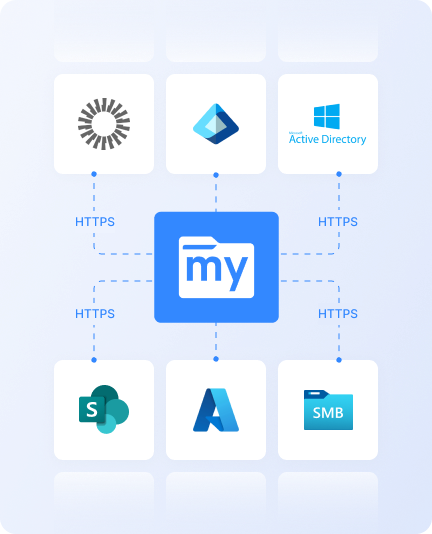
MyWorkDrive gives staff a mapped drive to existing file servers, SharePoint, Azure, and S3 over HTTPS on port 443, with no VPN and no data migration. The drive letter is the part staff see. Behind it, every request is authenticated against the directory, authorized against existing NTFS permissions at the server, and written to a central audit record.
A drive mapping utility presents remote storage as a drive letter but still depends on a route to that storage, normally a VPN tunnel or a transfer protocol published to the internet. MyWorkDrive is that route, delivered as a single role on a Windows Server the organization already operates.
Trusted by Organizations Worldwide


Architecture, Security, and Compliance Comparison
How a self-hosted access gateway and a drive mapping client differ on the controls a security review examines.
| Control |
|
Drive mapping client
|
|---|---|---|
| Architecture | Server-side gateway on existing Windows Server, with desktop, browser, and mobile clients | Software installed on each user device |
| Remote access to internal file servers | HTTPS on port 443, or an outbound-only tunnel with no published server | Requires a VPN or a transfer protocol published to the internet |
| Where authorization is decided | At the gateway, against existing NTFS ACLs and directory groups | By the storage, using the credential configured on the device |
| Credentials on user devices | None. Users authenticate to the gateway with directory credentials and MFA | Held in a local connection profile so the drive can reconnect |
| Identity and single sign-on | Active Directory, Entra ID, SAML, ADFS, Okta, with MFA and Duo | Dependent on what each storage service supports |
| Client coverage | Mapped drive on Windows and macOS, web browser, iOS, and Android | Windows and macOS desktops |
| In-browser document editing | Office Online, Collabora, and OnlyOffice against files that stay on the file server | Not applicable. Files open in desktop applications through the mounted drive |
| External sharing | Expiring, password-protected links with download restriction, watermarking, administrator revocation, and Entra ID B2B guest access | Not an access client function |
| Audit record | Central server-side log of logins, file activity, and shares, exported to syslog and SIEM | Client logging collected from each device |
| Data loss prevention controls | Device approval and blocking, session management, block download, and watermarking enforced at the gateway | Local policy restricting which connections may be configured |
| Offboarding | Disabling the directory account ends access to every client immediately | Requires reaching the device to revoke stored connection profiles |
| Vendor access to content | None at any point. No files are stored by the vendor | None. Traffic flows device to storage |
| Licensing basis | Named users who sign in, tracked over a rolling 30 day period and reassignable | Per seat, typically as an annual subscription |
Secure File Access Across Desktop, Browser, and Mobile
Five capabilities decide the outcome of a mapped drive evaluation once security and compliance requirements are applied.
Remote file access
File server access over HTTPS with no VPN
MyWorkDrive publishes existing shares on port 443 from a server the organization already runs, with an outbound-only tunnel option for environments that will not publish a server at all. Staff map a drive, open a browser, or use a phone, and reach the same shares from any network.
No VPN client to license and support, no SMB on the perimeter, and no separate transfer server to operate.
Identity
Directory authentication with no credentials on devices
Users sign in against Active Directory, Entra ID, SAML, ADFS, or Okta with MFA and Duo. The gateway holds the connection to the storage, so no storage credential is written to a laptop, a phone, or a home machine.
A lost or stolen device carries no reusable path to the file server, and disabling the directory account ends access everywhere at once.
Permissions
Existing NTFS permissions enforced at the gateway
Every request is evaluated against existing NTFS ACLs and directory group membership before any data moves, on the server, where the decision cannot be influenced by software on the user's device. Nothing is re-permissioned and no second access model is created.
One authoritative permission set, already maintained on the file server, governs every client and every session.
Audit and compliance
One central record of file and login activity
Logins, file opens, edits, downloads, and share activity are recorded centrally at the gateway and exported to syslog and SIEM, covering every user and every client type from a single source.
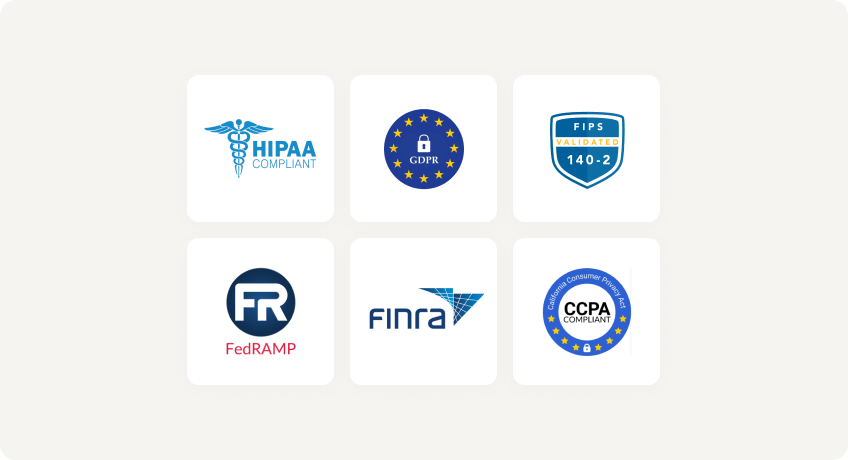
Access evidence for HIPAA, CMMC, FINRA, FERPA, and GDPR assessments is produced from one server-side record.
Client coverage
Mapped drive, browser, and mobile from one deployment
The same shares are delivered through a mapped drive on Windows and macOS, a web client with Office Online, Collabora, and OnlyOffice editing, and native iOS and Android applications. Device approval, session management, download restriction, and watermarking apply per client type.
Unmanaged devices, clinical tablets, and field phones are covered by the same deployment, the same permissions, and the same audit record.
Mapped Drive Access Without a VPN Project
No VPN, No Migration
Existing file servers, SharePoint, OneDrive, Azure, and S3 are published over HTTPS on port 443 where they are. No VPN client to roll out and no SMB exposed to the internet.
Existing NTFS Permissions Enforced
Native Active Directory and Entra ID integration, with authorization decided at the server. No storage credentials on user devices and no second permission model.
Lower Cost of Ownership
$5 per user per month billed annually, licensed on named users who sign in over a rolling 30 day period. No VPN licensing to add. Support included with every plan.
Requirements That Call for a Protocol Mounting Utility
Scope of a secure access gateway
MyWorkDrive governs the organization's own file estate: Windows file servers, NAS, SharePoint, OneDrive, Azure, and S3, under the permissions and identity already in place. It is not a generic protocol client and does not mount arbitrary SFTP or FTP hosts. Attaching a third-party transfer server the organization does not operate, or giving an engineer a drive-letter view of a remote host for ad hoc work, remains the work of a mounting utility, since those cases have no server to deploy and no internal permission model to enforce.
Secure File Access FAQ
Can MyWorkDrive replace WebDrive?

Where the requirement is giving staff a mapped drive to the organization's own file servers, SharePoint, or cloud storage, yes, and it removes the VPN or published transfer protocol that a mounting client still depends on. Where the requirement is mounting an external SFTP or FTP host the organization does not operate, a protocol mounting utility remains the correct category.
Does a mapped drive client remove the need for a VPN?
Not on its own. A mounting client needs a network route to the storage. For an on-premises file server that route is a VPN tunnel or a transfer protocol published to the internet. MyWorkDrive provides the route itself over HTTPS on port 443, so no VPN client and no exposed SMB are required.
How does MyWorkDrive enforce permissions?
Every request is evaluated at the gateway against existing NTFS ACLs and Active Directory or Entra ID group membership. No permission structure is rebuilt, and the decision is made on the server rather than by software running on the user's device.
Are storage credentials stored on user devices?
No. Users authenticate to the gateway with directory credentials and MFA, and the gateway holds the connection to the storage. A lost or stolen device carries no reusable connection to the file server, and access ends when the directory account is disabled.
What client platforms does MyWorkDrive support?
A mapped drive client for Windows and macOS, a web browser client with Office Online, Collabora, and OnlyOffice editing, and native iOS and Android applications. All clients enforce the same permissions and write to the same central audit record.
How long does MyWorkDrive deployment take?
MyWorkDrive installs as a single role on an existing Windows Server using IIS, with shares connected in hours. No data migration, no re-permissioning, and no change to how staff file documents.
Security You Can Prove
With MyWorkDrive, authentication and authorization stay anchored in your directory and your NTFS. No vendor keys to rotate for at-rest copies you don’t control, and no third-party repository to certify, making attestations simpler for regulated workloads.
Data Loss Prevention

(Block downloads, disable copy/paste, watermarking, device approvals)
Learn more
What our users are saying
 Industry-leading secure remote file access solution
We have determined that MyWorkDrive software is essential to the Government’s requirements and market research indicates that other companies’ similar products do not meet or cannot be modified to meet the agency’s needs.
We conducted annual market research in January 2025 by comparing two competitors, ShareFile and Dropbox.
However, neither of these companies provides us with the necessary capabilities required to allow us to utilize the existing infrastructure, maintain stringent control over their data, and integrate with current enterprise security and authentication protocols.
These companies software do not provide real-time collaboration capabilities, does not eliminate Virtual Private Network (VPN) security risks nor prevent lateral network access.
Due to the inabilities noted, we have determined that MyWorkDrive software is essential to the Government’s requirements and market research indicates that other companies’ similar products do not meet or cannot be modified to meet the agency’s needs.
MyWorkDrive is the most network secure compatible software application capable of eliminating VPN security risks and preventing lateral network access…
…Therefore, it is in the Government’s best interest to procure MyWorkDrive software.
Undisclosed Government Agency

See More Reviews





See the MyWorkDrive Advantage for Yourself
Book a personalized demo or start your free trial today