
M-Files Alternative: Secure, Compliant File Access on Existing Storage
Document management platforms are often purchased to solve a simpler problem: giving staff secure remote access to documents, sharing files with external parties, and producing audit evidence. Those outcomes do not require moving content into a managed vault. MyWorkDrive delivers them against existing file servers, SharePoint, OneDrive, Azure, and S3, with no repository of its own and no migration.
The compliance position is the difference. Files never leave the infrastructure the organization already controls and already certifies, access is enforced against existing NTFS permissions rather than a parallel permission model, and every action is logged and exportable to SIEM.
Trusted by Organizations Worldwide


Document Management Requirements Addressed by a Secure Access Layer
Five requirements that commonly justify a document management purchase are met more directly by an access layer, at a fraction of the licensing and implementation cost.
VPN-free remote access
Reaching documents from outside the network
MyWorkDrive publishes existing shares over HTTPS on port 443 and delivers them as a mapped drive letter, a browser client, or a mobile app. Vault-based platforms deliver remote access only to content that has first been brought under management.
Staff keep working on the file server. No vault, no change to how documents are filed, no SMB exposed to the internet.
External collaboration
Sharing documents with clients, auditors, and partners
Public link sharing with mandatory passwords, enforced expiry, download restriction, watermarking, and administrator visibility of every link users create, plus Entra ID B2B guest access with MFA. External collaboration is included rather than licensed as a separate premium module.
Shared material is served from the organization's own storage. No third-party collaboration repository enters the compliance boundary.
Access to existing network folders
Making file server content reachable without moving it
Repository connectors surface existing network folder content inside a document management platform, while documents created by users are written into the vault. MyWorkDrive works in place: shares are published where they are, and new files are written directly to the original storage.
One authoritative copy on the file server. Nothing to reconcile between a vault and a share.
Audit and compliance evidence
Proving who accessed which documents
MyWorkDrive logs file and login activity across every connected storage backend and exports to syslog and SIEM, with DLP controls, watermarking, and device approval applied at the access layer. Because no content is duplicated into a separate repository, the audit scope stays on systems the organization already certifies.
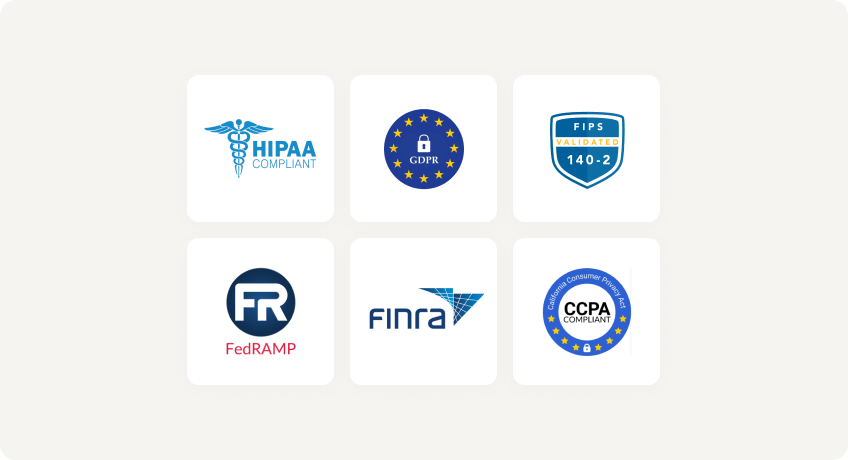
Fewer systems to assess for HIPAA, CMMC, FINRA, GDPR, and FIPS requirements, and no additional data processor to document.
Data sovereignty and residency
Keeping regulated content inside a defined boundary
Cloud document management requires content to reside in the vendor's infrastructure. MyWorkDrive stores no files at any point: it authenticates the user, enforces the permissions already set on the storage, and passes the file over HTTPS.
Residency commitments, data sovereignty mandates, and regulatory holds continue to be satisfied by the underlying storage platform.
Security and Compliance Comparison
How an access layer and a vault-based document management platform handle the controls a security review examines.
| Control |
|
Vault-based document management
|
|---|---|---|
| Where documents reside | Existing file servers, NAS, SharePoint, OneDrive, Azure, S3. No copy is created | A managed repository, cloud or on-premises |
| Authorization model | Existing NTFS ACLs and directory groups enforced directly, no parallel permission set to maintain | Permissions defined and maintained inside the repository |
| Identity | Active Directory, Entra ID, SAML, ADFS, Okta, with MFA and conditional access | Federated authentication, often tiered by edition |
| Additional data processor | None. The vendor never holds customer content | Applies wherever content is hosted by the vendor |
| Systems in audit scope | The storage already in scope, plus one Windows Server role | Storage in scope plus the repository platform and its content |
| Data loss prevention | Watermarking, download and print restriction, browser-only view, device approval | Governance controls applied to managed content |
| Deployment footprint | One Windows Server role published over port 443, deployed in hours | Repository infrastructure plus structure and workflow configuration |
| Migration required | None | Content to be managed is brought into the repository |
Secure Access Without a Repository Project
No Vault, No Migration
Existing file servers, SharePoint, OneDrive, Azure, and S3 are published where they are. One authoritative copy, nothing to reconcile.
Existing NTFS Permissions Enforced
Native Active Directory and Entra ID integration. No parallel permission model to build, maintain, or reconcile during an audit.
Lower Cost of Ownership
$5 per user per month billed annually, with external collaboration included rather than licensed as a premium module. Support included with every plan.
Requirements That Call for a Document Management Platform
Scope of an access layer compared with a records management system
Classification, approval workflows, retention and disposition, and electronic signature are document management capabilities and remain reasons to run a dedicated platform. Organizations frequently apply one to the controlled document estate and an access layer to the general file share estate, since the two serve different document populations and very different user counts.
Secure File Access FAQ
Can MyWorkDrive replace M-Files?

Where the deployment delivers remote document access, external file sharing, and access auditing, yes. MyWorkDrive provides those against existing storage with no vault and no migration. Where the platform is used for records management, approval workflows, retention, or classification, a dedicated document management system remains the correct category.
Why is keeping files out of a vault a compliance advantage?
Content copied into a managed repository adds a system that must be assessed, certified, and documented as a data processor. MyWorkDrive stores no files, so the audit scope remains the storage platform the organization already certifies, and no further processor needs to be recorded.
How does MyWorkDrive handle permissions?
Access is evaluated against existing NTFS ACLs and directory group membership, so no permission structure is rebuilt or maintained in parallel. Removing a user from a group removes their access immediately, with no synchronization step and no second permission model to reconcile during an audit.
Can MyWorkDrive handle secure external sharing?
Yes. Public links support mandatory passwords, enforced expiry, download restriction, and watermarking, with administrators able to view and revoke any link users create. Entra ID B2B guest access with MFA covers named external collaborators. Shared content is served from the organization's own storage.
Can an access layer and a document management platform run together?
Yes. Applying document management to the controlled document estate and an access layer to the general file share estate is a common arrangement, and it avoids extending platform licensing to users who only need to open files.
How long does MyWorkDrive deployment take?
MyWorkDrive installs as a single role on an existing Windows Server using IIS, published over port 443, with shares connected in hours. No metadata structure, workflow configuration, or user adoption programme is required.
Security You Can Prove
With MyWorkDrive, authentication and authorization stay anchored in your directory and your NTFS. No vendor keys to rotate for at-rest copies you don’t control, and no third-party repository to certify, making attestations simpler for regulated workloads.
Data Loss Prevention

(Block downloads, disable copy/paste, watermarking, device approvals)
Learn more
What our users are saying
 Industry-leading secure remote file access solution
We have determined that MyWorkDrive software is essential to the Government’s requirements and market research indicates that other companies’ similar products do not meet or cannot be modified to meet the agency’s needs.
We conducted annual market research in January 2025 by comparing two competitors, ShareFile and Dropbox.
However, neither of these companies provides us with the necessary capabilities required to allow us to utilize the existing infrastructure, maintain stringent control over their data, and integrate with current enterprise security and authentication protocols.
These companies software do not provide real-time collaboration capabilities, does not eliminate Virtual Private Network (VPN) security risks nor prevent lateral network access.
Due to the inabilities noted, we have determined that MyWorkDrive software is essential to the Government’s requirements and market research indicates that other companies’ similar products do not meet or cannot be modified to meet the agency’s needs.
MyWorkDrive is the most network secure compatible software application capable of eliminating VPN security risks and preventing lateral network access…
…Therefore, it is in the Government’s best interest to procure MyWorkDrive software.
Undisclosed Government Agency

See More Reviews





See the MyWorkDrive Advantage for Yourself
Book a personalized demo or start your free trial today