
ShareFile Alternative: Secure File Access Without Migration
ShareFile is a cloud sync-and-share platform. MyWorkDrive is an access gateway that leaves your files on the servers you already run. Publish your existing Windows file shares over HTTPS with native Active Directory and NTFS permissions, no data migration, and no third-party platform holding your data. Live support sessions always included.
Trusted by Organizations Worldwide


MyWorkDrive vs ShareFile at a Glance
| Capability |
|
|
|---|---|---|
| Where your files live | On your own servers; never stored by MyWorkDrive | ShareFile cloud by default; on-premises only via Storage Zone Controllers on Enterprise plans |
| Data migration required | No. Works in place with SMB and NTFS | Files are moved into the platform, or a Storage Zone deployment is stood up |
| Active Directory / NTFS permissions | Native, live NTFS permissions enforced at access time | Own user and folder permission model, managed inside ShareFile |
| Control plane | Runs entirely on your infrastructure | Authentication, administration, and sharing run in ShareFile's cloud, even with on-premises storage |
| Coexistence with in-office users | Same shares, same files; office users on mapped drives keep working unchanged | Files live in the platform; everyone adopts ShareFile clients and workflows |
| E-signature and client portals | Not the focus; MyWorkDrive is built for file server access | Integrated e-signature on Premium plans, plus client portals |
| Deployment | One Windows Server with IIS and .NET; most deployments finish in 60 to 90 minutes | Cloud service; on-premises data requires Storage Zone Controller servers to install and maintain |
| List price (per user / month) | $5/user/monthactive users only | From $16 billed annuallyAdvanced plan, 3-user minimum; e-signature requires Premium at $25+ |
Access Gateway, Not a Content Platform
ShareFile moves your documents into a platform and manages them there. MyWorkDrive publishes the file shares you already have. That single difference drives everything else on this page: migration, permissions, data residency, and cost.
No Migration Required
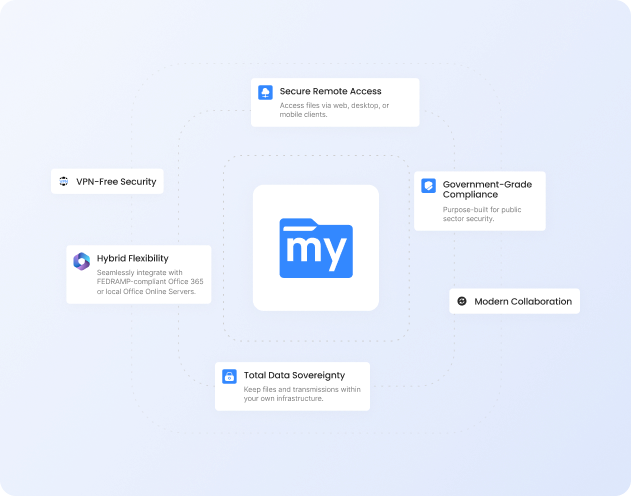
Deploy in minutes without moving or syncing data. MyWorkDrive layers securely over your existing file shares.
Native AD and Entra ID Integration
Live NTFS permissions enforced by your file server. No user import, no parallel permission model, no sync jobs.
Lower Cost of Ownership
$5 per user per month, maximum, on storage you already own. No cloud storage fees, and support is included with every plan.
Why Choose MyWorkDrive?
Architecture and Data Residency

- MyWorkDrive: Files remain on your own servers with zero migration. File content is processed in memory only and is never stored on MyWorkDrive servers.
- ShareFile: Files are stored in ShareFile's cloud by default. Keeping data on-premises requires Storage Zone Controllers on Enterprise plans, and the cloud still runs authentication, administration, and sharing.
Identity and Permissions
- MyWorkDrive: Direct integration with Active Directory or Entra ID. Your Windows file server enforces NTFS permissions at access time. MyWorkDrive can restrict further, never elevate.
- ShareFile: Users and folder permissions are managed inside ShareFile's own model. Access decisions live in the platform, not your NTFS ACLs.
Migration and Coexistence
- MyWorkDrive: Points at your existing SMB shares as they are. Remote users see the same folder structure, and in-office users on mapped drives continue working unchanged.
- ShareFile: Content is ingested into the platform, or a Storage Zone deployment is stood up. Either way, teams adopt ShareFile clients and workflows.
Why Teams Look Beyond ShareFile
Two themes come up consistently when IT teams with Windows file servers evaluate ShareFile: what its hybrid storage option does and does not change, and how the cost model scales.
What Storage Zones Does
ShareFile's Storage Zone Controllers let Enterprise customers keep file bytes on their own storage. The dependency on ShareFile's cloud remains: authentication, user management, sharing, and administration all run through the ShareFile platform, and the controller sits at the network edge to move files between your storage and that platform. You still adopt ShareFile, you just host part of it.
That dependency has practical consequences. In July 2026, Progress instructed all Storage Zone Controller customers to shut down their servers in response to a zero-day vulnerability, and temporarily suspended account access while a patch was developed. MyWorkDrive keeps the whole path on your side. The server runs on your infrastructure, under your patch schedule, and no vendor platform sits between your users and your files.
ShareFile Pricing Scales Against You
ShareFile's Advanced plan starts at $16 per user per month billed annually with a three-user minimum. Integrated e-signature requires the Premium plan at $25 and up, and industry-specific and virtual data room tiers cost more again. Storage lives in the platform, so you pay ShareFile to hold data you may already have capacity for.
MyWorkDrive is at most $5 per user per month, counting active users only, on storage you already own. There are no cloud storage fees and no feature tiers gating remote access basics. Support is included with every plan.
Security You Can Prove
With MyWorkDrive, authentication and authorization stay anchored in your directory and your NTFS. No vendor keys to rotate for at-rest copies you don't control, and no third-party repository to certify, making attestations simpler for regulated workloads.
Data Loss Prevention

(Block downloads, disable copy/paste, watermarking, device approvals)
Learn more
Where ShareFile Fits, and Where MyWorkDrive Fits
If your core need is client-facing document workflows, integrated e-signature, and branded portals in one suite, ShareFile does more in that lane and is worth evaluating on those terms. MyWorkDrive is the better fit when you are keeping existing Windows file servers and want secure remote access without migration: native AD and NTFS enforcement, data that stays on infrastructure you control, and a per-user cost that runs on storage you already own.
What our users are saying
 Industry-leading secure remote file access solution
We have determined that MyWorkDrive software is essential to the Government’s requirements and market research indicates that other companies’ similar products do not meet or cannot be modified to meet the agency’s needs.
We conducted annual market research in January 2025 by comparing two competitors, ShareFile and Dropbox.
However, neither of these companies provides us with the necessary capabilities required to allow us to utilize the existing infrastructure, maintain stringent control over their data, and integrate with current enterprise security and authentication protocols.
These companies software do not provide real-time collaboration capabilities, does not eliminate Virtual Private Network (VPN) security risks nor prevent lateral network access.
Due to the inabilities noted, we have determined that MyWorkDrive software is essential to the Government’s requirements and market research indicates that other companies’ similar products do not meet or cannot be modified to meet the agency’s needs.
MyWorkDrive is the most network secure compatible software application capable of eliminating VPN security risks and preventing lateral network access…
…Therefore, it is in the Government’s best interest to procure MyWorkDrive software.
Undisclosed Government Agency

See More Reviews





See the MyWorkDrive Advantage for Yourself
Book a personalized demo or start your free trial on your own infrastructure today