
Cloud File Sharing
Cloud file sharing lets people store, open, and share files from any device without carrying them around or emailing attachments. This guide explains how it works, how public, private, and hybrid cloud file sharing differ, the benefits and risks of each, and how to give users cloud-style access to files that stay on storage you control.
Last updated
Quick answer
Cloud file sharing is a way to store or publish files through an internet-accessible service so authorized users can open, edit, and share them from any device. It comes in three models: public cloud (a provider such as OneDrive, Google Drive, or Dropbox hosts your files), private cloud (files stay on infrastructure you control), and hybrid cloud (one access layer across both). Organizations that need control over sensitive data increasingly choose private or hybrid file sharing, which delivers cloud-style access without migrating files to a third party.


How Cloud File Sharing Works
Every cloud file sharing service, public or private, follows the same basic flow from storage to the user's screen.
- Files live in a storage locationA provider's data center for public cloud, or your own file servers, NAS, Azure Files, or S3-compatible storage for private and hybrid cloud.
- A service publishes them securelyThe file sharing service exposes that storage over HTTPS and encrypts data in transit, typically with TLS 1.2 or higher.
- Users sign in and are authorizedUsers authenticate, ideally with single sign-on and multifactor authentication, and the service checks what each person is allowed to see.
- People open, edit, and shareUsers work through a web browser, a desktop sync or mapped drive client, or a mobile app, and share with internal or external people through permissions or expiring links.
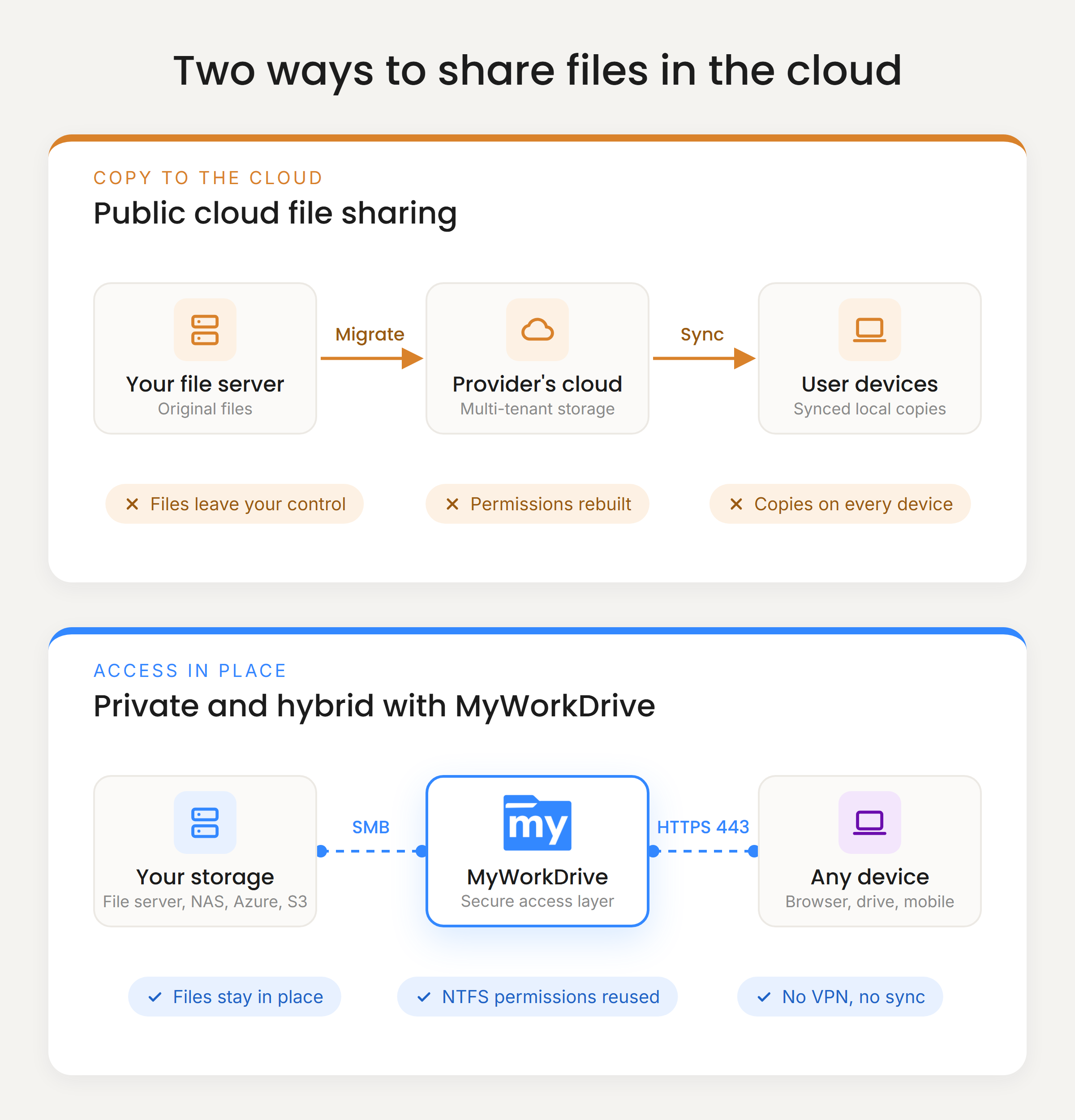
The biggest architectural difference between services is step one: whether your files are copied into the provider's storage, or stay where they are and are published securely. That single decision drives cost, migration effort, compliance scope, and how hard it is to leave a vendor later.
Public vs. Private vs. Hybrid Cloud File Sharing
The right model depends on how sensitive your data is, where it lives today, and how much control you need.
| Public cloud | Private cloud | Hybrid cloud | |
|---|---|---|---|
| Examples | OneDrive, Google Drive, Dropbox, Box | Windows file servers or NAS published securely, self-hosted file sharing | On-premises shares plus Azure Files, SharePoint, OneDrive, or S3 behind one access layer |
| Where files live | The provider's multi-tenant data centers | Infrastructure you own or your own cloud tenant | Both, chosen per workload |
| Migration required | Yes, files and permissions must be moved | No | Only for data you choose to move |
| Permissions | Rebuilt in the provider's sharing model | Existing NTFS and Active Directory permissions | Native permissions of each storage location |
| Vendor lock-in | High, data and workflows tied to one provider | Low, files stay in standard formats | Low to medium |
| Data residency and compliance | Depends on the provider's regions and terms | Fully under your control | Under your control for sensitive data |
| Best for | Small teams with simple sharing needs and little legacy data | Regulated industries, large file sets, sensitive IP | Organizations moving to cloud gradually, or mixing storage types |
For a deeper comparison, read private vs. hybrid cloud file sharing and our overview of hybrid cloud file management.
Benefits of Cloud File Sharing
Access from anywhere
Users reach the files they need from home, the road, or a client site, on Windows, Mac, iOS, or Android, without carrying copies on USB drives or laptops.
Real-time collaboration
Several people can work on the same Word, Excel, or PowerPoint file at once, which ends the email-attachment loop and the confusion of conflicting versions.
One source of truth
Everyone works from the same file instead of local copies, so version history, backups, and retention policies apply in one place.
Controlled external sharing
Share with clients and partners through links that can expire, require a password, or allow viewing only, rather than sending files outside your control.
Business continuity
When an office closes or a laptop is lost, work continues because files are not tied to a single device or location.
Predictable cost
Subscription pricing replaces large hardware purchases for many teams. Private and hybrid models also reuse the storage you have already paid for.
Risks of Cloud File Sharing
Most problems with cloud file sharing come from how a service is chosen and configured, not from the cloud itself.
Data residency and compliance
Moving files to a public provider changes where regulated data lives and who can access it, which can complicate HIPAA, GDPR, CMMC, and FINRA obligations.
Migration cost and disruption
Copying terabytes of files, rebuilding folder permissions, and retraining users can take months and often breaks file paths and line-of-business applications.
Vendor lock-in
Once data, sharing links, and workflows depend on one provider's format and APIs, switching later is slow and expensive.
Oversharing and public links
Links shared with "anyone" and permissions that drift over time are the most common cause of cloud data exposure.
Sync to endpoints
Sync clients place copies of company files on every device, which widens the impact of lost laptops and lets ransomware spread through synced folders.
Growing storage bills
Per-user storage tiers, egress fees, and premium security add-ons can make public cloud storage more expensive than expected as data grows.
Learn more about cloud file sharing security concerns and the risks of migrating to the cloud.
Cloud File Sharing Without Moving Your Files
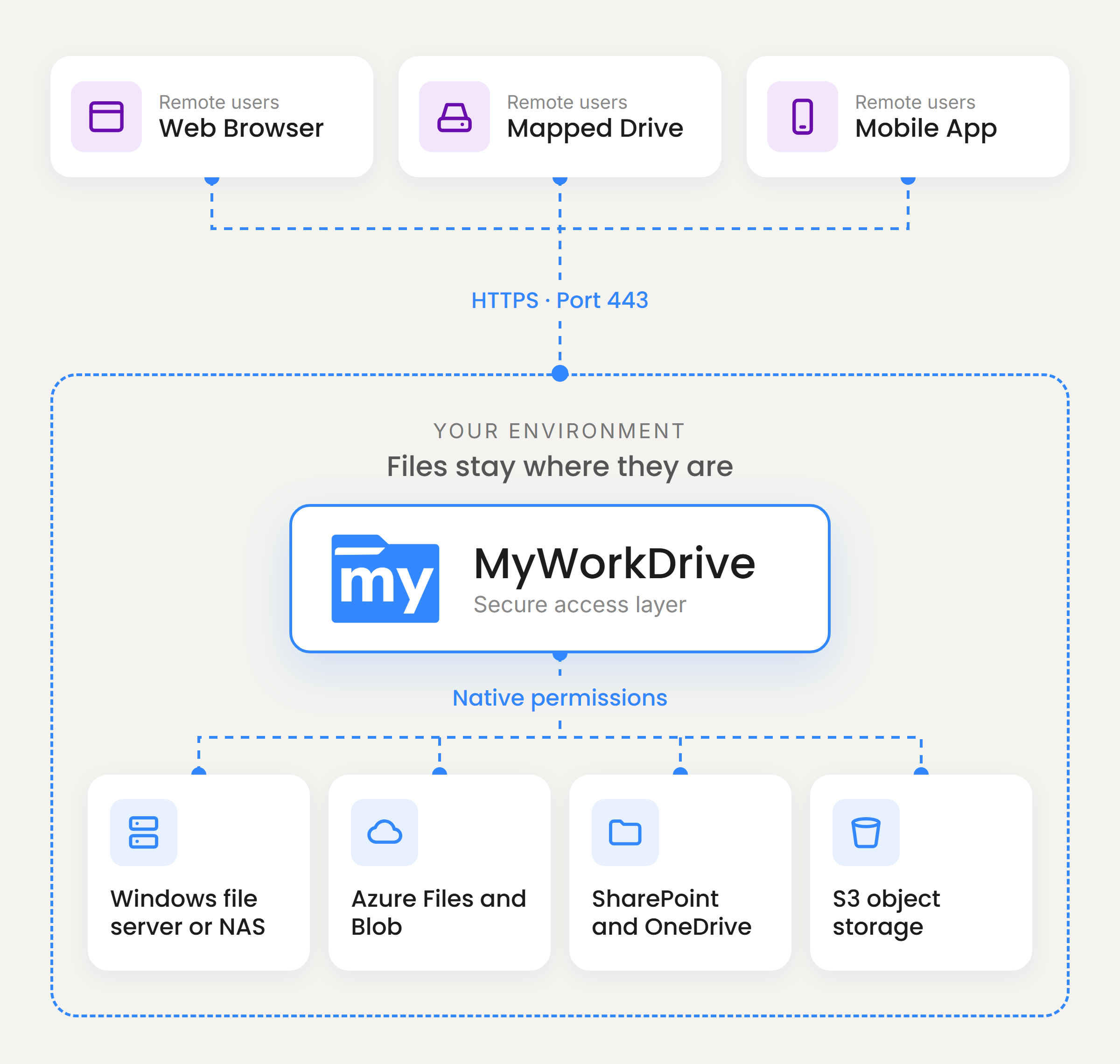
MyWorkDrive gives users a cloud file sharing experience on top of the storage you already run. It installs on Windows Server, connects to your existing shares, and publishes them securely over HTTPS. There is no migration, no sync, and no second copy of your data.
Files stay on your Windows file servers, NAS, Azure Files, SharePoint, OneDrive, Azure Blob, or S3-compatible storage. MyWorkDrive does not store your files or your users' passwords, and it can never grant more access than the NTFS permissions you have already set.
- Browser, mapped drive, and mobile access over a single port, 443, with no VPN required.
- Your existing identity through Active Directory or Microsoft Entra ID, with multifactor authentication through Duo, SAML, or Conditional Access.
- Native permissions from NTFS and access-based enumeration, so users see only what they are allowed to.
- Office editing in the browser with Office Online or Microsoft 365, including co-authoring.
- Secure external sharing with expiring, password-protected links.
- Data loss prevention with view-only mode, watermarking, and download restrictions per share or user.
- Full audit logging of access, edits, and deletions, with export to your SIEM.
- One view of every location through unified hybrid storage access.
How to Choose a Cloud File Sharing Solution
Use these questions to compare services before you commit.
- Where will the files live? Confirm the storage location, region, and whether you can keep sensitive data on infrastructure you control.
- Does it require migration? Estimate the time and cost to move data, rebuild permissions, and fix broken file paths.
- Does it use your identity provider? Look for Active Directory or Entra ID integration, single sign-on, and multifactor authentication.
- Are permissions inherited or rebuilt? Reusing existing NTFS permissions avoids drift and duplicate administration.
- What controls protect against leaks? Check for expiring links, view-only modes, download blocking, and device approval.
- Can you prove who did what? Audit logs should cover access, edits, deletions, and sharing, with export for compliance.
- How do users work? Test the browser, desktop, and mobile experience, plus Office co-authoring.
- How easy is it to leave? Standard file formats and in-place storage keep your exit costs low.
- What will it cost at scale? Compare per-user licensing, storage and egress fees, and the cost of the migration itself.
Related Guides
Give Users Cloud Access to the Files You Already Have
Start a free trial on your existing Windows file servers and have users connected in under an hour, or walk through your environment with our team.
Cloud File Sharing FAQ
What is cloud file sharing?

Cloud file sharing is the practice of storing or exposing files through an internet-accessible service so authorized people can open, edit, and share them from any device and location. It can run on a public cloud service such as OneDrive or Dropbox, on a private cloud you operate, or on a hybrid of both.
Is cloud file sharing secure?
It can be, but security depends on the configuration rather than the word cloud. Look for encryption in transit and at rest, multifactor authentication, permissions that follow least privilege, expiring and password-protected share links, audit logging, and control over where the data is stored. Most cloud file sharing incidents come from misconfigured permissions and public links, not from broken encryption.
What is the difference between public and private cloud file sharing?
Public cloud file sharing stores your files on a provider's multi-tenant infrastructure, and the provider runs the service. Private cloud file sharing keeps files on infrastructure dedicated to your organization, either on-premises or in your own cloud tenant, so you control the storage, the security settings, and the data location.
What is hybrid cloud file sharing?
Hybrid cloud file sharing gives users one way to reach files that live in several places, such as on-premises Windows file servers, Azure Files, SharePoint, and OneDrive. It lets an organization keep sensitive or large data on infrastructure it controls while still using public cloud services where they fit.
Do I have to migrate my files to the cloud to share them online?
No. A cloud file access gateway such as MyWorkDrive publishes your existing file shares securely over HTTPS, so users get browser, mapped drive, and mobile access while the files stay where they are today. This avoids migration projects, permission rebuilds, and vendor lock-in.
Can I share files in the cloud without a VPN?
Yes. Browser-based and HTTPS-based file access lets remote users reach company files without a VPN client. MyWorkDrive delivers web, mapped drive, and mobile access over a single port, 443, and applies your existing Active Directory or Entra ID permissions to every request.
Is cloud file sharing compliant with HIPAA, GDPR, or CMMC?
No file sharing product makes an organization compliant on its own. Compliance depends on controls such as access restrictions, encryption, audit trails, and data residency, plus your own policies. Keeping regulated files on storage you control and adding logging, multifactor authentication, and data loss prevention makes those requirements easier to meet and to evidence.