
Acronis Files Advanced Alternative: Keep Files in Place
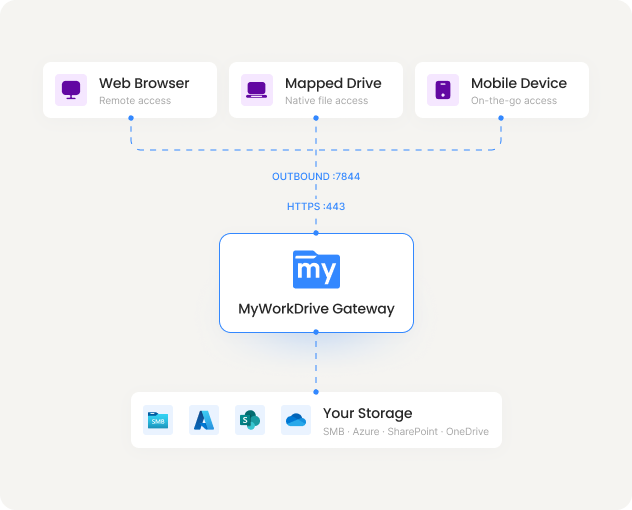
MyWorkDrive gives your team secure remote access to the Windows file servers, NAS, Azure Files, and SharePoint you already run. There is no PostgreSQL database to deploy and no file repository to maintain, so there is nothing to migrate. With Acronis winding down Acronis Files Advanced, now sold as Acronis Cyber Files, MyWorkDrive is a Microsoft native way to keep your files where they are and your users working. Live support sessions are included with every plan.
Trusted by Organizations Worldwide


Quick Answer
MyWorkDrive is the most direct Acronis Files Advanced alternative for organizations that want files to stay on their existing Windows file servers. It installs as a single role on Windows with IIS and .NET, so there is no PostgreSQL database to run and no separate file repository to back up.
Your files remain on your current NTFS shares and are reached over a single HTTPS port. That means you can replace Acronis Files Advanced without copying data into a product store, while still getting browser Office editing, external sharing with data leak controls, and full audit logging. Pricing starts at $5 or less per user per month on annual plans, with live support sessions included.
Acronis Files Advanced Is at End of Life
Acronis renamed Acronis Files Advanced to Acronis Cyber Files, and Acronis has published an end-of-life notice that also covers Acronis Files Connect. Once a product reaches end of life, new security patches, compatibility testing, and standard support stop. For teams handling regulated or sensitive files, staying on an unsupported platform turns into a compliance and risk problem. You can confirm the current timeline in Acronis's own end-of-life notice, then plan your move.
Moving to MyWorkDrive does not involve a data migration. Because MyWorkDrive reads your files where they already sit on SMB and NTFS shares, Azure Files, SharePoint, and OneDrive, you point it at your existing storage and publish access in minutes. Your folder structure, drive letters, and NTFS permissions stay exactly as they are.
MyWorkDrive vs Acronis Files Advanced
| Capability |
|
Acronis Files Advancednow Acronis Cyber Files |
|---|---|---|
| Product status and roadmap | Actively developed and supported | End of life announced by Acronis |
| Data migration to start | None; reads existing NTFS and SMB shares in place | Sync and Share copies files into a separate file store |
| Database required | No database; native IIS and .NET | PostgreSQL database for Web Server and Gateway |
| Server components to run | Single Windows role with IIS | Gateway Server, Web Server, File Repository, and PostgreSQL |
| Active Directory and Entra ID | Live NTFS permissions enforced in the user's own context | Users provisioned into the product and managed in its console |
| Browser Office editing on file shares | Yes; approved Microsoft Cloud Storage Provider for Office Online | Editing through Acronis desktop and mobile clients |
| Encryption and compliance | TLS 1.2+ with SHA-256; FIPS 186-4 RSA validation cert #3018; supports CMMC, HIPAA, GDPR, FINRA, FedRAMP | AES-256 in the file store; protections vary by deployment |
| Live support sessions | Included with every plan | Tied to product lifecycle now winding down |
| List price (per user / month) | $5 or lessall features included | Not publicly listedproduct at end of life |
Less to Deploy and Maintain
No Database to Maintain
Acronis Files Advanced installs a PostgreSQL database for its Web Server and Gateway. MyWorkDrive runs on native Windows IIS and .NET, so there is no database to back up, patch, or tune.
Files Never Leave Your Shares
Acronis Sync and Share copies files into a separate file repository. MyWorkDrive reads and writes on your existing NTFS shares, Azure Files, SharePoint, and OneDrive, so a single source of truth stays under your control.
Predictable Per-User Pricing
Pay for named users from $5 or less per user per month, with no overage fees and live support included. Licenses follow active users over a rolling 30 day window and are fully reassignable when people change roles.
Why Teams Move to MyWorkDrive
Architecture and data residency

- MyWorkDrive: Files stay on your own servers and storage with no migration. No file content or user records are written to any database.
- Acronis Files Advanced: Runs on Windows with a PostgreSQL database. The Sync and Share feature copies files into a separate file repository before they can be shared that way.
Identity and permissions
- MyWorkDrive: Uses Active Directory and Entra ID directly. Access runs in each user's own login context and can never grant more than the existing NTFS permissions allow.
- Acronis Files Advanced: Directory users are provisioned into the product and administered through its own console, which adds an identity layer to manage.
Operations and support lifecycle
- MyWorkDrive: A single Windows role patched with standard Windows tools, actively developed, with live support sessions included.
- Acronis Files Advanced: A multi-component stack of Gateway Server, Web Server, File Repository, and PostgreSQL, now at end of life under Acronis's lifecycle policy.
Security You Can Prove
With MyWorkDrive, authentication and authorization stay anchored in your directory and your NTFS. There is no separate file repository to certify and no vendor-held copy of your data to account for, which keeps attestations for regulated workloads straightforward.
Encryption in Transit
HTTPS and TLS 1.2+ with SHA-256, plus a FIPS 186-4 RSA validation certificate
Learn more
Data Loss Prevention

Block downloads, disable copy and paste, watermarking, and device approvals
Learn more
Compliance Ready

Supports CMMC, FINRA, HIPAA, and GDPR programs with FIPS 186-4 validated cryptography
Learn more
What our users are saying
 Industry-leading secure remote file access solution
We have determined that MyWorkDrive software is essential to the Government’s requirements and market research indicates that other companies’ similar products do not meet or cannot be modified to meet the agency’s needs.
We conducted annual market research in January 2025 by comparing two competitors, ShareFile and Dropbox.
However, neither of these companies provides us with the necessary capabilities required to allow us to utilize the existing infrastructure, maintain stringent control over their data, and integrate with current enterprise security and authentication protocols.
These companies software do not provide real-time collaboration capabilities, does not eliminate Virtual Private Network (VPN) security risks nor prevent lateral network access.
MyWorkDrive is the most network secure compatible software application capable of eliminating VPN security risks and preventing lateral network access…
…Therefore, it is in the Government’s best interest to procure MyWorkDrive software.
Undisclosed Government Agency

See More Reviews





Acronis Files Advanced Alternative FAQs
Is Acronis Files Advanced being discontinued?
Acronis Files Advanced was renamed Acronis Cyber Files, and Acronis has published an end-of-life notice that also covers Acronis Files Connect. After end of life, security patches, compatibility testing, and standard support stop, so teams on the product should plan a move to a supported platform.
What is the best Acronis Files Advanced alternative?
For teams that want files to stay on their existing Windows file servers, MyWorkDrive is the closest match. It installs as a single role on Windows with IIS and .NET, uses Active Directory and NTFS permissions directly, and needs no PostgreSQL database and no separate file repository.
Do I have to migrate data to replace Acronis Files Advanced?
No. MyWorkDrive reads and writes your files where they already live on SMB and NTFS shares, Azure Files, SharePoint, and OneDrive. There is no requirement to copy files into a product database or file repository before you can share or edit them, so your folder structure and permissions stay intact.
Does MyWorkDrive require a database like Acronis Files Advanced?
No. Acronis Files Advanced installs a PostgreSQL database for its Web Server and Gateway components. MyWorkDrive runs on native Windows IIS and .NET and writes no file content or user records to any database, which removes the database backup, patching, and tuning work.
How much does MyWorkDrive cost compared to Acronis Files Advanced?
MyWorkDrive is priced per named user from $5 or less per user per month, with live support sessions included. Acronis no longer lists public pricing for the end-of-life Files Advanced product.
See the MyWorkDrive Advantage for Yourself
Book a personalized demo or start your free trial today.