


By Vitalii Chetak
Last Updated: June 9, 2026
Quick answer: A SharePoint mapped drive keeps disconnecting because it relies on WebDAV, an aging Windows protocol whose authentication tokens expire every 30 to 60 minutes and do not survive sleep, hibernate, or idle timeouts. When the token lapses, File Explorer shows a red X on the drive and Office throws save errors. Registry edits to the WebClient service (
FileSizeLimitInBytes,ServerNotFoundCacheLifeTimeInSec) reduce the symptoms but cannot fix the root cause, because the Windows WebDAV redirector cannot negotiate modern OAuth, SAML, or Conditional Access. The permanent fix is to stop using WebDAV and access SharePoint through a client that authenticates via Entra ID / SSO over HTTPS. That is exactly what MyWorkDrive provides.
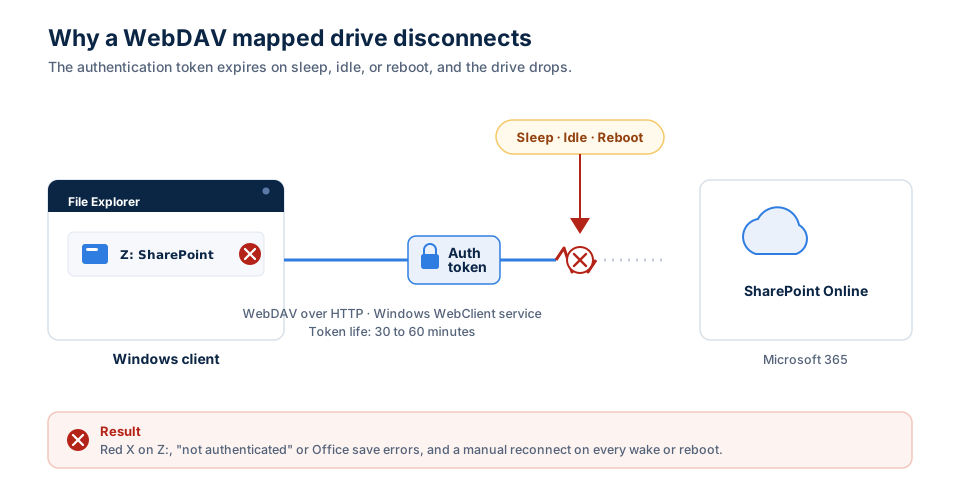
If your team maps a SharePoint Online library to a drive letter and it works for a few hours, or a few days, then shows a red X, drops mid-edit, or starts demanding credentials again, you are not doing anything wrong. You are hitting the built-in limits of the protocol Windows uses to map SharePoint: WebDAV. This guide explains exactly why the disconnections happen, walks through every registry workaround that genuinely helps, explains honestly where those workarounds stop working in an enterprise, and shows you the supported architecture that removes the problem for good.
Why WebDAV mapped drives disconnect
When you map a SharePoint library to a letter like Z:, Windows does not open an SMB file-share connection the way it would to an on-prem server. Instead it uses WebDAV (Web Distributed Authoring and Versioning), an HTTP-based protocol handled by the Windows WebClient service. Microsoft itself describes mapping a network drive this way as using "an older technology which is slower and less reliable than syncing SharePoint files with the new OneDrive sync client." Three distinct mechanisms cause the disconnections, and most environments are hit by more than one at a time.
1. Authentication token expiry
Token expiry is the most common cause. WebDAV against SharePoint Online authenticates through a session/security token that has to be renewed periodically. Microsoft's own SharePoint guidance notes that the SAML token is lost after a long period of inactivity or after rebooting the PC, at which point the user must re-authenticate before the mapped drive will work again. In practice the cached cookies that keep the WebDAV session alive live only 30 to 60 minutes. When the token lapses, the drive vanishes mid-session. The classic symptom is an Excel or Word save error the moment a file is written back.
A related quirk: because of a security change introduced all the way back in Windows XP SP2, the WebDAV redirector uses WinHTTP rather than WinINet. In a non-proxy network, WinHTTP only sends user credentials in response to requests it considers local-intranet. So even with "Remember my credentials" checked, the drive can come back from a reboot already disconnected, reporting that the user "has not been authenticated."
2. WebClient service timing and startup
The mapped drive depends entirely on the WebClient service running on the client. If its startup type is set to Disabled, the map-network-drive function will not work at all and you cannot start the service on demand. Persistent (reconnect-at-logon) mappings specifically require the WebClient service to be set to Automatic, not Manual. Even when it is set correctly, mapped drives often fail to reconnect at logon because of timing glitches: the service, the network adapter, and the credential store do not always come up in the right order at startup, leaving a broken reconnect entry behind.
3. Sleep, hibernate, and idle timeouts
Two separate timeouts produce the red-X behavior:
- Idle disconnect. Windows drops idle network connections after a default of 15 minutes to avoid wasting server resources. File Explorer paints a red X on the drive, but a single click usually re-establishes the connection. This is normal, by-design behavior: annoying, but not broken.
- Sleep / hibernate. When a laptop sleeps and the network adapter powers down, the session and its token are gone on wake. The drive reports "network path not found" until it is manually re-accessed or the machine is rebooted. Aggressive NIC power-management settings make this worse.
The pattern to recognize: a drive that reconnects instantly on click is hitting an idle/sleep timeout. A drive that demands a login or throws an Access Denied / authentication error is hitting token expiry. The fixes differ, which is why a single registry tweak rarely solves everything.
Registry fixes and workarounds
⚠️ Back up the registry before editing it. Incorrect changes can destabilize Windows. After changing any value under the WebClient
Parameterskey, you must restart the WebClient service (net stop webclient && net start webclient) or reboot for the change to take effect.
These are the workarounds that genuinely reduce WebDAV disconnections and the related 50 MB error. They live under:
HKEY_LOCAL_MACHINE\SYSTEM\CurrentControlSet\Services\WebClient\Parameters
| Registry value | Default | What it controls | Recommended change |
|---|---|---|---|
FileSizeLimitInBytes | 50,000,000 (≈50 MB) | Maximum size the WebClient service will transfer over WebDAV. Files above the limit fail; Windows treats an oversized download as a denial-of-service attempt and stops it. | Raise toward the 32-bit maximum FFFFFFFF (≈4 GB). Set Base to Decimal and enter your chosen byte value. |
ServerNotFoundCacheLifeTimeInSec | Cache active (non-zero) | How long Windows caches a "server not found" result. While cached, a transient failure keeps the drive offline even after the server is reachable again. | Set to 0 (Decimal) so Windows stops caching failures and re-attempts the connection immediately. |
FileAttributesLimitInBytes | 1,000,000 | Maximum size of a file's attributes/metadata the redirector will accept. Large metadata can trigger failures on otherwise valid files. | Raise if you see failures on files with extensive metadata; otherwise leave at default. |
AuthForwardServerList | (empty) | URL allow-list that lets WinHTTP forward credentials to WebDAV servers even with no proxy configured, which addresses the "not authenticated after reboot" failure. | Add your SharePoint host (e.g. https://*.sharepoint.com) as a multi-string value, then restart WebClient. |
Two additional, non-registry workarounds frequently appear in Microsoft and community guidance:
- Set the WebClient service to Automatic in
services.mscso persistent mappings survive a reboot. - Adjust the idle-disconnect window on the serving side with
net config server /autodisconnect:<minutes>(use-1to disable), which addresses the red-X-on-idle behavior, though this applies to SMB shares more than to SharePoint Online and is rarely available against a Microsoft-hosted tenant.
For SharePoint Online specifically, Microsoft's documented "workaround" is essentially behavioral: sign in to the site in the browser with Keep me signed in selected and open the library once to refresh the token. That is not a fix you can hand to a hundred end users.
Why these fixes don't fully solve the problem in enterprise environments
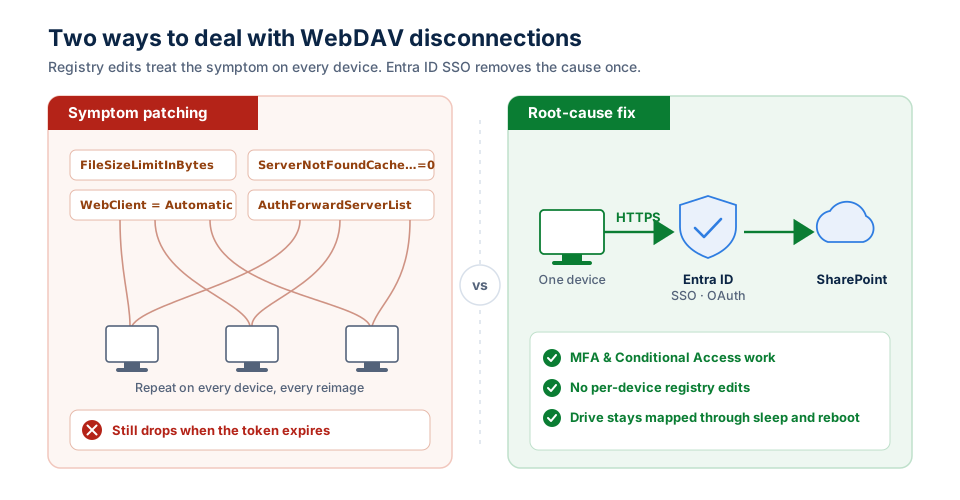
The registry edits above are real and worth applying, but each one treats a symptom, not the disease. In an enterprise, three structural problems remain no matter how you tune the registry.
MFA and Conditional Access break WebDAV outright
For most modern tenants this is the decisive limitation. The Windows WebDAV redirector cannot negotiate modern OAuth or SAML authentication flows. Any Entra ID tenant with Conditional Access enabled, which describes the overwhelming majority of organizations running Microsoft 365 today, effectively locks WebDAV out by default. No registry key under WebClient\Parameters changes the redirector's authentication capabilities. You can raise the file-size limit to 4 GB and zero out the failure cache, and the drive will still refuse to authenticate the moment Conditional Access or MFA is in the path.
The fixes are per-device and don't scale
Every registry value above has to be set on every client machine, and re-set on every reimaged, replaced, or newly provisioned device. You can push them through Group Policy, but you are now maintaining a fleet-wide policy whose only job is to keep an aging protocol limping along. On non-persistent VDI or shared workstations, the per-device assumption breaks entirely.
Token expiry is architectural, not configurable
The 30 to 60 minute cookie lifetime that underlies the disconnections is a property of how the legacy stack caches SharePoint Online sessions, and it is not exposed as a tunable registry value you can simply lengthen. You can make Windows retry faster after a failure (ServerNotFoundCacheLifeTimeInSec=0), but you cannot make the token last longer. The drive will keep dropping on the tenant's schedule, not yours. WebDAV also carries other documented limitations: it disables modern Office coauthoring and autosave from the mapped path, performs poorly over high-latency links, and does not work natively on macOS.
to stop patching WebDAV and switch to a supported solution
Patching WebDAV is reasonable for a single power user on a stable desktop. It stops being reasonable at the point where the maintenance cost and the helpdesk volume exceed the value of keeping the drive letter. Use this checklist. If two or more apply to you, the registry is no longer the right layer to be working at.
| Signal in your environment | Why WebDAV can't keep up |
|---|---|
| Conditional Access or MFA is enforced on Microsoft 365 | The WebDAV redirector can't complete modern OAuth/SAML; the drive is blocked regardless of registry tuning. |
| Users are on laptops that sleep and roam between networks | Token and session are lost on every sleep/wake and network change, producing constant red-X reconnections. |
| People open large files (CAD, media, datasets) from the drive | Even after raising FileSizeLimitInBytes, transfers are slow and time-prone over WebDAV's HTTP path. |
| Office coauthoring / autosave is required | WebDAV disables modern coauthoring and autosave for Office files opened from the mapped path. |
| You support macOS clients | The Windows WebDAV mapped-drive path doesn't work natively on macOS. |
| You need an audit trail or DLP on file access | WebDAV provides no per-file logging, watermarking, download blocking, or device approval. |
| Helpdesk is fielding repeat "my drive disconnected" tickets | Per-device registry maintenance does not scale; the tickets recur on the tenant's token schedule. |
The goal is not to abandon the mapped-drive experience your users rely on. It is to deliver that experience over a protocol that authenticates the way the rest of your Microsoft 365 estate does.
MyWorkDrive: a mapped drive without WebDAV, without disconnections
MyWorkDrive gives users a real mapped drive letter to SharePoint, OneDrive, Azure Files, Azure Blob, and on-prem Windows file shares, with no WebDAV, no sync, and no per-device registry edits. The MyWorkDrive desktop client uses its own optimized transfer protocol over HTTPS and authenticates through Entra ID or your existing identity provider over modern OAuth, so MFA and Conditional Access work normally instead of blocking access. For SharePoint, files stream on demand through the Microsoft Graph API; nothing is copied to the endpoint, so devices stay clean.
Because authentication is handled by Entra ID / SSO rather than a 30 to 60 minute WebDAV cookie, the drive does not drop when a token expires, when a laptop wakes from sleep, or when a user roams between networks. The same drive letter appears on every device, every login.
| Capability | SharePoint WebDAV | RECOMMENDEDMyWorkDrive |
|---|---|---|
| Underlying protocol | WebDAV via Windows WebClient service | Optimized HTTPS client, no WebDAV |
| Authentication | Legacy session/SAML cookie, 30 to 60 min lifetime | Entra ID / SAML SSO over modern OAuth |
| MFA & Conditional Access | Blocked by default | Fully supported, including conditional access at sign-in |
| Survives sleep / hibernate / reboot | No. Token lost, drive drops | Yes. Session re-authenticated via SSO |
| File-size limit | 50 MB default (registry workaround required) | No 50 MB WebDAV ceiling; large-file support |
| Per-device registry edits | Required on every client | None |
| macOS support | Not native | Native Windows & macOS clients |
| Deployment (Intune / GPO / SCCM / Jamf) | Manual or GPO registry pushes | Silent MSI/PKG with server URL, drive letter, DLP options |
| DLP, audit logging, device approval | None | Download blocking, watermarking, SIEM export, device approval |
| Also provides web & mobile access | No | Browser file manager + iOS/Android apps |
How to deploy it
Administrators create a share that points at the SharePoint Site, Library, or subfolder to expose, assign Active Directory or Entra ID security groups, and pre-assign a drive letter on the server so users get the same letter everywhere. The Mapped Drive Client is pushed through Intune, SCCM, GPO, or Jamf with silent install parameters. Users sign in once with SSO, and their assigned libraries appear as mapped drives in File Explorer or Finder. No WebDAV, no sync, no registry edits.
MyWorkDrive installs on Windows Server with IIS, requires no SQL database, and runs natively with Entra ID, so no on-prem Active Directory or domain controller is required. It carries compliance alignment for CMMC, HIPAA, GDPR, FIPS 186-4, and FedRAMP workflows, with full audit logging and SIEM export.
Stop patching WebDAV. See how MyWorkDrive delivers a stable SharePoint mapped drive with Entra ID SSO, MFA, and no disconnections.
Start a free trialBook a demoView pricing
Frequently asked questions
Why does my SharePoint mapped drive keep disconnecting? Because it uses WebDAV, whose authentication token expires every 30 to 60 minutes and does not survive sleep, hibernate, reboot, or roughly 15 minutes of idle time. When the token lapses, File Explorer shows a red X and Office throws save errors. The connection is using a legacy session cookie that the WebDAV redirector cannot keep refreshed in the background.
Does editing the WebClient registry fix the disconnections? Partially. Setting ServerNotFoundCacheLifeTimeInSec to 0 makes Windows retry faster, raising FileSizeLimitInBytes removes the 50 MB transfer error, and setting the WebClient service to Automatic helps persistent mappings survive a reboot. None of these extend the token lifetime or let WebDAV negotiate MFA/Conditional Access, so the drive still drops on the tenant's schedule.
Why does WebDAV stop working when we turn on MFA or Conditional Access? The Windows WebDAV redirector cannot complete modern OAuth or SAML authentication flows. Any Entra ID tenant with Conditional Access enabled blocks WebDAV by default, and no registry change alters that behavior.
What does Microsoft recommend instead of a WebDAV mapped drive? Microsoft has recommended the OneDrive sync client over WebDAV mapped drives for SharePoint Online since 2018, because sync supports Files On-Demand, offline access, and Group Policy control. Sync, however, has its own enterprise limits: a large-library performance ceiling, sync conflicts, and local storage bloat on shared or non-persistent devices.
How is MyWorkDrive different from a WebDAV mapped drive? MyWorkDrive provides the same drive-letter experience but over an optimized HTTPS client instead of WebDAV, authenticated by Entra ID / SSO. MFA and Conditional Access work normally, the drive survives sleep and reboot, there is no 50 MB limit, no per-device registry editing, and it adds DLP, audit logging, device approval, plus browser and mobile access. It works on both Windows and macOS.
Does MyWorkDrive require migrating files out of SharePoint? No. MyWorkDrive points at your existing SharePoint sites and libraries (and OneDrive, Azure Files, Azure Blob, or on-prem shares) and streams files on demand. There is no file migration and nothing is copied permanently to the endpoint.