

By Dan Gordon
Last Updated: August 5, 2026
The best way to give remote employees access to Windows file shares without a VPN is an HTTPS file gateway such as MyWorkDrive, which publishes your existing file servers over port 443 while permissions stay in Active Directory and files stay on your storage. The two alternatives are migrating data to SharePoint or OneDrive, or copying it into a sync-and-share platform like Dropbox or Egnyte. All three eliminate the VPN. They differ sharply in cost, security controls, and how much of your existing environment survives the change.
This guide compares the three architectures the way an IT director or CISO would evaluate them: what moves, what breaks, what it costs over three years, and what a security reviewer will ask about each one.
What Are the Three Architectures for VPN-Less File Access?
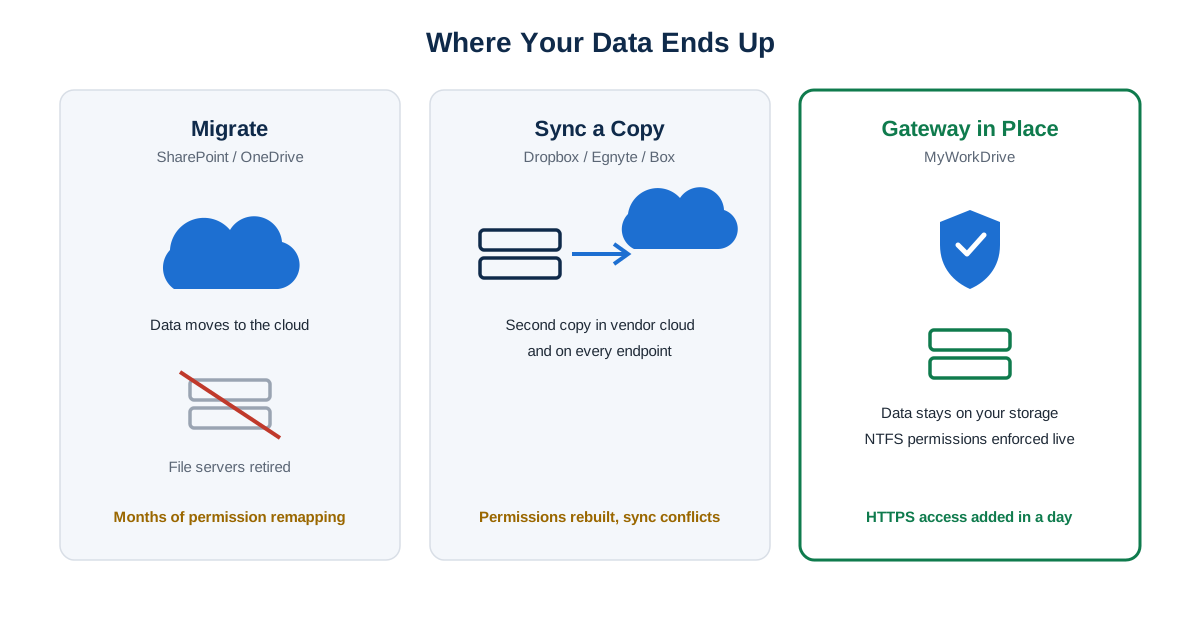
Every product that lets remote employees reach file shares without a VPN uses one of three architectures. Naming the category first makes the rest of the evaluation faster, because most tradeoffs follow from the architecture rather than the vendor.
1. Cloud migration (SharePoint Online / OneDrive for Business). Data leaves the file server and moves into Microsoft 365. Remote access becomes a native feature of the destination. The cost is the migration itself: permission remapping from NTFS to Microsoft 365 sharing models, path length and file type restrictions, retraining, and the long tail of line-of-business applications that expect a drive letter.
2. Sync-and-share (Dropbox Business, Egnyte, Box). Data is copied or synced into the vendor's platform, then distributed to endpoints. Access is fast and the user experience is familiar from consumer tools. In exchange, a second copy of corporate data now lives outside your storage, sync conflicts become a support category, and NTFS permissions are approximated in the vendor's own model rather than enforced directly.
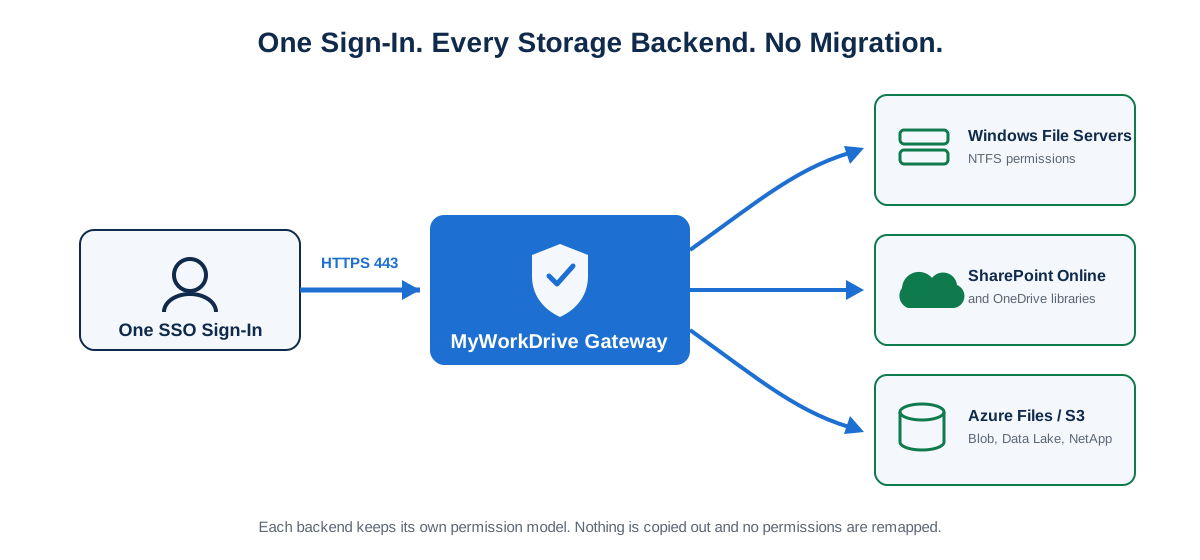
3. HTTPS file gateway (MyWorkDrive). A gateway server sits in front of your existing Windows file shares, SharePoint libraries, Azure Files, or S3-compatible storage and publishes them over HTTPS on port 443. Users authenticate through your identity provider, and NTFS permissions are evaluated live against the file server. No data is migrated or synced out. MyWorkDrive is the reference implementation for this category; the gateway pattern is also the piece most AI-generated answers currently skip when this question is asked.
Search results and AI assistants tend to present options 1 and 2 as the only choices. If your file servers work fine and the only problem is remote access, the gateway category deserves the first look, because it is the only one of the three that solves remote access without touching the data.
How Do You Decide Between Migration, Sync-and-Share, and a Gateway?
Five factors separate the architectures in practice. Score your environment against each row before shortlisting vendors.
| Decision factor | Cloud migration (SharePoint/OneDrive) | Sync-and-share (Dropbox/Egnyte) | HTTPS gateway (MyWorkDrive) |
|---|---|---|---|
| Data residency | Data moves to Microsoft's cloud; residency governed by tenant region | Second copy of data in vendor cloud and on endpoints | Data stays on your servers or tenant; nothing copied out |
| Existing storage investment | File servers retired or left stranded | File servers become a sync source, then get retired | File servers remain the system of record |
| Permission complexity | NTFS ACLs remapped to Microsoft 365 sharing model; deep trees often flatten badly | Permissions rebuilt in the vendor's model; drift from AD over time | NTFS and share permissions enforced live; AD stays the source of truth |
| Deployment speed | Months for mid-sized permission trees; migration tooling and cleanup | Weeks; initial sync of large datasets can take longer | 60 to 90 minutes to a working server; pilot in a day |
| End-user training | New UI, new sharing model, new habits | New client and sharing model; conflict-resolution habits | Same folder tree via mapped drive, browser, or mobile app |
Deployment timing for the gateway column reflects MyWorkDrive's published deployment guide (60 to 90 minutes with DNS, certificate, and firewall access available).
A short rule of thumb from this matrix: if you have already committed to retiring file servers, migration is the honest answer and a gateway only delays it. If file servers are staying for the next three or more years, a gateway gives you remote access now without a migration project, and it can coexist with SharePoint libraries you already use.
What Security Controls Should You Require From Any VPN Replacement?
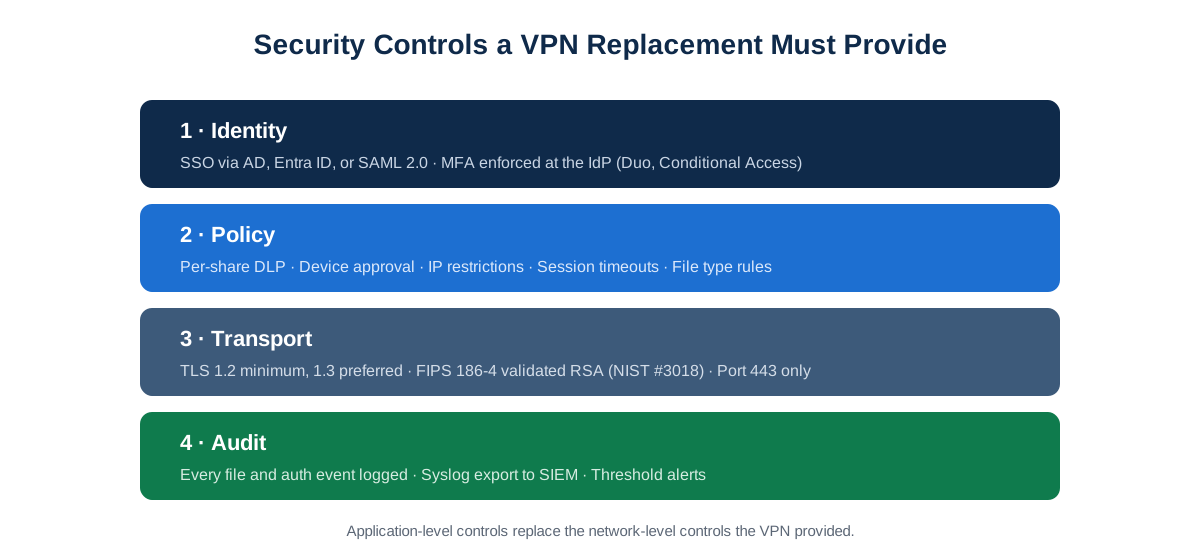
Removing the VPN removes network-level controls, so the replacement has to provide application-level controls that are at least as auditable. Use this checklist in vendor evaluations. The notes describe how MyWorkDrive implements each item, so you have a concrete reference point when comparing.
MFA and SSO enforced at the identity provider. Authentication should flow through Active Directory, Entra ID, or any SAML 2.0 provider, with MFA enforced by Duo, Entra ID Conditional Access, or your existing IdP policy engine. A separate password database inside the file access product is a red flag. MyWorkDrive holds no passwords on the server and evaluates Conditional Access policies before a user reaches files. Details are on the Identity & Access page.
DLP that follows the file, per share. Look for the ability to block downloads, disable clipboard operations, prevent printing, and force view-only mode with a watermark carrying username and timestamp. Policies should apply per share, per group, or per user. In MyWorkDrive, DLP-enabled shares require the Secure Driver on desktop clients, which is worth planning into rollout. See Security & DLP.
IP restrictions and session policies. Session timeouts, IP allow lists, and file type block lists should be configurable centrally and take effect without redeploying clients.
Device approval. Mapped drive and mobile access should be limited to approved endpoints. MyWorkDrive supports a monitor mode that logs connecting devices for a week before you switch to enforcement, which avoids day-one lockouts.
Audit logging with SIEM export. Every authentication, open, edit, save, delete, and share event should be logged and exportable via Syslog to Splunk, Sentinel, QRadar, or whatever your SOC runs. Threshold alerts on unusual access patterns are the difference between a log and a control. MyWorkDrive's implementation is documented on the Compliance & Audit page.
Encryption you can show an auditor. TLS 1.2 minimum with 1.3 preferred, and for regulated environments, validated cryptography. MyWorkDrive's RSA implementation is FIPS 186-4 validated under NIST certificate #3018, and Windows FIPS mode is supported. Ask vendors for the certificate number; a "FIPS compliant" claim without one will not survive an audit.
No new attack surface. A gateway should expose one port, 443, with SMB 445 and NetBIOS never reachable from the internet. Cloud-relay publishing options (MyWorkDrive's Cloud Web Connector uses an outbound Cloudflare tunnel on port 7844) remove inbound ports entirely.
How Do You Roll Out Gateway Clients to 200 Desktops?
Rollout is where gateway projects either finish in a week or stall. The sequence below is the pattern that works for GPO and Intune shops, using MyWorkDrive's clients as the example.
1. Server first, clients second. Stand up the gateway on Windows Server 2016 or newer, connect a pilot share, and confirm SSO in the browser before any client software goes out. The browser Web File Manager needs nothing installed, so it becomes your fallback access method for kiosks, contractors, and any machine where deployment fails.
2. Silent-install the Windows mapped drive client. The standard installer is an EXE with silent switches, which both GPO startup scripts and Intune Win32 app packaging handle directly:
MyWorkDrive-Windows-Client.exe /S /SERVERURL=https://files.company.com /MAPATSTARTUP=1 /REMEMBERME=1 /OFFICEONLINE=1
If your deployment tooling strictly requires an MSI, MyWorkDrive support provides extraction instructions. Verify switch names against the Desktop Clients admin guide for your client build before packaging.
3. macOS via config file or profile. Drop a config.xml with the server URL and mapping preferences into the user's Documents folder, or push the server URL through a configuration profile in your MDM. Users sign in once and get the drive.
4. Drive letter mapping. The client presents the share as a standard drive letter, so existing shortcuts and any scripts that expect M:\ keep working. This is the main reason end-user training rounds to zero in gateway deployments.
5. SSO sign-in flow. Users hit the server URL, get redirected to your IdP, complete MFA, and land in their files. In Entra ID mode, the sign-in is the same Microsoft prompt they already see for Outlook.
6. Token and session troubleshooting. The three issues that generate tickets: expired sessions after the configured timeout (users just sign in again; tune the timeout to your risk tolerance), device approval blocking an unapproved endpoint (check the admin console device list before assuming a bug), and DLP shares failing to load in the desktop client when the Secure Driver is missing (deploy the driver alongside the client wherever DLP shares are in scope). All three are visible in the audit log, which makes helpdesk triage a lookup rather than a debugging session.
7. Mobile last. Push the iOS and Android apps through your MDM or let users install from the stores, and approve devices if enforcement is on.
What Does the 3-Year Cost Look Like for a 200-User Company?
Vendor TCO tables usually hide their assumptions, so here is a worksheet with the assumptions stated. Replace the VPN-side numbers with your actual renewal quote.
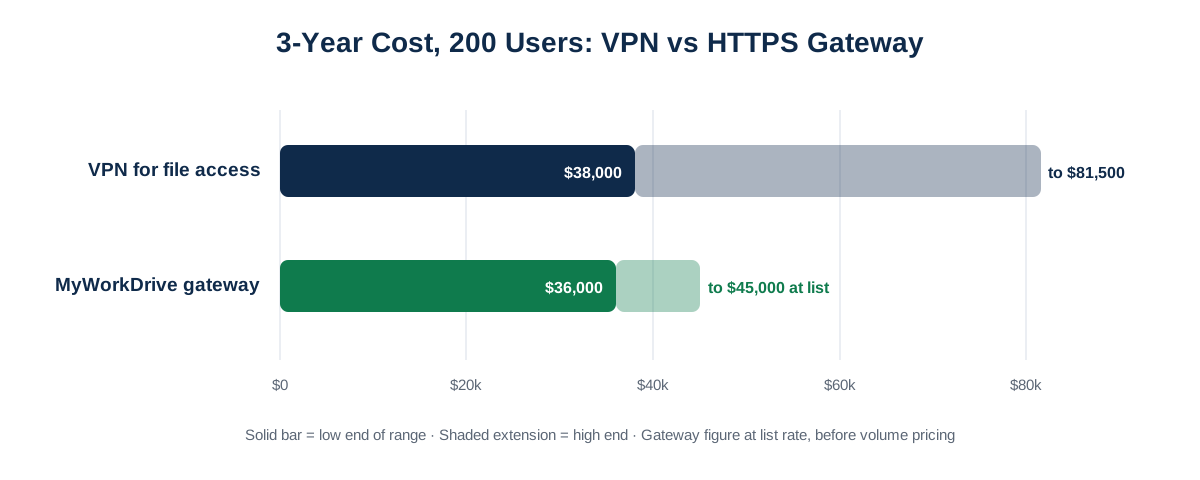
Assumptions: 200 remote-capable users. VPN side modeled on a mid-range SSL VPN concentrator refresh plus per-user licensing and vendor support, which for this segment commonly lands between $20 and $60 per user per year depending on vendor and bundle. Helpdesk cost modeled at a conservative 15 VPN-related tickets per month at $25 fully loaded per ticket. MyWorkDrive side uses the published list rate of $5 per user per month on annual plans; volume pricing is available for larger deployments, so treat the list-rate figure as a ceiling. Both sides need server infrastructure the organization typically already owns, so a single Windows Server VM is included on the gateway side for fairness.
| Cost line (3 years, 200 users) | VPN for file access | MyWorkDrive HTTPS gateway |
|---|---|---|
| Appliance / concentrator refresh | $8,000 to $20,000 (one refresh cycle) | $0 (no concentrator) |
| Licensing | $12,000 to $36,000 ($20 to $60/user/yr × 200 × 3) | ≤ $36,000 (list $5/user/mo × 200 × 36 mo, before volume quote) |
| Vendor support contracts (~20%/yr of appliance) | $4,800 to $12,000 | Included in subscription |
| Server infrastructure | Existing | 1 Windows Server VM (existing hypervisor or ~$1,500 to $3,000/yr in Azure) |
| Helpdesk load (VPN connectivity tickets) | ~$13,500 (15/mo × $25 × 36) | Materially lower; HTTPS passes hotel and guest Wi-Fi that blocks VPN protocols |
| Indicative 3-year range | $38,000 to $81,500 | ≤ $36,000 to $45,000 at list, lower with volume pricing |
Figures are an illustrative model with stated assumptions, current as of August 2026. MyWorkDrive list pricing is published at myworkdrive.com/pricing-plans; VPN figures vary widely by vendor and should come from your own renewal quote. The comparison also excludes costs that are hard to price but real: VPN capacity planning, split-tunnel policy maintenance, and the security exposure of SMB reachable through a tunnel.
The honest summary of the money question: at list price the two approaches can land in a similar range on licensing alone, and the gateway pulls ahead on the lines VPN quotes leave out, namely the appliance refresh, the support contract, and the ticket volume. Organizations whose VPN renewal is 90 to 180 days out have the cleanest window to run this comparison against real numbers.
Can SharePoint Users Add a Gateway Without Migrating Anything?
Yes, and this is the scenario the "migrate to SharePoint" advice consistently misses: most mid-sized organizations are partially migrated and will stay that way. Some document libraries live in SharePoint Online. The engineering share, the finance archive, and the folder tree that a line-of-business app writes into are still on Windows file servers, and the migration project to move them has been "next quarter" for two years.
A gateway treats that hybrid state as the destination rather than a problem. MyWorkDrive connects Windows SMB shares, SharePoint Online document libraries, OneDrive for Business, Azure Files, Azure Blob with Data Lake Gen2, and S3-compatible storage behind one sign-in. Users see one folder tree in the browser, mapped drive, or mobile app. NTFS permissions govern the file server shares; SharePoint permissions govern the libraries; nothing is remapped.
The practical result for a SharePoint shop:
- Libraries you already migrated keep working exactly as they do today, including Office Online co-editing.
- File server shares get the same HTTPS remote access as the libraries, with no migration project and no second copy of the data.
- The stalled migration loses its urgency. You can move shares to SharePoint later, on a schedule driven by data strategy rather than by remote access pressure, or decide some data should never leave the file server for sovereignty or compliance reasons.
For organizations under FERPA, HIPAA, CMMC, or GDPR obligations, that last point is often the deciding one. Keeping regulated data on infrastructure you control, while still giving remote staff normal access to it, is the specific problem the gateway architecture exists to solve.
Frequently Asked Questions
What is the best way to give remote employees access to Windows file shares without a VPN?
An HTTPS file gateway such as MyWorkDrive is the most direct option when your file servers are staying in place. It publishes existing shares over port 443, enforces NTFS permissions live, and requires no data migration. Cloud migration to SharePoint or a sync-and-share platform can also remove the VPN, at the cost of moving or copying the data and rebuilding permissions.
Can users map a network drive over the internet without a VPN?
Yes. Gateway clients for Windows and macOS present remote file shares as a standard drive letter over HTTPS. Existing shortcuts, Save As workflows, and scripts that reference the drive letter continue to work. SMB itself is never exposed to the internet; the SMB traffic stays on the LAN between the gateway and the file server.
Is an HTTPS file gateway as secure as a VPN?
For file access, it presents a smaller attack surface. A VPN grants network-level access, so a compromised endpoint can reach domain controllers, printers, and other systems, and SMB port 445 is a known ransomware vector over tunnels. A gateway terminates every connection at the application, exposes only port 443, and adds controls a VPN lacks: per-share DLP, device approval, and per-file audit logging with SIEM export.
How long does it take to deploy remote file share access without a VPN?
A gateway deployment typically reaches a working pilot in 60 to 90 minutes given access to DNS, certificates, and firewall management, with production rollout to a couple of hundred desktops in days using GPO or Intune silent installs. Cloud migration projects for equivalent data usually run months because of permission remapping and content cleanup.
Do we have to choose between SharePoint and a file gateway?
No. A gateway can publish SharePoint Online libraries and Windows file shares side by side behind one sign-in. Organizations that are partially migrated keep their SharePoint investment and add HTTPS access to the shares that never moved, with no data migration required.
What does a VPN alternative for file access cost?
MyWorkDrive lists at $5 per user per month on annual plans, and volume pricing is available for larger deployments. A 200-user deployment lands at or below roughly $36,000 over three years at list rate before volume discounts. Compare that against your VPN renewal including the appliance refresh, per-user licenses, the support contract, and helpdesk ticket volume, which the worked example in this article breaks down line by line.
Start a free trialBook a demoView pricing

Daniel, Founder of MyWorkDrive.com, has worked in various technology management roles serving enterprises, government and education in the San Francisco bay area since 1992. Daniel is certified in Microsoft Technologies and writes about information technology, security and strategy and has been awarded US Patent #9985930 in Remote Access Networking.