

By Kyle Lachmann
Last Updated: September 23, 2026
Quick answer
CMMC does not require GCC High. CMMC is a controls and assessment framework defined in 32 CFR Part 170, and it names no specific cloud environment. The clause that actually drives the cloud decision is DFARS 252.204-7012, read together with the type of CUI you handle.
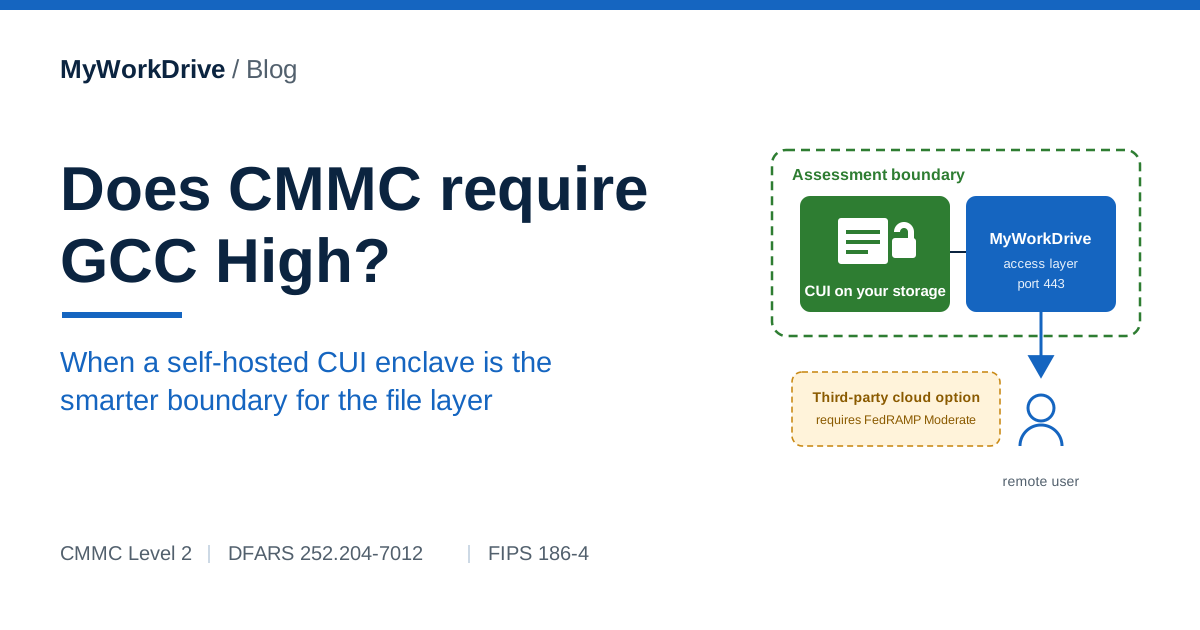
When your CUI includes export-controlled technical data under ITAR or EAR, GCC High is usually the practical answer. For standard CUI that is not export-controlled, a self-hosted CUI enclave can be the right boundary for the file layer. Keeping those files on storage you own means they sit inside your own CMMC assessment boundary and never enter a third-party cloud, so the FedRAMP Moderate equivalency requirement that DFARS 252.204-7012 places on external cloud providers does not apply to that file layer.
The July 2026 suspension of CMMC Phase 2 does not change this answer, because the platform requirement comes from DFARS 252.204-7012 and not from the CMMC schedule.
What CMMC actually requires
The Cybersecurity Maturity Model Certification program is governed by 32 CFR Part 170 and administered by the Department of Defense. It exists to verify that contractors have implemented the security controls in NIST SP 800-171 across a defined assessment scope. CMMC Level 2 maps to the 110 controls in NIST SP 800-171 for organizations that store, process, or transmit Controlled Unclassified Information.
CMMC names practices and evidence expectations. It does not name a cloud vendor or a Microsoft licensing tier. The framework itself will not pick GCC, GCC High, or an on-premises environment for you. That choice comes from your contract clauses and your data type.
The clause that carries the weight is DFARS 252.204-7012. It has appeared in DoD contracts that involve covered defense information since 2016. The relevant language is direct: when a contractor uses an external cloud service provider to store, process, or transmit covered defense information, that provider must meet security requirements equivalent to the FedRAMP Moderate baseline. Read that sentence closely. The FedRAMP Moderate equivalency requirement is triggered by the use of an external cloud service provider, so it lands on the third-party cloud itself and does not extend to every system that happens to touch a file.
Does CMMC require GCC High?
No. GCC High is not a formal CMMC requirement. It became the default recommendation in many CMMC planning conversations because DFARS 252.204-7012 requires a FedRAMP-aligned cloud for CUI, and GCC High is the most direct path to that requirement inside the Microsoft ecosystem. Microsoft publicly recommends GCC High for CMMC Level 2 and Level 3, which carries real operational weight, and that recommendation is often heard as a mandate even though the rule does not say so.
The DoD CMMC FAQ published in November 2025 made a related point worth keeping in mind. Encrypted CUI is still CUI, subject to all NIST SP 800-171 protections, and assessors evaluate the platform authorization status itself. Encryption layered on top of a tenant does not change that evaluation. Commercial Microsoft 365 does not carry Microsoft's DFARS 252.204-7012 contractual commitments and is not authorized to hold CUI on that basis. Turning on encryption inside a commercial tenant does not change its authorization status. That is a useful reminder that the question is about where the data lives and what that environment is authorized for, which is exactly why the enclave question is worth asking.
When does GCC High become effectively required?
GCC High earns its place in specific situations. It runs on Azure Government infrastructure with US-only data centers and operations staff who are screened US persons, and it carries FedRAMP High, DoD Impact Level 4 and 5, and contractual ITAR support. Those properties matter when your obligations call for them.
You generally need GCC High when any of the following is true:
- You handle ITAR or EAR export-controlled technical data. The US-person-only operations requirement under ITAR cannot be satisfied by commercial Microsoft 365 or by standard GCC.
- A contract requires FedRAMP High or DoD Impact Level 5 for the environment that holds CUI.
- A prime contractor flows down a requirement that specifies GCC High by name.
For CUI that is general defense-related engineering, bid data, or vendor proprietary information without an ITAR or EAR overlay, standard GCC often satisfies DFARS 252.204-7012, and a self-hosted enclave can satisfy it as well. The decision turns on the data, the contract language, and where you want the file layer to live.
Does the CMMC Phase 2 suspension change the GCC High decision?
It removes the deadline that pushed many contractors toward GCC High, and it leaves the platform requirements where they were.
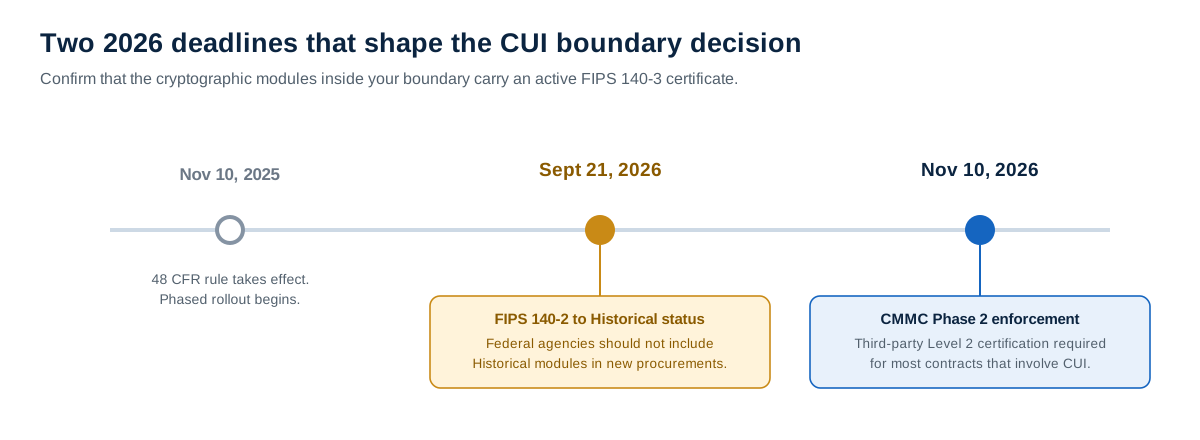
Phase 2 was scheduled to make Level 2 (C3PAO) certification a condition of award for most contracts involving CUI on November 10, 2026. The Department of War suspended it on July 13, 2026. DARS Class Deviation 2026-O0025, Revision 3, issued September 3, keeps the suspension in acquisition instruction and allows Level 2 requirements to be met through self-assessment. No replacement Phase 2 date has been set. A contractor that was planning a GCC High migration to be assessment-ready by November no longer has that date to plan against. The CMMC implementation timeline tracks the current status.
The requirements that decide the platform did not move. DFARS 252.204-7012 still requires FedRAMP Moderate equivalency from any external cloud provider that stores, processes, or transmits covered defense information. ITAR's US-person requirements have no connection to the CMMC schedule. If your data or your contract called for GCC High before July, it still does.
The change matters most for contractors who were buying GCC High as a hedge. A GCC High migration costs more in licensing than commercial Microsoft 365 and moves data into a new tenant, which is hard to undo. A self-hosted file enclave keeps CUI files where they already live and puts a controlled access layer in front of them. With no fixed certification date, a contractor can build the smaller boundary now and self-assess against it. If Phase 2 returns in a form that favors a government cloud, the migration option is still available, and a well-defined enclave keeps any later C3PAO assessment smaller.
Self-assessment cuts the other way in one respect. In a FedRAMP-authorized environment such as GCC High, part of the control implementation is inherited from the provider and documented in its customer responsibility matrix. In a self-hosted enclave, your team implements and evidences those controls for the file layer, and your affirming official attests to the result in SPRS. An overstated SPRS score carries False Claims Act exposure, so the enclave is the better choice when you can implement and document its controls well enough to support the score you submit. Our post on the CMMC Phase 2 suspension covers that exposure in more detail.
What is a CUI enclave?
A CUI enclave is a bounded environment that contains the people, systems, and storage that handle CUI, separated from the rest of the organization by clear technical and administrative controls. The enclave can be deployed on-premises, in a private cloud, or in a compliant public cloud. The point of an enclave is containment. By drawing a tight boundary around CUI, you keep the assets that fall inside CMMC scope to a manageable set and leave the rest of the business outside it.
An enclave approach is well established. It is one of the recognized ways contractors meet CMMC obligations without moving the entire organization into a government cloud. Many firms run their general collaboration tools on commercial platforms and operate a dedicated enclave for the CUI workloads that need it. That keeps licensing cost and operational disruption proportionate to the amount of CUI actually in play.
How a self-hosted enclave shrinks assessment scope
Scope reduction is the practical reason to consider a self-hosted file enclave. NIST SP 800-171 controls apply to assets within the CMMC assessment scope. When CUI is spread across the whole environment, the whole environment tends to fall in scope, and the evidence burden grows with it. When CUI is contained, the in-scope footprint shrinks.
For the file layer, the math works like this. If CUI files stay on storage you already own and are reached through a single authenticated access path, the systems an assessor has to examine for those files are the storage, the access layer, and the identity controls in front of them. You are not adding a third-party cloud data processor to your System Security Plan, because no third party is holding the files. Your existing backup, archiving, and retention procedures stay in place, since the data has not moved. Fewer in-scope assets means less evidence to gather and a smaller surface for the assessor to examine.
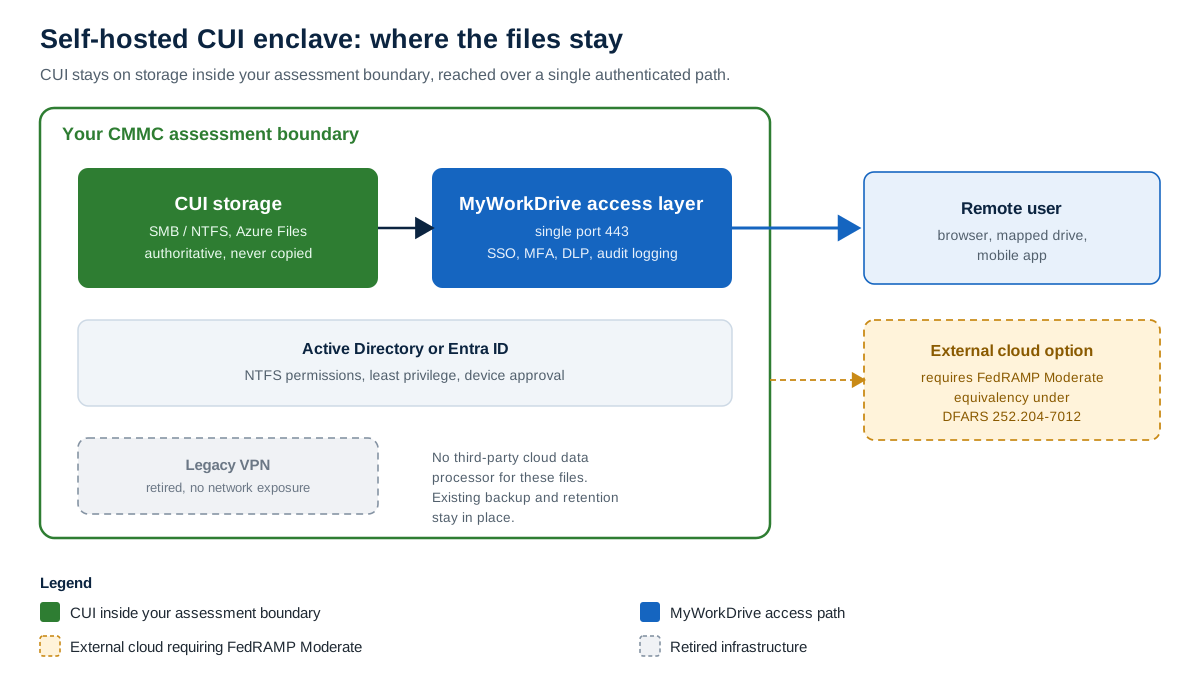
A self-hosted file enclave keeps CUI on storage inside your assessment boundary, reached over a single authenticated path.
How the environments compare for the file layer
| Capability | Commercial M365 | GCC | GCC High | Self-hosted CUI enclave |
|---|---|---|---|---|
| Authorized to hold CUI under DFARS 252.204-7012 | ✗ | PartialNon-export-controlled CUI at FedRAMP Moderate. Defensibility for CUI is debated, so confirm against your contract. | ✓ | ✓Files stay in your boundary. The FedRAMP requirement falls on any cloud storage you connect, while the on-prem access layer adds no third-party cloud. |
| Handles ITAR or EAR export-controlled CUI | ✗ | ✗ | ✓ | PartialExport-controlled workloads typically still call for GCC High. The enclave covers standard CUI on the file layer. |
| US-person-only operations access | ✗ | ✗ | ✓ | ✓Under your own administrative control. |
| Files stay on storage you own and control | ✗ | ✗ | ✗ | ✓ |
| Avoids adding a third-party cloud data processor for files | ✗ | ✗ | ✗ | ✓ |
A decision framework you can apply today
The choice gets simpler once you sort it by the data you handle and where you want the file layer to live.
| Your CUI scenario | Recommended boundary for the file layer |
|---|---|
| Export-controlled CUI (ITAR or EAR) | Plan on GCC High for the workloads that touch that data. The US-person operations requirement and the contractual ITAR commitments are the deciding factors. |
| Standard CUI with mostly non-CUI users | An enclave is often the better fit. Contain the CUI users and systems, keep the rest of the company on commercial tools, and size your CMMC scope to the enclave. |
| File-heavy CUI you want to keep on-premises | A self-hosted enclave with MyWorkDrive as the access layer keeps files on your own Windows infrastructure while adding the access controls, DLP, and audit logging an assessor expects to see. |
None of these removes the need to read your contract. The clauses in front of you, and the CUI categories they flow down, settle the question more reliably than any general rule.
Where MyWorkDrive fits in a CUI enclave
MyWorkDrive is secure remote file access software that installs on your own Windows Server. It connects to existing on-premises SMB and NTFS file shares, Azure Files, Azure Blob, SharePoint Online, and OneDrive without migrating or copying the data. Files stay in your storage. Access runs over HTTPS on a single port, 443, through a browser, a mapped drive, or a mobile app.
For the file layer of a CUI enclave, the relevant properties are these. MyWorkDrive inherits Active Directory users, groups, and NTFS permissions, and it enforces least privilege, since it can never grant more access than NTFS already allows. It adds SSO, MFA, and a DLP feature that supports download blocking, watermarking, and clipboard restrictions. It supports device approval and full audit logging with SIEM and Syslog export. File content does not reside on MyWorkDrive servers. Because the files stay on storage you own, the file access layer sits inside your assessment boundary and does not introduce a third-party cloud data processor.
On cryptography, accuracy matters to an assessor audience, so here is the precise position. MyWorkDrive holds a FIPS 186-4 RSA algorithm validation, CAVP certificate #3018 from NIST. That is an algorithm validation under the Cryptographic Algorithm Validation Program. It is separate from a FIPS 140-2 or FIPS 140-3 cryptographic module validation under the Cryptographic Module Validation Program, and it should not be described as a module validation. MyWorkDrive supports Windows FIPS mode, which relies on the operating system's validated cryptographic modules. Encryption in transit uses TLS 1.2 or higher through a TLS proxy architecture. It is transport encryption, and it is not end-to-end encryption.
What changed on September 21, 2026
On September 21, 2026, NIST moved all remaining FIPS 140-2 cryptographic module certificates to Historical status. This did not revoke the validation. NIST permits agencies to keep using Historical modules in existing systems based on a documented risk determination, and control SC.L2-3.13.11 asks for FIPS-validated cryptography, which a previously validated module still satisfies. What changes is procurement and assessment risk: agencies should not select Historical modules for new builds, and in a CMMC assessment a Historical certificate invites questions that can become findings. For new deployments, the defensible path is a module with an active FIPS 140-3 certificate. The FIPS date was set by NIST and was never tied to CMMC. CMMC Phase 2, which was scheduled to make third-party Level 2 certification the requirement for most contracts involving CUI on November 10, 2026, was suspended on July 13, 2026, and the FIPS transition went ahead on schedule. Control 3.13.11 applies the same way in a self-assessment as it does in a C3PAO assessment. Whichever boundary you choose, document the CMVP certificate and status for the module versions you actually run.
Answering the "fragments the data estate" objection
There is a fair counter-argument to the enclave model, and it deserves a straight answer. The concern is that carving out a separate enclave fragments the data estate, creates a second place to manage, and works against the consolidation many organizations have spent years pursuing.
That risk is real when an enclave is defined loosely, with overlapping copies of data and unclear ownership. The way to avoid it is to keep a single authoritative location for the CUI files and a single access path to them. A self-hosted file enclave built on storage you already own does not create a second copy of the data, because MyWorkDrive reaches the files where they live without syncing or copying them. The result is one authoritative location for those files, reached through a single controlled gateway that produces a complete audit trail. Used that way, the enclave concentrates CUI into a defined boundary and keeps it from scattering across the environment.
Honest caveats
A self-hosted enclave answers the file-layer question. It does not answer every CMMC question, and a credible plan says so plainly.
- MyWorkDrive is the file access layer. It is not a full GCC High replacement, and it does not cover email, collaboration suites, or identity by itself.
- Email, endpoints, and identity still need a compliant home regardless of where your files live. The enclave reduces the file-layer scope. It does not erase the rest of your program.
- ITAR and EAR export-controlled CUI typically still pushes the organization toward GCC High for the workloads that touch that data.
- Any Azure or SharePoint storage you connect must sit in an appropriately authorized environment. Connecting MyWorkDrive to a storage location does not change that location's authorization status.
- MyWorkDrive provides technical controls that support your compliance effort. Your CMMC certification is achieved and maintained in your environment, against your System Security Plan, by your assessor.
Frequently asked questions
Does CMMC require GCC High?
No. CMMC is a controls and assessment framework defined in 32 CFR Part 170, and it names no specific cloud environment. The platform decision is driven by DFARS clause 252.204-7012 and the type of CUI you handle. GCC High becomes the practical answer mainly when export-controlled technical data under ITAR or EAR is in scope.
Does the CMMC Phase 2 suspension change the GCC High decision?
It removes the November 10, 2026 certification deadline that pushed many contractors toward a fast GCC High migration. The requirements that decide the platform are unchanged: DFARS 252.204-7012 still requires FedRAMP Moderate equivalency from any external cloud that holds covered defense information, and ITAR obligations are separate from the CMMC schedule. For contractors who were buying GCC High as a hedge, a self-hosted enclave can be built and self-assessed now without a fixed certification date driving the choice.
Can CUI stay on-premises under CMMC?
Yes. A CUI enclave can be deployed on-premises, in a private cloud, or in a compliant public cloud. The requirement is that the NIST SP 800-171 controls are implemented and evidenced within your CMMC assessment scope. CUI files can remain on storage you own and control.
Does an enclave reduce my CMMC assessment scope?
Yes, when the enclave is defined well. Isolating the users and systems that handle CUI reduces the number of in-scope assets and the volume of evidence you produce. It also shrinks the surface an assessor has to examine, whether that assessor is a C3PAO or your own team during a self-assessment. A poorly bounded enclave can reverse those gains, so the boundary definition matters.
When does GCC High become effectively required for CMMC?
GCC High becomes the practical choice when you handle ITAR or EAR export-controlled technical data, when a contract requires US-person-only operations access, or when a contract specifies FedRAMP High. For standard CUI that is not export-controlled, other FedRAMP-authorized environments or a self-hosted enclave can satisfy the requirement.
Does MyWorkDrive replace GCC High?
No. MyWorkDrive is the file access layer. It provides secure remote access to files that stay on your own storage, with SSO, MFA, DLP, device approval, and full audit logging. Email, endpoints, and identity still need a compliant home regardless of where your files live.
What FIPS validation does MyWorkDrive hold?
MyWorkDrive holds a FIPS 186-4 RSA algorithm validation certificate, CAVP certificate #3018 from NIST. That is an algorithm validation under the CAVP program. It is separate from a FIPS 140-2 or FIPS 140-3 cryptographic module validation under the CMVP program. MyWorkDrive supports Windows FIPS mode, which relies on the operating system's validated cryptographic modules.
What happened to FIPS 140-2 on September 21, 2026?
On September 21, 2026, NIST moved all remaining FIPS 140-2 cryptographic module certificates to Historical status. This did not revoke the validation. NIST allows agencies to keep using Historical modules in existing systems based on a documented risk determination, so a Historical certificate is not an automatic CMMC failure. For new procurements and new builds, agencies should not select Historical modules, and in an assessment a Historical certificate invites scrutiny, so the defensible path is a module with an active FIPS 140-3 certificate. Confirm and document the CMVP certificate and status for the module versions you run.
Keep reading
- CMMC compliant file sharing with MyWorkDrive
- Security and DLP controls: least privilege, watermarking, and device approval
- Compliance and audit: how MyWorkDrive maps to CMMC, HIPAA, and GDPR
- CMMC implementation timeline and current status
- CMMC Phase 2 suspension: what still applies to DoD contractors