


By Scott Miller
Last Updated: May 13, 2026
With Phase 2 enforcement approaching, CMMC Level 2 certification is a given. The open question is whether your evidence package will hold up under a C3PAO's review. For most defense contractors, the weakest link isn't the controls themselves — it's the documentation proving those controls work. And file access infrastructure is usually where that gap is widest.
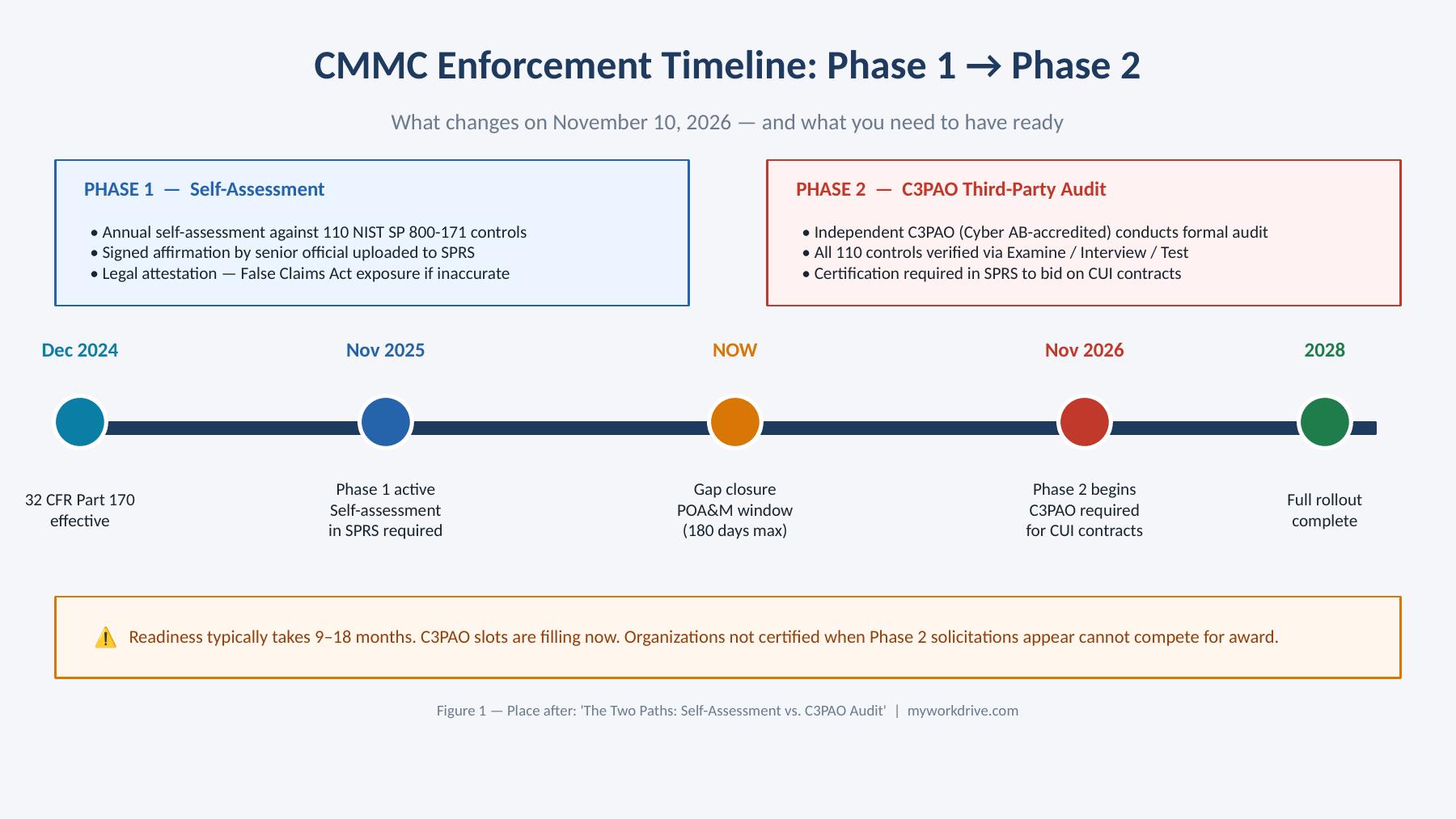
Phase 1. Level 2 Self-Assessment (Active Since November 10, 2025)
Under Phase 1 of the CMMC rollout, contracting officers may include Level 2 self-assessment requirements in new solicitations. Your organization conducts its own evaluation against all 110 NIST SP 800-171 Rev 2 controls, calculates a score using the DoD's official SPRS methodology (which ranges from -203 to +110), and has a senior official attest to that score in the Supplier Performance Risk System (SPRS).
Don't read "self-assessment" as informal. The SPRS attestation is a legal affirmation, and an inaccurate or unsupported score exposes you to False Claims Act liability. Prime contractors are also increasingly requiring subcontractors to demonstrate a minimum score (often 88 or higher) before they'll even consider them for a bid.
Self-assessment is also where most contractors find gaps they didn't know they had. Mapping your environment to all 110 controls in a testable, documented way surfaces problems routine IT reviews miss.
Phase 2. C3PAO Third-Party Audit (Mandatory from November 10, 2026)
Starting November 10, 2026, the DoD begins embedding Level 2 C3PAO certification requirements into the language of applicable solicitations as a condition of award. Self-attestation won't be sufficient for these contracts.
A C3PAO (Certified Third-Party Assessment Organization) is an independent entity accredited by the Cyber AB — the DoD's official CMMC accreditation partner — to conduct formal CMMC assessments. Only a C3PAO can validate compliance and award certification. They assess against the DoD's strict requirements, including all 110 practices in NIST SP 800-171 for Level 2.
Contracting officers also reserve the right to accelerate this timeline during Phase 1 for contracts handling particularly sensitive information. If your pipeline includes high-sensitivity CUI contracts, you may already be in scope for third-party assessment now.
The practical implication: getting to CMMC Level 2 certification readiness usually takes 6 to 18 months, depending on your starting cybersecurity posture, documentation maturity, and the size of your environment. If you haven't started readiness work, the November 2026 window is already tight.
One timing detail worth flagging: assessment scheduling lead times will lengthen as Phase 2 begins and demand for C3PAO capacity climbs. Book early.
What C3PAOs Actually Test in Access Control and Audit & Accountability
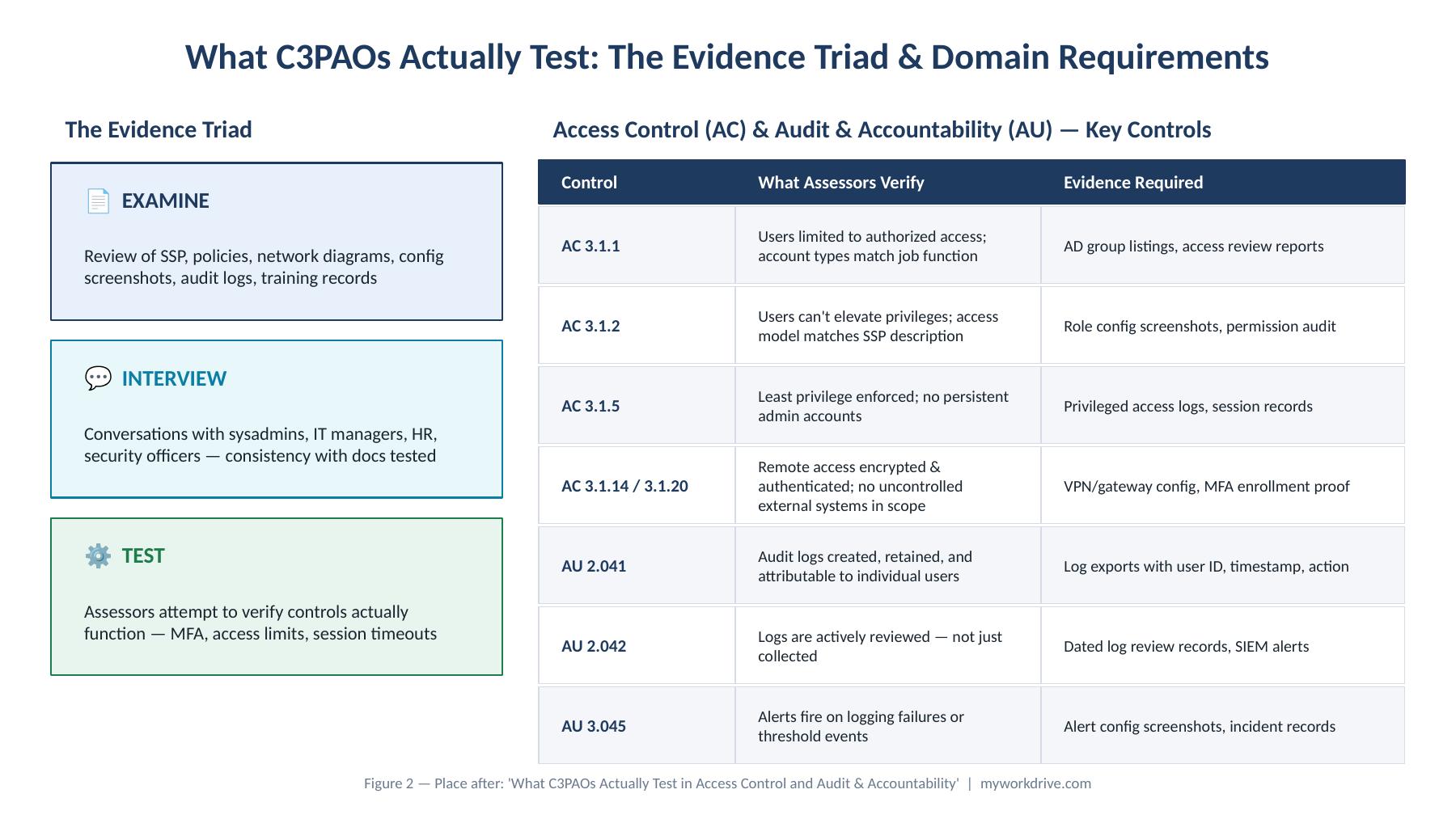
Access Control carries the highest number of controls at Level 2 and draws the most scrutiny during C3PAO assessments. That's because access control is the domain most directly tied to CUI containment, and it's where compromises most commonly originate.
Every finding traces back to what the CMMC Assessment Guide for Level 2 calls the three assessment methods — Examine, Interview, and Test. Experienced CCAs call this the Evidence Triad.
Examine means the assessment team reviews documentation and artifacts: the System Security Plan, policies, procedures, network diagrams, data flow diagrams, configuration screenshots, scan reports, audit logs, and training records.
Interview means assessors talk to your people directly. CCAs will sit down with system administrators, IT managers, security officers, HR personnel, and sometimes end users.
Test means assessors verify that controls actually function the way you say they do.
For the Access Control (AC) domain, assessors focus on:
3.1.1 — Limit system access to authorized users. Implementation is role-based access control with named groups and automated deprovisioning. Required artifacts are access review reports and group membership change logs. Assessors will pull a live sample of user accounts and check whether their access levels match their documented job function.
3.1.2 — Limit system access to the types of transactions and functions authorized users are permitted to execute. You need to demonstrate that users can't elevate their own privileges through any system in scope — including file access tools. Assessors check whether the access model in your SSP matches what's actually configured.
3.1.5 — Employ the principle of least privilege. Implementation is just-in-time privilege elevation with no persistent administrative accounts. Required artifacts are privileged access request logs and session recordings. Privileged accounts get disproportionate scrutiny. An admin account with broader access than its documented role warrants — that's an immediate finding.
3.1.14 / 3.1.20 — Remote access and use of external systems. Assessors verify that remote access to file shares occurs over an encrypted, authenticated channel and that no uncontrolled external system can reach CUI. VPN-free access methods are accepted, provided they're implemented correctly and documented in the SSP.
For the Audit and Accountability (AU) domain, the standard is just as exacting:
AU.2.041 — Create and retain system audit logs to enable monitoring, analysis, investigation, and reporting of unlawful or unauthorized system activity. Assessors want to see logs being created, retained, and reviewed.
AU.2.042 — Review and analyze audit records. Assessors want to see someone actually looking at the logs. When an assessor asks for evidence of a user's activity across a session — login, data access, file operations, logout — you should be able to pull it as one coherent narrative. If you have to stitch it together from three different consoles and hope the timestamps align, that's a gap.
AU.3.045 — Alert in the event of audit logging process failure. Assessors test that threshold alerts are configured and that someone receives and acts on them.
Expect testing of MFA for remote access, review of configurations, and verification that session timeouts and logon attempt limits are configured. Expect requests for user access review records and a walkthrough of account provisioning and deprovisioning.
The Evidence You Need to Produce
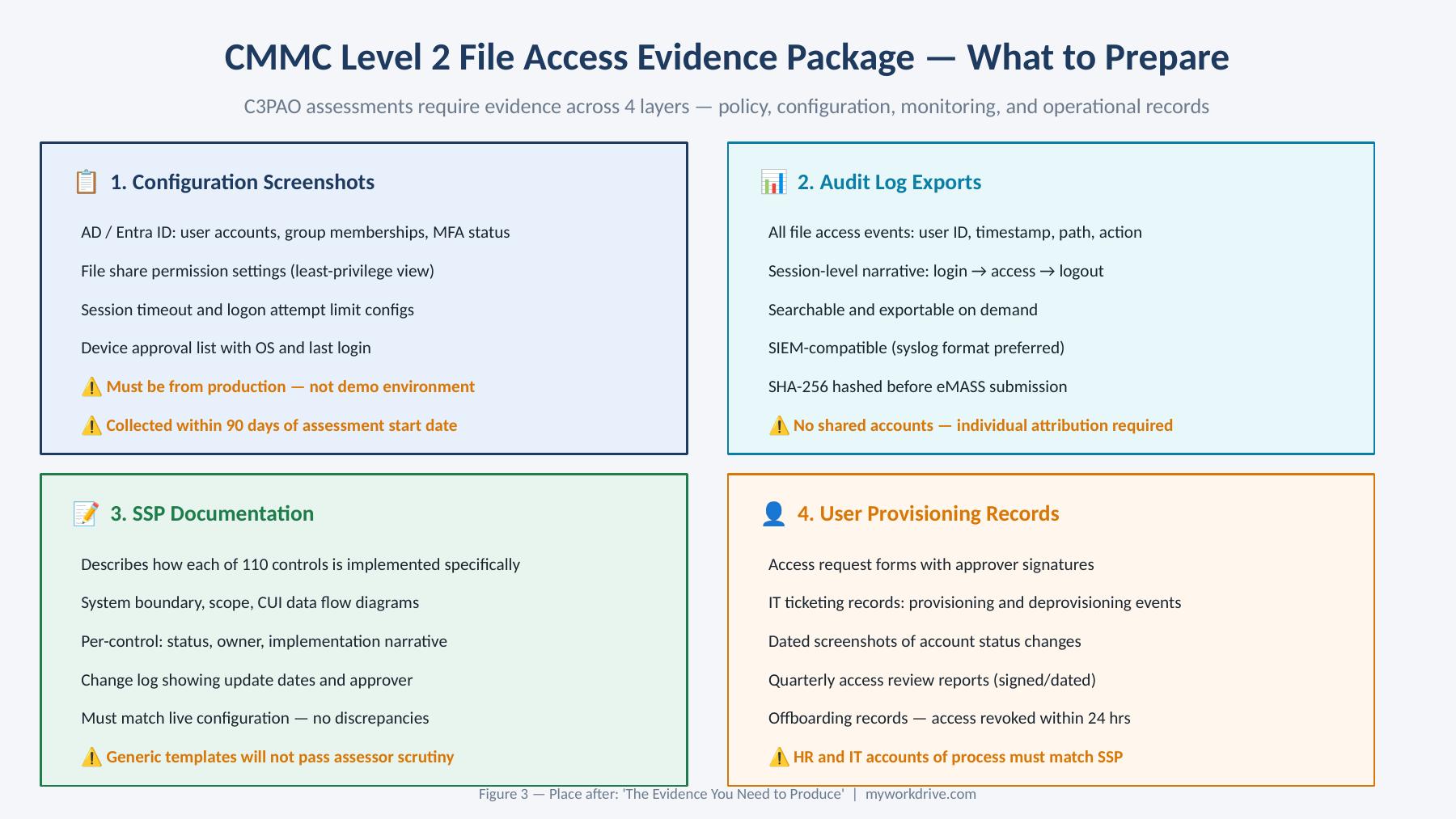
C3PAO assessments rely on verifiable evidence, not verbal explanations or documentation of intent. Evidence has to span four layers across all domains: policy, configuration, monitoring, and operational records. All artifacts should be retained for the full record-retention period defined by DoD — currently interpreted as at least six years from the CMMC Status Date.
For file access controls specifically, here's what assessors expect to see.
Configuration Screenshots
Active Directory or identity platform screenshots showing user account configuration — account types, group memberships, MFA enrollment status. Screenshots should be current. For a C3PAO assessment, evidence collected within 90 days of the assessment start date is the standard for most technical artifacts.
Screenshots have to come from your production environment, not a demo or staging system. Generic policy templates and screenshots from non-production environments don't satisfy the evidence standard.
Log Exports
File access logs — showing user identity, timestamp, file path, and action type (read, modify, delete) — are among the most frequently requested artifacts in the AC and AU domains. They need to be:
- Attributable to individual users, not shared accounts or service accounts
- Complete — gaps in the log timeline raise immediate questions
- Exportable on demand — assessors shouldn't have to wait days for log retrieval
- Integrated with or exportable to SIEM for organizations with a security operations function
All artifacts submitted to eMASS must be hashed using SHA-256. The folder hash value and the log filename are submitted alongside the artifacts. It's a technical submission requirement that trips a lot of teams up.
System Security Plan (SSP) Documentation
The SSP is the mandatory master document for any assessment involving CUI. It has to be comprehensive: system boundary, scope, and exactly how your organization implements each of the 110 NIST SP 800-171 controls. Assessors use the SSP as the roadmap to verify every practice and need to be able to trace implementation details to verifiable evidence.
For file access infrastructure, your SSP has to describe — specifically, not generically — how each file share is configured, who has access and why, how permissions are enforced and by what mechanism, and how access is reviewed and revoked.
A strong SSP response for access control looks like this:
"The system administrator provisions user accounts through Active Directory after written approval from department managers. Access requests are submitted through our IT ticketing system, which tracks requestor, justification, and approver. Access is granted only to users with a business need, based on least privilege. The security team reviews account activity quarterly. Evidence includes account request forms, Active Directory group listings, and quarterly access review reports."
That's what assessors expect — testable, verifiable, tied to real artifacts and real procedures.
User Provisioning and Deprovisioning Records
Assessors will specifically ask for evidence of how user access is granted when someone joins the organization and revoked when they leave. If the SSP says terminated employees have their access revoked within 24 hours, the CCA will ask the HR contact to walk through the offboarding process. The documentation and the operational practice have to match.
This category typically includes access request forms with approval signatures, IT ticketing system records showing provisioning and deprovisioning events, and dated screenshots showing account status changes in Active Directory or your identity platform.
Where Most Organizations Fail: The Control-Evidence Gap
Here's the pattern practitioners see again and again: organizations rarely fail because the controls aren't there. They fail because they can't prove the controls are there.
The patterns are predictable. The SSP doesn't match the live environment. Policies exist on paper but no one's enforcing them, or sometimes no one even knows about them. Evidence is scattered across systems or months out of date. And the team underestimated what a C3PAO assessment actually examines.
In the access control and audit domains, the specific failure modes are familiar:
1. Access reviews that exist in policy but not in practice. An organization will have a beautiful access review procedure documented in their SSP, and then when an assessor asks for records of the last review, someone has to dig through email threads to find a spreadsheet that may or may not be current.
2. Role creep with no documentation trail. Users accumulate access over time, roles get assigned for one-off reasons and never revoked, and the access model in the system stops matching what the policy describes. Assessors spot this fast. They'll pull a sample of user accounts and check whether the assigned roles line up with documented job functions. If they can't make that connection, it's a finding.
3. Logs that exist but can't be presented coherently. Logs spread across multiple systems with inconsistent timestamps, or with no search or export capability, mean assessors can't verify user activity as a coherent narrative. That scores as Not Met even if the underlying logging is technically in place.
4. Evidence collected too late. Evidence assembled in the days before an assessment looks rushed and incomplete because it is. Assessors are good at telling the difference between an evidence package maintained as part of an ongoing program and one thrown together under pressure.
5. SSP language that doesn't match live configuration. This is the single most common finding across experienced C3PAOs. The SSP describes a control one way; the assessor examines the live system and finds something different. At that point it's not really a paperwork problem — it's a credibility problem, and it puts the whole assessment at risk.
How MyWorkDrive's Admin Dashboard and Logs Map Directly to Assessor Requirements
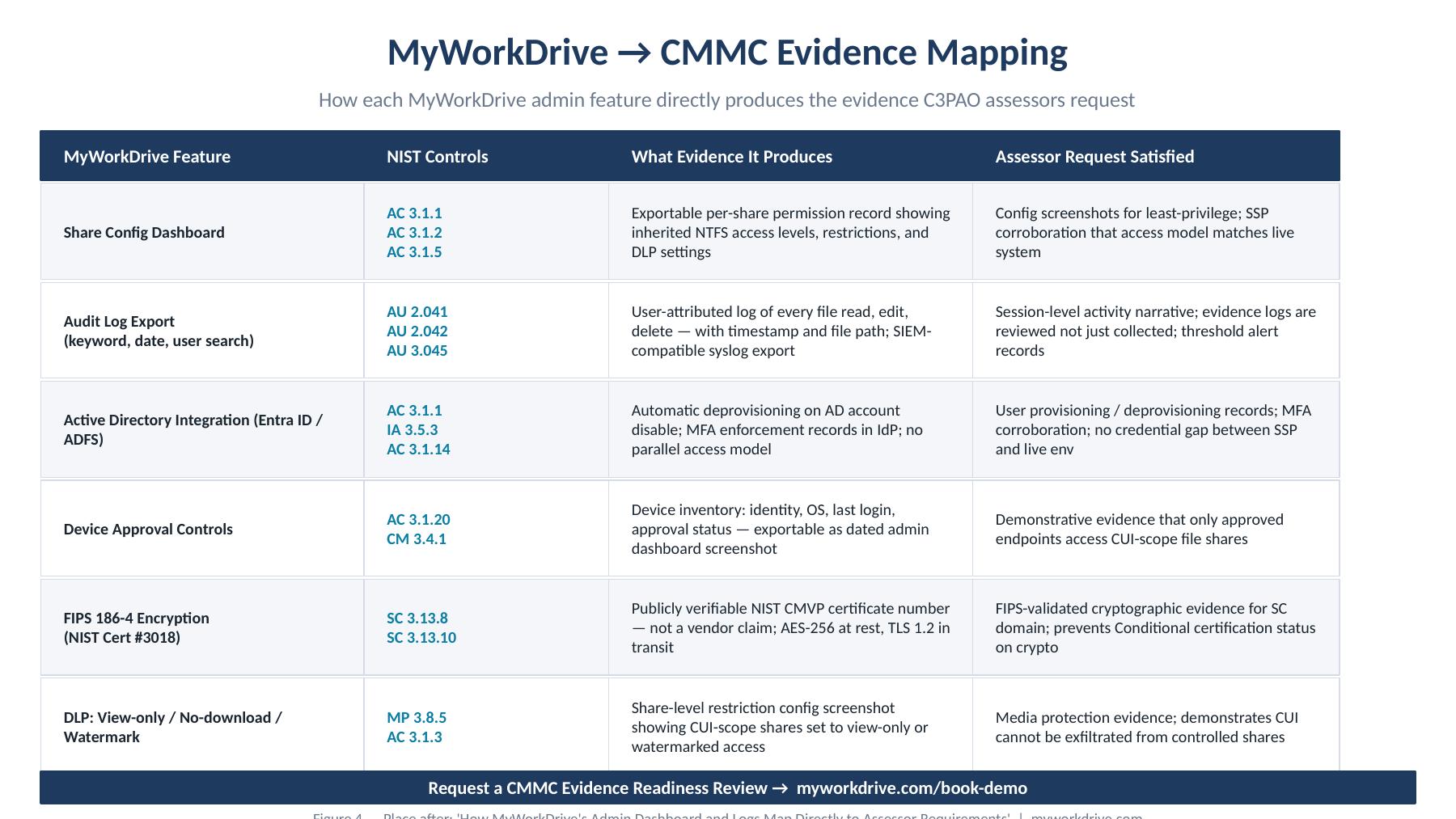
If your file access platform wasn't built with assessability in mind, you'll be carrying a documentation burden that's hard to manage when an assessment is bearing down on you.
MyWorkDrive's design addresses the evidence gap directly. The controls that assessors verify are surfaced in the admin interface, not buried in system logs that require specialist extraction.
Share Configuration Records: Evidence for 3.1.1, 3.1.2, and 3.1.5
MyWorkDrive's admin dashboard displays, for every configured share, the exact permissions inherited from NTFS — who has access, at what level, and what restrictions apply (view-only, no-download, watermarked, etc.). Because MyWorkDrive inherits NTFS permissions rather than maintaining a parallel access model, there's no access-model drift to discover. What the SSP describes and what the dashboard shows have to match by design.
That satisfies the assessor's need for configuration screenshots demonstrating least-privilege enforcement. The dashboard export gives you a point-in-time record of share configuration you can retain in your evidence package and date to the assessment window.
For SSP documentation, this means your description of how file access permissions are managed can reference a specific, exportable configuration source — not a spreadsheet someone's keeping current on the side.
Audit Log Exports: Evidence for AU.2.041, AU.2.042, and AU.3.045
MyWorkDrive logs all file access events — reads, modifications, deletions, and share-level access — with user identity, timestamp, and file path. Logs are searchable by keyword, date range, and user, and exportable in formats compatible with SIEM ingestion via syslog.
When an assessor asks for a session-level activity narrative for a specific user, a coherent log export is available in minutes — not hours of manual compilation across multiple systems. The export includes the fields assessors need: individual user identity (not a shared account), timestamp, action type, and resource path.
For AU.3.045 threshold alerting, MyWorkDrive supports configurable alerts for file activity that exceeds management-defined thresholds. That's the operational evidence assessors look for to confirm someone is actually acting on the logs, not just collecting them.
User Provisioning Records: Evidence for 3.1.1 and the Deprovisioning Requirement
MyWorkDrive integrates directly with Active Directory and Microsoft Entra ID, so user provisioning and deprovisioning in your identity platform automatically controls access in MyWorkDrive. Nothing separate to provision. Nothing separate to deprovision. Nothing extra to document.
When a user account is disabled or removed in Active Directory, access to MyWorkDrive shares is revoked at the same moment — and the event is logged. That's the automatic deprovisioning evidence assessors specifically look for when they interview HR and IT contacts about offboarding.
MFA and Device Approval: Evidence for 3.5.3 and Access Control Restrictions
MyWorkDrive's device approval controls give you evidence that only administrator-approved endpoints can connect to file shares. The admin dashboard records device identity, last login, operating system, and approval status — exactly the artifact format that satisfies assessor requests for evidence of endpoint control.
For MFA, MyWorkDrive supports SAML/ADFS, Duo, Okta, and standard TOTP-based MFA providers. Integration with your existing IdP means MFA enforcement records appear in your identity platform logs, providing the corroborating evidence assessors expect alongside SSP documentation of MFA requirements.
FIPS-Validated Encryption: Evidence for SC Domain Requirements
System and Communications Protection is the domain most commonly associated with Conditional certification status, primarily because of FIPS-validated encryption requirements. MyWorkDrive's FIPS 186-4 RSA Certificate #3018, issued by NIST, is a verifiable, publicly searchable artifact. It's not a vendor claim. The certification number appears in NIST's Cryptographic Module Validation Program database — searchable, verifiable, and exactly the format assessors expect for cryptographic compliance evidence.
Request a CMMC Evidence Readiness Review
If your organization is approaching a C3PAO assessment and your file access infrastructure is part of the assessment scope, the most useful thing you can do right now is find out what evidence your current setup can produce — and what it can't — before an assessor asks.
MyWorkDrive offers a CMMC Evidence Readiness Review for organizations using or evaluating the platform. In this session, our team walks through:
- Which AC and AU domain controls your current MyWorkDrive configuration directly satisfies
- What configuration screenshots and log exports you can produce today, and what they show
- How to document MyWorkDrive's role in your SSP in language that maps to assessor expectations
- What gaps, if any, exist in your evidence package and how to close them before your assessment date
Request a CMMC Evidence Readiness Review →
Or start a free trial to evaluate MyWorkDrive's admin dashboard and log export capabilities in your own environment before your assessment preparation begins.
Frequently Asked Questions
Does MyWorkDrive expand my CMMC assessment boundary?
No. MyWorkDrive functions as a secure gateway to file shares on infrastructure you already own and operate. It doesn't store CUI and doesn't process files on vendor-controlled infrastructure. Because no customer data transits or resides on MyWorkDrive's systems, your CMMC boundary doesn't expand to include a third-party cloud environment. Your assessor evaluates the security of your infrastructure; MyWorkDrive enforces the access controls that make that infrastructure auditable.
What does "self-assessment vs. C3PAO" mean for my current contracts?
If your existing contracts were awarded before November 2025 and don't include DFARS 252.204-7021, you may currently be operating under self-assessment requirements. If your solicitations issued after November 10, 2025 include the CMMC Level 2 (C3PAO) clause, third-party assessment is required. Check your contract language and consult with your contracting officer if the applicable requirement is unclear.
How much lead time should we allow for a C3PAO assessment?
Most experienced practitioners recommend 9 to 12 months of preparation before scheduling a formal assessment. Assessment booking itself should happen as early as possible — C3PAO capacity will be constrained as Phase 2 enforcement begins in November 2026 and demand climbs.
Can a MyWorkDrive log export be submitted directly to eMASS?
Log exports from MyWorkDrive are provided in formats that can be prepared for eMASS submission. Your evidence packaging process should include SHA-256 hashing of all submitted artifacts per eMASS requirements. Your CMMC Registered Practitioner Organization (RPO) or internal compliance team will typically manage the final eMASS submission preparation.
What if we have a mix of MyWorkDrive and other file access tools in scope?
Your SSP has to document all tools in scope for CUI access. MyWorkDrive's role should be described specifically — which shares it provides access to, what controls it enforces, and how those controls satisfy which NIST SP 800-171 requirements. Our evidence readiness review can help you develop SSP language that accurately reflects a hybrid environment.
Related reading: