

By Dan Gordon
Last Updated: August 17, 2026
Claude Cowork can work on files that live on a Windows file server, provided the share shows up on the user's computer as a mapped drive letter. Cowork reads and writes only inside folders a user has attached to the session, and on Windows the folder picker accepts a drive letter such as Z:\. Anthropic's documentation states that raw UNC paths like \\fileserver\projects cannot be attached, and that the share has to be mapped to a drive letter first.
That requirement is the sticking point for on-premises file shares. A MyWorkDrive mapped drive resolves it by publishing existing SMB shares over HTTPS on port 443, so Z:\Projects exists on the endpoint as a real drive letter while the files stay on the file server. There is no VPN tunnel involved, and nothing gets migrated to SharePoint or synced to the endpoint.
What Cowork can reach, and what it cannot
Cowork is Anthropic's agentic surface for knowledge work, available on paid Claude plans and reached from the same message box as chat. Two details about how it runs determine whether your file server is in scope.
First, the execution environment. Sessions run in the cloud on Anthropic's infrastructure by default. Local execution, where Claude's work runs on the user's computer with code in an isolated virtual machine, remains available for existing desktop deployments. Anthropic's support documentation is explicit that the cloud environment is isolated from your home or company network. It cannot route to a file server on your LAN, and it has no VPN client.
Second, the file access path. When a task needs a local file, Claude reaches the machine through the Claude Desktop app, and only for the folders the user has connected. Anthropic's Claude Desktop deployment documentation also notes that the agent cannot attach a network-drive path on its own; only the user can, through the folder picker. Anthropic describes this as a security boundary.
So there are two conditions for an AI agent to work on file server data through Cowork: the data has to be reachable from the endpoint as a filesystem path, and a human has to attach that path deliberately.
Why \\fileserver\projects does not work
Anthropic's Claude Desktop deployment documentation covers Windows network drives directly. Users can attach a mapped network drive such as Z:\ as a workspace folder. Raw UNC paths are not supported, and the guidance is to map the share to a drive letter first. The same restriction applies to WSL paths like \\wsl$\Ubuntu, which have to be mapped before they can be attached.
What the agent can do on that mapped drive then depends on timing:
- Mapped and reachable when the sandbox started: the attached folder is mounted alongside local folders, and both file tools and shell commands work.
- Mapped later, or unreachable at sandbox start: file tools still work, but shell commands cannot reach the drive. Anthropic's guidance is to copy the relevant files to a local folder before running a script against them.
Because the sandbox can stay running between sessions, a drive mapped while the sandbox is already up falls into the second category until the sandbox next restarts. On macOS, network mounts under /Volumes/ are currently treated as local folders.
Test this behavior in your own build rather than assuming it. Map the drive at login, then start the Cowork session, and confirm reads, writes, and any shell steps behave the way your task needs. Claude Desktop is under active development and behavior on network drives has changed between releases, so validate against the client version your users are running.
Where MyWorkDrive fits
MyWorkDrive is a gateway that sits in front of storage you already run: Windows SMB shares, Azure Files, Azure Blob with Data Lake Gen2, Amazon FSx, Azure NetApp Files, S3-compatible storage, SharePoint Online, and OneDrive for Business. Clients connect to the gateway over HTTPS on port 443. SMB traffic stays server-side on your LAN, so ports 445 and 139 are never exposed to the internet.
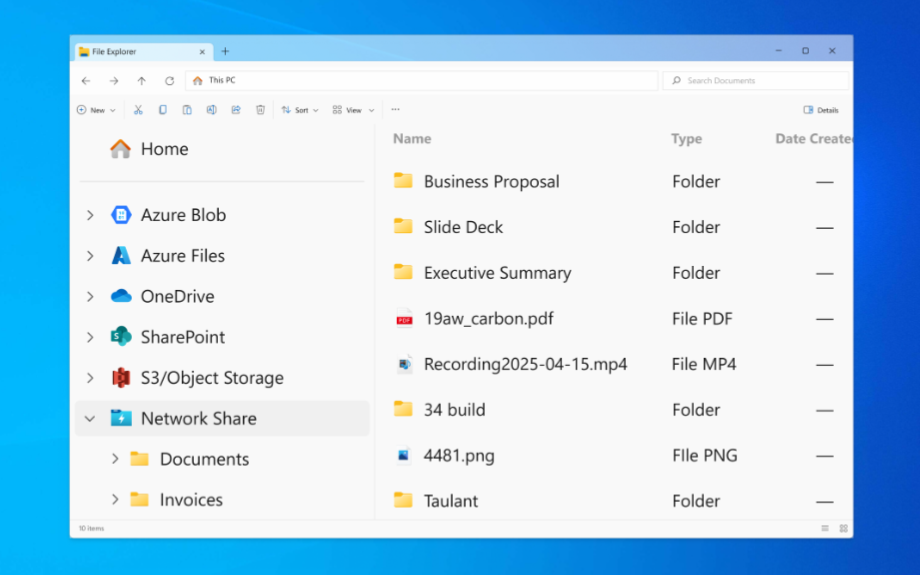
For this use case, the Windows mapped drive client does the work. It presents shares as native drive letters in File Explorer, and applications open files by path the way they always have. Files are not synced to the endpoint; they open through the client rather than being stored locally. Administrators can push drive letters from the server so mappings match what users had in the office, with up to eight drive letters on the Windows client.
A path like Z:\Projects\2026\Client-Deliverables is something Cowork's folder picker will accept, and the underlying files stay stored on the file server. Nothing is migrated and nothing is synced to the endpoint. What happens to file content once an agent opens it is a separate question, covered in the data handling section below.
Setup, step by step
The sequence below assumes MyWorkDrive Server is already installed and publishing shares. If it is not, MyWorkDrive documents the install and publishing sequence as a 60 to 90 minute process for a first deployment.
- Confirm the share is published. In the MyWorkDrive admin console, verify the share exists and that the intended user's Active Directory or Entra ID account resolves to the NTFS permissions you expect. The File Share Test Tool and Effective Access views will show what the user can actually reach.
- Assign a drive letter on the server. Set the drive letter per share so the mapping is consistent across the fleet. Users who need a predictable path for AI tasks benefit from a stable letter.
- Install the Windows mapped drive client on the endpoint. For scripted deployment, pass the server URL and enable mapping at startup so the drive is present before anyone opens Claude.
- Verify the path in File Explorer. Open the drive letter, browse to the folder you plan to hand over, and copy the full path.
- Install or update Claude Desktop. Cowork on Windows requires the current release of Claude for Windows. Local file access, browser use, and computer use all need the desktop app open and connected.
- Start a Cowork session and attach the folder. Use the folder picker to select the mapped drive path. Attach the narrowest folder that covers the task rather than the root of the drive.
- Add folder instructions. Folder instructions supply project context to Cowork when a local folder is selected. Use them to state naming conventions, where outputs belong, and which subfolders are off limits.
- Run a read-only task first. Ask for an inventory or a summary before allowing anything that writes. Confirm the file operations appear in the MyWorkDrive audit log with the expected user identity.
For a first task, something narrow works best: summarize every proposal in a folder into a comparison table, reconcile file naming across a project directory, or extract dates and dollar values from a set of contracts into a spreadsheet.
What works in which session type
Behavior differs depending on where the session runs and whether the desktop app is available.
| Session type | Where the work runs | Mapped drive reachable | Planning note |
|---|---|---|---|
| Local session on Windows desktop | Isolated virtual machine on the user's own computer | Yes, when the drive was mapped and reachable before the sandbox started | File tools and shell commands both work in this case |
| Cloud session, desktop app open | Anthropic infrastructure, with local files reached through the desktop app | Yes for file reads and writes | Shell commands run in the cloud sandbox and cannot see the drive letter; file content reaches the sandbox through the desktop app |
| Cloud session, desktop app closed | Anthropic infrastructure | No | The session keeps running but cannot see the drive letter |
| Scheduled task, cloud run | Anthropic infrastructure, with no device online | No | The default for scheduled work; point these tasks at cloud sources rather than the drive letter |
| Scheduled task requiring local files | The user's computer, which must be on with the desktop app open | Yes, while the endpoint is on and the drive is mapped | Anthropic notes a task that needs local files or apps runs locally instead of in the cloud, so the run depends on the machine being available |
Scoping what the agent can see
Granting an agent access to a drive letter is an access decision, and it deserves the same treatment as onboarding a contractor. The controls are already in place if you run MyWorkDrive; they just need to be applied with the agent in mind.
The starting point is that the mapped drive client authenticates as the signed-in user and honors NTFS and Active Directory group permissions live. MyWorkDrive can narrow access, and it has no mechanism for granting rights the storage does not already give that user. An agent working through the drive inherits exactly the rights of the person who attached it.
| Control | Where it is set | Effect on agent access |
|---|---|---|
| NTFS and AD group permissions | File server | Caps what the agent can read or write to the user's own rights |
| Share publishing | MyWorkDrive admin console | Unpublished shares have no drive letter and no path to attach |
| Per-share client restrictions | MyWorkDrive admin console | Mapped drive access can be disabled for a share while browser access continues |
| DLP restricted shares | MyWorkDrive admin console | Restricted shares surface through the Secure Mode Driver namespace extension rather than a standard drive letter, with downloads, copy, and print blocked. DLP requires an Enterprise license, and the Secure Mode Driver is not installed by default on current clients |
| File type blocking | MyWorkDrive admin console | Limits which extensions can move through the mapped drive client |
| Device approval | MyWorkDrive admin console | Only allowlisted endpoints can connect the client at all |
| Workspace folder allowlist | Managed Claude Desktop configuration in third-party deployments | Restricts which paths users may attach, with a read-only mode for reference folders |
| Folder attachment | End user, in the Cowork folder picker | The agent cannot attach a network drive path itself |
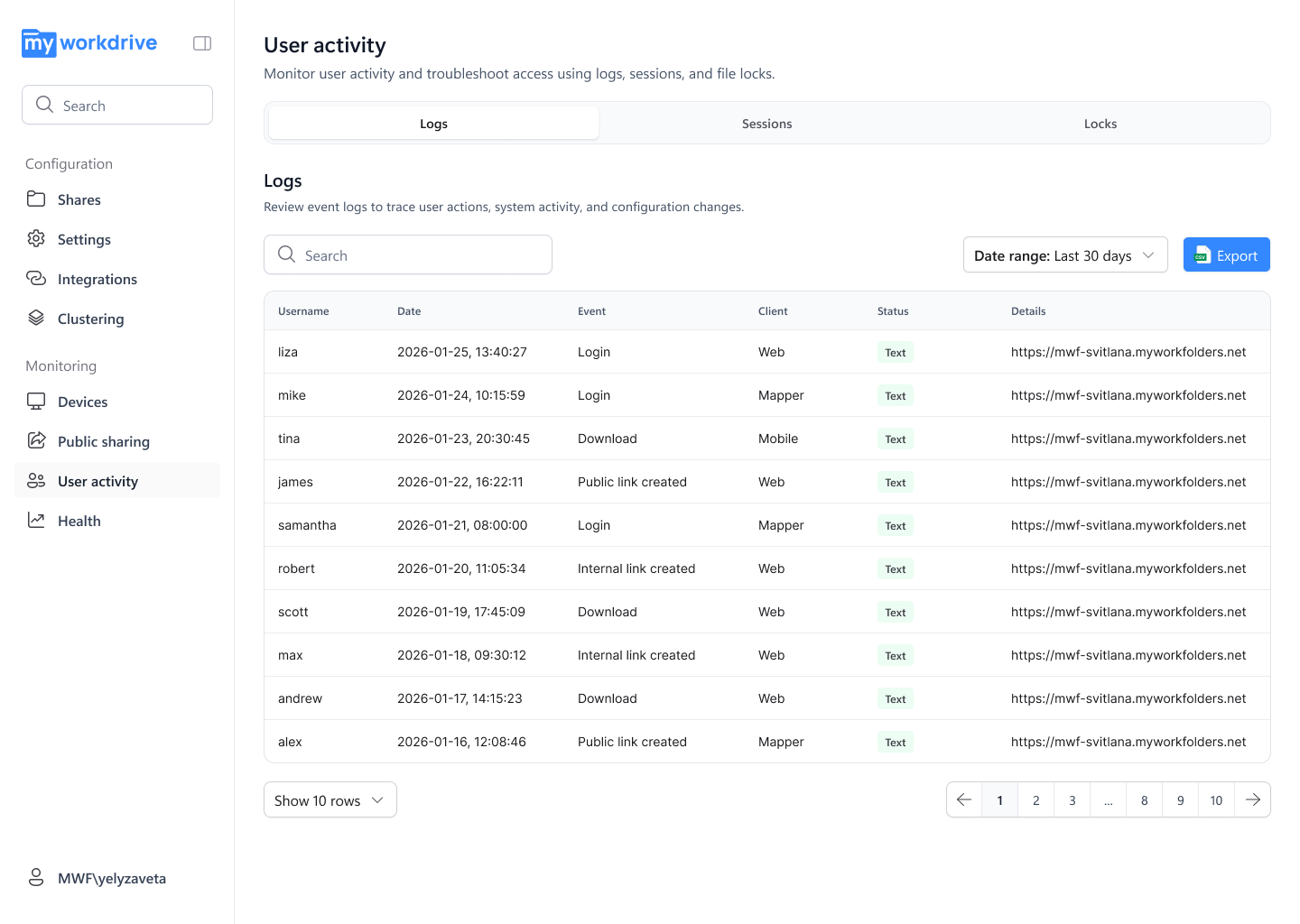
| Audit log and Syslog export | MyWorkDrive server | Records file operations with user, source IP, device identifier, share, path, operation, result, and bytes transferred. The events captured depend on the configured log level |
| OpenTelemetry export | Claude Team or Enterprise organization settings | Streams Cowork tool calls, file access, and approval decisions to your SIEM. Anthropic notes this is operational telemetry and does not replace audit logging for compliance purposes |
| Compliance API | Claude Enterprise plans and Claude Platform | Provides programmatic retrieval of Cowork session content for audit and eDiscovery |
Two controls matter most for regulated data. Per-share client restrictions let you keep a share off the mapped drive entirely, which means no drive letter and no attachable path for that data. File activity is also logged with user identity and device, so an agent session working through the drive leaves the same kind of audit trail as a person working in the same folder, subject to the log level you have configured.
Data handling before you start
Anthropic states that because Cowork sessions run on its servers, the work Claude does there, including local files opened through the desktop app, is processed on Anthropic's servers rather than staying on the computer. Isolation covers where Claude's code executes. The access you granted is what determines the reach of what Claude can read.
For a marketing project folder, that may be acceptable. For controlled unclassified information, protected health information, or student records, it is a decision for your security and privacy teams, and one that likely has to be documented. Anthropic also notes that the risk of prompt injection is non-zero. Its guidance is to avoid granting access to sensitive files, to monitor the agent for suspicious actions, and to extend internet access only to sites you trust.
The practical implication for a MyWorkDrive administrator is that the file server does not need to be the boundary. Publish the folders you are comfortable exposing to an AI workflow, keep the rest off the mapped drive, and let the audit log show which is which. Claude on Team and Enterprise plans also includes an organization-wide toggle to disable Cowork, and Enterprise plans can grant access by group.
Limitations to plan around
- Session timing. Map the drive at login, and start Cowork afterward, so the drive is present when the sandbox starts. A drive mapped mid-session may be visible to file tools while remaining invisible to shell commands.
- Re-authentication. MyWorkDrive session duration is configurable per client. If a session expires during a long agent run, the drive stops responding until the user signs in again. Set session length with long-running tasks in mind.
- Throughput. The mapped drive performs according to storage latency, network path quality, and file size. Large binary files, CAD assemblies, and video are slower to read than documents. Ask the agent to work on a defined subset rather than crawling a multi-terabyte share.
- Deletes. Cowork requires explicit permission before it permanently deletes a file. Keep the approval prompt enabled for any folder that matters, and confirm your Previous Versions or shadow copy configuration is current before an agent touches a production share.
- Scheduled work. Scheduled tasks run in the cloud by default and cannot be tied to a folder on the user's computer, so a cloud run cannot reach the mapped drive. Anthropic notes that a scheduled task requiring local files or apps runs locally instead, which means the endpoint has to be on with the desktop app open and the drive mapped for it to complete. Plan recurring reporting on file server content around that dependency, or point it at a different data path.
- macOS behavior. Network mounts under
/Volumes/are treated as local folders in current documentation. Verify the mount point your macOS client presents before writing procedures for Mac users. - Log level. Agent work is read-heavy, and the detail captured in the MyWorkDrive log depends on the configured log level. Confirm the level you run in production records the events you expect to see from an agent session before you rely on the log as your evidence trail.
How the options compare
Organizations that want AI agents working on file server content generally consider four routes.
| Approach | Migration required | Network exposure | Path the agent sees | Audit position |
|---|---|---|---|---|
| VPN plus SMB mapping | None | Endpoint receives a route onto the internal network | Drive letter, once the UNC share is mapped | File server and VPN logs, correlated manually |
| Sync client to the endpoint | Copies land on the device and in a vendor cloud | Outbound only | Local synced folder | Vendor logs, with local copies outside them |
| Migrate shares to SharePoint or OneDrive | Full migration project | Outbound only | Connector or synced folder | Microsoft 365 audit logs |
| MyWorkDrive mapped drive | None | Port 443 to the gateway, SMB stays on the LAN | Drive letter, no synced copies on the endpoint | Single gateway audit trail with Syslog export |
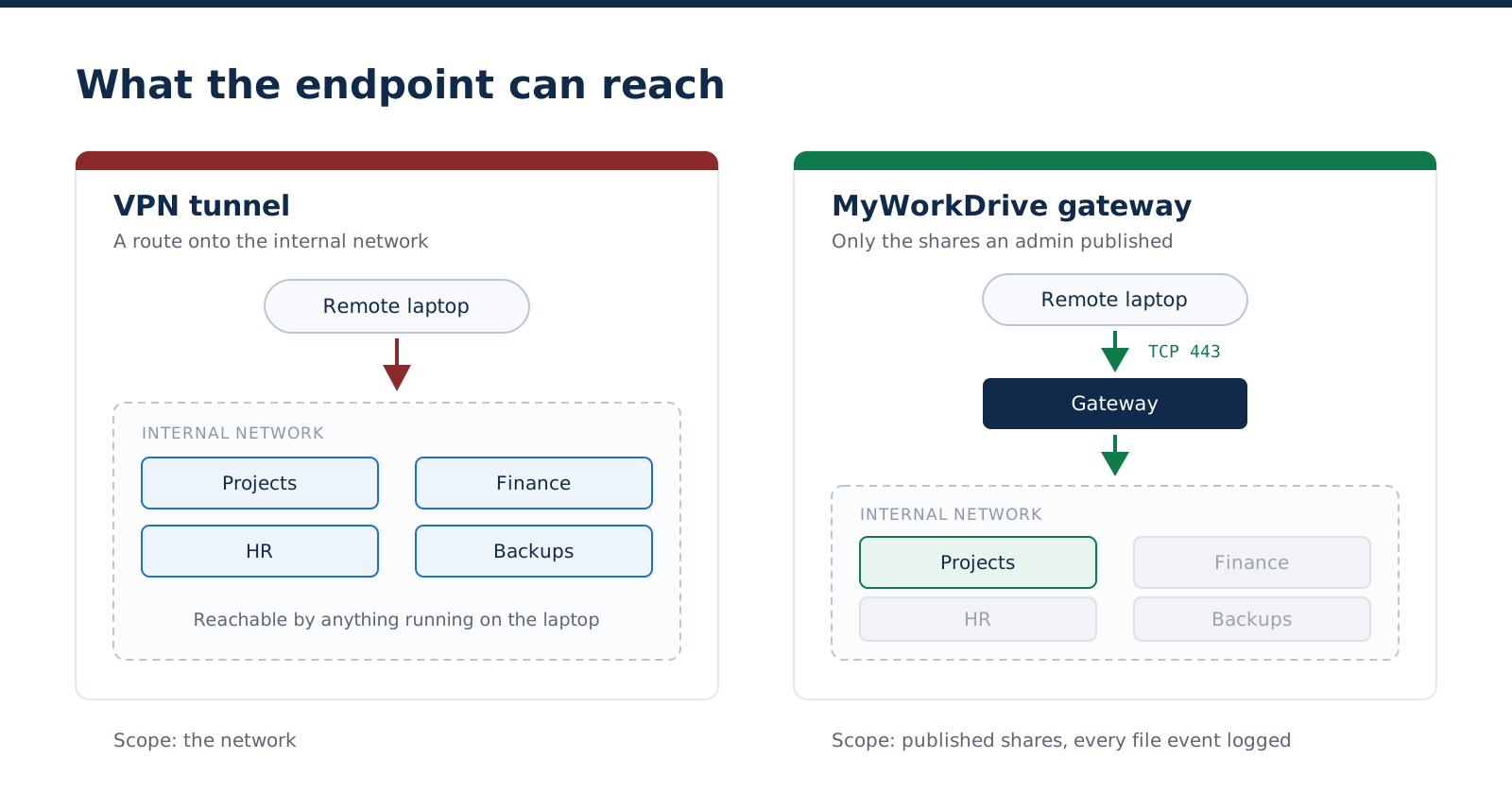
Scope of access is usually what decides it. A VPN gives the endpoint, and anything running on it, a route onto the internal network. With a gateway in front, the endpoint only sees the shares an administrator published, subject to per-share controls, with every file event recorded.
Where to start
Pick a single project folder and one user, and give the agent a read-only task. Publish the share with a fixed drive letter, install the client, attach the folder in Cowork, then check the audit log to confirm the events you expected are there. A test like that will surface gaps in your governance assumptions in an afternoon.
MyWorkDrive offers a 14-day trial, so the whole path can be validated against your own storage and your own policies before anything is rolled out more widely.
Start a free trial or book a demo to walk through the setup with an engineer.
Related reading: VPN Replacement for File Access, Access From Any Device, Security and DLP, Compliance and Audit Logging, Connect Any Storage.
Frequently asked questions
Can Claude Cowork open a UNC path like \\fileserver\projects?
No. Anthropic's Claude Desktop documentation states that raw UNC paths cannot be attached as workspace folders, and that the share must be mapped to a drive letter first. Once the share is mapped, the drive letter can be selected in the folder picker like any local folder.
Does Claude Cowork work with a network drive?
Yes, on Windows. A user can attach a mapped network drive such as Z:\ as a workspace folder. If the drive was mapped and reachable when the sandbox started, both file tools and shell commands work on it. If the drive was mapped later, file tools still work while shell commands do not see it, so files need to be copied locally before running a script against them.
Do I need a VPN for an AI agent to access my file server? No. A MyWorkDrive mapped drive publishes SMB shares over HTTPS on port 443, so the drive letter exists on the endpoint without a VPN tunnel and without exposing SMB ports 445 or 139 to the internet. The agent sees a drive letter, and the SMB connection happens server-side on your LAN.
Can the agent reach files the user cannot? No. The mapped drive client authenticates as the signed-in user and enforces NTFS and Active Directory group permissions live. MyWorkDrive can restrict access below what the storage allows and cannot grant access beyond it, so an agent working through the drive is limited to the rights of the person who attached the folder.
Are my files copied to the cloud? Your files are not migrated or synced anywhere. They stay stored in your own storage, and file content does not persist on MyWorkDrive servers. Anthropic states separately that because Cowork sessions run on its servers, the work Claude does there, including local files opened through the desktop app, is processed on Anthropic's servers rather than staying on the computer. So the storage location does not change, but content an agent opens is processed by Anthropic during the session. Treat the choice of which folders to attach as a data handling decision and document it.
How do I stop Cowork from reaching a sensitive share? Disable mapped drive access for that share in the MyWorkDrive admin console so no drive letter is created for it, or configure it as a DLP restricted share where downloads, copying, and printing are blocked. DLP requires an Enterprise license. Users can still reach the content through the browser client where policy permits. In managed Claude Desktop deployments, a workspace folder allowlist can also limit which paths users are permitted to attach.
Can scheduled Cowork tasks work on file server data? Only when the run happens on the endpoint. Scheduled tasks run in the cloud by default and cannot be tied to a folder on the user's computer, so a cloud run has no path to the drive letter. Anthropic notes that a scheduled task requiring local files or apps runs locally instead, which means the computer has to be on with the Claude Desktop app open and the drive mapped. Recurring work on file server content depends on the endpoint being available at the scheduled time.
Does this require migrating to SharePoint or OneDrive? No. Files stay on the existing file server, NAS, or cloud storage account, with permissions intact. MyWorkDrive publishes the shares as drive letters and browser access without moving data, which also avoids the file size, item count, and character restrictions that come with a SharePoint migration.
What gets logged when an agent reads files? MyWorkDrive records authentication events and file operations with user, source IP, device identifier, share, path, operation, result, and bytes transferred. The events captured depend on the log level configured on the server, so confirm your production setting records what you expect before relying on it as evidence. Events export to a SIEM over Syslog using UDP or TCP. On the Claude side, Team and Enterprise owners can stream Cowork tool calls and file access to a SIEM through OpenTelemetry, which Anthropic describes as operational telemetry rather than a replacement for audit logging. Compliance API access to Cowork session content is an Enterprise and Claude Platform feature.
Start a free trialBook a demoView pricing

Daniel, Founder of MyWorkDrive.com, has worked in various technology management roles serving enterprises, government and education in the San Francisco bay area since 1992. Daniel is certified in Microsoft Technologies and writes about information technology, security and strategy and has been awarded US Patent #9985930 in Remote Access Networking.