

By Ron Bhojwani
Last Updated: July 8, 2026
Criminal Justice Information Services (CJIS) audits are hands-on technical reviews. Auditors attempt live logins, test encryption in transit, walk the permission structure, and pull log samples on the spot. Agencies that pass are the ones that can demonstrate technical enforcement of every control they document. Agencies that fail often had clean paperwork paired with a file access layer that could not prove anything.
This article covers the file access portion of CJIS compliance specifically: what the CJIS Security Policy requires of the systems your staff use to open, edit, and share files containing Criminal Justice Information (CJI), and how an architecture decision at that layer affects your audit readiness. MyWorkDrive addresses this specific problem. It does not address the full scope of CJIS compliance, and this article is explicit about where that boundary sits.
What Does CJIS Security Policy v6.0 Require at the File Layer?
The FBI released CJIS Security Policy version 6.0 on December 27, 2024, the most significant modernization of the policy in over a decade. Future versions are expected on a 6 to 12 month update cadence, which means agencies that treat CJIS as a one-time project will fall behind before their next audit cycle. Version 6.0 organizes requirements into 20 policy areas mapped to NIST SP 800-53 controls. Four of those policy areas govern how CJI files are accessed, shared, and logged:
Access Control (AC) covers who can reach which files, under what conditions, and through which devices. This includes least-privilege role-based access, session timeout enforcement, device controls, and restrictions on CJI movement between system components.
Audit and Accountability (AU) requires a complete, tamper-resistant log of file access events with user identity, timestamp, action type, and result. Auditors check that logs are actively reviewed as well as collected, and that they export cleanly to a SIEM or log management platform.
System and Communications Protection (SC) requires encryption of CJI at rest and in transit using FIPS-validated cryptographic modules. The policy language centers on the word validated. Auditors expect to see CMVP certificate numbers recorded in your System Security Plan in place of vendor marketing language about FIPS support. Note the deadline here: NIST moves FIPS 140-2 certificates to Historical status on September 21, 2026, so SSPs citing 140-2 module certificates should transition to FIPS 140-3 validated modules.
Identification and Authentication (IA) houses the multi-factor authentication requirement. MFA is a Priority 1 control that became sanctionable on October 1, 2024, and it applies to all CJI access, including remote staff, dispatchers, and IT administrators with elevated privileges.
Two additional v6.0 themes affect how agencies evaluate file access tools:
Zero Trust principles. Version 6.0 shifts toward continuous validation of users and devices in place of perimeter-based trust. A staff member inside the office network is not automatically trusted, and every file access request must be authenticated and authorized individually. Tools that rely on VPN tunnel trust or broad network-level access grants do not satisfy this model. Tools that authenticate every request at the application layer, enforce device controls, and log every interaction regardless of network location align naturally with it.
Supply Chain Risk Management. Version 6.0 formalizes Supply Chain Risk Management Plans, requiring agencies to vet vendors before onboarding, inspect systems before deployment, and establish breach notification agreements with any vendor whose systems touch CJI. File access tools are now explicitly part of the vendor risk review process. A vendor that stores no CJI files on its own infrastructure is structurally simpler to vet: less surface area to assess and a narrower scope if a breach notification is ever required.
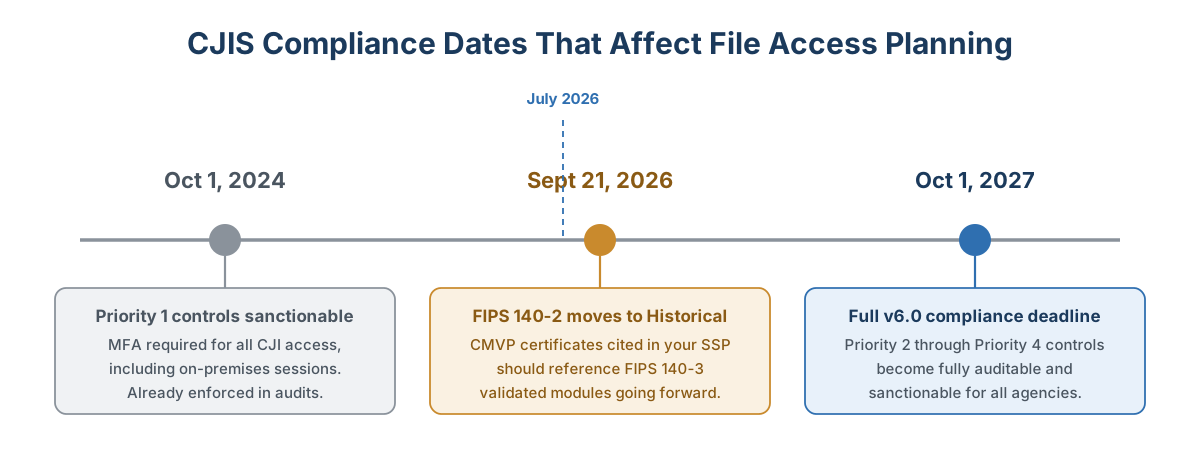
Priority 1 controls have been sanctionable since October 2024. Priority 2 through Priority 4 controls become fully auditable by October 1, 2027.
Where Do Agencies Fail CJIS File Access Audits?
Agencies generally understand the requirements. The failures tend to be technical. A few patterns show up repeatedly:
Incomplete audit coverage. Many agencies log successful authentication and file access events but miss the failures. CJIS requires both. If a user attempts to reach a CJI share and is denied, that event should appear in the log with the same detail as a successful access. Auditors check for this specifically.
Partial encryption. When CJI is at rest outside a physically secure location, the policy requires FIPS 197 certified AES at 256-bit strength or a FIPS 140-3 validated method. In practice, agencies encrypt primary file shares and miss secondary locations: backup staging areas, archive shares, or SharePoint libraries used by support staff. Auditors follow the data flow map, and the map covers more than the main server.
MFA enforcement gaps. MFA applies to all CJI access, including sessions that originate inside a secure facility. Some agencies enforce it for remote VPN connections but skip internal privileged account access. That gap has been a sanctionable Priority 1 finding since October 2024.
Broad permissions that cannot be demonstrated as least-privilege. RBAC documented in a spreadsheet and RBAC technically enforced at the file system level are two different things. Auditors ask to see live permission structures alongside the policy documents.
Third-party tools that expand the audit boundary. Any system that touches CJI files becomes part of your CJIS compliance scope. A file access tool that copies, caches, or stores file content on vendor infrastructure adds a new component to your System Security Plan, one that may require its own assessment and a CJIS Security Addendum review.
How Does File Access Architecture Affect the Audit Boundary?
The way your staff accesses files carries compliance weight on its own, separate from where the files are stored. Two architectures are worth comparing:
Sync-and-store platforms copy files to a vendor cloud for access. Staff download from the vendor's infrastructure, which means that infrastructure is handling CJI. That triggers CJIS requirements around third-party oversight and supply chain risk management, and it typically requires a Security Addendum. The vendor's cloud environment enters your System Security Plan as a data-holding component, which widens the audit boundary and gives an auditor additional systems to test.
Gateway-based access leaves files where they are and provides secure access through an intermediary layer over HTTPS. Staff reach agency-controlled storage directly. The gateway authenticates the request and brokers the connection without storing or copying the file. Because no CJI is resident on the gateway vendor's infrastructure, that vendor does not become a data-holding component in your SSP the way a sync platform does. Your audit boundary stays contained to infrastructure you already control.
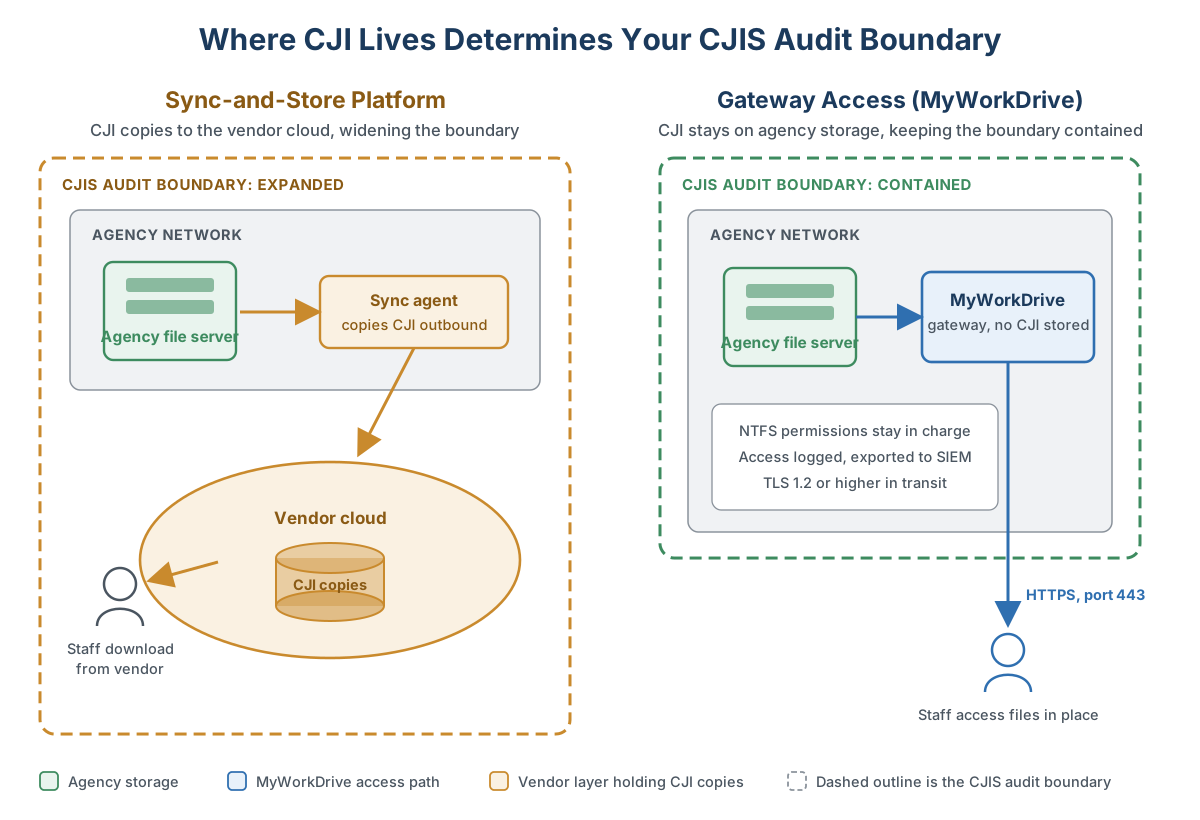
A sync platform pulls the vendor's cloud into your audit scope. A gateway keeps the boundary drawn around infrastructure you already control.
The distinction matters practically. A wider audit boundary brings additional vendor assessments and security addenda to manage, and it gives an auditor a larger surface on which to find a gap.
Where MyWorkDrive Fits in a CJIS File Access Program
MyWorkDrive is a secure file access gateway. It installs on Windows Server infrastructure, connects to existing SMB file shares, SharePoint, OneDrive, and Azure Files, and provides browser, mapped-drive, and mobile access over HTTPS. Files stay on agency storage. The gateway brokers access without storing, caching, or copying file content.
Here is how that architecture maps to the CJIS file access requirements:
Access Control. MyWorkDrive inherits NTFS permissions directly from Windows Server. It cannot grant a user more access than is already provisioned in the underlying file system, because the permission source of truth remains Active Directory and NTFS. Over-provisioning at the MyWorkDrive layer is structurally impossible. Access-Based Enumeration hides directories from users who lack rights to them. Session timeouts are configurable by administrator policy. Device approval controls restrict file access to approved endpoints, blocking unrecognized devices even when the credentials are valid.
Audit and Accountability. MyWorkDrive logs authentication successes and failures with identity provider claims, file operations such as open, download, and delete, public link creation and revocation, administrative changes, and device approval decisions, each with user identity, timestamp, action type, and result. Logs export via Syslog to Splunk, Microsoft Sentinel, or any Syslog-compatible SIEM platform. Administrators can configure alerts for high-volume downloads, file deletion and modification activity, and policy changes.
Encryption. MyWorkDrive transmits all data over HTTPS using TLS 1.2 as a minimum, with TLS 1.3 preferred. For FIPS-validated cryptography, MyWorkDrive supports Windows FIPS mode, under which the host operating system's CMVP-validated cryptographic modules handle the cryptographic operations. Separately, MyWorkDrive holds a NIST FIPS 186-4 RSA algorithm validation certificate, number 3018, issued under the Cryptographic Algorithm Validation Program. These are two different validation programs: CAVP validates algorithms and CMVP validates modules. For a System Security Plan, record the CMVP certificate numbers of the validated modules in use, since that is what auditors look for.
Multi-Factor Authentication. MyWorkDrive integrates with Active Directory, Microsoft Entra ID, ADFS, SAML providers, and Duo Security. MFA is enforced at the identity provider level, so it applies consistently across web, mapped drive, and mobile access without separate MFA configurations per access method. Agencies that already manage MFA policy through Entra ID or a SAML provider keep that policy in force automatically when MyWorkDrive is deployed.
Data Loss Prevention. Administrators can block downloads, clipboard access, and printing on a per-share, per-group, or per-user basis. View-only access with dynamic watermarks showing the user's identity and timestamp is available for shares where download rights are not appropriate. These DLP controls apply across all connected storage types and all access methods.
Data Residency. In a fully private deployment, all MyWorkDrive components run inside the agency's network boundary. Office document editing can be handled by a locally hosted Office Online Server, so document content stays on your network during editing. This deployment model keeps every component that touches CJI inside the agency's controlled environment, which supports a contained and demonstrable audit boundary. See the data sovereignty overview for deployment specifics.
What MyWorkDrive Does Not Cover
CJIS compliance spans 20 policy areas under v6.0, with Priority 2 through Priority 4 controls fully auditable by October 1, 2027, roughly 15 months from this writing. File access controls represent a meaningful portion of what auditors test, and they are far from the complete picture.
MyWorkDrive does not address personnel security requirements, including fingerprint-based background checks and the associated lifecycle management for staff and contractors. It does not replace an incident response plan, a configuration management program, or a physical security assessment. Staff training requirements, audit preparation documentation, and coordination with your state CJIS Systems Agency are outside its scope entirely.
An agency preparing for a triennial CJIS audit should work with its state CSA, a qualified compliance consultant familiar with the current CJIS Security Policy version, and an IT team capable of addressing the full set of 20 policy areas. MyWorkDrive supports one specific layer of that program: the controls governing how authorized users access and interact with files that contain CJI.
Practical Steps for File Access Audit Readiness
If a CJIS audit is on your horizon, a focused review of the file access layer is a productive starting point because it surfaces the most technically demonstrable gaps quickly. Version 6.0's emphasis on continuous monitoring also means audit readiness is no longer a pre-audit sprint. Agencies that build ongoing review processes now will be far better positioned than those that prepare reactively.
Map where CJI touches your file infrastructure. Build a current data flow diagram covering every location where CJI enters, moves through, or exits your environment, including file shares, SharePoint sites, remote access paths, and any archiving or staging areas. This map is both a compliance artifact and a practical diagnostic tool.
Audit your logging completeness. Pull a sample of audit logs and check whether authentication failures and denied access attempts appear alongside successful events. Verify that logs cover every storage type where CJI lives. Confirm that logs are reaching your SIEM and that someone is reviewing them on a schedule.
Verify encryption is complete. For CJI at rest outside a physically secure location, confirm AES-256 or a FIPS 140-3 validated method covers every repository in your data flow map, including backup staging and archive locations. For in-transit encryption, confirm the TLS version and record the CMVP certificate numbers for the validated modules in use. Check whether any of those certificates are FIPS 140-2, since those move to Historical status on September 21, 2026.
Test MFA enforcement at the file access layer. The MFA mandate applies to all CJI access, including on-premises sessions. Confirm that privileged accounts working inside the facility are also protected by MFA, and that enforcement holds across every access method your staff uses.
Review permission scope against documented roles. Pull live permission structures for file shares containing CJI and compare them to your documented RBAC matrix. Any user with access broader than their role requires is a finding waiting to be discovered, and this review is worth doing before an auditor does it for you.
Confirm the audit boundary of every third-party file access tool. If a tool copies or caches CJI files outside your agency's infrastructure, that tool is in scope for CJIS assessment and likely requires a Security Addendum. Document this in your System Security Plan before the audit begins.
Frequently Asked Questions
Does CJIS require a specific file sharing product?
No. The CJIS Security Policy is architecture independent and names no specific products. It defines the controls any system handling CJI must meet: validated encryption, complete audit logging, least-privilege access, and MFA. There is also no such thing as a CJIS-certified vendor. The agency is the audited party, so agencies must evaluate whether a given tool lets them demonstrate the required controls.
Does a file access vendor need to sign a CJIS Security Addendum?
It depends on whether the vendor handles CJI. A vendor whose infrastructure stores, processes, or transmits CJI falls within CJIS scope and typically requires a Security Addendum. A self-hosted gateway that runs on agency infrastructure and never holds file content presents a narrower question, and agencies should review the deployment model with their state CSA to confirm scope.
What encryption does CJIS require for files at rest?
When CJI is at rest outside a physically secure location, the policy requires encryption using a FIPS 197 certified AES cipher at 256-bit strength or a FIPS 140-3 validated method. Agencies should record the applicable validation certificate numbers in their System Security Plan and confirm coverage extends to backups and archives.
When is the CJIS v6.0 compliance deadline?
Priority 1 controls, including MFA for all CJI access, have been sanctionable since October 1, 2024. Priority 2 through Priority 4 controls become fully auditable and sanctionable by October 1, 2027.
Can MyWorkDrive make an agency CJIS compliant on its own?
No single product can. CJIS compliance spans 20 policy areas, including personnel security, physical security, incident response, and training. MyWorkDrive addresses the file access layer: inherited NTFS permissions, complete audit logging with SIEM export, encryption in transit, MFA through existing identity providers, and a deployment model that keeps files on agency-controlled infrastructure.
Summary
CJIS file access compliance is tested live, and the gaps that produce findings are almost always technical. An agency can have well-written procedures and still fail because logs missed denied access attempts, encryption skipped a secondary archive share, or permissions ran broader than the documented role required.
The file access layer, where CJI moves between storage and the people authorized to use it, is a controllable part of the compliance program. Architecture choices at that layer have a direct effect on what an auditor finds and how defensible your SSP is, especially the choice of whether files leave agency infrastructure and whether audit coverage is complete.
MyWorkDrive addresses this layer with access control through inherited NTFS permissions and device approval, audit logging with SIEM export, encryption in transit with Windows FIPS mode support, MFA through existing identity providers, and a deployment model that keeps files and file access inside agency-controlled infrastructure. It is one component of a CJIS compliance program and works alongside the broader policy scope your agency owns. Learn more on the government file sharing page or the compliance overview.
MyWorkDrive holds a NIST FIPS 186-4 RSA algorithm validation certificate, number 3018, and is available through GSA IT Schedule 70 and NASA SEWP via Vertosoft. Deployment on Azure Government and on-premises Windows Server is supported.
CJIS Security Policy v6.0, released December 27, 2024, is the current baseline as of this publication, with future versions expected on a 6 to 12 month cadence. For the latest policy version and state-level guidance, consult your state CJIS Systems Agency (CSA) and the FBI CJIS Division directly.
Start a free trialBook a demoView pricing

Ron, CEO of MyWorkDrive, builds secure file access solutions that help organizations maintain control over their data without cloud migrations or VPNs. Before stepping into the CEO role, Ron served as MyWorkDrive's Chief Product Officer and spent six years at CData Software in engineering and product management leadership. He holds a Bachelor's Degree in Computer Science from Dartmouth College and writes about file access, product strategy and enterprise IT.