


By Kyle Lachmann
Last Updated: July 29, 2026
Two clocks are running out on Acronis Files Connect at the same time. Acronis has published an end-of-life notice for the product, formerly known as ExtremeZ-IP, with support ending December 31, 2026. Apple, meanwhile, has removed the AFP client from the first developer builds of macOS 27, due this fall. Files Connect exists to serve Windows file shares to Macs over AFP, so the product is losing its vendor and its protocol within months of each other.
If your Macs reach Windows file servers or NAS shares through Files Connect today, this post walks through what breaks and when. It also covers what to look for in a replacement, and how MyWorkDrive keeps the same shares mapped on every Mac without a migration.
Two Deadlines, One Product
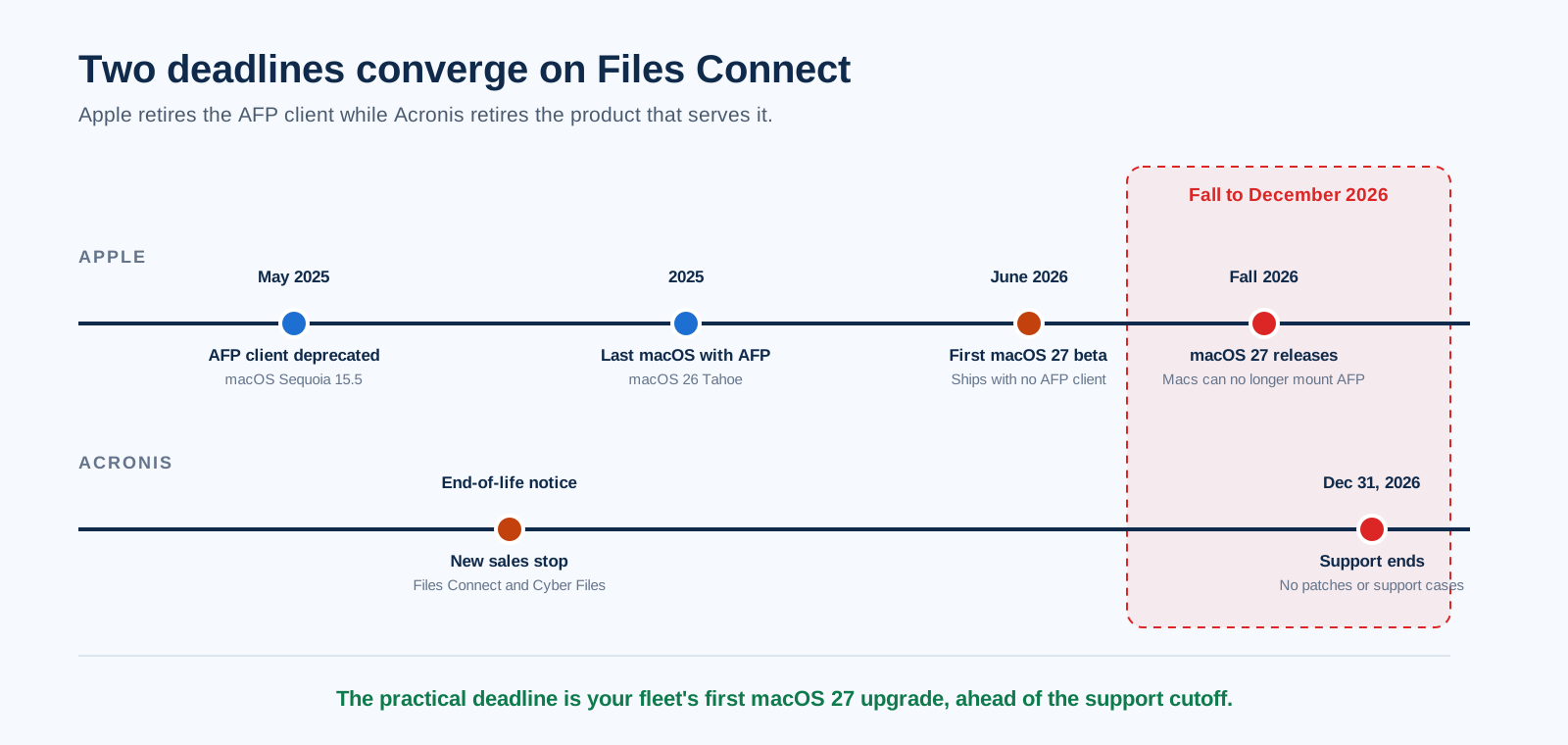
The Acronis side is straightforward. The company's end-of-life notice covers both Acronis Files Connect and Acronis Cyber Files. New sales have stopped, and support for Files Connect ends on December 31, 2026. After that date there are no security patches and no support cases, and compatibility against new macOS releases goes untested.
The Apple side has been building for over a year. Apple deprecated the AFP client in macOS Sequoia 15.5 in May 2025, warning in the mount_afp documentation that it would be removed in a future release. When macOS 26 Tahoe shipped, a System Settings warning confirmed AFP support would end with macOS 27. The first developer beta of macOS 27 Golden Gate, released in June 2026, contains no AFP client at all. From macOS 27 onward, Macs cannot mount AFP volumes, and Time Machine requires SMBv2 or SMBv3.
Put those together and the practical deadline for most organizations arrives well before December 31: it lands on the day the first Mac in your fleet upgrades to macOS 27 this fall. Once that happens, AFP volumes served by Files Connect simply stop mounting on that machine.
What Actually Breaks
It helps to separate what Files Connect does into its parts, because each one lands somewhere different after end of life.
File access over AFP. This is the core of the product and the part with no future. Any Mac on macOS 27 loses the ability to mount those volumes, regardless of what Acronis does. This is the piece that needs a true replacement.
Network Spotlight search. Files Connect earned real loyalty here. Its indexed search gave Mac users fast filename and content results on Windows shares at a time when nothing else did that well. The capability is tied to the retired product's own client software, so it retires with the product. A replacement needs its own answer for search, covered below.
Print services. The Files Connect print server component hands off cleanly to native Windows print services, which most environments already run.
Time Machine destinations. From macOS 27, Time Machine requires SMBv2 or SMBv3 anyway, so backups move to standard SMB shares on your existing servers. No third-party product is needed for this.
Across those four functions, print and backup pass to native Windows and macOS services, and search needs an answer from whatever replaces the product. That leaves Mac access to Windows shares as the core decision.
What to Look For in a Files Connect Replacement
No dependence on protocols Apple controls. The lesson of AFP's retirement is worth applying forward. Direct SMB from Macs works on the LAN today, but it inherits SMB's remote-access problems: exposing port 445 to the internet is not an option, so off-site users end up back on a VPN. A client that connects over HTTPS sidesteps both the AFP shutdown and the VPN question at once.
Files stay on the shares you have. Files Connect never required a data migration, and its replacement should not either. Sync-based platforms that copy your shares into a proprietary store turn a client swap into a months-long data project with permission remapping at the end.
Your directory, enforced live. Mac users on Files Connect authenticate against Active Directory today. A replacement should keep that, add Entra ID along with SSO and MFA for modern identity, and check NTFS permissions in each user's own login context so access can never exceed what the ACLs allow.
Search that outlives any one client. Fast search on Windows shares is the Files Connect feature Mac users will miss first. Look for integration with the Windows Search service on the file server itself, since that index is maintained by Windows and serves any client, rather than an index bound to one vendor's application.
MyWorkDrive vs Acronis Files Connect
MyWorkDrive installs as a single role on Windows Server and publishes your existing SMB and NTFS shares to a macOS mapped drive client, a Windows client, a web browser, and mobile apps for iOS and Android. Every connection travels over HTTPS on port 443. No AFP, SMB, or LDAP is exposed to the client, so nothing Apple removes from macOS can break access to your servers.
| Capability | MyWorkDrive | Acronis Files Connect (formerly ExtremeZ-IP) |
|---|---|---|
| Product status | Actively developed and supported | End of life; support ends December 31, 2026 |
| Works after macOS 27 removes AFP | Yes. Clients connect over HTTPS, with no AFP or SMB from the Mac | Built around AFP, which macOS 27 no longer supports |
| Access from outside the office | Single HTTPS port from any network, no VPN | LAN file protocols; remote use requires a VPN |
| Identity and permissions | Active Directory and Entra ID with SSO and MFA; live NTFS enforcement in each user's context | AD and NTFS on the LAN; no Entra ID, SSO, or MFA |
| Full-content search on shares | Windows Search integration in web and desktop clients | Network Spotlight, tied to the retired product's client software |
| Browser access and Office editing | Yes. Approved Microsoft Cloud Storage Provider for Office Online | No web client; editing happens in desktop applications |
| Platforms beyond the Mac | macOS, Windows, browser, iOS, and Android on one platform | Mac focused, with mobile apps tied to the retired product line |
| Encryption in transit | TLS 1.2+ with SHA-256; FIPS 186-4 RSA validation certificate #3018 | AFP does not encrypt file transfers; protection depends on the LAN or a VPN |
| Support | Live support sessions included with every plan | Ends with the product on December 31, 2026 |
| List price | $5 or less per user per month, all features included | No longer sold |
Search: Replacing Network Spotlight the Right Way
Search deserves its own section because it is the feature Files Connect customers ask about first, and for good reason. Network Spotlight made Windows shares feel native to Mac users for years.
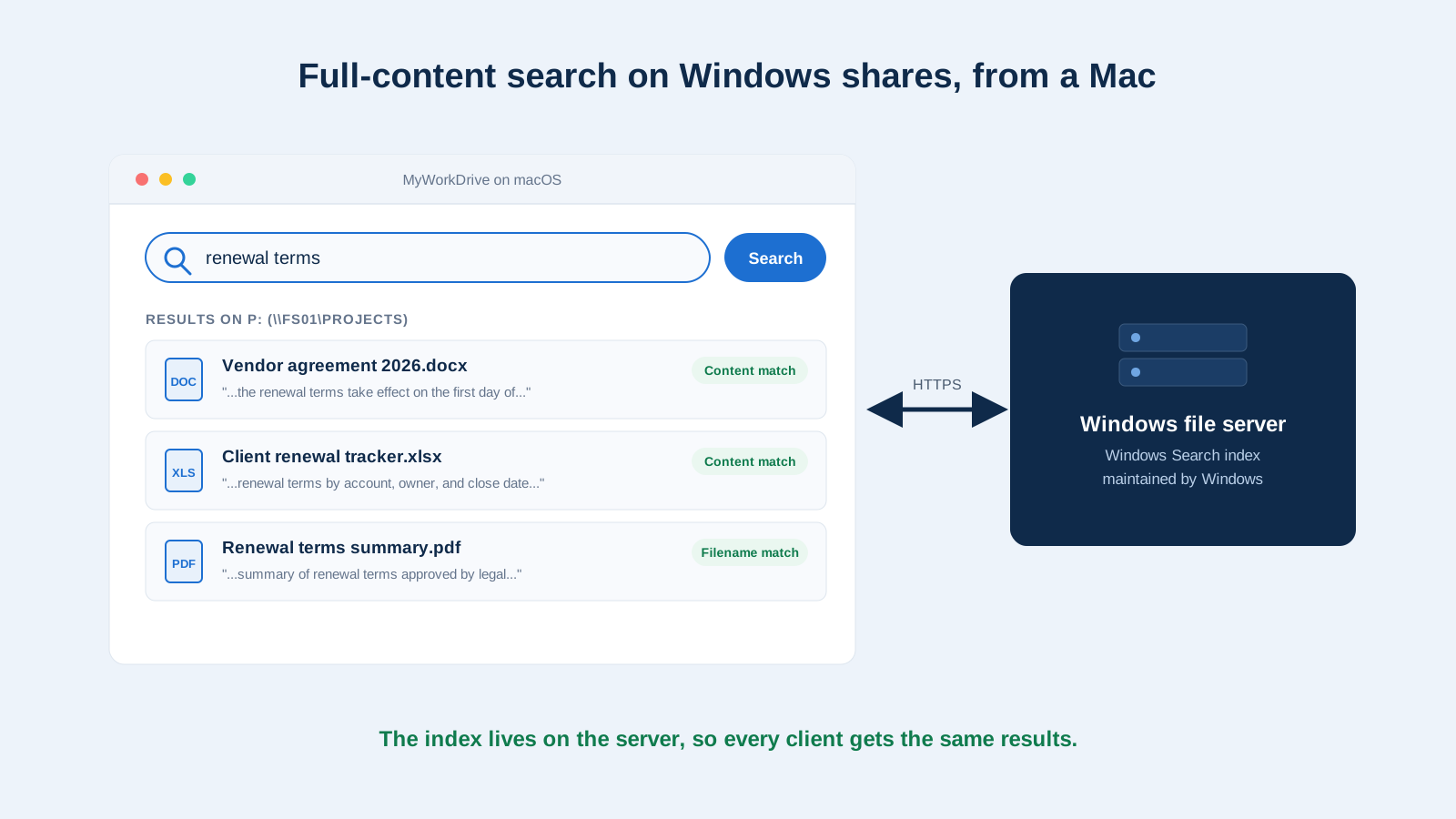
MyWorkDrive takes a different route to the same result. It integrates with the Windows Search service running on the file server itself, so filename and full-content queries return results in the web client and in mapped drives on Mac and Windows alike. The index lives in Windows and is maintained by Windows, which means it serves every client MyWorkDrive offers. There is no separate index server to license, and no client application from a retired product line for the capability to depend on.
Security Gains in the Move
AFP predates modern transport security, and the protocol does not encrypt file transfers. In practice, Files Connect deployments lean on the physical LAN or a VPN tunnel for protection, which is why remote access always meant a VPN client on every Mac.
Moving the connection to HTTPS changes that posture. Every MyWorkDrive session is encrypted with TLS 1.2 or higher using SHA-256, backed by a FIPS 186-4 RSA validation certificate (#3018), whether the user sits in the office or on hotel Wi-Fi. Only port 443 is exposed, so SMB and LDAP stay off the internet entirely. File and login activity is logged with Syslog export to your SIEM, and data leak protection options cover download blocking, copy and paste restrictions, watermarking, and device approvals. For CMMC, HIPAA, GDPR, and FINRA programs, that combination is far easier to attest than a protocol whose protection depends on the network it runs on.
How to Plan the Cutover
- Set your real deadline. It is probably not December 31. Check when your Mac fleet will start seeing macOS 27 this fall, and whether your MDM can defer the upgrade long enough to finish the move.
- Inventory the Files Connect footprint. List the shares it publishes and who relies on Network Spotlight, then check whether the print server or Time Machine roles are in use. Route print to Windows print services and point Time Machine at an SMB share, since macOS 27 requires that anyway.
- Stand up MyWorkDrive alongside. A free trial installs on one Windows Server, points at the same shares, and can be piloted with a single Mac team the same day. Enable Windows Search integration so search is ready before users arrive.
- Move Macs in groups. Install the macOS client, sign in with existing AD or Entra ID credentials, and the same shares appear as a mapped drive. Because permissions come from NTFS, there is nothing to remap.
- Retire Files Connect. Decommission the service before support lapses, and reclaim the licensing spend.
Frequently Asked Questions
Is Acronis Files Connect being discontinued?
Yes. Acronis has published an end-of-life notice covering Acronis Files Connect, formerly ExtremeZ-IP, and Acronis Cyber Files. New sales have stopped, and support for Files Connect ends on December 31, 2026. After that date, security patches and standard support stop, so teams on the product should plan a move to a supported platform.
What happens to Files Connect when Apple removes AFP from macOS?
Files Connect is at its core an AFP server for Windows. Apple deprecated the AFP client in macOS Sequoia 15.5, confirmed in macOS 26 Tahoe that support would end with macOS 27, and shipped the first macOS 27 beta without an AFP client. Once a Mac upgrades to macOS 27, it can no longer mount AFP volumes served by Files Connect, whatever the product's own support status.
What is the best Acronis Files Connect alternative for Macs?
For teams whose Macs work on Windows file servers and NAS shares, MyWorkDrive is the closest match. The macOS client presents the same shares as a mapped drive over HTTPS, Active Directory and NTFS permissions are enforced directly, and users also get browser access, mobile apps, and Office Online editing. Nothing about your storage or folder structure changes.
Do Mac users keep their NTFS permissions with MyWorkDrive?
Yes. MyWorkDrive authenticates against Active Directory or Entra ID and accesses files in each user's own login context, so existing NTFS permissions are enforced exactly as configured. Access can never exceed what the ACLs already allow, and the same permissions apply in every client.
Can Mac users still search Windows file shares without Network Spotlight?
Yes. MyWorkDrive integrates with the Windows Search service on the file server, so users get filename and full-content results from the web client and mapped drives on Mac and Windows. The index is maintained by Windows itself rather than by a client application from a retired product line.
Does replacing Files Connect require migrating data?
No. Like Files Connect, MyWorkDrive reads files where they already sit on SMB and NTFS shares, and it also connects Azure Files, SharePoint, and OneDrive. The folder structure and permissions stay as they are. What changes is the client connection, which becomes HTTPS on port 443 instead of AFP on the LAN.