
Acronis Files Connect Alternative: Mac Access Without AFP
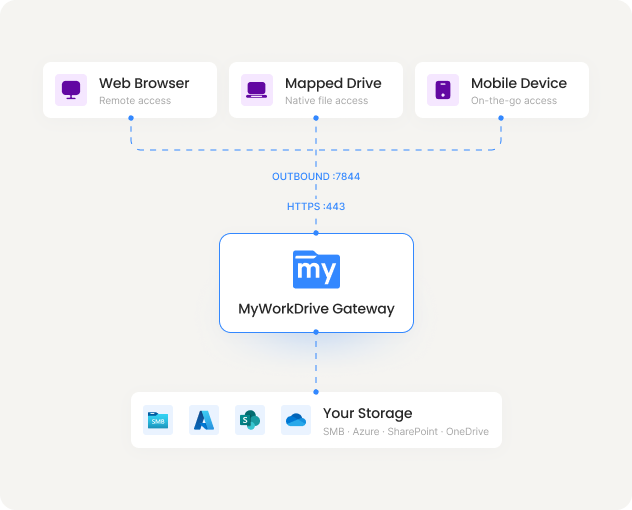
MyWorkDrive gives your Mac users a mapped drive to the same Windows file servers and NAS shares they reach through Acronis Files Connect today, over HTTPS instead of AFP. Acronis has announced end of life for Files Connect, and Apple is removing the AFP client from macOS. MyWorkDrive depends on neither. Files stay on your existing shares with Active Directory and NTFS permissions intact, users connect from the office or anywhere else without a VPN, and live support sessions are included with every plan.
Trusted by Organizations Worldwide


Quick Answer
MyWorkDrive is the most direct Acronis Files Connect alternative for organizations with Macs on Windows file servers and NAS. Instead of serving shares to Macs over AFP, a protocol Apple has deprecated and is removing from macOS, MyWorkDrive presents the same shares as a mapped drive over a single HTTPS port.
Files stay on your existing NTFS shares with Active Directory permissions enforced in each user's own context, so there is nothing to migrate. Mac users get full-content search through Windows Search integration, browser access with Office editing, and connectivity from any network without a VPN. Pricing starts at $5 or less per user per month on annual plans, with live support sessions included.
Files Connect Is at End of Life, and So Is AFP
Acronis has published an end-of-life notice covering Acronis Files Connect, formerly ExtremeZ-IP, alongside Acronis Cyber Files. New sales have stopped and support ends on December 31, 2026. The timing matters because the protocol at the core of the product is being retired too: Apple deprecated the AFP client in macOS Sequoia 15.5 and has confirmed that macOS 26 Tahoe is the last version to support it. From macOS 27 onward, Macs cannot mount AFP volumes at all. A product built to serve AFP to Macs is losing both its vendor support and its client platform in the same window. You can confirm the timeline in Acronis's end-of-life notice and Apple's macOS release notes, then plan your move.
Moving to MyWorkDrive does not involve a data migration. Like Files Connect, MyWorkDrive reads your files where they already sit on SMB and NTFS shares, and it also connects Azure Files, SharePoint, and OneDrive. Your folder structure and NTFS permissions stay exactly as they are; what changes is the client connection, which becomes HTTPS on port 443 instead of AFP on the LAN. Files Connect functions outside of file access, such as its print server and Time Machine support, are handled going forward by native Windows print services and SMB, which Time Machine requires from macOS 27 anyway.
MyWorkDrive vs Acronis Files Connect
| Capability |

|
Acronis Files Connectformerly ExtremeZ-IP |
|---|---|---|
| Product status and roadmap | Actively developed and supported | End of life; support ends December 31, 2026 |
| Works after Apple removes AFP from macOS | Yes; connects over HTTPS with no AFP or SMB from the Mac | Built around AFP, which macOS 27 no longer supports |
| Access from outside the office | Single HTTPS port from any network; no VPN | LAN file protocols; remote use requires a VPN |
| Active Directory and NTFS permissions | Live NTFS enforcement plus Entra ID, SSO, and MFA | AD and NTFS on the LAN; no Entra ID, SSO, or MFA |
| Full-content search on file shares | Windows Search integration in web and desktop clients | Network Spotlight, tied to the retired product's clients |
| Browser access and Office Online editing | Yes; approved Microsoft Cloud Storage Provider for Office Online | No web client; editing through desktop applications |
| Clients beyond the Mac | macOS, Windows, browser, iOS, and Android on one platform | Mac focused, with mobile apps tied to the retired product line |
| Encryption and compliance | TLS 1.2+ with SHA-256; FIPS 186-4 RSA validation cert #3018; supports CMMC, HIPAA, GDPR, FINRA, FedRAMP | AFP does not encrypt file transfers; protection depends on the LAN or VPN |
| Live support sessions | Included with every plan | Ends with the product on December 31, 2026 |
| List price (per user / month) | $5 or lessall features included | No longer soldproduct at end of life |
Built for Macs After AFP
No Dependence on AFP
Files Connect serves shares to Macs over AFP, a protocol Apple removes in macOS 27. MyWorkDrive clients connect over HTTPS, so macOS upgrades cannot break access to your file servers.
Works Beyond the Office LAN
Files Connect is a LAN product; off site, users need a VPN first. MyWorkDrive publishes the same shares over a single HTTPS port, so Macs at home, on site, or in the studio connect the same way they do at a desk.
Predictable Per-User Pricing
Pay for named users from $5 or less per user per month, with no overage fees and live support included. Licenses follow active users over a rolling 30 day window and are fully reassignable when people change roles.
Why Teams Move to MyWorkDrive
Protocol and platform direction

- MyWorkDrive: Clients connect over HTTPS on port 443. No AFP, no SMB, and no LDAP is exposed to the client, so Apple's protocol decisions and macOS upgrades have no effect on access.
- Acronis Files Connect: An AFP server for Windows at its core. Apple deprecated the AFP client in macOS Sequoia 15.5 and removes it in macOS 27, and Acronis support for the product ends December 31, 2026.
Identity and permissions
- MyWorkDrive: Uses Active Directory and Entra ID directly, with SSO and MFA. Access runs in each user's own login context and can never grant more than the existing NTFS permissions allow.
- Acronis Files Connect: Integrates with Active Directory and NTFS on the LAN, but has no Entra ID support, no SSO, and no MFA, which leaves remote access security to the VPN in front of it.
Operations and support lifecycle
- MyWorkDrive: A single Windows role patched with standard Windows tools, actively developed, with full-content search through the native Windows Search service and live support sessions included.
- Acronis Files Connect: A retired product whose search index, Mac client application, and mobile apps stop receiving updates when support ends. Its print server and Time Machine roles pass to native Windows print services and SMB.
Security You Can Prove
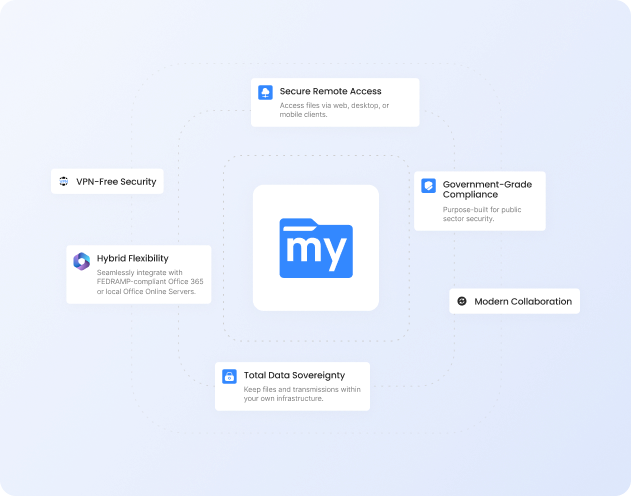
With MyWorkDrive, authentication and authorization stay anchored in your directory and your NTFS. Every connection is encrypted end to end over TLS, rather than depending on the safety of the local network the way LAN file protocols do, which keeps attestations for regulated workloads straightforward.
Encryption in Transit
HTTPS and TLS 1.2+ with SHA-256, plus a FIPS 186-4 RSA validation certificate
Learn more
Data Loss Prevention

Block downloads, disable copy and paste, watermarking, and device approvals
Learn more
Compliance Ready

Supports CMMC, FINRA, HIPAA, and GDPR programs with FIPS 186-4 validated cryptography
Learn more
What our users are saying
 Industry-leading secure remote file access solution
We have determined that MyWorkDrive software is essential to the Government’s requirements and market research indicates that other companies’ similar products do not meet or cannot be modified to meet the agency’s needs.
We conducted annual market research in January 2025 by comparing two competitors, ShareFile and Dropbox.
However, neither of these companies provides us with the necessary capabilities required to allow us to utilize the existing infrastructure, maintain stringent control over their data, and integrate with current enterprise security and authentication protocols.
These companies software do not provide real-time collaboration capabilities, does not eliminate Virtual Private Network (VPN) security risks nor prevent lateral network access.
MyWorkDrive is the most network secure compatible software application capable of eliminating VPN security risks and preventing lateral network access…
…Therefore, it is in the Government’s best interest to procure MyWorkDrive software.
Undisclosed Government Agency

See More Reviews





Acronis Files Connect Alternative FAQs
Is Acronis Files Connect being discontinued?
Yes. Acronis has published an end-of-life notice covering Acronis Files Connect, formerly ExtremeZ-IP, and Acronis Cyber Files. New sales have stopped and support ends on December 31, 2026. After that date, security patches, compatibility testing, and standard support stop, so teams on the product should plan a move to a supported platform.
What happens when Apple removes AFP from macOS?
Files Connect is at its core an AFP server for Windows. Apple deprecated the AFP client in macOS Sequoia 15.5 and has confirmed macOS 26 Tahoe is the last version to support it. Once Macs move to macOS 27, they can no longer mount AFP volumes served by Files Connect. MyWorkDrive is unaffected because its clients connect over HTTPS rather than AFP or SMB.
What is the best Acronis Files Connect alternative for Macs?
For teams whose Macs work on Windows file servers and NAS shares, MyWorkDrive is the closest match. The macOS client presents the same shares as a mapped drive over HTTPS, Active Directory and NTFS permissions are enforced directly, and users also get browser access, mobile apps, and Office Online editing. Nothing about your storage or folder structure changes.
Do Mac users keep their NTFS permissions with MyWorkDrive?
Yes. MyWorkDrive authenticates against Active Directory or Entra ID and accesses files in each user's own login context, so existing NTFS permissions are enforced exactly as configured. Access can never exceed what the ACLs already allow, and the same permissions apply in the browser, the mapped drive, and the mobile apps.
Can Mac users still search Windows file shares?
Yes. MyWorkDrive integrates with the Windows Search service on the file server, so users get filename and full-content results from the web client and mapped drives on Mac and Windows. Unlike the Network Spotlight feature in Files Connect, this does not depend on a client application from a retired product line.
See the MyWorkDrive Advantage for Yourself
Book a personalized demo or start your free trial today.