
Compliant File Access for HIPAA, CMMC, GDPR, FERPA, FINRA, FIPS, and More.
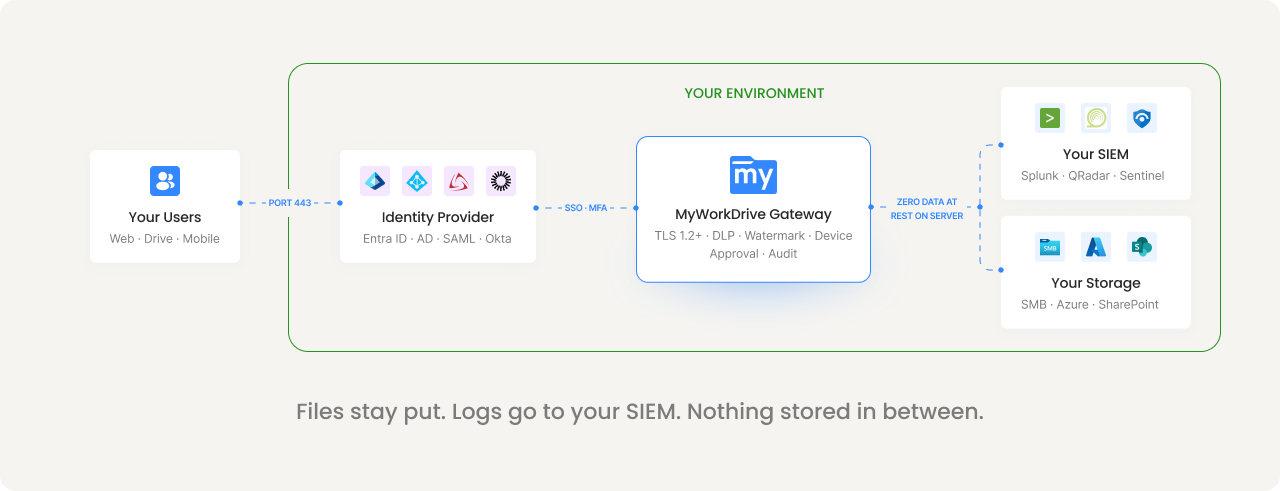
MyWorkDrive is a gateway, not a repository. It provides encrypted access to files where they already live, without syncing, copying, or storing them on a third-party cloud. Your existing permissions stay authoritative. Your compliance framework stays intact. No new attack surface. No new data processor.

Most File Access Tools Store Your Data. That's A Compliance Problem.
With sync-and-share platforms, files get copied to a vendor cloud. That's another attack surface, another data processor, another place you have to prove controls. MyWorkDrive's gateway model is different: files stay on your storage, under your control, governed by your permissions.
Data sovereignty by design
File content never resides on MyWorkDrive servers. No third-party cloud stores your data. Your storage remains the single source of truth, in the jurisdiction and environment you choose.
Existing permissions stay authoritative
Your NTFS permissions, SharePoint ACLs, and Azure RBAC remain the source of access control. MyWorkDrive can restrict access further by policy, but it can never elevate permissions beyond what your storage and identity already grant.
One audit trail for everything
Whether files live on SMB shares, Azure Files, or SharePoint, every access event flows through the same gateway and into the same audit log. No blind spots. No reconciling logs from five different systems.
How MyWorkDrive Maps To The Frameworks You're Measured Against
Compliance isn't a checkbox. It's proving to an auditor that specific controls are in place and functioning. Here's how MyWorkDrive addresses requirements across major frameworks.
Healthcare Data Protection
Protected health information stays in your storage. MyWorkDrive provides the technical safeguards required by the HIPAA Security Rule, and a Business Associate Agreement is available on request.
Technical safeguards addressed:
Defense Contractor Requirements
MyWorkDrive aligns with CMMC Level 2 control families for organizations handling Controlled Unclassified Information (CUI). Self-hosted architecture keeps CUI in approved environments.
Control families addressed:
EU Data Protection Regulation
MyWorkDrive's architecture aligns with GDPR's core principles by design. File content does not reside on application servers, supporting data minimization. Files remain in designated locations, supporting data residency requirements.
Article 32 alignment:
Aligned With Trust Service Criteria
MyWorkDrive's security controls align with SOC 2 Type II trust service criteria for availability, confidentiality, and processing integrity. The gateway architecture supports these principles by design.
Trust service criteria:
Financial Services Compliance
Financial services organizations use MyWorkDrive to enforce data handling policies for sensitive financial records while maintaining the audit trail that regulators expect.
Capabilities for financial compliance:
Federal Standards
MyWorkDrive holds FIPS 186-4 RSA algorithm validation (NIST Certificate #3018). The self-hosted architecture supports FedRAMP requirements by keeping government data within approved infrastructure.
Federal Alignment:
A Complete Audit Trail Comes Built In
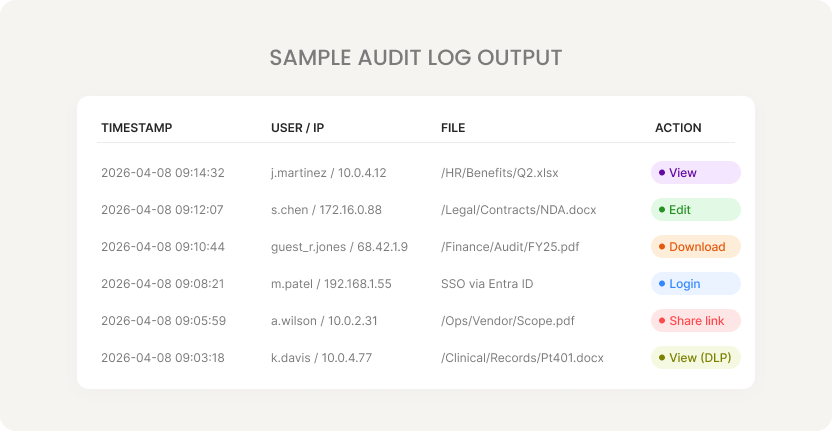
Every file access event is logged with the detail auditors and regulators require. Export to your SIEM, search by keyword, or filter by user, date, or action.
Structured event logging
Authentication outcomes, file operations (view, edit, download, delete), public link lifecycle, admin changes, and device approvals. Each event includes user, source IP, device identifier, share, path, operation, result, and bytes transferred.
SIEM integration via Syslog
Export structured logs to Splunk, QRadar, Microsoft Sentinel, or any Syslog-compatible platform. Choose verbosity from high-level errors to detailed debug output.
Alerting and thresholds
Configure alerts for mass downloads, sudden public link creation on sensitive shares, repeated authentication failures, unusual device requests, and unexpected policy changes.
Unified across all storage types
Whether files are on SMB shares, Azure Files, or SharePoint/OneDrive, all access flows through the same gateway and into the same log. No blind spots from VPN tunnels or multiple access methods.
Controls That Auditors Can Verify And Users Can Live With
DLP isn't just about blocking access. It's about enforcing the right level of access for the right user on the right file, with proof that it happened.
View-Only Mode
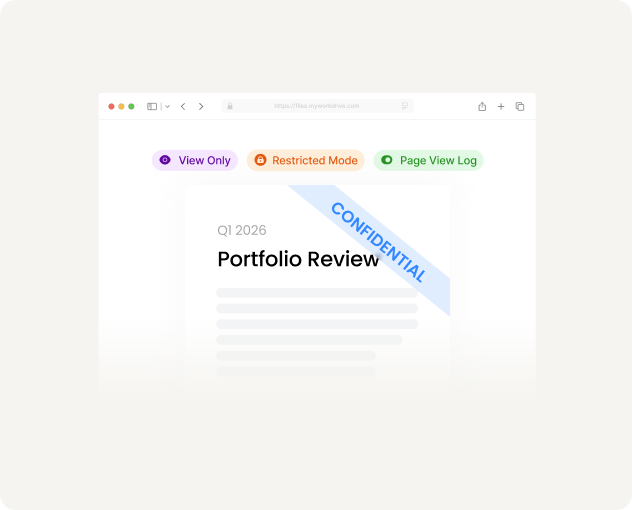
Users view files in a secure browser viewer. Downloads, clipboard access, and printing are blocked. Dynamic watermarks stamp each view with the user's identity and timestamp.
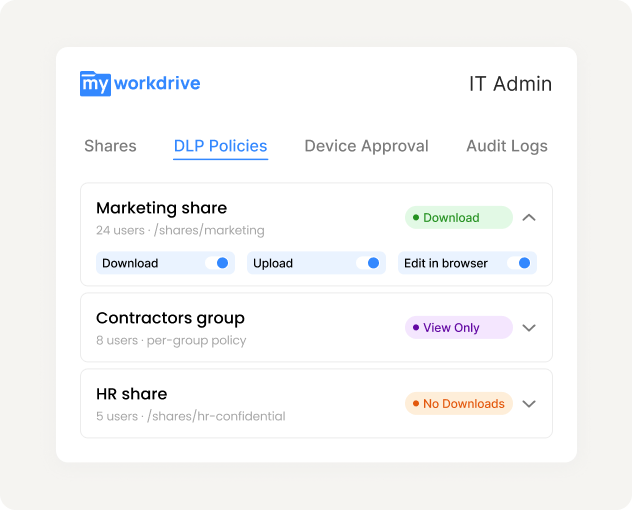
Granular Enforcement
Configure DLP per share, per group, or per user. Marketing gets download with watermark. Contractors get view-only. HR shares block all downloads. Rules apply across web, mapped drive, and mobile.
Device Approval
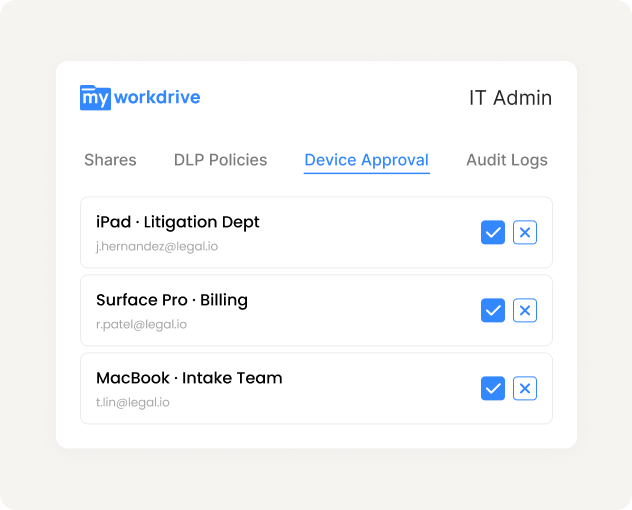
Control which devices can connect via mapped drive and mobile clients. Start in monitor mode to build an allowlist, then enforce. Unapproved devices are blocked from access.
Built For Zero Trust, Not Bolted On
MyWorkDrive's security model follows zero trust principles: identity-based access, least privilege, continuous verification, and encrypted communications. No VPN. No lateral movement exposure.
Port 443 only
All client connections use HTTPS. SMB (445), NetBIOS (139), and DNS (53) are never exposed to external clients. Eliminates the lateral movement risk of VPN-based file access.
Cannot elevate permissions
MyWorkDrive honors your existing NTFS, SharePoint, and Azure RBAC permissions. It can restrict further by policy, but can never grant access beyond what storage and identity already allow.
Zero data at rest on servers
File contents are processed in memory only and never written to disk on MyWorkDrive application servers. Browser editing uses temporary staging in your Microsoft 365 tenant with automatic cleanup.
TLS 1.2+ everywhere
All client connections, API communications, and internal paths are encrypted with TLS 1.2 or higher. TLS 1.3 preferred where supported. FIPS-validated cryptography available.
Companies Benefited from Using MyWorkDrive
 HEALTHCARE
Sanford Health
One of the largest rural health systems in the United States, Sanford Health operates an integrated network of hospitals, clinics, and long-term care facilities across the Midwest and Great Plains regions.
 EDUCATION
University of Oxford
University of Oxford is one of the world's oldest and most prestigious universities. It comprises 39 autonomous colleges and is consistently ranked among the top universities globally across virtually every academic discipline.
 GOVERNMENT
CA Department of Fish and Wildlife
A California state agency responsible for managing the state's diverse fish, wildlife, and plant resources, as well as the habitats on which they depend. It oversees hunting and fishing regulations, species conservation programs, and environmental review across California's vast ecosystems.
 NONPROFIT
Habitat for Humanity
A global nonprofit that brings together volunteers, donors, and partner families to build and improve homes for people in need. Since 1976, it has helped millions of families achieve strength, stability, and self-reliance through affordable homeownership in over 70 countries.
 LEGAL
LEGAL
Aderant
A leading global provider of business management software for law firms, offering solutions that cover practice management, billing, financial reporting, and knowledge management. Its platforms are used by many of the world's largest law firms to streamline operations and improve profitability.
 DATA ANALYTICS
J.D. Power
A global data and analytics company known for its independent consumer intelligence and benchmarking studies across industries including automotive, financial services, healthcare, and technology.
See The Audit Trail On Your Own Files
Start a free 30-day trial. Connect your storage, enable DLP on a test share, and generate your first audit log export, all in a single afternoon.