

Synology remote file access is easy to enable, but hard to secure at enterprise scale. This guide explains how enterprises can enable Synology remote file access securely, without exposing SMB ports or relying on traditional VPNs. If your Synology NAS hosts business critical SMB/CIFS shares, you need an enterprise remote file access approach that reduces attack surface, enforces least privilege, and produces audit ready logs without creating a VPN support burden.
-
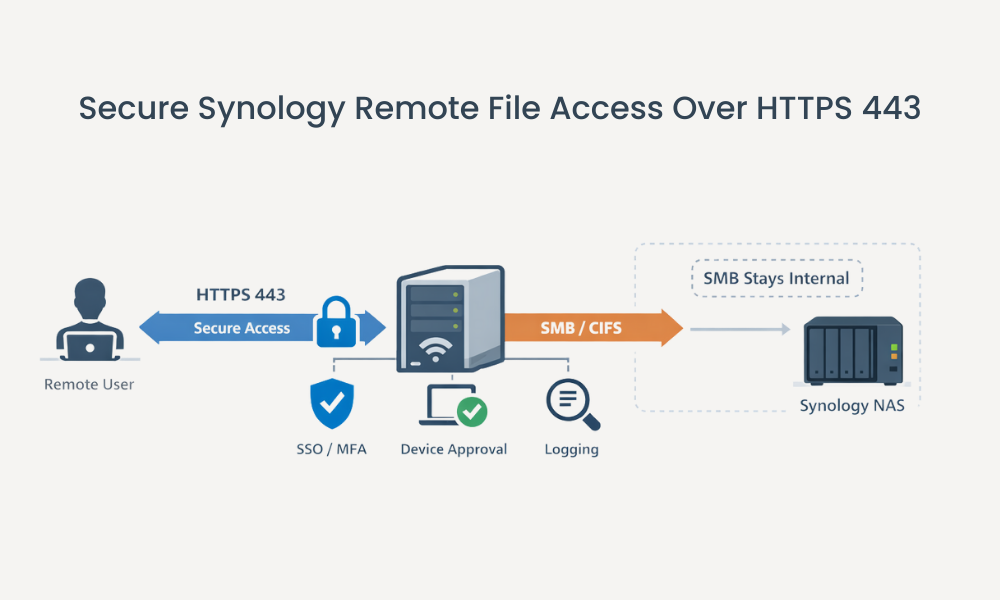
Publish Synology SMB shares over HTTPS 443 without SMB port exposure
-
Enforce SSO/MFA, device approval, and DLP style controls for remote users
-
Centralize visibility with detailed access logs you can retain and review
What is Synology remote file access?
Synology remote file access is the set of methods used to reach files stored on a Synology NAS from outside the local network, such as through browser based access, sync clients, VPN, or WebDAV. For IT and security teams, the goal is secure access to approved shares without opening risky ports or expanding network exposure.
For enterprise environments, Synology remote file access is not only about connectivity. It is about identity enforcement, least privilege, segmentation, auditing, and preventing data sprawl across unmanaged endpoints.
Why secure Synology remote file access matters for enterprises
For IT directors, CISOs, and sysadmins, secure Synology NAS remote access impacts both security posture and operational load:
-
Reduce externally reachable services: Fewer exposed services means fewer opportunities for scanning, exploitation, and misconfiguration.
-
Protect internal networks from flat access: Avoid designs where remote users land on broad network segments just to reach file shares.
-
Standardize identity controls: Apply consistent SSO and MFA policies across remote access entry points.
-
Improve auditability: Prove who accessed what, when, and from where with centralized logs.
-
Cut helpdesk friction: Reduce client VPN issues, split tunnel confusion, and the “it works at home but not at the hotel” scenarios.
Common challenges and risks
-
Opening inbound ports for access methods: Port forwarding and direct exposure can expand your attack surface and increase configuration drift.
-
Exposing SMB services to the internet: Microsoft guidance recommends blocking SMB (TCP 445) at the internet boundary in most environments, including inbound from the internet and often outbound to the internet unless specifically required. See Microsoft’s guidance on securing SMB traffic and Microsoft’s “cut inbound SMB access” guidance in Beyond the Edge: How to Secure SMB Traffic in Windows.
-
VPN sprawl and lateral movement risk: VPNs often provide broad network reach unless you invest heavily in segmentation and conditional access (see MITRE ATT&CK: SMB/Windows Admin Shares).
-
Inconsistent MFA and device posture enforcement: Remote access can become a patchwork of policies across DSM, VPN, and endpoint tools.
-
Limited visibility for investigations: Without centralized logging, incident response becomes slower and less certain.
-
Data leakage to unmanaged endpoints: Sync and local caching can multiply copies of sensitive files outside your storage controls.
How to secure Synology remote file access at enterprise scale
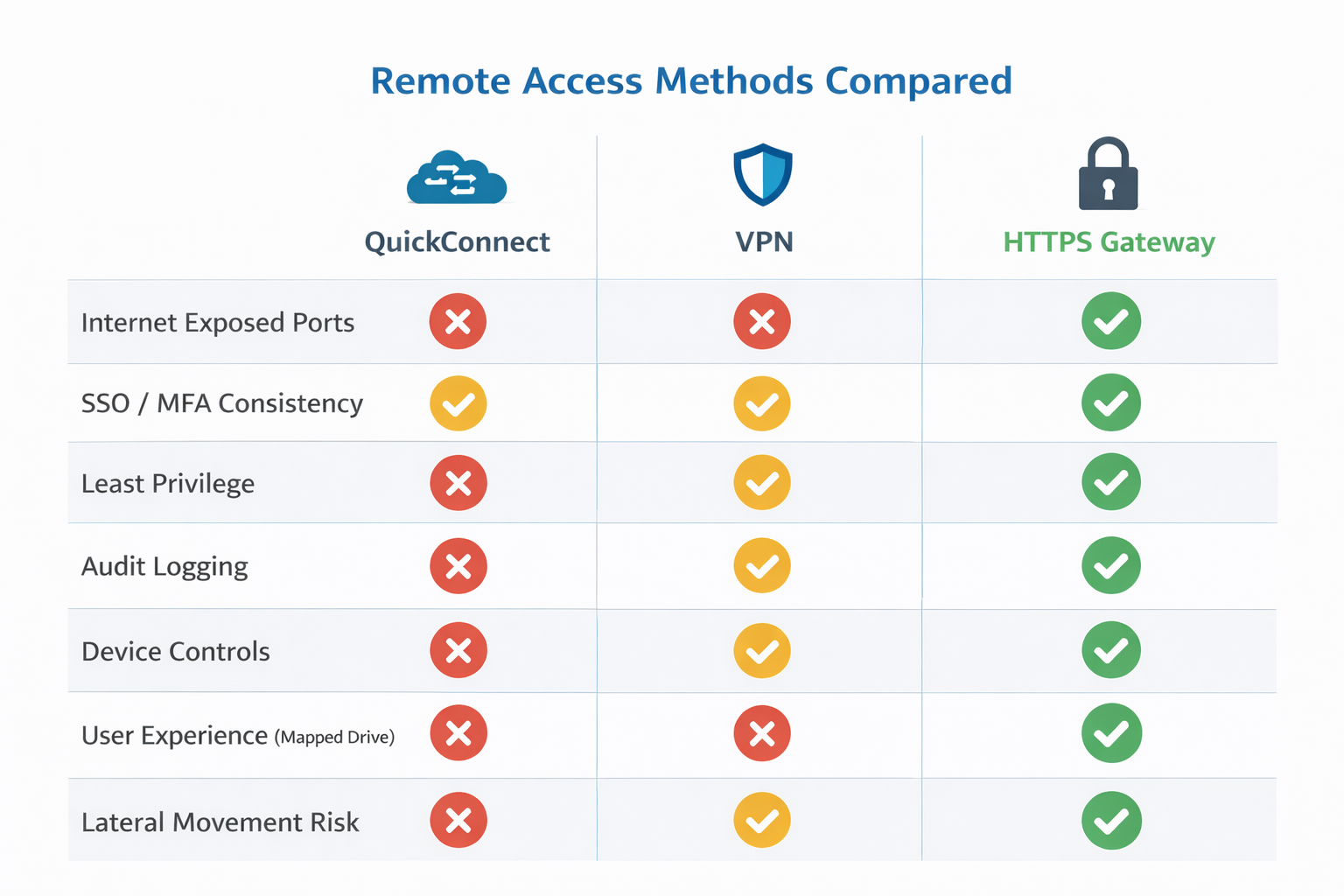
Use this checklist to implement secure Synology remote file access that holds up in enterprise environments:
-
Inventory shares and access paths
Identify which Synology shared folders are business critical, who needs access, and from where (managed laptops, BYOD, contractors). -
Choose an access method aligned to risk
Common approaches include Synology QuickConnect, a NAS hosted VPN such as the Synology VPN Server package, or HTTPS based access such as Synology WebDAV Server. For enterprise file share workflows, consider an HTTPS gateway that publishes Synology SMB shares over HTTPS 443 while keeping SMB/CIFS shares internal. -
Avoid direct SMB exposure
Keep SMB internal. Block inbound internet SMB (TCP 445) at the edge per Microsoft recommendations and use HTTPS based access patterns for remote users where feasible. -
Enforce least privilege and visibility
Tighten share permissions, reduce “everyone” style access, and require logging for access and sharing activity. -
Require strong authentication
Standardize on SSO and MFA for remote access entry points wherever possible (align policies in your identity provider, not per tool). -
Control endpoints and data movement
Use device approval, view only modes where appropriate, and reduce uncontrolled downloads for sensitive shares. -
Pilot, then scale
Start with one department, validate performance and permissions behavior, then expand with documented policy.
How MyWorkDrive helps
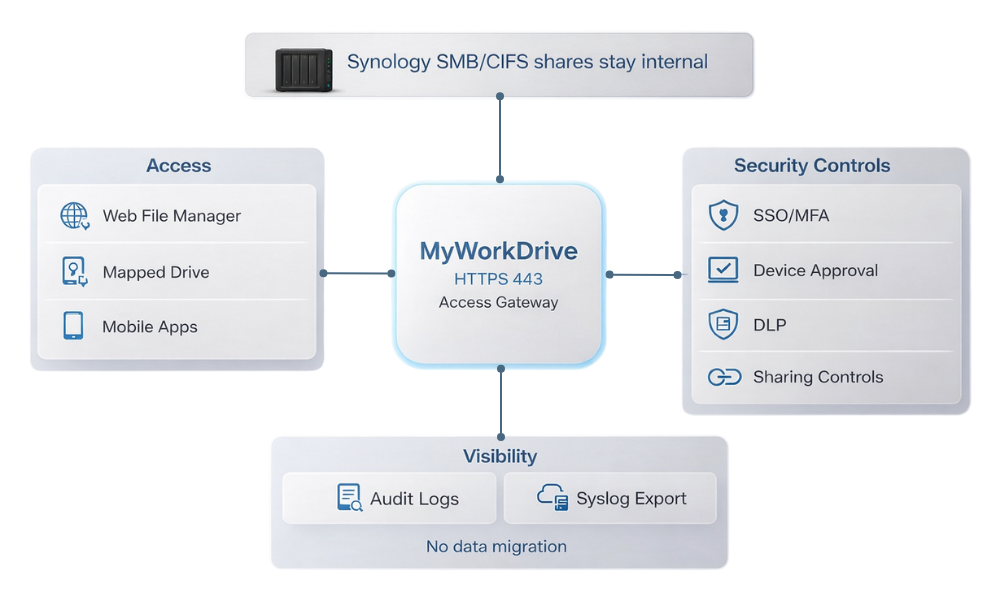
If your Synology NAS is serving SMB/CIFS shares for teams, MyWorkDrive can act as an application layer access gateway: users connect over HTTPS 443, while you maintain centralized controls and keep files on your existing storage.
Capabilities that map directly to enterprise outcomes:
-
VPN free access over HTTPS 443 to published shares, reducing reliance on SMB over the internet and minimizing inbound exposure.
-
Multiple access methods for different roles: browser access with the, mapped drive clients, and mobile apps.
-
Least privilege access tied to existing permissions with NTFS and access based behaviors described in the MyWorkDrive security overview.
-
TLS encrypted sessions in transit (see the security model in the MyWorkDrive security overview).
-
Device approval controls to reduce risk from unmanaged endpoints (see Device Approval).
-
Data Leak Prevention style controls including download restrictions and view only policies (see Data Leak Prevention).
-
Public sharing with governance controls such as passwords, expirations, and admin visibility (see Public Link Sharing controls).
-
Outbound only publishing options that avoid exposing inbound ports, including Cloudflare based methods (see publishing guidance and the Cloudflare tunneling integration).
-
Centralized auditing and investigation support through detailed logging for user actions (see Syslog integration).
Soft CTA: Enterprises evaluating secure Synology remote file access can pilot MyWorkDrive with a single share to validate security, performance, and user experience before scaling.
How it works
A typical deployment workflow for securing access to Synology hosted shares looks like this:
-
Install the gateway on a Windows Server (on premises or in your cloud environment).
-
Connect storage by publishing the SMB/CIFS shares you want users to access (for Synology, this typically means your NAS shares presented over SMB to the gateway server).
-
Integrate identity (AD, Entra ID, or SSO depending on your environment).
-
Assign access using groups and share level policies.
-
Apply controls like device approval and download restrictions where required.
-
Publish the service securely using your preferred edge method, including outbound only options described in the MyWorkDrive Server Setup Guide.
-
Roll out clients: browser, mapped drive, and mobile.
Security and compliance
Secure Synology remote file access should support a Zero Trust approach: verify explicitly, apply least privilege, and assume breach. NIST defines these principles in NIST SP 800-207 Zero Trust Architecture.
Key controls to prioritize:
-
Encrypt traffic in transit: Use TLS for all remote access paths and terminate TLS where you can inspect and log.
-
Avoid internet SMB exposure: Microsoft recommends blocking SMB (TCP 445) at the internet boundary in most environments (and note that newer Windows releases increasingly harden SMB defaults, such as signing requirements; see SMB security hardening).
-
Least privilege authorization: Ensure users only see and access what they are permitted to, and avoid network wide VPN reach for simple file tasks.
-
Centralized auditability: Capture user actions with timestamps, identities, and source context for investigations and compliance evidence.
-
Control data movement: For sensitive data sets, use view only or restricted download modes and require approved devices.
Diagram: secure Synology remote file access patterns
Preferred pattern (HTTPS gateway):
Remote user → HTTPS 443 → Access gateway → SMB internal → Synology NAS shares
Common pattern (VPN):
Remote user → VPN → Network segment → SMB internal → Synology NAS shares
Avoid (direct SMB exposure):
Remote user → SMB 445 exposed → Synology NAS shares
Use cases
-
IT administrators supporting hybrid work
Outcome: deliver consistent mapped drive access to Synology shares over HTTPS without supporting VPN clients for every endpoint. -
Security teams reducing attack surface
Outcome: keep SMB internal, reduce inbound exposure, and centralize access controls and logging. -
External contractors accessing a limited project folder
Outcome: provide time bound, governed sharing with password and expiration controls via Public Link Sharing. -
Field teams and executives on mobile devices
Outcome: secure access from iOS and Android using the official clients available on the download page, without syncing entire shares. -
Organizations standardizing Zero Trust file access to file shares
Outcome: align workflows with NIST SP 800-207 principles through explicit verification and least privilege.
FAQ
What is Synology remote file access in an enterprise context?
It is the ability to access files stored on a Synology NAS from outside the corporate network while enforcing enterprise controls: strong authentication, least privilege, encrypted transport, audit logs, and policies that limit data movement to unmanaged devices.
What are common ways to enable Synology remote file access?
Common methods include Synology QuickConnect, running a NAS hosted VPN using the Synology VPN Server package, or enabling Synology WebDAV Server. Enterprises often add an HTTPS gateway to publish SMB shares without exposing SMB.
Is it safe to expose SMB port 445?
For most organizations, no. Microsoft recommends blocking inbound SMB (TCP 445) from the internet at the perimeter and keeping SMB internal. See Microsoft’s guidance on securing SMB traffic.
How to access Synology NAS via SMB?
Use SMB/CIFS shares internally on trusted networks, then publish remote access through HTTPS or a VPN that enforces least privilege and strong identity controls.
Can Synology NAS be accessed remotely?
Yes. Options include QuickConnect, VPN, WebDAV, or an HTTPS gateway, depending on your security and workflow needs.
How to access a Synology folder remotely?
Pick an approved access method for the folder, enforce SSO/MFA where possible, and restrict downloads if the data is sensitive.
Can MyWorkDrive be used with a Synology NAS?
If your Synology shared folders are available over SMB/CIFS to a Windows Server, MyWorkDrive can publish those shares for secure Synology remote file access over HTTPS and apply controls like device approval, download restrictions, and audit logs.
Does MyWorkDrive require migrating files off the Synology NAS?
No. The Synology NAS remains the system of record, and users connect through browser, mapped drive, or mobile clients.
How can I publish remote access without opening inbound firewall ports?
Use an edge publishing method that supports outbound only connectivity, such as Cloudflare Tunnel, to publish HTTPS access without inbound port forwarding.