

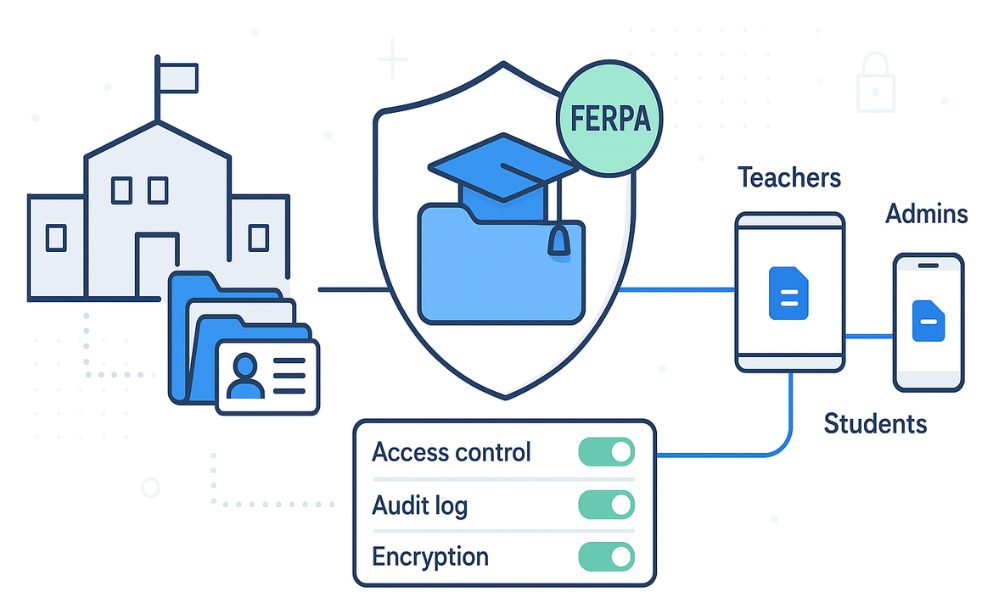
Educational institutions across the country rely on sharing data between educational agencies and partner organizations to facilitate effective teaching, administration, and student support. However, with the average cost of a data breach in education exceeding $3.7 million, protecting student data has never been more critical. The Family Educational Rights and Privacy Act (FERPA) developed to protect student data and establish strict requirements for protecting student information, yet many institutions struggle with implementing truly compliant file sharing solutions. Compliance with FERPA is not optionaland is a legal requirement for all educational institutions receiving federal funding.
Traditional file sharing methods often fall short of meeting the legal requirements for protecting student records, leaving institutions vulnerable to costly violations and federal funding loss. This comprehensive guide explores how educational institutions can achieve FERPA compliant file sharing while maintaining operational efficiency and supporting legitimate educational interest activities. Establishing comprehensive policies for handling, storing, and sharing student data, both digital and physical, and defining what constitutes a 'school official' and 'legitimate educational interest' are critical steps in achieving compliance.
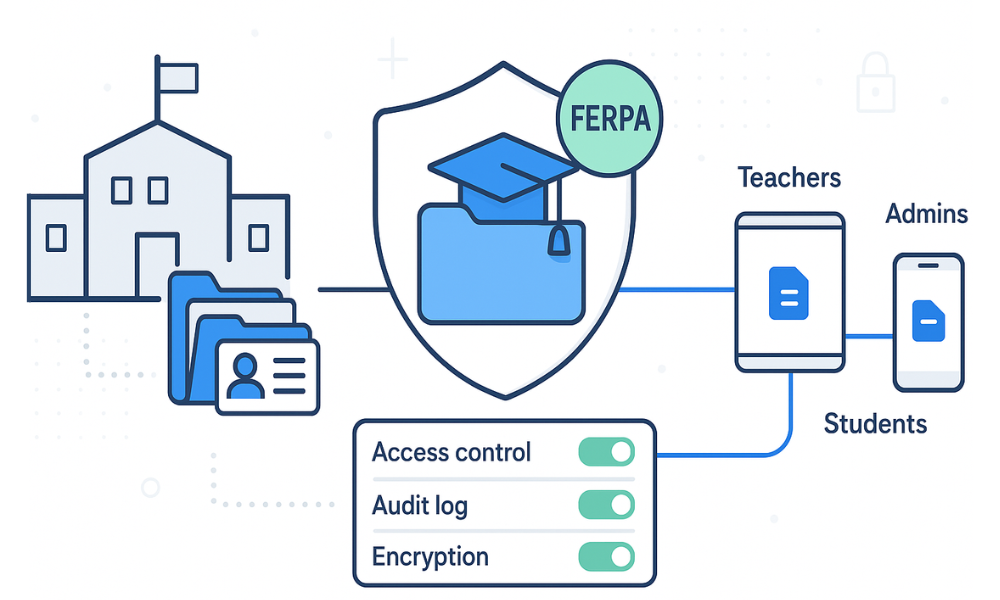
What is FERPA and Why It Matters for File Sharing
The Family Educational Rights and Privacy Act (FERPA) is a federal law enacted in 1974 that governs the privacy and data sharing of student education records in the United States. This privacy act establishes comprehensive protections for personally identifiable information contained within education records, granting specific rights to parents and eligible students regarding access to and control over their educational information.
FERPA grants parents significant rights concerning their children’s education records at educational institutions that receive federal funding. These educational rights and privacy protections transfer to students when they reach 18 years of age or attend a postsecondary institution, making them “eligible students” with direct control over their education records. The educational institution is responsible for ensuring the vendor complies with FERPA, which includes verifying that third-party service providers adhere to all legal requirements.
The core rights protected under FERPA include:
-
The right to inspect and review education records maintained by the institution
-
The right to request amendments to inaccurate or misleading information
-
The right to control most disclosures of personally identifiable information from education records
-
The right to file complaints with the U.S. Department of Education regarding alleged violations
Legal Requirements and Federal Compliance
Educational institutions receiving federal funding must comply with related federal legal requirements under FERPA or face severe consequences. The general rule under FERPA prohibits the disclosure of education records without written consent from parents or eligible students, though FERPA allows educational institutions to share information under specific circumstances with approved parties.
Violations can result in:
-
Complete loss of federal education funding
-
Legal penalties and lawsuits
-
Damage to institutional reputation
-
Costly remediation and compliance measures
The stakes are particularly high given that institutions across the country rely heavily on federal funding for operations, making FERPA compliance not just a legal obligation but a financial necessity.
Understanding FERPA Compliant File Sharing Requirements
FERPA’s scope covers all education records that contain personally identifiable information about students. These records cannot be disclosed without written consent FERPA includes exceptions for specific circumstances that permit data sharing with authorized parties under controlled conditions.
What Constitutes Education Records
Education records under FERPA include any information directly related to students and maintained by educational agencies or their authorized representatives. This encompasses:
-
Academic transcripts and grades
-
Disciplinary records and behavioral assessments
-
Health records maintained by the school
-
Financial aid and billing information
-
Student schedules and enrollment data
-
Special education files and individualized education plans (IEPs)
-
Counseling and psychological records
Written Consent Requirements
The fundamental principle governing education records is that they cannot be disclosed without written consent FERPA includes specific requirements for valid authorization. Valid consent must:
-
Be written and signed by the parent or eligible student
-
Specify the records to be disclosed
-
State the purpose of the disclosure
-
Identify the party or class of parties receiving the information
-
Include a signature and date
However, consent FERPA includes exceptions that permit data sharing in specific circumstances without prior authorization.
Legitimate Educational Interest Exception
One of the most important exceptions allows school officials with legitimate educational interest to access student information with contractors, volunteers, and other authorized personnel. This exception enables day-to-day educational operations while maintaining student privacy protection. Role-based access control (RBAC) assigns permissions based on roles rather than individuals, ensuring only authorized personnel access data, further strengthening compliance with FERPA.
A legitimate educational interest exists when school officials need to review education records to fulfill their professional responsibilities, including:
-
Classroom instruction to measure student progress and outcomes
-
Academic advising and student support services
-
Administrative functions and institutional research
-
Health or safety emergencies requiring immediate action
Directory Information vs. Protected Records
FERPA distinguishes between directory information and protected educational records. Directory information typically includes basic details like names, addresses, phone numbers, and honors that institutions may disclose without consent unless students opt out. However, most academic and behavioral information requires specific authorization or must fall under approved exceptions.
Why Traditional File Sharing Methods Fall Short of FERPA Compliance
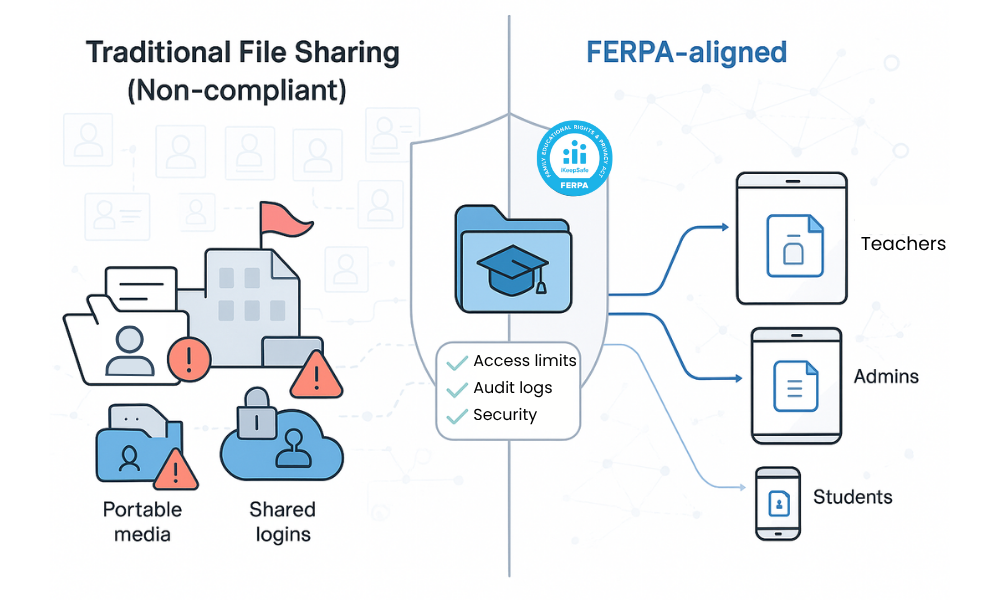
Many educational institutions still rely on outdated file sharing methods that create significant compliance gaps and expose sensitive data to unauthorized access. Understanding these limitations is crucial for institutions seeking to protect student data effectively.
Email Attachment Vulnerabilities
Email remains one of the most common methods for sharing student information, yet it presents numerous security risks:
-
Lack of encryption: Standard email transmissions are not encrypted, leaving sensitive data vulnerable during transmission.
-
Forwarding risks: Recipients can easily forward emails to unauthorized parties without institutional control.
-
Storage concerns: Email attachments may be stored indefinitely in various email systems without proper security controls.
-
No access revocation: Once sent, institutions cannot revoke access to attached files. The service should allow secure sharing with students, parents, or third parties via controlled guest accounts, not unsecured methods like unencrypted email.
-
Lack of encryption: Standard email transmissions are not encrypted, leaving sensitive data vulnerable during transmission
-
Forwarding risks: Recipients can easily forward emails to unauthorized parties without institutional control
-
Storage concerns: Email attachments may be stored indefinitely in various email systems without proper security controls
-
No access revocation: Once sent, institutions cannot revoke access to attached files
Consumer Cloud Service Limitations
Popular consumer file sharing platforms like Dropbox, Google Drive, and similar services were not designed with FERPA compliance in mind:
-
Inadequate access controls: Basic permission settings cannot provide the granular control required for legitimate educational interest
-
Missing audit trails: Limited logging capabilities make it impossible to track who accessed what information and when
-
Third-party data mining: Consumer platforms may analyze uploaded content for advertising purposes, violating student privacy
-
Geographic data storage: Files may be stored in international data centers, creating additional compliance complications
Basic FTP and File Server Shortcomings
Traditional file transfer protocols and basic file servers often lack essential security features:
-
Unencrypted transmission: Standard FTP sends data in plain text, making interception trivial
-
Weak authentication: Simple password-based access cannot provide adequate security for sensitive student information
-
No activity monitoring: Basic systems cannot track file access, downloads, or modifications
-
Limited remote access: Secure remote access often requires complex VPN configurations that create usability barriers
Data Security Requirements Gap
The fundamental issue with traditional methods is their failure to meet basic data security requirements mandated by FERPA:
-
Encryption standards: FERPA compliance requires strong encryption both in transit and at rest.
-
Access controls: Role-based permissions must restrict access based on legitimate educational interest.
-
Audit capabilities: Comprehensive logging is essential for compliance monitoring and incident response.
-
Data lifecycle management: Proper retention and secure deletion procedures are required but often missing. Managed file transfer solutions offer a higher level of control and security than standard FTP, addressing many of these shortcomings.
-
Encryption standards: FERPA compliance requires strong encryption both in transit and at rest
-
Access controls: Role-based permissions must restrict access based on legitimate educational interest
-
Audit capabilities: Comprehensive logging is essential for compliance monitoring and incident response
-
Data lifecycle management: Proper retention and secure deletion procedures are required but often missing
Essential Features of FERPA Compliant File Sharing Solutions
Achieving true FERPA compliant file sharing requires specific technical capabilities that address both security and operational requirements. Educational institutions must evaluate potential solutions against these critical features to ensure comprehensive student privacy protection.
End-to-End Encryption Standards
Data protection begins with robust encryption that protects student information throughout its entire lifecycle:
Encryption in Transit:
-
TLS 1.2 or higher for all data transmissions
-
Certificate-based authentication to prevent man-in-the-middle attacks
-
Perfect forward secrecy to protect historical communications
Encryption at Rest:
-
AES-256 encryption for stored files and databases
-
FIPS 140-2 Level 1 validated encryption modules
-
Secure key management and rotation procedures
Role-Based Access Controls
Effective access management ensures that only authorized personnel can access student records based on their legitimate educational interest.
Comprehensive Audit Logging
Maintaining detailed records of all file access and sharing activities is essential for both compliance monitoring and incident response:
-
User authentication logs: Every login attempt and session detail
-
File access tracking: Who accessed which files and when
-
Sharing activity records: All file sharing events with recipients and permissions
-
Administrative actions: System configuration changes and permission modifications
-
Failed access attempts: Security events and potential breach indicators
Multi-Factor Authentication Support
Strong authentication mechanisms protect against unauthorized access even when credentials are compromised:
-
Integration with institutional identity providers (Active Directory, LDAP)
-
Support for hardware tokens and mobile authenticator apps
-
Risk-based authentication for unusual access patterns
-
Session management with automatic timeouts
Data Loss Prevention Capabilities
Advanced DLP features help prevent both accidental and intentional data disclosure:
-
Content scanning: Automatic detection of sensitive information patterns
-
Download restrictions: Controlled file access with view-only options
-
Watermarking: Digital watermarks to track document usage
-
Screenshot prevention: Technical controls to prevent unauthorized capture
How MyWorkDrive Ensures FERPA Compliance
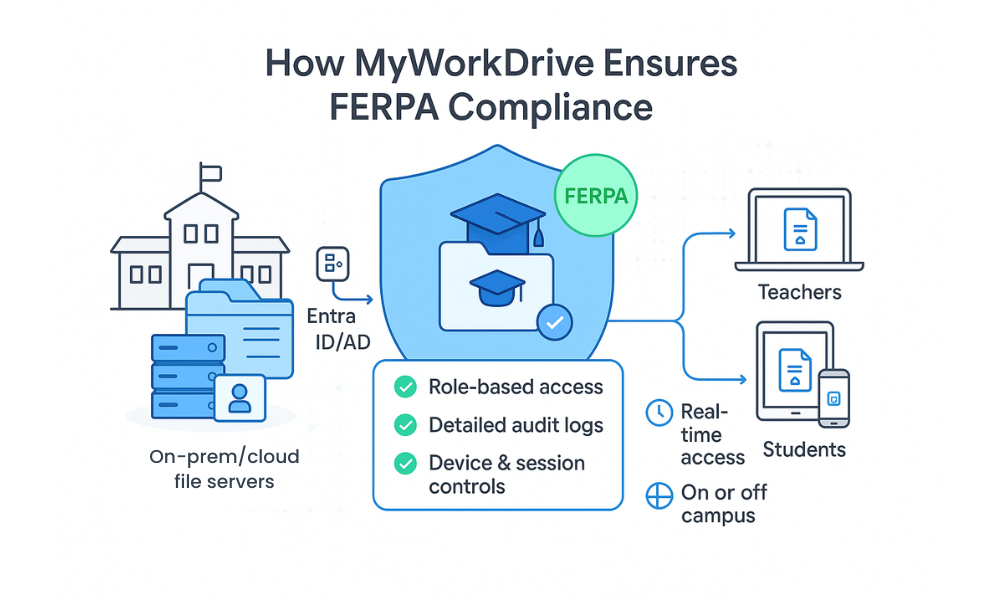
MyWorkDrive addresses the specific challenges of FERPA compliant file sharing by providing enterprise-grade security while maintaining the familiar file sharing experience educational institutions need. The platform’s architecture directly addresses each FERPA requirement while eliminating common compliance gaps.
Enterprise-Grade Security Architecture
MyWorkDrive implements military-grade security measures that exceed FERPA requirements:
FIPS 140-2 Level 1 Validated Encryption: All student data benefits from government-approved encryption standards, ensuring that personally identifiable information remains protected both in storage and during transmission.
Zero-Trust Network Architecture: The platform assumes no inherent trust and continuously validates every access request, preventing unauthorized access to education records even from compromised internal networks.
SSL/TLS Protocol Enforcement: All communications use the latest encryption protocols, protecting student information during file transfers between authorized users.
Seamless Identity Integration
MyWorkDrive integrates directly with existing institutional identity management systems, enabling precise control over who can access student records:
-
Active Directory Integration: Leverages existing user accounts and group structures
-
LDAP Support: Works with various directory services for consistent authentication
-
Single Sign-On (SSO): Reduces password fatigue while maintaining security
-
Automated User Provisioning: Streamlines access management for new staff and students
Granular Permission Controls
The platform provides sophisticated access controls that align perfectly with FERPA’s legitimate educational interest requirements:
Department-Based Access: Faculty can only access records for students in their courses or programs, automatically enforcing appropriate boundaries.
Time-Limited Permissions: Access can be configured to expire automatically, ensuring that temporary staff or contractors cannot retain long-term access to sensitive data.
File-Level Security: Individual documents can have specific sharing restrictions, allowing institutions to apply different security levels based on sensitivity.
Complete Audit Trail Compliance
MyWorkDrive maintains comprehensive logs that exceed FERPA record-keeping requirements:
-
Real-time Activity Monitoring: Every file access, download, and sharing event is immediately logged
-
Tamper-Proof Logging: Audit records cannot be modified or deleted by users
-
Compliance Reporting: Built-in reports simplify FERPA compliance audits
-
Long-term Retention: Configurable log retention meets institutional policy requirements
On-Premises Deployment Option
For institutions requiring maximum control over sensitive data, MyWorkDrive offers on-premises deployment that keeps all student information within institutional infrastructure:
-
No Data Migration Required: Files remain on existing servers and storage systems
-
Direct File Server Access: Integrates with Windows file shares without duplication
-
Institutional Control: Complete governance over data location and access policies
-
Network Isolation: Can operate entirely within institutional networks for maximum security
Implementation Best Practices for Educational Institutions
Successfully implementing FERPA compliant file sharing requires careful planning and systematic execution. These best practices help institutions avoid common pitfalls while ensuring comprehensive protection for student data.
Data Classification and Inventory
Before implementing any new file sharing solution, institutions must understand what data they’re protecting:
Conduct Comprehensive Data Audits: Identify all locations where education records are stored, including faculty computers, shared drives, and cloud services. This baseline assessment reveals the full scope of FERPA-protected information.
Classify Information Sensitivity: Categorize student data based on sensitivity levels:
-
High Sensitivity: Academic transcripts, disciplinary records, special education files
-
Medium Sensitivity: Course enrollment data, grade information, student schedules
-
Low Sensitivity: Directory information, publicly available academic achievements
Map Data Flows: Document how student information currently moves through the institution, identifying all sharing points and recipients.
Policy Development and Governance
Clear policies provide the foundation for consistent FERPA compliance:
Define Legitimate Educational Interest: Create specific criteria for determining when staff members need access to student records, including:
-
Job function requirements
-
Student interaction responsibilities
-
Administrative oversight duties
-
Emergency response situations
Establish Access Request Procedures: Implement formal processes for requesting and approving access to student records, including:
-
Written justification requirements
-
Supervisory approval workflows
-
Time-limited access grants
-
Regular access reviews
Create Data Sharing Agreements: Develop standardized agreements for sharing student information with external parties, ensuring all conditions with agencies vendors or individuals include appropriate FERPA protections.
Staff Training and Awareness Programs
Human error remains one of the largest compliance risks, making comprehensive training essential:
Role-Specific Training: Develop training programs tailored to different staff roles:
-
Faculty: Focus on classroom record management and student privacy
-
Administrators: Emphasize oversight responsibilities and reporting requirements
-
IT Staff: Concentrate on technical controls and system security
-
Support Staff: Cover basic privacy principles and incident reporting
Regular Refresher Sessions: Schedule annual training updates to address new threats, policy changes, and lessons learned from security incidents.
Incident Response Training: Prepare staff to recognize and properly respond to potential FERPA violations or security breaches.
Technology Implementation Strategy
Rolling out new file sharing technology requires careful coordination to minimize disruption while maximizing security:
Pilot Program Approach: Begin with a small group of users to test functionality and identify potential issues before full deployment.
Phased Migration: Gradually transition from existing file sharing methods to the new compliant platform:
-
Phase 1: High-sensitivity records and critical systems
-
Phase 2: General academic records and routine sharing
-
Phase 3: Archive migration and legacy system retirement
Integration Testing: Thoroughly test connections with existing systems including:
-
Student information systems
-
Learning management platforms
-
Administrative software applications
-
Backup and recovery systems
Monitoring and Continuous Improvement
FERPA compliance requires ongoing vigilance and regular assessments:
-
Regular Security Audits: Conduct quarterly reviews of access logs, permission settings, and security configurations to identify potential vulnerabilities or policy violations.
-
Compliance Assessments: Perform annual comprehensive evaluations of FERPA compliance status, including: Policy effectiveness reviews; Technology security assessments; Staff training adequacy evaluations; Incident response capability testing. Regular audits and real-time monitoring of MFT data transfers can help institutions identify potential compliance issues early.
Regular Security Audits: Conduct quarterly reviews of access logs, permission settings, and security configurations to identify potential vulnerabilities or policy violations.
Compliance Assessments: Perform annual comprehensive evaluations of FERPA compliance status, including:
-
Policy effectiveness reviews
-
Technology security assessments
-
Staff training adequacy evaluations
-
Incident response capability testing
Performance Metrics: Track key indicators of compliance health:
-
Time to provision new user access
-
Number of access request denials
-
Security incident frequency and severity
-
Staff training completion rates
MyWorkDrive’s Technical Advantages for FERPA Compliance
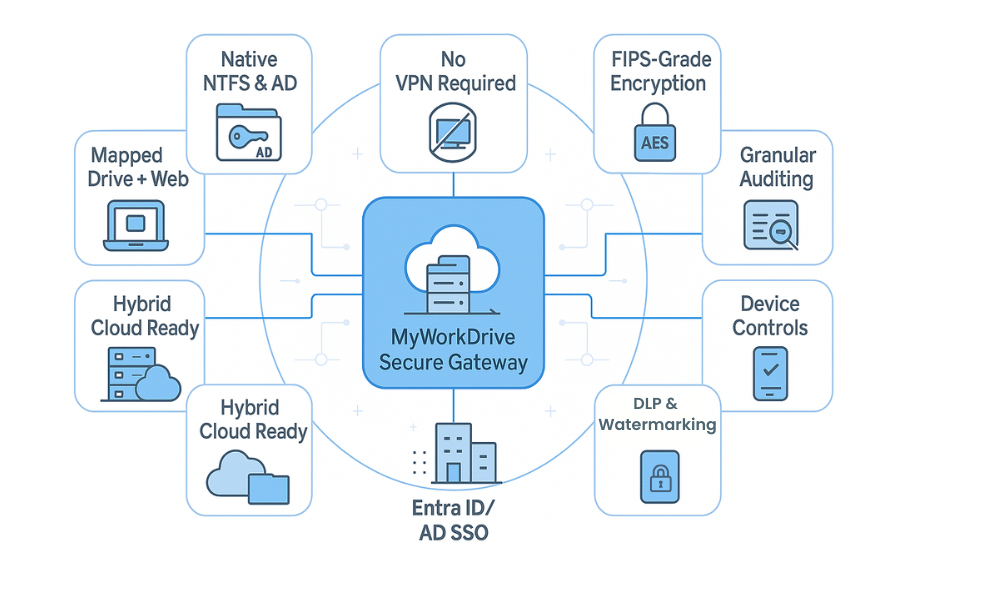
MyWorkDrive’s unique architecture provides several technical advantages that directly address the challenges educational institutions face in achieving and maintaining FERPA compliance while supporting day-to-day operations.
Direct File Server Integration
Unlike cloud-based solutions that require data migration, MyWorkDrive connects directly to existing file servers and storage systems:
No Data Duplication: Student records remain in their original, secure locations while gaining enhanced access controls and sharing capabilities. This approach eliminates the risks associated with copying sensitive data to external platforms.
Unified File Access: Faculty and staff can access all their files through a single interface, whether stored on local servers, network shares, or approved cloud storage, simplifying workflows while maintaining security.
Existing Backup Integration: Current backup and disaster recovery procedures continue to protect student data without modification, ensuring business continuity.
Advanced Encryption Implementation
MyWorkDrive implements multiple layers of encryption to protect student information throughout its lifecycle:
Transport Layer Security: All file transfers use TLS 1.3 encryption, providing perfect forward secrecy and protection against network interception.
Client-Side Encryption: Files are encrypted on user devices before transmission, ensuring that even network administrators cannot access file contents during transfer.
Encrypted Local Storage: Cached files on devices are automatically encrypted, protecting sensitive data if devices are lost or stolen.
Cross-Platform Compatibility
MyWorkDrive supports all major operating systems and devices commonly used in educational environments.
Cross-Platform Secure Access
Consistent experience, device-native security| Platform | Capabilities | Security Features |
|---|---|---|
| Windows | Full desktop integration | Active Directory authentication |
| macOS | Native file system access | Keychain integration |
| iOS | Mobile file access | Face ID or Touch ID support |
| Android | Mobile file access | Device-level encryption |
| Web Browser | Zero install web access | TLS encryption and SSO |
Administrative Control Features
Comprehensive management tools ensure that IT administrators can maintain complete oversight of file sharing activities:
Policy Enforcement: Automated enforcement of institutional policies including file size limits, sharing restrictions, and access timeouts.
Usage Analytics: Detailed reporting on file access patterns, user behavior, and system performance to support compliance monitoring and capacity planning.
Remote Management: Complete administrative control over user access, file permissions, and security settings from any location.
Cost-Effective Compliance Strategy
Implementing FERPA compliant file sharing represents a significant investment, but the costs of non-compliance far exceed the expense of proper protection. Understanding the full financial picture helps institutions make informed decisions about compliance strategies.
Avoiding Federal Funding Penalties
The financial consequences of FERPA violations can be catastrophic for educational institutions:
Federal Funding Loss: The Department of Education can withdraw all federal funding from non-compliant institutions. For many schools, this represents millions of dollars in annual operating revenue that would be impossible to replace through other sources.
Legal Defense Costs: FERPA violations often trigger lawsuits from affected families, resulting in substantial legal fees regardless of case outcomes. Defense costs can easily reach hundreds of thousands of dollars for significant breaches.
Regulatory Investigation Expenses: Department of Education investigations require extensive documentation, staff time, and often external legal counsel, creating substantial indirect costs beyond any imposed penalties.
Preventing Data Breach Expenses
The education sector faces unique risks that make data breaches particularly expensive:
Notification Requirements: FERPA violations often trigger notification requirements to thousands of affected families, creating substantial administrative and communication costs.
Credit Monitoring Services: When social security numbers or other identity information is compromised, institutions often provide credit monitoring services to affected individuals, typically costing $100-200 per person annually.
System Remediation: Recovering from security breaches requires extensive system rebuilding, security enhancements, and often complete infrastructure replacement, easily reaching millions of dollars for large institutions.
Reputation Management: The long-term impact on institutional reputation can affect enrollment, alumni donations, and community support, creating financial consequences that persist for years.
Operational Efficiency Gains
Proper file sharing solutions often improve operational efficiency while enhancing security:
Reduced IT Support: User-friendly interfaces and automated processes reduce help desk tickets and IT support requirements, freeing technical staff for strategic initiatives.
Streamlined Workflows: Efficient file sharing eliminates time-consuming workarounds and manual processes, improving productivity across the institution.
Enhanced Collaboration: Secure sharing capabilities enable better collaboration between faculty, staff, and external partners without compromising student privacy.
Scalable Investment Strategy
MyWorkDrive’s pricing model accommodates institutions of all sizes:
Per-User Licensing: Costs scale directly with usage, making the solution accessible for small schools while remaining cost-effective for large universities.
No Infrastructure Requirements: Cloud deployment options eliminate the need for additional hardware purchases or data center expansion.
Predictable Costs: Fixed monthly or annual pricing provides budget certainty without unexpected usage charges or hidden fees.
Education Discount Pricing: Educational institutions qualify for discounted pricing and complimentary setup assistance.
Real-World FERPA Compliance Scenarios
Understanding how FERPA compliant file sharing works in practice helps institutions recognize opportunities to improve their current processes while ensuring comprehensive protection for student data.
Secure Transcript Sharing Between Institutions
When students transfer between schools or apply to new institutions, sharing academic transcripts requires careful FERPA compliance:
Traditional Process Challenges: Many schools still mail paper transcripts or send unencrypted emails, creating security risks and delays.
MyWorkDrive Solution: Educational institutions can create secure, time-limited sharing links that allow receiving schools to access transcripts directly. The sharing institution maintains complete control over access duration and can revoke permissions at any time.
Compliance Benefits: Complete audit trails document exactly when transcripts were accessed and by whom, while encryption protects student information during transmission. The process meets all FERPA requirements while dramatically reducing processing time.
Faculty Collaboration on Student Records
Teachers, counselors, and administrators often need to collaborate when developing intervention strategies or academic support plans:
Legitimate Educational Interest Application: Under FERPA, multiple school officials can access the same student records when they each have legitimate educational interest in supporting that student’s success.
Secure Collaboration Process: MyWorkDrive enables faculty to share relevant portions of student files while automatically maintaining access controls. For example, a teacher can share a student’s academic performance data with a counselor without providing access to unrelated disciplinary records.
Privacy Protection: Role-based permissions ensure that each collaborator can only access information directly related to their professional responsibilities, maintaining strict FERPA compliance while enabling effective teamwork.
Parent Access to Student Records
K-12 institutions must provide parents with appropriate access to their children’s education records while protecting other students’ privacy:
Controlled Parent Portals: MyWorkDrive can create shareable secure parent access folders where families can view their child’s academic records, attendance information, and relevant communications.
Privacy Boundaries: The system automatically filters out information about other students, ensuring that parents only see records relating to their own children.
Access Documentation: Complete audit trails document all parent access to student records, supporting compliance monitoring and addressing any future disputes about information disclosure.
Compliance Audits and External Reviews
Educational institutions regularly undergo compliance audits that require sharing student records with authorized external reviewers:
Audit or Evaluation Exception: FERPA permits institutions to share student records with external auditors and evaluators studying educational programs, measuring their effectiveness of educational programs, or helping programs enforce or comply with federal regulations.
Controlled External Access: MyWorkDrive enables institutions to provide auditors with secure, time-limited access to relevant student records without compromising ongoing security.
Comprehensive Documentation: Detailed logs of all auditor access support the institution’s compliance documentation while ensuring that external reviewers cannot retain copies of sensitive information beyond the audit period.
Special Education File Management
Special education records require particularly careful handling due to their sensitivity and the multiple professionals involved in student support:
Multi-Disciplinary Teams: Special education often involves teachers, therapists, administrators, and external service providers who all need access to relevant portions of student files.
Granular Permissions: MyWorkDrive’s role-based access controls can provide each team member with access to only the specific information they need for their role, such as giving speech therapists access to evaluation reports while restricting access to unrelated academic records.
Longitudinal Record Management: The system maintains complete histories of file access and modifications, supporting the detailed documentation requirements common in special education compliance.
Getting Started with FERPA Compliant File Sharing
Transitioning to FERPA compliant file sharing requires systematic planning and careful execution. This practical roadmap helps educational institutions implement comprehensive student data protection while maintaining operational efficiency. Developing a formal data breach response plan to manage security incidents swiftly and effectively is essential to minimize potential damage and ensure compliance with FERPA.
Assessment Checklist for Current Practices
Before implementing new solutions, institutions must understand their existing compliance gaps and security vulnerabilities:
-
Data Location Inventory:
-
Identify all locations where education records are stored.
-
Document current file sharing methods and platforms.
-
Catalog cloud services and external platforms in use.
-
Shared folders containing student data.
-
Review email practices for sharing student information.
-
-
Policy and Training Review:
-
Review existing FERPA policies and procedures;
-
Assess staff training programs and completion rates;
-
Evaluate incident response procedures and notification processes;
-
Examine contracts with third-party vendors and service providers;
-
Review data retention and secure destruction policies. Conducting mandatory, regular FERPA training for all staff, including teachers, administrators, and IT personnel, to cover practical scenarios regarding data sharing and privacy is a critical step in this process.
-
Data Location Inventory:
-
Identify all locations where education records are stored
-
Document current file sharing methods and platforms
-
Catalog cloud services and external platforms in use
-
Map network drives and shared folders containing student data
-
Review email practices for sharing student information
Security Assessment:
-
Evaluate current encryption practices for data at rest and in transit
-
Review access control mechanisms and user permission structures
-
Assess audit logging capabilities and retention policies
-
Test authentication systems and password policies
-
Examine backup and disaster recovery procedures
Policy and Training Review:
-
Review existing FERPA policies and procedures
-
Assess staff training programs and completion rates
-
Evaluate incident response procedures and notification processes
-
Examine contracts with third-party vendors and service providers
-
Review data retention and secure destruction policies
Implementation Steps for MyWorkDrive
Successful deployment requires careful coordination between IT, administration, and end users:
Phase 1: Planning and Preparation (Weeks 1-2)
-
Technical Assessment: Evaluate existing infrastructure compatibility and integration requirements
-
Pilot Group Selection: Choose a diverse group of users representing different roles and use cases
-
Policy Alignment: Review and update institutional policies to reflect new security capabilities
-
Training Material Development: Create role-specific training materials and user guides
Phase 2: Pilot Deployment (Weeks 3-4)
-
System Installation: Deploy MyWorkDrive in a controlled environment with limited users
-
Integration Testing: Verify connections with Active Directory, file servers, and other systems
-
User Acceptance Testing: Gather feedback from pilot users on functionality and usability
-
Security Validation: Confirm that all security controls are functioning correctly
Phase 3: Production Rollout (Weeks 5-8)
-
Gradual User Migration: If needed, move users from existing systems to MyWorkDrive
-
Legacy System Retirement: Safely decommission non-compliant file sharing methods
-
Full Training Deployment: Conduct comprehensive training sessions for all user groups
-
Compliance Verification: Validate that all FERPA requirements are being met
Migration Strategies from Existing Systems
Transitioning from non-compliant systems requires careful data handling to maintain security throughout the process:
Email Attachment Replacement: Identify faculty and staff who regularly share student records via email and provide training on secure sharing alternatives through MyWorkDrive.
Consumer Cloud Service Migration: For institutions using services like Dropbox or Google Drive for student records, implement controlled migration processes that ensure no sensitive data remains on unauthorized platforms.
File Share Modernization: Upgrade existing network file shares with enhanced security while maintaining familiar user experiences through MyWorkDrive’s native mapped drive experience.
Staff Training and Change Management
Successful implementation depends heavily on user adoption and proper security practices:
Role-Based Training Programs:
-
Faculty Training: Focus on classroom applications, grade sharing, and parent communication
-
Administrative Training: Emphasize compliance monitoring, audit procedures, and policy enforcement
-
IT Staff Training: Cover technical configuration, troubleshooting, and security monitoring
-
Support Staff Training: Address basic security principles and incident reporting procedures
Change Management Strategies:
-
Executive Sponsorship: Ensure visible leadership support for the new system
-
Champion Networks: Identify enthusiastic early adopters to support their colleagues
-
Feedback Mechanisms: Create channels for users to report issues and suggest improvements
-
Success Communication: Regularly share positive outcomes and compliance achievements
Ongoing Monitoring and Verification
FERPA compliance requires continuous attention and regular assessment:
Daily Monitoring Tasks:
-
Review security alerts and unusual access patterns
-
Monitor system performance and user experience
-
Verify backup completion and data integrity
-
Track user training completion and compliance
Weekly Review Activities:
-
Analyze access logs for compliance verification
-
Review and approve new user access requests
-
Update security configurations based on emerging threats
-
Communicate with stakeholders about system performance
Monthly Compliance Assessments:
-
Conduct comprehensive audit log reviews
-
Test incident response procedures and notification systems
-
Review vendor compliance and contract performance
-
Update policies and procedures based on lessons learned
Annual Strategic Reviews:
-
Comprehensive FERPA compliance audit
-
Technology refresh and upgrade planning
-
Staff training effectiveness assessment
-
Institutional policy and procedure updates
The implementation of FERPA compliant file sharing represents a critical investment in protecting student data while enabling modern educational collaboration. MyWorkDrive’s comprehensive approach addresses every aspect of FERPA compliance from technical security requirements to operational best practices, providing educational institutions with the tools they need to protect student privacy while supporting academic excellence.
Educational institutions that implement proper data security measures protect not only their students’ sensitive data but also their own operational sustainability and reputation. The combination of regulatory compliance, enhanced security, and improved operational efficiency makes FERPA compliant file sharing an essential investment for any institution serious about protecting student privacy and maintaining federal funding eligibility.
By following these implementation guidelines and leveraging MyWorkDrive’s specialized capabilities, educational institutions can achieve comprehensive FERPA compliance while providing faculty, staff, and students with the secure, efficient file sharing capabilities they need to succeed in today’s digital learning environment.
FERPA Compliant File Sharing FAQ
1. What is FERPA compliant file sharing?
FERPA compliant file sharing is the secure transmission, storage, and access of student education records in a way that meets all requirements of the Family Educational Rights and Privacy Act (FERPA). It ensures that personally identifiable information in education records is only shared with authorized parties, for a legitimate educational interest, using technical and administrative safeguards such as encryption, access controls, and audit logs.
2. Why is FERPA compliant file sharing important for schools and districts?
FERPA compliant file sharing protects student privacy, reduces the risk of data breaches, and helps institutions avoid loss of federal funding and costly remediation efforts. It also supports trust with students, parents, and regulators by demonstrating that the institution treats education records as highly sensitive data and manages them through controlled, auditable processes.
3. What types of student information are covered by FERPA?
FERPA covers any education record that is directly related to a student and maintained by a school, district, or an authorized third party. This includes transcripts, grades, disciplinary records, attendance, special education files and IEPs, health and counseling records maintained by the school, financial aid information, and class schedules. Most of this information cannot be shared unless there is written consent or a clearly documented FERPA exception, such as a legitimate educational interest.
4. Are email attachments FERPA compliant for sharing student records?
Standard email is rarely FERPA compliant for sharing student records. Typical email systems lack enforced encryption, granular access controls, and centralized audit logs. Once an email is sent, it can be forwarded, stored indefinitely, or accessed on unsecured devices, which undermines FERPA requirements. Institutions should avoid sending student records as regular email attachments and instead use a secure, FERPA-compliant file sharing platform that supports access revocation, strong authentication, and logging.
5. Can I use consumer cloud storage (e.g., Dropbox or Google Drive) for FERPA compliant file sharing?
Consumer-grade cloud storage services are generally not appropriate for FERPA compliant file sharing. They often lack the granular role-based access controls, detailed audit trails, and contractual protections required for education records. Some enterprise versions of cloud services can be configured for compliance, but institutions must ensure proper configurations, disable public links, and have signed agreements in place before storing or sharing FERPA-protected data in the cloud. A purpose-built secure file sharing solution designed for education typically provides a more controlled and auditable environment.
6. What technical features should a FERPA compliant file sharing solution include?
A FERPA compliant file sharing solution should provide strong encryption in transit (TLS 1.2+ or TLS 1.3) and at rest, granular role-based access controls, and comprehensive audit logging of all file access and sharing activity. It should integrate with institutional identity systems such as Active Directory or Entra ID, support multi-factor authentication, and offer data loss prevention capabilities such as view-only access, download restrictions, and watermarking. Centralized administration, policy enforcement, and flexible deployment options (including on-premises) are also critical.
7. How do “school official” and “legitimate educational interest” affect file sharing under FERPA?
Under FERPA, a “school official” can include teachers, administrators, support staff, contractors, and service providers performing institutional services. A “legitimate educational interest” exists when that person needs access to specific education records to perform their professional responsibilities. FERPA compliant file sharing must enforce this principle through role-based permissions so that users only see the minimum records required for their role, and all access is logged and reviewable.
8. Do third-party vendors need formal agreements to support FERPA compliant file sharing?
Yes. When third-party vendors host, process, or access education records, schools must ensure those vendors are contractually bound to comply with FERPA. Agreements should clearly define the vendor’s role as a school official, restrict use of data to specified purposes, require appropriate security controls, and mandate breach notification procedures. Institutions should also verify that vendors can provide detailed logs and documentation to support FERPA compliance reviews.
9. How does MyWorkDrive help institutions achieve FERPA compliant file sharing?
MyWorkDrive provides a secure gateway to existing on-premises file servers and approved cloud storage, enabling FERPA compliant file sharing without migrating data to a new platform. It leverages native NTFS and Active Directory permissions, enforces encryption and multi-factor authentication, and records detailed audit logs for every access and sharing event. Features such as granular permission settings, data loss prevention, and on-premises deployment options help institutions align day-to-day file access with FERPA’s legitimate educational interest and record-keeping requirements.
10. Is a VPN alone enough to make file sharing FERPA compliant?
A VPN by itself does not guarantee FERPA compliant file sharing. While a VPN encrypts network traffic, it does not provide fine-grained access controls, document-level audit trails, or data loss prevention. Users connected via VPN can often browse large portions of the network, forward files, or store copies on personal devices without institutional oversight. FERPA compliant file sharing requires application-level security controls, detailed logging, and governance features that go beyond what a VPN provides.
11. What are best practices for staff training around FERPA compliant file sharing?
Best practices include mandatory, role-specific training for faculty, administrators, IT staff, and support personnel on how to handle education records securely. Training should explain which data is protected, when written consent is required, how to use the approved FERPA compliant file sharing system, and how to avoid risky practices such as sending records via unencrypted email or using personal cloud accounts. Regular refreshers, short scenario-based exercises, and clear incident reporting procedures help keep FERPA compliance top of mind.
12. How can we move from legacy file sharing tools to a FERPA compliant solution?
Start by inventorying where education records reside (network shares, email archives, cloud folders, and local devices) and mapping current sharing flows. Next, adopt a FERPA compliant file sharing platform that integrates with your existing file servers and storage, then migrate high-risk use cases first, such as transcript sharing, special education records, and cross-institution collaboration. Phase out non-compliant tools, update policies and procedures, and provide hands-on training so that staff can confidently use the new system while meeting FERPA requirements.
13. Does FERPA compliant file sharing support remote and hybrid learning?
Yes. Modern FERPA compliant file sharing solutions provide secure access to education records from any authorized device, including laptops, tablets, and smartphones, without exposing internal networks or requiring complex VPN configurations. By combining strong authentication, encryption, and granular access controls, institutions can support remote instruction, online advising, and virtual student services while maintaining full compliance with FERPA.