Aec File Sharing Solution

Date November 21, 2025
Azure Files architecture showing on-prem cache and cloud sync

Key Takeaways

  • An AEC file sharing solution must handle two very different workloads: live CAD/BIM models and everything else (RFIs, submittals, Office documents, PDFs, photos, contracts, archives).

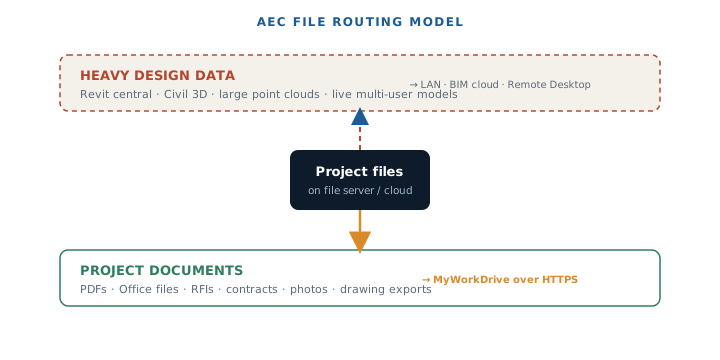
  • Heavy multi-file design workloads such as Revit, Civil 3D, and large point clouds are usually not suitable for generic HTTPS or VPN style remote access and are best handled on a fast LAN, in vendor hosted BIM collaboration platforms, or via remote desktop. This applies to MyWorkDrive and VPNs alike, due to latency and how these applications expect to talk to storage.

  • MyWorkDrive excels as the secure AEC file sharing solution for the majority of project data: Office documents, PDFs, specifications, contracts, photos, RFIs, transmittals, and other project files that do not require LAN-grade transactional access. Files stay on existing Windows file servers or cloud storage while users connect without VPN.

  • Administrators can use MyWorkDrive block and allow lists, along with file size controls, to prevent unsupported or very large design files from being opened over the internet and to steer users toward supported workflows such as remote desktop for CAD/BIM.

  • Compared to pure cloud sync tools, MyWorkDrive provides a private cloud model: no data migration, direct integration with Active Directory or Entra ID, and strong security controls for regulated AEC customers that must keep file servers under their own custody.

The architecture engineering and construction industry faces unique challenges when it comes to file sharing and data management. Project teams must collaborate across different locations, managing everything from massive CAD files to sensitive project documents while maintaining strict security and compliance standards. Unlike other industries that primarily deal with standard office documents, AEC projects involve complex file types that require specialized handling and infrastructure considerations.

Traditional approaches to AEC file sharing often fall short, creating bottlenecks that impact project deadlines and team productivity. The industry needs solutions that can handle both the technical demands of large files and the collaborative requirements of distributed teams working on time-sensitive projects.

What Is an AEC File Sharing Solution?

An AEC file sharing solution represents a combination of storage, network, and collaboration tools that allows architecture, engineering, and construction teams to access, share, and control project files across offices, job sites, and remote staff. These platforms must accommodate the unique demands of AEC workflows while providing the security and compliance features essential for project success.

The typical file landscape in AEC projects includes CAD files like DWG and DGN formats, AutoCAD files that are critical for design and collaboration, BIM models such as RVT and IFC files, Civil models, GIS datasets, point clouds, PDFs, Office files, images, RFIs, and contract packages. Each file type presents different challenges for remote access and collaboration.

Modern AEC file sharing solutions employ several architectural patterns to address these diverse needs:

  • Vendor hosted BIM collaboration platforms for live models that require real-time multi-user editing

  • Streaming or cache oriented file systems designed specifically for large design workloads, including working on AutoCAD files in the cloud and managing DWG file versions

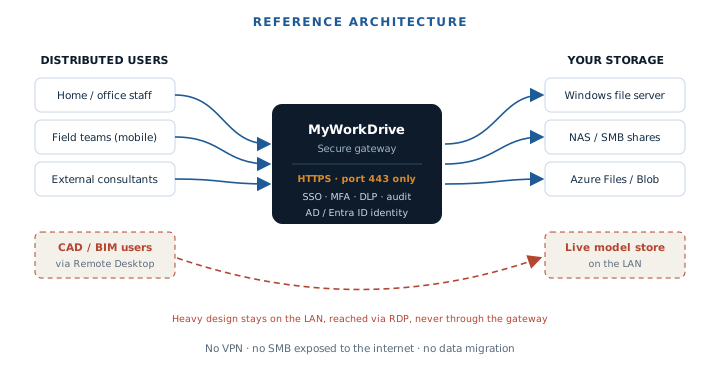
  • Secure remote file access gateways such as MyWorkDrive that expose existing SMB file shares over HTTPS without VPN or sync requirements

A modern AEC file sharing solution should serve as one source for all digital content, ensuring that teams always have access to the most current and accurate information.

The key requirement for any effective AEC file sharing solution is aligning each file type with a network pattern it can safely support, rather than assuming one tool can handle all AEC workloads efficiently. Maintaining one version of each file is also crucial to reduce errors and enhance collaboration across distributed teams.

A construction team is gathered at an active job site, using tablets to access project files and sensitive project information. They are collaborating in real-time, managing project data and documents efficiently to meet project deadlines and enhance productivity.

AEC File Types and Remote Access Limitations

Categories of AEC Files

AEC projects generate two distinct categories of files that require different handling approaches. Live multi-user design data includes Revit central models and worksharing folders, Civil 3D and infrastructure models, and large point clouds and reference datasets that require constant, low-latency access for collaborative editing.

Supporting project documentation encompasses Word, Excel, PowerPoint, and PDF documents, specifications, contracts, RFIs, submittals, meeting minutes, photos, markups, site reports, and as-built documentation. These files typically don’t require the same level of network performance as active design files.

Why Some File Types Are Not Suitable for Generic Remote Access

Applications such as databases, accounting systems, Outlook PST files, and many design tools are built for constant low-latency LAN access or at most SMB on a local network. MyWorkDrive converts SMB access into HTTPS on demand rather than pre-syncing entire datasets, but this traffic is subject to firewalls, WAFs, and endpoint inspection, which adds latency and can interrupt very chatty protocols.

Traditional remote access methods often require downloading large files, which can lead to delays and duplicate files. In contrast, modern solutions can stream data on demand, enabling instant access and reducing these issues.

The average home internet connection, providing about 100 Mbps down and 20 Mbps up, is far slower and higher latency than a 1 Gbps office LAN. This makes short-timeout applications prone to failures, corruption, or severe performance problems when used directly over the internet connection.

Autodesk and other vendors generally recommend that live CAD/BIM models be accessed on a fast LAN, in their own collaboration clouds, or via remote desktop, not over generic VPN or HTTPS gateways. This guidance applies to most complex design workflows that involve frequent file locking and unlocking operations.

MyWorkDrive’s Position on Unsuitable File Types

MyWorkDrive documentation on limitations for opening certain file types clearly states that multi-user databases, large media, and design files should be opened only via vendor recommended networking methods or remote desktop, not directly through MyWorkDrive’s web interface.

A default block list includes QuickBooks, Microsoft Access, PST files, and similar workloads that do not tolerate WAN latency. AEC environments can extend this blocking to specific CAD or BIM extensions if required to enforce proper workflow patterns.

The recommended pattern for heavy design work involves keeping live models on a LAN or in BIM collaboration services, providing remote users with remote desktop or VDI access to an environment on the same LAN as those models, and using MyWorkDrive for project documents, PDFs, exports, and other files that are safe and efficient to open over HTTPS.

Core Capabilities of an AEC File Sharing Solution

Performance and Large File Handling

General requirements for AEC file sharing include efficient handling of multi-gigabyte files without constant full downloads, caching strategies to reduce repeated transfers for frequently used data, and sensible guardrails for file sizes that are realistic over internet links.

MyWorkDrive addresses these performance needs through optimized SMB over HTTPS for file server workloads, making it ideal for Office documents, PDFs, photos, and typical project documentation. The platform includes the ability to block specific file types and very large files to prevent scenarios that would be slow or unsafe over internet connections.

Additionally, MyWorkDrive provides guidance and tooling for redirecting unsuitable CAD/BIM workflows to remote desktop or local LAN sessions, ensuring that each file type uses the most appropriate access method for optimal performance and data integrity.

File Locking and Version Control

Effective AEC file sharing requires centralized version control and locking to avoid overwrites when multiple team members open the same file. The system must also maintain awareness of application-specific locking behaviors, as Office applications handle file locking differently than CAD software.

MyWorkDrive provides file locking and version conflict prevention for supported file types such as Office documents when accessed via web, mapped drive, or mobile clients. The platform supports co-authoring in Office 365 and Office Online Server, allowing real time editing of Word, Excel, and PowerPoint files stored on existing SMB shares.

However, MyWorkDrive recommends against using legacy peer-to-peer sharing modes, such as Excel legacy shared workbooks, and unsupported design tools via the platform due to how they handle locking and network traffic patterns that aren’t optimized for internet-based access.

Security and Compliance

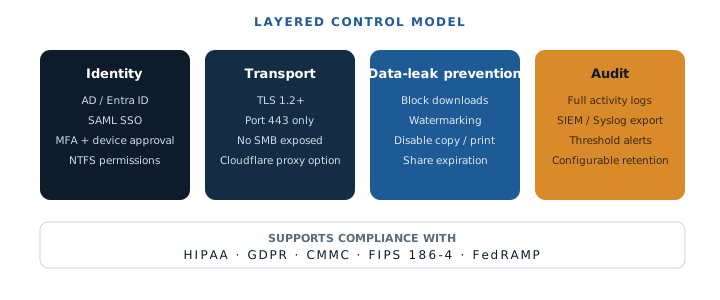
AEC projects often involve sensitive project information that requires strong authentication through SSO and MFA, encrypted transport, and centralized policy enforcement. Detailed audit trails for user activity across projects and shares are essential for compliance and accountability. The platform helps a firm maintain compliance and protect against legal risks by ensuring all access and activity are monitored and controlled according to regulatory requirements.

Support for data residency and “data never leaves our environment” requirements is common in AEC, government, and regulated sectors where project data must remain under strict organizational control.

MyWorkDrive integrates with Active Directory or Entra ID for identity management, with support for SAML SSO, two factor authentication, and granular NTFS permission enforcement. The platform provides data leak prevention controls, watermarking, share expiration, and device approval features to align with standards such as HIPAA, GDPR, CMMC, and industry best practices.

Importantly, MyWorkDrive keeps files on existing file servers or cloud file shares that you control, allowing AEC firms to satisfy data sovereignty and contractual custody requirements without forcing data migration to third-party platforms.

The image depicts a secure office environment where team members are collaboratively working on project documents across various devices, ensuring efficient file sharing and management of sensitive project information. The scene highlights the importance of real-time insights and external collaboration in architecture, engineering, and construction (AEC) workflows.

Integration with AEC Tooling and Infrastructure

Modern AEC file sharing solutions must provide compatibility with Windows file servers, NAS systems, cloud file shares like Azure Files and AWS FSx, and existing backup strategies. The ability to coexist with BIM collaboration platforms such as Autodesk Construction Cloud and BIM Collaborate is essential without forcing data migration.

MyWorkDrive publishes SMB file shares via web, mapped drive, and mobile clients, supporting storage back ends including Windows file servers, Azure Files, and Azure Blob storage. The platform can sit alongside BIM and CAD collaboration platforms, providing a single secure gateway for the rest of the project file landscape without duplicating large design datasets.

This integration approach allows organizations to maintain their existing infrastructure investments while adding secure remote access capabilities for the document-centric aspects of their project workflows.

Centralized File Management in AEC Environments

Centralized file management is a cornerstone of successful architecture, engineering, and construction (AEC) projects. With multiple teams and stakeholders working across different phases and locations, having a single source of truth for all project files and documents is essential. A centralized file management system ensures that every team member—whether in the office, on site, or working remotely—can access the most current versions of project documents, reducing the risk of errors and miscommunication.

By consolidating project files in one platform, AEC firms can streamline workflows and improve collaboration between architects, engineers, contractors, and external partners. This approach not only boosts productivity but also supports compliance by maintaining detailed audit trails and robust version control. Centralized management makes it easier to track changes, manage permissions, and ensure that sensitive data is only accessible to authorized users, significantly reducing compliance risks.

For AEC teams, the ability to manage and organize files efficiently means fewer delays, less confusion, and a smoother project delivery process. With all project data managed in a centralized system, firms can minimize the risk of data loss or corruption, maintain consistent folder structures, and ensure that every document is accounted for throughout the project lifecycle. Ultimately, centralized file management empowers AEC businesses to deliver projects with greater accuracy, efficiency, and confidence.

How MyWorkDrive Fits as an AEC File Sharing Solution

MyWorkDrive’s Role in an AEC Architecture

MyWorkDrive acts as a secure gateway to existing Windows file servers and cloud file shares, specifically optimized for contracts, RFIs, submittals, and specifications, meeting minutes, change orders, and correspondence, PDF drawing sets, redlines, and markups exported from CAD/BIM tools, and photos, inspection reports, schedules, and spreadsheets.

The platform provides a VPN alternative for project stakeholders, allowing external consultants, owners, and field staff to reach approved shares without granting full VPN access to the entire network infrastructure. This approach reduces security risks while maintaining productivity for distributed teams.

For live design collaboration, the recommended approach involves keeping Revit, Civil 3D, and similar models on a high speed LAN or vendor BIM cloud, while using vendor supported collaboration services or remote desktop sessions for day-to-day modeling work.

Supporting documentation should be stored on SMB shares fronted by MyWorkDrive, allowing the platform to handle secure access, sharing, co-authoring, and mobile access to those documents. Governance can be enforced through MyWorkDrive block lists and file size policies to prevent accidental opening of unsupported design file types over the internet.

Where MyWorkDrive Shines for AEC Teams

MyWorkDrive excels in scenarios requiring no data migration, allowing teams to keep file servers and permission models they already have, including project folders structured by client, project, and discipline. The familiar mapped drive and web interface reduces training time for architects, engineers, and contractors.

The platform provides a strong fit for compliance-focused AEC customers that must demonstrate auditability, least privilege access, and control over where data resides. This is particularly important for firms working on government projects or in regulated industries with strict data custody requirements.

A mobile device displays project documents being accessed from a construction site, showcasing the seamless file sharing and management capabilities for architecture, engineering, and construction (AEC) teams. The image illustrates the importance of real-time access to sensitive project data and collaboration among external partners, ensuring compliance and efficient workflows.

Benefits for AEC Teams and Projects Using MyWorkDrive

Enhanced Remote Collaboration

Project teams can access documents from office, home, or job site as if they were on the local network, without requiring VPN connections that often create performance bottlenecks. External parties including consultants, clients, and inspectors can be granted scoped access to project folders without replicating data to third party sync platforms.

Co-authoring capabilities in Office 365 provide real time updates for specifications, meeting notes, and registers, reducing version conflicts that commonly plague AEC projects. This real time collaboration capability is particularly valuable during design development and construction administration phases.

Cost and Complexity Reduction

Organizations can reuse existing file servers and backup systems instead of standing up new sync platforms for general project files. This approach reduces VPN, VDI, or separate cloud drive licenses for non-design staff who primarily need access to documents and PDFs rather than live CAD models.

Centralized security policy management eliminates the need to manage multiple disparate storage silos, reducing IT overhead and improving compliance posture across all project data.

Project Efficiency and Risk Reduction

Maintaining a single source of truth on existing SMB shares ensures that the latest documents are always accessible through MyWorkDrive, eliminating confusion about which version of a specification or drawing set is current.

Granular permissioning and DLP features reduce accidental oversharing of sensitive design and commercial information, while guardrails around unsuitable file types and file sizes help avoid corruption or performance issues for CAD/BIM files by directing those workloads to the correct tools and platforms.

Common Pain Points in AEC File Sharing

File sharing in the AEC industry comes with a unique set of challenges that can hinder project progress and collaboration. One of the most significant pain points is the need to transfer large files—such as design files, point clouds, and high-resolution project documents—between teams and external partners. Traditional file sharing methods often struggle with these large files, leading to slow transfers, failed uploads, and wasted time.

Another common issue is version control. With multiple team members working on the same files, version conflicts and accidental overwrites can occur, resulting in errors and lost work. Managing different versions of files across various platforms or email threads increases the risk of confusion and mistakes, especially when project deadlines are tight.

Security and compliance are also major concerns. Sharing sensitive project data with external partners or across distributed teams can expose firms to data breaches and compliance risks if not managed properly. Ensuring that only authorized users have access to specific project documents is critical, but difficult to enforce with ad hoc or outdated file sharing solutions.

These challenges highlight the need for a robust, centralized file sharing platform that can handle large files, provide secure and efficient file transfers, and offer comprehensive version control. By addressing these pain points, AEC teams can reduce errors, improve collaboration, and ensure that project data remains secure and compliant throughout the project lifecycle.

Use Cases by AEC Segment

Architecture Firms

Architecture firms benefit from centralized storage for proposals, design briefs, planning submissions, and presentation decks that need to be shared securely with clients and consultants. The platform enables secure delivery of design PDFs and image boards to clients without relying on ad hoc file transfer sites that may not meet security standards.

Hybrid environments work particularly well where live Revit or ArchiCAD models stay in BIM collaboration platforms for real-time design work, while all related documentation flows through MyWorkDrive for secure access and collaboration on supporting materials.

Engineering Companies

Engineering firms use MyWorkDrive for sharing analysis reports, spreadsheets, and calculation packages with internal and external stakeholders while maintaining strict access controls. The platform manages Civil design outputs, typical detail libraries, and standards in secure, searchable SMB shares that integrate with existing workflows.

Field engineers can access current PDFs, spreadsheets, and inspection templates on tablets or phones via MyWorkDrive mobile apps, ensuring they always have the latest project documentation available on site without compromising security.

Construction Contractors

Construction contractors benefit from a central document hub for RFIs, submittals, change orders, and site instructions that can be accessed by both office and field teams. Job site access to drawings in PDF form, along with checklists, health and safety documents, and quality records, improves project coordination and compliance.

The platform supports audit-friendly sharing of handover documentation with owners and facility managers at project closeout, ensuring all parties have access to final documentation while maintaining appropriate access controls and audit trails.

An engineering team is gathered around a table, intently reviewing technical drawings and project documents on various devices, including laptops and tablets. They are collaborating on sensitive project information and ensuring compliance with project deadlines while managing large files and maintaining version control in their architecture, engineering, and construction workflows.

Implementation Best Practices for MyWorkDrive in AEC Environments

Project Aware Share Design

Structure SMB shares by client and project with subfolders for design, commercial, correspondence, and site records to match typical AEC project organization patterns. Align NTFS permissions and MyWorkDrive share settings with AEC roles including design, engineering, commercial, site, and external consultant access levels.

This approach ensures that team members can only access the project data relevant to their role while maintaining the folder structures that AEC professionals expect when managing projects across multiple clients and project phases.

File Type and Size Governance

Use MyWorkDrive block or allow lists to restrict unsupported workloads, including specific CAD/BIM extensions if you standardize on dedicated BIM collaboration tools for live design work. Configure recommended file size thresholds to prevent exceptionally large design sets from being opened over low bandwidth internet links.

These governance policies help ensure that users are directed to the appropriate tools for their specific tasks while preventing performance issues and potential data corruption from inappropriate use of the platform.

Security Configuration

Integrate MyWorkDrive with SSO and MFA systems, enforce device approval policies, and apply data leak prevention controls such as watermarking and download restrictions where required by project contracts or regulatory requirements.

Lock down the server following MyWorkDrive recommended security settings and firewall rules to meet regulatory expectations for regulated AEC work, including government contracts and projects in sensitive industries.

Performance Optimization

Place MyWorkDrive servers close to file servers or storage platforms to minimize back end latency that could affect user experience. Ensure sufficient internet bandwidth at offices and major sites, particularly where many concurrent users will access project documentation throughout the day.

Monitor usage patterns to refine file type policies and identify locations that may benefit from improved connectivity or additional infrastructure to support growing file sharing demands.

Overcoming Connectivity Challenges in AEC Projects

Connectivity is a persistent challenge in AEC projects, where teams are often spread across different locations—from corporate offices to remote job sites. Traditional file sharing methods like FTP or email are not only slow and unreliable for transferring large project files, but they also make it difficult to ensure everyone has access to the latest project documents. This can lead to delays, errors, and miscommunication that impact project timelines and outcomes.

To overcome these challenges, AEC firms are increasingly turning to cloud-based file management platforms. These solutions enable fast, secure file transfers and provide real-time insights into project data, regardless of where team members are located. With centralized access to project files, teams can collaborate seamlessly, ensuring that everyone is working from the most up-to-date versions of documents.

Cloud-based platforms also enhance productivity by allowing teams to access and manage project files from any location with an internet connection. This flexibility is especially valuable for field teams who need to review plans, submit reports, or update project documents on the go. By centralizing file management and leveraging the cloud, AEC firms can reduce errors, improve collaboration, and keep projects on track—even when teams are distributed across multiple locations.

Ultimately, overcoming connectivity challenges with modern file management solutions empowers AEC teams to deliver projects more efficiently, maintain data integrity, and meet the demands of today’s fast-paced construction and engineering environments.

ROI and Business Impact

Organizations implementing MyWorkDrive as their AEC file sharing solution typically see quantifiable savings from reducing duplicate storage, retiring legacy VPN access for document users, and consolidating cloud file sharing sprawl that often develops organically across different project teams.

Productivity gains emerge as teams access documents through a single, role-aware gateway rather than juggling multiple platforms, SharePoint sites, and ad hoc sharing methods that create confusion and version control issues.

Risk reduction occurs by keeping unsuitable CAD/BIM workloads off generic remote access paths and enforcing vendor supported patterns that prevent data corruption and performance issues that can impact project deadlines and quality.

The platform also reduces compliance risks by providing centralized audit trails and access controls that meet the stringent requirements often found in AEC contracts and regulatory frameworks.

The industry is moving toward closer integration between secure file gateways like MyWorkDrive and BIM collaboration platforms, including automated export and archival workflows that maintain project documentation while keeping live models in specialized environments.

Increased use of analytics on document activity and access patterns will improve project governance and resourcing by providing insights into how teams actually use project data and where bottlenecks or security risks may exist.

Expanded mobile and offline capabilities for field teams will include secure caching that respects DLP rules, allowing construction and site teams to access critical project documentation even in areas with limited connectivity.

There will be stronger emphasis on data sovereignty, residency, and zero trust access to satisfy global infrastructure and construction customers operating under increasingly strict regulatory requirements and contract terms.

The image depicts a modern construction site where workers are utilizing tablets and mobile devices to access sensitive project information and project files. This setup enhances collaboration and data management, allowing teams to efficiently track project deadlines and share large files in real time.

FAQ

How does an AEC file sharing solution differ from generic cloud storage such as Dropbox or SharePoint, and where does MyWorkDrive fit in that landscape?

AEC file sharing solutions must handle specialized file types like CAD models and BIM data that require specific network performance characteristics. Generic cloud storage platforms like Dropbox and SharePoint sync entire files and don’t provide the granular control needed for different AEC file types. MyWorkDrive bridges this gap by providing secure access to existing file servers without requiring data migration, while offering governance tools to ensure appropriate use patterns for different file types.

Which AEC file types are safe to open directly through MyWorkDrive, and which should remain on a LAN, in BIM collaboration platforms, or behind remote desktop sessions?

MyWorkDrive excels with Office documents, PDFs, specifications, contracts, photos, RFIs, transmittals, and exported drawing sets. Live CAD/BIM models like active Revit central files, Civil 3D models with frequent multi-user editing, and large point clouds should remain on fast LANs or in vendor BIM collaboration platforms. Database applications, accounting software, and files requiring constant low-latency access should use remote desktop solutions.

Can MyWorkDrive integrate with our existing Windows file servers, Azure Files, or AWS file services without a full data migration?

Yes, MyWorkDrive is designed to work with existing infrastructure including Windows file servers, Azure Files, AWS FSx, and other SMB-compatible storage. The platform publishes your existing shares via secure web and mobile interfaces without requiring data migration, allowing you to maintain current folder structures, permissions, and backup strategies while adding secure remote access capabilities.

What security and compliance controls does MyWorkDrive provide that are relevant to AEC firms working under strict contractual or regulatory obligations?

MyWorkDrive provides integration with Active Directory or Entra ID, SAML SSO, multi-factor authentication, granular NTFS permission enforcement, data leak prevention controls, watermarking, share expiration, device approval, and comprehensive audit trails. The platform keeps files on your controlled infrastructure to satisfy data sovereignty requirements common in government and regulated AEC projects.

How should we phase in MyWorkDrive alongside existing BIM collaboration tools so that each file type uses the most appropriate AEC file sharing solution?

Start by identifying which files are truly collaborative design data versus supporting project documentation. Keep live CAD/BIM models in specialized collaboration platforms or on LANs accessed via remote desktop. Use MyWorkDrive for project documents, specifications, PDFs, photos, and administrative files. Implement governance policies using MyWorkDrive’s block and allow lists to guide users toward appropriate platforms for each file type, ensuring optimal performance and data integrity across your entire AEC workflow.